
Photographer SEO: Get More Bookings from Google (2026)
SEO for photographers explained step by step. Covers image optimization, local keywords, GBP, blog strategy, and portfolio pages. Updated 2026.
Siddharth Gangal • 2026-03-28 • Local SEO

In This Article
A 2025 survey of 330+ wedding and elopement photographers found that SEO was the number 1 inquiry source. Not Instagram. Not referrals. Not wedding directories. Google search.
Yet most photographers build their entire marketing strategy around social media. Instagram algorithm changes can cut reach by 50% overnight. A Google ranking lasts months or years.
Photographer SEO is the gap between relying on an algorithm you do not control and owning a pipeline of inquiries from people actively searching for a photographer in your area. The U.S. photography industry is worth $15.8 billion with over 267,000 businesses competing for the same clients, according to IBISWorld. Most of those businesses have weak or nonexistent SEO.
This guide covers photographer SEO with the specific challenges photographers face: image-heavy websites, portfolio optimization, Google Images ranking, and the blog strategy mistake that wastes most photographers’ time. We publish 3,500+ articles across 70+ industries at Stacc, and creative services businesses are one of our most active verticals.
Here is what you will learn:
- The keywords photographers should target by specialty (wedding, portrait, headshot, commercial)
- How to optimize images without destroying page speed
- The blog strategy mistake 90% of photographers make (and what to do instead)
- Google Business Profile setup for service-area photographers
- How to rank in Google Images as a traffic channel
- Portfolio page structure that ranks for “[specialty] photographer [city]” searches
Keywords for Photographers by Specialty
The right keywords connect your website to people searching for a photographer right now. Every photography specialty has its own keyword set.
Wedding Photography Keywords
| Keyword Type | Examples |
|---|---|
| Primary service | wedding photographer [city], wedding photography [city] |
| Style-specific | candid wedding photographer, photojournalistic wedding photographer |
| Venue-specific | wedding photographer at [venue name], [venue] wedding photos |
| Budget | wedding photographer cost, affordable wedding photographer [city] |
| Niche | elopement photographer [city], intimate wedding photographer, micro wedding photographer |
Wedding keywords are the most competitive photography keywords. Venue-specific and style-specific terms have lower competition and higher conversion rates.
Portrait and Family Photography Keywords
| Keyword Type | Examples |
|---|---|
| Primary service | family photographer [city], portrait photographer near me |
| Session-specific | newborn photographer [city], maternity photographer [city], senior portraits [city] |
| Location-based | outdoor family photographer [city], in-home newborn session [city] |
| Question-based | what to wear for family photos, best time of day for outdoor photos |
Headshot and Commercial Keywords
| Keyword Type | Examples |
|---|---|
| Headshots | headshot photographer [city], corporate headshot photographer, LinkedIn headshots [city] |
| Commercial | product photographer [city], food photographer [city], brand photographer [city] |
| Real estate | real estate photographer [city], drone photography [city], interior photographer [city] |
The Location Modifier Rule
Photography is local. Every core keyword needs a city or neighborhood modifier.
Pattern: [specialty] photographer [city]
Examples:
- “wedding photographer Austin TX”
- “headshot photographer Denver”
- “newborn photographer near me”
If you serve multiple cities, create a dedicated landing page for each. Do not stuff 5 city names into one page. Google rewards pages that focus on a single location with genuine local content.
Stop posting. Start ranking. Stacc publishes 30 SEO articles per month for $99. Build a booking pipeline that grows every month. Start for $1 →
Image SEO: The Photographer’s Biggest Advantage and Weakness
Photography websites live and die by images. Those images are simultaneously your greatest SEO asset and your biggest technical liability.
The Technical Problem
A portfolio page with 30 high-resolution images creates massive loading problems. Google measures Core Web Vitals on every page. A slow-loading gallery pushes your site down in rankings.
Image optimization checklist:
- Convert all images to WebP format (50-80% smaller than JPEG with no visible quality loss)
- Resize images to the maximum display size (a 6000px wide image displayed at 1200px wastes bandwidth)
- Enable lazy loading on all gallery images (only load images as the viewer scrolls)
- Use responsive
srcsetso mobile devices load smaller files - Compress to under 200KB per image for gallery thumbnails
- Keep hero images under 400KB
- Target Largest Contentful Paint (LCP) under 2.5 seconds
File Naming That Ranks
Most photographers upload images named DSC_0043.jpg or IMG_7821.jpg. Google cannot read those file names. Rename every image before uploading.
File naming formula: [what-is-happening]-[session-type]-[location].webp
Examples:
bride-groom-first-dance-outdoor-wedding-austin-texas.webpnewborn-girl-studio-portrait-denver-colorado.webpcorporate-headshot-woman-downtown-seattle.webp
Alt Text That Drives Traffic
Alt text tells Google what an image shows. It also helps your images rank in Google Images search.
Alt text formula: [Descriptive scene] + [session type] + [location]
Examples:
- “Bride and groom exchanging vows at sunset during outdoor wedding ceremony at The Oaks Austin Texas”
- “Newborn baby girl sleeping in white wrap during studio session in Denver Colorado”
- “Professional corporate headshot of woman in navy blazer against gray backdrop in Seattle”
Do not keyword stuff. Describe the image naturally with the location included.
Ranking in Google Images
Google Images is an overlooked traffic channel for photographers. Clients search “outdoor fall family photos” or “industrial wedding venue photography” in Google Images before they ever type a photographer name.
To rank in Google Images:
- Use descriptive file names and alt text (covered above)
- Add an image sitemap in Google Search Console
- Surround images with relevant text content on the page
- Use
ImageObjectschema markup on portfolio pages - Ensure images load fast (WebP format, proper sizing)
Google Business Profile listings with quality photos receive 42% more direction requests and 35% more website clicks. Upload 5 to 10 professional images to your GBP every month.
The Blog Strategy Mistake Most Photographers Make
Most photographer blogs look like this:
“Sarah + Tom | The Oaks Wedding | Austin, TX”
That title targets the clients’ names. Nobody except Sarah and Tom will ever search for it. The post generates zero SEO value.
Blog for Future Clients, Not Past Clients
The fix: write titles that match what future clients search for.
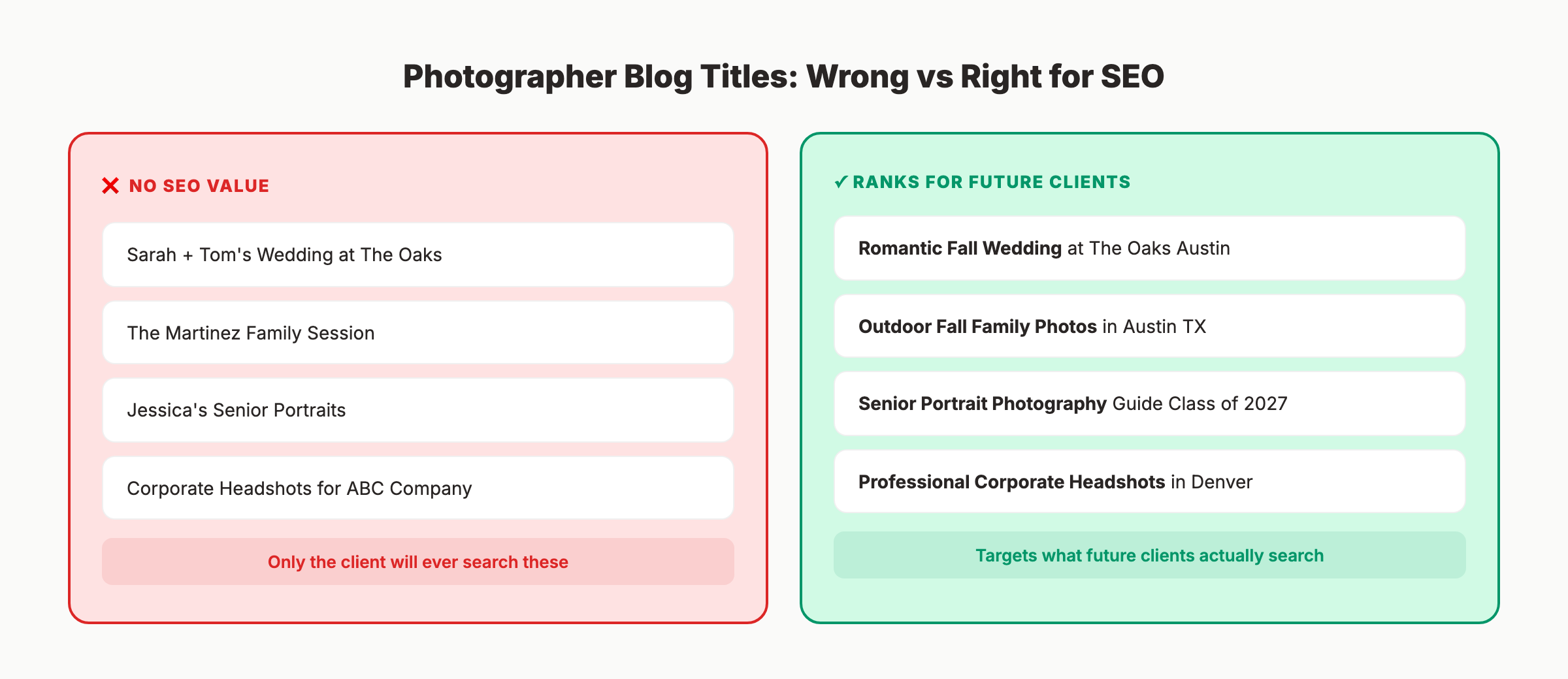
| Wrong Title (SEO Value: Zero) | Right Title (SEO Value: High) |
|---|---|
| Sarah + Tom’s Wedding at The Oaks | Romantic Fall Wedding at The Oaks Austin |
| The Martinez Family Session | Outdoor Fall Family Photos in Austin TX |
| Jessica’s Senior Portraits | Senior Portrait Photography Guide for Class of 2027 |
| Corporate Headshots for ABC Company | Professional Corporate Headshots in Denver |
The right titles include the venue name, session type, season, and location. These are the terms future clients actually search.
Blog Topics That Generate Bookings
Focus on topics that attract people planning to hire a photographer:
Venue guides: “Best Wedding Venues in [City] (With Photos)” ranks for high-intent searches and earns backlinks from the venues themselves.
Cost and pricing posts: “How Much Does a Wedding Photographer Cost in [City]?” captures clients during the decision phase. Include your actual pricing ranges.
Planning content: “What to Wear for Family Photos” and “Wedding Photography Timeline Guide” attract clients 2 to 6 months before they book.
Location guides: “Best Outdoor Photo Locations in [City]” ranks for location-based searches and showcases your local expertise.
Seasonal content: Publish fall session guides in July. Publish spring mini-session content in January. Content published 6 to 8 weeks before the season ranks by the time clients search, following the same pattern that works for seasonal content strategies.
Publishing Frequency
Photographers who publish 2 to 4 blog posts per month build topical authority faster than those who post sporadically. Each post targets a different keyword and adds to your content ecosystem. The Content Compound Effect applies here: every article reinforces the others through internal linking and topic clustering.
Your SEO team. $99 per month. 30 optimized articles, published automatically. Focus on shooting while your blog grows itself. Start for $1 →
Portfolio Pages That Rank
Your homepage cannot rank for every photography specialty. Each major service needs its own dedicated page.
The Service Page Template
URL pattern: /[specialty]-photography-[city]
Example: /wedding-photography-austin
Required elements:
-
H1: [Specialty] Photographer in [City] Example: “Wedding Photographer in Austin, TX”
-
Opening paragraph (100-150 words): Describe what you offer, your approach, and your location. Include the target keyword naturally in the first sentence.
-
Portfolio gallery (8-15 curated images): Show your best work for this specific specialty. Every image uses descriptive file names and alt text.
-
Service description (200-300 words): Explain your process, what clients can expect, and what makes your approach unique. Be specific. “Documentary-style wedding coverage capturing candid moments” beats “I photograph weddings.”
-
Pricing guidance: Even a starting price range helps. “Austin wedding photography packages start at $3,500” captures pricing searches.
-
FAQ section: Add 3 to 5 questions specific to this specialty. Use FAQPage schema to increase visibility in search results.
-
Schema markup: Add
LocalBusiness+Serviceschema with your business name, service area, and photography specialty. -
CTA: Clear booking link or contact form.
Multi-City Pages
If you travel for shoots, create separate pages for each city. “Wedding Photographer Denver” and “Wedding Photographer Boulder” should be 2 different pages with unique content.
Each city page needs:
- Unique opening paragraph referencing local venues and locations
- Photos from actual sessions in that area
- Local venue recommendations
- City-specific pricing (if rates vary by travel distance)
Do not copy content and swap city names. Google detects thin content and ignores duplicate pages.
Google Business Profile for Photographers
Your Google Business Profile drives local pack visibility. When someone searches “photographer near me,” the map results appear first.
Setup for Service-Area Photographers
Most photographers work on location at clients’ homes, venues, or outdoor spots. Google allows service-area businesses to hide their home address while defining the areas they serve.
Profile setup checklist:
- Primary category: “Photographer” (or “Wedding Photographer” if that is your only specialty)
- Secondary categories: Portrait Photographer, Commercial Photographer, Event Photographer
- Service area defined (list every city within your travel radius)
- Home address hidden (unless you have a studio clients visit)
- Business hours set (include by-appointment availability)
- Website URL pointing to your homepage
- All services listed with descriptions
- Business description (750 characters, include specialties and cities)
Photos on Your GBP
Upload 5 to 10 new photos every month. Include:
- Shots from recent sessions (variety of specialties)
- Behind-the-scenes images (builds trust)
- Team or headshot (personalizes the profile)
Geo-tag photos before uploading. The location metadata reinforces your service area to Google.
Reviews That Boost Rankings
Reviews are the strongest local ranking signal. Ask every client for a Google review after delivering their gallery.
Tips for SEO-friendly reviews:
- Ask clients to mention the session type and location naturally (“our family photos at Zilker Park turned out amazing”)
- Respond to every review within 48 hours
- Target 3 to 5 new reviews per month
- Never incentivize reviews with discounts or freebies (violates Google policy)
Google values review velocity (how frequently new reviews arrive) as much as total count. A photographer with 30 reviews and 4 new ones per month outranks a competitor with 100 reviews and zero new ones.
Technical SEO for Photography Websites
Photography websites face unique technical challenges that text-based businesses do not.
Platform Considerations
| Platform | SEO Ceiling | Best For |
|---|---|---|
| WordPress + Yoast/RankMath | High | Full SEO control, plugins, schema, blog power |
| Showit (WordPress blog) | Medium-High | Beautiful design + WordPress blog backend |
| Squarespace | Medium | Easy to use, limited schema and plugin options |
| Pixieset / Format | Low-Medium | Client galleries, limited SEO customization |
WordPress provides the highest SEO ceiling. Showit combines design flexibility with a WordPress blog backend. Squarespace is adequate for basic SEO but limits advanced schema and plugin options.
Speed Optimization
Photography sites routinely fail Core Web Vitals tests. Common fixes:
- Convert all images to WebP or AVIF format
- Enable browser caching
- Minimize CSS and JavaScript files
- Use a CDN (content delivery network) for image serving
- Lazy load all below-the-fold images
- Optimize the hero image on every page (it determines your LCP score)
Test your site with Google PageSpeed Insights. Target a mobile performance score of 70 or higher.
Internal Linking Structure
Connect your content with clear internal links:
- Every blog post about weddings links to your wedding photography service page
- Service pages link to 2 to 3 related blog posts
- Venue guide posts link to the relevant city service page
- All pages include a link to your contact or booking page
3,500+ blogs published. 92% average SEO score. See what Stacc can do for your photography business. Blog SEO + Local SEO starting at $133/mo bundled. Start for $1 →
Building Backlinks for Photography Businesses
Backlinks from other websites tell Google your site is trustworthy. Photographers have specific link-building opportunities.
The Venue and Vendor Ecosystem
Wedding and event photographers work within a vendor ecosystem. Every vendor you work with is a potential backlink source.
- Ask venues to add you to their preferred vendor list (with a link to your site)
- Submit session features to venue blogs (“See this wedding at [Venue Name]”)
- Collaborate with planners, florists, and DJs who list vendor partners on their websites
- Join local vendor networking groups and get listed on their directories
Directory Listings
Ensure consistent NAP (name, address, phone) across all directories:
- Google Business Profile
- The Knot and WeddingWire (for wedding photographers)
- Yelp
- Better Business Bureau
- Local Chamber of Commerce
- Photography association directories (PPA, WPPI)
Editorial Submissions
Submit your best sessions to photography blogs and publications. Sites like Junebug Weddings, Green Wedding Shoes, and Style Me Pretty accept real wedding and elopement features. Each published feature includes a backlink to your site.
Local Press and Community Links
Offer to photograph a local charity event for free in exchange for a feature on their website. Write guest posts for local wedding or lifestyle blogs. Get listed on “best of [city]” roundup posts. Sponsor a local business event and receive a link from the event page.
Every quality backlink strengthens your domain authority. A photographer with 15 links from local venues, vendor sites, and editorial features outranks a competitor with a technically better website but zero external validation.
Measuring Photographer SEO Results
Track the right metrics to know whether your SEO investment generates actual bookings.
Essential Tracking Setup
- Google Search Console for ranking positions and search queries
- Google Analytics 4 for website traffic and form submissions
- Contact form tracking (tag inquiries by source)
- GBP Insights for profile views and actions
What to Measure Monthly
| Metric | Target |
|---|---|
| Organic traffic | 15-25% growth per quarter |
| Keyword rankings | Top 5 for “[specialty] photographer [city]” within 6 months |
| Inquiry form submissions from organic search | Track trend month over month |
| GBP profile views | Steady growth quarter over quarter |
| New Google reviews | 3-5 per month |
| Google Images impressions | Monitor for portfolio-driven traffic |
FAQ
How long does SEO take for photographers?
Expect initial ranking improvements in 60 to 90 days. Meaningful inquiry generation typically begins at 4 to 6 months. Competitive markets (major metros, wedding photography) take longer. Consistent blogging and review collection accelerate the timeline.
Is SEO or Instagram better for photographers?
Both serve different purposes. Instagram builds brand awareness and showcases your style. SEO captures people actively searching for a photographer to hire. SEO leads convert at higher rates because the searcher has intent. Build both, but do not depend on Instagram alone.
Do photographers need a blog for SEO?
Yes. Blog content targets informational and venue-specific keywords that portfolio pages cannot rank for. A blog post about “Best Wedding Venues in Austin” captures prospects during the planning phase. Without a blog, you compete only on direct service keywords.
What website platform is best for photographer SEO?
WordPress offers the most SEO control (custom schema, plugins, full blog functionality). Showit provides beautiful design with a WordPress blog backend. Squarespace works for basic SEO but limits advanced optimization. Choose based on your technical comfort and growth goals.
How do I optimize 500+ portfolio images for SEO?
Batch process. Rename files using the formula: [scene]-[session-type]-[location].webp. Add alt text describing each image with the session type and location. Convert to WebP format using a batch conversion tool. Prioritize your top 50 images first, then work through the rest over time.
How much does SEO cost for photographers?
SEO agencies charge $500 to $2,000 per month for photography clients. Done-for-you services like Stacc start at $99 per month for 30 published articles. Free options (Google Search Console, basic on-page optimization) cost nothing but require your time.
Photographer SEO builds a booking pipeline that runs independently of social media algorithms. Every blog post, every optimized portfolio page, and every Google review compounds over time. Start with your highest-revenue specialty, your primary city, and your Google Business Profile. The photographers ranking on page 1 right now are not better photographers. They just started their SEO earlier.
Written and published by Stacc. We publish 3,500+ articles per month across 70+ industries. All data verified against public sources as of March 2026.
