
Web Hosting and SEO: The Complete Guide (2026)
Learn how web hosting affects SEO rankings. Covers server speed, uptime, Core Web Vitals, hosting types, and how to switch safely. Updated 2026.
Siddharth Gangal • 2026-03-29 • SEO Tips
In This Article
Your web hosting sets the ceiling for your SEO performance. No amount of content optimization or link building can fix a slow server.
Most businesses choose hosting based on price. They pick the cheapest shared plan, install WordPress, and wonder why their Core Web Vitals fail. A study of 7,718 businesses found that top-10 positions on Google consistently had faster server response times than lower-ranking competitors.
53% of mobile users abandon sites that take more than 3 seconds to load. Sites loading in 1 second convert 3x higher than sites loading in 5 seconds. Your hosting directly controls both numbers.
We have published 3,500+ SEO articles across 70+ industries. Server performance is one of the first things we check when diagnosing ranking problems. This guide covers everything we know about how web hosting affects SEO and how to choose the right host.
Here is what you will learn:
- Why server speed matters more than most SEO factors
- The 6 hosting metrics Google actually measures
- How different hosting types compare for SEO performance
- What to look for when choosing a host
- How to switch hosts without losing rankings
How Web Hosting Affects SEO
Google has confirmed page speed as a ranking factor 3 separate times. Desktop speed became a signal in 2010. Mobile speed followed in 2018. Core Web Vitals joined page experience signals in 2021.
Your hosting provider controls server response time. That single metric determines how fast your pages can possibly load. A server responding in 200ms gives your pages a head start. A server responding in 600ms puts them behind before a single image loads.
This matters because Google measures real-world performance. Chrome User Experience Report (CrUX) data feeds directly into ranking algorithms. If your server is slow, your CrUX data suffers. If your CrUX data suffers, your rankings drop.
The relationship is not theoretical. Vodafone improved their Largest Contentful Paint by 31%. The result was 15% more leads, 11% more cart visits, and 8% more sales. CoinStats improved their Core Web Vitals and saw a 300% increase in Google impressions.
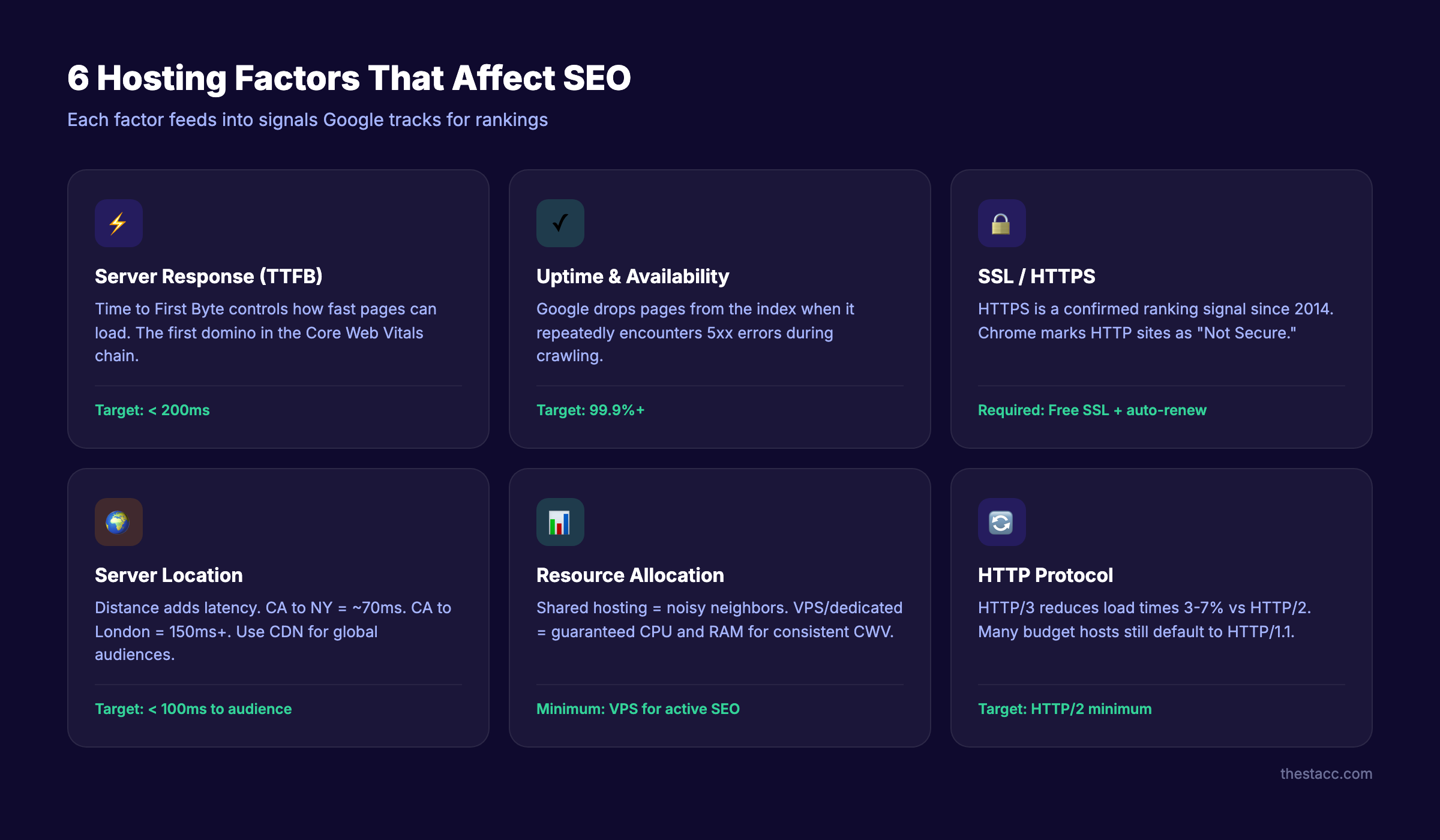
Hosting affects SEO through 6 specific mechanisms. Each one feeds into signals Google tracks.
The 6 Hosting Factors Google Measures
Server Response Time (TTFB)
Time to First Byte measures how long your server takes to begin responding to a request. Fast servers respond in under 200ms. Slow servers take 500ms or more.
TTFB is the first domino in the page speed chain. If your server takes 500ms to respond, your Largest Contentful Paint cannot possibly score under 2.5 seconds on slow connections. The front-end optimization in the world cannot fix a slow backend.
Google recommends a TTFB under 800ms. But competitive rankings require under 200ms. Check your TTFB with Google PageSpeed Insights or WebPageTest.
Uptime and Availability
Google cannot rank a page it cannot reach. When Googlebot encounters a server error (5xx response), it flags the URL for reduced crawling. Repeated failures cause Google to drop pages from the index entirely.
A 99.9% uptime guarantee sounds impressive. It still allows 8.8 hours of downtime per year. That is enough to miss critical crawl windows and cause indexing gaps.
Monitor your actual uptime independently. Do not rely on your host’s self-reported numbers. Tools like UptimeRobot and Pingdom verify the claim.
SSL and HTTPS
Google confirmed HTTPS as a ranking signal in 2014. Every reputable host now includes free SSL certificates via providers like ZeroSSL and others.
But having SSL is not enough. Your certificate must be properly configured. Mixed content warnings, expired certificates, and incorrect redirects all undermine the SEO benefit. Run your site through an SSL checker to verify your configuration.
Server Location and Latency
Distance between your server and your visitors adds latency. A server in California serving a user in New York adds roughly 70ms of round-trip delay. Serving a user in London adds 150ms or more.
For sites targeting a single region, choose a data center near your audience. For sites targeting multiple regions, use a CDN to cache content at edge locations worldwide.
Server location also matters for local SEO. Google uses server IP geolocation as one signal (among many) for determining geographic relevance. A .co.uk site hosted in the US sends mixed signals for local SEO in the UK.
Resource Allocation and Hosting Type
Shared hosting means your site shares CPU, RAM, and bandwidth with dozens or hundreds of other sites. When a neighbor site gets a traffic spike, your site slows down. This “noisy neighbor” problem is the most common cause of unpredictable Core Web Vitals scores.
VPS and dedicated hosting guarantee your resources. Your site performs consistently regardless of what other sites do. This consistency matters because Google measures performance over time, not just during a single test.
HTTP Protocol Version
Modern servers support HTTP/2 and HTTP/3. These protocols allow multiple simultaneous requests, header compression, and server push. HTTP/3 specifically reduces page load times by 3 to 7% compared to HTTP/2 according to Search Engine Journal.
Check which protocol your host supports. Many budget shared hosts still default to HTTP/1.1. Upgrading to HTTP/2 or HTTP/3 often requires a VPS or managed host.
Stop writing. Start ranking. Stacc publishes 30 SEO articles per month for $99. Your hosting handles the speed. Stacc handles the content. Start for $1 →
Hosting Types Compared for SEO
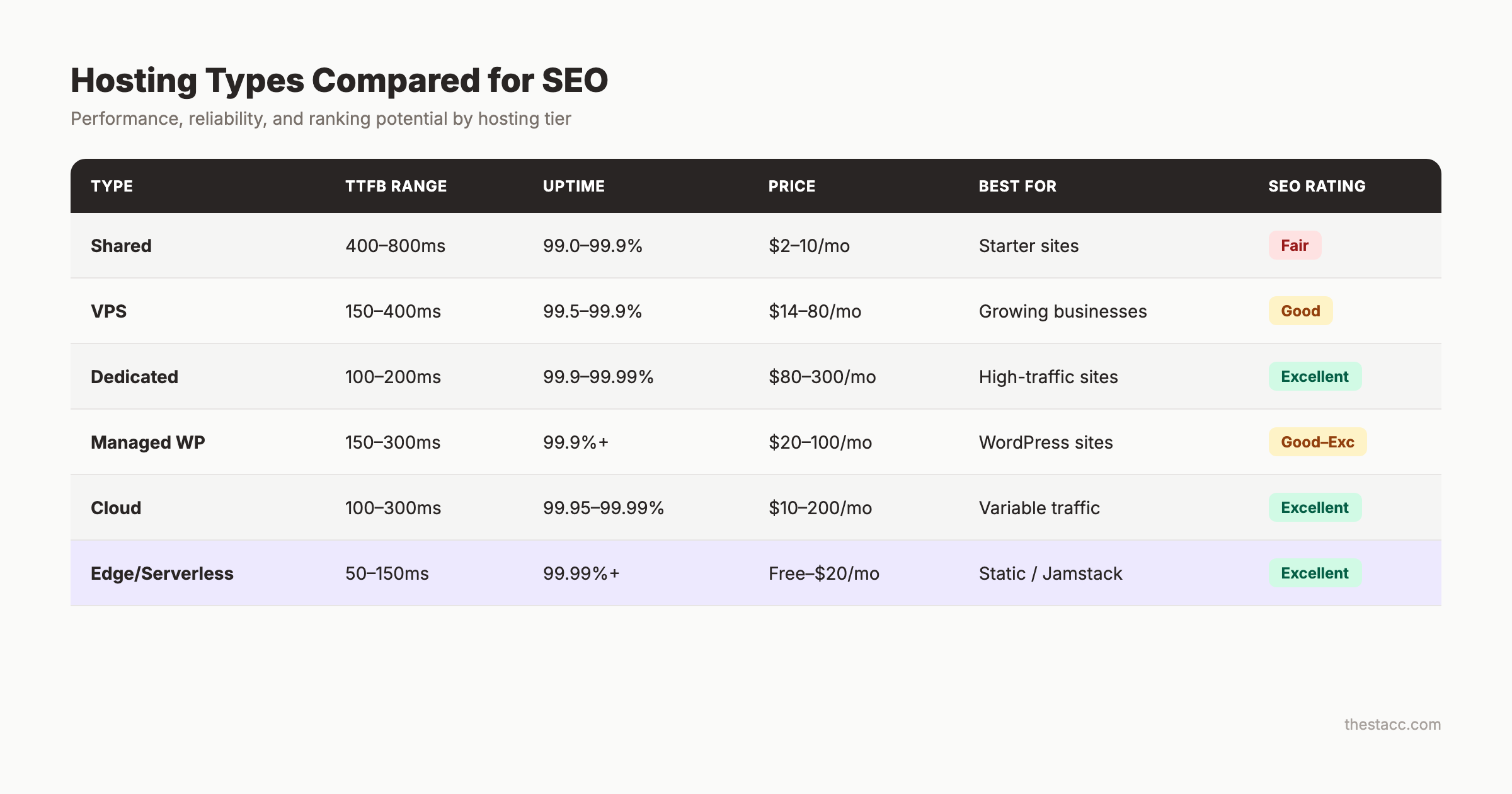
Not all hosting is equal. Each type offers different levels of performance, control, and SEO capability.
| Hosting Type | TTFB Range | Uptime | Best For | SEO Rating |
|---|---|---|---|---|
| Shared | 400-800ms | 99.0-99.9% | Starter sites, blogs under 10K visits/mo | Fair |
| VPS | 150-400ms | 99.5-99.9% | Growing sites, 10K-100K visits/mo | Good |
| Dedicated | 100-200ms | 99.9-99.99% | High-traffic sites, 100K+ visits/mo | Excellent |
| Managed WordPress | 150-300ms | 99.9%+ | WordPress sites prioritizing ease | Good to Excellent |
| Cloud | 100-300ms | 99.95-99.99% | Sites with variable traffic | Excellent |
| Edge/Serverless | 50-150ms | 99.99%+ | Static sites, Jamstack, headless CMS | Excellent |
Shared Hosting
Shared hosting costs $2 to $10 per month. It works for brand-new sites with minimal traffic. But shared hosting creates an SEO ceiling. Once your site gets real traffic, shared resources become a bottleneck.
The noisy neighbor problem is real. Your TTFB can swing from 300ms to 800ms depending on server load. Google sees this inconsistency in CrUX data.
When shared hosting makes sense: New blogs, portfolio sites, testing a business idea before investing. Move to VPS once you pass 5,000 monthly visits.
VPS Hosting
VPS (Virtual Private Server) gives you guaranteed CPU, RAM, and storage. Your performance does not depend on other sites. Prices range from $14 to $80 per month.
For most small businesses doing active SEO, VPS is the sweet spot. You get consistent TTFB under 300ms, reliable uptime, and enough control to configure caching and compression properly.
Managed WordPress Hosting
Managed hosts like Kinsta, WP Engine, and SiteGround handle server optimization for you. They pre-configure caching, CDN, and security. Prices range from $20 to $100 per month.
The trade-off is cost versus convenience. You pay more but skip the technical SEO configuration. For businesses without a developer, managed hosting often delivers better SEO out of the box than a poorly configured VPS.
Cloud Hosting
Cloud hosting (AWS, Google Cloud Platform, DigitalOcean) distributes your site across multiple servers. If one server fails, another takes over automatically. Prices range from $10 to $200 per month depending on resources.
The SEO advantage of cloud hosting is auto-scaling. When your content ranks well and traffic surges, cloud hosting adds resources automatically. Your site stays fast during peak traffic. Shared hosting crashes under the same conditions.
Cloud hosting also lets you choose your exact data center location. AWS has 33 regions worldwide. Google Cloud has 40. Pick the region closest to your audience for the lowest possible latency.
Edge and Serverless Hosting
Edge hosting (Vercel, Cloudflare Pages, Netlify) serves your site from data centers closest to each visitor. TTFB drops below 100ms for most users worldwide. Most articles about web hosting for SEO ignore this option entirely.
Edge hosting works best for static sites and Jamstack architectures. If your site runs on Astro, Next.js, Hugo, or similar frameworks, edge hosting gives you the fastest possible server response. The SEO advantage is significant. A 50ms TTFB beats 300ms VPS hosting by 250ms on every single page load.
How to Choose the Best Hosting for SEO
Choosing hosting for SEO comes down to 5 factors. Price is the least important one.
Factor 1: Server Speed (Test It Yourself)
Do not trust marketing claims. Every host says they are “fast.” Test actual performance before committing.
How to test:
- Use GTmetrix or WebPageTest to measure TTFB from your target region
- Check the host’s infrastructure (LiteSpeed vs Apache vs Nginx)
- Look for built-in caching (server-level, not just plugin-level)
- Verify CDN integration (Cloudflare, Fastly, or proprietary)
A host should deliver TTFB under 300ms from your primary audience location. Under 200ms is ideal.
Factor 2: Uptime Guarantee (Verify Independently)
Look for 99.9% uptime minimum with an SLA (service level agreement) that credits you for downtime. But do not stop there.
Check independent uptime monitoring sites. Review real user reports on Reddit and hosting forums. A 99.9% guarantee means nothing if the host consistently delivers 99.5%.
Factor 3: Data Center Locations
If your audience is in the US, your server should be in the US. If your audience is global, you need either multiple data centers or a strong CDN.
Hosts with a single data center location limit your SEO reach. Every 100ms of latency reduces conversion rates by roughly 7%. Choose a host with data centers near your primary audience.
Factor 4: Security Infrastructure
Google Chrome marks HTTP sites as “Not Secure.” Google Safe Browsing flags compromised sites. Both destroy click-through rates and rankings.
Your host should provide:
- Free SSL certificates with auto-renewal
- Web Application Firewall (WAF)
- DDoS protection
- Automated malware scanning
- Regular security patches and updates
A compromised site loses rankings within days. Recovery takes weeks. Your host is your first line of defense.
Factor 5: Scalability
Your hosting needs will grow as your SEO improves. A site ranking on page 1 gets exponentially more traffic than a site on page 5. Your host must handle traffic spikes without crashing.
Cloud and VPS hosting scale better than shared hosting. Some managed hosts auto-scale during traffic surges. Ask your host what happens when you get 10x your normal traffic. If the answer involves downtime, find a different host.
Your SEO team. $99 per month. 30 optimized articles, published automatically. Great hosting gets your pages to load fast. Stacc gets them to rank. Start for $1 →
The SEO Hosting Checklist
Before signing up with any host, verify these items. Each one directly affects your ability to rank.
- TTFB under 300ms from your target region
- 99.9%+ uptime guarantee with SLA
- Free SSL with auto-renewal
- CDN integration (built-in or easy setup)
- HTTP/2 or HTTP/3 support
- Server-level caching (not just application-level)
- Data center in your target region
- Gzip or Brotli compression enabled by default
- PHP 8.1+ for WordPress sites
- Automated backups (daily minimum)
- DDoS protection and WAF
- SSH access for technical configuration
- Staging environment for testing changes
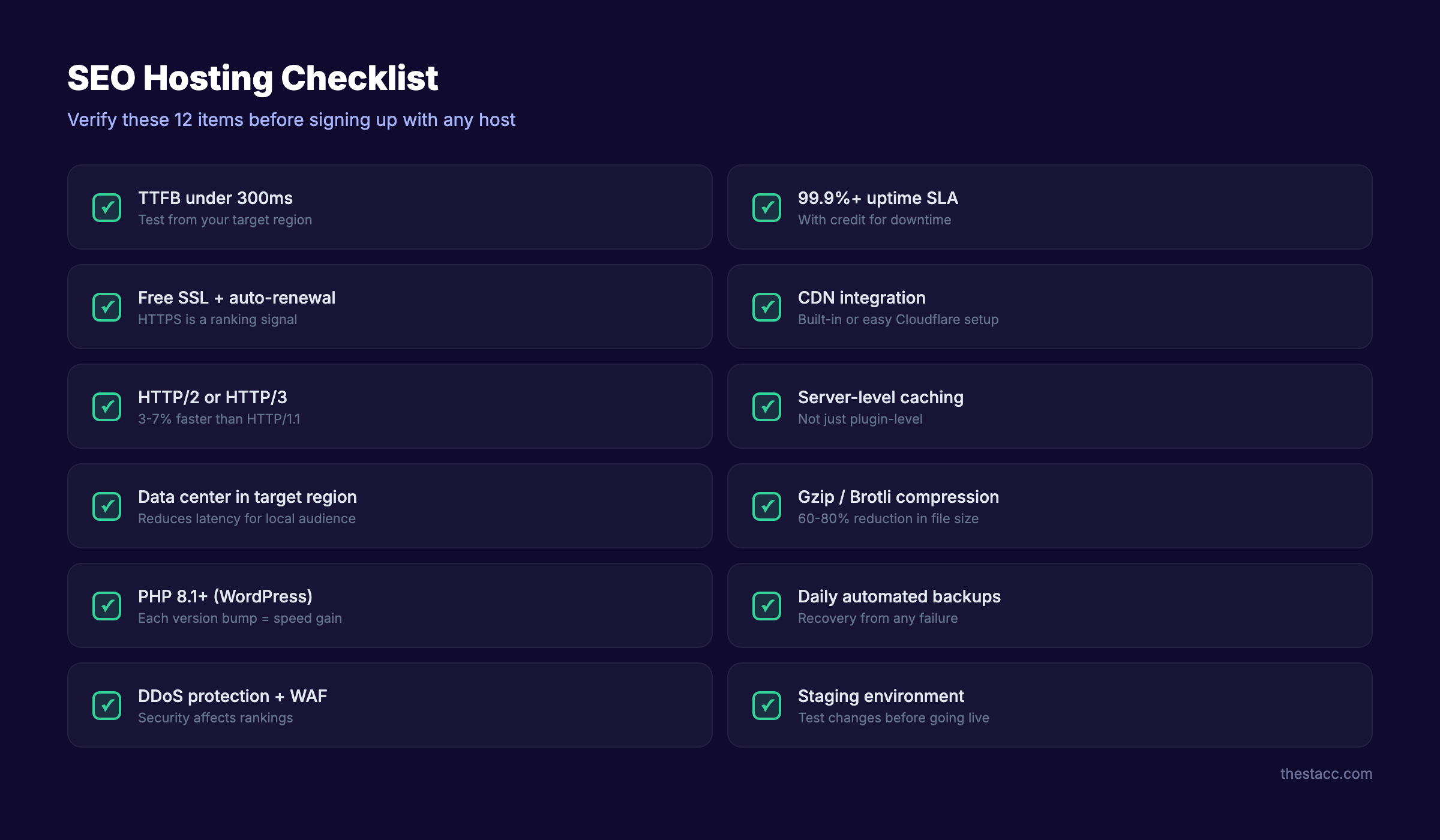
Skip any host that fails more than 2 items on this list. Your on-page SEO and content strategy depend on a solid hosting foundation.
How to Switch Hosts Without Losing Rankings
Switching hosts improves SEO only if you do it without breaking your existing rankings. A botched migration can cause weeks of traffic loss.
Step 1: Benchmark Current Performance
Before touching anything, record your baseline metrics. Document your TTFB, Core Web Vitals scores, organic traffic, and top keyword rankings. Follow the same process outlined in our site migration SEO guide.
Step 2: Set Up the New Host in Parallel
Configure your new hosting environment completely before switching. Install your CMS, migrate your database, upload files, and configure SSL. Test everything on the new server using a temporary domain or hosts file modification.
Step 3: Lower DNS TTL
48 hours before the switch, lower your DNS TTL (Time to Live) to 300 seconds. This ensures DNS changes propagate quickly when you make the switch. Faster propagation means less time with split traffic between old and new servers.
Step 4: Update DNS and Monitor
Point your domain to the new server. Monitor Google Search Console for crawl errors. Track your rankings daily for the first 2 weeks. Check that Core Web Vitals scores improve (not degrade) on the new host.
Google’s John Mueller has confirmed that temporary crawl slowdowns during host changes are normal. Google adjusts its crawl rate as it detects the new server’s capacity.
Step 5: Keep the Old Host Active
Maintain your old hosting account for 2 to 4 weeks after migration. This gives you a fallback if anything goes wrong. Once you confirm stable performance and no ranking drops, cancel the old account.
Common Web Hosting SEO Mistakes
Most hosting-related SEO problems come from the same 5 errors.
Mistake 1: Choosing hosting based on price alone. A $2/month shared host saves $20/month compared to a VPS. But if slow hosting costs you 30% of your organic traffic, you lose far more in revenue than you save on hosting. Hosting is an investment in performance, not an expense to minimize.
Mistake 2: Ignoring TTFB until rankings drop. By the time Google penalizes slow performance, the problem has existed for months. Monitor TTFB monthly. A sudden increase often signals server overload, misconfigured caching, or a noisy neighbor on shared hosting.
Mistake 3: Skipping CDN integration. A CDN reduces latency for every visitor outside your server’s region. For sites targeting multiple cities, states, or countries, a CDN is not optional. It is a requirement. Cloudflare offers a free tier that handles most small business needs.
Mistake 4: Running outdated server software. Old PHP versions, outdated MySQL, and legacy HTTP/1.1 all drag performance. Ask your host which PHP version your server runs. If the answer is below 8.1, upgrade immediately. Each PHP version bump delivers measurable speed improvements.
Mistake 5: No uptime monitoring. Your host will not tell you when they had downtime. Set up free monitoring through UptimeRobot or similar tools. You need independent verification that your 99.9% uptime guarantee holds up.
3,500+ blogs published. 92% average SEO score. See what Stacc can do for your site. Fast hosting handles the infrastructure. Stacc handles the rankings. Start for $1 →
FAQ
Does web hosting affect SEO?
Yes. Google uses page speed and Core Web Vitals as ranking signals. Your hosting provider controls server response time (TTFB), which is the foundation of page speed. A fast host with under 200ms TTFB gives your pages a ranking advantage over slow competitors.
Is shared hosting bad for SEO?
Shared hosting is not inherently bad. But it creates inconsistent performance. The “noisy neighbor” problem means other sites on your server can slow down your pages unpredictably. For sites doing active SEO, VPS or managed hosting delivers more reliable results.
Does server location affect SEO?
Server location affects latency. A server 3,000 miles from your visitors adds roughly 70ms of delay per request. For local SEO, Google also uses server geolocation as one signal for geographic relevance. Use a data center near your audience or a CDN with global edge locations.
Can changing hosting improve rankings?
Yes. If your current host delivers slow TTFB or poor uptime, switching to a faster host directly improves Core Web Vitals scores. Vodafone improved their LCP by 31% and saw 15% more leads. The improvement shows up in rankings within 2 to 8 weeks of Google recrawling.
Does a dedicated IP address help SEO?
A dedicated IP is not a ranking factor. Google has confirmed this multiple times. The myth comes from early SEO practices when shared IPs could get blacklisted. Modern hosting infrastructure separates IP reputation from individual sites. Do not pay extra for a dedicated IP for SEO purposes.
How do Core Web Vitals relate to hosting?
Your host controls TTFB, which directly affects Largest Contentful Paint (LCP). If your server is slow, LCP fails regardless of front-end optimization. Your host also affects Interaction to Next Paint (INP) through server processing speed. Hosting is the foundation that Core Web Vitals are built on.
How much should I spend on hosting for SEO?
For a small business doing active SEO, budget $15 to $50 per month for VPS or managed hosting. This gets you consistent TTFB under 300ms, reliable uptime, and proper CDN integration. The ROI on good hosting far exceeds the cost difference from a $3/month shared plan.
Your hosting is the foundation your entire SEO strategy sits on. Fast server response, reliable uptime, and proper security configuration determine how high your rankings can climb. Choose a host that passes the checklist above, monitor performance monthly, and upgrade before your hosting becomes the bottleneck.
Written and published by Stacc. We publish 3,500+ articles per month across 70+ industries. All data verified against public sources as of March 2026.
