Learn how to write website content that ranks and converts. This 9-chapter guide covers planning, structure, SEO, E-E-A-T, and content maintenance.
Website content writing follows rules most writers never learn: how people scan a page, how search engines judge quality, and how a page earns the next click. This nine-chapter guide covers planning, structure, on-page SEO, E-E-A-T, and the maintenance schedule that keeps pages ranking.
Your website content is not ranking. Your bounce rate is high. Your pages read like brochures instead of answers. And every time you publish something new, it sinks into the internet without a trace.
This is the reality for most businesses writing website content in 2026. The problem is not that you are a bad writer. The problem is that writing for the web follows rules most people never learn. Rules about how people scan, how search engines evaluate quality, and how trust gets built one sentence at a time.
This guide fixes that. In 9 chapters, you will learn the exact process we use to publish 3,500+ blogs across 70+ industries. You will get frameworks for planning, structuring, optimizing, and maintaining website content that earns traffic and drives conversions.
Here is what you will learn:
- How to plan website content around business goals, not guesswork
- The exact structure that keeps readers on the page longer
- How to write headlines and introductions that stop the scroll
- How to match every page to the search intent behind the query
- On-page SEO tactics that work in the AI search era
- How to build E-E-A-T signals into every piece of content
- Where to place CTAs for maximum click-through rate
- How to audit, refresh, and maintain content so it keeps performing
Table of Contents
- Chapter 1: How to Plan Website Content That Actually Converts
- Chapter 2: How to Structure Content for the Way People Actually Read
- Chapter 3: How to Write Headlines and Introductions That Stop the Scroll
- Chapter 4: How to Match Content to Search Intent
- Chapter 5: How to Optimize Website Content for SEO in 2026
- Chapter 6: How to Build E-E-A-T Into Every Page
- Chapter 7: How to Write CTAs That Get Clicked
- Chapter 8: How to Maintain and Refresh Content Over Time
- Chapter 9: The Complete Website Content Writing Checklist
Chapter 1: How to Plan Website Content That Actually Converts
Most website content fails before a single word is written. The writer opens a blank document without a clear goal, a defined audience, or an understanding of what competitors already cover. The result is generic content that answers no specific question and serves no specific business purpose.
Planning is where winning content separates itself from the noise. This chapter covers the three planning pillars that every page needs before drafting begins.
Define the Goal Before You Write
Every page on your website must have one primary goal. Not two. Not three. One.
A homepage might exist to build trust and guide visitors to a service page. A service page exists to generate a consultation booking. A blog post exists to rank for a keyword and capture an email address. If you cannot state the goal in one sentence, the page will fail.
Ask these three questions before writing:
- What action do I want the reader to take after reading this?
- What question or problem brought them to this page?
- What objection might stop them from taking action?
Write the answers at the top of your draft. Refer back to them in every section. If a paragraph does not serve the goal, delete it.
Research Your Audience, Not Just Your Keywords
Keyword research tells you what people search for. Audience research tells you why they search. You need both.
Start with search data. Use Google Search Console to see what queries already bring people to your site. Look at the "People Also Ask" boxes for your target keyword. Read the auto-complete suggestions. These reveal the specific language your audience uses and the exact problems they want solved.
Then go deeper. Read Reddit threads, Quora answers, and industry forums where your audience discusses their challenges. Note the exact phrases they use. Note the emotions behind their questions. Note what solutions they have already tried and why those solutions failed.
This research becomes the foundation of your content. When you mirror your audience's language back to them, they feel understood. That feeling builds trust faster than any design element.
Audit Competitors for Content Gaps
Before you write, read the top 5 ranking pages for your target keyword. Not to copy them. To find what they miss.
Create a simple spreadsheet. List each competitor page and note:
- Word count
- Number of headings and subheadings
- Types of evidence used (data, case studies, quotes, screenshots)
- Topics covered
- Topics obviously missing
The gaps are your opportunity. If every competitor lists 5 tips but none explain how to implement them, your page should include a step-by-step implementation section. If no competitor includes original data, commission a small survey or analyze your own internal data. Original research is the fastest path to backlinks and rankings.
| Content Type | Typical Purpose | Key Metrics |
|---|---|---|
| Homepage | Build trust, guide navigation | Time on page, pages per session |
| Service page | Generate leads or sales | Conversion rate, form submissions |
| About page | Build credibility and trust | Return visitor rate |
| Blog post | Capture organic traffic | Organic sessions, keyword rankings |
| Case study | Prove results | Conversion rate, time on page |
| FAQ page | Answer objections | Bounce rate, scroll depth |
Your content should out-inform, not out-volume. A 1,500-word page that answers every sub-question beats a 3,000-word page that rambles. Sign up for free →
Chapter 2: How to Structure Content for the Way People Actually Read
People do not read websites. They scan them. Research from the Nielsen Norman Group shows that 79% of web users scan new pages rather than reading word for word. Only 16% read in a linear fashion. Your structure must accommodate scanners without alienating readers.
Use the Inverted Pyramid
Journalists have used the inverted pyramid for over a century. Put the most important information first. Then add supporting details. Then background context. This structure serves both scanners and readers.
Your first paragraph should answer the core question. If someone searches "how to write website content," your opening should define it and promise a complete process. Do not bury the answer under three paragraphs of context. The reader will leave before they find it.
Write Descriptive Headings That Stand Alone
Every H2 and H3 should make sense out of context. A scanner should understand your entire article by reading only the headings.
Compare these two heading options:
- Bad: "The Importance of Structure"
- Good: "How to Structure Content So People Actually Read It"
The second heading tells the reader exactly what they will learn. It also includes a benefit (people will read it) that creates curiosity. Use this standard for every heading in your content.
Keep Paragraphs Short and Focused
Long paragraphs are walls of text. Walls of text get skipped.
Limit paragraphs to 2-3 sentences. Each paragraph should make one point. If you find yourself making a second point, start a new paragraph. This creates white space. White space guides the eye and reduces cognitive load.
The same rule applies to sentences. Keep them under 20 words where possible. Break complex ideas into multiple short sentences. Your readability score will improve. So will your engagement metrics.
Use Lists, Tables, and Bold Text Strategically
Bulleted lists break up dense information. Numbered lists create a sense of progression. Tables compare options side by side. Bold text highlights key takeaways for scanners.
Use these elements every 200-300 words. They create visual rhythm. They give scanners resting points. And they signal to search engines that your content is well-organized and complete.

The best website content feels effortless to consume. That effortlessness is the result of deliberate structural choices. See how theStacc structures 30 articles per month
Chapter 3: How to Write Headlines and Introductions That Stop the Scroll
You have 3 seconds to capture attention. Your headline and introduction determine whether a visitor stays or leaves. This chapter covers the formulas that work.
Write Headlines Using Proven Formulas
The best headlines combine specificity, benefit, and curiosity. They promise a clear outcome without giving away the entire answer.
Here are five headline formulas that consistently perform:
- How to [Achieve Result] Without [Common Obstacle]
- Example: "How to Rank on Google Without Hiring an Agency"
- The [Number]-Step Process for [Desired Outcome]
- Example: "The 7-Step Process for Writing Website Content That Converts"
- [Topic]: What [Audience] Gets Wrong
- Example: "Website Content: What Most Small Businesses Get Wrong"
- Why [Common Belief] Is [Wrong/Simpler/Different] Than You Think
- Example: "Why Longer Content Is Not Always Better Content"
- [Number] [Topic] Tips for [Specific Audience]
- Example: "12 Content Writing Tips for Service Business Owners"
Include your primary keyword in the headline when it fits naturally. But prioritize clarity and click-worthiness over exact-match placement. A headline that earns clicks will outperform a keyword-stuffed headline every time.
Hook Readers in the First 100 Words
Your introduction has one job: prove that the rest of the article is worth reading.
Start with the reader's problem. Name their pain in their own words. Then agitate it. Show what this pain costs them in time, money, or missed opportunity. Then promise a solution. Tell them exactly what they will learn and why it matters.
This is the PAS framework: Problem, Agitate, Solution. It works because it mirrors how people think. They feel a problem, they worry about it, and they want relief.
Avoid introductions that start with definitions, history lessons, or vague statements about the importance of your topic. The reader already knows the topic matters. That is why they searched for it. Get to the value immediately.
Use the BLUF Method for Blog Posts
BLUF stands for Bottom Line Up Front. It is a military communication technique that puts the conclusion first. For web content, this means answering the core question in the first paragraph, then providing supporting detail.
If your article answers "how long should website content be," state the answer in sentence one. Then explain the factors that influence length. Then provide examples. The reader who wants a quick answer gets it. The reader who wants depth can keep scrolling.

Chapter 4: How to Match Content to Search Intent
Search intent is the reason behind a query. Google now prioritizes intent matching over keyword density. If your content format does not match what the searcher wants, it will not rank no matter how well it is written.
The Four Types of Search Intent
Every search query falls into one of four categories:
| Intent Type | What the User Wants | Best Content Format |
|---|---|---|
| Informational | Learn something | How-to guides, explainers, tutorials |
| Navigational | Find a specific page or brand | Homepage, brand landing pages |
| Commercial | Compare options before buying | Comparison pages, review roundups |
| Transactional | Make a purchase | Product pages, checkout flows, pricing |
Before writing, search your target keyword and analyze the top 10 results. What format dominates? If the first page is full of listicles, write a listicle. If it is full of in-depth guides, write an in-depth guide. Google has already voted on what format satisfies this intent. Your job is to create the best version of that format.
Map Content to the Buyer's Journey
Different intent types map to different stages of the buyer's journey:
- Awareness stage: Informational content that answers broad questions
- Consideration stage: Commercial content that compares solutions
- Decision stage: Transactional content that enables purchase
A common mistake is creating only bottom-funnel content. You need content for every stage. The awareness-stage article captures the visitor who does not yet know they need your solution. The consideration-stage content builds trust. The decision-stage content closes the sale.
Identify and Fill Content Gaps
Search intent analysis also reveals gaps. If every ranking page for "website content writing guide" is a generic list of tips, but none include a downloadable template or a step-by-step workflow, that gap is your competitive advantage.
Create a content gap matrix for your topic. List every subtopic covered by competitors. Mark which ones are covered well, covered poorly, or missing entirely. Prioritize the missing and poorly covered topics. This is how you create content that is genuinely better than everything else on page one.

Chapter 5: How to Optimize Website Content for SEO in 2026
SEO in 2026 is not about tricking algorithms. It is about making your content easy for search engines to understand, evaluate, and serve to the right users. This chapter covers the on-page fundamentals that still matter.
Place Keywords Strategically
Your primary keyword should appear in:
- The title tag (within the first 60 characters)
- The H1 heading
- The first 100 words of the content
- At least one H2 heading
- The meta description
- The URL slug
- Image alt text (where relevant)
Do not force keywords where they do not fit. Natural language always wins. Use semantic variations and related terms throughout the content. Search engines understand topic relationships. A page about "website content writing" should also mention "web copy," "content strategy," and "SEO writing."
Optimize Meta Titles and Descriptions
Your meta title and description are your advertisement in the search results. They determine whether someone clicks.
- Title tag: Keep under 60 characters. Include the primary keyword. Add a benefit or number when possible.
- Meta description: Keep between 145-155 characters. Include the primary keyword. Include a clear call to action. Make it a promise, not a summary.
Example meta description for this guide:
"Learn how to write website content that ranks and converts. This 9-chapter guide covers planning, structure, SEO, E-E-A-T, and content maintenance."
Build Internal Links With Purpose
Internal linking helps readers discover related content. It also distributes link equity across your site and helps search engines understand your site architecture.
Every page should link to 3-5 relevant internal pages. Use descriptive anchor text that tells the reader what they will find. Avoid generic phrases like "click here" or "read more."
For example, if you mention search intent, link to your dedicated guide on that topic. If you discuss on-page SEO, link to your checklist. If you cover internal linking strategy, link to your strategy guide.
Add Schema Markup for Rich Results
Schema markup is structured data that helps search engines understand your content. It can also trigger rich results like featured snippets, FAQ accordions, and how-to carousels.
For website content, the most relevant schema types are:
- Article: For blog posts and guides
- FAQPage: For FAQ sections
- HowTo: For step-by-step tutorials
- BreadcrumbList: For navigation context
Schema does not directly improve rankings. But it improves visibility. A result with star ratings, FAQ dropdowns, or a how-to carousel takes up more space on the SERP. That extra space earns more clicks.
Optimize for AI Search and Generative Engines
AI search engines like ChatGPT, Perplexity, and Gemini now cite sources directly. To earn those citations, structure your content with clear, factual statements that AI can extract.
- Use answer-first structure: direct answer, then supporting detail
- Include specific data points with sources
- Use clear definitions and concise explanations
- Update content regularly (fresh content gets cited more often)
- Implement FAQ schema so AI engines can pull direct answers
Learn more about SEO content writing and how to structure content for both traditional and AI search.
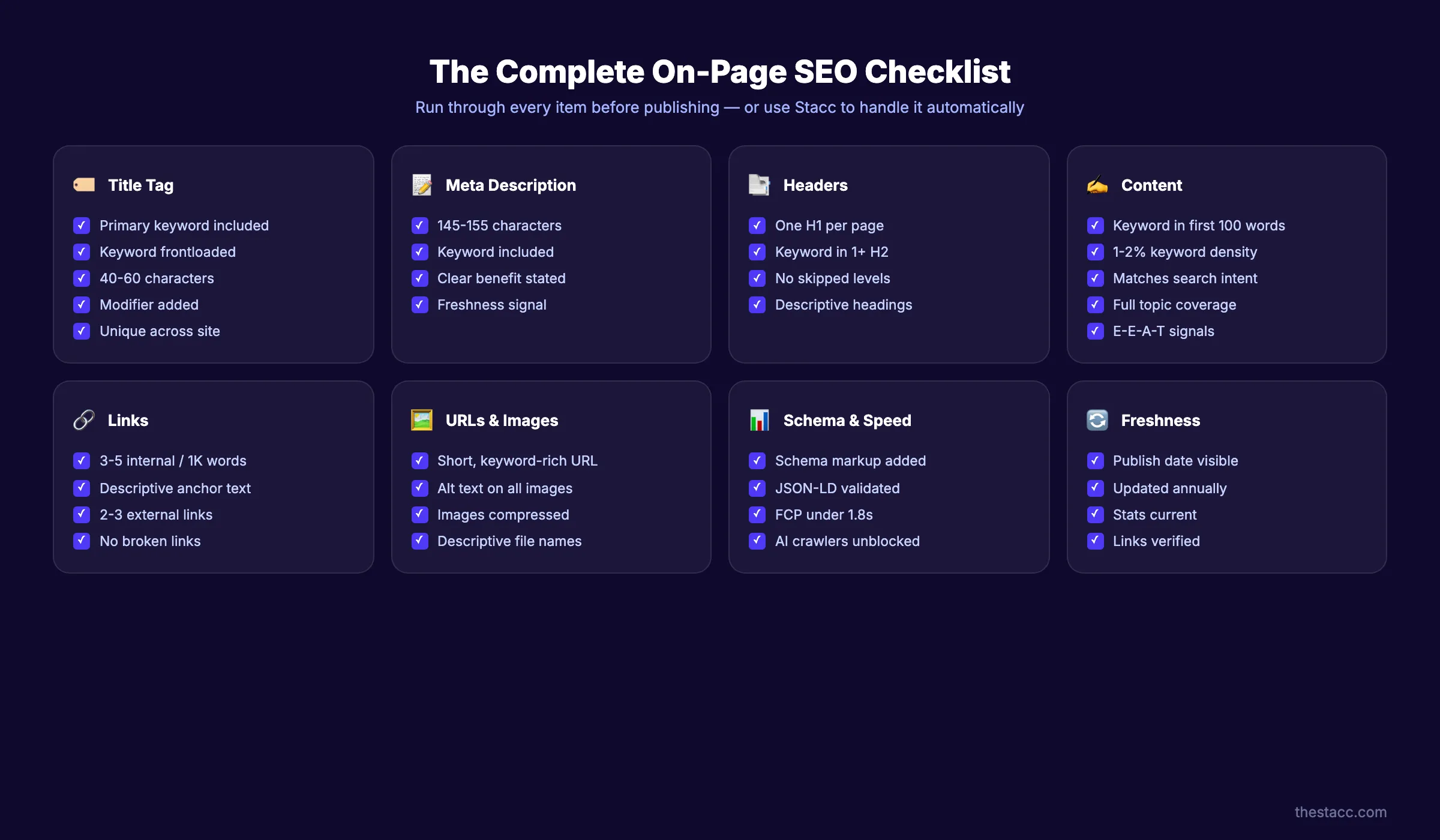
SEO is not a layer you add after writing. It is built into every structural choice you make. Get SEO-optimized content written for you
Chapter 6: How to Build E-E-A-T Into Every Page
E-E-A-T stands for Experience, Expertise, Authoritativeness, and Trustworthiness. It is Google's framework for evaluating content quality. Pages that demonstrate strong E-E-A-T rank higher. Pages that lack it sink.
Show Real Experience
Google now distinguishes between theoretical knowledge and lived experience. A guide on website content writing written by someone who has actually written thousands of pages carries more weight than one written by someone who has only researched the topic.
Demonstrate experience by:
- Including specific examples from your own work
- Sharing data and results from your own campaigns
- Using first-person accounts and case studies
- Adding original screenshots, not stock images
- Mentioning how long you have been doing this work
If you are writing about a topic where you lack direct experience, interview someone who has it. Quote them. Link to their credentials. Transparency about your sources builds more trust than pretending expertise you do not have.
Demonstrate Expertise
Expertise is about depth of knowledge. It shows in the details you include, the nuance you acknowledge, and the mistakes you warn against.
Expert content:
- Explains not just what to do, but why it works
- Acknowledges exceptions and edge cases
- Cites authoritative sources
- Uses industry-specific terminology correctly
- Addresses common misconceptions
For example, an expert guide on website content does not just say "write short paragraphs." It explains that short paragraphs reduce cognitive load, which increases readability scores, which correlates with lower bounce rates. That depth signals expertise.
Build Authoritativeness
Authoritativeness is about reputation. It is built over time through consistent, high-quality content and external validation.
Build authority by:
- Creating complete content that becomes a reference resource
- Earning backlinks from reputable sites in your industry
- Getting mentioned by recognized experts
- Maintaining a consistent publishing schedule
- Updating old content to keep it current
Authority compounds. The more quality content you publish, the more likely others are to reference you. Each reference strengthens your authority signal.
Earn Trustworthiness
Trust is the foundation of E-E-A-T. Without trust, experience, expertise, and authority do not matter.
Build trust by:
- Adding author bios with credentials and photos
- Including publication dates and update timestamps
- Citing sources for every statistic and claim
- Adding privacy policies and terms of service where relevant
- Using HTTPS and displaying security badges
- Making contact information easy to find
- Responding to comments and feedback
For YMYL (Your Money or Your Life) topics like health, finance, or legal advice, trust signals are even more critical. Google holds this content to a higher standard. Get it wrong, and your rankings will suffer.
Learn more about building E-E-A-T for blogs and how to demonstrate quality signals that search engines reward.

Chapter 7: How to Write CTAs That Get Clicked
Every page needs a call to action. But not every CTA works. The difference between a CTA that converts and one that gets ignored comes down to placement, copy, and clarity.
Place CTAs Where Readers Are Ready
CTA placement should follow the reader's emotional journey. Do not ask for a sale in the first paragraph. The reader does not trust you yet.
Instead, use a progressive CTA strategy:
- Early in the page: Soft CTAs like "read more" or "download the guide"
- Mid-page: Engagement CTAs like "try this technique" or "share your experience"
- End of page: Hard CTAs like "schedule a call" or "start your free trial"
For long-form content, add a CTA every 800-1,000 words. Readers who scroll that far are engaged. They are ready for the next step.
Write CTA Copy That Focuses on the Reader
Bad CTAs focus on what you want. Good CTAs focus on what the reader gets.
Compare:
- Bad: "Submit"
- Bad: "Sign up for our newsletter"
- Good: "Get the weekly playbook"
- Good: "Start ranking higher today"
The good CTAs promise a specific benefit. They use action verbs. They create urgency without being aggressive. And they make the next step feel obvious, not demanding.
Test One Variable at a Time
CTA optimization is a continuous process. Test one element at a time so you know what caused the change.
Variables to test:
- Button color and size
- Button copy (verb choice, length, specificity)
- Placement (above fold, mid-content, end of page)
- Offer (free trial vs. demo vs. consultation)
- Urgency (limited time, limited spots, none)
Run each test for at least two weeks or until you reach statistical significance. Document your results. Over time, you will build a library of CTA insights specific to your audience.

The best CTAs feel like the natural next step, not an interruption. See how theStacc publishes content with built-in CTAs
Chapter 8: How to Maintain and Refresh Content Over Time
Publishing content is not the finish line. It is the starting line. Content decays. Statistics become outdated. Competitors publish better guides. Links break. Search algorithms change. Without maintenance, even your best content will lose rankings.
Conduct Regular Content Audits
A content audit is a systematic review of everything on your site. It identifies what is working, what is broken, and what needs improvement.
Run a content audit every 6 months. For each page, record:
- Current organic traffic (last 90 days)
- Current keyword rankings
- Bounce rate and time on page
- Conversion rate (if applicable)
- Last update date
- Content accuracy and freshness
Sort pages into four categories:
- Keep: High-performing content that is current and accurate
- Update: Content with traffic potential but outdated information
- Consolidate: Thin content that should be merged into a larger piece
- Remove: Content with no traffic, no backlinks, and no strategic value
Follow a Content Refresh Schedule
Not all content needs the same refresh frequency. Create a tiered schedule:
| Content Type | Refresh Frequency | What to Update |
|---|---|---|
| Evergreen guides | Every 6-12 months | Statistics, examples, screenshots, links |
| Trend-based posts | Every 3-6 months | Trends, data, predictions |
| Product pages | Every 3 months | Pricing, features, testimonials |
| News and updates | As needed | Current events, announcements |
When you refresh content, change the publication date. Search engines and readers both value freshness. A guide dated 2024 will underperform against an identical guide dated 2026.
Manage Content Decay Proactively
Content decay is the gradual decline in traffic and rankings that happens to every page over time. It is normal. But it is also preventable.
Signs of content decay:
- Gradual traffic decline over 3+ months
- Dropping keyword rankings for target terms
- Increasing bounce rate without content changes
- Competitors outranking you with newer or better content
When you spot decay, act fast. Update the content with new information. Add new sections that competitors now cover. Improve the structure. Add new internal links. Then resubmit the URL through Google Search Console for re-indexing.
Learn more about content governance and how to build systems that keep your content fresh at scale.

Chapter 9: The Complete Website Content Writing Checklist
Before you publish any page, run through this checklist. It covers every element discussed in this guide.
Planning
- ✓ Goal is defined in one sentence
- ✓ Target audience is researched and documented
- ✓ Primary keyword is identified
- ✓ Competitor content is audited for gaps
- ✓ Content format matches search intent
Structure
- ✓ Inverted pyramid structure is used
- ✓ Headings are descriptive and stand alone
- ✓ Paragraphs are 2-3 sentences maximum
- ✓ Lists and tables break up dense information
- ✓ White space is generous throughout
Writing
- ✓ Headline uses a proven formula
- ✓ Introduction hooks the reader in 100 words
- ✓ Content answers the core question early
- ✓ Tone matches the audience and brand
- ✓ Active voice is used throughout
SEO
- ✓ Primary keyword is in title, H1, first 100 words, and URL
- ✓ Meta title is under 60 characters
- ✓ Meta description is 145-155 characters with a CTA
- ✓ 3-5 internal links use descriptive anchor text
- ✓ 2-3 external links cite authoritative sources
- ✓ Images have descriptive alt text
- ✓ Schema markup is implemented
E-E-A-T
- ✓ Author bio with credentials is included
- ✓ Publication and update dates are visible
- ✓ Statistics and claims cite sources
- ✓ Original examples or data are included
- ✓ Common misconceptions are addressed
Conversion
- ✓ CTA is clear and benefit-focused
- ✓ CTA placement follows reader journey
- ✓ No competing CTAs on the same page
- ✓ Next step is obvious and easy to take
Quality Assurance
- ✓ Content is proofread for grammar and spelling
- ✓ Readability score is appropriate for audience
- ✓ All links are tested and working
- ✓ Mobile formatting is checked
- ✓ Page load speed is acceptable

What practitioners are saying on X
AI search advice ages quickly. Here is high-signal public discussion from SEO and growth operators — context for your roadmap, not a substitute for primary data.
- @varunram (Jul 2026): Critique of GEO slopfarm products that combine SEO clickbait with unresearched content marketing — quality and research still separate winners from farms. See the post on X.
- @jakezward (Feb 2026): 2026 SEO predictions emphasize AI Overview share-of-SERP, schema for LLM token efficiency, brand mentions in AI answers as a KPI, proprietary data as a moat, and content refresh beating net-new AI slop. See the post on X.
- @HlynurStefDev (Jul 2026): Public case: niche site traffic jumped from ~18 to 4,162 Google visits/month after focused technical/on-page SEO work (GSC screenshots claimed) — reminds that fundamentals still move numbers. See the post on X.
Grok, AI Overviews, and multi-engine visibility
Content topics like “website content writing” get AI citations when process steps, quality bars, and examples are concrete. Operator consensus on X is clear: research-backed pages beat unedited bulk generation — reflect that honestly.
- Google AI Overviews: Use passage-ready answers, tables, and FAQ schema where relevant.
- ChatGPT / Perplexity: Cite named sources next to key claims.
- Grok: Maintain accurate entity facts on-site and in high-signal X posts.
Frequently Asked Questions
A website content writing guide is a complete resource that teaches the principles, strategies, and tactics for creating effective web content. It covers planning, writing, SEO optimization, and content maintenance. The goal is to help writers and business owners produce content that ranks in search engines, engages readers, and drives conversions.
Start by defining the goal of each page. Research your audience and the keywords they use. Audit competitor content to find gaps. Create an outline with clear headings. Write the first draft focusing on value, not perfection. Then edit for clarity, structure, and SEO before publishing.
Update evergreen guides every 6-12 months. Refresh trend-based content every 3-6 months. Review product pages quarterly. Run a full content audit every 6 months to identify decaying pages. Fresh content signals quality to both readers and search engines.
Good website content answers a specific question for a specific audience. It is structured for scanners, optimized for search engines, and written in clear, active language. It demonstrates expertise through original examples and data. And it guides the reader toward a clear next step with a compelling call to action.
The ideal length depends on the page type and search intent. Homepage content typically runs 300-700 words. Service pages need 500-1,500 words to fully explain the offering. Blog posts and guides often perform best at 1,500-3,000 words when the topic warrants depth. The key is to match length to intent. Do not add words for the sake of length.
AI can assist with research, outlining, and first drafts. But human oversight is essential for quality. AI-generated content often lacks original examples, nuanced expertise, and brand voice. The best approach is a hybrid: use AI for efficiency, then edit heavily for accuracy, originality, and tone. Always fact-check AI output and add your own experience and perspective.
That is the complete process for writing website content that ranks and converts. The businesses winning in organic search are not the ones publishing the most content. They are the ones publishing the most deliberate content. Content built on research, structured for readers, optimized for search, and maintained over time.
Start with one page. Apply every chapter of this guide. Measure the results. Then scale what works.
Sources & references
- [1] Princeton / Georgia Tech et al. — GEO research (arXiv:2311.09735)
- [2] @varunram on X — Critique of GEO slopfarm products that combine SEO clickbait with unresearched content marketing — quality and research
- [3] @jakezward on X — 2026 SEO predictions emphasize AI Overview share-of-SERP, schema for LLM token efficiency, brand mentions in AI answers
- [4] @HlynurStefDev on X — Public case: niche site traffic jumped from ~18 to 4,162 Google visits/month after focused technical/on-page SEO work (G
- [5] Referenced source — search.google.com

Plan topics, review article drafts, and publish to a connected CMS.
Weekly local SEO teardowns
One practical email a week. Map Pack, GBP, AI Overviews. No fluff. Unsubscribe anytime.
Explore this topic: Top 10 Best AI Content Writing Tools for SEO (2026) · Top 7 Best SEO Content Writing Tools (2026).