
10 Best SEO Audit Tools in 2026 (Free + Paid)
We tested the 10 best SEO audit tools and ranked them by features, pricing, and accuracy. Free and paid options compared. Updated March 2026.
Siddharth Gangal • 2026-03-28
In This Post
96% of all web pages get zero traffic from Google, according to Ahrefs. Most of those pages have technical issues that a proper SEO audit would catch: broken links, missing meta descriptions, slow load times, crawl errors.
The best SEO audit tools find these problems before they tank your rankings. The worst ones bury you in 200-page reports that no one reads and no one acts on.
We tested 10 SEO audit tools across real websites. This guide ranks each one by features, pricing, accuracy, and usability. Whether you need a free option for a personal blog or an enterprise crawler for a 500,000-page site, one of these tools fits.
We have published 3,500+ blog posts and run hundreds of site audits across 70+ industries. Here is what we recommend.
What you will learn:
- The 10 best SEO audit tools ranked with pros, cons, and pricing
- A comparison table showing all tools side by side
- Which tools work best for freelancers, agencies, and enterprises
- A free-only audit stack that covers 80% of what paid tools offer
- What a complete SEO audit should actually include
Quick Comparison: All 10 SEO Audit Tools
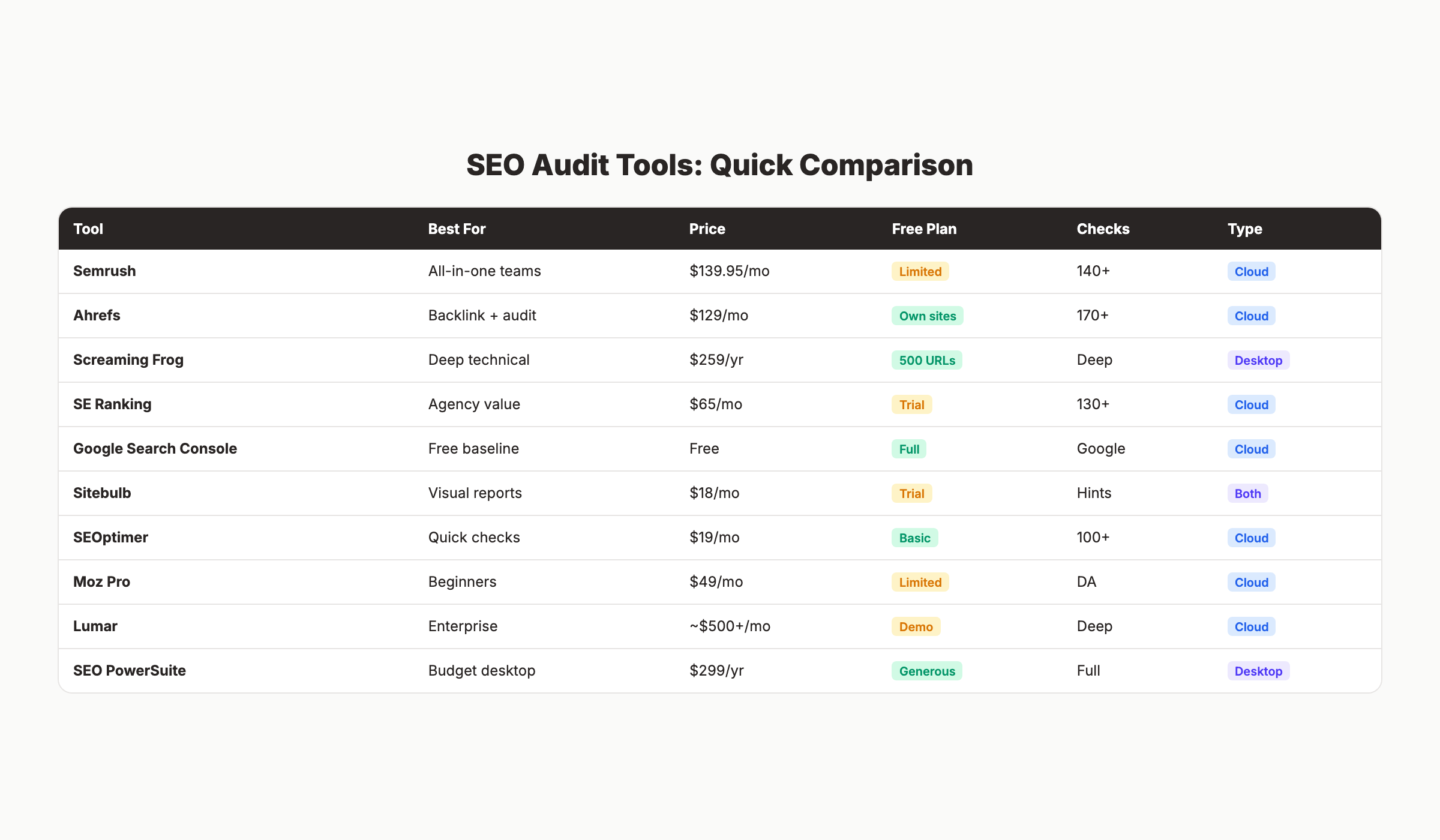
| Tool | Best For | Starting Price | Free Plan | Crawl Depth |
|---|---|---|---|---|
| Semrush | All-in-one SEO + audit | $139.95/mo | 100 pages/mo | 140+ checks |
| Ahrefs | Backlink + technical audit | $129/mo | Own sites only | 170+ checks |
| Screaming Frog | Deep technical crawling | $259/year | 500 URLs | Unlimited |
| SE Ranking | Best value for agencies | $65/mo | 14-day trial | 130+ checks |
| Google Search Console | Free baseline audit | Free | Full access | Google data |
| Sitebulb | Visual audit reports | $18/mo | 14-day trial | Priority hints |
| SEOptimer | Quick site health checks | $19/mo | Basic analysis | 100+ checks |
| Moz Pro | Beginner-friendly audits | $49/mo | Limited | DA scoring |
| Lumar | Enterprise-scale crawling | Custom (~$500+) | Demo only | Millions of pages |
| SEO PowerSuite | Budget desktop auditor | $299/year | Generous free | Full site crawl |
1. Semrush Site Audit
Best for: All-in-one SEO teams that want auditing, keyword research, and competitive analysis in one platform.
Semrush runs 140+ technical SEO checks across your entire site and assigns a Health Score from 0 to 100. The 2026 version includes an AI Search Health score that evaluates your site’s readiness for AI Overviews and LLM citations.
Key features:
- 140+ technical and on-page checks
- Site Health Score with trend tracking
- Core Web Vitals monitoring
- Internal linking analysis and recommendations
- On-Page SEO Checker with content suggestions
- AI Search Health for GEO readiness
Pros:
- Most complete all-in-one SEO platform (50+ tools)
- Excellent reporting for clients and stakeholders
- Scheduled recurring audits with email alerts
Cons:
- Expensive for solo users ($139.95/mo minimum)
- Steep learning curve for beginners
- Crawl limits on lower plans
Pricing: Free (100 pages/month). Pro $139.95/mo. Guru $249.95/mo. Business $499.95/mo.
Best for: Agencies, in-house SEO teams, and businesses that need more than just auditing.
For a deeper look, read our Semrush review.
2. Ahrefs Site Audit
Best for: Teams that prioritize backlink analysis alongside technical auditing.
Ahrefs checks for 170+ SEO issues and runs an always-on crawler that re-checks your site continuously. The backlink database is the largest in the industry, which makes Ahrefs particularly strong for link-related audit issues.
Key features:
- 170+ SEO issue checks
- Always-on crawler (re-crawls automatically)
- Orphan page detection
- Toxic backlink identification
- Internal link analysis
- JavaScript rendering for SPA sites
Pros:
- Strongest backlink index available
- Real-time crawling catches issues faster
- Free version available for verified site owners (Ahrefs Webmaster Tools)
Cons:
- Site audit depth is slightly behind Semrush for technical checks
- Expensive ($129/mo for the lowest paid plan)
- Free tier is limited to your own sites
Pricing: Free (Ahrefs Webmaster Tools, own sites only). Lite $129/mo. Standard $249/mo. Advanced $449/mo.
Best for: SEO professionals who need backlink analysis and technical auditing in one tool.
For a deeper look, read our Ahrefs review.
Stop writing. Start ranking. Stacc publishes 30 SEO articles per month for your business, starting at $99. Start for $1 →
3. Screaming Frog SEO Spider
Best for: Technical SEO specialists who need deep crawl control.
Screaming Frog is a desktop-based crawler that SEO professionals have used for over a decade. It crawls websites locally on your machine, giving you complete control over crawl speed, filters, and data extraction. Every competitor article mentions it. Reddit’s r/SEO community considers it the industry standard for technical audits.
Key features:
- Desktop crawler with full JavaScript rendering
- Custom extraction (scrape any element from every page)
- Log file analysis
- Hreflang validation
- XML sitemap generation
- Canonicalization and redirect chain detection
Pros:
- Deepest technical crawl capabilities in the market
- One-time annual cost ($259/year) instead of monthly subscription
- Handles sites with millions of pages
- Scriptable and automatable for recurring audits
Cons:
- Desktop-only (no cloud version)
- Steep learning curve for non-technical users
- Interface feels dated compared to SaaS tools
- No keyword research, backlinks, or content features
Pricing: Free (500 URLs, limited features). Paid: $259/year (single license).
Best for: Technical SEO consultants and agencies that need maximum crawl control.
4. SE Ranking
Best for: Agencies looking for the best value across auditing and client reporting.
SE Ranking checks 130+ parameters and assigns a Health Score with fix-impact quantification. It tells you what is broken AND how much fixing each issue will improve your overall score. The crawl comparison feature lets you track changes across multiple audit runs.
Key features:
- 130+ audit parameters
- Health Score with impact estimates
- Crawl-over-time comparison
- Backlink audit and monitoring
- White-label reports for agencies
- On-page SEO checker
Pros:
- Best price-to-feature ratio in the category
- Clean, intuitive interface
- White-label reporting is included on all plans
- Pricing scales with your needs
Cons:
- Less brand recognition than Semrush or Ahrefs
- Pricing scales by page count (large sites get expensive)
- Backlink database is smaller than Ahrefs
Pricing: Essential from $65/mo (annual billing from $23.52/mo). 14-day free trial.
Best for: Small agencies and freelancers who need professional features without enterprise pricing.
5. Google Search Console
Best for: Every website owner. The essential free baseline.
Google Search Console is not an audit tool in the traditional sense. But it provides data that no other tool can: direct information from Google about how it sees your site. Indexing issues, Core Web Vitals problems, mobile usability errors, and security warnings all appear here first.
Key features:
- URL inspection (check how Google sees any page)
- Index coverage reports
- Core Web Vitals data
- Mobile usability testing
- Security and manual action alerts
- Search performance data (clicks, impressions, CTR, position)
Pros:
- Completely free with no limits
- Data comes directly from Google (not estimated)
- Essential for identifying indexing and crawl issues
- Sitemap submission and monitoring
Cons:
- No competitor analysis
- No site-wide technical crawl (checks pages Google has already found)
- Data is delayed by 2-3 days
- No content or keyword optimization features
Pricing: Free.
Best for: Everyone. Use GSC as your foundation, then add paid tools for deeper analysis.
For a full walkthrough, read our Google Search Console guide.
3,500+ blogs published. 92% average SEO score. See what Stacc can do for your site. Start for $1 →
6. Sitebulb
Best for: Visual learners and teams that need shareable audit reports.
Sitebulb produces the most visually clear audit reports in the category. Its dual scoring system assigns “priority hints” that rank issues by importance, so you know exactly what to fix first. Available as both a desktop app and a cloud version.
Key features:
- Priority hints system (ranks issues by impact)
- Visual site architecture maps
- Accessibility auditing
- JavaScript rendering
- Team collaboration features (cloud version)
- Scheduled recurring audits
Pros:
- Best visualizations and report design in the category
- Actionable “hints” tell you what to do, not just what is wrong
- Affordable entry point ($18/mo for Lite)
- Both desktop and cloud versions available
Cons:
- No keyword research or backlink database
- Less well-known than major competitors
- Cloud version is relatively new
Pricing: Lite $18/mo. Pro $45/mo. 14-day free trial.
Best for: Consultants who present audit findings to non-technical clients.
7. SEOptimer
Best for: Quick website health checks and agency lead generation.
SEOptimer runs a 100+ data point analysis and generates a clean, readable report in seconds. The embeddable audit widget lets agencies add a free SEO audit tool to their own website, capturing leads while providing value.
Key features:
- 100+ data point analysis
- Keyword tracking
- Backlink monitoring
- White-label PDF reports
- Embeddable website audit widget
- Bulk reporting for multiple sites
Pros:
- Generous free tier for basic audits
- Best embeddable widget for agency websites
- Very affordable ($19/mo starting price)
- Beginner-friendly with clear scoring
Cons:
- Shallow crawl depth compared to Screaming Frog or Semrush
- Limited technical analysis for complex sites
- Single-page focus (not a full site crawler)
Pricing: Free tier available. DIY SEO $19/mo. White Label $39/mo. White Label & Embedding $59/mo.
Best for: Agencies that want a lead-gen tool and quick client audits.
8. Moz Pro
Best for: SEO beginners who want a guided, educational approach.
Moz Pro includes a Site Crawl feature, on-page grader, and the industry-standard Domain Authority metric. The platform emphasizes education, with clear explanations of what each issue means and how to fix it.
Key features:
- Site Crawl with issue prioritization
- On-Page Grader
- Domain Authority and Page Authority scores
- Keyword Explorer
- Link Explorer and spam score detection
- MozBar browser extension
Pros:
- Most beginner-friendly interface among major SEO tools
- Domain Authority is widely used as a benchmarking metric
- Extensive educational resources and community
- MozBar is a useful free browser extension
Cons:
- Crawl speed and depth behind Semrush and Ahrefs
- Domain Authority is a Moz metric, not a Google ranking factor
- Interface feels less modern than competitors
- Pricing is high relative to crawl capabilities
Pricing: Starter $49/mo. Standard $99/mo. Medium $179/mo. Large $299/mo.
Best for: Beginners learning SEO who want clear guidance alongside their audit data.
9. Lumar (formerly DeepCrawl)
Best for: Enterprise sites with millions of pages.
Lumar handles the scale that other tools cannot. It crawls millions of pages, integrates with CI/CD pipelines for automated pre-deployment checks, and includes accessibility auditing alongside SEO. If you manage enterprise websites, Lumar is the industry standard.
Key features:
- Enterprise-scale crawling (millions of pages)
- CI/CD pipeline integration
- Accessibility auditing (WCAG compliance)
- Core Web Vitals monitoring
- Custom dashboards and alerts
- DevOps-friendly API
Pros:
- Handles the largest sites without breaking
- DevOps integration prevents SEO issues from reaching production
- Accessibility + SEO in one platform
- Strong API and automation capabilities
Cons:
- Custom pricing starts around $500+/month
- Complete overkill for small and mid-sized sites
- No keyword research or content tools
- Requires technical setup knowledge
Pricing: Custom (enterprise). Contact for quote.
Best for: Enterprise SEO teams and large-scale publishers.
Skip the agency. Keep the results. Stacc starts at $99/mo with a $1 trial. Start for $1 →
10. SEO PowerSuite (WebSite Auditor)
Best for: Budget-conscious users who want a powerful desktop tool.
SEO PowerSuite’s WebSite Auditor is a desktop-based tool that performs full technical and on-page audits at a fraction of the cost of SaaS tools. The annual pricing model ($299/year) makes it one of the most affordable professional options.
Key features:
- Full site crawl with technical analysis
- Site structure visualization
- On-page content optimization
- White-label reports
- Scheduled automated audits
- Robots.txt and sitemap analysis
Pros:
- Extremely affordable ($299/year vs $1,680/year for Semrush Pro)
- Generous free version with most features unlocked
- White-label reporting included
- Desktop processing means no crawl limits
Cons:
- Desktop-only (no cloud collaboration)
- Interface feels dated
- Requires local processing power for large sites
- No backlink database or keyword research
Pricing: Free version available. Professional $299/year. Enterprise $499/year.
Best for: Freelancers and small businesses who want professional auditing without monthly subscriptions.
The Free SEO Audit Stack
You do not need to spend $140/month to run a proper audit. This free stack covers approximately 80% of what paid tools offer for sites under 500 pages.
| Layer | Tool | What It Covers |
|---|---|---|
| Indexing + performance | Google Search Console | How Google sees your site, Core Web Vitals, search performance |
| Technical crawl | Screaming Frog (free) | 500 URLs, broken links, redirects, meta tags, headers |
| Issue checks | Ahrefs Webmaster Tools | 170+ issue checks on your own verified sites |
| Page speed | Google PageSpeed Insights | Single-page Core Web Vitals and performance scores |
| Structured data | Google Rich Results Test | Schema markup validation |
Run GSC and Screaming Frog first to identify the issues. Use Ahrefs Webmaster Tools to cross-reference. Fix issues in priority order: indexing errors first, then broken links, then speed, then content optimization.
For a step-by-step process, read our guide on how to do an SEO audit.
What a Complete SEO Audit Should Include
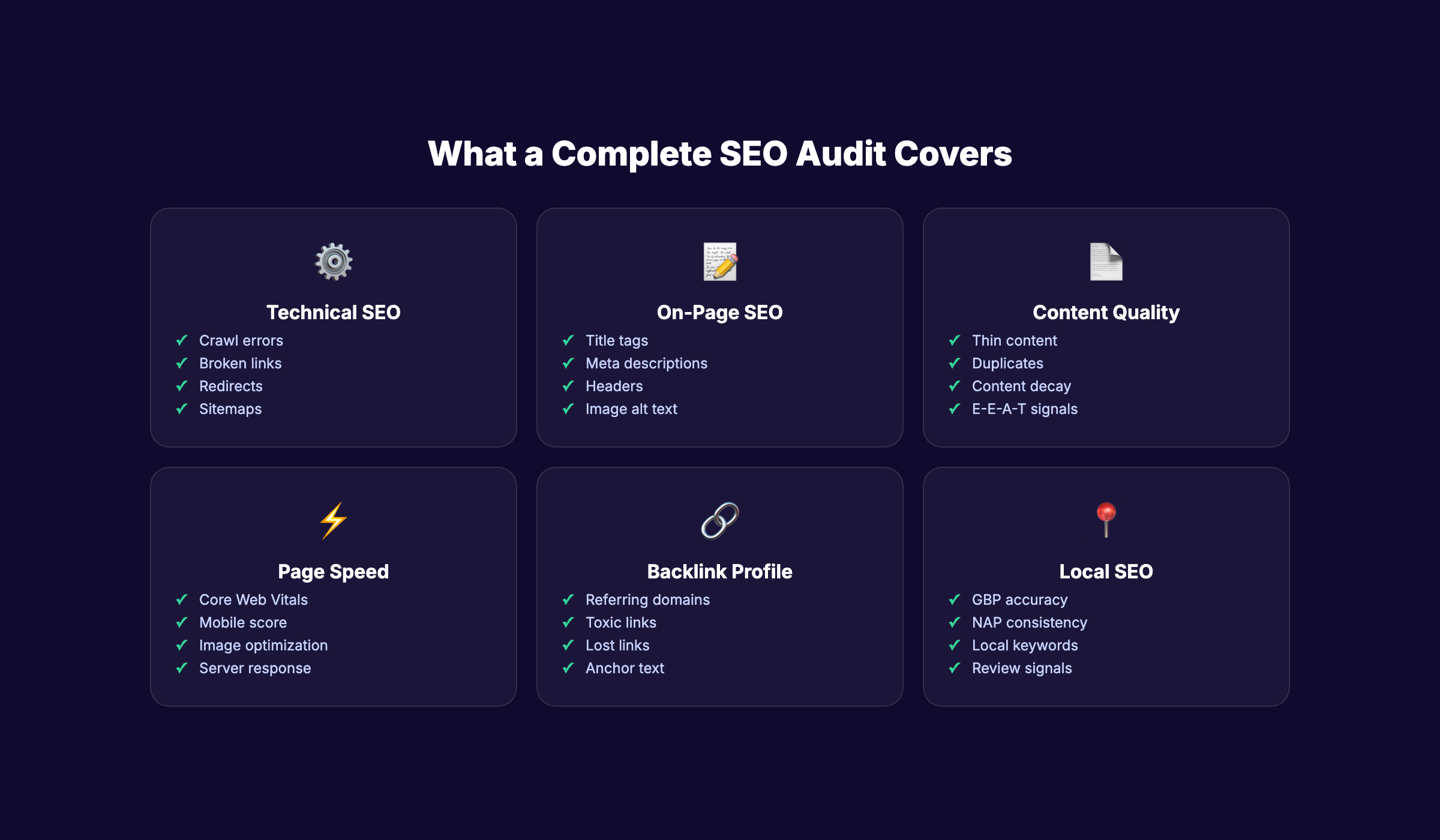
Most audit tools focus on technical SEO. A complete audit covers 6 areas.
Technical SEO
- Crawl errors and indexing issues
- Broken links (internal and external)
- Redirect chains and loops
- XML sitemap validity
-
robots.txtconfiguration - HTTPS implementation
- Canonical tag accuracy
On-Page SEO
- Title tags (unique, under 60 characters, keyword-optimized)
- Meta descriptions (145-155 characters, compelling)
- Header hierarchy (H1 > H2 > H3, no skipping)
- Image alt text on all images
- Keyword optimization (placement and density)
Content Quality
- Thin content pages (under 300 words)
- Duplicate content issues
- Content decay (pages losing rankings)
- E-E-A-T signals (author bios, sources, expertise)
Page Speed
- Core Web Vitals (LCP, INP, CLS)
- Mobile performance scores
- Image optimization
- Server response time
Backlink Profile
- Total referring domains
- Toxic or spammy backlinks
- Lost backlinks
- Anchor text distribution
Local SEO (for local businesses)
- Google Business Profile accuracy
- NAP consistency across citations
- Local keyword targeting
- Review volume and velocity
Use our free SEO Audit Tool for a quick assessment, or our On-Page SEO Checker for individual page analysis.
How to Choose the Right SEO Audit Tool
| If You Are… | Best Tool | Why |
|---|---|---|
| A solo blogger or small site owner | Google Search Console + Screaming Frog (free) | Free, covers the essentials |
| A freelance SEO consultant | SE Ranking or Sitebulb | Best value, white-label reports |
| An agency managing 10+ clients | Semrush or SE Ranking | Multi-project management, scalable |
| An in-house SEO team | Ahrefs or Semrush | All-in-one with competitive analysis |
| An enterprise with 100K+ pages | Lumar or Semrush Business | Enterprise crawling, DevOps integration |
| On a tight budget | SEOptimer or SEO PowerSuite | Under $25/mo for professional features |
Your SEO team. $99 per month. 30 optimized articles, published automatically. Start for $1 →
FAQ
What is the best free SEO audit tool?
Google Search Console is the best free SEO audit tool because it provides data directly from Google. For deeper technical crawling, combine it with Screaming Frog’s free version (500 URLs) and Ahrefs Webmaster Tools. Together, these 3 free tools cover approximately 80% of what paid tools offer.
How often should you run an SEO audit?
Run a full technical audit quarterly. Run on-page content audits monthly for high-traffic pages. Set up automated monitoring (most paid tools offer this) to catch critical issues like broken pages or indexing errors in real time between full audits.
How much does a professional SEO audit cost?
DIY with free tools costs nothing. Paid tools range from $18/mo (Sitebulb Lite) to $500+/mo (Lumar). Hiring an SEO agency for a one-time audit costs $1,000-5,000 for mid-sized sites and $10,000+ for enterprise sites. Stacc includes ongoing SEO optimization for $99/mo with 30 published articles.
What should an SEO audit include?
A complete audit covers 6 areas: technical SEO (crawl errors, redirects, sitemaps), on-page SEO (titles, meta descriptions, headers), content quality (thin content, duplicates, E-E-A-T), page speed (Core Web Vitals), backlink profile (toxic links, anchor text), and local SEO (GBP, citations, reviews) if applicable.
Can I do an SEO audit myself?
Yes. Start with Google Search Console to identify indexing issues and Core Web Vitals problems. Run Screaming Frog’s free version to crawl up to 500 pages for technical issues. Use Google PageSpeed Insights for individual page performance. Follow our SEO audit guide for a step-by-step walkthrough.
Is Semrush or Ahrefs better for SEO audits?
Semrush offers deeper technical audit features (140+ checks, AI Search Health, better reporting). Ahrefs offers the strongest backlink database and always-on crawling. For audit-focused work, Semrush edges ahead. For combined audit + backlink analysis, Ahrefs is stronger. Both are excellent. Read our Semrush review and Ahrefs review for detailed comparisons.
The best SEO audit tool is the one you actually use. A free Google Search Console audit run quarterly beats a $500/month enterprise tool that sits unused. Start with the free stack, identify your biggest issues, fix them, and upgrade your tools as your site and needs grow.
This post was written and published by Stacc. We compete with several tools reviewed here. All pricing and feature data verified against public sources as of March 2026.
