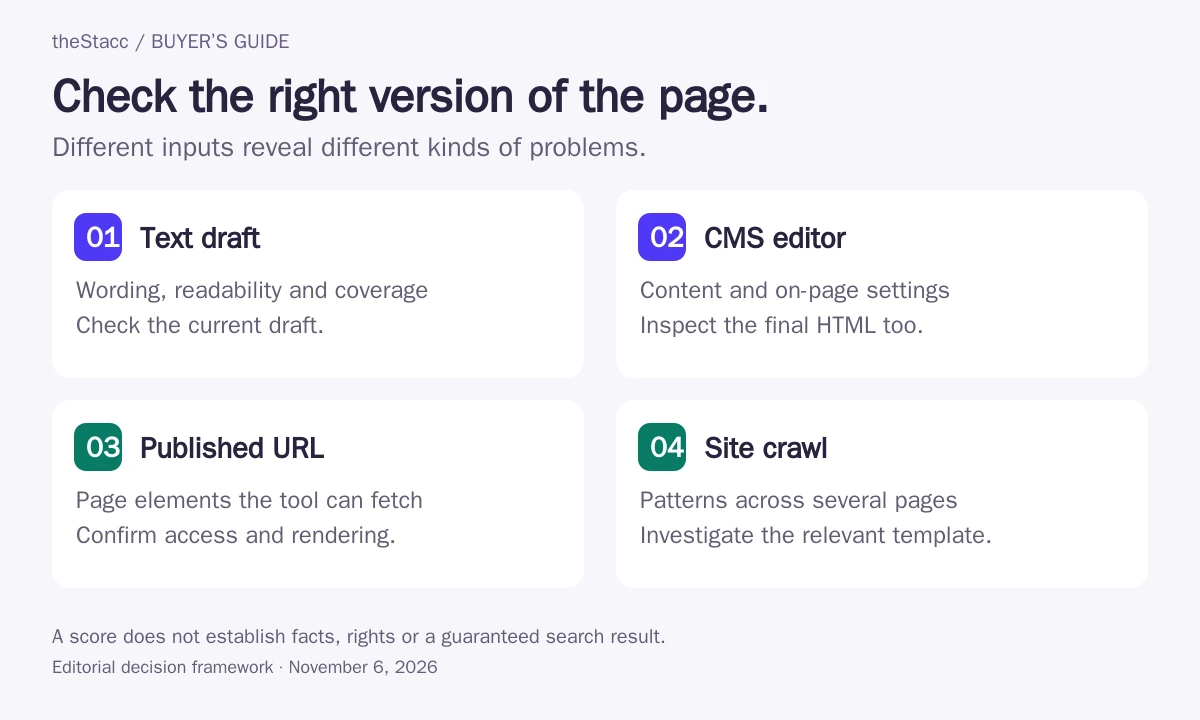
Start with the input you can actually check
| Input | Useful checks | What may be missing |
|---|---|---|
| Pasted draft | Readability, wording and suggested topic coverage | Published metadata, links, templates and rendering |
| CMS editor | On-page settings and writing feedback while editing | The final page as a visitor or crawler receives it |
| Published URL | Visible text and the page elements the tool can fetch | Private content, unsupported rendering or editorial context |
| Site crawl | Repeated metadata, link and template patterns | Whether every finding matters to the reader |
A successful check needs the right input. If a tool reads an old draft or cannot fetch the relevant page, its result may not describe the version you plan to publish. Confirm the checked URL, content version and date before acting on the output.
Compare what each checker can inspect
| Option | Useful role | Cost basis and limit to check |
|---|---|---|
| Yoast SEO | CMS content and readability checks | Free core plugin; Premium adds features |
| Rank Math | CMS on-page tests and content score | Free plugin; additional paid features and AI services |
| Semrush SEO Writing Assistant | Draft analysis with separately metered originality checks | Limited Free/Pro access; broader SEO Toolkit entitlement required |
| Surfer | Draft optimization and published-content audit | Discovery $49/month equivalent billed yearly; verify scope |
| Clearscope | Draft grading and topic coverage guidance | Essentials $129/month; drafting and monitoring allowances differ |
| SEO Review Tools Content Editor | Draft editor with keyword and metadata feedback | Free access; Freelancer $19/month with separate allowances |
| Seobility SEO Checker | Single-URL on-page and technical analysis | Free checks subject to allowance; paid plans expand access |
| Screaming Frog SEO Spider | Desktop crawler for published-site checks | Free up to 500 URLs; US$279/year per user for paid licence |
How this shortlist was researched
theStacc sells SEO software and managed services. This guide uses official-source research and automated editorial assistance. Inclusion is not a hands-on performance test, a customer endorsement or a promise of results. We have not assigned numerical quality scores.
Options are grouped by useful fit rather than scored from first to last. Each profile links to its source. Confirm the selected plan or proposal before buying. See our editorial standards.
Eight checkers, grouped by the work they inspect
1. Yoast SEO
Good fit: A WordPress editor checking a page while it is still in the CMS
Yoast checks selected keyphrase use, links, metadata and other on-page elements inside the editing workflow. Its separate readability analysis examines features such as sentence length, paragraph structure and passive voice.
Use the feedback to locate a specific issue, then inspect the sentence or page element yourself. A green indicator does not establish factual accuracy, originality or that the finished page renders correctly.
Before you buy: Confirm language support and whether the checks you need are in the free plugin or a paid product.
2. Rank Math
Good fit: A WordPress publisher checking titles, text and links before release
Rank Math presents basic SEO, additional checks, title readability and content readability within the WordPress editor. The focus keyword you enter shapes its recommendations, so the setup matters as much as the displayed score.
Inspect the tests rather than treating the total as a pass certificate. Adding a term only to satisfy a check can weaken a sentence, and the plugin cannot decide whether the target topic is appropriate for your business.
Before you buy: Test the page builder and editor you actually use, and check the published HTML for the metadata and headings you intended.
3. Semrush SEO Writing Assistant
Good fit: A writer checking draft readability, tone and search guidance in a familiar editor
SEO Writing Assistant reviews readability, SEO recommendations, tone and originality, and works in Semrush, Google Docs, WordPress and Microsoft Word. Its plagiarism checker is documented separately from the writing and recommendation allowances.
Set the intended location, device and target query before interpreting the suggestions. An originality alert needs inspection of the matched material; it does not verify every factual statement or replace a review of the live URL.
Before you buy: Confirm document access, plagiarism-check limits and Smart Writer usage in the exact subscription before buying for a team.
Semrush SEO Writing Assistant: official offering and current details
4. Surfer
Good fit: An editor comparing an existing page with current search-based guidance
Surfer combines an optimization editor with content-audit and page-monitoring features. These provide a way to review a draft or identify published pages that may need another editorial pass.
Keep the suggested content changes separate from technical release checks. A coverage score cannot establish that a canonical tag, image or link reached the live page as intended, and automated revisions still need a factual review.
Before you buy: Confirm document-credit renewal rules, monitored-page allowances and the controls used before a suggested change is published.
5. Clearscope
Good fit: A team comparing draft coverage while working in Docs, Word or WordPress
Clearscope grades a draft against current ranking pages and highlights terms or questions that may be missing. Its guidance is available in its own workspace and through Google Docs, Microsoft Word and WordPress integrations.
Use the term map to investigate a missing answer, not to copy another page’s structure automatically. A relevant topic can belong in a short answer, a separate page or nowhere in the current draft; the editor still makes that decision.
Before you buy: Check the selected market, sharing workflow and which activities consume a new draft or research allowance.
6. SEO Review Tools Content Editor
Good fit: A writer who wants a browser-based check before moving content into a CMS
SEO Review Tools provides a browser editor with feedback on keyword focus, titles and descriptions, alongside newer AI-oriented suggestions. It can be a useful place to inspect a draft without first configuring a WordPress plugin.
Check how the draft is saved and transferred into your publishing workflow. Metadata fields entered in an editor are not proof that the final CMS will use them, so repeat the relevant checks after publication.
Before you buy: Confirm document and AI-word limits, export behavior and the handling of content you submit to the service.
SEO Review Tools Content Editor: official offering and current details
7. Seobility SEO Checker
Good fit: An owner who needs a quick check of a published page
Seobility’s SEO Checker accepts a URL and reports on metadata, page quality, headings, links and server-related issues. This makes it a different kind of check from pasting draft text into a content editor.
Inspect the exact URL and the evidence behind each warning. A live-page report can reveal missing information or technical obstacles, but its aggregate score is not an editorial judgment about whether the answer is reliable or useful.
Before you buy: Check whether the crawler can access the relevant content and whether the report covers one page or the broader site audit you need.
Seobility SEO Checker: official offering and current details
8. Screaming Frog SEO Spider
Good fit: A site editor investigating whether a publishing issue repeats across pages
Screaming Frog checks published-site elements such as response status, titles, metadata, directives and duplicate pages. It is useful when the same content or template issue may affect more than the one article in front of you.
Use crawl evidence to create a specific fix, then verify representative pages after the change. Advanced features such as JavaScript rendering and saved crawls need the appropriate licence, and crawl capacity also depends on local resources.
Before you buy: Confirm the crawl scope, rendering requirements and paid features you need before treating a clean crawl as a complete content review.
Screaming Frog SEO Spider: official offering and current details
Run a check that can change a decision
- Name the question. Decide whether you are checking clarity, coverage, metadata, links or another specific issue.
- Supply the right version. Use the current draft or exact published URL, including the relevant language.
- Read the finding. Look at the sentence, element or URL behind a warning instead of reacting only to its color.
- Verify the change. Check sources for factual additions and inspect the affected page element.
- Recheck the final page. Confirm that the approved edit reached the live URL and did not create another problem.
Treat each result according to what it measures
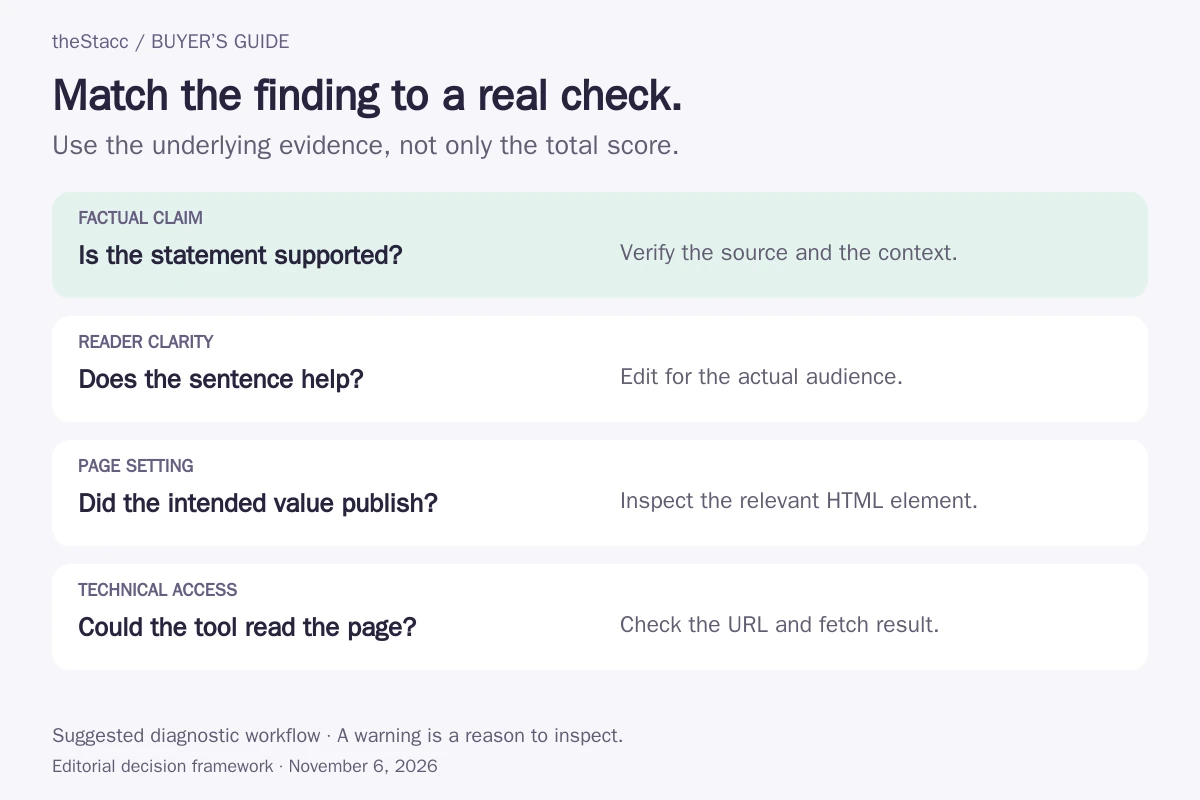
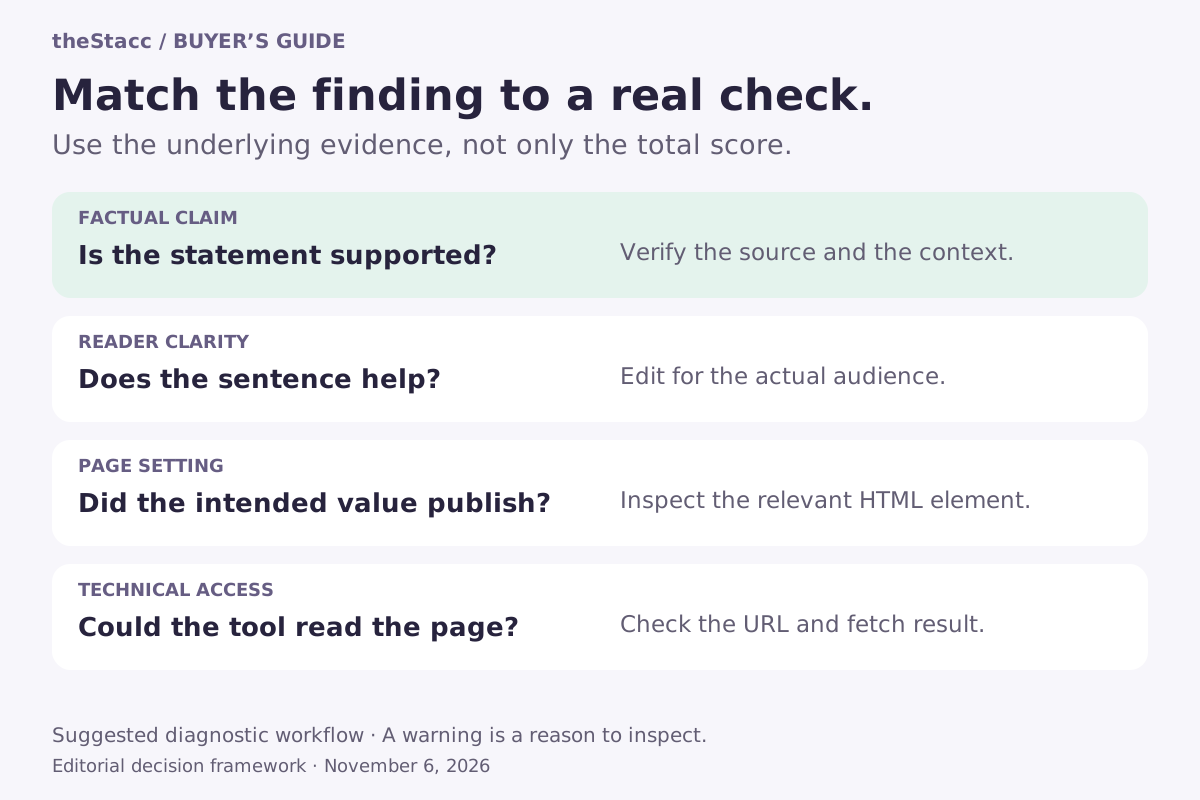
| Result | Reasonable use | Limit |
|---|---|---|
| Readability warning | Review a difficult sentence or structure | Specialist terms may be necessary and accurate |
| Topic recommendation | Consider a missing answer relevant to the brief | Another topic is not automatically useful on this page |
| Metadata or heading issue | Inspect the named HTML element | A fixed character count does not guarantee a search display |
| Text-similarity match | Inspect the matched passage and source | A match alone does not establish authorship, permission or intent |
| Crawl finding | Investigate the URL and affected page type | A crawl is not a complete editorial or factual review |
Compare allowances for the checks you will repeat
Some checkers are free inside a plugin or have limited public scans. Others charge for documents, reports, crawl capacity or a larger software subscription. A paid writing feature can have a separate allowance for similarity checks. Confirm which action consumes a credit and whether checking the same revision consumes another one.
| Work you need | Capacity to confirm |
|---|---|
| Review drafts | Documents, analyses, languages and export options |
| Check originality | Whether similarity checking is included and separately limited |
| Inspect live pages | Fetch limits, JavaScript handling and private-page support |
| Audit a site | URLs per crawl, stored projects and repeat scheduling |
| Work with an editor | Seats, sharing, comments and access to the same document |
Check the language and the page version
Confirm the supported language and search market before using recommendations for a localized page. Readability rules and suggested terms do not transfer perfectly between languages. If a URL redirects or changes content by location, make sure the result describes the version your intended audience sees.
Use only content you are authorized to upload. For unpublished client material, check the service’s data-handling terms and your organization’s policy before pasting it into an external checker.
Use the result to improve a page, not to chase a number
For a draft, start with the checker that fits your writing workflow and language. For a published-page issue, inspect the URL rather than relying on a text score. For repeated problems across many pages, a crawler can help group the work so you can fix the relevant template or process.
Some tools include text-similarity checks, but there is no single check that establishes usefulness, factual accuracy, originality and technical accessibility together. Google’s helpful-content guidance emphasizes useful, reliable content. Keep source checks and editorial judgment in the workflow.
For broader planning and rewriting, compare content optimization tools. For a small research and technical stack, see affordable SEO tools.
Evaluate theStacc against your actual workflow
If you are evaluating theStacc, compare its current content workflow with the checks and review responsibilities you need. Use a representative page to discuss fact checking, editing and the final publishing handoff. Review the current plans before choosing a paid service.
Start free → to explore the software, or Book a demo → to discuss your requirements.
SEO content checker: questions answered
Can I check an article before it is published?
Yes, if the tool accepts pasted text, an editor document or a CMS draft. That can help review wording and on-page choices before release. It does not prove that the published page has the same metadata, links or rendering, so check the live version after publication.
Why do two SEO content checkers give different scores?
Their inputs, rules and datasets can differ. One may emphasize readability or keyword usage while another compares topic coverage or HTML elements. Inspect the underlying suggestions and the content version checked instead of treating the scores as interchangeable.
Can an SEO checker verify factual accuracy?
Do not assume it can. A tool may flag issues or provide research assistance, but a score does not confirm each claim. Verify important facts against appropriate sources and use a qualified reviewer when the subject needs specialist knowledge.
Do SEO content checkers include plagiarism checks?
Some include text-similarity or plagiarism features, sometimes with a separate allowance. Others focus on readability, coverage or page elements. Confirm the specific feature and inspect any matched passages; the result alone does not establish ownership or permission.
What if the tool cannot read my page?
Check whether the page is public, the exact URL redirects, or the content requires a login or unsupported rendering. Review the fetch status before interpreting missing text as an editorial problem. Use a draft-based tool when that is the information you actually need to inspect.
Should every warning be fixed?
No. Investigate its relevance first. A warning can reveal a real issue, a rule that does not fit the page or a limitation in the tool’s input. Prioritize accurate information, clear answers and working page elements over changing text solely to remove a warning.
Sources and scope of this comparison
Product and service information was checked against the official pages linked in the profiles on November 6, 2026. Published features are vendor descriptions, not independently measured performance. Confirm the selected plan and current terms before purchasing.