
13 Best Social Media Scheduling Tools in 2026 (Tested)
We tested 13 social media scheduling tools on ease of use, pricing, and platform support. See which scheduler fits your workflow. Updated March 2026.
Expert Verified · Written by Stacc Editorial Team. 13 tools tested for social media scheduling. Pricing verified March 2026. We publish 3,500+ blog articles and automate social content for businesses across 70+ industries.
Quick Picks:
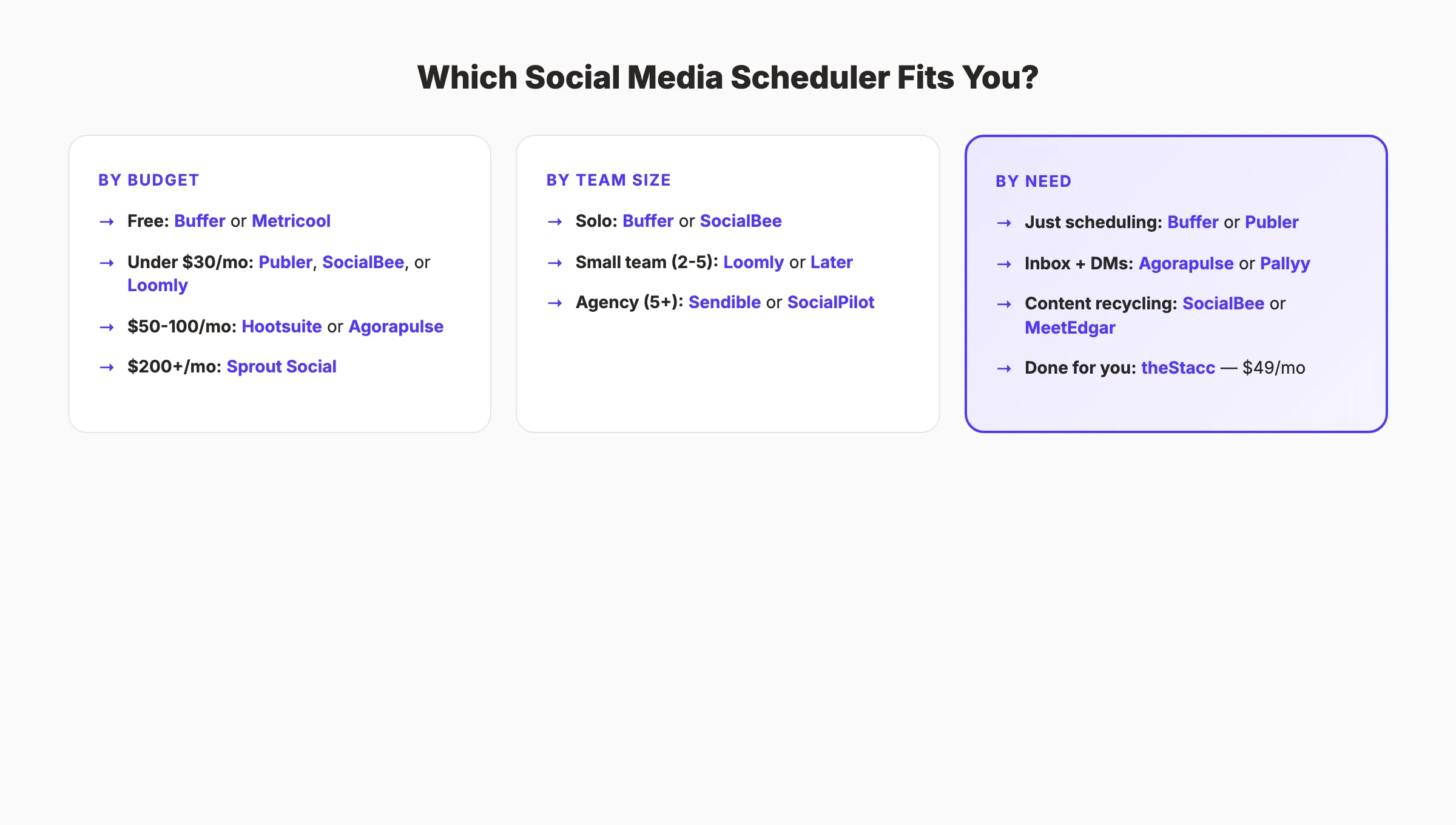
- Best overall: Buffer. Clean interface, generous free plan, 11 platform support from $6/mo per channel
- Best for visual brands: Later. Instagram grid planner and Linkin.bio from $18.75/mo
- Best free option: Metricool , 20 scheduled posts/month with analytics included free
- Best for evergreen content: SocialBee. Category-based recycling keeps your queue full from $29/mo
- Best for agencies: Sendible. White-label dashboard and client approvals from $25/mo
- Best done-for-you social: theStacc , 30 original posts/month created and published for $49/mo
How We Tested and Ranked These Social Media Scheduling Tools
Most “best social media scheduling tools” lists are written by the tools themselves. Buffer ranks Buffer first. Sprout Social ranks Sprout Social first. We have no scheduling tool to sell.
We publish social content for businesses across 70+ industries and manage 3,500+ monthly articles. We evaluated each tool on 5 criteria: platform support, ease of use, pricing transparency, free plan generosity, and whether it actually saves time or just moves the work around.
Below is our honest breakdown of 13 scheduling tools. Including pricing, pros, cons, and exactly who each tool works best for.
What We Looked For
| Criteria | What We Measured |
|---|---|
| Platform Support | Number of social networks supported, including newer platforms like Threads, Bluesky, and TikTok |
| Ease of Use | Time from signup to first scheduled post. Can a non-technical user figure it out in under 10 minutes? |
| Pricing | Entry cost, per-channel math, what the free plan actually includes, and hidden add-on costs |
| Scheduling Depth | Bulk upload, evergreen recycling, best-time suggestions, first-comment scheduling, content queues |
| Analytics | Post performance data, audience insights, and whether useful reporting requires an upgrade |
Social Media Scheduling Tools Compared
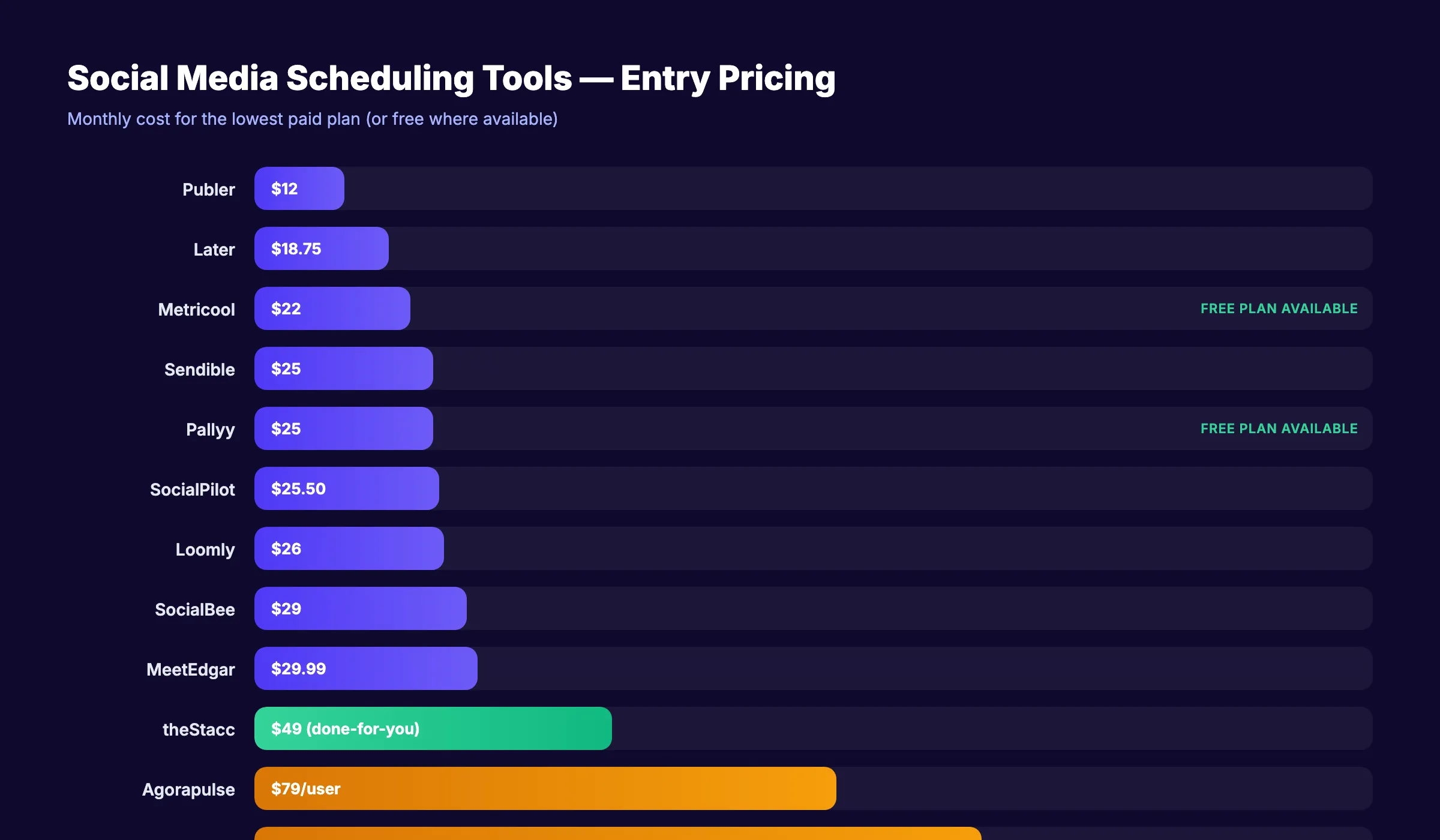
| Tool | Best For | Starting Price | Free Plan? | Key Strength |
|---|---|---|---|---|
| Buffer | Solo creators | $6/mo/channel | ✅ 3 channels | Simplest interface on the market |
| Hootsuite | Enterprise teams | $99/mo | ❌ | Social listening + ad management |
| Sprout Social | Customer care teams | $249/mo | ❌ | Smart Inbox for unified engagement |
| Later | Visual brands | $18.75/mo | ✅ 1 social set | Instagram grid planner |
| SocialBee | Evergreen content | $29/mo | ❌ | Category-based content recycling |
| Metricool | Data-driven marketers | $22/mo | ✅ 20 posts/mo | Unified paid + organic analytics |
| Agorapulse | Agency inbox management | $79/mo/user | ❌ | Best social inbox in the category |
| Sendible | Agency white-labeling | $25/mo | ❌ | Rebrandable client dashboard |
| Pallyy | Instagram-first brands | $25/mo/set | ✅ 15 posts/mo | Visual planner + social inbox |
| Publer | Bulk scheduling | $12/mo | ✅ | CSV bulk upload + workspaces |
| SocialPilot | Budget agencies | $25.50/mo | ❌ | 500 posts per bulk upload |
| Loomly | Content teams | $26/mo | ❌ | Post idea engine + approval workflows |
| MeetEdgar | Content recycling | $29.99/mo | ❌ | Fully automated evergreen queue |
1. Buffer. Best Social Media Scheduling Tool for Solo Creators
Buffer built its reputation on one thing: simplicity. The interface is the cleanest in the category. You connect your accounts, write a post, pick a time, and publish. No streams, no dashboards-within-dashboards, no 45-minute onboarding.
What It Does Well
Buffer supports 11 platforms. More than most competitors. Facebook, Instagram, X, LinkedIn, TikTok, YouTube, Pinterest, Mastodon, Bluesky, Threads, and Google Business Profile all connect natively. The content calendar uses drag-and-drop scheduling that works exactly how you expect.
The AI assistant drafts captions and repurposes content across platforms. Start Page (their link-in-bio builder) is included on all plans. For creators who need a clean posting workflow without enterprise complexity, Buffer remains the default choice.
Our Take: Buffer is what most people actually need. The per-channel pricing model makes it cheap for 3 accounts and expensive for 15. Do the math before committing if you manage multiple brands.
Where It Falls Short
No evergreen content recycling. No social inbox on cheaper plans. Analytics are basic compared to Sprout Social or Agorapulse. Per-channel pricing adds up fast. Managing 10 channels costs $60/month on the Essentials plan, which pushes it into Hootsuite territory.
Key Features
- Multi-platform scheduling. Post to 11 networks from one dashboard
- AI caption assistant. Generate and repurpose post copy
- Start Page. Link-in-bio landing page builder included free
- Analytics dashboard. Engagement, reach, and post performance tracking
- Content calendar. Drag-and-drop visual scheduling
Pricing
- Free: 3 channels, 10 posts per channel per month
- Essentials: $6/month per channel. Unlimited posts, engagement tools
- Team: $12/month per channel. Unlimited users, approval workflows
- Agency: $120/month , 10 channels included
Who Should Use Buffer
Strong fit:
- Solo creators and bloggers managing 1-5 social accounts
- Small teams that want the fastest onboarding possible
Probably not right for:
- Agencies managing 20+ client accounts (per-channel pricing becomes expensive)
- Teams that need evergreen content recycling or a social inbox
2. Hootsuite. Best Social Media Scheduling Tool for Enterprise Teams
Hootsuite is the oldest name in social scheduling. It is also the most controversial after removing its free plan and raising prices to $99/month minimum. The tool delivers on features. Social listening, ad management, 150+ integrations, bulk CSV scheduling. The question is whether you need all of it.
What It Does Well
The Streams dashboard provides real-time monitoring across all connected accounts. You see mentions, comments, and keyword alerts in customizable columns. Bulk scheduling via CSV upload handles high-volume publishing. Ad management lets you boost posts and manage paid campaigns without leaving the platform.
150+ app integrations connect Hootsuite to your CRM, project management tools, and analytics stack. For enterprise teams already embedded in a complex marketing tech stack, Hootsuite plugs in.
Our Take: Hootsuite is overkill for anyone publishing under 50 posts per week. The interface has improved since the 2024 redesign, but it still takes most new users 2-3 sessions to feel comfortable. If your team already uses it, the switching cost is real. If you are starting fresh, look at Buffer or SocialBee first.
Where It Falls Short
The $99/month entry point locks out solopreneurs and small businesses. The interface complexity creates a learning curve that simpler tools avoid entirely. A team of 3 users costs $249/month minimum on the Team plan. Add-ons for advanced analytics and social listening inflate the total.
Key Features
- Streams dashboard. Real-time social monitoring in customizable columns
- Bulk scheduling. Upload hundreds of posts via CSV
- Social listening. Brand monitoring and keyword tracking
- Ad management. Boost and manage paid campaigns in-platform
- 150+ integrations. Connects to Salesforce, Slack, HubSpot, and more
Pricing
- Professional: $99/month , 1 user, 10 social profiles
- Team: $249/month , 3 users, 20 social profiles
- Business: $739/month , 5 users, 35 social profiles
- Enterprise: Custom pricing
Who Should Use Hootsuite
Strong fit:
- Mid-to-large marketing teams (5+ people) already using enterprise tools
- Organizations that need social listening and ad management in one platform
Probably not right for:
- Solopreneurs or freelancers (price is too high for the value received)
- Small businesses that only need scheduling and basic analytics
3. Sprout Social. Best Social Media Scheduling Tool for Customer Care Teams
Sprout Social is the most expensive tool on this list. It is also the most powerful for teams that treat social media as a customer service channel. The Smart Inbox unifies every message, mention, and comment across all platforms into one stream.
What It Does Well
The Smart Inbox is Sprout Social’s defining feature. Every DM, comment, mention, and review across all connected platforms appears in a single feed. Team members can assign, tag, and resolve conversations. For brands handling hundreds of customer interactions daily, this eliminates platform-hopping.
Social listening goes deep. Keyword tracking, sentiment analysis, competitor monitoring, and trend identification. Custom reporting lets you build dashboards for different stakeholders. The approval workflow supports multi-step review chains for regulated industries.
Our Take: Sprout Social is a CRM that happens to schedule posts. If customer engagement is your primary use case, nothing else comes close. If you just need to schedule 20 posts per week, you are paying 5 times more than you need to.
Where It Falls Short
The $249/month starting price is the highest entry point in the category. Standard plan limits you to 5 social profiles. A team of 3 costs $747/month minimum. The post scheduler itself is less intuitive than Buffer or Later. The tool prioritizes inbox management over publishing speed.
Key Features
- Smart Inbox. Unified messages, mentions, and comments across all platforms
- Social listening. Keyword and sentiment tracking across platforms
- Custom reporting. Build stakeholder-specific analytics dashboards
- Approval workflows. Multi-step review chains for content teams
- Influencer marketing. Discovery and tracking on higher tiers
Pricing
- Standard: $249/month , 1 user, 5 social profiles
- Professional: $399/month. Unlimited profiles
- Advanced: $499/month. Automation features, chatbots
- Enterprise: Custom pricing
Who Should Use Sprout Social
Strong fit:
- Enterprise brands using social media for customer service
- Agencies that need detailed custom reporting for clients
Probably not right for:
- Anyone whose primary need is content scheduling (too expensive for that alone)
- Small teams with fewer than 100 monthly social interactions
4. Later. Best Social Media Scheduling Tool for Visual Brands
Later started as an Instagram-first scheduler and still leans into visual content planning. The grid planner lets you preview exactly how your Instagram feed will look before publishing. For brands where aesthetics matter. Fashion, food, real estate, fitness. This feature alone justifies the subscription.
What It Does Well
The visual feed planner is the best in the category. Drag photos into a calendar grid and see your Instagram layout update in real time. Linkin.bio converts your Instagram feed into a shoppable landing page. Each post links to a product or URL. Best Time to Post uses your audience data to recommend optimal publishing windows.
Hashtag suggestions and performance tracking help refine your Instagram strategy over time. User-generated content discovery surfaces posts from fans and customers for easy reposting.
Our Take: Later is the right pick if Instagram or TikTok is your primary platform. The visual planner creates genuine value that text-focused schedulers cannot replicate. For LinkedIn or X-heavy strategies, Later offers less differentiation.
Where It Falls Short
Unlimited posts require the Advanced plan ($80/month). Analytics depth falls behind Sprout Social and Hootsuite. The tool is less suited for text-heavy platforms like LinkedIn and X. The visual-first interface does not optimize for those formats. Team collaboration requires the Growth plan at $40/month.
Key Features
- Visual grid planner. Preview your Instagram feed before publishing
- Linkin.bio. Turn your Instagram feed into a clickable landing page
- Best Time to Post. Data-driven publishing time recommendations
- Hashtag manager. Suggestions and performance tracking
- UGC discovery. Find and repost user-generated content
Pricing
- Free: 1 social set, 30 posts per month
- Starter: $18.75/month , 1 social set, 60 posts
- Growth: $40/month , 3 social sets, 150 posts
- Advanced: $80/month , 6 social sets, unlimited posts
Who Should Use Later
Strong fit:
- Instagram-first brands (fashion, food, fitness, ecommerce)
- Visual content creators who care about feed aesthetics
Probably not right for:
- B2B companies focused on LinkedIn and X
- Teams that need a social inbox or customer service features
5. SocialBee. Best Social Media Scheduling Tool for Evergreen Content
SocialBee approaches scheduling differently than most tools. Instead of a simple calendar, it uses content categories. You group posts by topic (promotions, tips, industry news, evergreen) and set a different publishing frequency for each category. The tool automatically fills your queue.
What It Does Well
The category-based system is SocialBee’s core advantage. Create a category called “Blog Posts,” add 30 posts, set it to publish twice per week, and SocialBee cycles through them indefinitely. When posts run out, it loops back to the beginning. This evergreen recycling keeps your social presence active without constant content creation.
Post variants let you create multiple versions of the same message for A/B testing. The AI Copilot generates a full social media strategy, content calendar, and captions based on your business description. RSS feed auto-import pulls content from your blog automatically.
Our Take: SocialBee is the best tool for teams that have a library of evergreen content and want it distributed on autopilot. The category system takes 30 minutes to set up but saves hours every week after that. Most competitors make you manually re-queue old content.
Where It Falls Short
No social inbox for managing comments and DMs. The interface is functional but not as polished as Buffer or Later. The category system has a learning curve. New users often over-complicate their setup with too many categories. No free plan (14-day trial only).
Key Features
- Category-based scheduling. Group posts by topic with independent frequencies
- Evergreen recycling. Automatically re-queues content when the cycle ends
- Post variants. Create multiple versions for testing
- AI Copilot. Generates strategy, calendar, and captions
- RSS auto-import. Pull blog content into your queue automatically
Pricing
- Bootstrap: $29/month , 5 social profiles, 1 user
- Accelerate: $49/month , 10 profiles, 1 user
- Pro: $99/month , 25 profiles, 3 users
Who Should Use SocialBee
Strong fit:
- Content marketers with a large library of evergreen articles and tips
- Solopreneurs who want to “set and forget” their social posting
Probably not right for:
- Teams that need inbox management or customer engagement features
- Brands that post primarily time-sensitive or trending content
Your social media team. $49/month. theStacc creates and publishes 30 original social posts per month across Instagram, LinkedIn, X, and Facebook. Automatically. Start for $1 →
6. Metricool. Best Free Social Media Scheduling Tool
Metricool offers the most generous free plan in the category. You get 20 scheduled posts per month with analytics included. No credit card required. Most competitors either cap free plans at 10 posts or strip out analytics entirely.
What It Does Well
The unified analytics dashboard combines organic social performance with paid ad data (Facebook Ads, Google Ads, TikTok Ads) in one view. Competitor tracking lets you benchmark your performance against specific accounts. The auto-generated CSV reports save time for agencies that need client-ready data. Over 1 million brands use the platform.
The scheduling interface supports 9 platforms including Twitch. A platform most competitors ignore. The AI content creation assistant helps generate captions when you are stuck.
Our Take: Metricool is the best free option for freelancers and small businesses that want scheduling plus analytics without paying for either. The paid plans ($22-54/month) are competitive too, but the free tier is the real draw.
Where It Falls Short
The free plan caps at 20 posts per month. Enough for 1 platform at 5 posts per week, but tight for multi-platform strategies. The social inbox is limited compared to Agorapulse or Sprout Social. The scheduling interface is less intuitive than Buffer for pure posting workflows.
Key Features
- Unified analytics. Organic social + paid ads in one dashboard
- Competitor tracking. Benchmark against specific accounts
- Ad management. Facebook, Google, and TikTok Ads built in
- Auto reports. CSV exports for client reporting
- 9-platform support. Including Twitch and Google Business Profile
Pricing
- Free: 20 scheduled posts per month, analytics included
- Starter: $22/month. More posts, competitor tracking
- Advanced: $54/month. Team features, white-label reports
Who Should Use Metricool
Strong fit:
- Freelancers and small businesses that want free scheduling with analytics
- Data-driven marketers tracking paid and organic together
Probably not right for:
- Teams posting more than 50 times per month (free plan is too restrictive)
- Enterprise teams needing advanced social listening
7. Agorapulse. Best Social Media Scheduling Tool for Agency Inbox Management
Agorapulse has built the strongest social inbox in the scheduling category. If your business receives hundreds of comments, DMs, and mentions daily, Agorapulse organizes them into a manageable workflow with assignment, tagging, and resolution tracking.
What It Does Well
The social inbox pulls every interaction across all connected platforms into a single feed. Team members can assign conversations, add internal notes, and mark items as resolved. Saved replies speed up response times for common questions. The listening tool tracks brand mentions and keywords beyond your owned profiles.
ROI reporting attempts to connect social activity to revenue. A feature most competitors lack. Over 3,000 agencies use Agorapulse for multi-client management. The approval workflow routes content through review chains before publishing.
Our Take: Agorapulse is the tool to pick when engagement management matters more than content creation. The inbox is genuinely best-in-class. The scheduling features are solid but not exceptional. You are paying the premium for inbox and listening.
Where It Falls Short
Per-user pricing makes large teams expensive. Three users on the Standard plan cost $237/month. The scheduling interface is less elegant than Buffer or SocialBee. Analytics can feel complex for users who just want basic post performance data.
Key Features
- Social inbox. Unified comment, DM, and mention management
- Social listening. Brand mention and keyword monitoring
- ROI reporting. Connect social activity to revenue metrics
- Approval workflows. Multi-step content review chains
- Saved replies. Template responses for common interactions
Pricing
- Standard: $79/month per user
- Professional: $99/month per user
- Advanced: $149/month per user
- Enterprise: Custom pricing
Who Should Use Agorapulse
Strong fit:
- Agencies managing social engagement for multiple clients
- Brands receiving 50+ daily comments and messages across platforms
Probably not right for:
- Solo users who primarily need scheduling (per-user pricing is expensive for one person)
- Teams that do not prioritize comment and DM management
8. Sendible. Best Social Media Scheduling Tool for Agency White-Labeling
Sendible targets agencies with a specific feature most competitors lack: a fully white-label dashboard. You can rebrand the entire tool with your agency logo, colors, and domain. Clients log in and see your brand, not Sendible.
What It Does Well
The white-label dashboard is the standout feature. Agencies can present Sendible as their own proprietary platform. Content suggestions from RSS feeds and web sources help fill content calendars. The AI assistant generates captions and optimizes post copy. Approval workflows let clients review and sign off on content before it publishes.
Reply management covers Instagram, Facebook, and LinkedIn comments from within the platform. WordPress and Slack integrations extend the tool beyond social-only workflows.
Our Take: Sendible is the best value for agencies that want to present a branded experience to clients. The white-label feature on the Traction plan ($76/month) is cheaper than building a custom dashboard. If you do not need white-labeling, Publer or SocialPilot offer similar features for less.
Where It Falls Short
The entry plan limits you to 6 social profiles. Tight for agencies managing even 2 clients. Analytics are weaker than Sprout Social or Agorapulse. Some users report slower customer support response times compared to Buffer or Hootsuite.
Key Features
- White-label dashboard. Rebrand the tool with your agency identity
- Content suggestions. RSS feeds and web source curation
- AI caption assistant. Generate and optimize post copy
- Approval workflows. Client review and sign-off before publishing
- Reply management. Respond to comments across platforms
Pricing
- Creator: $25/month , 1 user, 6 social profiles
- Traction: $76/month , 4 users, 24 profiles, white-label
- Scale: $170/month , 7 users, 49 profiles
Who Should Use Sendible
Strong fit:
- Agencies that want a branded client-facing dashboard
- Freelancers managing 2-4 client accounts who need approval workflows
Probably not right for:
- Solo creators (the white-label feature has no value for personal use)
- Enterprise teams that need social listening or deep analytics
9. Pallyy. Best Social Media Scheduling Tool for Instagram-First Brands
Pallyy is a newer player that combines Later’s visual planning with Agorapulse’s inbox management. At a lower price than either. The visual grid planner, social inbox, and analytics suite are all included on every paid plan.
What It Does Well
The Instagram grid planner rivals Later for visual feed preview. The social inbox combines comments, DMs, mentions, and Google reviews in one view. A feature that usually requires enterprise pricing on other platforms. Analytics break down performance by platform with clear, visual reports. The media library keeps all your assets organized and accessible.
Per-social-set pricing ($25/month) includes the full feature set. There are no tier-locked features. Every paying customer gets the inbox, analytics, and planner.
Our Take: Pallyy delivers 80% of what Later and Agorapulse offer at roughly half the combined cost. The main risk is brand maturity. Pallyy is newer and smaller than established players. If you value feature parity over brand recognition, it is worth testing.
Where It Falls Short
No content recycling or evergreen queue feature. The brand is less established, which creates hesitation for enterprise buyers who need vendor stability. Per-social-set pricing can add up for agencies managing 10+ client accounts.
Key Features
- Visual grid planner. Preview Instagram feed layout before posting
- Social inbox. Comments, DMs, mentions, and Google reviews in one feed
- Platform analytics. Per-network performance breakdowns
- Media library. Organize and access all creative assets
- Team collaboration. Multi-user access on all paid plans
Pricing
- Free: 15 scheduled posts per month
- Premium: $25/month per social set. Full features included
Who Should Use Pallyy
Strong fit:
- Instagram and TikTok-focused brands that also need inbox management
- Small teams looking for Later + Agorapulse features at a lower price
Probably not right for:
- Enterprise buyers that require established vendor track records
- Teams that rely on evergreen content recycling
10. Publer. Best Social Media Scheduling Tool for Bulk Scheduling
Publer focuses on volume. If you need to schedule hundreds of posts at once. Product launches, seasonal campaigns, client content backlogs. Publer handles bulk uploads better than most competitors.
What It Does Well
CSV and RSS bulk uploads let you schedule hundreds of posts in minutes. Workspaces keep different brands and clients cleanly separated with their own accounts, teams, and content. Auto-scheduling uses AI to suggest optimal posting times. The watermarking tool brands images automatically before publishing. First-comment scheduling for Instagram and LinkedIn is built in.
The pricing is aggressive: the Professional plan at $12/month makes Publer one of the cheapest paid options in the category. Over 240,000 users rely on the platform.
Our Take: Publer is the best pick for power users who batch-create content and need to upload it quickly. The bulk scheduling alone saves hours for agencies doing monthly content drops. The trade-off is a less polished interface than Buffer or Later.
Where It Falls Short
Analytics are functional but not deep. The interface is less polished than Later or Pallyy. Brand recognition is lower than Buffer or Hootsuite. Though 240,000+ users suggest the tool delivers on its promises.
Key Features
- Bulk scheduling. CSV and RSS upload for hundreds of posts
- Workspaces. Separate brands and clients cleanly
- Auto-scheduling. Data-driven posting time suggestions
- Watermarking. Brand images automatically before publishing
- First-comment scheduling. For Instagram and LinkedIn
Pricing
- Free: Limited features, basic scheduling
- Professional: $12/month. Full scheduling and analytics
- Business: $21/month. Team features and workspaces
Who Should Use Publer
Strong fit:
- Agencies that batch-create monthly content and need fast bulk uploads
- Power users managing multiple brands in separate workspaces
Probably not right for:
- Visual brands that prioritize feed aesthetics (no grid planner)
- Teams that need social inbox or listening features
11. SocialPilot. Best Budget Social Media Scheduling Tool for Agencies
SocialPilot competes on volume and price. The Professional plan manages up to 10 social accounts for $25.50/month. The top-tier Agency plan handles 50 accounts with unlimited users and white-label features for $200/month. For agencies watching margins, SocialPilot offers the most accounts per dollar.
What It Does Well
Bulk scheduling handles up to 500 posts per upload. The highest limit in the category. The white-label dashboard (on higher plans) lets agencies present a branded experience. Client approval workflows route content through review before publishing. Post repetition and evergreen scheduling keep queues active without manual intervention.
Platform support is broad: Facebook, Instagram, X, LinkedIn, TikTok, YouTube, Pinterest, Google Business Profile, and Tumblr. First-comment scheduling is included.
Our Take: SocialPilot is the tool for agencies where cost per account matters more than interface polish. The 500-post bulk upload is unmatched. If your clients care about the dashboard experience, Sendible’s white-label is more refined. If they care about cost, SocialPilot wins.
Where It Falls Short
The interface feels dated compared to newer tools like Pallyy or Buffer. Analytics lack the depth of Sprout Social or Agorapulse. Customer support quality is inconsistent based on user reviews.
Key Features
- 500-post bulk upload. Highest batch limit in the category
- White-label dashboard. Agency branding on higher plans
- Client approval workflows. Content review before publishing
- Evergreen scheduling. Post repetition for recurring content
- 10-platform support. Including Tumblr and Google Business Profile
Pricing
- Professional: $25.50/month , 10 accounts, 1 user
- Small Team: $42.50/month , 20 accounts, 3 users
- Agency: $85/month , 30 accounts, 6 users
- Agency+: $200/month , 50 accounts, unlimited users, white-label
Who Should Use SocialPilot
Strong fit:
- Small agencies that need to manage 10-50 accounts affordably
- Teams that prioritize bulk scheduling and cost efficiency
Probably not right for:
- Brands that value interface design and user experience
- Teams that need advanced analytics or social listening
12. Loomly. Best Social Media Scheduling Tool for Content Teams
Loomly is built for teams that collaborate on content before publishing. The Post Ideas engine generates content suggestions based on trending topics, holidays, and industry events. Approval workflows support multi-step review chains with commenting and revision tracking.
What It Does Well
The Post Ideas engine is unique. Log in and see a feed of content suggestions tailored to your industry. Trending topics, upcoming events, seasonal themes. The content library centralizes all assets (images, videos, templates) for the team. Multi-step approval workflows let stakeholders review, comment, and approve before anything publishes.
Ad management for Facebook and Instagram is built in. Loomly supports 9 platforms including Snapchat. One of the few schedulers that does.
Our Take: Loomly is the right tool for marketing teams with 3+ people who need structured content workflows. The Post Ideas engine genuinely saves brainstorming time. Solo users will find more value in Buffer or SocialBee, where collaboration features are unnecessary overhead.
Where It Falls Short
A recent price increase of roughly 50% frustrated existing users. Analytics are lighter than enterprise tools. No social listening capability. The Base plan includes only 10 accounts and 2 users. Tight for growing teams.
Key Features
- Post Ideas engine. AI-generated content suggestions from trends and events
- Content library. Centralized asset management for teams
- Multi-step approvals. Review chains with commenting and revisions
- Ad management. Facebook and Instagram ads in-platform
- 9-platform support. Including Snapchat and Google Business Profile
Pricing
- Base: $26/month , 2 users, 10 accounts
- Standard: $59/month , 6 users, 20 accounts
- Advanced: $129/month , 14 users, 35 accounts
- Premium: $269/month , 30 users, 50 accounts
Who Should Use Loomly
Strong fit:
- Marketing teams of 3+ people that need structured content workflows
- Teams that struggle with content ideation and want AI-driven suggestions
Probably not right for:
- Solo creators (collaboration features add cost without value)
- Teams that need social listening or deep engagement analytics
13. MeetEdgar. Best Social Media Scheduling Tool for Content Recycling
MeetEdgar does one thing better than any other tool on this list: it keeps your social queue full without you touching it. The category-based evergreen system automatically recycles your content, varying the copy each time to avoid repetition.
What It Does Well
The core feature is automated evergreen recycling. Create categories (tips, blog posts, promotions, quotes), add content to each, and MeetEdgar cycles through them on your schedule. When the queue runs out, it loops back and starts again with auto-varied copy. The URL shortener tracks clicks on every shared link. RSS feed import pulls new blog posts into your queue automatically.
Unlimited scheduled posts on both paid plans means you never hit a posting cap. For solopreneurs who have a content library but no time to manage distribution, MeetEdgar removes the manual work entirely.
Our Take: MeetEdgar is a specialist tool. It does recycling better than SocialBee and better than Buffer (which does not recycle at all). But it does nothing else. No social inbox, no deep analytics, no bulk scheduling. If recycling is your primary need, MeetEdgar is the pick. If you need a full platform, look elsewhere.
Where It Falls Short
No social inbox or engagement management. Analytics are minimal. Link click tracking only. No bulk scheduling. The tool serves one use case well and does not attempt to cover everything. Platform support is narrower than most competitors (no YouTube or Google Business Profile).
Key Features
- Evergreen recycling. Automated content re-queuing with copy variation
- Category scheduling. Group content by type with independent frequencies
- URL shortener. Built-in click tracking on all shared links
- RSS feed import. Auto-populate queue from blog content
- Unlimited posts. No posting caps on paid plans
Pricing
- Eddie: $29.99/month , 5 social accounts, limited features
- Edgar: $49.99/month , 25 social accounts, all features
Who Should Use MeetEdgar
Strong fit:
- Solo entrepreneurs with a library of evergreen content
- Bloggers who want their archives shared automatically on social media
Probably not right for:
- Agencies managing multiple clients (limited accounts and no collaboration)
- Teams that need engagement management or analytics beyond click tracking
Which Social Media Scheduling Tool Is Right for You?
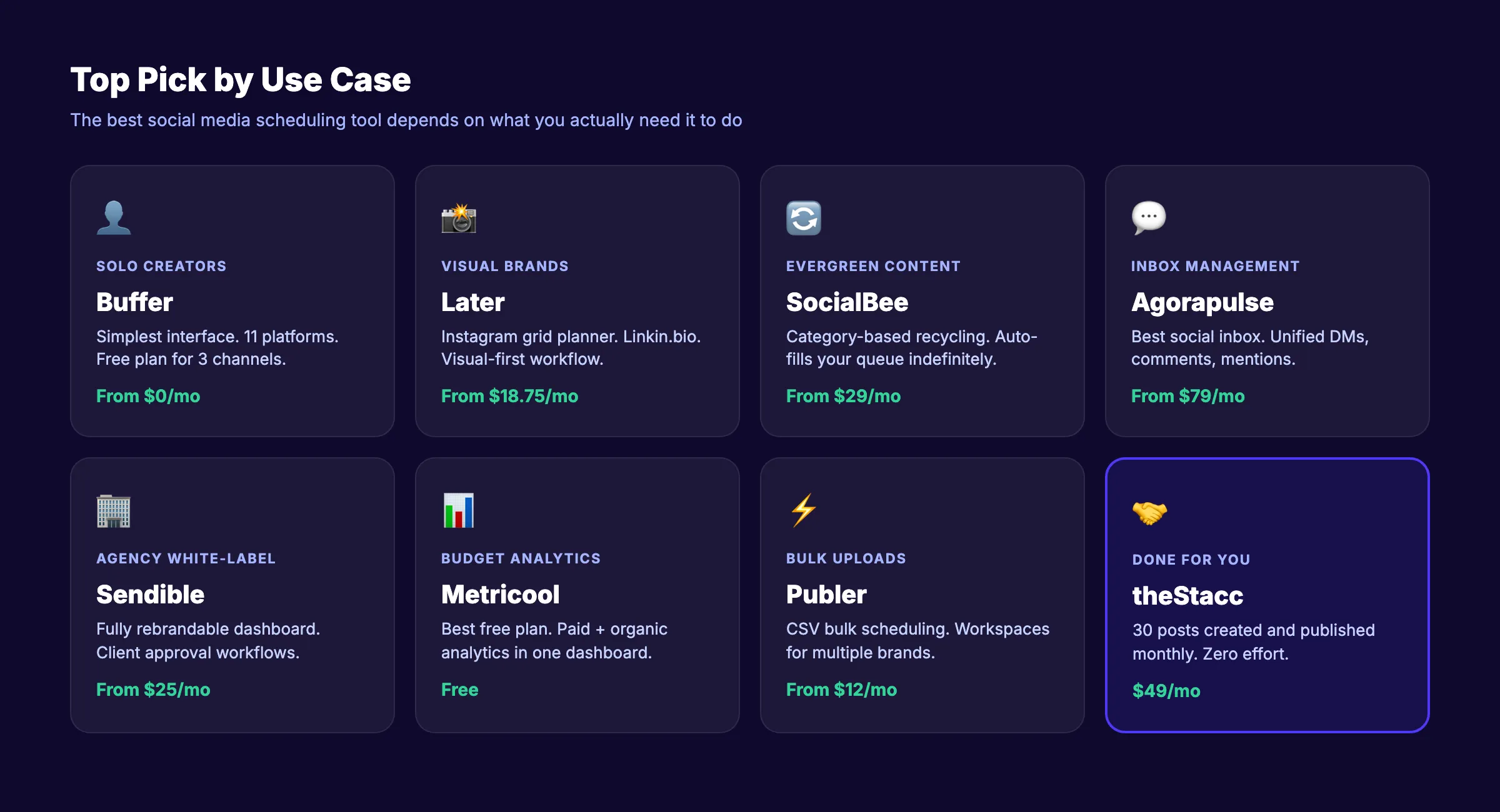
What is your budget?
- Free. Buffer (3 channels), Metricool (20 posts/month), or Later (1 set, 30 posts)
- Under $30/month. Publer ($12), SocialBee ($29), Loomly ($26), or SocialPilot ($25.50)
- $50-100/month. Hootsuite ($99) or Agorapulse ($79/user)
- $200+/month. Sprout Social ($249+) for enterprise engagement
What is your team size?
- Solo / 1 person. Buffer (simplest) or SocialBee (evergreen automation)
- Small team (2-5). Loomly (content workflows) or Later (visual planning)
- Agency (5+). Sendible (white-label) or SocialPilot (bulk + budget)
What do you actually need?
- “I just need to schedule posts”. Buffer or Publer
- “I need to manage comments and DMs too”. Agorapulse or Pallyy
- “I need my content to recycle automatically”. SocialBee or MeetEdgar
- “I need a branded dashboard for clients”. Sendible or SocialPilot
- “I want social content CREATED and published for me” , theStacc (30 posts/month, $49)
What Does Social Media Scheduling Actually Cost?
The sticker price tells half the story. Here is what social media content management costs across different approaches.
| Approach | Monthly Cost | What You Get | Time Investment |
|---|---|---|---|
| Native platform scheduling | $0 | Basic scheduling per platform | 8-15 hrs/month |
| Free scheduling tool | $0 | 10-30 posts, limited analytics | 5-10 hrs/month |
| Budget paid tool | $12-30/mo | Full scheduling, basic analytics | 4-8 hrs/month |
| Premium scheduling tool | $80-250/mo | Full features, social inbox, listening | 3-6 hrs/month |
| Freelance social media manager | $1,500-4,000/mo | Content creation + scheduling + engagement | 2-4 hrs/month (managing) |
| Social media agency | $3,000-8,000/mo | Full service, strategy to execution | 2-3 hrs/month (meetings) |
| theStacc Social | $49/mo | 30 original posts created and published | 0 hrs/month |
Most scheduling tools reduce the time you spend publishing. They do not reduce the time you spend creating content. That distinction matters.
Skip the content creation grind. theStacc creates 30 original social media posts per month and publishes them across Instagram, LinkedIn, X, and Facebook. For $49/month. Start for $1 →
5 Red Flags When Choosing a Social Media Scheduler
Before committing to any tool, watch for these warning signs.
1. “See website” pricing. If a tool will not show pricing publicly, the number is high enough that they expect sticker shock. Sprout Social is the exception. Their pricing is public, just expensive.
2. Free plans with hidden walls. Some tools advertise “free forever” but lock analytics, team features, and even basic scheduling behind paid tiers. Check what the free plan actually includes before signing up.
3. Per-channel pricing without caps. Tools that charge per channel ($6-12 each) seem cheap at 3 channels. At 15 channels, you are paying $90-180/month. The same as Hootsuite with fewer features.
4. No crisis pause button. If a tool does not let you pause all scheduled posts instantly, one poorly timed post during a crisis can damage your brand. Ask about this feature before committing.
5. Platform-specific limitations. TikTok, Threads, and Bluesky have API restrictions that affect what third-party tools can do. Some schedulers list these platforms as “supported” but can only post images. Not videos or carousels. Verify the specific post types each tool supports on your priority platforms.
Frequently Asked Questions
What is the best social media scheduling tool in 2026?
Buffer is the best overall choice for most users. It supports 11 platforms, offers a generous free plan, and has the simplest interface in the category. For agencies, Sendible or SocialPilot offer better multi-client management. For teams that need engagement management, Agorapulse has the strongest social inbox.
What is the best free social media scheduling tool?
Metricool offers the most useful free plan , 20 scheduled posts per month with analytics included. Buffer’s free plan covers 3 channels with 10 posts each. Later offers 1 social set with 30 posts. All three are genuinely usable without upgrading, though multi-platform strategies will outgrow free plans quickly.
Is Hootsuite still worth it in 2026?
For enterprise teams, yes. For small businesses, probably not. Hootsuite removed its free plan and raised its entry price to $99/month. The features justify the cost for teams managing 10+ social profiles with social listening needs. Solo users and small businesses get better value from Buffer, SocialBee, or Publer.
Can you schedule posts directly on social media platforms for free?
Yes. Facebook, Instagram, LinkedIn, and X all offer native scheduling at no cost. The trade-off is managing each platform separately. No unified calendar, no cross-platform analytics, no bulk uploads. Native scheduling works for businesses posting on 1-2 platforms. Beyond that, a dedicated tool saves meaningful time.
What is the best social media scheduling tool for agencies?
Sendible ($25/month) offers the best white-label experience. SocialPilot ($25.50/month) handles the most accounts per dollar. Agorapulse ($79/month per user) has the strongest inbox management. The right choice depends on whether your priority is client-facing branding, cost per account, or engagement management.
How much should a social media scheduling tool cost?
Budget tools start at $12-30/month (Publer, SocialBee, Loomly). Mid-range tools run $50-100/month (Hootsuite, Agorapulse). Enterprise tools cost $200-500/month (Sprout Social). For businesses that want content created and published automatically, theStacc handles social media for $49/month with 30 original posts included.
The Bottom Line
The social media management market hit $33 billion in 2025 and is growing at 20%+ annually. The tools are getting better. But every tool on this list still requires you to create the content.
If you want the best DIY scheduler, start with Buffer (simplest), SocialBee (best for evergreen), or Metricool (best free option). If you manage clients, look at Sendible or SocialPilot. If engagement is your priority, Agorapulse or Sprout Social handle that best.
If you want social content created and published without lifting a finger, theStacc publishes 30 original social posts per month across Instagram, LinkedIn, X, and Facebook. For $49.
Start for $1 → See the difference in 3 days
This article was researched and published by theStacc. The same platform businesses use to publish SEO and social content automatically. We do not sell a scheduling tool. We use several of the tools reviewed above in our own workflow. All pricing and features were verified against public sources as of March 2026.
More Best-List Posts

Written by
Siddharth GangalSiddharth is the founder of theStacc and Arka360, and a graduate of IIT Mandi. He spent years watching great businesses lose organic traffic to competitors who simply published more. So he built a system to fix that. He writes about SEO, content at scale, and the tactics that actually move rankings.
Stop researching. Start ranking.
30 SEO blog articles published to your site every month. No writers, no workflow, no waiting.
30-day trial · Cancel anytime
theStacc
Stop writing SEO content manually
30 blog articles, 30 GBP posts, and social media content. Published every month. Automatically.
Start Your $1 Trial$1 for 3 days · Cancel anytime