Shortlist by the work your agency already does
Compare DashThis, AgencyAnalytics and Semrush My Reports using the same client report and data sources.
Compare SE Ranking and Search Atlas. Test the client view and the work controls separately.
Check BrightLocal’s location scope and resolve its conflicting custom-domain guidance before promising your own URL.
Evaluate Vendasta’s selected products, or theStacc for agencies if you need the client content produced, against the exact client offer.
Compare white-label SEO tools by branding scope
| Option | Client-facing capability | Plan or purchase check |
|---|---|---|
| SE Ranking | Branded interface, reports and own-domain access | Confirm the current plan and Agency Pack entitlement |
| BrightLocal | Branded reports and a generic unbranded share URL | Official custom-domain guidance conflicts; confirm before purchase |
| Vendasta | Client experience plus a marketplace of products and services | Separate platform fees from each selected product or service |
| Search Atlas | Vendor-advertised custom domain, reports and client permissions | Confirm plan, site limits and enabled implementation features |
| Semrush My Reports | Pro reports include white-labeling, share links and custom domain | Pro is listed at $20 per report monthly; check toolkit and data costs separately |
| DashThis | Custom branding and own-domain dashboard sharing | Check both dashboard and data-source allowances in the current plan |
| AgencyAnalytics | Branded reports, client dashboards, logo/colors and custom domain | Confirm client capacity, selected plan and extra tracking features |
| theStacc | A project per client with roles; reports carry theStacc's format, not your logo | Module pricing per client project; confirm terms for 10+ projects |
How this shortlist was researched
theStacc sells a platform included here. This comparison uses official product information and automated editorial assistance. It does not claim a hands-on product benchmark, independently verified agency margins or individual reviewer approval.
Options are grouped by useful fit rather than scored from first to last. Each profile links to its source. Confirm the selected plan or proposal before buying. See our editorial standards.
Eight tools and platforms: strengths and buying checks
1. SE Ranking
Good fit: An agency that wants research tools and branded client access
SE Ranking describes custom colors, logos, a personalized domain and client access for its white-label offering. It is a practical shortlist option when your team needs SEO research and monitoring as well as a branded place to share work.
Test the exact client role rather than only the administrator view. Confirm what the selected plan includes, how projects are separated and whether the reports contain the data your client expects. A suite subscription and its agency add-on are separate items to check.
Before you buy: Ask to see a client login, an exported report, a scheduled email and the complete account price.
2. BrightLocal
Good fit: Location-focused reporting for local SEO clients
BrightLocal documents branded local SEO reports and generic unbranded share URLs. Its current product page gives conflicting custom-domain guidance: upper copy mentions custom domains, while the FAQ says reports cannot use your own website domain. Confirm that requirement with support before buying.
It remains a candidate when local reporting is the main job. Its support documentation describes a shareable external report URL. Test the actual link and the report your client would receive, and check location allowances separately from citation or managed-service purchases.
Before you buy: Send a sample report to a test client account and inspect the URL, branding, data period and available export.
3. Vendasta
Good fit: A business comparing a broader reseller platform
Vendasta’s marketplace brings digital products and services into a reseller platform. It may fit an agency that wants to coordinate more than reporting. Evaluate the actual products you intend to sell; marketplace membership is not evidence that every product has identical branding, delivery or support terms.
Map one client’s journey from purchase through onboarding and reporting. Find out which party supplies each product and who handles a problem. A platform can simplify administration while still leaving several different service responsibilities to manage.
Before you buy: Ask for an itemized price and a demonstration of the exact product bundle, not a general platform tour.
4. Search Atlas
Good fit: A team evaluating a branded SEO platform with automation
Search Atlas advertises a branded platform with a custom domain, reporting and client permissions alongside SEO and content capabilities. It belongs on the shortlist when the team wants a broader work environment rather than a report exporter alone.
Its scope includes features that can affect client websites, so evaluate access, approval and rollback separately from the visual branding. A branded dashboard may look ready before the publishing or deployment process has been tested on your site.
Before you buy: Ask for a restricted client view, a sample change log and a demonstration of how a rejected change is stopped or reversed.
5. Semrush My Reports
Good fit: A team that already works with Semrush and needs branded reports
Semrush’s current My Reports documentation distinguishes Base and Pro reports. Pro is listed at $20 per report per month and includes branding, white-labeling, link sharing and a custom domain. That is report pricing, not the total cost of every SEO toolkit or data source you might connect.
Count the reports you need and confirm their integrations. A Base allocation does not establish Pro branding access. The old Agency Growth Kit has been retired; the current reporting product and any required SEO toolkit subscriptions need to be scoped separately.
Before you buy: Build one actual client report and confirm its tier, recurring charge, source data and delivery settings.
6. DashThis
Good fit: An agency bringing several marketing data sources into reports
DashThis describes branded marketing dashboards that can be shared from your own domain. It is worth comparing when the client needs one readable report across several channels and your team already has a process for doing the underlying work.
Start with the questions the report should answer. A clean dashboard is helpful, but too many widgets can hide the actual decision. Check which sources connect directly and how missing or delayed data appears.
Before you buy: Ask to see the domain setup, scheduled delivery, required dashboard count and an export the client can keep.
7. AgencyAnalytics
Good fit: An agency managing recurring client reporting
AgencyAnalytics offers white-label reports, dashboards and a client portal, with custom branding and domain options. It fits a team that wants recurring reporting and controlled client access around its existing service delivery.
Test how one client is separated from another and what the client can see or export. Check the plan’s included capacity and any additional tracking requirements. Reporting can support an SEO service, but it is not evidence that someone will write content or fix the site for you.
Before you buy: Connect an authorized test client, schedule a report and review it while logged in with client permissions.
8. theStacc
Good fit: A content-focused agency that needs client work produced, not a branded report
theStacc for agencies runs each client as its own project, with its own brand voice, calendar and approvals, and Owner, Admin, Editor and Viewer roles. White-label reporting isn’t available today: reports carry theStacc’s format, not your logo. This is a first-party product description because theStacc publishes this guide.
Ask for a demonstration of the exact client setup, output, review process and reporting connections you need. This guide does not reuse advertised agency bill rates, margin percentages or customer examples as independently verified evidence.
Before you buy: Confirm the current partner terms, account scope, client branding and cancellation process before selling the service to a client.
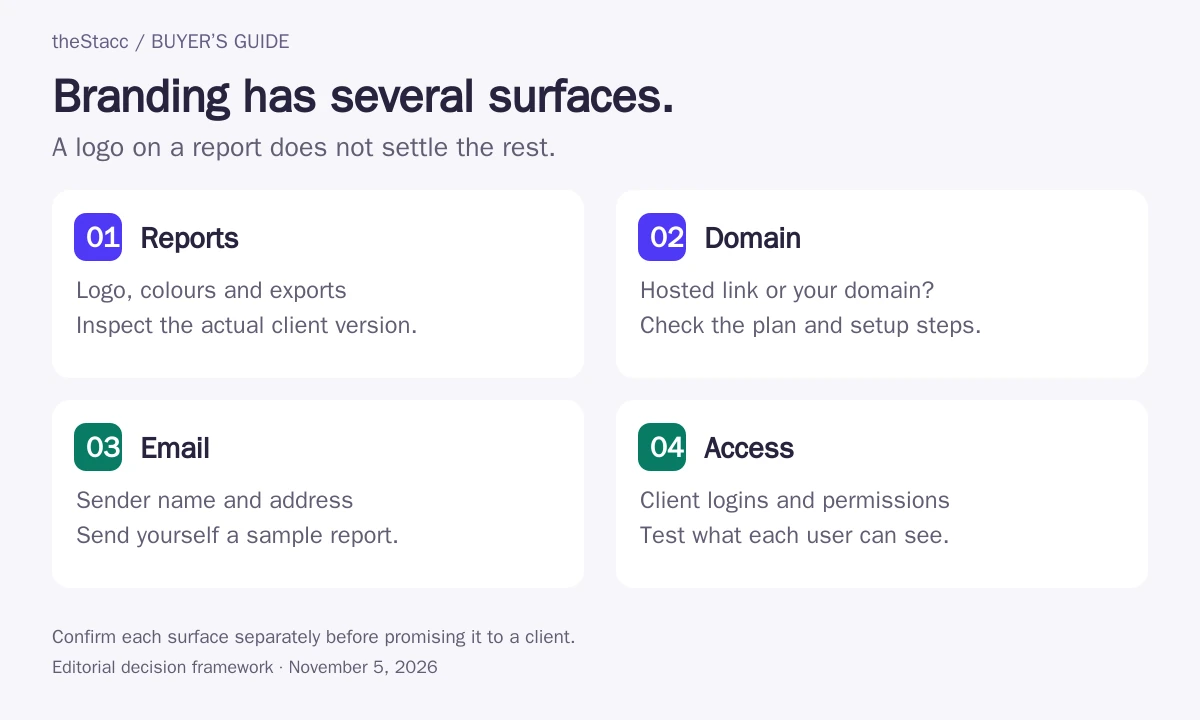
Check every surface carrying your agency’s name
| Surface | Inspect | Do not assume |
|---|---|---|
| Report | Logo, colors, footer, annotations and exports | A sample PDF proves every report is branded |
| Domain | Login and share URLs, including mobile access | An unbranded vendor URL is your custom domain |
| Sender, reply address, body and attachment | A branded PDF makes the delivery email branded | |
| Client access | Permissions, project separation and offboarding | An administrator demo matches a client login |
| Service terms | Permitted client use and commercial arrangement | Rebranding creates an unrestricted resale licence |
Build a reporting workflow that explains the work
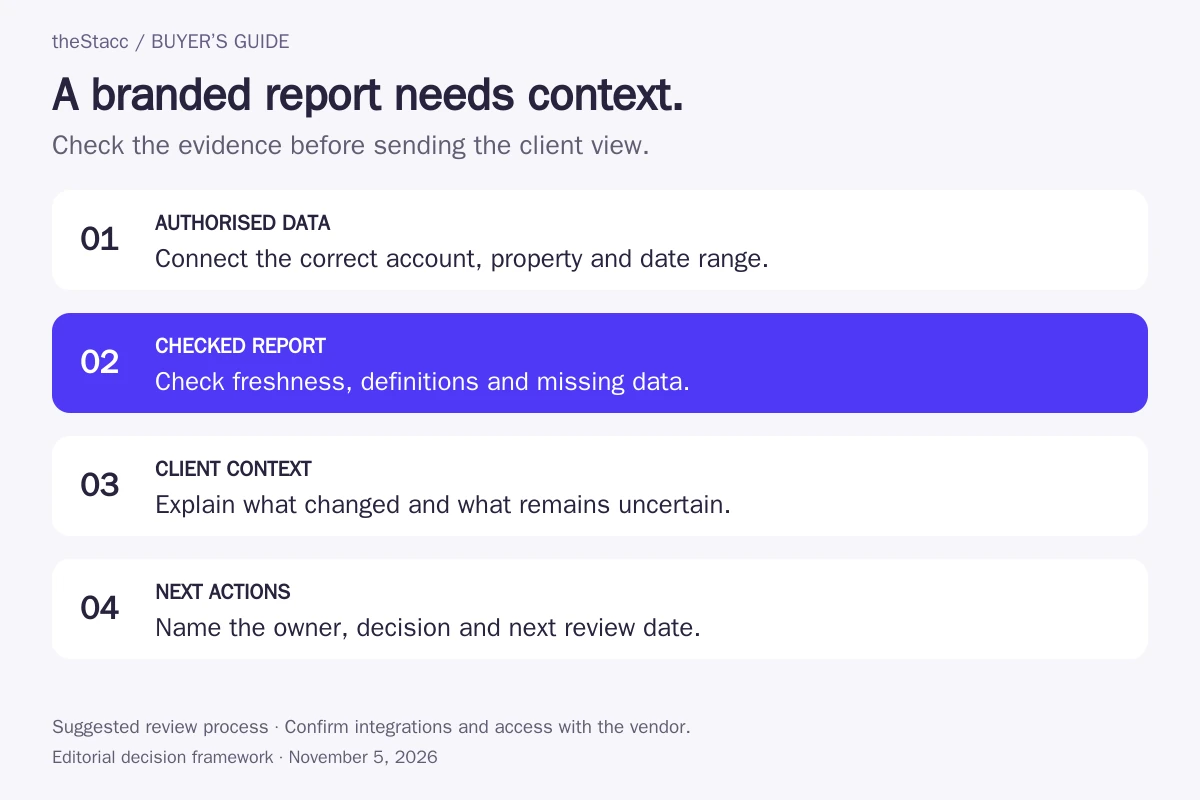
Start with authorized data sources and consistent dates. Check the numbers before adding a logo. Explain the change the client needs to understand, what work was completed and what will happen next. Reporting quality depends on definitions as well as design.
For AI-search reporting, keep mentions, citations, referrals and conversions separate. A citation observed in one prompt is not an overall visibility rate. Record the system, date, prompt and relevant market when you use a test result in a client report.
Price the complete reporting setup
Compare the same number of clients, reports, dashboards and users. Record the billing period and the branding entitlement. Then add the data subscriptions and time needed to check, explain and maintain each report. A headline platform price is not the cost of an agency service.
| Line item | Question |
|---|---|
| Base subscription | Which exact plan and billing period are required? |
| Capacity | What counts as a client, location, report or dashboard? |
| Branding | Are custom domain, email and exports included? |
| Data access | Which integrations, connectors or tracking tools cost extra? |
| Operating work | Who checks data, adds commentary and fixes failed connections? |
Reporting software and SEO fulfillment are different purchases
The HOTH and SEOReseller provide service options. Their reseller and white-label service offerings address delivery work, so they should not be scored as if they were interchangeable dashboard products.
If you need another team to deliver the campaign, use the SEO reseller program comparison. If your team already delivers the work, choose the software that improves research, production or reporting without duplicating subscriptions.
Run a client-view pilot before rolling out the tool
- Create one authorized test client and connect only the data needed for the trial workflow.
- Apply your branding and check the domain, report, email and client permissions.
- Send a report to an address you control and inspect the result on a phone and a desktop.
- Check missing data, expired credentials and a failed scheduled delivery.
- Export the report, remove the client and confirm what access and data remain.
Document any gap before promising the experience to a client. For broader software selection, see automated SEO tools.
Evaluate the workflow before choosing a plan
For theStacc, compare the current software and managed-service plans with the scope you need. Agencies can also review how theStacc works for agencies and confirm its specific terms. These are different purchasing decisions.
Start free → (free for 3 days, no card needed) to explore the product, or Book a demo → to discuss your requirements. Confirm paid-service terms before activating a plan.
White label SEO tools: questions answered
What is a white-label SEO tool?
It is software that lets you present some part of an SEO workflow under your brand, such as a report, dashboard or client portal. The extent varies. A logo on a PDF does not establish a custom domain, branded email, resale permission or outsourced SEO delivery. Check those separately.
Which white-label SEO tool is best for a small agency?
Start with the missing workflow. Compare reporting tools if you already do the SEO work; compare broader platforms if you need research or content tools as well. Check the total charge for your client and report count. A small stack that meets the actual requirement can be easier to run than several overlapping subscriptions.
Does white-label reporting include a custom domain?
Not always. Several shortlisted vendors describe own-domain options, but the exact plan and setup matter. BrightLocal’s current product page gives conflicting guidance: its FAQ describes generic unbranded share URLs, while other copy mentions custom domains. Confirm support in writing and test a real shared report before promising an agency-owned URL.
Do I need Semrush Pro reports for white-labeling?
The current My Reports documentation places branding and white-labeling in the Pro report tier, listed at $20 per report per month. This is distinct from the cost of SEO toolkits and connected services. Check the report tier and delivery limits in your actual account before quoting a client package.
Do white-label tools perform the SEO work for me?
Some platforms include content or implementation features, while reporting tools mainly organize and present data. Outsourced fulfillment is a separate service model. Ask who researches, edits, implements, checks and explains the work. A branded dashboard by itself does not assign those responsibilities.
Can I remove every trace of the software vendor?
Verify that in a pilot instead of assuming it. Check the login URL, PDFs, report links, scheduled emails, reply addresses, notifications and help links. Some branding depends on a plan or domain setup. Also review the terms governing your intended client use and resale arrangement.
Sources and scope of this comparison
The profiles link to official feature and plan documentation checked November 5, 2026. Branded reports, domain options and service delivery are recorded separately. For BrightLocal, also see its external report URL documentation. Semrush documents the retirement of Agency Growth Kit and integration requirements. Vendor capabilities were researched from public sources; account-level access and the complete client experience remain pilot checks.
Explore this topic: White Label SEO for Agencies: Margins, Vendors, Setup · White Label SEO: The Complete Guide for Agencies in 2026.