Sign in to ChatGPT, open Business Hub from the sidebar, search for your business and pick your listing. Verify by phone, business email, a DNS record on your domain, or Shopify. After OpenAI approves the claim, finish identity verification with Persona. That unlocks edits, insights and the blue check. It is free.
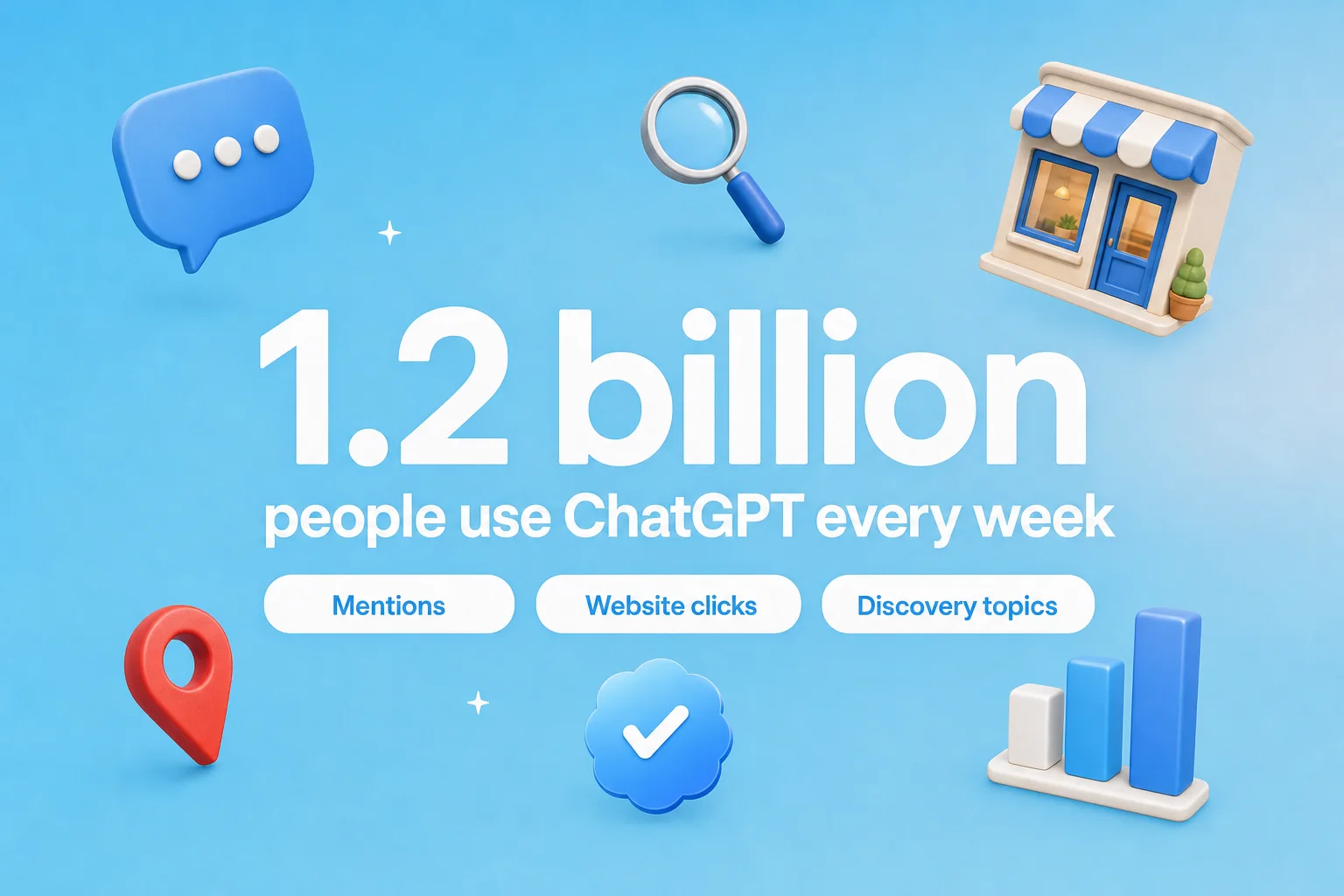
People already ask ChatGPT which business to pick. Now you can check what it says about yours. On November 10, 2026, OpenAI launched Businesses in ChatGPT in beta. Through Business Hub, a business can claim its profile, correct its details and see how often ChatGPT mentions it. OpenAI says ChatGPT reaches 1.2 billion people a week, so this is worth ten minutes today.
Think of it as Google Business Profile, but for ChatGPT. Below is every step, what each one unlocks, and the mistakes that slow verification down.
What Is Business Hub in ChatGPT?
Business Hub is the free dashboard where a business claims its ChatGPT profile, keeps its details current, uploads a product feed if it sells products, and sees insights such as mentions and website clicks. It sits inside your normal ChatGPT account, in the sidebar. You do not need an Ads account or an Enterprise contract.
OpenAI launched two things together:
- Business profiles: claim your listing, verify it, and get a blue check. Open to eligible businesses wherever ChatGPT is available.
- Business Agents: an optional chat assistant that answers shopper questions using your product and policy information. For now, only eligible US ecommerce and online service businesses can create one (see the Business Agents Policy).
Your business can appear in ChatGPT answers whether or not you claim it. Claiming changes who controls the details, not whether you exist there.
Who Can Claim a Business in ChatGPT?
You can claim a business if you own it or are authorized to represent it, and it has a website. Availability depends on where the business is and what kind of business it is. One limit matters most for local businesses.
| Business type | Claim an existing listing | Add a missing listing | Business Agent |
|---|---|---|---|
| Local store or restaurant, US | Yes | Not yet | No |
| Local store or restaurant, outside the US | Not yet | Not yet | No |
| Online business or online service | Yes, where verification is supported | Sometimes offered | US only, eligible categories |
| Ecommerce store | Yes, Shopify makes it faster | Sometimes offered | US only, eligible categories |
If you are an OpenAI Enterprise customer or advertiser, your OpenAI representative can claim it for you. Multi-brand companies claim each brand separately. Claiming the main brand does not claim its locations.
Is It Live for Everyone, or Is There a Waitlist?
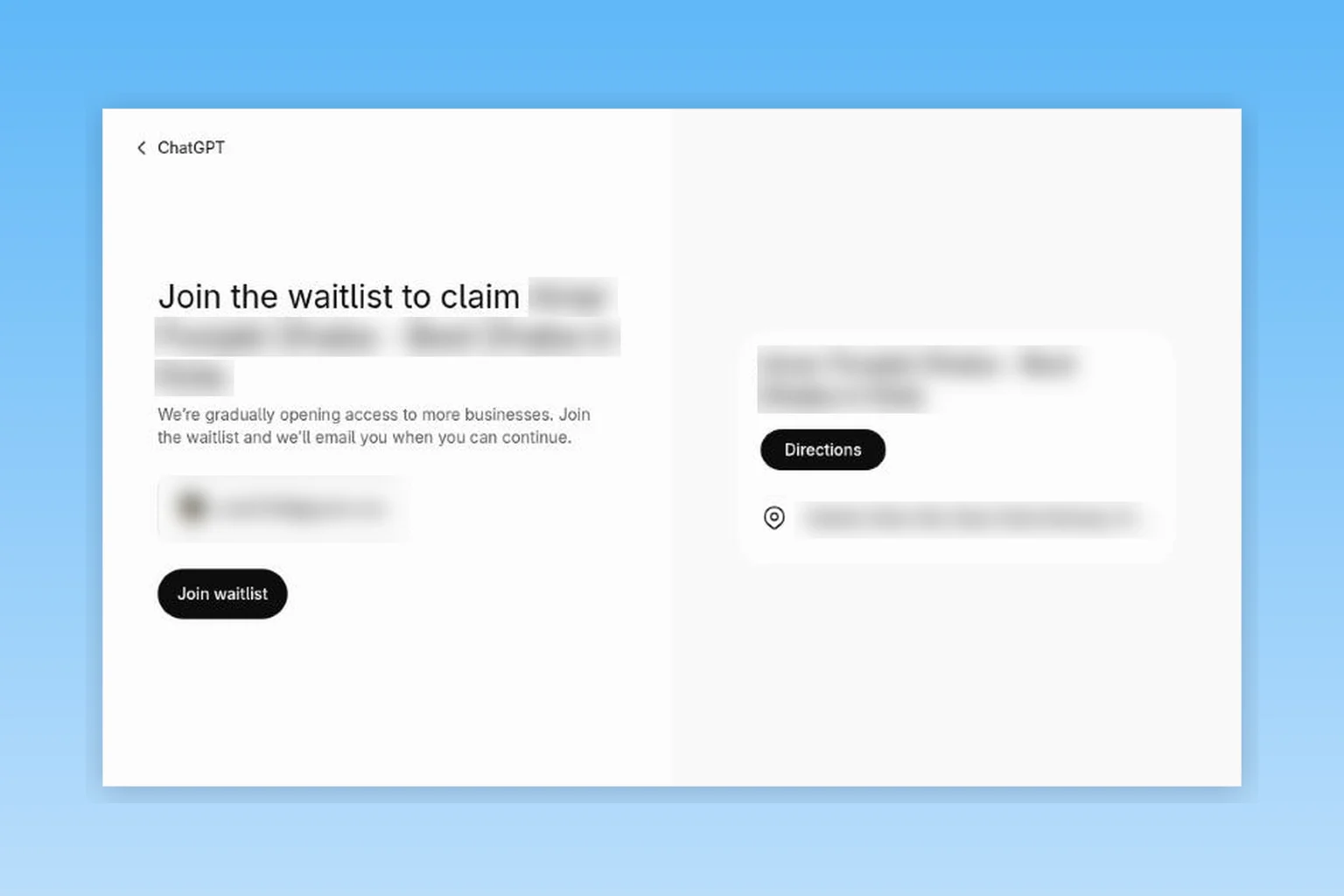
Business Hub itself is an open beta: anyone with a ChatGPT account, even a free one, can open it today at chatgpt.com/business-hub. But some businesses are put on a waitlist. When we tried to claim an existing restaurant listing in Kota, India on November 12, 2026, ChatGPT showed "Join the waitlist to claim" this business, saying OpenAI is gradually opening access to more businesses. What you can do depends on where your business is and what kind of business it is.
| Your business | What happens when you try | Likely result today |
|---|---|---|
| US local store or restaurant | Search finds your existing listing, often already filled in | Claim, verify and get the blue check |
| US online store or online service | Claim your listing, or Create one if it is missing | Full profile, insights, and a Business Agent if your category is eligible |
| Online business outside the US | Create or claim may be offered, depending on your country and whether a verification method is supported there | Profile and insights if you are eligible. Early owners report quick approvals in some countries and failed verification in others |
| Local store or restaurant outside the US | Search can find your listing, but selecting Claim leads to a waitlist screen | Waitlist. Join it to get an email when you can continue, and keep your details consistent everywhere until then |
| Service business (agency, consultant, home services) | There is no service option yet. You pick physical location or website | Works as a website business, but you are asked for delivery and return policies |
| Business Agent (chat assistant) | The agent builder appears only for eligible accounts | US ecommerce and online services only, rolling out gradually |
Claiming from India
We tested Business Hub from India with a free ChatGPT account on November 12, 2026. It opened straight away and, for our software business, offered to create a profile with no waitlist. A local restaurant listing in Kota got a waitlist instead. Here is what that means for Indian businesses:
- Online businesses can try today. Eligible software, ecommerce and other website businesses may be offered the option to create or claim a profile. Final access still depends on your business type, a supported verification method and OpenAI's approval.
- Local shops go on a waitlist. Indian local listings already show up in Business Hub search, but when we tried to claim a restaurant in Kota, ChatGPT asked us to join a waitlist instead. OpenAI also says local stores and restaurants can currently claim only an existing US listing. Join the waitlist if it is your business, and keep your Google Business Profile and website accurate in the meantime, because ChatGPT can still show your business from other sources.
- Business Agents are not available. They are limited to eligible US businesses for now.
Have a website but teach or serve people in person?
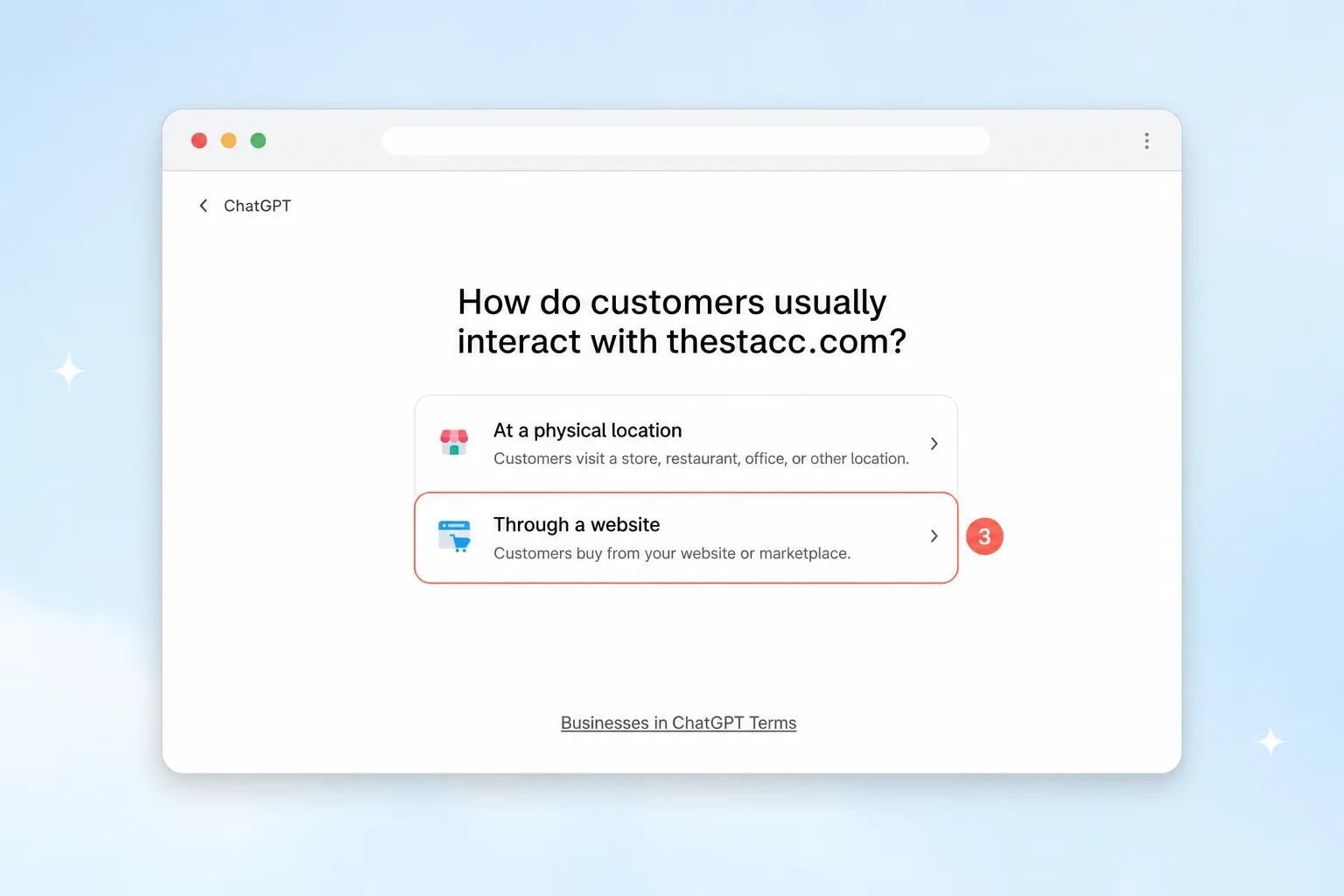
Having a website does not make you an online business in Business Hub. ChatGPT asks how customers usually interact with you: "At a physical location" (customers visit a store, restaurant, office or other location) or "Through a website" (customers buy from your website or marketplace). Answer for how customers actually buy.
- Customers come to you, like a coaching centre, clinic or salon: you are a physical location business. In India and other countries outside the US, expect the waitlist, even with a website.
- Customers also buy fully online, like paid online courses or digital products: you may be offered the "Through a website" path, but online sales alone don't guarantee you qualify. OpenAI still decides based on your business type, location, verification and review. If you go this way, you will be asked for delivery and return policies, so copy your real refund terms exactly, because ChatGPT can repeat them to customers. If you are unsure which type fits, ask OpenAI Support before you submit.
- Choose carefully. A published profile can't be deleted, so only pick "Through a website" if online sales are a real, ongoing part of the business.
Split the work between the right people:
- Your developer or web person can handle the website domain method: add the TXT record to your DNS and select Verify domain. OpenAI suggests asking whoever manages your domain to add the record.
- The owner or an authorized representative should do the Persona identity check with their own government ID. Persona may ask for business registration details and proof that the person is allowed to represent the business, so whoever does it should have that proof ready.
- Before you start, keep your company's registration and tax documents handy, and enter the legal name and address exactly as they appear there.
Once you submit, there are four possible outcomes:
- Approved: you get an email, the profile moves on to the Persona ID check, and the blue check appears once that passes.
- Pending: OpenAI is still reviewing, or wants more information by email. There is no published review time.
- Stuck as a Draft: the claim went through but the Persona check failed or wasn't finished. You can't edit details or see insights until it passes.
- Waitlist: you are asked to join a waitlist instead of verifying. OpenAI emails you when you can continue.
- Not eligible or locked: your business type or country isn't supported yet, or the listing shows "Contact support". Ask OpenAI Support for access.
How to Claim Your Business in ChatGPT: 9 Steps
We walked through Business Hub for thestacc.com on November 12, 2026, and rebuilt each screen below with the button you need marked. Screens after the domain check follow what other owners published from their own claims, and every step matches OpenAI's setup guide.
Step 1: Open Business Hub and search for your business
Sign in to ChatGPT and open Business Hub from the sidebar, or go to chatgpt.com/business-hub. Type your business name or website in Search business. If your listing appears, select it, confirm the ChatGPT account that will manage it, and skip to Step 5. If you see No matching business, select Create to add it and follow Steps 2 to 4. Continuing means you accept the Businesses in ChatGPT Terms.
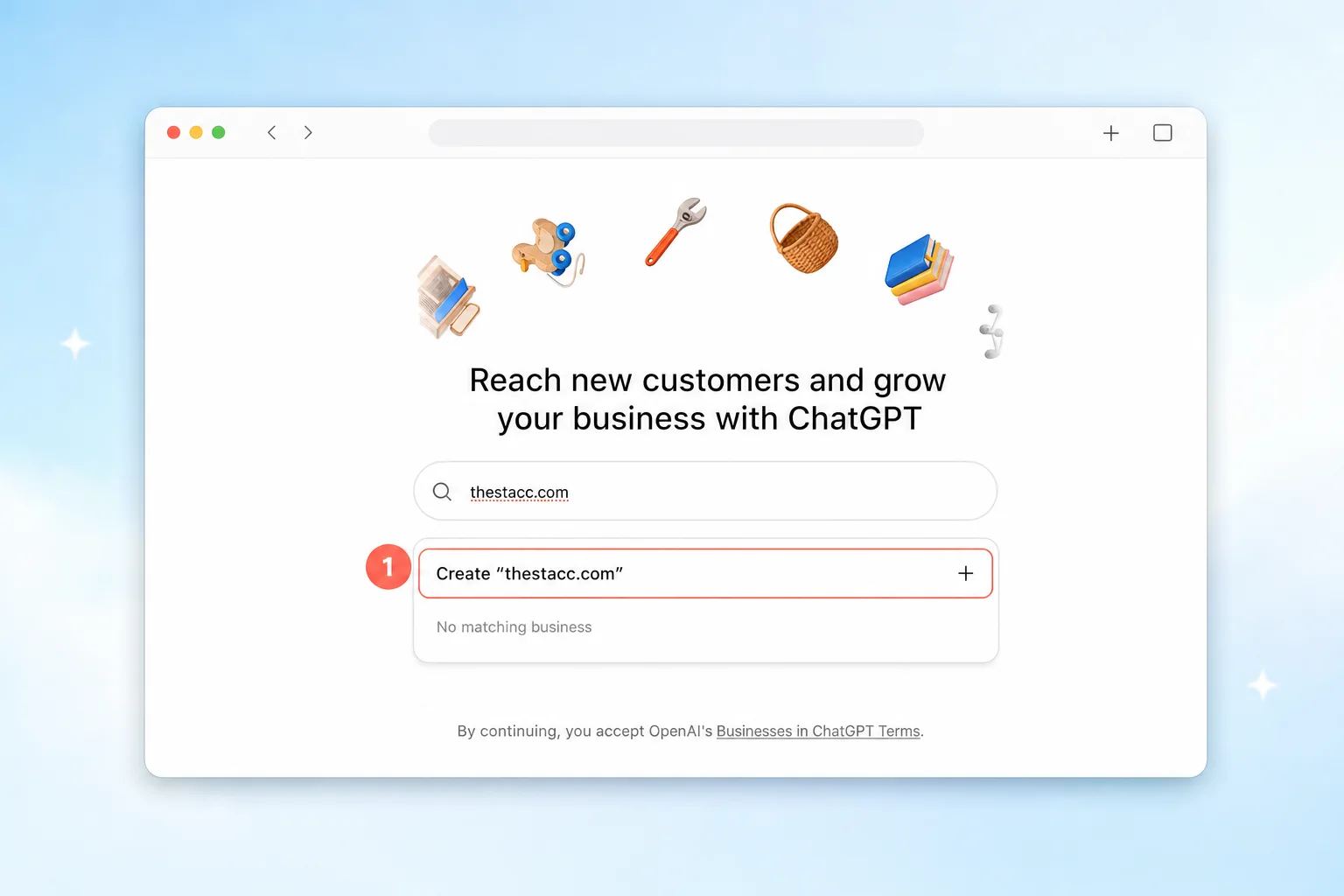
- Local store or restaurant? You can only claim an existing US listing for now. The Create option is for eligible online businesses.
- See "Contact support"? The listing is locked. Use that button to ask OpenAI for access.
- Already claimed by someone else? Open the profile, choose the ••• menu, then Dispute ownership.
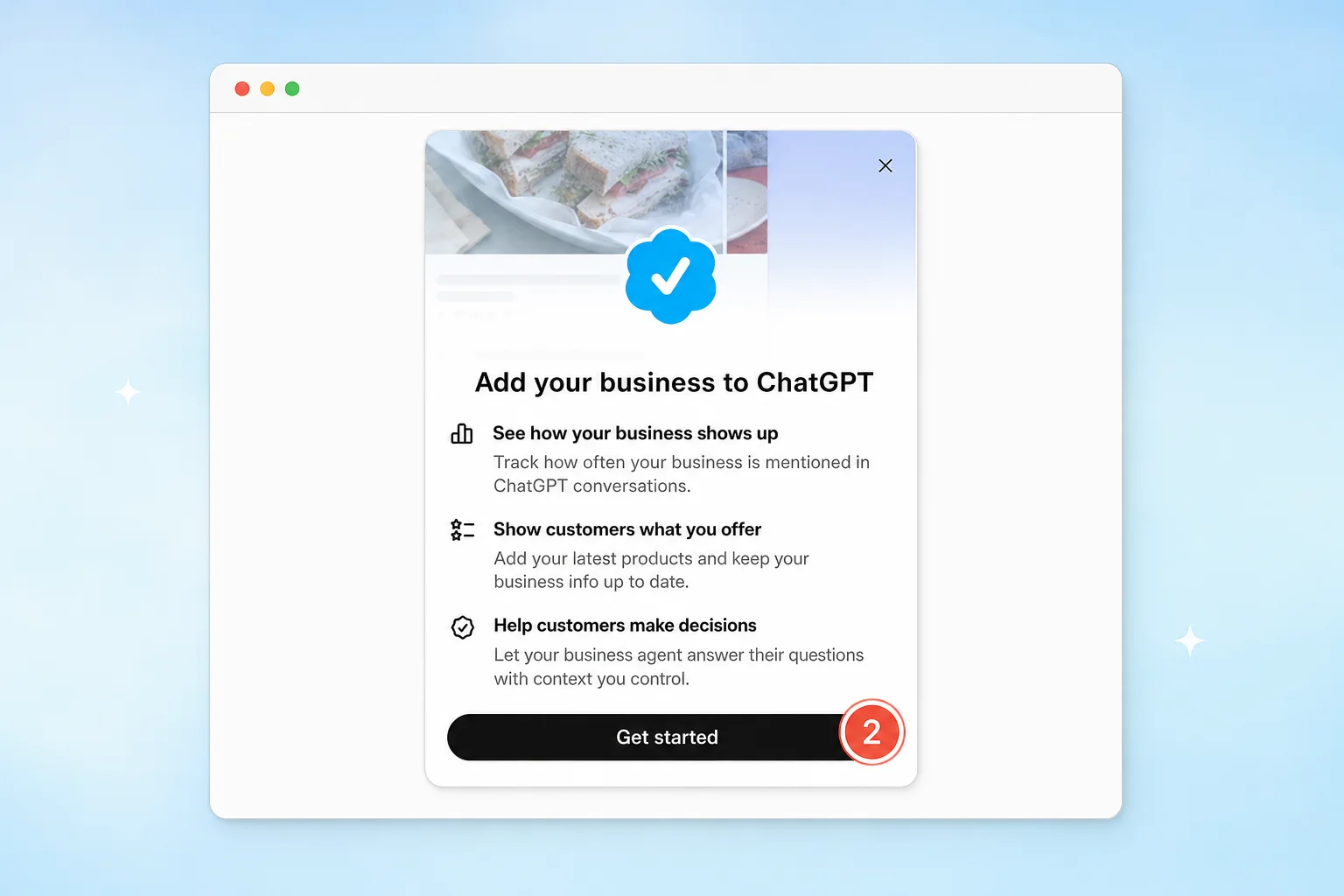
Step 2: Select Get started (new profiles only)
A short screen explains what you get: insights on how you show up, a place to keep your products and details current, and an optional business agent. Select Get started.
Step 3: Choose how customers reach you (new profiles only)
Pick At a physical location if customers visit a store, office or restaurant, or Through a website if they buy or sign up online. A software company like theStacc picks Through a website.
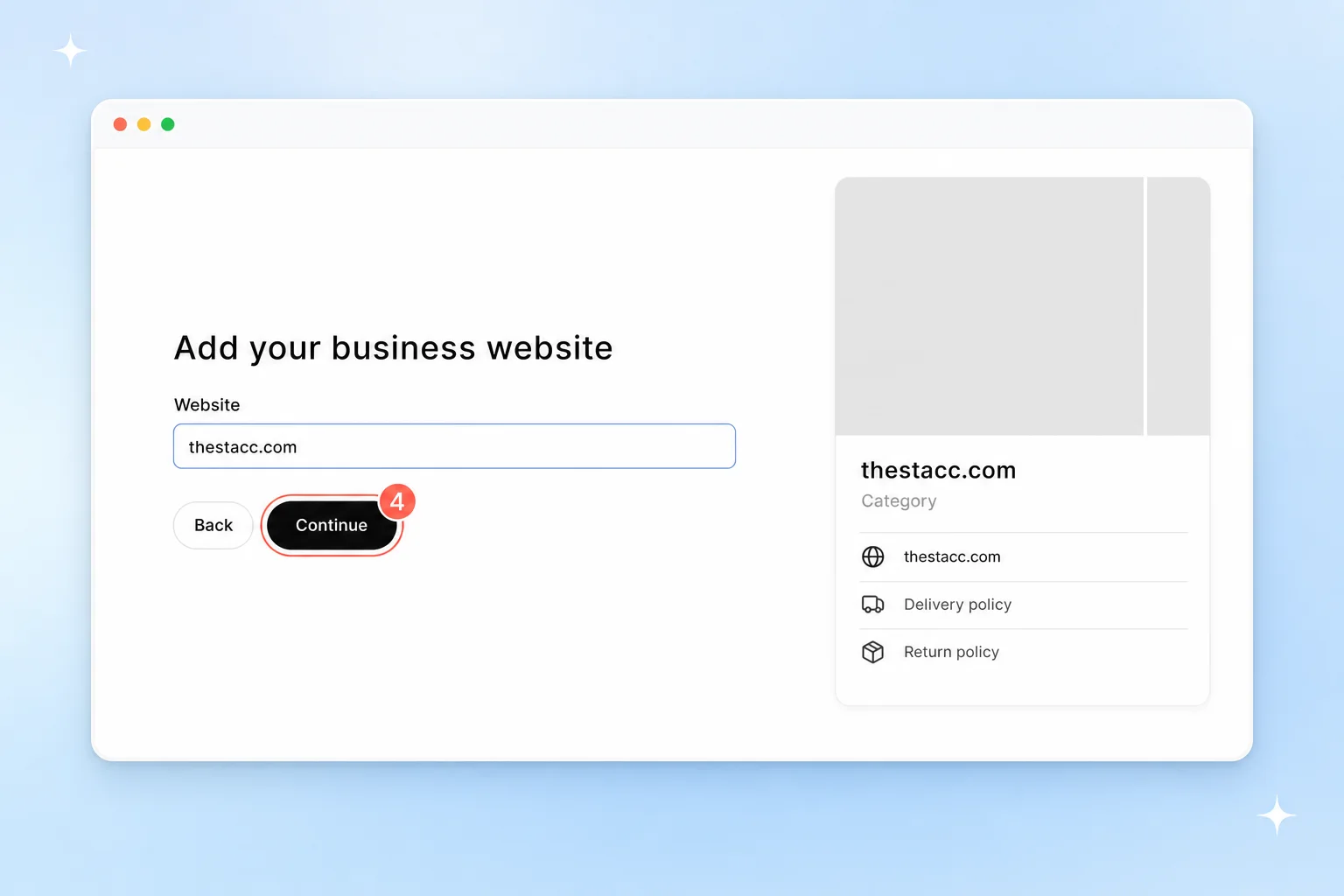
Step 4: Add your website (new profiles only)
Type your main domain without https:// and select Continue. The preview on the right shows how your profile card will start to look. If you see "A business profile has already been submitted for this website", a draft already exists. Look for it in the Business list instead of starting again.
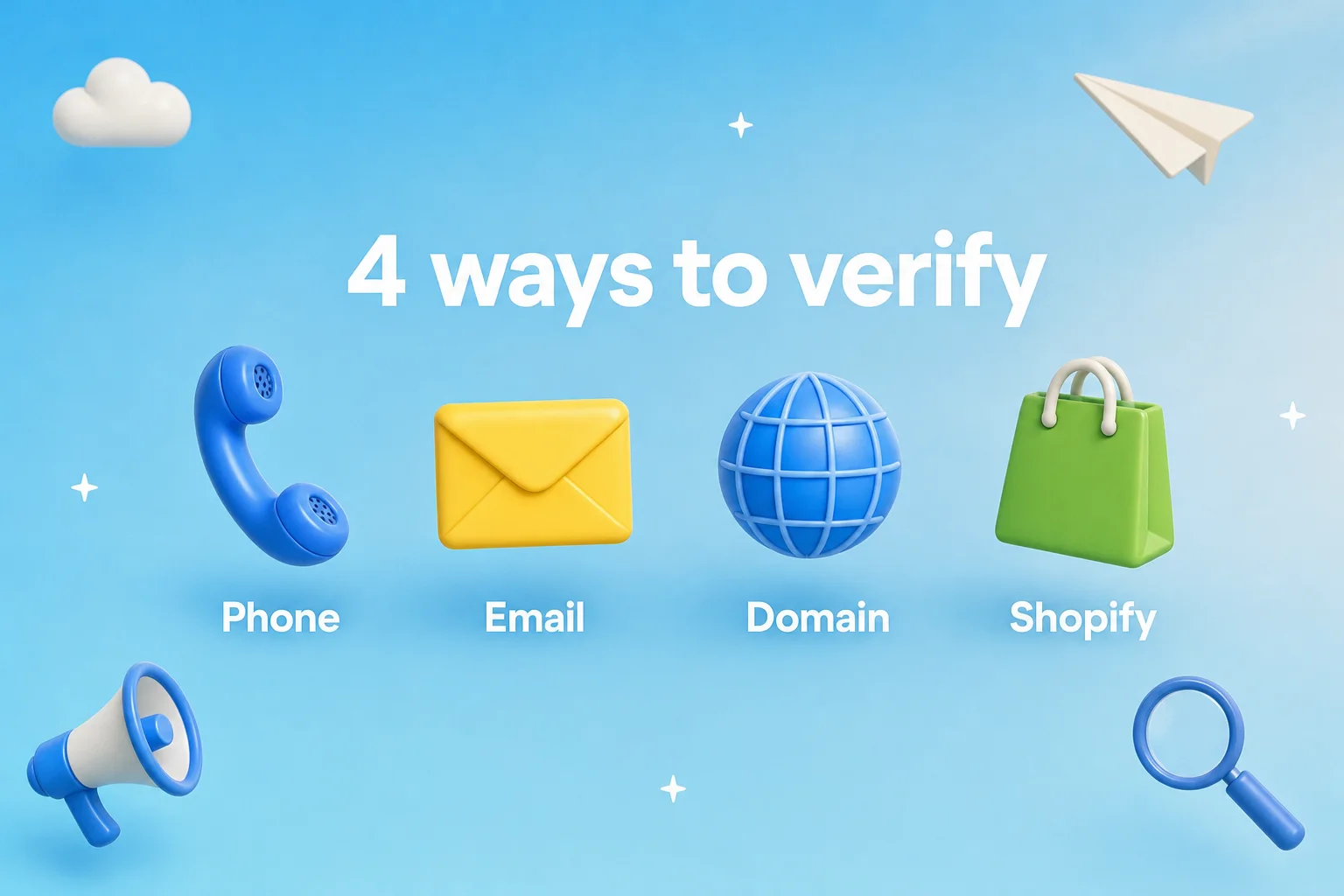
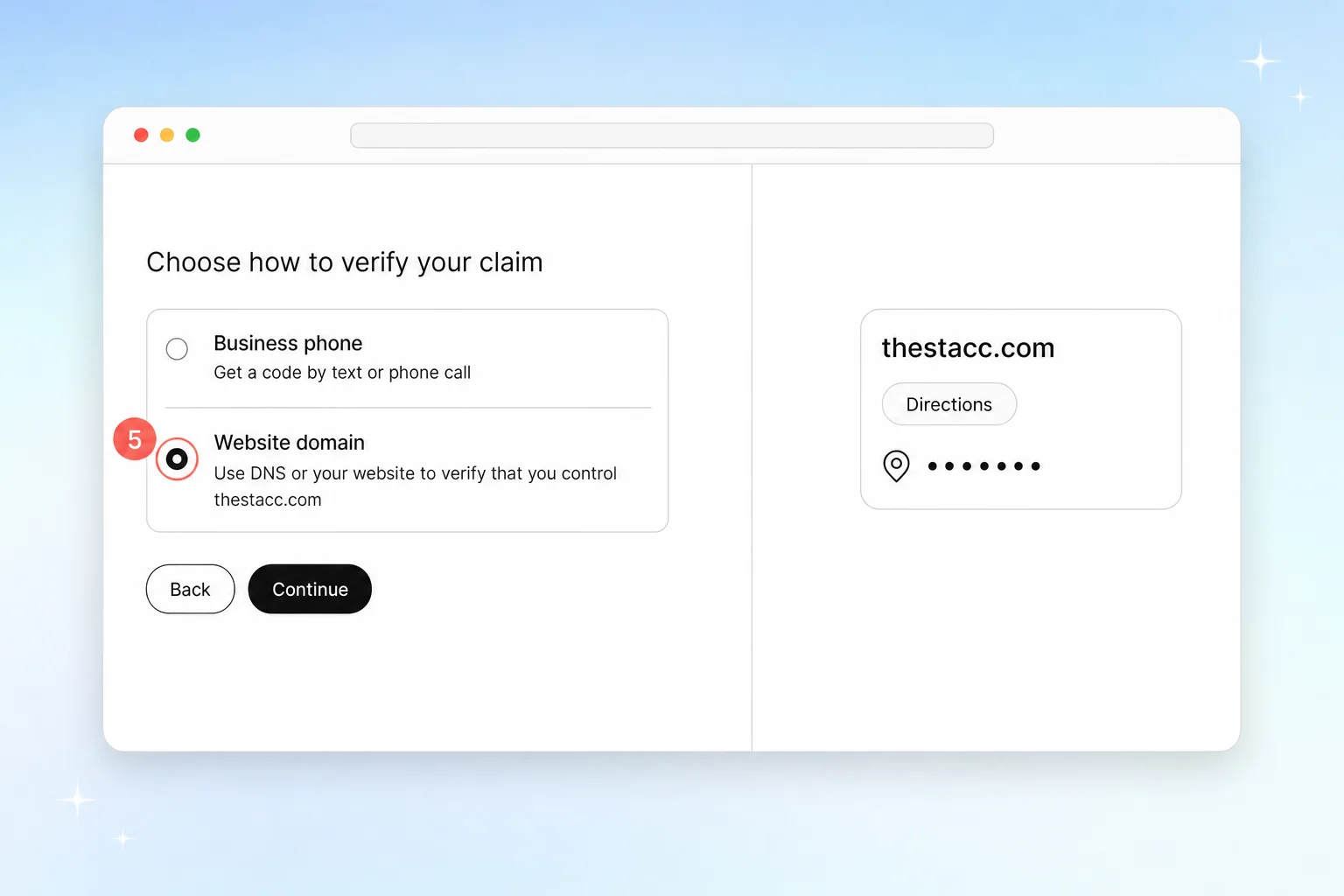
Step 5: Choose how to verify your claim
ChatGPT offers only the methods that fit your listing: business phone, business email, website domain or Shopify.
| Method | What you do | Best when |
|---|---|---|
| Business phone | Get a code by text or phone call, enter it | The listed number rings at your desk |
| Business email | Get a code at the email tied to the business | You control that exact inbox |
| Website domain | Add a TXT record to your DNS, then select Verify domain | You or your web person can edit DNS |
| Shopify store | Select Connect Shopify and sign in to your store | You sell on Shopify |
Step 6: Add the TXT record and select Verify domain
If you picked Website domain, ChatGPT shows a TXT record. Copy the type, host and value exactly into your domain provider's DNS settings, such as Cloudflare, GoDaddy or Namecheap. The host looks like openai-business-profile.yourdomain.com. Then come back and select Verify domain.
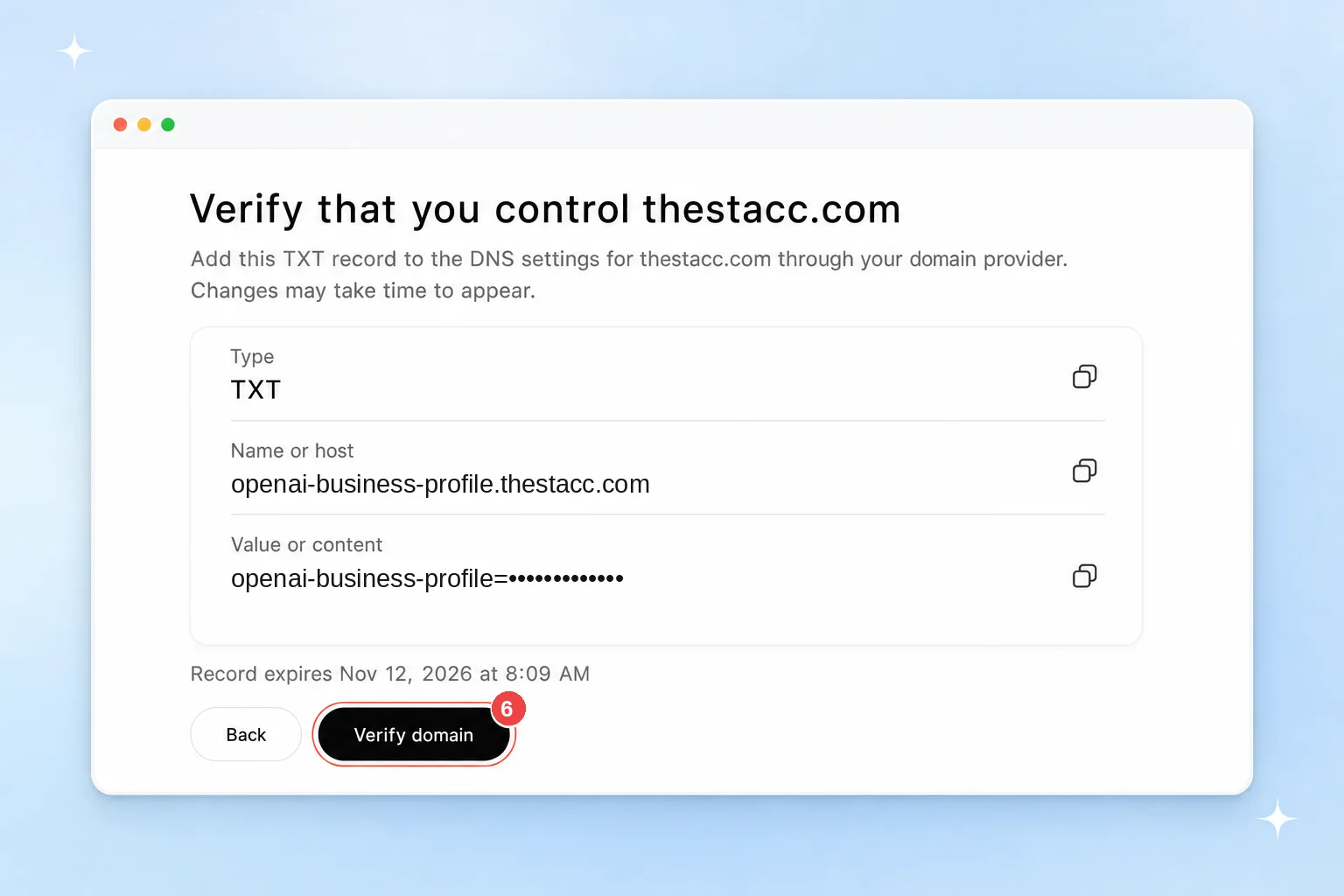
The token has an expiry time printed under it. Add the record straight away, check it with a DNS lookup tool, and only then select Verify domain. If it expires, start the domain step again for a fresh token. If someone else runs your domain, send them the record, not your login.
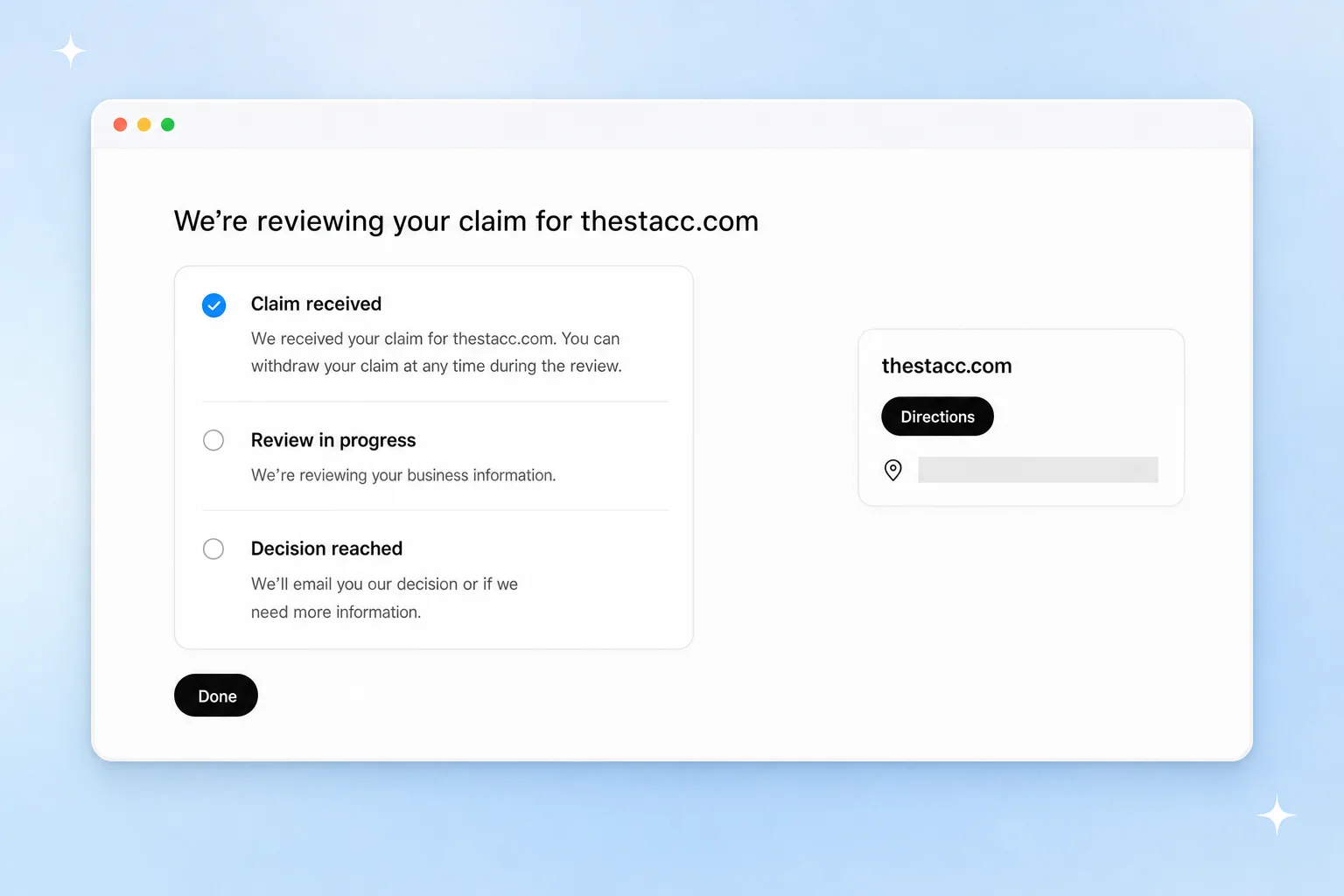
Step 7: Wait for OpenAI to review the claim
You'll see three stages: claim received, review in progress, decision reached. OpenAI emails its decision, or asks for more information. It does not publish a review time. You can withdraw the claim while it's under review.
Step 8: Select Verify to check your identity with Persona
Your business now shows in Business Hub as a Draft. A banner asks you to verify your identity with a government-issued ID before you can edit details or publish an agent. Select Verify.
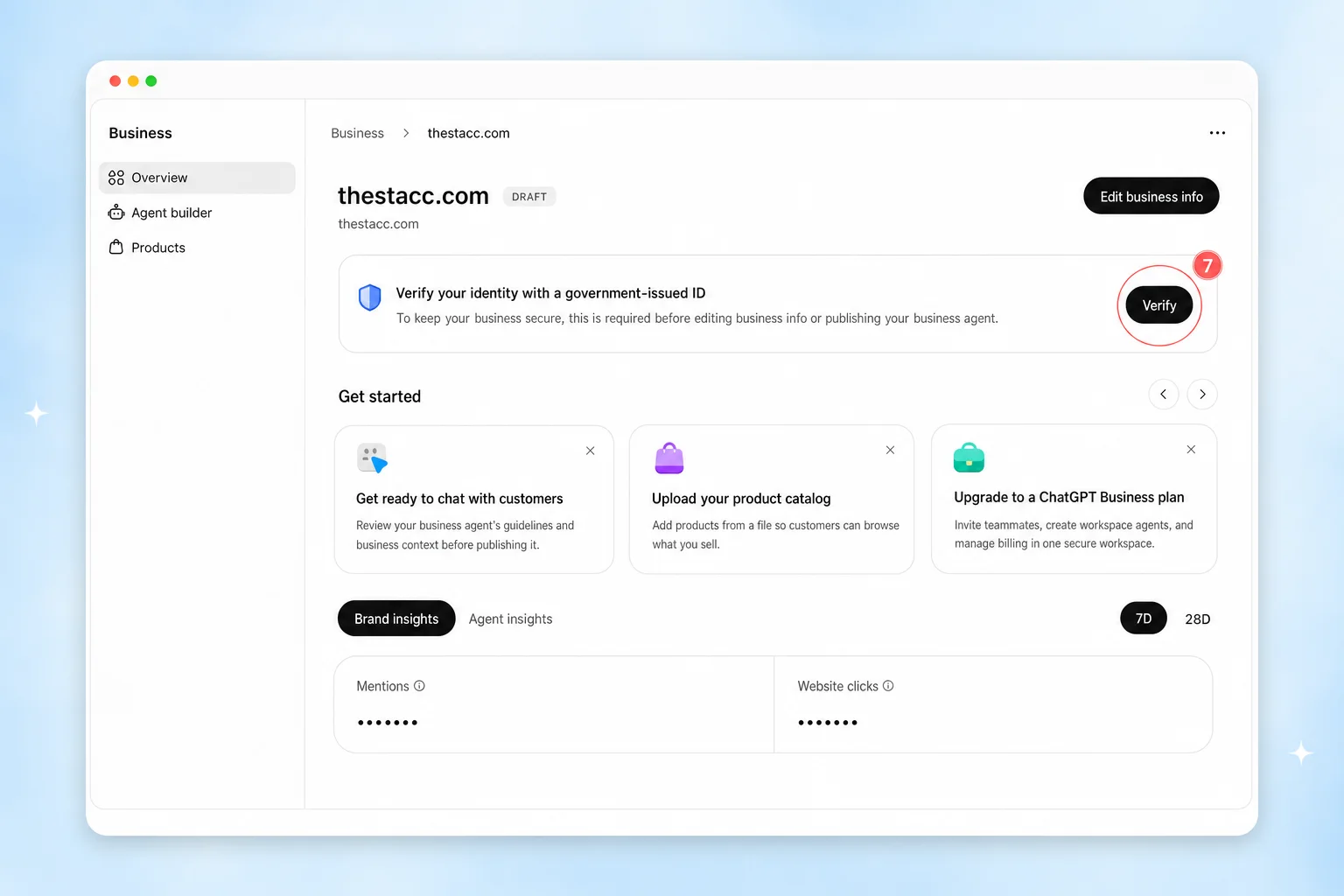
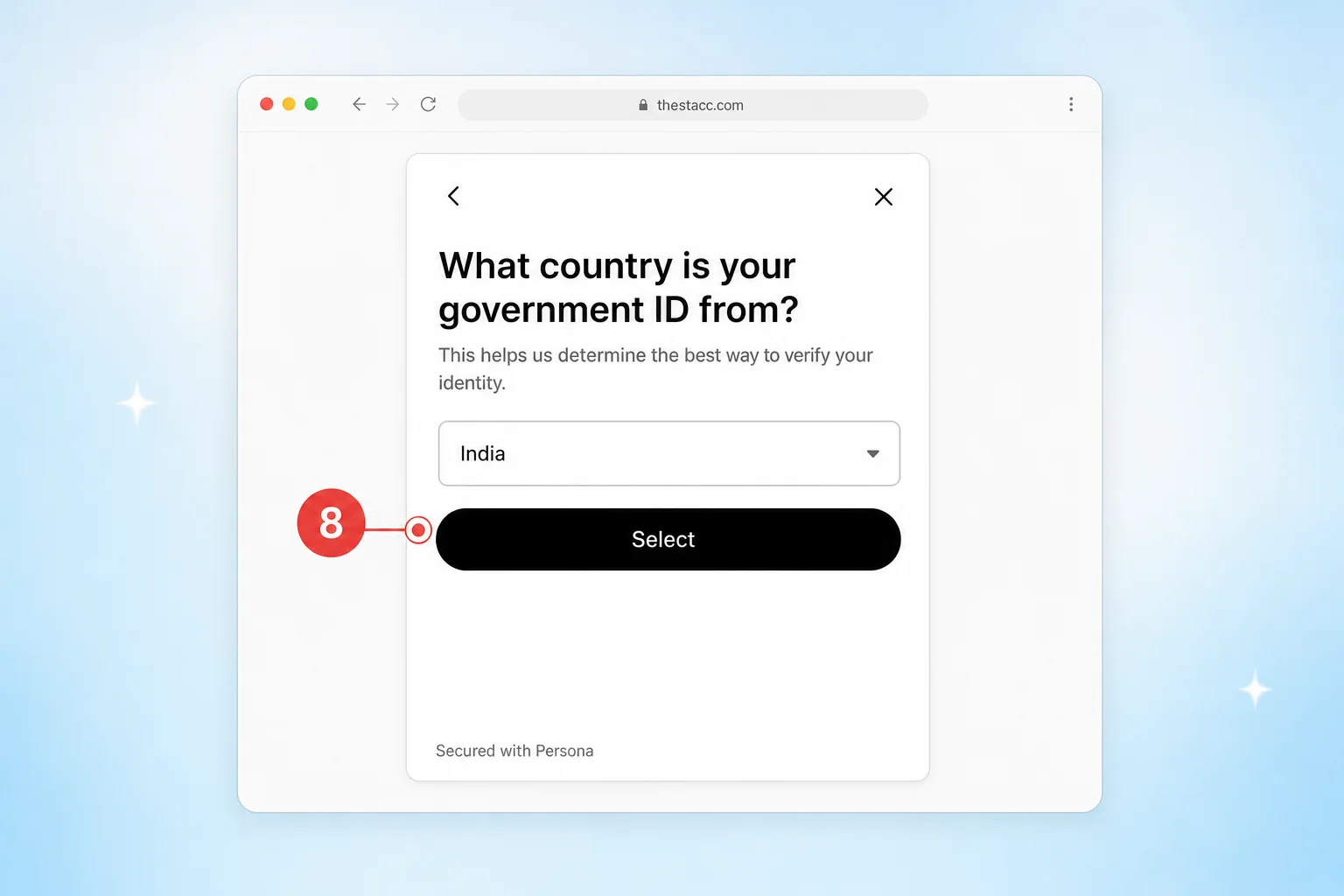
Persona, OpenAI's identity partner, asks for consent, then which country your ID is from, then a photo of the ID. Have these ready:
- Government-issued ID for the person claiming.
- Business registration details, such as a registration or tax number.
- Proof you can represent the business if you are not the owner.
- A name and address that match your official records exactly. If a check fails, follow the decision email and select Try again if it is offered.
If you create a new profile, Persona approval publishes it automatically. A published profile cannot be deleted or hidden, even by OpenAI Support. Get your details right first.
Step 9: Update your details
Once Persona is approved, the blue check appears. Select Edit business info and fill in your website, description, category, logo, delivery and return policies, and a cover photo. OpenAI reviews each change before it goes live, and ChatGPT may keep using other sources for a while, so allow some time.
What Do ChatGPT Business Insights Show?
Insights show activity over the last 7 or 28 days. There are a few numbers, and none of them include anyone's actual conversation.
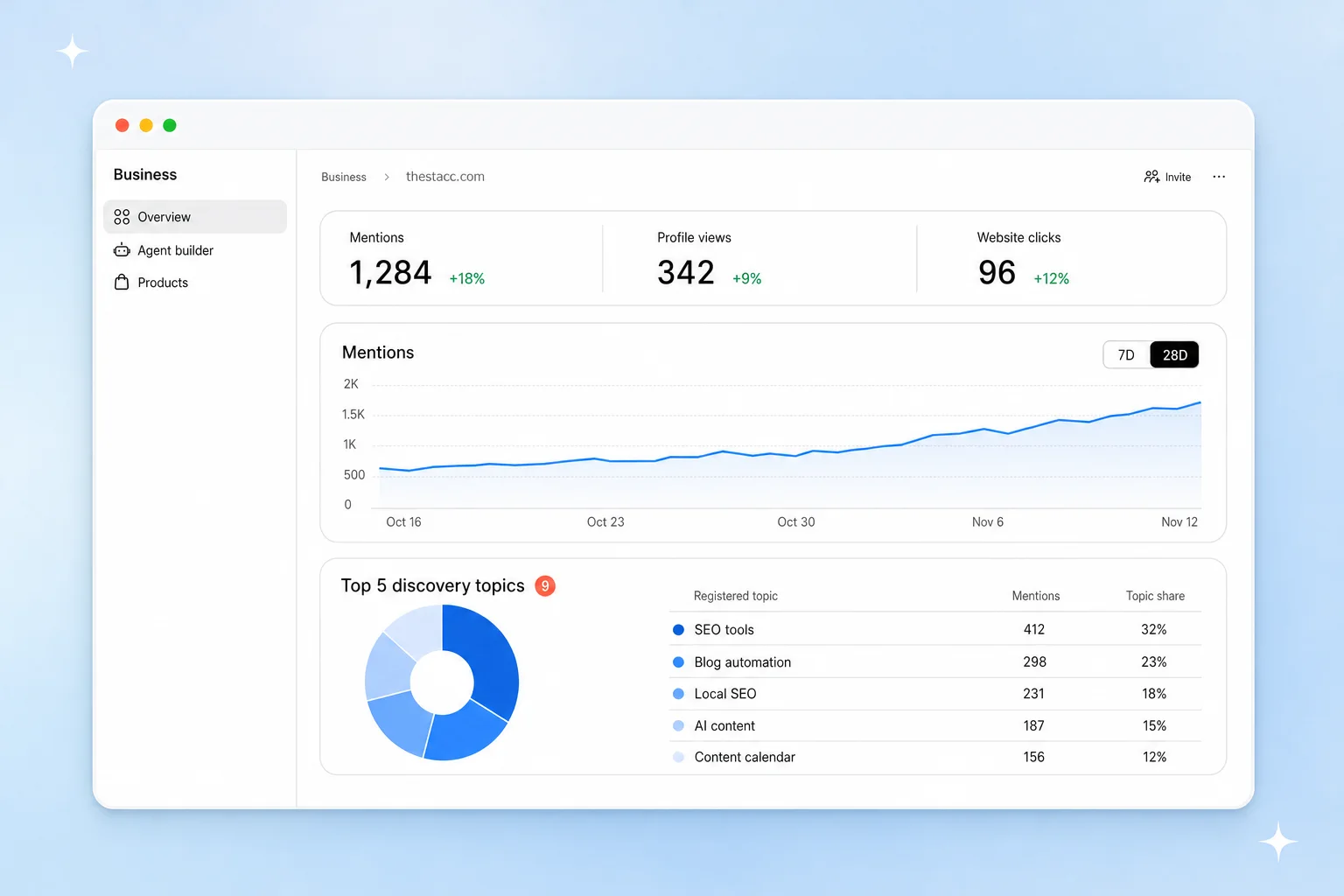
- Mentions: for an online business, how often ChatGPT referenced your website. Your brand name alone does not count. For a local business, how often ChatGPT showed your location as a result.
- Profile views: how often people opened your ChatGPT profile.
- Website clicks: how often people clicked through to your site.
- Discovery topics: the themes of answers that mentioned you, such as "emergency plumbing" or "affordable SEO tools". These are grouped themes, not real prompts.
A blank number does not mean zero. It can mean you have not reached OpenAI's reporting threshold yet. ChatGPT links also carry utm_source=chatgpt.com, so you can watch the same traffic in Google Analytics.
Make Your Details Match Everywhere First
ChatGPT builds answers from many sources, not only your profile. If your website says one phone number, your Google Business Profile says another, and an old directory says a third, you look less trustworthy and verification gets harder.
Before you claim, check these match on your website, Google Business Profile and major directories:
- Business name, exactly as registered
- Address and phone number
- Hours and service areas
- Main category and the services you list
Our NAP consistency guide walks through the cleanup, and LocalBusiness schema helps AI tools read the same details straight from your site.
Want your business to show up right in ChatGPT and Google? theStacc keeps your website, blog and Google Business Profile fresh and consistent every week, and tracks how AI assistants talk about you.
Sign up for free → Or see the local SEO tools behind the work.
What Early Users Are Running Into
Business Hub is a beta, and it shows. We tried it ourselves and read what business owners and SEOs posted on X in the first days after launch. These are the mistakes and problems that come up most, and how to avoid them.
Problems while claiming
| What happens | What to do |
|---|---|
| The email code fails, then says "too many requests" | Switch to the website domain (DNS) method. Early users say it is the most reliable. |
| The DNS token expires before the record is live | Open your DNS panel before you start. Some owners say the token lasts only about 30 minutes, so add the record straight away and check it with a DNS lookup before selecting Verify domain. |
| The Persona ID check errors out | The profile stays a Draft until it passes. Try again later with a clear photo of your ID, and make sure your name and address match your official records. |
| Verification keeps failing outside the US | Some owners outside the US report several failed attempts. If one method fails, try another (DNS, then phone), and wait for the email before trying again. |
| "A business profile has already been submitted for this website" | We saw this ourselves. A draft already exists, maybe from an earlier try or a teammate. Look for it in your Business list instead of starting over. |
| There is no option for service businesses | Only "At a physical location" and "Through a website" were offered when we tried it. Service businesses that pick website are asked for delivery and return policies. Write accurate ones, because ChatGPT can repeat them to customers. |
| You can't find Business Hub | Use the web app at chatgpt.com/business-hub. Owners report it is hard to find in the desktop app. |
Problems after claiming
| What happens | What to do |
|---|---|
| Your profile card shows the wrong photos | Check your card in ChatGPT after you claim. Some owners found photos from other businesses and had to replace them. |
| Your listing shows an old link or details you didn't write | ChatGPT may have built a listing before you claimed it. Early users found their Google Business Profile link copied over, tracking tags included. Fix the source first (see below). |
| Insights are blank | Insights need the Persona check, and a blank number can mean you haven't reached OpenAI's reporting threshold yet. It doesn't mean zero. |
| Your brand is named in answers but mentions stay low | For an online business, a mention only counts when ChatGPT cites your website, not when it just names your brand. For a local business, it counts when ChatGPT shows your location as a result. Online businesses should make sure their site is the page worth citing. |
| Your team or agency can't get access | The admin who claimed must invite each person, and each needs their own ChatGPT account. If the business was claimed inside a ChatGPT workspace, invitees may need to be members of that workspace. If an agency invite is blocked, contact OpenAI Support. |
| No blue check in answers yet | Early testers saw very few verified badges in ChatGPT answers so far. Claiming doesn't guarantee more recommendations. |
Several owners point out that the Businesses in ChatGPT Terms (linked at the bottom of Business Hub) give OpenAI a lasting license to the basic details you submit and include a promise not to sue. A published profile also can't be deleted. Read the terms before you continue, and get your details right before you submit.
Your Google Business Profile may already be feeding it
Early users noticed that their ChatGPT listing carried the same website link as their Google Business Profile, tracking tags included, before they edited anything. OpenAI also says ChatGPT can show a listing whether or not you claim it, and may use other sources. So if your Google profile has an old phone number or wrong hours, expect ChatGPT to repeat it. Fix Google first, then claim in ChatGPT.
What you can't do yet
- No API or export: insights live only inside Business Hub. You can't pull them into a report or another tool.
- No individual prompts: you see 28-day totals and grouped topics, never the actual questions people asked.
Should Every Business Claim Its ChatGPT Profile?
Yes, if you are eligible. It is free, it puts the correct details in your hands, and the insights are the first official numbers on how ChatGPT talks about your business. The only real cost is the identity check, and the only real risk is publishing wrong details you cannot remove later.
Do not expect a ranking boost. OpenAI is clear that claiming does not guarantee more recommendations and that ads do not change ChatGPT's own answers. What gets you recommended is the same thing that works on Google: useful pages, real reviews and details that agree everywhere.
Frequently Asked Questions
Does it cost anything to claim my business in ChatGPT?
No. Claiming and Business Hub are free, and you do not need an Ads account or an Enterprise agreement. Sponsoring a Business Agent through ChatGPT Ads is a separate, paid option.
Will claiming my business make ChatGPT recommend it more?
Not directly. OpenAI says claiming lets you manage your information but does not guarantee more visibility. Accurate, consistent details still help ChatGPT describe you correctly.
Can a local store outside the US claim its business in ChatGPT?
Not yet. Local stores and restaurants can currently claim only an existing US listing. When we tried with a restaurant in India, ChatGPT offered a waitlist instead. Eligible online businesses may be able to add a missing listing.
Is there a waitlist for Business Hub?
For some businesses, yes. Anyone can open Business Hub, but local businesses outside the US, like restaurants in India, are asked to join a waitlist when they try to claim. OpenAI emails you when you can continue. Business Agents are limited to eligible US businesses.
When do I get the blue check in ChatGPT?
After OpenAI approves your Persona identity verification. Claim approval alone does not add the badge.
Can I delete my ChatGPT business profile later?
Only unpublished drafts can be deleted. A published profile cannot be removed or hidden.
Do I need a Business Agent to show up in ChatGPT?
No. ChatGPT can show your business with or without one. Agents are optional and limited to eligible US ecommerce and online service businesses for now.
Sources & references
Explore the tools for blog content, Google Business Profile, and social publishing.
Weekly local SEO teardowns
One practical email a week. Map Pack, GBP, AI Overviews. No fluff. Unsubscribe anytime.