
Duplicate Content SEO: Find and Fix It (2026)
Learn how to find and fix duplicate content SEO issues that hurt your rankings. Covers canonical tags, 301 redirects, and prevention. Updated 2026.
Stacc Editorial • 2026-04-04 • SEO Tips
In This Article
29% of websites have duplicate content issues. That is nearly 1 in 3 sites competing against themselves in search results without knowing it.
Duplicate content SEO problems drain crawl budget, split backlink equity across multiple URLs, and confuse Google about which page to rank. The result is lower rankings, wasted index space, and lost organic traffic.
Most duplication is accidental. URL parameters, CMS defaults, and HTTP/HTTPS mismatches create copies that nobody intended. The good news is every type of duplicate content has a clear fix.
We publish 3,500+ SEO articles across 70+ industries. We see duplicate content slow down site performance every week. This guide covers everything we know about finding and fixing it.
Here is what you will learn:
- What duplicate content is and why Google cares about it
- The difference between exact duplicates and near-duplicates
- How Google handles duplication (it is not a penalty)
- 7 common causes most site owners miss
- How to find every duplicate page on your site
- The exact fixes for each type of duplication
- How to prevent duplicate content from ever returning
Table of Contents
- Chapter 1: What Is Duplicate Content?
- Chapter 2: Types of Duplicate Content
- Chapter 3: How Google Handles Duplicate Content
- Chapter 4: 7 Common Causes of Duplicate Content
- Chapter 5: How to Find Duplicate Content on Your Site
- Chapter 6: How to Fix Duplicate Content Issues
- Chapter 7: How to Prevent Duplicate Content
- Chapter 8: Duplicate Content FAQ
Chapter 1: What Is Duplicate Content? {#ch1}
Duplicate content is text that appears on more than one URL. It can live on the same website (internal duplication) or across different domains (external duplication). Google defines it as “substantive blocks of content within or across domains that either completely match other content or are appreciably similar.”
The keyword here is “appreciably similar.” Two pages do not need to be identical to count as duplicates. Pages that share 85% or more of the same text trigger duplication flags in most SEO audit tools.
Why It Matters for Rankings
Google wants to show one version of every piece of content. When it finds duplicates, it must choose which URL to index. The version Google picks may not be the one you prefer.
This creates 3 problems:
- Link equity splits. External sites link to different versions of the same page. Instead of one URL with 50 backlinks, you get 3 URLs with 15-20 each.
- Crawl budget waste. Googlebot spends time crawling duplicate pages instead of your unique content. On large sites, this delays indexing of new pages.
- Wrong URL in search results. Google may rank the parameterized URL or the print version instead of your clean canonical page.
A study by Raven Tools found that sites fixing duplicate content issues saw up to a 20% increase in organic traffic. That is traffic sitting on the table for 29% of websites right now.
What Duplicate Content Is Not
Duplicate content is not the same as thin content. A 200-word page with unique text is thin but not duplicated. A 2,000-word page that exists at 3 different URLs is duplicated but not thin.
Duplicate content is also not plagiarism in the legal sense. Google does not care about copyright. It cares about which URL provides the best user experience. The fix is technical, not legal.
Chapter 2: Types of Duplicate Content {#ch2}
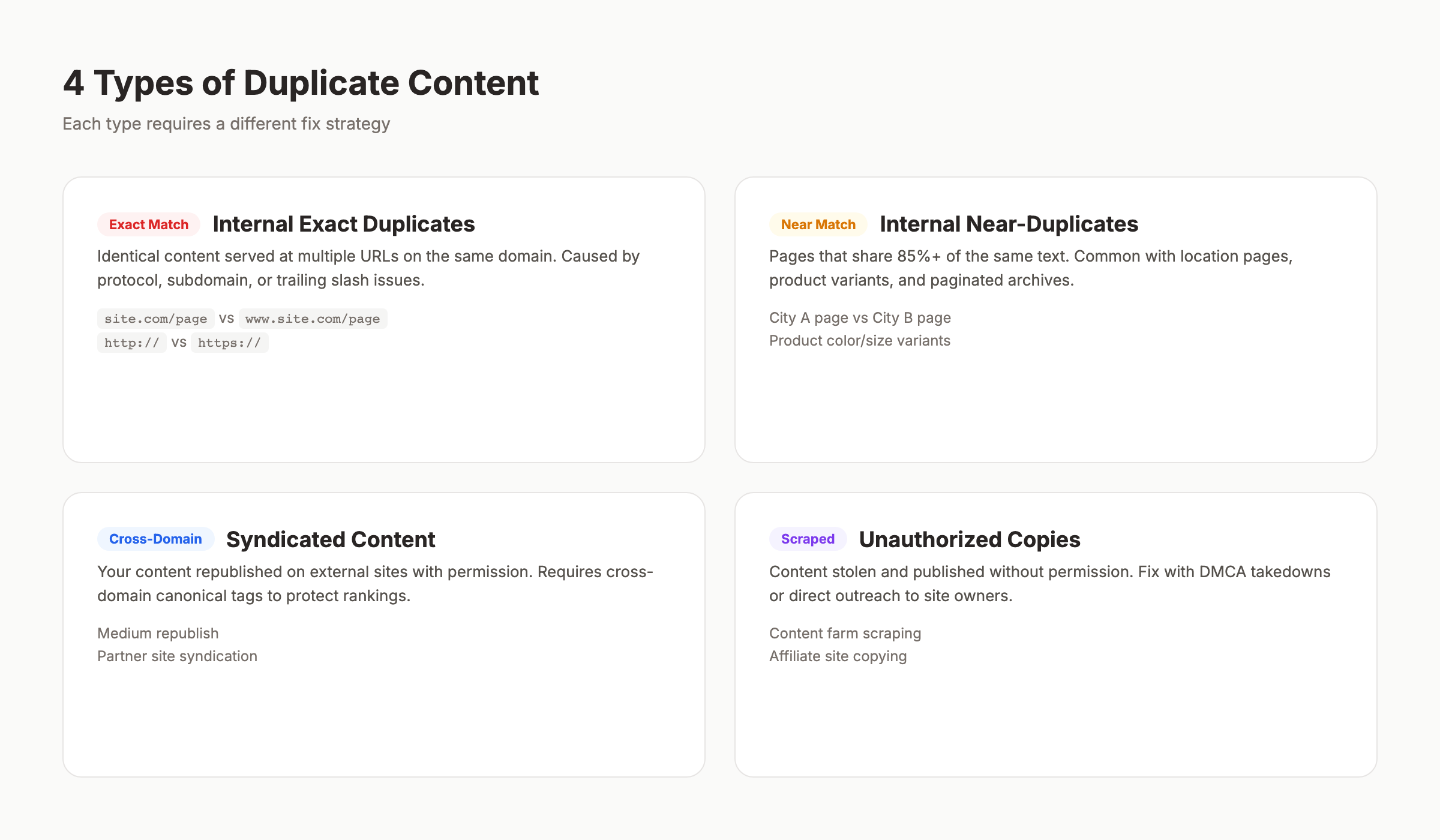
Not all duplication is the same. The type determines the fix. Here is how to categorize every case you will encounter.
Exact Duplicates
Exact duplicates are pages with identical content on different URLs. The text, HTML structure, and layout match completely. These are the easiest to detect and fix.
Common examples:
| Scenario | URL A | URL B |
|---|---|---|
| WWW vs non-WWW | www.site.com/page | site.com/page |
| HTTP vs HTTPS | http://site.com/page | https://site.com/page |
| Trailing slash | site.com/page/ | site.com/page |
| Index pages | site.com/blog/ | site.com/blog/index.html |
Every one of these pairs serves the same content. Without proper configuration, Google treats them as separate pages.
Near-Duplicates
Near-duplicates share most of their content but differ in small ways. Product pages with only the color or size changed. Location pages with just the city name swapped. Blog posts republished with minor edits.
Near-duplicates are harder to detect because automated tools use similarity thresholds. Screaming Frog flags pages above 90% similarity. Semrush uses 85%. The exact threshold matters less than the pattern: if your pages differ only by a heading and a city name, Google sees them as duplicates.
Internal vs External Duplication
Internal duplication happens within your own site. You control both URLs. Fixes include canonical tags, 301 redirects, and parameter handling.
External duplication happens across domains. Someone scraped your content. You syndicated an article. An affiliate site copied your product descriptions. Fixes here are different: cross-domain canonicals, DMCA takedowns, or syndication attribution.
| Type | Control | Primary Fix | Difficulty |
|---|---|---|---|
| Internal exact | Full | 301 redirect or canonical | Low |
| Internal near-duplicate | Full | Rewrite or canonical | Medium |
| External (you copied) | Partial | Add canonical to source | Low |
| External (they copied) | Limited | DMCA or outreach | High |
Understanding the type is step one. Step two is finding every instance on your site.
Duplicate content drains your SEO performance without you noticing. Stacc publishes unique, optimized articles every month so you never compete against yourself. Start for $1 →
Chapter 3: How Google Handles Duplicate Content {#ch3}
Google does not penalize duplicate content. That is the most misunderstood fact in SEO. But “no penalty” does not mean “no consequences.”
There Is No Duplicate Content Penalty
Google’s official documentation states: “Duplicate content on a site is not grounds for action on that site unless it appears that the intent of the duplicate content is to be deceptive and manipulate search engine results.”
The only time Google takes manual action is when a site deliberately duplicates content at scale to manipulate rankings. Think auto-generated doorway pages or scraped content farms. Normal website duplication from CMS defaults or URL structure issues does not trigger penalties.
What Google Actually Does
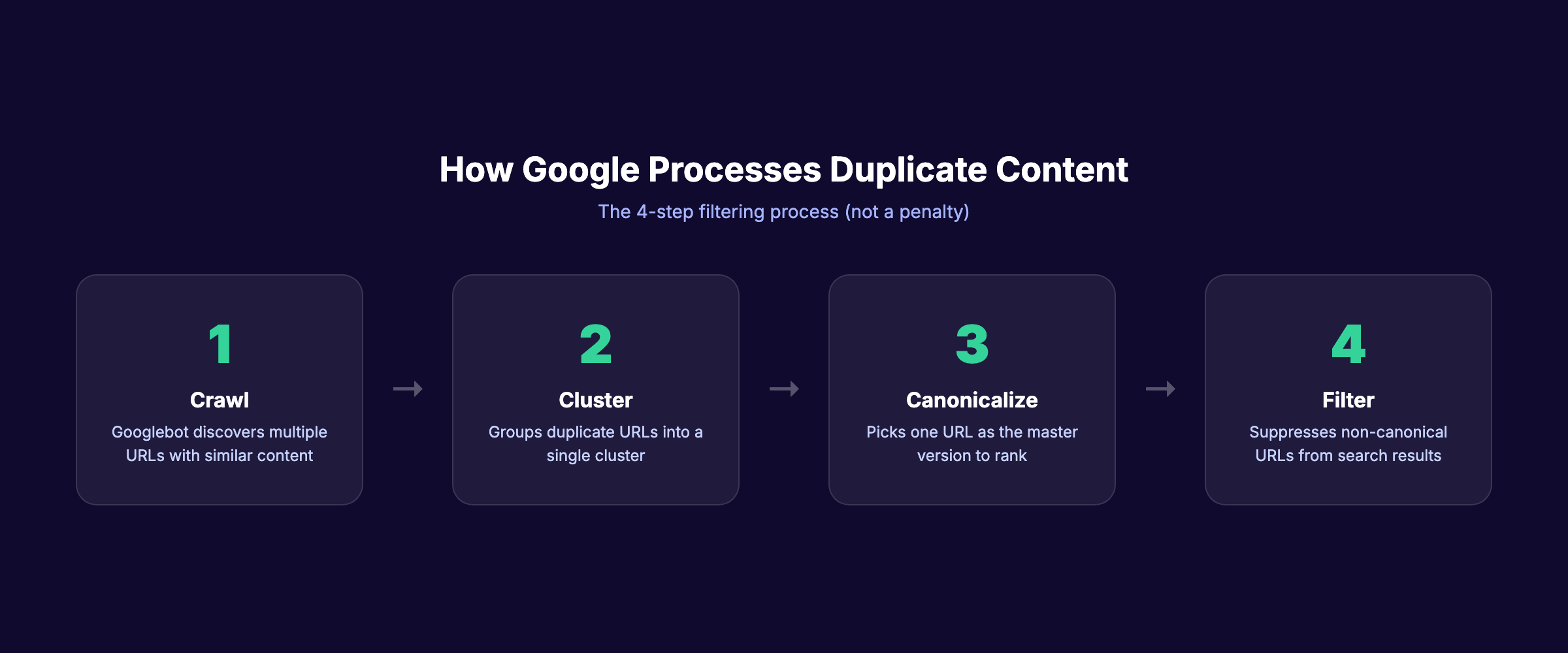
Instead of penalizing, Google filters. Here is the process:
- Crawl. Googlebot discovers multiple URLs with similar content.
- Cluster. Google groups the duplicate URLs into a cluster.
- Select canonical. Google picks one URL as the “canonical” (the master version). This choice considers: which URL has the most backlinks, which version the XML sitemap references, which URL uses HTTPS, which URL has structured data, and which URL the site explicitly canonicalizes.
- Filter. The non-canonical URLs get filtered from search results. They still exist in Google’s index but do not appear in rankings.
The problem is that Google’s choice may differ from yours. If a parameterized URL (site.com/shoes?color=red&size=10) gets more backlinks than your clean URL (site.com/red-shoes), Google may canonical the messy version.
The Crawl Budget Impact
For sites under 10,000 pages, crawl budget rarely matters. For larger sites, duplication is a serious crawl budget drain.
When Googlebot encounters 5 versions of the same page, it crawls all 5 before clustering them. That is 4 wasted crawls per duplicated page. Multiply that across thousands of product pages on an ecommerce site, and new pages can wait weeks for their first crawl.
Log file analysis reveals the damage. Sites with heavy duplication often see 30-50% of their crawl budget consumed by duplicate URLs.
Chapter 4: 7 Common Causes of Duplicate Content {#ch4}
Most duplicate content is accidental. These 7 causes account for 90% of duplication issues we see across client sites.
1. URL Parameters
URL parameters are the number one cause of duplicate content. Sorting, filtering, tracking, and session parameters all create new URLs with the same page content.
Examples:
site.com/shoesvssite.com/shoes?sort=pricesite.com/blog-postvssite.com/blog-post?utm_source=twittersite.com/productvssite.com/product?ref=homepage
Each parameter combination generates a unique URL. A product page with 3 sort options, 4 filters, and 2 tracking codes creates 24 indexable URLs. All with the same content.
2. WWW vs Non-WWW and HTTP vs HTTPS
If your site resolves on both www.site.com and site.com, every page exists at 2 URLs. Add HTTP vs HTTPS, and that doubles to 4 URLs per page. A 500-page site becomes 2,000 pages in Google’s eyes.
The fix is a server-level redirect. Yet 15% of sites still lack proper protocol and subdomain consolidation.
3. Trailing Slash Inconsistency
site.com/about and site.com/about/ are different URLs. Most servers serve the same content at both. Some CMS platforms default to trailing slashes. Others do not. Mixed internal links pointing to both versions create duplication.
4. CMS-Generated Duplicates
Content management systems create duplicate URLs by design:
- Tag and category pages that replicate post content
- Pagination that duplicates the first page at
/page/1/ - Print-friendly versions at
/print/URLs - AMP pages that mirror the original page
- Preview or draft URLs that get accidentally indexed
WordPress sites are especially prone to tag-page duplication. A post tagged with 5 terms appears on 5 separate tag archive pages, each containing the full post text. Proper blog post structure reduces this risk.
5. Product Variations Without Unique Content
Ecommerce sites list the same product in multiple categories. A red sneaker appears under /mens/sneakers/red-runner and /sale/red-runner. The content is identical. The URLs differ.
Product variations (color, size, material) often share the same description, images, and specifications. Without canonical tags, every variation becomes a separate indexed page.
6. Syndicated and Republished Content
Publishing your article on Medium, LinkedIn, or industry sites creates external duplicates. Syndicating content to partner websites does the same.
Google typically favors the original source. But “typically” is not “always.” If the syndication partner has higher domain authority, Google may pick their version as the canonical.
7. Scraped Content
Scrapers copy your content and publish it on their sites. They may change the author name or rearrange paragraphs, but the content is recognizably yours. If their site has stronger signals, your rankings suffer.
| Cause | Frequency | Detection Difficulty | Fix Complexity |
|---|---|---|---|
| URL parameters | Very common | Easy | Medium |
| WWW/HTTPS issues | Common | Easy | Low |
| Trailing slashes | Common | Easy | Low |
| CMS duplicates | Very common | Medium | Medium |
| Product variations | Common (ecommerce) | Medium | Medium |
| Syndicated content | Occasional | Hard | Medium |
| Scraped content | Occasional | Hard | High |
Chapter 5: How to Find Duplicate Content {#ch5}
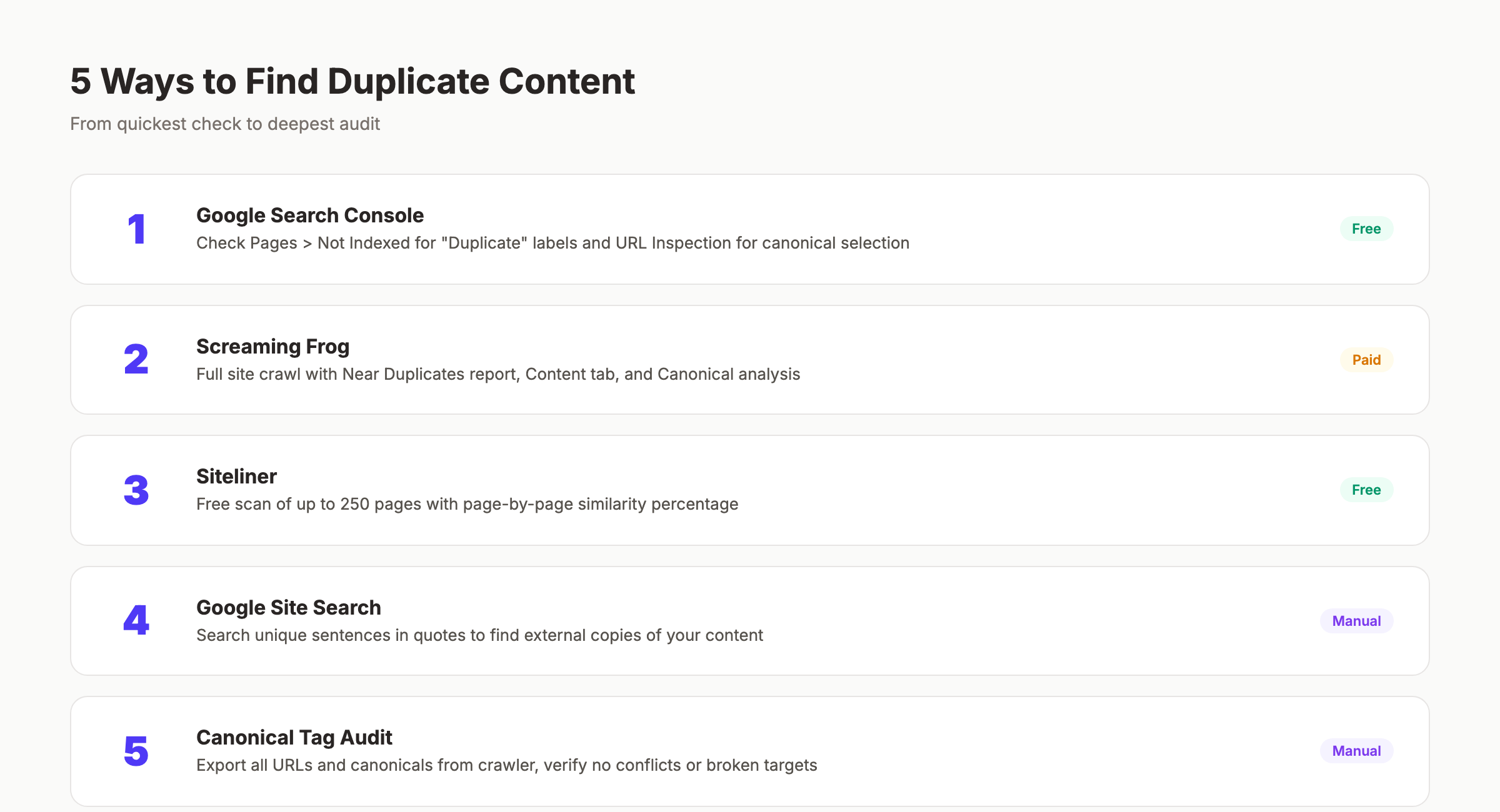
You cannot fix what you cannot see. Here are 5 methods to find every duplicate on your site, ranked from simplest to most thorough.
Method 1: Google Search Console
Google Search Console is the fastest free check. Go to Pages > Not indexed and look for pages marked “Duplicate without user-selected canonical” or “Duplicate, Google chose different canonical than user.”
These reports tell you exactly which pages Google considers duplicates and which URL it selected as canonical. If Google’s choice does not match your preferred URL, you have a problem to fix.
Also check the URL Inspection tool. Enter any URL and Google shows you the canonical it selected. Compare this to your intended canonical.
Method 2: Screaming Frog Site Audit
Screaming Frog is the most thorough crawler for finding internal duplicates. Run a full crawl and check these reports:
- URL > Duplicate — exact URL matches
- Content > Near Duplicates — pages above 90% similarity
- Content > Exact Duplicates — identical content on different URLs
- Directives > Canonical — pages where the canonical does not match the URL
The Near Duplicates report uses a similarity threshold you can adjust. Set it to 85% to match Semrush’s standard.
Method 3: Siteliner
Siteliner is a free tool that scans up to 250 pages and highlights internal duplication. It shows a percentage match for every page and identifies the specific duplicate pairs.
For small sites (under 250 pages), this is the fastest way to get a duplication overview. For larger sites, you need Screaming Frog or a cloud-based crawler.
Method 4: Site Search Operators
Use Google itself to spot external duplicates. Copy a unique sentence from your page and search for it in quotes:
"your unique sentence goes here exactly as written"If other domains appear in the results with your exact text, you have external duplication. Repeat this for 3-5 key pages to get a quick picture.
Method 5: The Canonical Audit
Run a targeted audit of every canonical tag on your site. Export all URLs and their declared canonical from Screaming Frog. Then check for these issues:
- Self-referencing canonicals on every page
- No canonicals pointing to 404 pages
- No canonicals pointing to redirected URLs
- No pages with missing canonical tags
- No conflicting signals (canonical says URL A, but robots.txt blocks URL A)
This checklist catches the most common technical implementation errors.
Stop guessing which pages are duplicated. Stacc runs technical SEO audits and publishes optimized content that never competes against itself. Start for $1 →
Chapter 6: How to Fix Duplicate Content Issues {#ch6}
Each type of duplicate content has a specific fix. Choose the right one based on whether you want to keep both URLs accessible.
Fix 1: Canonical Tags
Canonical tags tell Google which URL is the master version. Add a <link rel="canonical" href="https://site.com/preferred-url"> tag to the <head> of every duplicate page.
When to use canonical tags:
- Product pages with multiple category paths
- Pages with URL parameters (sorting, filtering, tracking)
- Syndicated content on external sites (cross-domain canonical)
- Paginated content where page 1 is the main version
Canonical tags are suggestions, not directives. Google can ignore them if other signals contradict the canonical. Make sure your internal links, sitemap, and backlinks all point to the canonical URL.
Fix 2: 301 Redirects
A 301 redirect permanently sends users and search engines from one URL to another. Unlike canonical tags, redirects are enforced. The old URL cannot appear in search results.
When to use 301 redirects:
- WWW to non-WWW consolidation (or vice versa)
- HTTP to HTTPS migration
- Trailing slash normalization
- Merging two pages with overlapping content
- Removing old product pages
Implement 301s at the server level (.htaccess for Apache, nginx.conf for Nginx) for best performance. Plugin-level redirects add processing overhead.
| Fix | Use When | Strength | Both URLs Accessible? |
|---|---|---|---|
| Canonical tag | Both URLs serve users | Suggestion | Yes |
| 301 redirect | One URL is obsolete | Enforced | No |
| Noindex | Page is useful but should not rank | Directive | Yes |
| Parameter handling | URL params cause duplicates | Varies | Yes |
Fix 3: Noindex Tags
Add a <meta name="robots" content="noindex"> tag to pages you want accessible but not indexed. This works well for:
- Internal search results pages
- Tag and category archives in WordPress
- Print-friendly page versions
- User account pages
- Filtered or sorted product listings
Noindex removes the page from Google’s index entirely. Use it only when you do not want the page to rank for anything. For pages that should rank, use canonical tags instead.
Fix 4: URL Parameter Handling
Google Search Console previously offered URL parameter configuration. That tool was deprecated in 2022. The current best practice is:
- Use canonical tags on parameterized pages pointing to the clean URL
- Block parameters in robots.txt if the parameterized pages provide no unique value
- Use the
noindextag on filter/sort results pages - Implement server-side rendering to avoid client-side parameters for JavaScript-heavy sites
For tracking parameters (UTM codes), canonical tags are the correct fix. The parameterized URL should canonical to the clean URL.
Fix 5: Cross-Domain Canonicals for Syndicated Content
When you syndicate content to Medium, LinkedIn, or partner sites, add a cross-domain canonical tag:
<link rel="canonical" href="https://yoursite.com/original-article">This tells Google your site is the original source. Most syndication platforms support this. Medium adds it automatically when you import a URL. For other platforms, request that the publisher add the tag.
The alternative is adding a “Originally published at [yoursite.com]” note with a dofollow link. This does not consolidate ranking signals as well as a canonical, but it gives Google a strong signal about the original source.
Fix 6: DMCA Takedowns for Scraped Content
When another site copies your content without permission, you have 3 options:
- Contact the site owner. Request removal or a canonical tag. This works about 30% of the time.
- File a DMCA takedown with Google. Submit the request through the Google Legal Help page. Google removes the infringing URL from search results within 1-2 weeks.
- File a DMCA with the hosting provider. The host can remove the content entirely. Check who hosts the site using WHOIS lookup.
DMCA takedowns are a last resort. Start with direct outreach. Most scrapers use automated tools and may not even know they copied your content.
Chapter 7: How to Prevent Duplicate Content {#ch7}
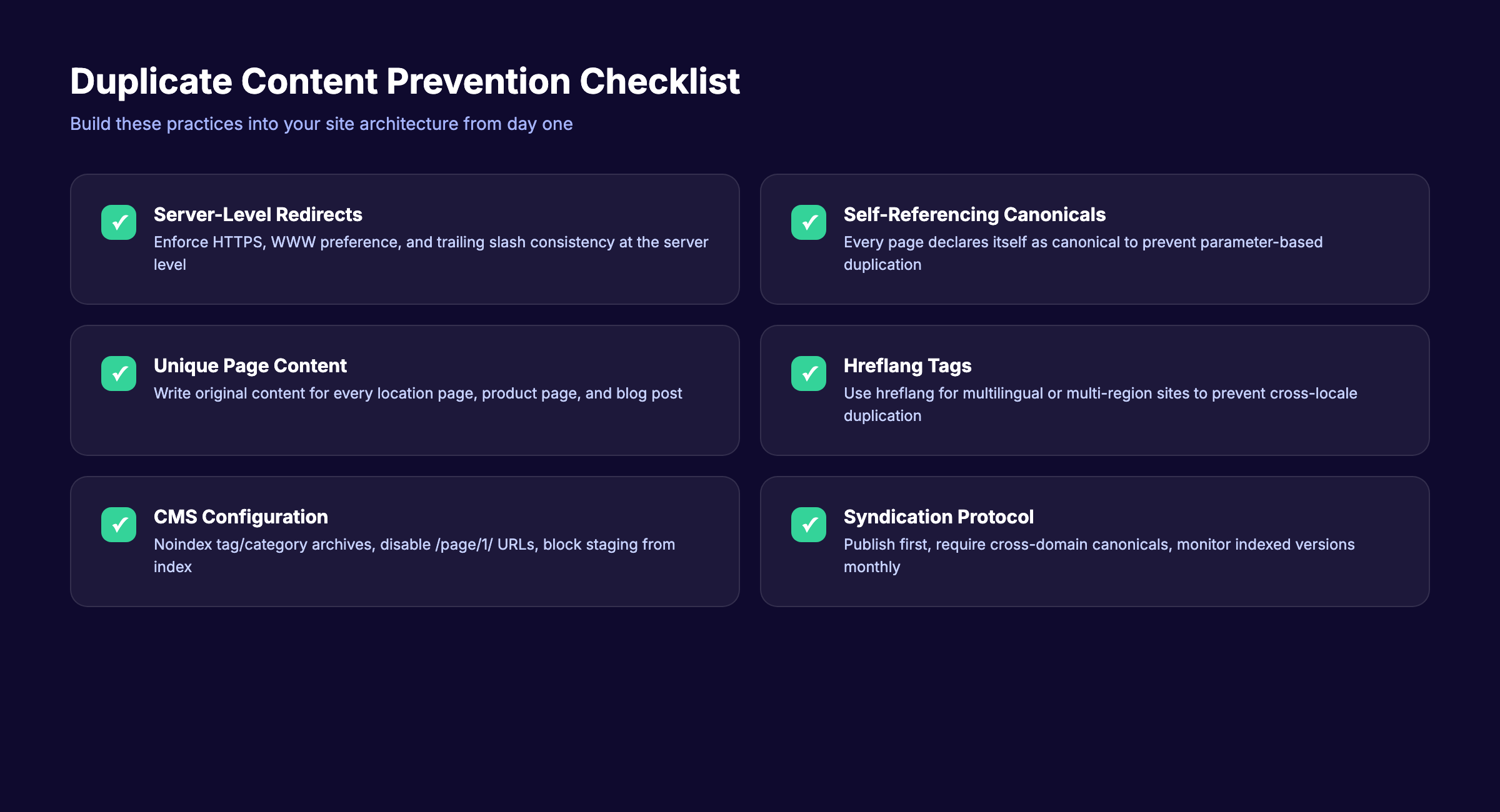
Fixing existing duplicates solves today’s problem. Prevention keeps it from coming back. Build these practices into your site architecture and content workflow.
Set Server-Level Redirects from Day One
Configure your server to enforce one canonical version of every URL. This means:
- Redirect HTTP to HTTPS
- Redirect WWW to non-WWW (or vice versa)
- Enforce trailing slash preference (with or without)
- Redirect
/index.htmlto/
Do this before you publish a single page. Retroactive fixes work, but you lose link equity during the transition.
Add Self-Referencing Canonical Tags
Every page on your site should declare itself as the canonical. This sounds redundant, but it prevents problems when external sites link to parameterized versions of your URL.
Most on-page SEO plugins handle this automatically. Yoast, Rank Math, and AIOSEO all add self-referencing canonicals by default. Verify they are present with your on-page SEO checker.
Write Unique Content for Every Page
This sounds obvious, but it is the most common prevention failure. Avoid these shortcuts:
- Location pages with only the city name changed. Each location page needs unique statistics, testimonials, and local details.
- Product descriptions copied from the manufacturer. Rewrite every description with unique angles, use cases, and comparisons.
- Blog posts that rephrase the same topic. Use a content cluster strategy where each article covers a distinct subtopic.
Use Hreflang for Multilingual Sites
If your site serves content in multiple languages or regions, use hreflang tags to tell Google which version to show each audience:
<link rel="alternate" hreflang="en-us" href="https://site.com/page">
<link rel="alternate" hreflang="en-gb" href="https://site.co.uk/page">
Without hreflang tags, Google may treat your English-US and English-UK pages as duplicates.
Configure CMS Settings
Tighten your CMS to minimize default duplication:
- Noindex tag and category archives (unless they have unique content)
- Disable pagination of the first page (no
/page/1/URL) - Block print-friendly URLs from indexing
- Set canonical tags on AMP versions
- Exclude preview and staging URLs from indexing
These settings prevent 80% of CMS-generated duplicates before they reach Google. For a full technical SEO walkthrough, see our SEO for beginners guide.
Manage Content Syndication
Before syndicating any content:
- Publish on your site first. Wait for Google to index your version.
- Require cross-domain canonical tags from every syndication partner.
- Add a “Originally published at” link at the top of syndicated versions.
- Monitor indexed versions monthly to ensure Google picks your URL.
Syndication builds reach without sacrificing SEO. But only when you protect the original source.
Unique, optimized content published on schedule. Stacc writes and publishes 30 SEO articles per month so your site never competes against itself. Start for $1 →
Chapter 8: Duplicate Content FAQ {#ch8}
Does duplicate content cause a Google penalty?
No. Google does not penalize sites for duplicate content unless the duplication is deliberate manipulation at scale. Normal duplication from technical issues causes filtering, not penalties. Google selects one URL to rank and suppresses the others. The consequence is lost traffic and wasted crawl budget, not a manual action.
How much duplicate content is too much?
There is no official threshold. Most SEO tools flag pages with 85-90% similarity as duplicates. A better question is: does the duplication cause ranking problems? Check Google Search Console for pages marked “Duplicate, Google chose different canonical than user.” If Google is choosing the wrong URL, you have too much.
Can I republish my own content on Medium or LinkedIn?
Yes, but protect the original. Publish on your site first. Wait for Google to index it (check with the URL Inspection tool in GSC). Then syndicate with a cross-domain canonical tag. Medium adds this automatically when you import a URL. LinkedIn does not support canonical tags, so add a “Originally published at” link with your URL.
Do canonical tags pass link equity like 301 redirects?
Canonical tags consolidate ranking signals similarly to 301 redirects. Google treats the canonical URL as the master and attributes link signals from duplicate URLs to it. The difference is that canonical tags are suggestions. Google can override them if conflicting signals exist. A 301 redirect is enforced and always passes equity.
Will Google penalize me if another site copies my content?
No. Google tries to identify the original source and rank that version. If the copying site outranks you, it is not a penalty against you. It means Google incorrectly identified the source. File a DMCA takedown, add a canonical tag pointing to your original, and build more backlinks to strengthen your page’s authority signals.
How often should I audit for duplicate content?
Run a full duplicate content audit quarterly. Run a quick check in Google Search Console monthly. Set up alerts in Screaming Frog to flag new duplicates during regular crawls. Add the audit to your SEO checklist and SEO reporting workflow.
Duplicate content does not need to be a ranking killer. The fix is almost always technical: a canonical tag, a redirect, or a server configuration change. The harder part is finding every instance and preventing new ones from appearing.
Start with Google Search Console. Run a Screaming Frog crawl. Fix the issues in order of impact: server-level redirects first, then canonical tags, then content rewrites. Build prevention into your publishing workflow so duplication never returns.
Your next step is to audit your site today. Or let us handle the content entirely.
Written and published by Stacc. We publish 3,500+ articles per month across 70+ industries. All data verified against public sources as of March 2026.
