
Location Pages for SEO (2026): Structure, Schema & Ranking Tactics
How to create location pages that rank: page structure, unique content requirements, LocalBusiness schema, doorway page risks, and multi-location SEO strategy with examples.
76% of people who search for something nearby on their phone visit a business within a day. 28% of those local searches result in a purchase. Location pages are how your business captures that intent for every city, neighborhood, and service area you cover.
Location pages for SEO are dedicated web pages optimized for a specific geographic area. A plumber in Austin with service coverage across 5 cities needs 5 location pages, not one generic “Areas We Serve” list. Each page targets local keywords, includes location-specific content, and connects to a Google Business Profile listing.
Most businesses get this wrong. They create thin, duplicate pages that swap out city names and change nothing else. Google classifies those as doorway pages. After the March 2024 Core Update, over 80% of doorway pages lost rankings with a 63% traffic drop within 30 days. The penalty is real and the recovery is slow.
This guide covers how to build location pages that rank, convert, and stay safe from Google penalties. We publish 3,500+ blog posts per month across 70+ industries, including multi-location businesses that rely on location pages for their entire local SEO strategy.
Here is what you will learn:
- What location pages are and when to create them
- The anatomy of a high-performing location page
- How to make each location page genuinely unique
- Schema markup that connects location pages to GBP
- The line between location pages and doorway pages
- URL structure and internal linking architecture
- How to scale location pages without triggering penalties
- Measuring location page performance
Chapter 1: What Location Pages Are and When You Need Them
A location page is a standalone web page targeting a specific geographic area where your business operates. It exists to rank for “[service] + [city]” and “[service] near me” queries in that area.
When to Create Location Pages
| Business Type | Location Page Strategy |
|---|---|
| Single location, single city | 1 location page (often the homepage) |
| Single location, serves nearby cities | 1 location page + service area pages for each additional city |
| Multiple physical locations | 1 location page per physical location |
| Franchise | 1 location page per franchisee location |
| Service area business (no storefront) | Service area pages for each primary city served |
Do not create a location page for every city within a 100-mile radius. Create pages only for areas where you actively serve customers, have staff, or can demonstrate genuine local presence. Quality beats quantity every time.
The distinction matters. A dental practice with offices in Austin and Round Rock needs 2 location pages. A plumber based in Austin who also serves Pflugerville, Cedar Park, and Georgetown needs 1 location page for Austin (physical office) and service area pages for the other 3 cities.
For a broader overview of local ranking factors, read our local SEO guide.
Chapter 2: Anatomy of a High-Performing Location Page
Every location page needs specific elements to rank and convert. Missing any of these reduces your chances of appearing in local search results.
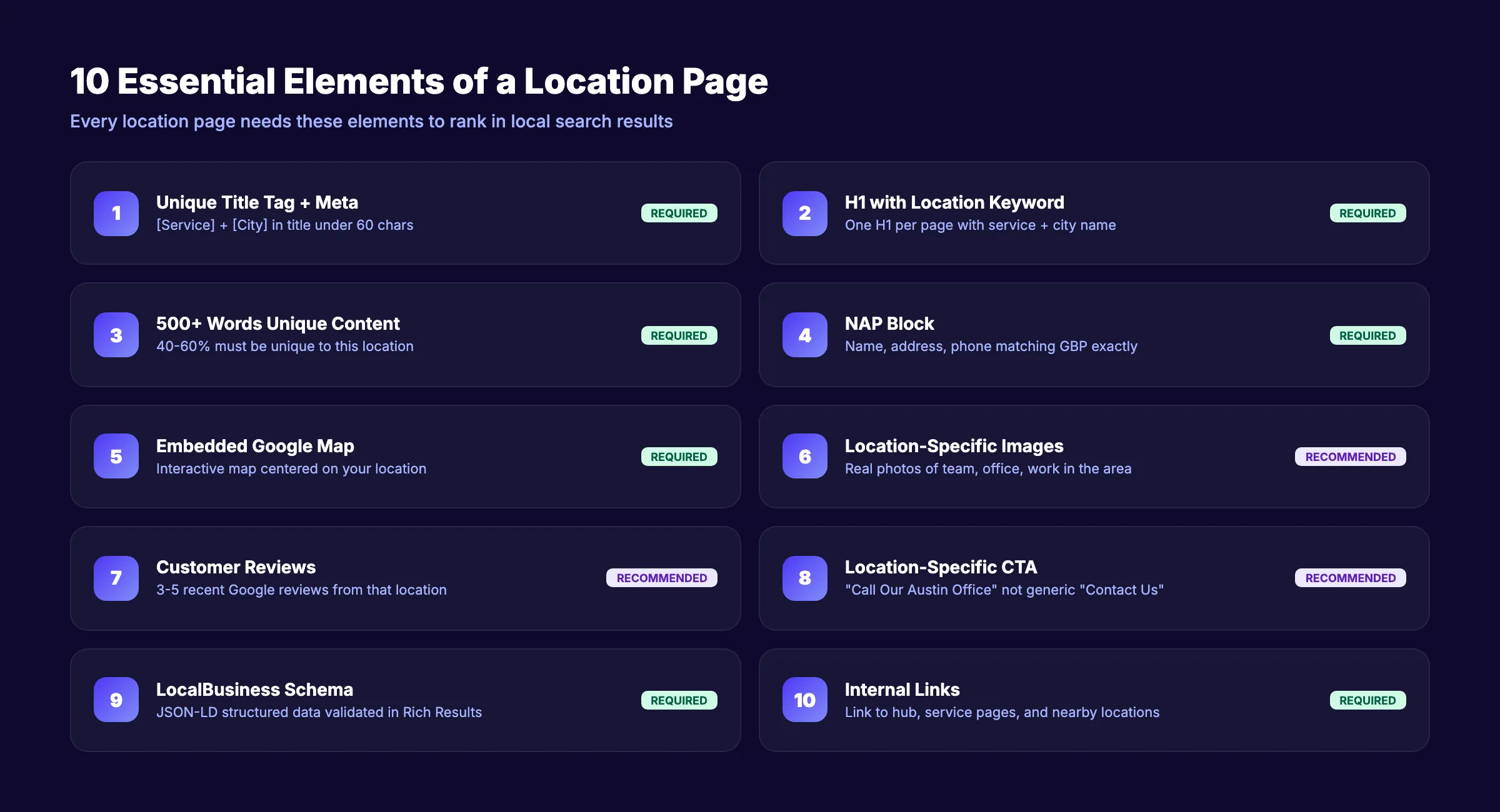
Required Elements
1. Unique title tag and meta description. Include the service keyword and city name. “Emergency Plumber in Austin TX” not “Our Locations.” Keep titles under 60 characters.
2. H1 heading with location keyword. One H1 per page. Include the primary service and city. “Plumbing Services in Austin, Texas.”
3. 500+ words of unique content. BrightLocal recommends 40 to 60% unique content on each location page. This means at least half the content should be specific to that location and not duplicated from other pages.
4. NAP block. Business name, address, and phone number. Match this exactly to your Google Business Profile listing. Use the same format everywhere. Read our NAP consistency guide for formatting rules.
5. Embedded Google Map. An interactive Google Map centered on your business location or service area. This confirms your geographic relevance to both users and search engines.
6. Location-specific images. Photos of your actual team, office, or work in that area. Stock photos from a generic library do not count. Google can detect stock images. Real photos build trust and demonstrate local presence.
7. Customer reviews from that location. Pull Google reviews specific to that location. Display 3 to 5 recent reviews with star ratings. Reviews build credibility and add unique, user-generated content to the page.
8. Clear call-to-action. A phone number, contact form, or booking button specific to that location. “Call Our Austin Office” is better than a generic “Contact Us” button.
9. LocalBusiness schema markup. Structured data that tells Google exactly what your business is, where it operates, and how to display it in search results. More on this in Chapter 4.
10. Internal links. Link to related service pages, your main location hub page, and other nearby location pages. Internal links distribute authority and help Google understand your site structure.
Chapter 3: How to Make Each Location Page Unique
Duplicate content across location pages is the single most common reason they fail. Swapping city names in a template is not enough. Google treats near-identical pages as thin content and may index only one while ignoring the rest.
5 Methods for Creating Unique Location Content
1. Location-specific service details. Different areas have different needs. A roofing company in Houston writes about hurricane-resistant materials. The same company in Denver writes about snow load ratings. Tailor service descriptions to the local environment.
2. Local customer testimonials. Feature reviews and case studies from customers in that specific city. “Sarah M. from Cedar Park” is more relevant on the Cedar Park page than a generic testimonial with no location.
3. Local landmarks and directions. “Located 2 blocks south of Barton Springs Pool on South Lamar” gives geographic context that both users and search engines understand. Include driving directions from nearby landmarks.
4. Local statistics and context. A pest control company in Phoenix can reference the average number of scorpion calls per year in Maricopa County. A dentist in Portland can mention the city’s water fluoridation history. This data exists. Use it.
5. Local team information. Name the team members who serve that location. Include their photos and brief bios. “Meet your Austin team: Marcus (10 years experience), Jennifer (certified master plumber)” adds unique, relevant content.
Stop writing. Start ranking. Stacc publishes 30 SEO-optimized articles per month for your business. Build domain authority and local relevance across every location you serve. Start for $1 →
Chapter 4: Schema Markup for Location Pages
Schema markup tells search engines exactly what your business is, where it is, and what it does. Without schema, Google has to interpret your page content. With schema, you provide the information in a format Google can read directly.
LocalBusiness Schema Implementation
Every location page needs LocalBusiness schema (or a more specific subtype like Dentist, Plumber, or LegalService). The schema should include:
- Business name
- Street address (with city, state, postal code)
- Phone number
- Business hours
- Geographic coordinates (latitude, longitude)
- URL of the location page
- Service area (for SABs)
- Price range
- Aggregate review rating
{
  "@context": "https://schema.org",
  "@type": "Plumber",
  "name": "Austin Pro Plumbing",
  "address": {
    "@type": "PostalAddress",
    "streetAddress": "123 Main St",
    "addressLocality": "Austin",
    "addressRegion": "TX",
    "postalCode": "78701"
  },
  "telephone": "+1-512-555-0100",
  "url": "https://example.com/locations/austin",
  "geo": {
    "@type": "GeoCoordinates",
    "latitude": "30.2672",
    "longitude": "-97.7431"
  }
}
Validate your schema at Google’s Rich Results Test before publishing. Fix every error and warning.
For a deeper walkthrough of structured data, read our schema markup guide. Use our schema markup generator to create the JSON-LD code.
Connect GBP to Location Pages
Each Google Business Profile listing should link to its corresponding location page, not your homepage. Google’s documentation confirms that the website URL in GBP should point to the most relevant page for that location.
For multi-location businesses, this means each GBP listing links to its own location page. Linking all GBP listings to the homepage wastes the signal that tells Google which page represents which location.
Chapter 5: The Doorway Page Problem
Google defines doorway pages as “sites or pages created to rank for specific search queries that funnel users to a single page.” Location pages that exist only to rank for city names without offering unique value fit this definition.
Doorway Page Red Flags
| Safe Practice | Risky Practice | Penalty Risk |
|---|---|---|
| Unique 500+ word content per page | Same template with city name swapped | High |
| Real local photos and reviews | Stock photos repeated across pages | Medium |
| Location-specific service details | Identical service descriptions | High |
| Pages for cities where you operate | Pages for cities you have no presence in | Very High |
| Embedded map of actual location | No map or generic regional map | Medium |
| Local team bios and contact info | Same generic contact form | Low |
According to Google’s spam policies, doorway pages are explicitly against their guidelines. The March 2024 Core Update aggressively targeted this pattern.
Self-Audit for Doorway Risk
- Open all your location pages side by side. If more than 50% of the content is identical across pages, you have a doorway risk.
- Check Google Search Console for keyword cannibalization. If multiple location pages compete for the same queries, Google cannot determine which is most relevant.
- Ask this question: “If I removed the city name from this page, would a reader know which location it is about?” If the answer is no, the page lacks genuine local content.
Fix risky pages by adding unique content (reviews, team info, local details) or consolidating them into a single service area page if you cannot justify individual pages.
Chapter 6: URL Structure and Internal Linking
How you organize location pages in your site architecture affects how Google crawls, indexes, and ranks them.
Recommended URL Structures
| Structure | Example | Best For |
|---|---|---|
| /locations/[city] | /locations/austin | Multi-location businesses |
| /[city]-[service] | /austin-plumbing | Service area businesses |
| /[service]/[city] | /plumbing/austin | Large service catalogs |
Pick one structure and use it consistently across all location pages. Do not mix formats.
Internal Linking Architecture
Build a hub-and-spoke model. The hub is a “Locations” or “Service Areas” index page that lists and links to every individual location page. Each location page links back to the hub and to its related service pages.
Example structure for a plumber serving 5 cities:
/locations/ (hub page. Lists all 5 cities)
  ├── /locations/austin (spoke)
  ├── /locations/round-rock (spoke)
  ├── /locations/cedar-park (spoke)
  ├── /locations/pflugerville (spoke)
  └── /locations/georgetown (spoke)
Each spoke page links to:
- The /locations/ hub
- Its city-specific service pages (if applicable)
- 2 to 3 nearby location pages (“Also serving Round Rock and Cedar Park”)
- The main service pages (/services/drain-cleaning, /services/water-heater-repair)
This structure distributes link equity across all location pages and helps Google discover them during crawling. For broader guidance on site structure, read our programmatic SEO guide.
Your SEO team. $99 per month. 30 optimized articles per month, published automatically. Build domain authority and local relevance at scale. Start for $1 →
Chapter 7: Location Pages vs. Service Area Pages
These are different page types with different purposes. Using the wrong one confuses Google.
Key Differences
| Factor | Location Page | Service Area Page |
|---|---|---|
| Physical presence | Yes. Storefront or office | No. You travel to the customer |
| GBP listing | Links to this page | May not have a GBP for this area |
| Address displayed | Full street address | City/region name only |
| Content focus | About your business at that address | About your service in that area |
| Schema type | LocalBusiness with address | LocalBusiness with serviceArea |
| Risk level | Low (if content is unique) | Medium (easier to become doorway) |
Service area pages require even more unique content because you do not have a physical address, real storefront photos, or location-specific team members to differentiate them. The content has to do the work.
For service area businesses (plumbers, electricians, cleaners, landscapers), create service area pages only for your top 5 to 10 highest-demand cities. Target cities where you complete the most jobs and can provide the most specific local content.
Read our guide on optimizing your Google Business Profile for how to set up GBP correctly for service area businesses.
Service Area Page Content Strategy
Because service area pages lack a physical address, you need other local signals to prove relevance.
Content elements for service area pages:
- Local project examples. “Last month we completed 14 drain cleaning jobs in Cedar Park, including 3 emergency calls in the Brushy Creek neighborhood.” Specific job details prove you actually serve the area.
- Local pricing context. “Average water heater replacement cost in Cedar Park ranges from $1,200 to $2,800 depending on tank size and access.” Location-specific pricing adds genuine utility.
- Drive time and availability. “Our Austin team reaches Cedar Park jobs in 25 to 35 minutes. Same-day service available for emergency calls.” This helps both users and search engines understand your coverage.
- Neighborhood-level detail. Name the specific neighborhoods, subdivisions, or ZIP codes you serve within that city. “We serve Avery Ranch, Brushy Creek, Twin Creeks, and all neighborhoods within the 78613 ZIP code.”
- Local partnerships or community involvement. Sponsor a Cedar Park Little League team? Mention it. Member of the Cedar Park Chamber of Commerce? Include the badge.
These details make service area pages useful and unique. They also make them impossible to generate at scale with city-name-swap templates, which is exactly why Google trusts them.
Chapter 8: Measuring Location Page Performance
Building location pages without tracking their performance is wasted effort. Set up measurement before you launch.
Key Metrics to Track
| Metric | Tool | What It Tells You |
|---|---|---|
| Organic traffic per page | Google Analytics 4 | Which locations drive the most search traffic |
| Keyword rankings by city | Semrush / BrightLocal | Whether each page ranks for its target terms |
| Click-through rate | Google Search Console | How well your title and description perform in SERPs |
| Conversions per page | GA4 Goals or Events | Phone calls, form fills, direction clicks per location |
| GBP actions | GBP Insights | Calls, website clicks, direction requests per listing |
Monthly Review Process
- Pull organic traffic data for each location page. Compare month-over-month.
- Check rank tracking for each target keyword (“[service] [city]”).
- Review conversion data. Which location pages drive the most leads?
- Identify underperforming pages. Do they need more content, better schema, or more reviews?
- Compare against competitors in each local market.
What Good Performance Looks Like
A well-optimized location page should generate measurable results within 3 to 6 months.
Benchmarks to aim for:
- Organic traffic: 50 to 200+ monthly visits per location page (varies by market size and competition)
- Keyword rankings: Position 1 to 10 for your primary “[service] + [city]” keyword
- Conversion rate: 3 to 8% of visitors take an action (call, form fill, direction request)
- GBP actions: 20 to 100+ monthly actions per listing connected to the location page
Pages that fall below these benchmarks after 6 months need attention. Check for thin content, missing schema, weak internal linking, or stronger competitors in that market. Sometimes the fix is simple: add 200 words of unique local content, embed 3 fresh reviews, and resubmit to Google Search Console.
Run a full local SEO audit every quarter to catch new issues.
3,500+ blogs published. 92% average SEO score. Stacc publishes local content that builds authority across every market you serve. Start for $1 →
FAQ
Do location pages help with SEO?
Yes. Multi-location businesses with individually optimized location pages generate 20 to 30% more organic traffic per location than those using a single “Locations” page, according to BrightLocal. Each page targets a distinct geographic keyword set that a single page cannot rank for.
Are location pages considered doorway pages?
Only if they lack unique content. Google defines doorway pages as pages created to rank for search queries without offering unique value. Location pages with 500+ words of unique, location-specific content, real photos, local reviews, and genuine service information are not doorway pages. Pages that swap city names and nothing else are.
How many location pages should I create?
Create one page per physical location you operate. For service area businesses without storefronts, create pages only for your top 5 to 10 highest-demand cities where you can provide genuinely unique content. More pages with thin content is worse than fewer pages with strong content.
What URL structure is best for location pages?
Use /locations/[city] for multi-location businesses with storefronts. Use /[service]/[city] or /[city]-[service] for service area businesses. Pick one format and apply it consistently. Avoid deep nesting like /locations/texas/austin/downtown because it dilutes URL signals.
Should I create location pages for cities where I do not have an office?
Only if you actively serve customers in those cities and can provide unique, helpful content specific to that area. A cleaning company that completes 20 jobs per month in a nearby city has a valid reason. A business with zero presence creating pages for 50 surrounding cities does not. Google penalizes the second approach.
Location pages are one of the highest-ROI tactics in local SEO. They capture intent at the exact moment someone searches for a service in a specific city. Build them with unique content, proper schema, and clear internal linking. Audit them quarterly. The businesses that maintain strong location pages rank in multiple local markets without running separate campaigns for each one.
Related Tools & Resources
Free SEO Tools:
Best Lists:

Written by
Siddharth GangalSiddharth is the founder of theStacc and Arka360, and a graduate of IIT Mandi. He spent years watching great businesses lose organic traffic to competitors who simply published more. So he built a system to fix that. He writes about SEO, content at scale, and the tactics that actually move rankings.
Automate your Google Business Profile content
30 GBP posts, local SEO articles, and review responses. Published every month automatically.
30-day trial · Cancel anytime
theStacc
Stop writing SEO content manually
30 blog articles, 30 GBP posts, and social media content. Published every month. Automatically.
Try for free$1 for 3 days · Cancel anytime