
NAP Consistency: The Complete Local SEO Guide
NAP consistency is a top local ranking factor. Learn what NAP means, how to audit your listings, and fix inconsistencies that hurt rankings.
One wrong phone number on Yelp can drop your Google Maps ranking by 3 positions. One mismatched address on Yellow Pages can suppress your visibility for “near me” searches. NAP consistency is the most overlooked local SEO factor. And the easiest to fix.
NAP stands for Name, Address, and Phone number. NAP consistency means your business information is identical across every online listing, directory, and platform where your business appears. Not similar. Not close. Identical.
We have published 3,500+ articles across 70+ industries and helped hundreds of local businesses fix citation issues that were silently killing their rankings. This guide covers everything you need to know about NAP consistency and how to get it right.
Here is what you will learn:
- What NAP consistency means and why Google cares about it
- How NAP inconsistencies hurt your local rankings (with data)
- The step-by-step process to audit your NAP across all listings
- How to fix the most common NAP problems
- Which directories matter most for your business
- Tools that automate NAP management at scale
What Is NAP Consistency?
NAP stands for Name, Address, and Phone number. These 3 data points are the foundation of your local SEO identity. Every time your business appears online, those 3 elements should match exactly.
NAP consistency means the same business name format, the same street address format, and the same phone number appear on:
- Your website
- Google Business Profile
- Yelp
- Apple Maps
- Bing Places
- Industry directories
- Yellow Pages
- BBB
- Every other listing
Why Exact Matches Matter
Google verifies business information by cross-referencing data across hundreds of sources. When your NAP matches everywhere, Google trusts your information. When your NAP varies, Google questions which version is correct.
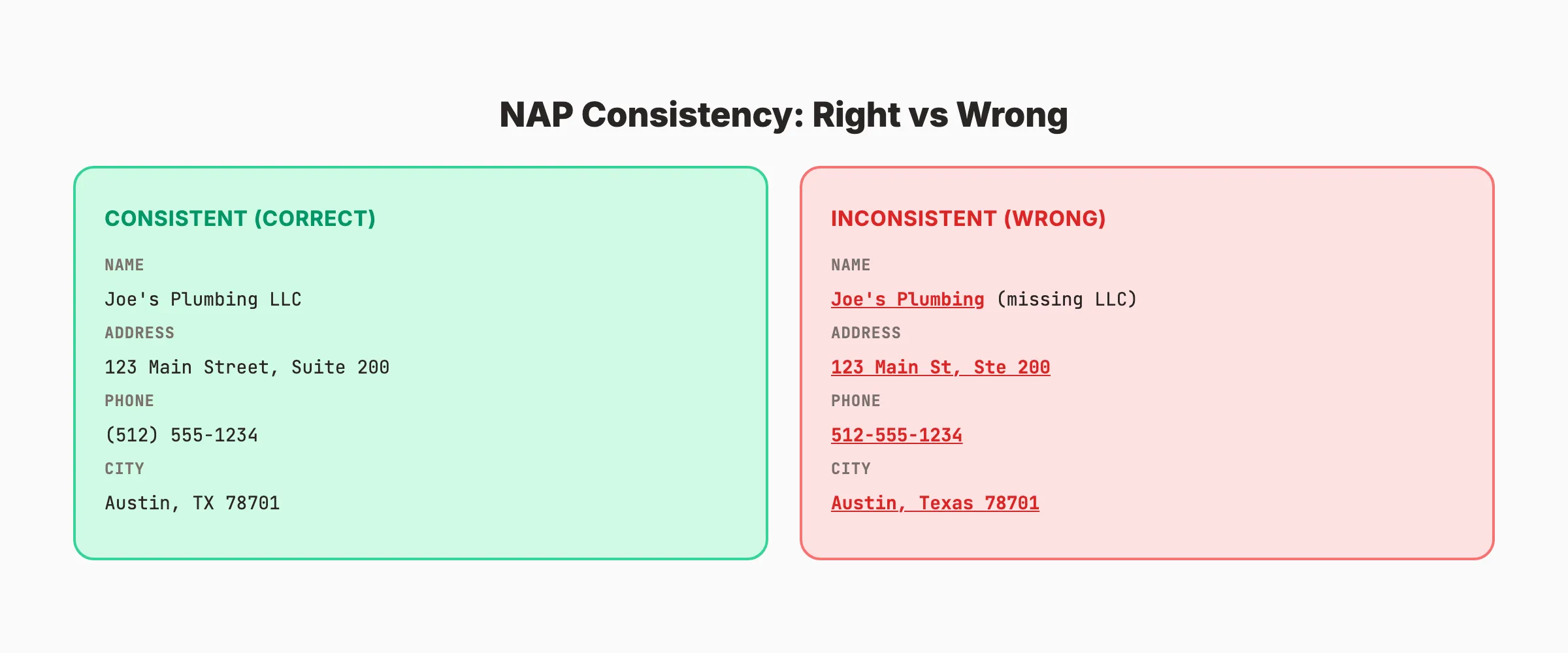
Here is the problem. To a human, these are obviously the same business:
- “Joe’s Plumbing LLC” and “Joe’s Plumbing”
- “123 Main Street” and “123 Main St”
- “(512) 555-1234” and “512-555-1234”
To Google’s algorithm, those are different businesses. Or at minimum, uncertain data points. That uncertainty reduces your prominence score, which directly affects your map pack ranking.
The NAP Consistency Rule
Pick one exact format for each element. Use it everywhere. No variations.
| Element | Choose One Format | Stick With It |
|---|---|---|
| Business Name | Joe’s Plumbing LLC | Not “Joe’s Plumbing” or “Joes Plumbing LLC” |
| Street Address | 123 Main Street, Suite 200 | Not “123 Main St, Ste 200” or “123 Main Street #200” |
| Phone Number | (512) 555-1234 | Not “512-555-1234” or “512.555.1234” |
| City/State/ZIP | Austin, TX 78701 | Not “Austin, Texas 78701” |
The format you choose does not matter. What matters is that the format is identical everywhere. No exceptions.
Rank everywhere. Do nothing. Blog SEO, Local SEO, and Social on autopilot. Starting at $99 per month. Start for $1 →
How NAP Inconsistencies Hurt Local Rankings
NAP consistency is a confirmed local ranking factor. According to Whitespark’s 2026 Local Search Ranking Factors report, citation signals (which include NAP consistency) are a top-tier ranking factor for both map pack and local organic results.
The Ranking Impact
Businesses with 95%+ NAP consistency across their top 50 citations rank an average of 3.2 positions higher in the local pack than businesses with inconsistent information.
The impact compounds. A single wrong listing does not destroy your rankings. But 10 or 15 inconsistent listings create a pattern that Google interprets as untrustworthy data.
What Google Does With Inconsistent NAP
When Google finds conflicting information about your business, it takes one of 3 actions:
- Picks the version it trusts most (usually from your GBP or high-authority directories)
- Averages the data (displays a blended version that may be partially incorrect)
- Suppresses your listing (reduces visibility because confidence in accuracy is low)
The third option is the worst. Google would rather show a competitor with verified, consistent data than show your business with questionable information.
Common Symptoms of NAP Problems
If you experience any of these, NAP inconsistencies are likely a factor:
- Your business does not appear in the map pack for your primary keywords
- Google shows an old address or phone number in search results
- Customers call a number that goes to a disconnected line
- You see duplicate listings for your business on Google Maps
- Your rankings fluctuate without any changes to your website or GBP
How to Audit Your NAP
A NAP audit is the process of finding every listing of your business online and checking each one against your correct information. Here is the step-by-step process.
Step 1: Establish Your Master NAP
Before auditing anything, define your official NAP. Write it down exactly. This is your reference for every comparison.
Business Name: [Exact legal name as shown on GBP]
Street Address: [Exact format including suite/unit]
City, State ZIP: [Exact format]
Phone Number: [Exact format including area code]
Website URL: [Exact URL including https://]
Your master NAP should match your Google Business Profile exactly. GBP is Google’s primary data source. Everything else should match it.
Step 2: Search for Your Business
Search Google for your business name. Check the first 5 pages of results. Look for:
- Directory listings (Yelp, Yellow Pages, BBB, etc.)
- Social media profiles (Facebook, LinkedIn, Instagram)
- Industry-specific directories
- Chamber of commerce listings
- Data aggregator listings (Infogroup, Acxiom, Neustar)
- Old or outdated listings from previous addresses or phone numbers
Step 3: Create a NAP Audit Spreadsheet
Track every listing in a spreadsheet with these columns:
| Directory | Name Match? | Address Match? | Phone Match? | URL | Status |
|---|---|---|---|---|---|
| Google Business Profile | Yes | Yes | Yes | gbp-link | Correct |
| Yelp | No (missing LLC) | Yes | No (wrong format) | yelp-link | Needs Fix |
| Yes | No (old address) | Yes | fb-link | Needs Fix | |
| Yellow Pages | Yes | Yes | No (old number) | yp-link | Needs Fix |
Step 4: Check Data Aggregators
Data aggregators distribute your business information to hundreds of smaller directories. If your NAP is wrong with an aggregator, it propagates everywhere.
The 4 major data aggregators in the US:
| Aggregator | What It Feeds | How to Update |
|---|---|---|
| Data.com (Infogroup) | 100+ directories | Express Update tool |
| Acxiom | Credit bureaus, directories | MyDataRequest portal |
| Neustar/Localeze | GPS systems, apps | Neustar Localeze portal |
| Foursquare | Apps, maps, social platforms | Foursquare listing manager |
Correcting your information at the aggregator level fixes dozens of downstream listings automatically. Start here before fixing individual directories.
Step 5: Prioritize Fixes
Not all directories are equal. Fix the highest-impact listings first.
| Priority | Directories | Why |
|---|---|---|
| Critical | Google Business Profile, Apple Maps, Bing Places | Primary search engines |
| High | Yelp, Facebook, BBB, Yellow Pages | High domain authority |
| Medium | Industry-specific directories | Niche relevance |
| Lower | Small local directories | Low impact per listing |
Your SEO team. $99 per month. 30 optimized articles, published automatically. Plus local SEO starting at $49/month. Start for $1 →
How to Fix NAP Inconsistencies
Fixing NAP issues requires patience. Some directories update instantly. Others take 2 to 8 weeks.
Fix Your Website First
Your website is the source of truth that Google cross-references. Ensure your NAP appears:
- In the footer of every page (not just the contact page)
- On your contact page with full details
- In your schema markup (LocalBusiness JSON-LD)
- In the same exact format as your GBP
Use LocalBusiness schema to encode your NAP in a machine-readable format. Here is the structure:
{
  "@context": "https://schema.org",
  "@type": "LocalBusiness",
  "name": "Joe's Plumbing LLC",
  "address": {
    "@type": "PostalAddress",
    "streetAddress": "123 Main Street, Suite 200",
    "addressLocality": "Austin",
    "addressRegion": "TX",
    "postalCode": "78701"
  },
  "telephone": "(512) 555-1234",
  "url": "https://joesplumbing.com"
}
Fix Google Business Profile
If your GBP information is incorrect, fix it first. Log into your GBP dashboard, update the incorrect fields, and save. Changes to GBP typically reflect within 24 to 72 hours.
Common GBP fixes:
- Business name matches your signage and legal documents
- Address includes suite or unit number if applicable
- Phone number is your primary local number (not a tracking number)
- Categories are accurate and specific
- Service area matches your actual coverage
Fix Major Directories
For each directory, log into your listing (or claim it if unclaimed) and update the information. Most directories allow self-service updates.
| Directory | How to Fix | Update Timeline |
|---|---|---|
| Yelp | Yelp for Business portal | 1-3 days |
| Page Settings > About | Instant | |
| Apple Maps | Apple Business Connect | 1-7 days |
| Bing Places | Bing Places for Business | 3-14 days |
| BBB | Contact BBB directly | 7-14 days |
| Yellow Pages | YP Business portal | 7-30 days |
Handle Duplicate Listings
Duplicate listings are a severe NAP problem. If Google finds 2 listings for your business with different information, neither ranks well.
To fix duplicates:
- Identify all duplicate listings on Google Maps
- Mark duplicates as “Suggest an edit” > “Place does not exist” in Google Maps
- Contact Google Business Profile support for stubborn duplicates
- Merge listings if both have reviews you want to keep
Remove Old Listings
If you moved locations or changed phone numbers, old listings with outdated information still exist. Those old listings create NAP conflicts.
Search for your old address and old phone number. Find every listing that still shows outdated information. Update each one to your current NAP or request removal.
Citation Sources That Matter Most
Not every directory carries equal weight. Focus your NAP management on the directories that Google trusts most.
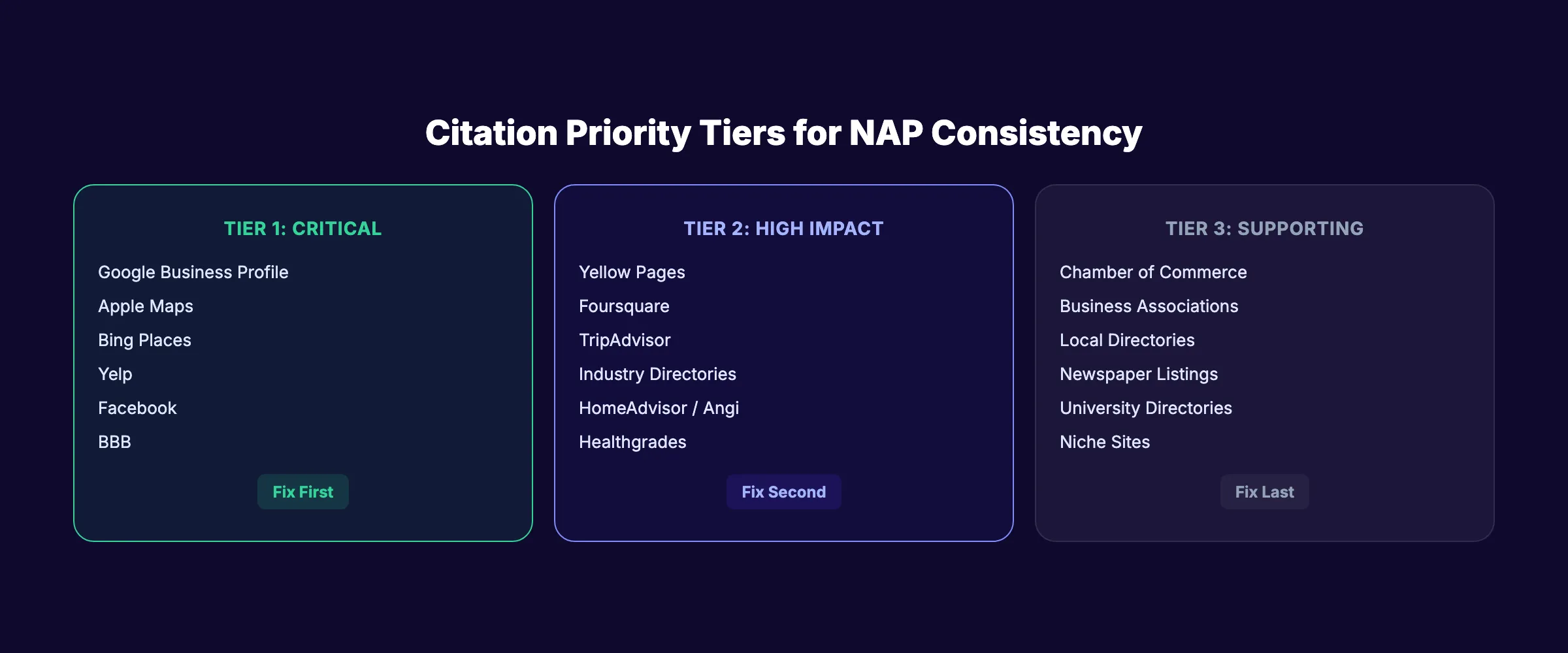
Tier 1: Essential (Fix These First)
- Google Business Profile
- Apple Maps / Apple Business Connect
- Bing Places
- Yelp
- Facebook Business
- Better Business Bureau
Tier 2: High Impact
- Yellow Pages / YP.com
- Foursquare / Swarm
- TripAdvisor (for hospitality)
- Healthgrades (for healthcare)
- Avvo (for legal)
- HomeAdvisor / Angi (for home services)
- DealerRater (for automotive)
Tier 3: Supporting
- Chamber of Commerce listings
- Local business associations
- Industry-specific directories
- University or hospital directories (for relevant businesses)
- Local newspaper or media directories
How Many Citations Do You Need?
Quality beats quantity. 10 consistent, high-authority citations outperform 100 inconsistent, low-quality listings.
For most local businesses, 30 to 50 accurate citations across Tier 1 and Tier 2 directories is enough. Use a local citation tool to manage them efficiently.
3,500+ blogs published. 92% average SEO score. See what Stacc can do for your local business. Start for $1 →
NAP Management Tools
Manual NAP auditing works for small businesses with 20 to 30 listings. For businesses with multiple locations or hundreds of citations, tools automate the process.
Citation Management Tools
| Tool | Best For | Cost |
|---|---|---|
| BrightLocal | Citation audit + building | $39-$79/month |
| Moz Local | Automated distribution | $14-$20/month |
| Yext | Enterprise multi-location | $199+/month |
| Semrush Listing Management | All-in-one SEO + citations | $129+/month |
| Whitespark | Citation finding + building | $20-$100/month |
What These Tools Do
- Scan for every existing citation of your business
- Compare each listing against your master NAP
- Flag inconsistencies for manual or automated correction
- Submit your correct NAP to new directories
- Monitor for changes or new inconsistencies over time
For a single-location business, BrightLocal or Moz Local provides the best value. For multi-location businesses or franchises, Yext handles enterprise-scale NAP management.
NAP Consistency for Multi-Location Businesses
Multi-location businesses face amplified NAP challenges. Every location needs its own consistent NAP. One dentist office with 5 locations has 5 separate NAP sets across 50+ directories each. That is 250+ listings to manage.
Unique Challenges
Shared phone numbers. Some multi-location businesses route all calls to a central number. For local SEO, each location needs its own local phone number. A Dallas location with an 800 number does not rank well for “dentist in Dallas.”
Franchise name variations. “ServiceMaster Clean” vs “ServiceMaster of Dallas” vs “ServiceMaster by Johnson.” Franchise networks often have inconsistent naming conventions across locations. Establish one naming format per location and enforce it.
Employee turnover and updates. When a location manager updates the business listing without following NAP standards, inconsistencies appear. Create a documented NAP policy that every location manager follows.
Multi-Location NAP Management Process
- Create a master NAP spreadsheet with every location’s exact information
- Assign one person (or team) as the NAP owner responsible for all updates
- Use an enterprise citation tool (Yext, RioSEO, or Uberall) to manage listings at scale
- Audit each location’s NAP quarterly using the same process described above
- Lock listings where possible to prevent unauthorized edits
- Train location managers on NAP standards before they make any changes
For businesses with 10+ locations, manual NAP management is not realistic. The cost of citation management tools ($200 to $500 per month) is far less than the cost of lost rankings from inconsistent data across hundreds of listings.
Ongoing NAP Maintenance
NAP consistency is not a one-time fix. Information changes. Directories reset data. Aggregators push outdated records. Ongoing maintenance prevents regression.
Quarterly NAP Audit Checklist
- Search your business name on Google and check the first 5 pages
- Verify GBP information is current (hours, phone, address)
- Check the 4 major data aggregators for accuracy
- Verify Tier 1 directories match your master NAP
- Search your old phone numbers and addresses for outdated listings
- Check for new duplicate listings on Google Maps
- Verify website footer and schema markup match your GBP
When NAP Changes
If you move locations, change phone numbers, or rebrand your business name, treat it as a full NAP reset.
- Update your master NAP document
- Update your website (footer, contact page, schema)
- Update Google Business Profile immediately
- Update all 4 data aggregators
- Update all Tier 1 directories within 1 week
- Update Tier 2 and Tier 3 directories within 1 month
- Run a full citation audit 90 days after the change to catch stragglers
The 90-day follow-up is critical. Some directories pull data from aggregators on delayed schedules. An old NAP can reappear months after you thought you fixed everything.
FAQ
What does NAP stand for in SEO?
NAP stands for Name, Address, and Phone number. These 3 data points identify your business across the internet. NAP consistency means your business name, street address, and phone number are identical on every online listing, directory, and platform.
Does NAP consistency really affect local rankings?
Yes. NAP consistency is a confirmed local ranking factor. Businesses with consistent NAP across their top citations rank an average of 3.2 positions higher in the local pack. Inconsistent NAP creates trust issues that Google resolves by reducing your visibility.
How do I find all my business listings online?
Search your business name on Google and check the first 5 pages of results. Use a citation audit tool (BrightLocal, Moz Local, or Whitespark) to scan for listings automatically. Also search your phone number and address independently to find listings that may use a slightly different business name.
What are the most common NAP inconsistencies?
Abbreviation differences (“Street” vs “St”), missing suite numbers, old phone numbers from before a change, business name variations (with or without “LLC” or “Inc”), and formatting differences in phone numbers. Data aggregators are the most common source of persistent inconsistencies.
How often should I check my NAP consistency?
Audit your NAP quarterly. Check GBP monthly. If you change any NAP element (new phone, new address, new name), run a full audit immediately and a follow-up audit 90 days later to catch listings that update on delayed schedules.
Can I use a tracking phone number on my GBP?
Use your real local phone number as your primary GBP number. You can add a tracking number as a secondary number, but the primary number must match your website and all citations. Using a tracking number as your primary GBP phone number creates an automatic NAP mismatch with every other listing. If call tracking is essential, use a call tracking provider that supports local number forwarding. Place the tracking number on your website only and keep the real number on all directory listings.
NAP consistency is boring work. It is not glamorous. It does not go viral on social media. But it is one of the highest-ROI activities in local SEO. A business with 50 consistent citations and a strong review profile will outrank a competitor with a bigger budget and messy data.
Fix your NAP. Keep it fixed. And if you need help with the content and GBP posts that amplify your local rankings, 30 optimized articles cost $99 per month when publishing happens automatically.

Written by
Siddharth GangalSiddharth is the founder of theStacc and Arka360, and a graduate of IIT Mandi. He spent years watching great businesses lose organic traffic to competitors who simply published more. So he built a system to fix that. He writes about SEO, content at scale, and the tactics that actually move rankings.
Automate your Google Business Profile content
30 GBP posts, local SEO articles, and review responses. Published every month automatically.
30-day trial · Cancel anytime
theStacc
Stop writing SEO content manually
30 blog articles, 30 GBP posts, and social media content. Published every month. Automatically.
Start Your $1 Trial$1 for 3 days · Cancel anytime