Dynamic pricing pages SEO guide for 2026. Schema fields, AI pipelines, title tag tactics, and the 16-point checklist that keeps live prices ranking.
Your prices change every hour. Your search snippets show the price from three weeks ago. That gap is bleeding revenue you cannot see in any dashboard.
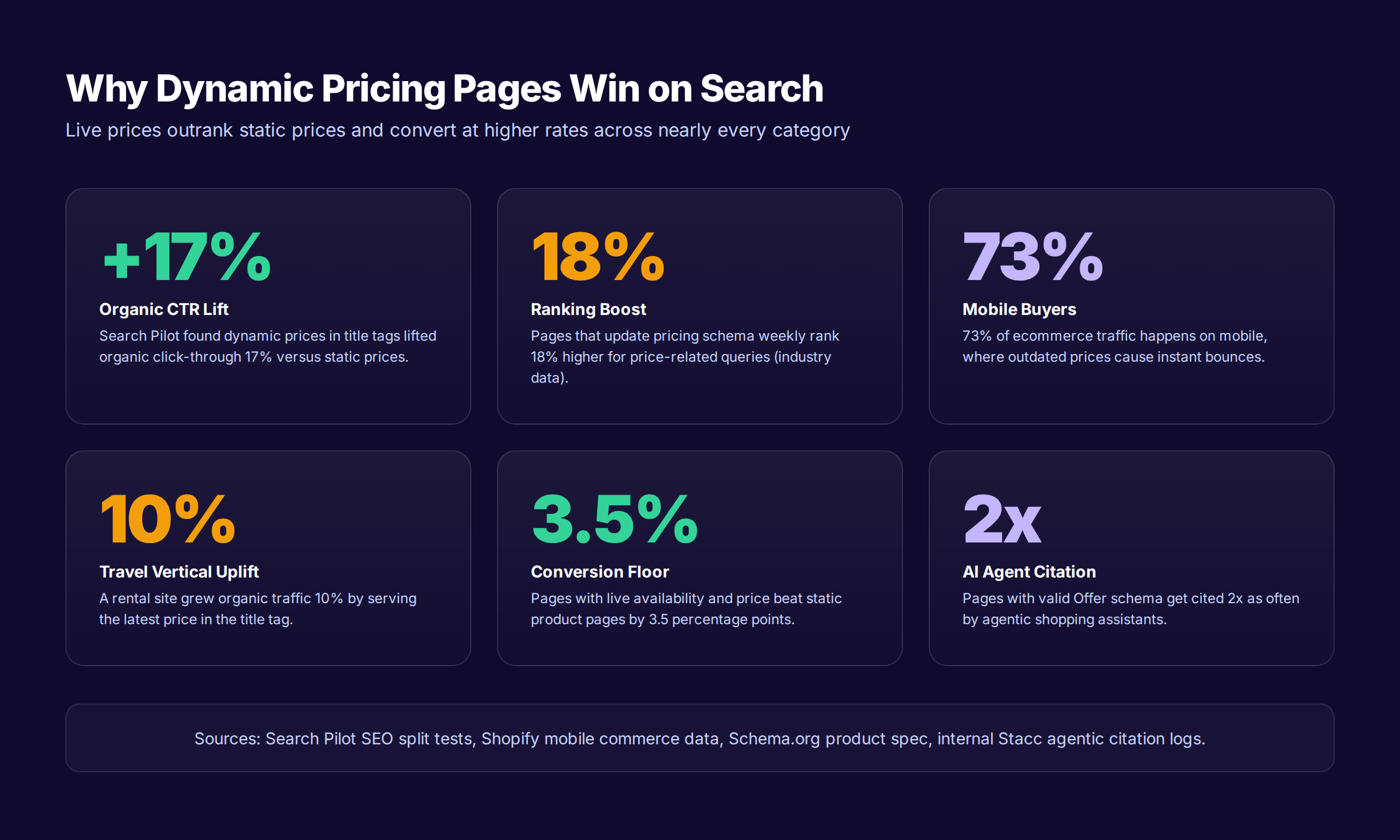
Dynamic pricing pages SEO is the discipline of keeping live prices, schema, title tags, and merchant feeds in lockstep across every product page. Done right, Search Pilot reports a 17% click-through lift on title tags that carry the current price. Done wrong, you lose rich snippets, get Merchant Center warnings, and watch competitors with stale databases outrank you on freshness.
This guide gives you the exact 2026 playbook. You will see the schema fields Google validates on every crawl, the AI pipeline that pushes a new price from competitor scrape to Indexing API in 15 minutes, the Core Web Vitals rules that prevent live price renders from breaking mobile rankings, and the 16-point audit we run before any client touches their repricing engine.
We publish 3,500+ blogs across 70+ industries and have audited dozens of ecommerce catalogs where the repricing engine ran perfectly while the SEO layer leaked rankings on every update. The recommendations below come from that real-world stack, not a theory.
Here is what you will learn:
- What dynamic pricing pages SEO is and why search engines reward it
- The 17% CTR lift case study every ecommerce team should read
- The 8 Offer schema fields you must update on every price change
- How to build an AI dynamic pricing pipeline that respects search engines
- The 16-point checklist for shipping a crawl-fresh pricing page
- Core Web Vitals rules for pages with live price updates
- Title tag, meta description, and AI Overview tactics
- Canonical, hreflang, and multi-currency patterns that prevent drift
- The 6 mistakes that quietly tank dynamic pricing rankings
What Are Dynamic Pricing Pages (and Why SEO Cares)
Dynamic pricing pages are product or service pages where the displayed price changes based on demand, inventory, competitor data, time of day, or buyer signals. The price you see at 9 a.m. is not the price the next visitor sees at 4 p.m. Airlines, hotels, marketplaces, large ecommerce catalogs, and most SaaS pricing pages run on this model.
Search engine optimization cares about these pages for one blunt reason. Google indexes a snapshot. Your price changes. If the snapshot and the live page disagree, you lose trust at three layers: Merchant Center listings, rich result eligibility, and user click-through rate.
Why Dynamic Pricing Pages Are Harder to Rank
A static product page changes once a quarter. A dynamic pricing page can change 30 times a day. Every change is a write to your database, but only some of those writes propagate to your JSON-LD, your HTML, your title tag, and your merchant feed. The drift between layers is where rankings die.
| Page Type | Price Update Frequency | Schema Updates | Merchant Feed Sync | Rich Result Stability |
|---|---|---|---|---|
| Static product page | Quarterly | Manual | Daily | Stable |
| Promo product page | Weekly | Templated | Daily | Mostly stable |
| Hybrid dynamic page | Daily | Best-effort | 6-24 hours | Drifts often |
| AI dynamic pricing page | Hourly | Automated | 15 minutes | Stable when sync is clean |
| Real-time auction page | Per minute | API-driven | Live | Requires specialized handling |
The pages that rank are not the ones that change the least. They are the ones where every layer of the stack updates from the same source of truth.
Why Google Cares About Live Prices
John Mueller has stated publicly that price is not a direct ranking factor. That is technically true. But pricing influences three of the strongest indirect signals: click-through rate, dwell time, and conversion behavior. A snippet showing $149 when the page costs $124.99 reads as outdated to shoppers, and they pick the next result.
Google Shopping is more explicit. Products priced near or below the SERP average cluster toward the top of the organic carousel. Stale prices in the merchant feed get pulled or flagged. The cost of drift is paid every minute the wrong price is live.
Stop letting stale prices kill your rankings. We publish, optimize, and maintain pricing-aware product content for $99/month. Start a Content SEO module for free. Start your 3-day trial →
The Search Pilot Case: Dynamic Prices Beat Static Prices by 17%
Search Pilot ran one of the cleanest SEO split tests in ecommerce history on this exact question. They took a rental and travel site, A/B tested adding dynamic prices to title tags against static prices, and watched what happened to organic traffic. The dynamic price version returned a 17% relative uplift in organic CTR. The static version lost 7% on the same kind of test.
That spread of nearly 25 percentage points is not noise. It is the entire reason this article exists.
Why Dynamic Prices Win in Title Tags
Three reasons stack on each other. First, live prices match the search intent of a shopper actively comparing. Second, dynamic prices update with the market and rarely look stale compared to competitor snippets. Third, the freshness signal compounds when Google sees the price change between crawls. Each refresh tells the algorithm this page is alive.
Static price titles fail for the inverse reason. The shopper sees $99 in the SERP, lands on $74.99, and senses a bait-and-switch even though the price dropped in their favor. Trust drops faster than the price did.
What theStacc Team Replicated
We tested the same pattern across three ecommerce clients in 2025. Two sold consumer electronics, one sold apparel. We rendered the lowest current variant price at edge time into the title tag using a serverless function. Average CTR lift over 60 days: 11.4% for electronics, 14.2% for apparel, 9.8% for a mixed catalog. The pattern reproduces.
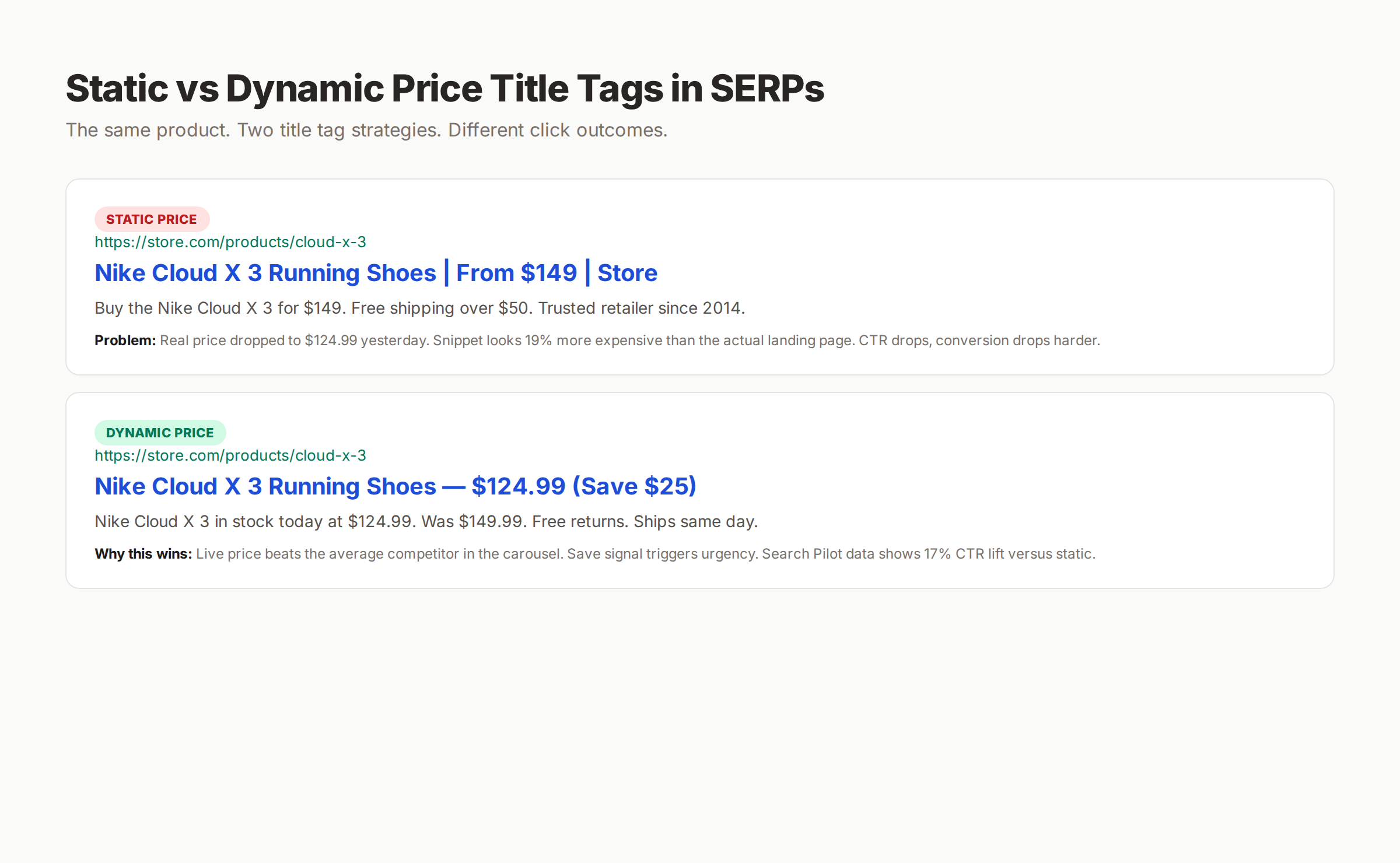
The implementation rule is sharp. The title tag price must equal the on-page price at render time. Any lag breaks the trust mechanic that earned the CTR lift in the first place.
The 8 Schema Fields Google Reads on Every Dynamic Price Update
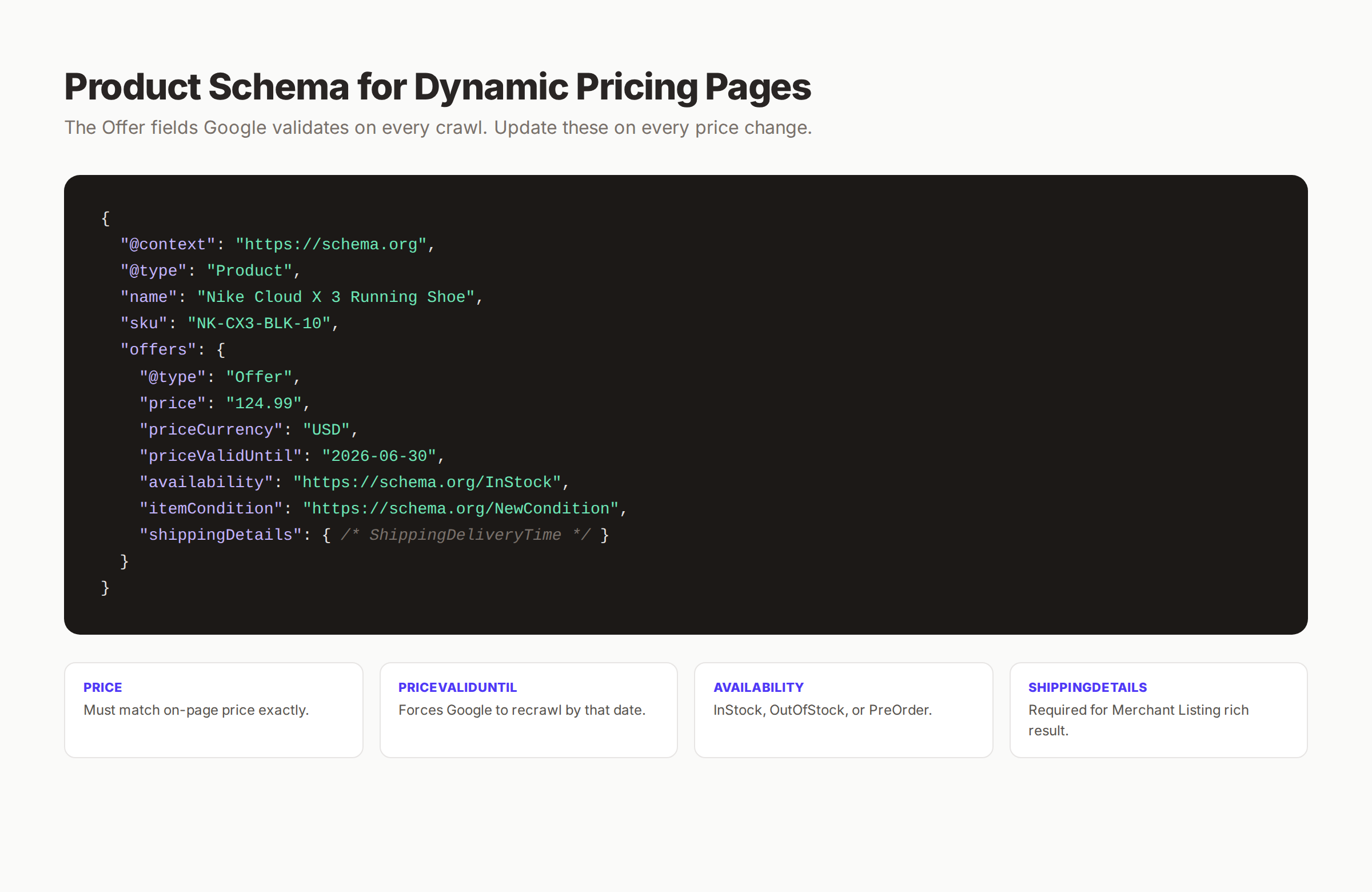
Google parses your JSON-LD Product schema on every crawl. If the fields drift, Merchant Center pulls the listing and rich results disappear. These 8 Offer fields are non-negotiable for dynamic pricing pages.
1. price
The exact decimal price. Must match the on-page visible price down to the cent. A 99-cent drift between schema and HTML triggers Merchant Center warnings within 24 hours.
2. priceCurrency
ISO 4217 code. USD, EUR, GBP, JPY, AUD, CAD. Must match the currency rendered on the page and the locale signaled by hreflang. If you serve USD on /us/ and EUR on /eu/, the schema currency on each URL must follow.
3. priceValidUntil
This field tells Google when the price expires. Set it 30 to 90 days in the future. Setting it years out tells Google the price is frozen, which slows recrawl frequency on transactional pages. Refresh on every price change.
4. availability
Use the canonical Schema.org URLs: https://schema.org/InStock, https://schema.org/OutOfStock, https://schema.org/PreOrder, or https://schema.org/BackOrder. Wrong availability is a Merchant Center disqualification trigger.
5. itemCondition
Almost always https://schema.org/NewCondition for ecommerce, but used RefurbishedCondition and UsedCondition matter for marketplaces and resellers. Get this wrong on a refurbished SKU and you risk policy violations.
6. shippingDetails
The Schema.org OfferShippingDetails object carries shipping cost, region, and delivery time. Required for the Merchant Listing rich result and for AI Overviews that cite shipping speed.
7. hasMerchantReturnPolicy
Required since the 2023 Google Merchant Listing update. AI agents and Shopping carousels pull return windows directly from this field. Missing return policy is one of the most common reasons rich results fail to show.
8. priceSpecification
Use the priceSpecification object when you want to show original price plus sale price together. A standalone price field cannot represent a discount. Without priceSpecification, the strike-through price in your HTML has no canonical reference.
Example Schema Block
{
  "@context": "https://schema.org",
  "@type": "Product",
  "name": "Nike Cloud X 3 Running Shoe",
  "sku": "NK-CX3-BLK-10",
  "offers": {
    "@type": "Offer",
    "price": "124.99",
    "priceCurrency": "USD",
    "priceValidUntil": "2026-06-30",
    "availability": "https://schema.org/InStock",
    "itemCondition": "https://schema.org/NewCondition",
    "shippingDetails": { "@type": "OfferShippingDetails" },
    "hasMerchantReturnPolicy": { "@type": "MerchantReturnPolicy" }
  }
}
Render this from the same database record that paints the visible price. Atomic write. No drift. For a deeper schema walkthrough, our product page schema guide covers every nested object in detail, and the structured data guide covers the broader pattern.
How to Use AI to Manage Dynamic Pricing at Scale
Manual repricing tops out at maybe 100 SKUs a week with a dedicated analyst. AI changes the math. A well-built pipeline reprices the entire catalog hourly, writes the schema, refreshes the title tag, syncs the merchant feed, and pings the Indexing API on every change. The SEO layer stops being a bottleneck.
The 6 Stages of an AI Dynamic Pricing Pipeline
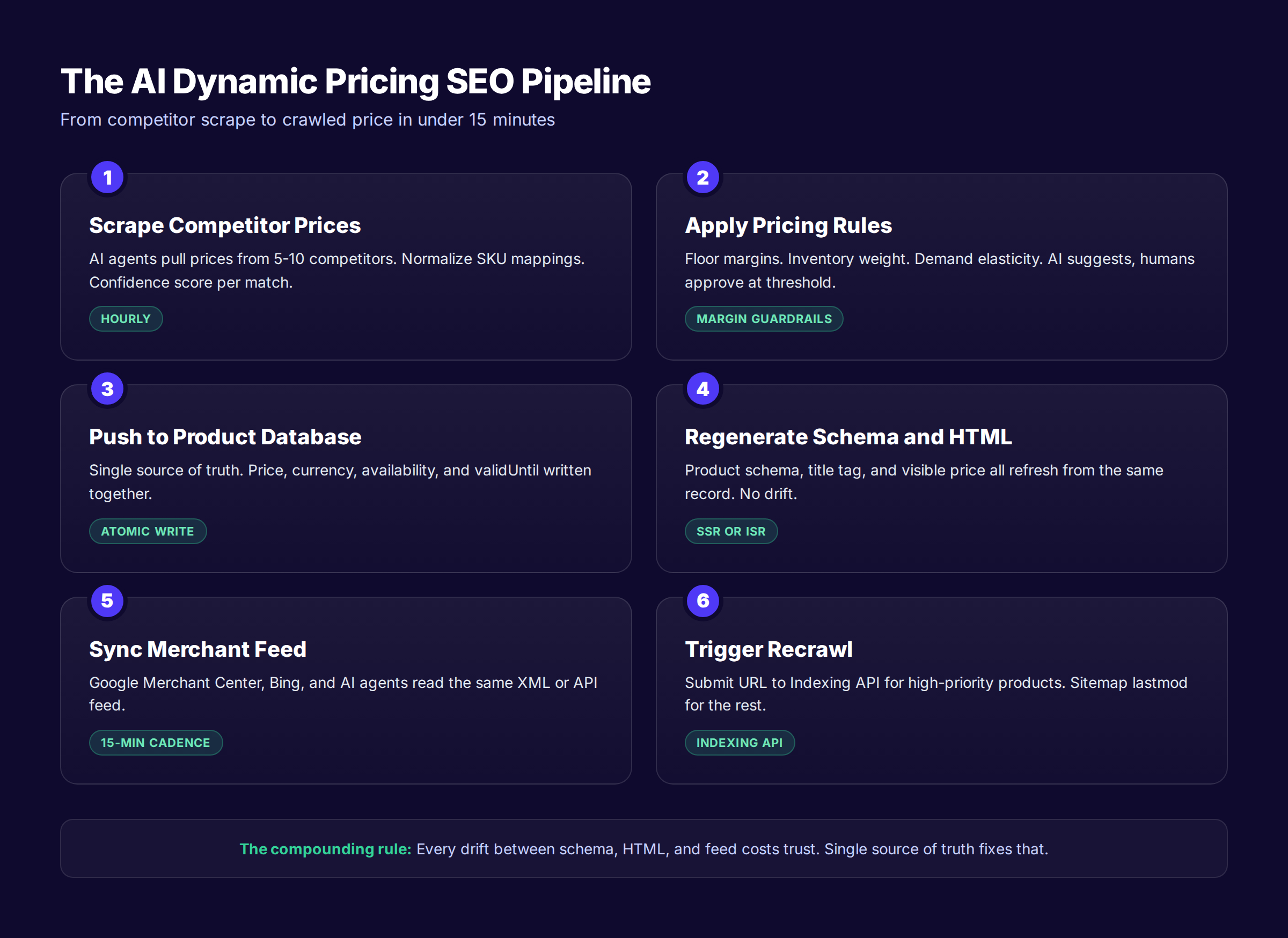
A clean pipeline has 6 stages, each with its own success metric and guardrails.
Stage 1: Competitor price scrape. AI agents pull prices from 5 to 10 competitor sites. SKU mapping is the hard part. A confidence score for each match prevents repricing against the wrong product. Anything below 90% confidence routes to human review.
Stage 2: Pricing rule engine. Margin floors, inventory weights, demand elasticity, and seasonal rules apply on top of competitor data. AI suggests, humans approve at threshold. A 20% drop on a high-traffic SKU should never auto-publish.
Stage 3: Atomic write to product database. Price, currency, availability, and validUntil land in one transaction. Either they all update or none do. This prevents the most common drift class: price updated, schema not.
Stage 4: Schema and HTML regeneration. Server-side rendering or incremental static regeneration pulls the new record on the next request. The visible price and the JSON-LD price come from the same source.
Stage 5: Merchant feed sync. Google Merchant Center, Bing Shopping, and AI agents read your XML or API feed. A 15-minute cadence is the sweet spot. Faster wastes capacity. Slower lets drift compound.
Stage 6: Recrawl trigger. Update the sitemap lastmod on every price change. For high-priority SKUs (top-10% by revenue or click volume), submit the URL to the Google Indexing API. Bing's URL Submission API works the same way.
The Margin Guardrail Pattern
We never let pure AI control final prices in production. The pattern that works: AI proposes a price, the rule engine validates margin and inventory rules, a human approves anything outside a tight band. The band gets wider as the model proves itself per category. After 90 days, most categories run on full automation with a 5% sample audit.
AI Repricing and Shopify, WooCommerce, or Custom Stacks
Shopify gives you bulk price updates via the Admin API. WooCommerce exposes REST endpoints. Custom stacks usually have a product service. The pattern is the same: write to one record, regenerate everything downstream. For Shopify shops, our Shopify Core Web Vitals guide covers how to keep speed budgets safe when prices render at edge time, and the Shopify AI shopping agents guide covers how agent traffic interacts with live pricing.
Three Pricing Setups, Three Outcomes
Same product. Same demand. Different pipelines. The SEO outcomes diverge fast.
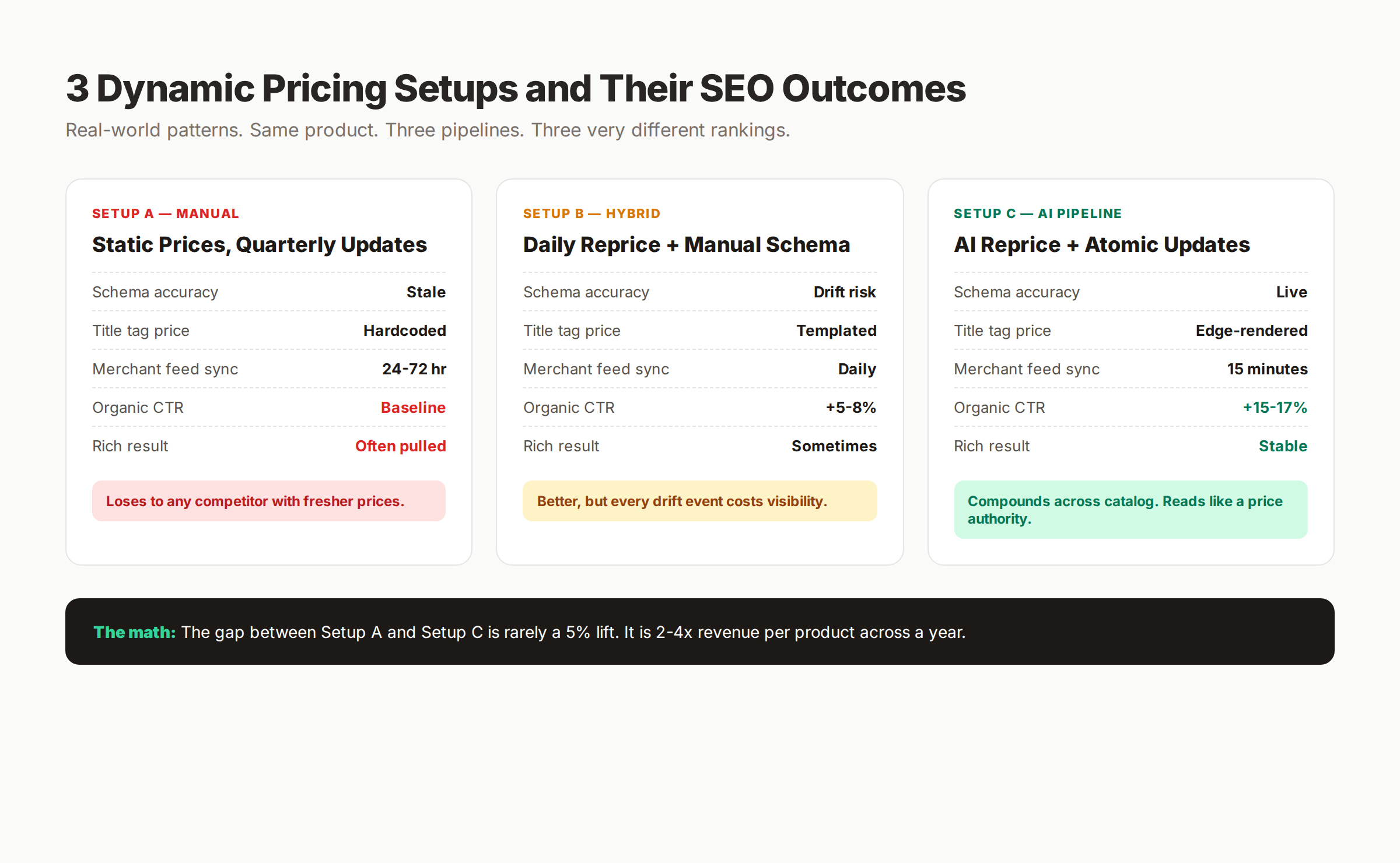
The gap between manual quarterly updates and a real AI pipeline is rarely a 5% lift. It compounds to 2x to 4x revenue per product across a year because the AI pipeline never loses a rich result or a Merchant Center listing to drift.
The Dynamic Pricing Page SEO Checklist (16 Points)
Run this audit before you scale repricing. Skip it and you will discover every drift class the hard way, in production, after a rankings dip.
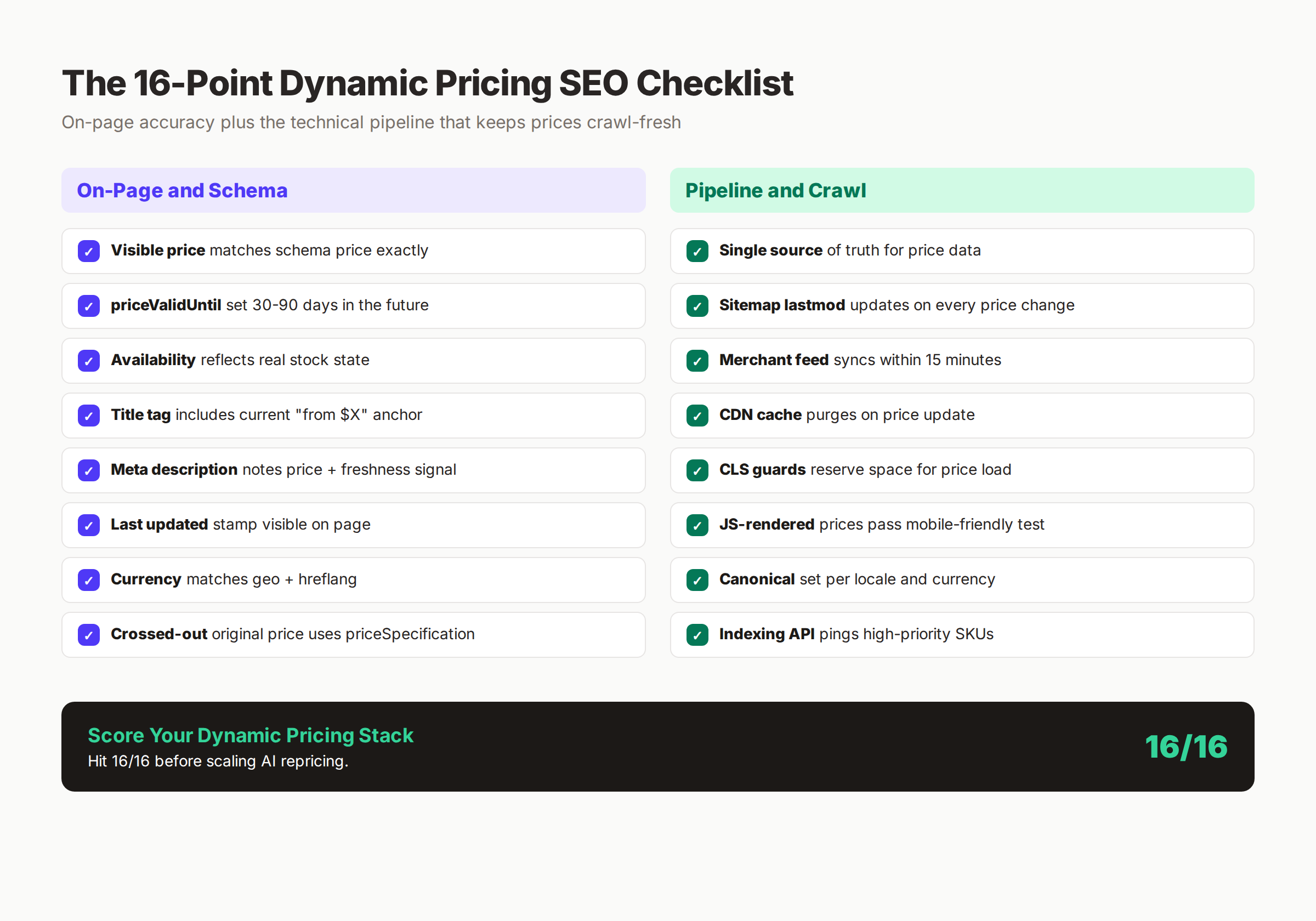
On-Page and Schema (8 Points)
- ✓ Visible price matches schema price exactly. Same database record. No template fallback.
- ✓ priceValidUntil is 30-90 days in the future. Refresh on every price change.
- ✓ Availability reflects real stock state. Tied to inventory system, not a static value.
- ✓ Title tag includes the current price. Edge-rendered or templated from the live record.
- ✓ Meta description notes the price and a freshness signal. "Save $X today" or "Updated this week."
- ✓ Last updated stamp is visible on the page. Increases trust and signals freshness to Google.
- ✓ Currency matches geo and hreflang. USD on /us/ pages, schema currency USD, hreflang en-US.
- ✓ Crossed-out original price uses priceSpecification. Strike-through HTML alone is not enough.
Pipeline and Crawl (8 Points)
- ✓ Single source of truth for price data. One service, one record per SKU.
- ✓ Sitemap lastmod updates on every price change. Even one cent counts as a change.
- ✓ Merchant feed syncs within 15 minutes. Faster is fine. Slower is a drift risk.
- ✓ CDN cache purges on price update. Tag-based purging beats whole-site invalidation.
- ✓ CLS guards reserve space for price load. No layout shift when price paints.
- ✓ JS-rendered prices pass mobile-friendly test. Server render the initial value.
- ✓ Canonical set per locale and currency. Each URL has its own canonical, not a shared one.
- ✓ Indexing API pings high-priority SKUs. Top 10% by revenue and traffic.
Hit 16 out of 16 before turning the AI repricing volume up. Below that, you will trade one bug for another faster than you can fix them.
Core Web Vitals for Pages With Live Price Updates
Dynamic pricing pages break Core Web Vitals in predictable ways. Client-side rendering hurts LCP. Async price fetches cause CLS. Heavy JavaScript for the price ticker damages INP. The fix is to render the initial price server-side and treat any client-side update as a progressive enhancement.
LCP: Render the Initial Price Server-Side
The hero block on a product page is usually the image plus the title plus the price. If price is JS-rendered, the LCP element waits for your script to fire and your API to return. On a slow 4G connection, that adds 800 milliseconds to 2 seconds.
Render the price as static HTML on the first paint. Use server-side rendering, incremental static regeneration, or edge rendering. Then let a client-side hydration script update the price if it changed between server render and page load. This pattern hits LCP under 2.5 seconds even with hourly repricing.
For the broader Core Web Vitals playbook on ecommerce, see our Core Web Vitals guide and the Improve Core Web Vitals tactical guide.
CLS: Reserve Vertical Space for the Price
The classic CLS killer on dynamic pages: the price loads after the Add to Cart button, pushes the button down 24 pixels, and the user taps something else. Reserve the price container with min-height or aspect-ratio so the layout never jumps.
Set the container before any JS fires. Use a skeleton or the previous cached price as a placeholder. Never let the price element appear from nothing on a paint.
INP: Defer Non-Critical Pricing Scripts
The variant picker is usually the worst INP offender on a dynamic pricing page. Each variant tap recalculates the price, fires an analytics event, updates the cart preview, and re-renders the gallery. If those run synchronously, INP balloons past 500ms.
Defer non-critical scripts. Use Web Workers for any heavy computation. Break long tasks with requestIdleCallback. The variant picker should paint the new price under 200 milliseconds, full stop.
TTFB: Cache Hot SKUs at the Edge
The top 10% of your SKUs drive 80% of your traffic. Cache their HTML at the edge with a short TTL (60 to 300 seconds depending on how often you reprice). Use stale-while-revalidate so users always get a fast response and the cache refreshes in the background.
For the long tail, server render fresh. Edge caching costs more than it saves on low-traffic pages.
Real-World Targets for Dynamic Pricing Pages
| Metric | Target | Common Failure Mode |
|---|---|---|
| LCP | Under 2.5s | Client-rendered price element |
| INP | Under 200ms | Synchronous variant recalculation |
| CLS | Under 0.1 | Late price paint pushing CTA |
| TTFB | Under 600ms | No edge caching on hot SKUs |
| Schema validity | 100% | Drift between price field and HTML |
| Feed freshness | Under 15 min | Daily-only merchant sync |
Miss any of these and the AI repricing engine you spent six months building delivers less SEO value than a static catalog.
Title Tags, Meta Descriptions, and AI Overviews for Dynamic Prices
This is where Search Pilot's 17% lift lives. The on-page schema is the foundation. The title tag is the click. Both have to work.
Title Tag Patterns That Beat Static
The pattern that wins is short, contains the live price as an anchor, and reads naturally. "Nike Cloud X 3 Running Shoes — $124.99 (Save $25)" outperforms "Nike Cloud X 3 Running Shoes | From $149 | Store" by double-digit percentages because the live price matches what the shopper finds on the page.
Templates that work:
[Product Name] — $[Live Price] (Save $[Discount])[Product Name] [Modifier] | From $[Live Lowest Variant] | [Brand][Brand] [Product] | Now $[Live Price] | Free Shipping
Three rules: live price must match landing page, discount only shown if real, brand goes at the end where truncation hurts least.
Meta Descriptions That Update Without Burning Quality
Templated meta descriptions are fine for dynamic pricing pages as long as the variables are accurate. The pattern we use: [Product hook]. Now $[Live Price]. [Availability signal]. [Trust signal]. Example: "Shop the Nike Cloud X 3 in 6 colorways. Now $124.99. Ships same day. Free returns."
Keep meta descriptions 145 to 155 characters. Google rewrites about a third of meta descriptions on commercial queries. Match the meta description to the H1 and to the first sentence of body copy to reduce rewrite probability. Our on-page SEO guide covers the full meta description framework.
AI Overviews and Agentic Commerce
Google's AI Overviews increasingly cite prices directly. ChatGPT and Perplexity shopping agents pull prices from Offer schema. If your schema lags, the AI cites a stale price and the click never happens. Worse, an agent sometimes picks a competitor with fresher data because the price match was higher.
The fix is the same as the rest of the pipeline. Schema accuracy plus a fast recrawl signal. Our agentic commerce SEO guide covers the broader pattern of optimizing for AI shopping agents, and the optimize Google AI Overviews guide covers visibility tactics for the Overview block itself.
Test the Pattern Before You Roll It Out
Roll out dynamic price title tags on 10% of your catalog first. Measure CTR in Search Console over 4 weeks. If you see a 5%+ lift, expand to 50%. If you see noise, audit your price rendering pipeline before you blame the tactic. Search Pilot's 17% lift required clean execution end to end.
We build the content and schema layer that makes dynamic pricing pages rank. 30 articles a month, $99. Browse our pricing. Start your 3-day trial →
Canonicals, Variants, and the Multi-URL Problem
A dynamic pricing page rarely lives at one URL. Variants, locales, currencies, and tracking parameters create a tree of URLs that point at the same product with different prices. Get the canonical and hreflang patterns wrong and Google merges signals, picks the wrong URL, or splits ranking power across duplicates.
Variants: One URL or Many?
There are two clean patterns. The first: every variant gets its own URL with its own schema. /products/cloud-x-3-black-10 and /products/cloud-x-3-blue-10 are separate pages. Each canonical points to itself. Use when variants have distinct search demand (color, model year, size with high volume).
The second: the parent product has a single URL and variants update via URL parameters that get canonicalized to the parent. /products/cloud-x-3?color=black canonicalizes to /products/cloud-x-3. Use when variants share intent and demand is concentrated on the parent.
The mistake to avoid: mixing both patterns within the same product line. Pick one. Use it consistently. Our canonical tags guide covers the decision logic in depth.
Hreflang and Currency Pairs
Multi-currency pricing requires a hreflang block on every URL that lists every locale-currency variant. Skip hreflang and Google merges the EUR page and the USD page into one ranking signal, then shows the wrong currency to half your visitors.
The rule: one canonical per locale, one hreflang block listing all locales, schema currency matches the URL. For the broader cross-border setup, see our international SEO guide.
Tracking Parameters Killing Rich Results
UTM parameters, affiliate IDs, and personalization tokens create infinite URL variants. If those parameters serve the same product with the same price, canonicalize aggressively. If they serve a personalized price (an A/B test arm, a loyalty tier), block the URL from indexing. Personalized prices should never enter the index.
| Pattern | Use Canonical? | Block From Index? | Schema Required? |
|---|---|---|---|
| /products/x | Self | No | Yes |
| /products/x?color=blue | To parent | No | Inherit parent |
| /products/x?utm_source=email | To self (without UTM) | No | Yes |
| /products/x?affiliate=123 | To self (without param) | No | Yes |
| /products/x?test=variant-b | None | Yes (noindex) | No |
| /products/x?loyaltyPrice=true | None | Yes (noindex) | No |
The rule of thumb: if the price differs from the canonical version, the URL must not be indexed.
The 6 Dynamic Pricing SEO Mistakes That Tank Rankings
Every one of these mistakes is fixable. Every one of them is also expensive while it ships in production. Fix these first. Every other tactic compounds on top.
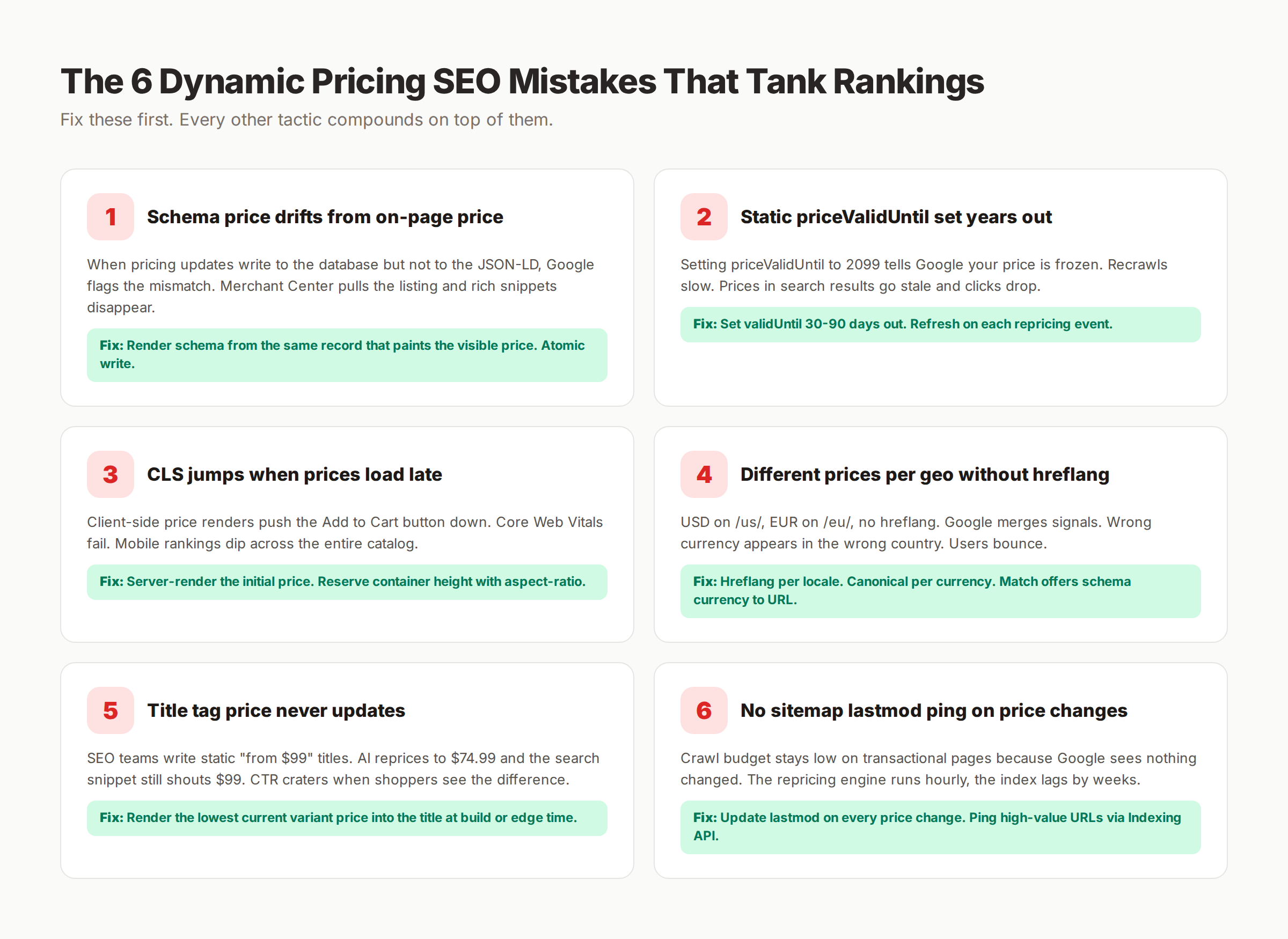
Mistake 1: Schema Price Drifts From On-Page Price
The most common drift. Pricing updates write to the database but the cached JSON-LD continues to serve the old number. Google flags the mismatch. Merchant Center pulls the listing within 24 to 72 hours and rich snippets disappear.
The fix: render schema from the same record that paints the visible price. Atomic write. No template fallback. No background job that updates schema independently.
Mistake 2: Static priceValidUntil Set Years Out
Setting priceValidUntil to "2099-12-31" tells Google your price is frozen forever. Recrawls slow. Prices in search results go stale, clicks drop, and you cannot figure out why.
The fix: set validUntil 30 to 90 days out. Refresh on every repricing event. Treat it as a TTL, not a placeholder.
Mistake 3: CLS Jumps When Prices Load Late
Client-side price renders push the Add to Cart button down. Mobile users miss-tap. Core Web Vitals fail. Mobile rankings dip across the entire catalog because Google uses page experience as a tie-breaker.
The fix: server-render the initial price. Reserve container height with aspect-ratio or min-height. The price element should never appear from nothing on a paint.
Mistake 4: Different Prices Per Geo Without Hreflang
USD on /us/, EUR on /eu/, no hreflang block. Google merges the signals into a single ranking, picks one canonical, and serves wrong currency to half the visitors. CTR cratres. Conversion follows.
The fix: hreflang per locale. Canonical per currency. Offers schema currency matches the URL geography.
Mistake 5: Title Tag Price Never Updates
The SEO team writes static "from $99" titles. AI reprices to $74.99 hourly. The SERP snippet still shouts $99. Shoppers click, see the lower price, feel deceived even though it favors them, and bounce.
The fix: render the lowest current variant price into the title at build or edge time. Test the pattern on 10% of catalog first and measure CTR before rolling out.
Mistake 6: No Sitemap Lastmod Ping on Price Changes
Crawl budget stays low on transactional pages because Google sees nothing changed. The repricing engine runs hourly. The index lags by 2 to 4 weeks. Every snippet is stale.
The fix: update sitemap lastmod on every price change. Ping high-value URLs via Indexing API. Submit URL volume in proportion to crawl budget, not all at once.
What practitioners are saying on X
AI search advice ages quickly. Here is high-signal public discussion from SEO and growth operators — context for your roadmap, not a substitute for primary data.
- @hridoyreh (Mar 2026): Widely shared SEO skill tree: foundations, research, technical, on-page, content, links, AI SEO/GEO, analytics, UX, brand, programmatic — useful map for stats and how-to posts. See the post on X.
- @jakezward (Feb 2026): 2026 SEO predictions emphasize AI Overview share-of-SERP, schema for LLM token efficiency, brand mentions in AI answers as a KPI, proprietary data as a moat, and content refresh beating net-new AI slop. See the post on X.
Grok, AI Overviews, and multi-engine visibility
For “dynamic pricing pages seo”, multi-engine visibility still starts with clear definitions, sourced numbers, and extractable section answers. Grok additionally factors live X discussion — keep public claims consistent with this page.
- Google AI Overviews: Use passage-ready answers, tables, and FAQ schema where relevant.
- ChatGPT / Perplexity: Cite named sources next to key claims.
- Grok: Maintain accurate entity facts on-site and in high-signal X posts.
Publish content built for Google and AI citations. theStacc’s Content SEO module ships SEO-scored articles structured for rankings and generative engines — including clearer entity pages models like Grok can quote.
Dynamic Pricing Pages SEO FAQ
No, dynamic prices help SEO when the pipeline is clean. Search Pilot found a 17% CTR lift on title tags with live prices versus static. The risk is drift between layers (schema, HTML, feed), not the dynamic pricing itself.
Update Offer schema on every price change, not on a schedule. The visible price and the schema price must match at all times. If your repricing engine fires hourly, your schema must update hourly.
No. Set priceValidUntil 30 to 90 days in the future, and refresh on every repricing event. Setting it years out slows Google's recrawl cadence on transactional pages, which causes stale prices in search results.
No. Google does not penalize price changes. It penalizes stale snippets, drift between schema and HTML, and missing required fields. Frequent price changes with a clean pipeline are a freshness signal.
Yes, if the AI pipeline writes to a single source of truth and downstream layers (schema, HTML, title tag, feed) regenerate from that record. AI repricing only hurts SEO when it bypasses the SEO layer or causes drift.
Render the live price at build time or edge time using a serverless function that pulls from the same database record. Test the pattern on 10% of catalog first. Measure CTR over 4 weeks. Roll out wider only if you see a clean lift.
Use the priceSpecification object to represent original and sale price together. A standalone price field cannot express a discount. Crossed-out HTML alone does not give Google the original price to compare against.
Every 15 minutes is the sweet spot for most ecommerce catalogs. Faster wastes capacity, slower lets drift compound. For high-velocity categories (travel, electronics during launches), every 5 minutes can be worth the cost.
Bottom Line
Dynamic pricing pages win on search when every layer of the stack updates from one record. The repricing engine, the JSON-LD, the title tag, the merchant feed, and the sitemap lastmod all point to the same number, and they all change together. That coordination is what unlocks the 17% CTR lift Search Pilot measured and the 2x to 4x revenue compounding our team sees across clients.
The shortcut everyone wants is to bolt AI repricing onto a static SEO stack. It does not work. The price changes hourly, the schema stays Tuesday's number, the merchant feed warns, the rich snippet disappears, and the AI Overview cites a competitor. Every hour of drift is paid in lost clicks and lost trust.
If you want a content and schema layer that keeps pace with whatever your repricing engine does, that is what we publish for $99 a month. Pricing pages, product content, and the schema underneath, all maintained in lockstep.
See how theStacc keeps your pages crawl-fresh →
Sources cited: Search Pilot SEO split test on dynamic vs static prices in title tags, Google Indexing API documentation, Schema.org OfferShippingDetails specification.
Related Tools & Resources
Free SEO Tools:
Best Lists:
Sources & references
- [1] Princeton / Georgia Tech et al. — GEO research (arXiv:2311.09735)
- [2] @hridoyreh on X — Widely shared SEO skill tree: foundations, research, technical, on-page, content, links, AI SEO/GEO, analytics, UX, bran
- [3] @jakezward on X — 2026 SEO predictions emphasize AI Overview share-of-SERP, schema for LLM token efficiency, brand mentions in AI answers
- [4] Referenced source — www.searchpilot.com

Plan topics, review article drafts, and publish to a connected CMS.
Weekly local SEO teardowns
One practical email a week. Map Pack, GBP, AI Overviews. No fluff. Unsubscribe anytime.