Google Maps SEO: how to rank in the local Map Pack with an accurate Business Profile, service areas, reviews, and local landing pages.
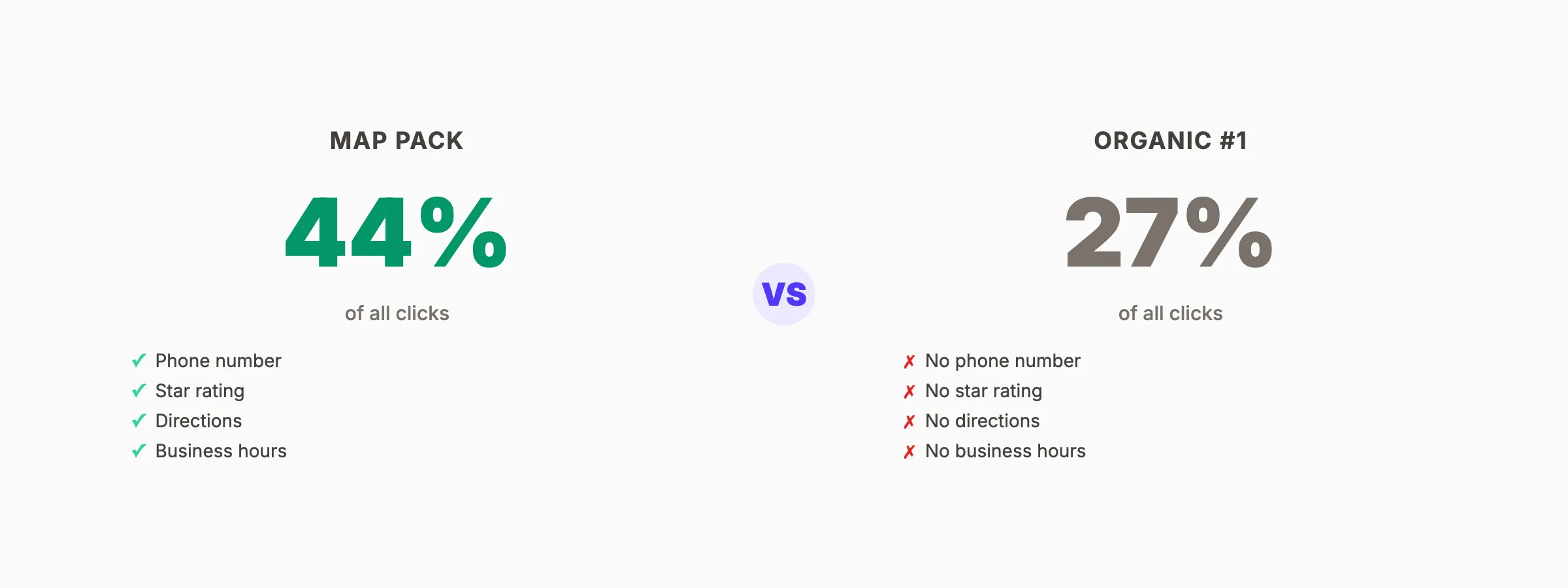
46% of all Google searches have local intent. When someone types "plumber near me" or "best Italian restaurant," Google shows a map with 3 businesses. Those 3 spots get 44% of all clicks on the page. Everyone else is invisible.
Google Maps SEO is how local businesses earn a position in that 3-pack. It is different from traditional SEO. The ranking factors are different. The optimization tactics are different. And the results show up faster.
We have published 3,500+ articles across 70+ industries and helped local businesses across every category rank in the map pack. This guide covers everything you need to know about Google Maps SEO in 2026.
Here is what you will learn:
- How Google Maps rankings work and the 3 factors that determine your position
- A complete Google Business Profile optimization checklist
- The local keyword strategy that targets map pack results specifically
- How to turn Google reviews into a ranking advantage
- Citation building and NAP consistency best practices
- A content strategy that strengthens map pack visibility
What Is Google Maps SEO?
Google Maps SEO is the process of optimizing your business to appear in Google's local map results. These results show up as a map with 3 business listings (the "local 3-pack" or "map pack") at the top of search results for location-based queries.
The map pack appears for searches like:
- "[service] near me"
- "[business type] in [city]"
- "[service] [neighborhood]"
- "best [business type] [location]"
Map pack results display your business name, star rating, review count, address, hours, and phone number. Searchers can click to call, get directions, or visit your website without scrolling past the first screen.
Why Map Pack Rankings Matter More Than Organic
For local businesses, the map pack is more valuable than the #1 organic position.
| Factor | Map Pack | Organic #1 |
|---|---|---|
| Click-through rate | 44% of clicks | 27% of clicks |
| Shows phone number | Yes (tap-to-call) | No |
| Shows reviews | Yes (star rating + count) | No |
| Shows directions | Yes (1-click) | No |
| Shows hours | Yes | No |
| Mobile prominence | Takes full screen | Below the fold |
According to BrightLocal's 2025 local search study, 98% of consumers used the internet to find information about local businesses. 87% used Google specifically. The map pack is the first thing those searchers see.
How Google Maps Rankings Work
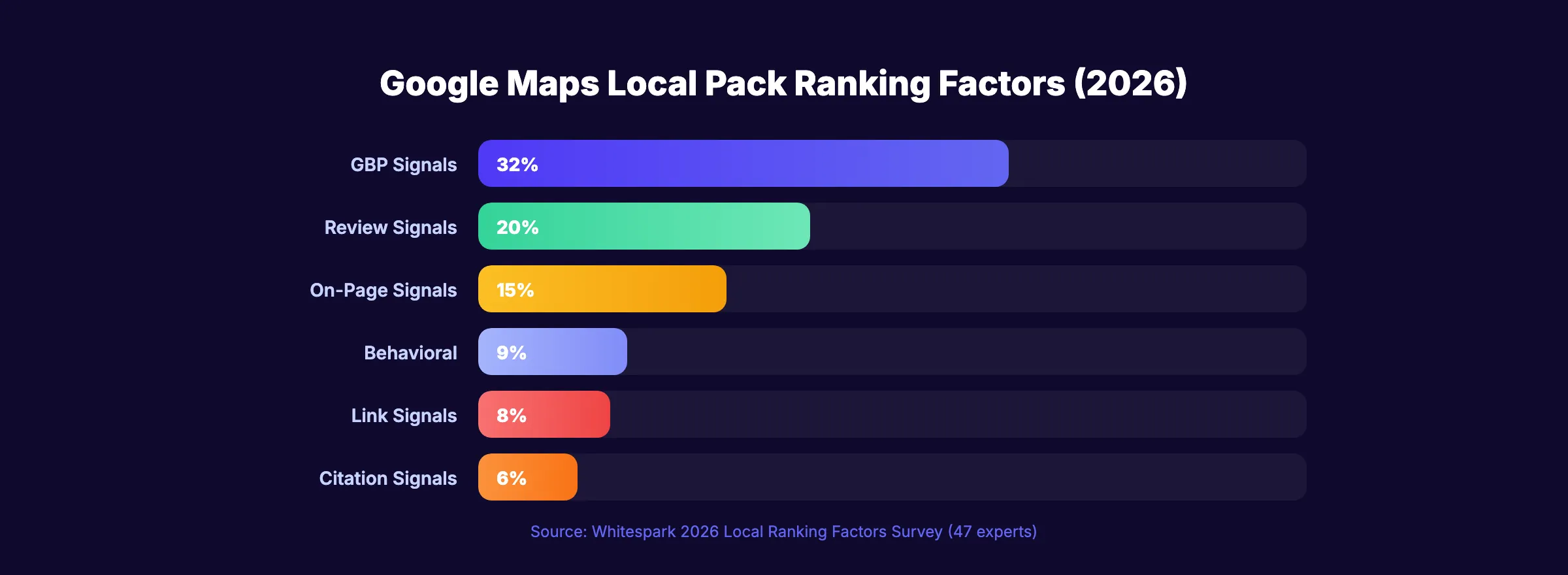
Google uses 3 primary factors to determine map pack rankings. Understanding these factors is the foundation of any Google Maps SEO strategy.
1. Relevance
Relevance measures how well your Google Business Profile matches what the searcher is looking for.
Google determines relevance from:
- Your primary business category
- Your secondary categories (up to 9)
- Your business description
- Your services and products listed
- Reviews that mention specific services
- Content on your website
If someone searches "emergency plumber near me" and your GBP lists "Plumbing" as your primary category with "Emergency Plumbing" as a service, Google considers you relevant. If your profile only says "Home Services," you are less relevant for that specific search.
2. Distance
Distance measures how close your business is to the searcher or the location they specified. This is the factor you have the least control over. Your physical address is your physical address.
But distance is not always the deciding factor. A business 5 miles away with a complete, optimized GBP and 200 reviews can outrank a business 1 mile away with an incomplete profile and 5 reviews. Relevance and prominence override distance when the quality gap is large enough.
3. Prominence
Prominence measures how well-known and trusted your business is. Google evaluates prominence through:
- Review count and rating (the most influential prominence signal)
- Citation consistency across directories
- Backlinks to your website from local sources
- Online mentions of your business name
- Website SEO (on-page optimization, content, domain authority)
- Engagement signals (clicks, calls, direction requests from your GBP)
Prominence is where most of your Google Maps SEO effort should focus. You cannot change your location. But you can dramatically improve your prominence signals.
Rank everywhere. Do nothing. Blog SEO, Local SEO, and Social on autopilot. Starting at $99 per month.
Google Business Profile Optimization Checklist
Your Google Business Profile is the single most important asset for Google Maps SEO. An incomplete or inaccurate profile will not rank, regardless of how strong your other signals are.
Essential Setup
- ✓ Claim and verify your listing (if not done already)
- ✓ Use your exact legal business name (no keyword stuffing)
- ✓ Select the most specific primary category available
- ✓ Add all relevant secondary categories (up to 9)
- ✓ Enter your complete street address (match it exactly to your website)
- ✓ Add your local phone number (not a call tracking number as primary)
- ✓ Set your website URL to a location-specific page (not just your homepage)
- ✓ Define your service area if you serve customers at their location
Profile Content
- ✓ Write a 750-word business description using natural language and target keywords
- ✓ List every service you offer with detailed descriptions
- ✓ Add products with photos, descriptions, and pricing
- ✓ Fill out all attributes (accessibility, amenities, offerings, highlights)
- ✓ Add your founding year
Visual Content
- ✓ Upload at least 50 photos (exterior, interior, team, products, work examples)
- ✓ Add a logo and cover photo
- ✓ Upload short videos (under 30 seconds, showing your business in action)
- ✓ Geo-tag photos with your business location before uploading
- ✓ Add new photos weekly to signal an active profile
Posting and Engagement
- ✓ Post updates at least 4 times per month (weekly is better)
- ✓ Use GBP posts for: promotions, events, new products, and tips
- ✓ Respond to every question in the Q&A section
- ✓ Answer every review (positive and negative)
- ✓ Enable messaging
Hours and Information
- ✓ Keep regular hours accurate
- ✓ Add special hours for holidays and closures
- ✓ Add holiday hours in advance (not the day of)
- ✓ Update hours immediately if they change
Most businesses complete 30 to 40% of their GBP profile and stop. Every empty field is a missed signal. Businesses with 100% complete profiles are 7 times more likely to receive clicks than incomplete profiles.
Local Keyword Strategy for Map Pack Rankings
Google Maps SEO requires a different keyword approach than traditional organic SEO. Map pack results are triggered by location-intent queries. Your keyword strategy must match.
Keyword Categories for Maps
| Category | Pattern | Examples |
|---|---|---|
| Service + Location | [service] in [city] | "plumber in Austin" |
| Near Me | [service] near me | "dentist near me" |
| Best + Location | best [business] [city] | "best pizza Dallas" |
| Neighborhood | [service] [neighborhood] | "hair salon Uptown" |
| Open Now | [service] open now | "auto repair open now" |
| Emergency | emergency [service] near me | "emergency vet near me" |
Where to Place Local Keywords
Local keywords go in specific locations that feed Google Maps rankings:
- GBP business description (naturally, not stuffed)
- GBP service descriptions (each service entry)
- GBP posts (weekly updates mentioning your city and services)
- Website title tags (every page should include your city)
- Website H1 and H2 headings (service + location)
- Website meta descriptions (city + service mentions)
- Image alt text (descriptive, including location)
- Schema markup (LocalBusiness schema with geo coordinates)
Build Location Pages
If you serve multiple cities or neighborhoods, create a dedicated page for each service area.
A plumber in the Dallas metro should have pages for:
/plumbing-services-dallas/plumbing-services-plano/plumbing-services-frisco/plumbing-services-fort-worth
Each page needs unique content. Not the same template with the city name swapped. Google penalizes thin, duplicated location pages. Each page should include:
- Unique introduction about serving that area
- Area-specific testimonials or case studies
- Local landmarks or neighborhood references
- Unique photos from jobs in that area
- NAP information consistent with your GBP
Avoid These Local Keyword Mistakes
- Keyword stuffing your business name. "Joe's Plumbing | Best Plumber Dallas | Emergency Plumber" violates Google's naming guidelines and risks suspension.
- Ignoring "near me" optimization. You do not target "near me" literally. You optimize for relevance + proximity. Google matches "near me" to the closest relevant businesses.
- Targeting only broad terms. "Plumber" is too competitive. "Emergency plumber for water heater repair" is specific and high-converting.
Your SEO team. $99 per month. 30 optimized articles, published automatically. Plus GBP posts starting at $49/month.
Reviews: The Ranking Factor Most Businesses Ignore
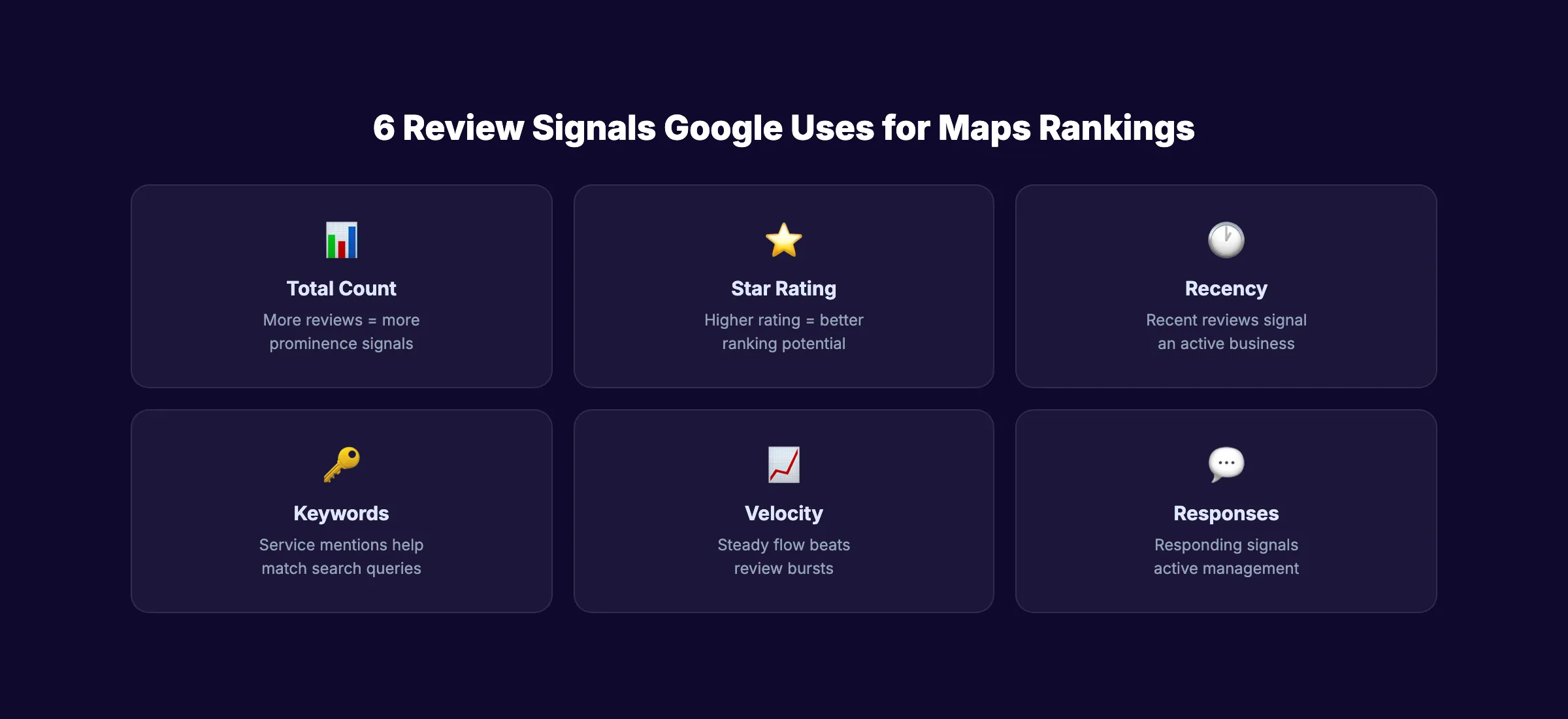
Reviews are the single most influential local ranking factor after your GBP category selection. Google uses review signals for both relevance (what people say about you) and prominence (how many say it).
How Reviews Affect Map Rankings
| Review Signal | How Google Uses It |
|---|---|
| Total review count | Prominence: more reviews = more established |
| Average star rating | Prominence: higher rating = better ranking |
| Review recency | Freshness: recent reviews signal active business |
| Review content | Relevance: keywords in reviews help match queries |
| Review velocity | Consistency: steady flow beats bursts |
| Owner responses | Engagement: responding signals active management |
According to BrightLocal, 88% of consumers trust online reviews as much as personal recommendations. For Google Maps rankings, reviews are the tiebreaker between otherwise equal businesses.
How to Get More Google Reviews
Most satisfied customers never leave reviews unless asked directly. Build a systematic review collection process.
At the point of service:
- Ask every customer before they leave
- Train front-desk staff with a specific script: "Would you mind leaving us a Google review? It really helps other people find us."
- Place a QR code at checkout, waiting areas, and on receipts
After service:
- Send a text or email within 2 hours (while the experience is fresh)
- Use a review request template with a direct link to your Google review form
- Include a 1-click link. Every extra step reduces completion by 50%
Ongoing:
- Set a monthly review target (10+ new reviews per month for competitive markets)
- Track review velocity weekly
- Never offer incentives for reviews. Google prohibits this and will remove incentivized reviews.
Responding to Reviews
Respond to every review. Every single one. Positive reviews get a genuine thank-you. Negative reviews get a professional response that acknowledges the issue and moves the conversation offline.
Response timing matters. Respond within 24 hours. Fast responses signal to Google that you actively manage your profile. They also show future customers that you care about the experience.
Reviews With Keywords
Reviews that mention specific services help your Maps rankings for those terms. A review saying "Best emergency plumber in Austin, they fixed our burst pipe in under an hour" sends strong relevance signals for "emergency plumber Austin" and "burst pipe repair."
You cannot control what customers write. But you can prompt them with specifics: "If you could mention the service we provided, that helps others know what to expect." Most customers are happy to include details when asked.
Citations and NAP Consistency
A citation is any online mention of your business name, address, and phone number. Citations are a core local ranking signal. Consistency across citations tells Google your business information is trustworthy.
Primary Citation Sources
| Priority | Source | Why It Matters |
|---|---|---|
| 1 | Google Business Profile | Your primary listing |
| 2 | Apple Maps / Apple Business Connect | iOS default maps app |
| 3 | Bing Places | Microsoft search + Cortana |
| 4 | Yelp | High domain authority + review platform |
| 5 | Facebook Business | Social signal + business listing |
| 6 | BBB (Better Business Bureau) | Trust signal |
| 7 | Yellow Pages / YP.com | Traditional directory authority |
| 8 | Industry-specific directories | Niche relevance signal |
NAP Consistency Rules
Your Name, Address, and Phone number must be identical across every listing. Not similar. Identical.
- "123 Main Street" and "123 Main St" are different to Google
- "Suite 200" and "Ste 200" are different
- "(512) 555-1234" and "512-555-1234" are different
- "Joe's Plumbing LLC" and "Joe's Plumbing" are different
Pick one format. Use it everywhere. Audit your existing listings quarterly and fix any inconsistencies.
How to Audit Your Citations
- Search your business name + city on Google
- Check the first 20 results for directory listings
- Compare each listing against your GBP information
- Fix any mismatches directly on each platform
- Use a local citation tool to find and manage listings at scale
One incorrect citation on a high-authority directory can suppress your map pack rankings. A mismatched phone number on Yelp, for example, creates a trust conflict that Google resolves by reducing your prominence score.
3,500+ blogs published. Every article is SEO-scored before publish. See what theStacc can do for your local business.
Content Strategy for Local Map Rankings
Your website content directly influences Google Maps rankings. Google connects your GBP to your website and uses website signals as part of the prominence calculation.
Blog Content That Boosts Map Rankings
Publishing regular blog content builds topical authority that strengthens your map pack position. For local businesses, the most effective blog topics are:
Service-specific content:
- "How Much Does [Service] Cost in [City]?"
- "[Service] vs [Alternative]: Which Is Right for You?"
- "Signs You Need [Service] (And What to Do)"
- "How to Choose a [Business Type] in [City]"
Location-specific content:
- "Best [Topic] in [City/Neighborhood]"
- "[City] Guide to [Service Category]"
- "[Seasonal Topic] Tips for [City] Residents"
FAQ and educational content:
- Common questions about your service
- How-to guides related to your industry
- Industry news and trends for your local market
Each blog post should include internal links to your service pages and location pages. This link structure tells Google which pages are most important and connects your content to your GBP through your website.
Publishing Frequency for Local SEO
Local businesses that publish 12 to 20 blog posts per month see the fastest map pack improvements. Each article targets new keywords, adds internal links, and signals site freshness.
Pair blog content with GBP posts. Every new blog article can become a GBP post that drives traffic back to your site while signaling GBP activity.
On-Page SEO for Local Pages
Every page on your site should support your local SEO with:
- Title tags that include your city and primary service
- Meta descriptions with location + service + benefit
- H1 headings with your primary local keyword
- LocalBusiness schema markup on every page
- Your address in the footer of every page
- An embedded Google Map on your contact page
Tracking Your Google Maps Performance
Google Maps SEO takes time. Most businesses see ranking movement in 4 to 8 weeks and significant traffic growth in 3 to 6 months. Track these metrics to measure progress.
Key Metrics to Monitor
| Metric | Where to Find It | What It Tells You |
|---|---|---|
| Map pack position | Manual search or rank tracker | Your visibility for target keywords |
| GBP views | GBP Insights dashboard | How many people see your listing |
| GBP actions | GBP Insights dashboard | Calls, direction requests, website clicks |
| Review count + rating | GBP dashboard | Reputation strength |
| Website organic traffic | Google Analytics | Overall search visibility |
| Local keyword rankings | Google Search Console | Keyword-level performance |
Monthly Tracking Checklist
- ✓ Check map pack position for top 10 target keywords
- ✓ Review GBP Insights for month-over-month trends
- ✓ Count new reviews received vs monthly target
- ✓ Verify all GBP information is current and accurate
- ✓ Check for new competitor listings in your area
- ✓ Audit citations for any new inconsistencies
- ✓ Review blog publishing output vs target
- ✓ Track phone calls and direction requests from GBP
Common Ranking Fluctuations
Map pack rankings fluctuate more than organic rankings. A business that ranks #2 on Monday may rank #4 on Wednesday and #1 on Friday. This is normal.
Google personalizes map results based on:
- The searcher's exact location (within meters)
- Time of day (businesses open now may rank higher)
- Search history and preferences
- Device type (mobile vs desktop results differ)
Track your average position over weeks, not days. Weekly averages smooth out the noise and show real trends.
What practitioners are saying on X
AI search advice ages quickly. Here is high-signal public discussion from SEO and growth operators — context for your roadmap, not a substitute for primary data.
- @noelcetaSEO (Sep 2025): Local SEO playbook still centers complete GBP, NAP consistency, quality citations, local keywords, location content, review velocity, and local links. See the post on X.
- @irentdumpsters (Jan 2026): Most businesses have a GBP; few fully optimize every ranking-relevant section for Map Pack visibility. See the post on X.
- @EldarCohenSEO (Jul 2026): 2026 WhiteSpark-oriented reminder: primary Google Business category is a top Map Pack ranking factor — wrong primary category can erase visibility for money queries. See the post on X.
Grok, AI Overviews, and multi-engine visibility
Local topics like “google maps seo” get cited when GBP, NAP, reviews, and service-area steps are concrete. Grok mixes those web facts with Map Pack operator advice circulating on X.
- Google AI Overviews: Use passage-ready answers, tables, and FAQ schema where relevant.
- ChatGPT / Perplexity: Cite named sources next to key claims.
- Grok: Maintain accurate entity facts on-site and in high-signal X posts.
Rank higher in the Map Pack without a full-time local SEO hire. theStacc’s Local SEO module handles daily GBP posts, review reply workflows, and local visibility tracking — built for service businesses that need calls, not vanity rankings.
FAQ
Most businesses see initial ranking improvements in 4 to 8 weeks after optimizing their GBP. Significant visibility in competitive markets takes 3 to 6 months. The timeline depends on your current profile completeness, review count, competition level, and how consistently you optimize.
Your Google Business Profile category selection and completeness is the foundation. After that, review count and rating are the strongest ranking signals. A business with 200+ reviews and a 4.5+ rating will outrank a closer competitor with 10 reviews in most markets.
Yes, if you serve customers at their location (plumber, locksmith, cleaning service). You can set up a service-area business in GBP without displaying an address. Service-area businesses can rank in the map pack for searches in their defined service area.
Yes. Google connects your GBP to your website and uses website signals as part of the prominence calculation. On-page SEO, content quality, domain authority, and backlinks all contribute to your map pack ranking. A strong website makes every other Maps signal more effective.
There is no magic number. The benchmark is your competitors. If the top 3 map pack businesses in your market have 150, 120, and 90 reviews, you need at least 100 to compete. In low-competition markets, 30 to 50 reviews may be enough. Aim for 10+ new reviews per month.
Google Maps SEO is a subset of local SEO. Local SEO includes map pack rankings, organic local results, citation management, and reputation management. Google Maps SEO focuses specifically on the map pack. The strategies overlap significantly, but map pack optimization emphasizes GBP signals, reviews, and proximity more than traditional on-page factors.
The map pack is the most valuable real estate on Google for local businesses. 3 spots. 44% of clicks. And most of your competitors are doing the bare minimum to compete for them.
Start with a complete, accurate GBP. Build a review collection system. Publish content that targets local keywords. And if producing that content feels like a full-time job, 30 optimized articles cost $99 per month when publishing happens automatically.
Related Tools & Resources
Free SEO Tools:
Best Lists:
Sources & references
- [1] Princeton / Georgia Tech et al. — GEO research (arXiv:2311.09735)
- [2] @noelcetaSEO on X — Local SEO playbook still centers complete GBP, NAP consistency, quality citations, local keywords, location content, rev
- [3] @irentdumpsters on X — Most businesses have a GBP; few fully optimize every ranking-relevant section for Map Pack visibility.
- [4] @EldarCohenSEO on X — 2026 WhiteSpark-oriented reminder: primary Google Business category is a top Map Pack ranking factor — wrong primary cat
- [5] Referenced source — www.brightlocal.com

Manage Google Business Profile posts, review replies, and local rank tracking.
Weekly local SEO teardowns
One practical email a week. Map Pack, GBP, AI Overviews — no fluff. Unsubscribe anytime.
Explore this topic: Top 10 Best Google Maps Ranking Tools (2026) · Google Maps Marketing.