
WordPress vs Webflow for SEO: Honest Comparison (2026)
WordPress vs Webflow for SEO compared with real Core Web Vitals data, schema, speed benchmarks, and cost analysis. Updated April 2026.
Siddharth Gangal • 2026-04-02 • SEO Tips
In This Article
Choosing the wrong CMS costs more than money. It costs rankings, speed, and months of migration work if you switch later.
WordPress powers 42.5% of all websites. Webflow powers under 1%. Yet among the world’s top 1,000 highest-traffic sites, Webflow’s share jumps to 4.2%. That gap tells a story worth examining.
This is the WordPress vs Webflow SEO comparison built on real performance data, not opinions. We break down speed benchmarks, technical SEO capabilities, schema support, security, content scalability, and total cost of ownership.
We have published 3,500+ SEO articles across 70+ industries on both WordPress and Webflow sites. This comparison comes from operational experience, not spec sheets.
Here is what you will learn:
- Which platform has better Core Web Vitals scores (with data)
- How technical SEO features compare side by side
- Where each CMS hits its content scaling limit
- The real total cost of SEO on each platform
- A decision framework based on your business type and budget
Quick Verdict
Best for SEO plugin ecosystem: WordPress
Best for clean code and speed out of the box: Webflow
Best for content teams publishing at scale: WordPress
Best for design-first sites with moderate content: Webflow
Both platforms can rank on Google. The question is not “which one ranks” but “which one costs you less time, money, and technical debt to rank.” The answer depends on your content volume, team size, and technical resources.
What Is WordPress?
WordPress is an open-source content management system that started as a blogging platform in 2003. It now powers roughly 60% of all CMS-driven websites globally.
The platform runs on PHP and MySQL. You install it on your own hosting, choose a theme, and extend functionality through plugins. There are over 60,000 plugins available. For SEO specifically, Yoast SEO and Rank Math are the two dominant plugins, with Yoast installed on over 13 million sites.
WordPress is best for: Businesses that need maximum flexibility, publish large volumes of content, or require custom functionality through plugins and custom development.
What Is Webflow?
Webflow is a visual website builder and hosted CMS launched in 2013. It generates clean HTML, CSS, and JavaScript without requiring you to write code.
Unlike WordPress, Webflow handles hosting, security, and infrastructure on its own managed platform. You design visually, and Webflow outputs production-ready code. The platform had $213 million in revenue in 2024 and a $4 billion valuation.
Webflow is best for: Design-focused teams, agencies building client sites, and businesses that want fast page speed without managing hosting infrastructure.
Head-to-Head SEO Feature Comparison
| Feature | WordPress | Webflow |
|---|---|---|
| Meta title and description | Via plugin (Yoast, Rank Math) | Native |
| XML sitemap | Via plugin (auto-generated) | Native (auto-generated) |
| Robots.txt control | Via plugin or file edit | Native editor |
| Canonical URLs | Via plugin | Native |
| 301 redirects | Via plugin or .htaccess | Native redirect manager |
| Schema markup | Via plugin (auto-generated) | Manual code embed |
| Open Graph tags | Via plugin | Native |
| Alt text for images | Native | Native |
| Custom URL slugs | Native | Native |
| Hreflang (international SEO) | Via plugin (WPML, Polylang) | Native localization |
| Blog CMS | Native (built for blogging) | CMS collections |
| Page speed optimization | Requires plugins + hosting config | Built into platform |
| CDN | Depends on host (Cloudflare, etc.) | Included (AWS/Fastly) |
| SSL certificate | Depends on host | Included |
The pattern is clear. WordPress requires plugins for most SEO functionality. Webflow includes most features natively. Neither approach is inherently better. Plugin dependency adds maintenance overhead. Native features limit customization depth.
Site Speed and Core Web Vitals
Page speed is a confirmed Google ranking factor. Core Web Vitals measure three metrics: Largest Contentful Paint (LCP), Interaction to Next Paint (INP), and Cumulative Layout Shift (CLS).
Here is what the real data shows.
Performance Benchmarks
| Metric | Webflow | WordPress |
|---|---|---|
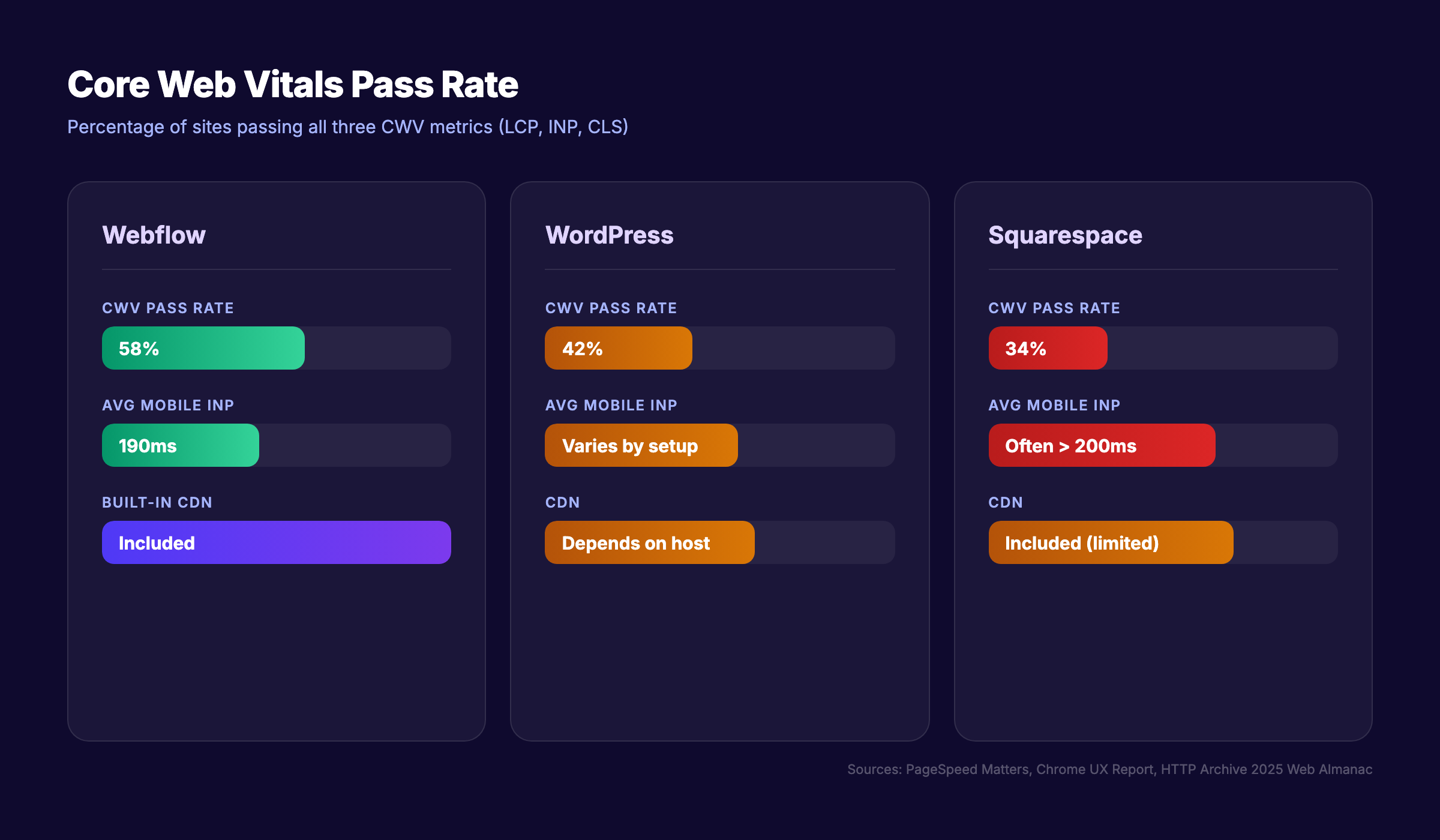
| Core Web Vitals pass rate | 58% | 42% |
| Average mobile INP | 190ms | Varies by theme/plugins |
| INP threshold | Under 200ms (good) | Often over 200ms |
| Median mobile page weight | Lighter (no plugin overhead) | 2,362 KB median |
Sources: PageSpeed Matters, HTTP Archive 2025 Web Almanac
Webflow wins on speed out of the box. Its managed hosting, built-in CDN, and clean code output produce faster sites without configuration. The 58% Core Web Vitals pass rate beats WordPress at 42% and Squarespace at 34%.
WordPress speed varies enormously. A WordPress site on premium hosting with a lightweight theme and minimal plugins can match or beat Webflow. But the median WordPress site carries 2,362 KB on mobile. Elementor (used by 43% of WordPress sites) adds significant JavaScript overhead.
What This Means for Rankings
Google does not rank one CMS over another. It ranks pages. A fast WordPress site outranks a slow Webflow site every time. But achieving speed on WordPress requires more work: choosing the right host, optimizing images, managing caching plugins, and auditing theme performance.
Webflow delivers good speed with zero configuration. WordPress delivers great speed with deliberate optimization.
Stop writing. Start ranking. Stacc publishes 30 SEO articles per month for $99. Works with WordPress and Webflow. Start for $1 →
Technical SEO Capabilities
Technical SEO determines whether Google can crawl, index, and understand your pages. Both platforms handle the basics. The differences appear in depth and control.
Crawlability and Indexation
WordPress gives you direct access to robots.txt, .htaccess files, and server-level configuration. You control everything. Plugins like Yoast generate XML sitemaps automatically and let you exclude specific post types or taxonomies.
Webflow provides a visual robots.txt editor and auto-generates sitemaps. The control is simpler but more limited. You cannot add custom directives beyond what the interface allows.
Winner: WordPress for advanced control. Webflow for simplicity.
URL Structure
Both platforms support custom URL slugs. WordPress defaults to /?p=123 unless you change the permalink structure (most users set it to /%postname%/). Webflow generates clean URLs by default.
WordPress supports deeper URL nesting: /blog/category/post-name/. Webflow’s CMS collections create URLs like /blog/post-name with one level of nesting. For most sites, this difference does not matter. For complex site architecture, WordPress offers more flexibility.
Server-Side Rendering
WordPress renders pages on the server by default (PHP generates HTML). This is ideal for SEO. Googlebot receives fully rendered HTML on the first request.
Webflow also serves pre-rendered HTML from its CDN. Pages load fast and arrive fully rendered. Neither platform has a client-side rendering problem for SEO.
Some WordPress page builders (Elementor, Divi) inject heavy JavaScript that delays rendering. Some Webflow interactions use client-side JavaScript that can delay INP scores. Both platforms have potential JavaScript SEO issues depending on how the site is built.
Redirect Management
WordPress handles redirects through plugins (Redirection, Yoast Premium) or manual .htaccess edits. The plugin approach is easier. The .htaccess approach is faster (server-level redirects fire before WordPress loads).
Webflow has a built-in 301 redirect manager in the dashboard. Simple and effective. Limited to path-based redirects. No regex support. No conditional redirects.
Winner: WordPress for complex redirect needs. Webflow for straightforward redirect management.
Schema Markup and Structured Data
Schema markup helps search engines understand your content. It powers rich snippets, FAQ accordions, review stars, and knowledge panels in search results.
WordPress Schema
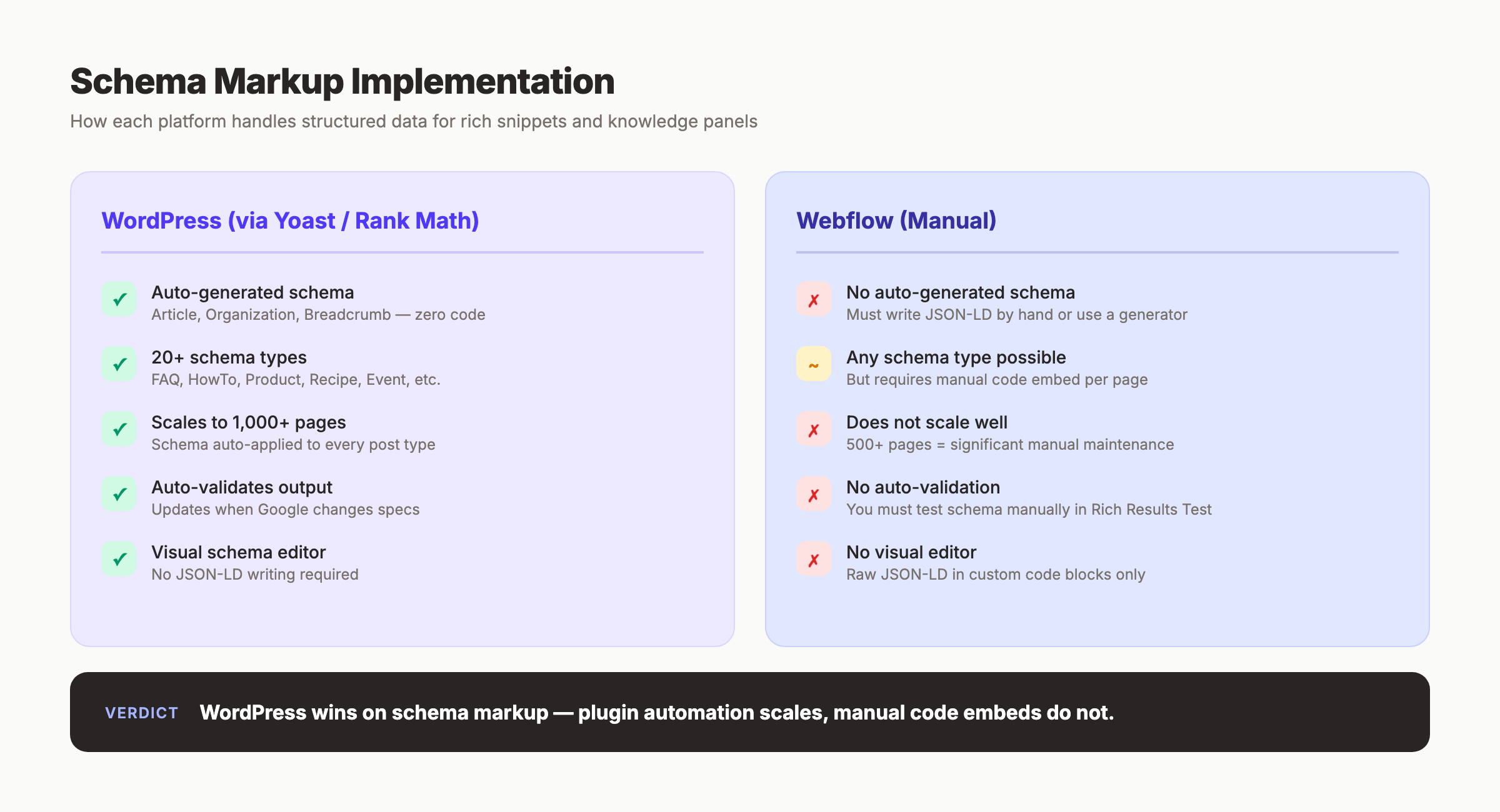
Yoast SEO and Rank Math auto-generate schema for articles, organizations, breadcrumbs, FAQs, and products. Install the plugin, configure your settings, and schema appears on every page automatically. No code required.
Rank Math supports 20+ schema types. Yoast covers the core types. Both validate output against Google’s requirements. Both update when Google changes schema specifications.
Webflow Schema
Webflow does not auto-generate schema. You add structured data by embedding JSON-LD in custom code blocks on each page or in site-wide settings.
This means you write (or generate) the JSON-LD yourself. There is no visual interface. No validation. No automatic updates when schema specifications change.
For a 10-page site, manual schema is manageable. For a 500-page site, it becomes a maintenance problem.
Verdict on Schema
WordPress wins on schema. Plugin-based auto-generation scales to thousands of pages without extra work. Webflow requires manual implementation that does not scale well for content-heavy sites.
Content Management at Scale
Your CMS choice matters most when you publish regularly. A blog posting once per month has different needs than one publishing 30 articles per month.
WordPress Content Scaling
WordPress was built for content. It handles millions of posts without architectural limits. The admin panel supports multiple authors, editorial workflows, scheduled publishing, categories, tags, and custom post types.
For teams building topical authority through high-volume publishing, WordPress has no real ceiling. Sites with 100,000+ posts run without issues when properly hosted.
Webflow Content Scaling
Webflow’s CMS has hard limits:
| Limit | Amount |
|---|---|
| CMS items (Business plan) | 10,000 |
| Items per collection | 5,000 |
| Reference fields | 5 per collection |
| Items per collection list | 100 |
| CMS collections | 40 |
For a blog publishing 30 posts per month, you hit 5,000 items in under 14 years. That sounds like plenty. But if you also use CMS collections for team members, case studies, testimonials, categories, and landing pages, those 10,000 items get consumed faster.
The 100-item limit per collection list is more immediately limiting. Paginating blog archives or category pages requires workarounds.
Programmatic SEO
WordPress excels at programmatic SEO. Custom post types, Advanced Custom Fields, and WP_Query let you create thousands of templated pages from structured data. Location pages, product pages, comparison pages, and directory listings scale easily.
Webflow’s CMS collections support basic programmatic content, but the 10,000-item limit and 40-collection cap restrict large-scale programmatic builds.
Winner: WordPress for content at scale. Webflow for sites under 5,000 pages.
Your SEO team. $99 per month. 30 optimized articles, published automatically to WordPress or Webflow. Start for $1 →
Security and Its SEO Impact
A hacked site loses rankings. Google flags compromised sites in search results. Downtime from attacks means Googlebot cannot crawl your pages. Security is an SEO issue.
WordPress Security Reality
The Patchstack State of WordPress Security 2026 report found 11,334 new vulnerabilities in the WordPress ecosystem in 2025. That is a 68% increase from the prior year.
Key detail: 91% of those vulnerabilities are in plugins, not WordPress core. WordPress core had only 6 vulnerabilities. The risk comes from third-party code, not the platform itself.
This means security depends on your maintenance discipline:
- Updating plugins regularly
- Removing unused plugins
- Using a security plugin (Wordfence, Sucuri)
- Choosing a host with server-level protection
- Running regular backups
Neglect any of these, and your site becomes a target. That affects uptime, which affects crawlability, which affects rankings.
Webflow Security Reality
Webflow handles security at the platform level. There are no plugins to exploit. SSL is included. Hosting infrastructure is managed by Webflow’s engineering team. DDoS protection is built in.
You cannot install third-party code that introduces vulnerabilities (beyond custom embeds). The attack surface is dramatically smaller.
Winner: Webflow for security with zero maintenance. WordPress if you have a dedicated developer or ops person managing updates.
Hosting and Infrastructure
WordPress Hosting
WordPress hosting ranges from $3 per month shared hosting to $200+ per month managed hosting. The host you choose directly affects page speed, uptime, and security.
Shared hosting ($3-15 per month): Slow. Shared resources. Fine for personal blogs. Not suitable for business sites targeting SEO rankings.
Managed WordPress hosting ($25-200 per month): Kinsta, WP Engine, Cloudways. Server-level caching, automatic backups, staging environments, and CDN included. This is where WordPress performance matches or beats Webflow.
The hidden cost: WordPress hosting quality directly determines SEO performance. Cheap hosting produces slow sites. Slow sites rank worse. The “$5 per month WordPress site” is a myth for anyone serious about SEO.
Webflow Hosting
Webflow hosting is included in your plan:
| Plan | Price | CMS Items |
|---|---|---|
| Basic | $18/mo | No CMS |
| CMS | $29/mo | 2,000 items |
| Business | $49/mo | 10,000 items |
| Enterprise | Custom | Custom |
Every plan includes SSL, CDN, and managed infrastructure. No configuration needed. No security patches. No hosting management.
Total Cost Comparison
| Cost Category | WordPress | Webflow |
|---|---|---|
| Hosting | $25-200/mo (managed) | $29-49/mo (included) |
| SEO plugin | $0-99/yr (Yoast/Rank Math) | $0 (native) |
| Security plugin | $0-300/yr | $0 (included) |
| Caching plugin | $0-50/yr | $0 (included) |
| Theme | $0-80 one-time | $0 (you design it) |
| CDN | $0-20/mo | $0 (included) |
| Developer maintenance | $50-200/mo | $0-50/mo |
| Annual total (typical) | $900-4,500 | $348-588 |
WordPress costs more when you factor in managed hosting, plugin licenses, security, and maintenance. Webflow costs less but limits your scalability and plugin ecosystem.
When to Choose WordPress for SEO
Choose WordPress if:
- You publish more than 50 articles per month
- You need programmatic SEO at scale (location pages, product directories)
- Your content strategy requires custom post types and advanced taxonomies
- You need 10+ content authors with different permission levels
- Schema markup automation is critical for your content types
- You have a developer (or budget for one) to manage updates and optimization
- You plan to exceed 10,000 pages over the life of the site
- You need specific plugin functionality that Webflow cannot replicate
WordPress is the better choice for content-heavy businesses, publishers, and ecommerce sites where scale and flexibility outweigh simplicity.
When to Choose Webflow for SEO
Choose Webflow if:
- Your site will stay under 5,000 pages total
- Page speed matters and you do not want to manage hosting optimization
- Your team is design-focused and values visual editing over code access
- You do not have a developer for ongoing WordPress maintenance
- Security without maintenance effort is a priority
- You publish fewer than 30 articles per month
- Your budget favors predictable, all-inclusive pricing
- International SEO with native localization matters to you
Webflow is the better choice for design-driven businesses, agencies, and small teams that prioritize speed and simplicity over scale.
3,500+ blogs published. 92% average SEO score. See what Stacc can do for your site. Start for $1 →
Decision Matrix by Business Type
| Business Type | Recommended CMS | Reason |
|---|---|---|
| Local service business (plumber, dentist) | Either | Both work fine under 500 pages |
| SaaS company blog | WordPress | Scale, custom taxonomies, integrations |
| Design agency portfolio | Webflow | Visual control, speed, client handoff |
| Ecommerce (non-Shopify) | WordPress + WooCommerce | Plugin ecosystem, product SEO |
| Media or publishing company | WordPress | No CMS item limits, multi-author workflows |
| Startup landing page + blog | Webflow | Fast launch, included hosting, clean code |
| Enterprise with 50+ editors | WordPress | Permission management, editorial workflows |
| Freelancer or consultant | Webflow | Low maintenance, predictable cost |
FAQ
Is Webflow better than WordPress for SEO?
Neither platform is inherently better for SEO. Webflow produces faster sites with less configuration. WordPress offers deeper SEO tooling through plugins. A well-optimized WordPress site and a well-built Webflow site both rank on Google. The difference is in operational effort, not ranking potential.
Can Webflow rank on Google?
Yes. Webflow sites rank on Google. Among the world’s top 1,000 websites, Webflow’s market share is 4.2%, more than 3 times its overall share. This suggests Webflow sites perform well in organic search when built correctly.
Does WordPress have better SEO plugins than Webflow?
WordPress has a massive SEO plugin ecosystem. Yoast and Rank Math auto-generate schema, manage sitemaps, and optimize on-page elements. Webflow handles meta tags and sitemaps natively but lacks equivalent plugin depth. For schema markup at scale, WordPress plugins are significantly more capable.
Is Webflow faster than WordPress?
On average, yes. Webflow sites pass Core Web Vitals at a 58% rate compared to 42% for WordPress. However, WordPress on managed hosting with a lightweight theme can match Webflow’s speed. The speed gap is a default vs. optimized comparison.
Can I migrate from WordPress to Webflow without losing rankings?
Yes, if you handle site migration correctly. Map all URLs, implement 301 redirects for every page, preserve title tags and meta descriptions, and submit the updated sitemap to Google Search Console. Expect a temporary ranking fluctuation for 2 to 8 weeks.
Which platform is better for blogging?
WordPress. It was built as a blogging platform and has no content limits. Webflow’s CMS collections work for blogs under 5,000 posts but lack the editorial workflow depth, category management, and plugin integrations that WordPress offers for serious publishing operations.
The Bottom Line
WordPress vs Webflow for SEO is not about which platform ranks better. Both rank. The real question is which platform fits your content volume, team size, technical capacity, and budget.
Pick WordPress if you plan to publish at scale and have the resources to maintain it. Pick Webflow if you want speed and simplicity without a developer on call. Either way, the CMS is the foundation. The content, technical optimization, and internal linking strategy you build on top of it determine whether you rank.
Rank everywhere. Do nothing. Blog SEO, Local SEO, and Social on autopilot. Stacc starts at $99/mo with a $1 trial. Start for $1 →
Written and published by Stacc. We publish 3,500+ articles per month across 70+ industries. All data verified against public sources as of March 2026.
