
URL Structure SEO (2026): Strategies, Tactics & Examples
Practical url structure seo strategies for 2026: step-by-step tactics, real examples, and tools to improve rankings and drive organic traffic.
A Backlinko study of 11.8 million Google search results found that URLs in position 1 are 9.2 characters shorter than URLs in position 10. That is not a coincidence.
URL structure is one of the simplest ranking factors to get right. Yet most websites still use auto-generated URLs filled with random numbers, redundant folders, and parameter strings that confuse both users and search engines.
Google’s own documentation states that simple, descriptive URLs help users and crawlers understand page content. John Mueller has called URL structure “a very, very lightweight ranking factor.” But lightweight does not mean irrelevant. URLs affect crawl efficiency, click-through rates, internal link equity, and how AI search engines parse your site.
This guide covers everything about URL structure SEO in 2026. We publish 3,500+ blog posts across 70+ industries. Every one follows the URL rules you will learn here.
Here is what you will learn:
- What makes a URL “SEO-friendly” and why it matters
- The 8 rules Google recommends for clean URL structures
- How to structure URLs for blogs, ecommerce, and local pages
- When to use subdomains vs. subfolders (with data)
- How to migrate URLs without losing rankings
- The most common URL mistakes and how to fix them
What URL Structure Is and Why It Matters for SEO
A URL (Uniform Resource Locator) is the address of a page on the web. Every page has one. The structure of that URL tells Google, users, and AI search engines what the page is about before they ever click on it.
The Anatomy of a URL
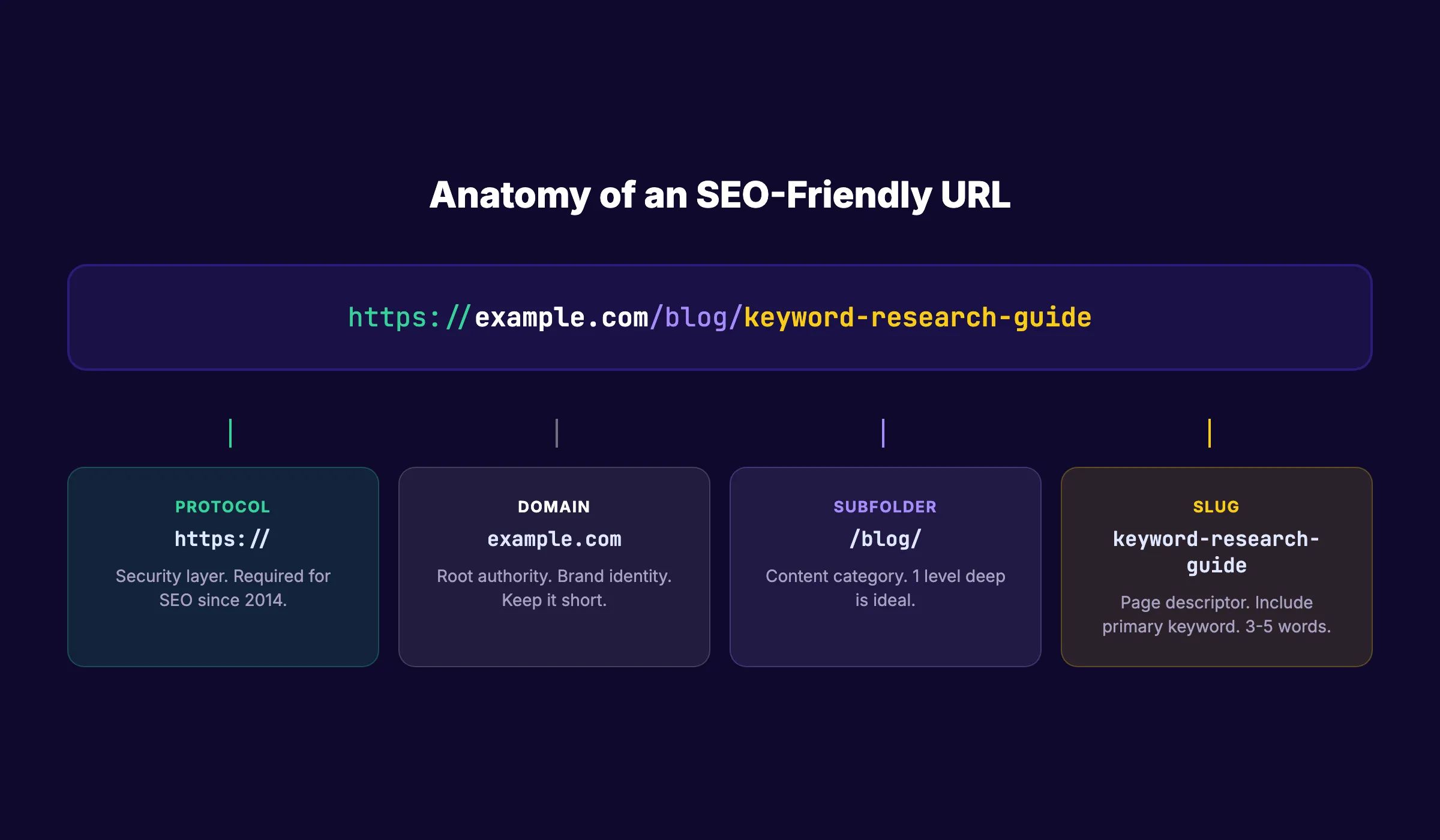
A standard URL has 5 parts:
https://example.com/blog/keyword-research-guide
| Part | Example | Purpose |
|---|---|---|
| Protocol | https:// | Security layer. HTTPS is required for SEO. |
| Domain | example.com | Your brand identity and root authority. |
| Subdirectory | /blog/ | Organizes content into categories. |
| Slug | keyword-research-guide | Describes the specific page content. |
| Parameters (optional) | ?ref=email | Tracks campaigns. Not indexed by default. |
The slug is the part you control most. It is also the part that matters most for on-page SEO.
Why URL Structure Affects Rankings
Google uses URLs in 3 ways:
1. Crawl discovery. Googlebot follows links to find new pages. Clean, logical URL paths help the crawler map your site faster. A flat, organized structure means fewer crawl budget wasted on duplicate or dead-end pages.
2. Relevance signals. Keywords in the URL give Google a lightweight signal about page topic. A URL like /blog/url-structure-seo tells Google exactly what the page covers. A URL like /p?id=47392 tells Google nothing.
3. User trust and CTR. Users see the URL in search results. According to SE Ranking, URLs with a keyword in the slug see 45% higher click-through rates than URLs without one. A clean URL builds trust before the click.
Stop writing. Start ranking. Stacc publishes 30 SEO articles per month for $99. Every one follows the URL, meta, and content rules in this guide. Start for $1 →
How Google Reads and Evaluates URLs
Google has been clear about how it processes URLs. Understanding this helps you make better structural decisions.
Googlebot Treats Each URL as a Unique Page
Every distinct URL is a separate document in Google’s index. That means example.com/page, example.com/Page, and example.com/page/ can all be treated as different pages serving duplicate content.
This is why canonical URLs matter. If you have multiple URL variations pointing to the same content, use rel="canonical" to tell Google which version to index.
Words in URLs Are Weighted (Lightly)
John Mueller confirmed in 2021 that words in URLs are used as a ranking factor, but with very low weight. The real value is indirect:
- Keywords in URLs improve click-through rates in SERPs
- They help internal link anchor text when someone pastes a raw URL
- They give AI search engines clearer signals for citation and attribution
URL Length Matters More Than You Think
Backlinko’s study of 11.8 million results found that the average URL length in the top 10 results is 66 characters. Shorter URLs correlate with higher rankings. Not because length itself is a factor, but because shorter URLs tend to be:
- Closer to the root domain (fewer subdirectories)
- More focused on a single topic
- Easier to share and earn backlinks
The practical limit is 60-80 characters for the full URL path after the domain.
Trailing Slashes Do Not Affect Rankings (But Pick One)
Google treats example.com/page and example.com/page/ as different URLs. Neither format is better for SEO. But using both creates duplicate content.
Pick one format and enforce it sitewide with redirects. Most CMS platforms default to trailing slashes. Stick with whatever your platform uses.
The 8 Rules of an SEO-Friendly URL
These rules come directly from Google’s URL structure guidelines and data from ranking studies.
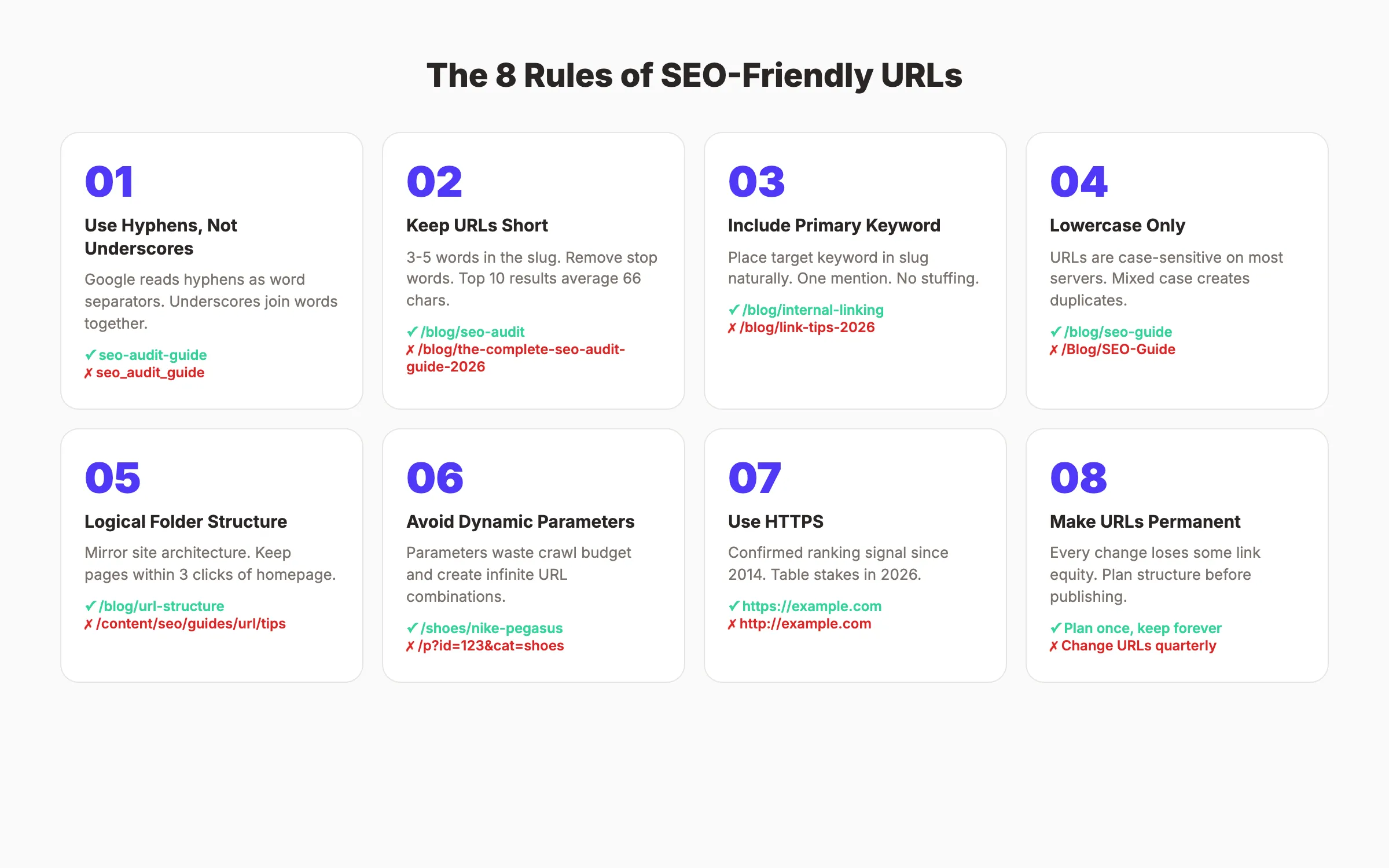
Rule 1: Use Hyphens, Not Underscores
Google treats hyphens as word separators. Underscores join words together.
| URL | How Google Reads It |
|---|---|
/seo-audit-guide | ”seo” + “audit” + “guide” (3 words) |
/seo_audit_guide | ”seo_audit_guide” (1 word) |
Always use hyphens. This has been Google’s recommendation since 2009 and has not changed.
Rule 2: Keep URLs Short and Descriptive
Remove filler words. A URL should describe the page content in 3-5 words.
| Bad | Good |
|---|---|
/blog/the-complete-guide-to-doing-an-seo-audit-for-your-website | /blog/seo-audit-guide |
/blog/2026/03/29/how-to-do-keyword-research-step-by-step | /blog/keyword-research-guide |
/products/category/subcategory/item-12345 | /products/category/item-name |
Stop words like “the,” “a,” “to,” “for,” and “how” add length without value. Remove them from slugs.
Rule 3: Include the Primary Keyword
Place your target keyword in the slug. Not stuffed. Not repeated. Just once, naturally.
For a page targeting “internal linking,” the URL should be /blog/internal-linking-blog-posts, not /blog/link-strategy-tips-2026. The first URL tells Google exactly what the page covers. Read our internal linking guide for more on this topic.
Rule 4: Use Lowercase Only
URLs are case-sensitive on most servers. example.com/SEO-Guide and example.com/seo-guide are different URLs.
Always use lowercase. Set up server-level redirects to catch any uppercase variations. This prevents duplicate content issues and broken links.
Rule 5: Use a Logical Folder Structure
Your URL paths should mirror your site architecture. Every subfolder should represent a real content category.
Good structure:
/blog/url-structure-seo
/blog/on-page-seo-guide
/reviews/surfer-seo
/best/ai-blog-writing-tools
/glossary/canonical-url
Bad structure:
/page/12847
/blog/2026/03/29/post-title
/content/articles/seo/guides/beginner/url-tips
Flat is better than deep. Google recommends keeping pages within 3 clicks of the homepage. Every additional subfolder level dilutes the page’s perceived importance.
Rule 6: Avoid Dynamic Parameters When Possible
Dynamic URLs with parameters like ?id=123&category=seo&sort=date create problems:
- They generate near-infinite URL combinations
- They waste crawl budget
- They confuse users and look untrustworthy
- They create duplicate content when parameter order changes
If your site uses parameters for filtering or sorting, use robots.txt to block parameter-heavy URLs from crawling. Read our robots.txt optimization guide for setup instructions.
For ecommerce sites with faceted navigation, consider using canonical tags to point all filtered variations back to the main category page.
Rule 7: Use HTTPS
HTTPS has been a confirmed ranking signal since 2014. In 2026, it is table stakes. Any page served over HTTP loses ranking potential and shows a “Not Secure” warning in Chrome.
If you have not migrated to HTTPS yet, do it now. Use 301 redirects from every HTTP URL to its HTTPS equivalent.
Rule 8: Make URLs Permanent
Every URL change is a risk. Even with proper 301 redirects, you lose some link equity during migration. Google has confirmed that redirects pass “most” PageRank, not all of it.
The best URL is one you never have to change. Plan your URL structure before you publish. If you must change URLs later, the migration section of this guide covers how to do it safely.
Your SEO team. $99 per month. 30 optimized articles, published automatically. Every URL, title tag, and meta description follows best practices. Start for $1 →
URL Structure for Different Page Types
Different content types need different URL patterns. Here is what works for each.
Blog Posts
Pattern: /blog/[keyword-slug]
Keep blog URLs flat under a single /blog/ directory. Do not include dates, author names, or category folders in the URL. Dates make content look stale. Categories change over time, which forces URL migrations.
| Avoid | Use |
|---|---|
/blog/2026/03/url-structure-tips/ | /blog/url-structure-seo |
/blog/seo-tips/url-structure-guide/ | /blog/url-structure-seo |
/blog/john-doe/url-tips/ | /blog/url-structure-seo |
This is the same pattern we use for every post on thestacc.com. It keeps URLs short, keyword-focused, and migration-proof. For more on blog structure, read our blog post structure guide.
Ecommerce Product Pages
Pattern: /[category]/[product-name]
Product URLs should include the category for context but keep it to one level deep.
/running-shoes/nike-pegasus-41
/laptops/macbook-air-m4
/coffee-makers/breville-barista-express
Do not include SKU numbers, color variants, or size parameters in the canonical URL. Use canonical tags to consolidate product variations. Our ecommerce SEO guide covers this in detail.
Local Landing Pages
Pattern: /[service]-[location] or /locations/[city]
For businesses targeting multiple locations, keep location pages in a flat structure.
/plumber-austin-tx
/dentist-chicago-il
/locations/houston
Include both the service and city in the URL. This signals local intent to Google and local search algorithms.
Tool and Resource Pages
Pattern: /tools/[tool-name]
Utility pages like calculators, generators, and checkers should live under a /tools/ directory.
/tools/seo-audit
/tools/schema-markup-generator
/tools/meta-tag-analyzer
Glossary Pages
Pattern: /glossary/[term]
Keep glossary URLs as single terms or short phrases. These pages target featured snippet opportunities for definition queries.
Subdomains vs. Subfolders: What the Data Shows
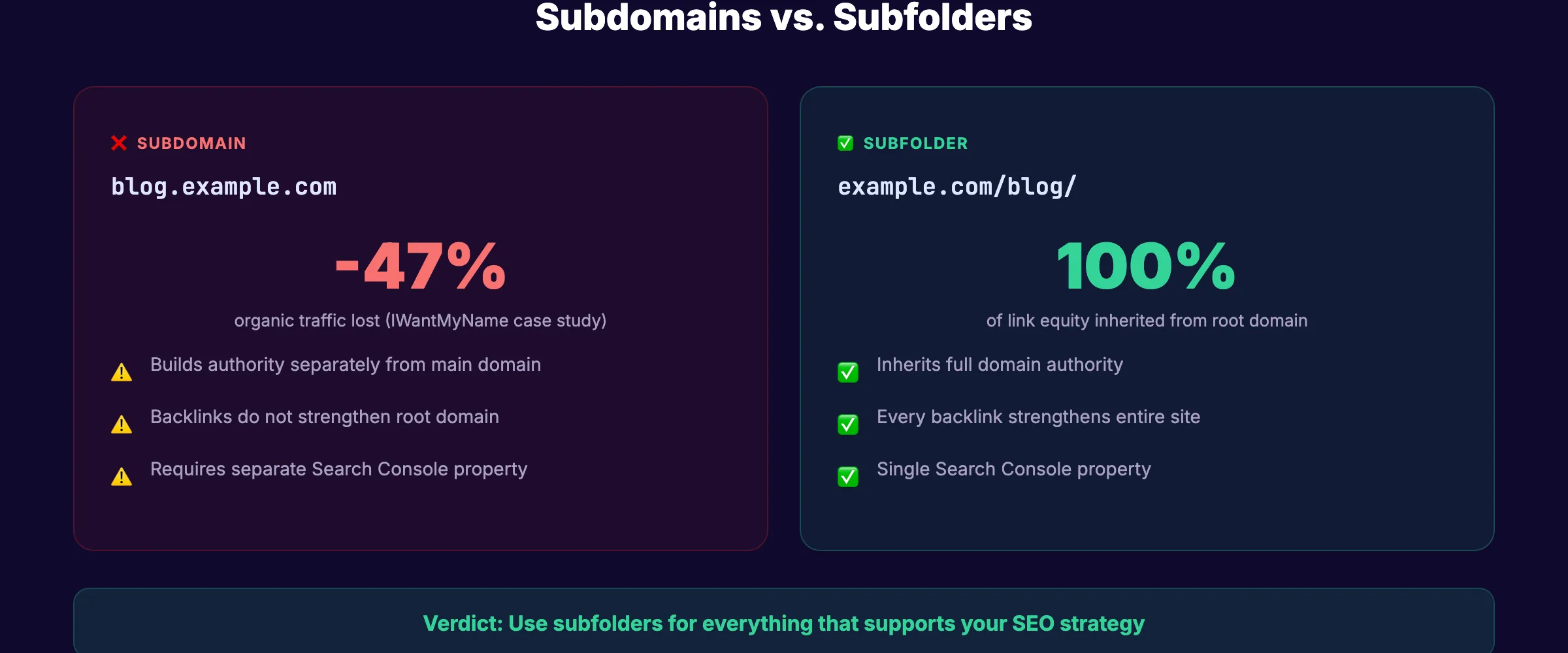
This is one of the most debated topics in technical SEO. Should your blog live at blog.example.com (subdomain) or example.com/blog (subfolder)?
The Data Favors Subfolders
A study cited by Backlinko found that IWantMyName lost 47% of organic traffic after moving content from a subfolder to a subdomain. Multiple case studies confirm the same pattern.
Google’s official position is that subdomains and subfolders are treated “roughly the same.” But in practice, subfolders inherit domain authority directly. Subdomains are treated as semi-separate entities that need to build authority independently.
When to Use Subfolders (Almost Always)
| Use Case | URL Structure |
|---|---|
| Company blog | example.com/blog/ |
| Help center | example.com/help/ |
| Resource library | example.com/resources/ |
| Product documentation | example.com/docs/ |
Subfolders consolidate all link equity under one domain. Every backlink to your blog strengthens your entire site.
When Subdomains Make Sense (Rare Cases)
| Use Case | URL Structure |
|---|---|
| Separate web app | app.example.com |
| Different language/region | fr.example.com |
| Developer API docs | developers.example.com |
| Community forum | community.example.com |
Use subdomains only when the content is fundamentally different from your main site and serves a different audience.
The Verdict
Use subfolders for everything that supports your SEO strategy. Use subdomains only for truly separate products or platforms. This applies to blog SEO, resource centers, and landing pages.
3,500+ blogs published. 92% average SEO score. See what Stacc can do for your site. Start for $1 →
Common URL Structure Mistakes and How to Fix Them
These are the URL problems we see most often when auditing websites.
Mistake 1: Date-Based URL Structures
WordPress defaults to /2026/03/29/post-title/. This is bad for 3 reasons:
- It makes evergreen content look dated
- It adds unnecessary depth (3 extra folders)
- It forces URL changes if you update the publish date
Fix: Change your WordPress permalink structure to /blog/%postname%/ or just /%postname%/. Then set up 301 redirects from old URLs to new ones.
Mistake 2: Session IDs and Tracking Parameters in URLs
Some platforms append session IDs to URLs: example.com/page?sessionid=abc123. This creates thousands of duplicate URLs that waste crawl budget.
Fix: Move tracking to cookies or use the canonical tag to consolidate. Block parameter URLs in robots.txt.
Mistake 3: Duplicate Content From URL Variations
The same page accessible at 4 different URLs is a common problem:
http://example.com/page
https://example.com/page
https://www.example.com/page
https://www.example.com/page/
Fix: Choose one canonical version. Set up 301 redirects from all others. Implement a sitewide canonical tag strategy.
Mistake 4: Keyword Stuffing in URLs
/best-seo-tools-seo-software-seo-programs-2026 does not help. It looks spammy to users and triggers over-optimization signals.
Fix: Use the primary keyword once. Keep the slug to 3-5 words.
Mistake 5: Changing URLs Without Redirects
Every URL change without a redirect creates a broken link. Broken links lose all accumulated backlink equity and return 404 errors.
Fix: Always implement 301 redirects before changing any URL. Read our guide to fixing broken links for a step-by-step process.
Mistake 6: Using Auto-Generated URLs
CMS platforms sometimes generate URLs from the full page title, including stop words and extra length. how-to-create-an-effective-url-structure-for-your-website-in-2026 is not a good URL.
Fix: Manually set your slug before publishing. Edit it down to the core keyword.
How to Change URLs Without Losing Rankings
Sometimes URL changes are unavoidable. A rebrand, a site migration, or a CMS switch can force thousands of URL changes. Here is how to do it safely.
Step 1: Map Every Old URL to Its New URL
Create a complete spreadsheet of every old URL and its new destination. Use Google Search Console to export all indexed URLs.
| Old URL | New URL | Status |
|---|---|---|
/old-blog/post-title/ | /blog/post-title | 301 redirect |
/services/seo/ | /modules/content-seo | 301 redirect |
/deleted-page/ | /relevant-alternative/ | 301 redirect |
Step 2: Implement 301 Redirects
Use server-level redirects, not JavaScript redirects. A 301 tells Google the move is permanent and passes link equity.
For Apache servers, add redirects to .htaccess. For Nginx, add them to the server configuration. For Cloudflare Pages, use the _redirects file.
Step 3: Update Internal Links
After setting up redirects, update every internal link to point directly to the new URL. Do not rely on redirect chains. Each redirect hop loses a small amount of link equity.
Search your XML sitemap and content files for old URLs. Replace them all.
Step 4: Submit the New Sitemap
After migration, submit an updated XML sitemap through Google Search Console. This tells Google to re-crawl and re-index the new URLs faster.
Step 5: Monitor for 90 Days
Watch for:
- 404 errors in Google Search Console
- Ranking drops on migrated pages
- Crawl errors in the Coverage report
- Traffic changes in Google Analytics
Most URL migrations cause a temporary ranking dip. Full recovery typically takes 4-8 weeks if redirects are implemented correctly.
URL Structure for CMS Platforms
Different content management systems handle URLs differently. Here is how to configure the most popular ones.
WordPress
Default: /?p=123 (bad)
Recommended: /blog/%postname%/ or /%postname%/
Go to Settings → Permalinks and select “Post name.” This gives you clean, keyword-based slugs.
For WooCommerce, set product permalinks to /product-category/product-name/ or just /shop/product-name/ for a flatter structure.
Shopify
Shopify forces a /products/, /collections/, and /blogs/ prefix. You cannot remove these.
Default: /products/product-name
Blog: /blogs/news/post-title
Customize only the slug portion. Keep product slugs short and keyword-rich. For blog posts, change the blog handle from “news” to something relevant like “guides” or “seo-tips.”
Webflow
Webflow gives full control over URL structure. Set your blog collection URL to /blog/[slug] in Collection settings.
Key setting: Under Hosting → 301 Redirects, add redirects for any URL you change. Webflow does not auto-redirect.
Astro and Static Site Generators
Static site generators like Astro use file-based routing. The file path IS the URL.
src/content/blog/url-structure-seo.md → /blog/url-structure-seo
src/pages/tools/seo-audit.astro → /tools/seo-audit
This gives you complete control. Plan your folder structure before creating files, because changing paths means changing URLs.
Rank everywhere. Do nothing. Blog SEO, Local SEO, and Social on autopilot. Start for $1 →
URL Structure Checklist
Use this checklist to audit your current URL structure or plan new URLs. Run this alongside a full SEO audit for best results.
- All pages use HTTPS
- All URLs use lowercase letters only
- Hyphens separate words (no underscores or spaces)
- Primary keyword appears in the slug
- Slugs are 3-5 words (under 60 characters)
- No dates in URLs (unless date is the content, like event pages)
- No session IDs or tracking parameters in canonical URLs
- No duplicate URL variations (www vs. non-www, trailing slash vs. not)
- All pages within 3 clicks of the homepage
- 301 redirects in place for every changed URL
- Canonical tags set on pages with URL variations
- Dynamic parameters blocked in robots.txt or handled with canonicals
- XML sitemap contains only canonical, indexable URLs
- No keyword stuffing in slugs
FAQ
Does URL structure directly affect Google rankings?
Yes, but the effect is lightweight. John Mueller has confirmed that words in URLs serve as a very minor ranking signal. The bigger impact comes from improved crawl efficiency, higher click-through rates in search results, and cleaner internal link architecture. A well-structured URL supports every other SEO factor on the page.
Should I change my existing URLs to make them more SEO-friendly?
Only if the current URLs are severely broken (random numbers, session IDs, extreme length). Every URL change risks temporary ranking loss, even with 301 redirects. If your current URLs are simply “not perfect” but functional, leave them. Focus on getting new URLs right from the start.
What is the ideal URL length for SEO?
Research from Backlinko shows that top 10 results average 66 characters in total URL length. Aim for slugs of 3-5 words and total URLs under 75 characters. There is no hard cutoff, but shorter URLs correlate with higher rankings and better user experience.
Do URL keywords matter for AI search engines like ChatGPT and Perplexity?
AI search engines parse URLs when deciding which sources to cite. A descriptive URL like /blog/url-structure-seo gives AI models a clear signal about page content. This matters for generative engine optimization as AI search grows. Vague URLs like /p/12345 provide no context for citation decisions.
Should I use subdomains or subfolders for my blog?
Subfolders. Almost always. Multiple studies show that subfolder content inherits domain authority directly, while subdomain content must build authority semi-independently. Use subdomains only for truly separate applications (web apps, API docs, community forums). For blog content, resource pages, and landing pages, subfolders win.
How do I handle URL structure for multilingual sites?
Use subdirectories with language codes: example.com/en/page and example.com/fr/page. Implement hreflang tags to tell Google which version serves which language. Avoid using URL parameters like ?lang=fr for language selection, as this creates duplicate content problems.
Related Tools & Resources
Free SEO Tools:
Best Lists:

Written by
Siddharth GangalSiddharth is the founder of theStacc and Arka360, and a graduate of IIT Mandi. He spent years watching great businesses lose organic traffic to competitors who simply published more. So he built a system to fix that. He writes about SEO, content at scale, and the tactics that actually move rankings.
30 SEO blog articles published every month
Keyword-optimized, scheduled, and live on your site. Automatically.
30-day trial · Cancel anytime
theStacc
Stop writing SEO content manually
30 blog articles, 30 GBP posts, and social media content. Published every month. Automatically.
Start Your $1 Trial$1 for 3 days · Cancel anytime