Managing local SEO at scale is a different problem
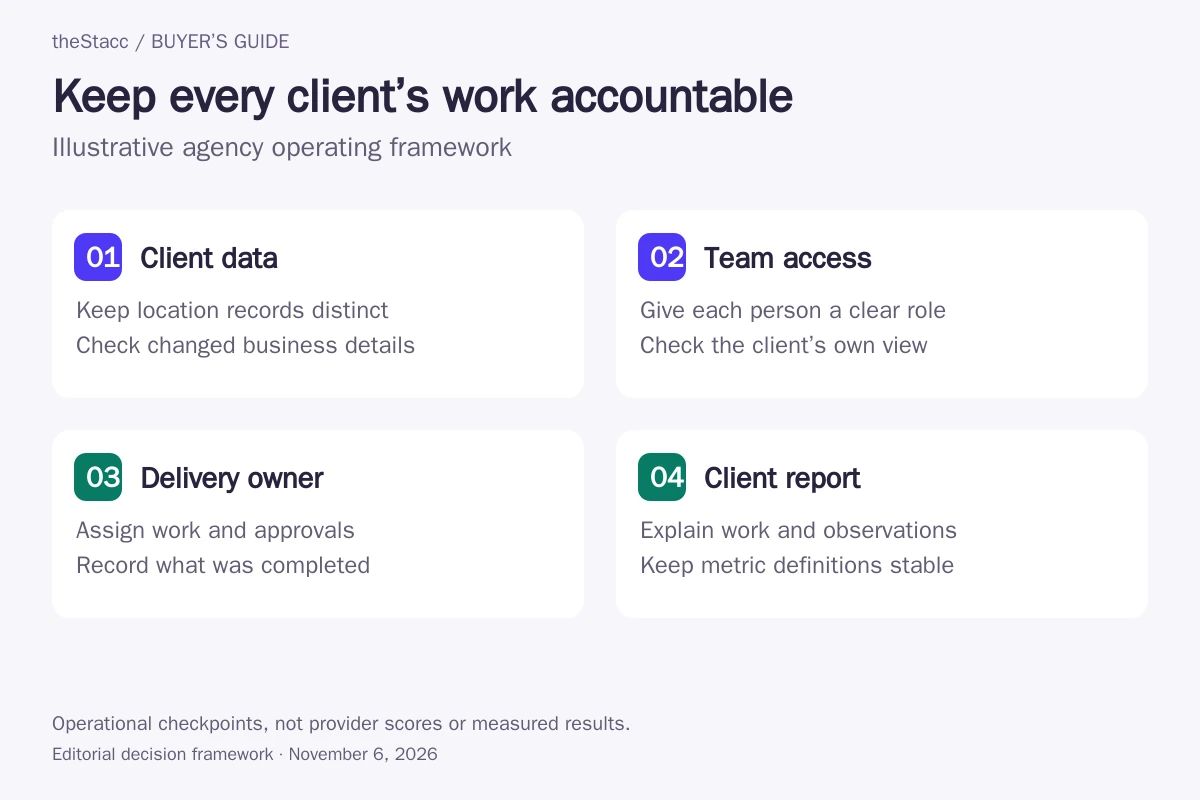
Running local SEO for one business is a process. Running it for several clients adds an operating problem: keeping business information consistent, posts approved, reviews handled and reports delivered without mixing accounts. The strongest stack makes responsibility clear as well as collecting data.
Solo local SEO and agency local SEO share tactics but face different operational needs:
- Multi-client data: see citation accuracy, rank and reviews for the client portfolio, with a clear route into each location.
- White-label reporting: send clients a useful explanation under your agency brand, with access restricted to their business.
- Fulfillment capacity: name who writes posts, approves responses and corrects business information. A dashboard does not assign that work for you.
- Per-client unit economics: include software, location allowances and staff time before deciding what your client package can support.
For broad platform coverage, use the local SEO software guide. An owner buying for their own business has a different decision: see local SEO tools for small business. Here the deciding factor is whether a workflow remains manageable across separate client accounts. If you need the Google posts, review reply drafts and articles produced for each client, not only reported, see theStacc's agency workflow: a project per client, with roles for your team.
Side-by-side comparison: agency scope and billing units
| Option | Agency job and operating scope | Published price or quote requirement |
|---|---|---|
| theStacc Managed Services | Managed delivery; software access is a separate purchase | Local Growth: US$749 managed per month on monthly billing; confirm the client/location scope |
| BrightLocal | Local audits, tracking and client reporting; listing/review work depends on tier | Track: US$62/month for 2–5 locations on monthly billing; higher tiers cost more |
| Semrush Local | Per-location GBP operations; optional user and reporting add-ons | Base US$30 or Pro US$60 per location/month, displayed with annual billing |
| Yext | Location-data operations with permissions and audit trails | Scoped agency/partner quote; no exact public price verified |
| Whitespark | Separate local products; Local Rank Tracker has shareable client reports | Rank Tracker Agency: US$60/month equivalent, billed annually, for weekly tracking |
| SE Ranking | Broader SEO projects plus separately counted local locations and manager seats | Core: US$129/month on monthly billing; agency/reporting additions cost extra |
| Local Falcon | Geo-grid campaigns with credit-based capacity and reporting tiers | Starter: US$24.99/month billed monthly for 7,500 credits |
| AgencyAnalytics | Client reporting across connected data sources | Core: US$20 per client/month, billed annually; tracking add-ons extra |
| Birdeye | Agency portfolio oversight for listings, reputation and related products | Custom quote based on deployed scope and locations; no exact rate verified |
| Moz Local | Per-location listing workflow with tier-dependent agency permissions | Lite US$20/month; Preferred US$30/month, monthly billing, per location |
How this shortlist was researched
theStacc publishes this guide and sells software and managed services. Its managed offering is a separate delivery option. This comparison uses official-source research and automated editorial assistance. We did not run account-level trials, measure time savings or verify ranking outcomes. The profiles are not a performance ranking.
Options are grouped by useful fit rather than scored from first to last. Each profile links to its source. Confirm the selected plan or proposal before buying. See our editorial standards.
10 local SEO tools and services: agency buying checks
1. theStacc Managed Services
Good fit: Agencies considering hired content and GBP delivery alongside their reporting process
The Local Growth managed plan describes content production, Google Business Profile posts, review reply drafts and weekly performance reports. Separately, the agency software page describes client projects and Admin, Editor and Viewer access. A software subscription is not the managed-service price.
Use the written service scope to assign fact checking, approvals and client communication. Keep directory submissions outside the comparison unless separately agreed; this is not a mass directory-distribution product. No wholesale rate or resale margin is assumed.
Before you buy: Confirm the number of clients and locations covered, reporting ownership, review-response responsibilities and what remains with your team.
theStacc Managed Services: official offering and current details
2. BrightLocal
Good fit: Agencies delivering repeatable local audits and reports across several clients
BrightLocal separates Track, Manage and Grow and prices them by location band. Track covers audits and local measurement; Manage adds business-detail synchronization and GBP post scheduling; Grow adds review workflows. Its agency offering describes client dashboards and branded reporting.
Count locations, not just the number of contracts. A multi-location client can cross a pricing band. Compare the needed capability tier before choosing annual billing, and obtain the current staff and client-access terms.
Before you buy: Demonstrate the portfolio view, a client report and the permissions for an account manager. Confirm separately billed citation work and location changes.
3. Semrush Local
Good fit: Agencies that need to budget location work and reporting access separately
Base includes GBP management and map-rank capacity; Pro adds Listing Management and review-management features. The current page also lists Additional Users at US$20/month and a Pro Report add-on at US$20/month with branding and white-labeling.
Price the exact reporting and staff setup. A Local subscription is not the same purchase as the wider SEO toolkit. Confirm how client locations are shared with colleagues before assigning accounts.
Before you buy: Request a total for your location count, user roles, reporting entitlement and scan usage, with annual commitment and renewal terms shown. No automatic listing-reversion claim is assumed.
4. Yext
Good fit: Agencies managing complex location information and approval responsibilities
Yext describes centralized listing management, role-based access and audit trails. Its partner ecosystem supports agencies and other service providers, but the pages checked do not establish a universal agency subscription price.
Evaluate the operational complexity rather than rejecting it using an arbitrary client-count threshold. Ask the vendor to demonstrate a change across a permitted location group and how another team member reviews the record.
Before you buy: Confirm location and product charges, permissions, reporting, implementation work and the treatment of data and publisher connections when the agreement ends.
5. Whitespark
Good fit: Agencies buying tracking capacity without assuming an entire local suite is included
The weekly Agency plan lists 1,000 location keywords and unlimited domains and locations. Local Rank Tracker describes password-protected report URLs, custom-domain options, email reports and CSV/PDF exports. Daily tracking is priced separately.
Unlimited locations does not remove the location-keyword limit. Price the terms tracked in each market and the reporting frequency. Citation Finder, Local Ranking Grids and other Whitespark products have separate scopes.
Before you buy: Confirm staff access, report branding, tracking frequency and the number of location-keyword combinations your portfolio consumes.
6. SE Ranking
Good fit: Agencies combining traditional SEO work with a limited local-location allowance
The USD pricing page lists Core with ten projects, one manager seat and three Local Marketing locations. Those are separate allowances. The Agency Pack is advertised separately at US$69/month on annual billing for the displayed configuration, including client seats and white-label reporting.
A project allowance is not permission to add the same number of local locations. Compare the required manager seats, local capacity and client reporting before treating the base subscription as the complete agency cost.
Before you buy: Confirm the currency, selected billing period, additional locations and whether your report frequency and client-access requirements need an add-on.
7. Local Falcon
Good fit: Agencies explaining visibility across client service areas
Local Falcon lists unlimited locations and keywords with limited scanning credits. It describes scheduled campaigns and report exports; the agency page places white-label reporting on Premium and above. The entry price therefore does not establish the cost of branded client delivery.
Build a scan budget from grid size, terms, locations and frequency. Keep those settings consistent when showing changes over time. Confirm extra features and team access separately instead of assuming every capability comes with Starter.
Before you buy: Price your actual scheduled scans and the required reporting tier. Check credit expiry, client report access and how a failed scan is reported.
8. AgencyAnalytics
Good fit: Agencies whose main bottleneck is assembling and explaining client reports
The current core plan includes unlimited staff accounts, data sources, reports and dashboards, plus a white-labeled client portal. Rank Tracker and AI Tracker are separate add-ons. A reporting subscription does not establish that someone has corrected listings or completed local campaign work.
Confirm how the vendor defines one client when a contract contains several locations or brands. Check the source integrations already included in your stack before paying for another tracking layer.
Before you buy: Open a sample client view, verify that other accounts stay private, and test missing data and connection failures before scheduling reports.
9. Birdeye
Good fit: Agencies needing portfolio visibility across reputation and listing work
Birdeye’s reseller page describes a client dashboard, centralized listing management, alerts and white-label or co-branded options. Its pricing page asks for location count and describes paying for products deployed at locations rather than seat counts.
Treat the partner agreement, product scope and staff permissions as separate questions. A dashboard showing account health should be checked against the actual location-level work and client-facing report.
Before you buy: Request a quote that identifies products, locations, onboarding, access roles, branding and exit terms. Do not infer an agency wholesale rate from a generic business offer.
10. Moz Local
Good fit: Agencies checking permission needs alongside per-location costs
Moz’s help documentation says each managed location needs its own subscription even when several locations share one dashboard. The pricing page places Agency Permissions in Preferred; Lite and Preferred show exact annual charges of US$199 and US$299 respectively.
Compare the tier your staff actually need rather than multiplying the lowest advertised rate. The annual page uses rounded monthly equivalents, so use the full annual invoice when budgeting. Verify country coverage and reporting scope.
Before you buy: Demonstrate which users can access each location, confirm the chosen package and add-ons, and inspect what data can be exported when a client leaves.
9-point agency tool evaluation checklist
Answer these agency questions with the selected plan and a demonstration using your own portfolio structure. This is a suggested evaluation, not a test we performed.
- Per-client cost: is the bill flat, per client, per location, per seat or credit-based? Record minimum commitments.
- White-label depth: which reports, domains and emails carry your brand? For a detailed branding comparison, use white-label SEO tools.
- Client portal: can a client see only their own locations? Check read-only access and the approval rights you actually need.
- Multi-client dashboard: can staff find overdue work, failed connections and changed business data without opening every account?
- Fulfillment: is this software access, automation you supervise or a contracted service? Identify who checks each completed task.
- Reporting templates: can a report repeat the same definitions and date range while keeping location detail available?
- Integrations: which connectors or API access are included, who maintains them and how are failed updates surfaced?
- Agency terms: are volume pricing and client access part of your actual agreement? Do not assume a published business rate is a wholesale rate.
- Cancellation: can you remove one client or location, retain exports and transfer access without closing the whole agency account?
What does agency local SEO cost vs. revenue?
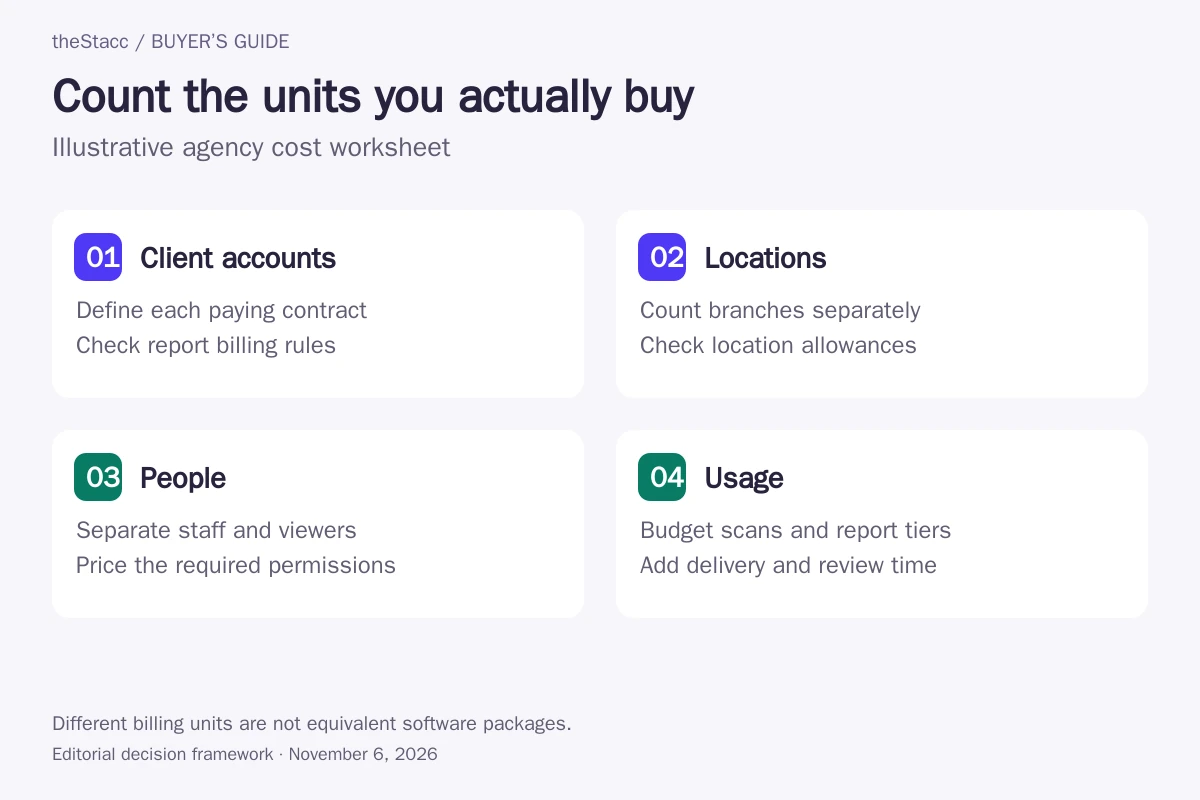
Start with the cost to serve each client. Revenue is your agreed client fee. Delivery cost includes the selected software, hired work and your team’s direct time. A tool price alone does not establish a resale margin or a safe client capacity.
| Cost unit | Record for your agency | Common buying mistake |
|---|---|---|
| Clients and locations | List contracts and the locations under each one separately | Treating a multi-location client as one billable location |
| Staff and client access | Count managers, editors and client viewers by required permission | Assuming a client portal includes additional staff seats |
| Tracking usage | Record terms, grid settings, frequency and remaining credits | Reading unlimited locations as unlimited scans |
| Reporting | Identify the report tier, source connections and time for commentary | Paying for overlapping reporting tools without replacing any work |
| Commitment | Write down the full annual charge, renewal and removal rules | Committing annually while assuming every departing client reduces the bill |
| Delivery time | Measure onboarding, review, corrections and reporting in your own workflow | Using a vendor’s productivity claim as your staffing forecast |
Avoid redundant reporting subscriptions, unnecessary seats and annual commitments that do not fit client retention. No provider is automatically too expensive below a particular client count. Compare its scoped quote with the work you need.
DIY tool stack vs done-for-you with theStacc
A tool stack gives your agency capabilities to operate. A managed service assigns specified delivery work to another team. Neither removes your responsibility to obtain accurate client information, agree approvals and explain results. Keep both purchases visible in the cost model.
theStacc Managed Services has a separately agreed delivery scope. Its software plans and client-project features are separate. Software access does not include a managed engagement, and directory distribution is not included by assumption. Confirm the proposal and client responsibilities before purchase.
When the missing control is supplier orders, corrections and delivery acceptance, use the SEO reseller tools guide. This page stays focused on local client operations and reporting rather than recreating that order-management comparison.
Final verdict: which tool to pick by agency size
Agency size changes the operational load, but a client-count threshold alone should not decide the purchase. Use the work and permissions you need:
- Solo operator: buy the missing local task and verify that the client report is usable without paying for unused seats.
- Growing delivery team: prioritize project separation, account-manager access, repeatable reports and a clear way to spot unfinished work.
- Agency with multi-location clients: require location groups, scoped permissions, change history and a quote that shows each billing unit.
- Reporting-led need: evaluate AgencyAnalytics or existing reporting features before adding another data tool.
- Hired delivery need: compare theStacc Managed Services against a written scope; keep agency oversight and additional local work assigned.
Preserve one reporting definition for each metric. Map visibility, website clicks, calls and qualified enquiries measure different things. Record source, date range and scan settings, and keep completed work separate from observed outcomes. No tool purchase establishes rankings, AI citations or client revenue.
Evaluate theStacc against your actual workflow
Confirm client access, reporting, location limits and the work included in the chosen plan before adding a client. Software access and managed services have different scopes. Review the current plans before choosing a paid service.
Start free → to explore the software, or Book a demo → to discuss your requirements.
Local SEO tools for agencies: questions answered
What is the best local SEO tool for agencies in 2026?
Choose by the operating job. BrightLocal is a candidate for local audits and client reporting; Semrush Local for location-level GBP operations; Local Falcon for geo-grid campaigns; AgencyAnalytics for reporting across sources. Confirm team access and total portfolio cost. theStacc Managed Services is a separate hired-delivery option, not an interchangeable software subscription.
Do agencies actually need a separate local SEO tool?
Only when it fills a real gap in the existing stack. Check whether your current tools provide the location data, controls and reporting you need before adding another subscription. Assign someone to act on the findings; a second dashboard does not itself correct a listing or complete client work.
What is the best white-label local SEO tool?
First define the client-facing experience: branded PDF, scheduled email, dashboard, custom domain or client login. Entitlements differ by plan. Check the report and client permissions in the exact tier you intend to buy. A branded report does not imply that campaign delivery or all underlying data sources are included.
How much should an agency charge for local SEO?
Use your own service scope and costs rather than an assumed industry margin. Include software, billable locations, staff access, usage, hired delivery and internal review time. Agree the client fee and reporting responsibilities separately. This guide does not establish a wholesale rate or predict the margin your agency will earn.
Can one agency stack replace BrightLocal, Local Falcon and Whitespark?
Possibly, if its selected plan covers your required tasks and reporting with acceptable limits. These products overlap but their allowances and operating workflows differ. List the work each subscription supports, demonstrate one client’s full monthly cycle, and remove duplication only after checking data access and handover.
Is Yext too expensive for small agencies?
That cannot be decided from agency size alone. Obtain a scoped quote for the locations, permissions, publisher coverage and implementation work you need. Compare it with an alternative that delivers the same scope. This comparison has not verified a universal Yext agency price or a client-count cutoff.
What is the best tool for agencies to track local rank?
Choose the measurement your client needs: location-based search results, geo-grid visibility or both. Evaluate the relevant tracking product, then record keywords, locations, grid settings and schedule. Check credit or location-keyword limits and the reporting tier. Keep the methodology consistent before describing a change in performance.
Sources and scope of this comparison
Official pricing, product and help pages linked in the profiles were checked on November 6, 2026. Moz pages were readable by direct download and browser despite web-extraction errors. SE Ranking dollar prices come from the official page’s USD response; another extraction showed EUR. BrightLocal’s rendered pricing table specifies location bands. Whitespark weekly and daily tracking prices differ. Features remain vendor descriptions; demonstrate account permissions and selected-plan entitlements before purchase.