
MCP Keyword Research: The Complete Guide (2026)
Learn how MCP keyword research connects AI to SEO tools like Ahrefs and Semrush. Setup, workflows, and server picks. Updated April 2026.
Stacc Editorial • 2026-04-04 • SEO Tools
In This Article
MCP Keyword Research: The Complete Guide (2026)
Keyword research still takes too long. You export CSVs from Ahrefs. You copy data into spreadsheets. You paste metrics into ChatGPT for analysis. The cycle eats 30 to 45 minutes per keyword batch.
That time adds up fast. Over a month, a single SEO manager loses 8 to 12 hours on data transfer alone. Those hours produce zero rankings. They produce zero content.
MCP keyword research eliminates that cycle entirely. The Model Context Protocol connects your AI assistant directly to SEO data sources. No exports. No tabs. No reformatting.
We publish 3,500+ blogs across 70+ industries. MCP has changed how our team handles keyword discovery, clustering, and gap analysis. This guide covers the full workflow.
Here is what you will learn:
- What MCP is and why it matters for keyword research
- Which MCP servers connect to Ahrefs, Semrush, and Google Search Console
- How to set up MCP keyword research in under 10 minutes
- 5 ready-to-use workflows for keyword discovery, clustering, and gap analysis
- Advanced techniques for competitive research and automated reporting
- Common mistakes that waste API credits and how to avoid them
Table of Contents
- What Is MCP (Model Context Protocol)?
- Why MCP Changes Keyword Research
- How MCP Connects AI to SEO Data Sources
- The 5 Best MCP Servers for Keyword Research
- How to Set Up MCP for Keyword Research
- 5 MCP Keyword Research Workflows
- Advanced MCP Techniques for SEO
- Common Mistakes and How to Fix Them
- FAQ
What Is MCP (Model Context Protocol)? {#what-is-mcp}
Anthropic released the Model Context Protocol in November 2024. It is an open standard that lets AI models talk directly to external data sources. Think of it as a USB-C port for AI. One universal connector replaces dozens of custom integrations.
Before MCP, connecting Claude or ChatGPT to an SEO tool required custom API code. Each tool needed its own integration. MCP standardizes that connection into a single protocol.
How MCP Works in Plain English
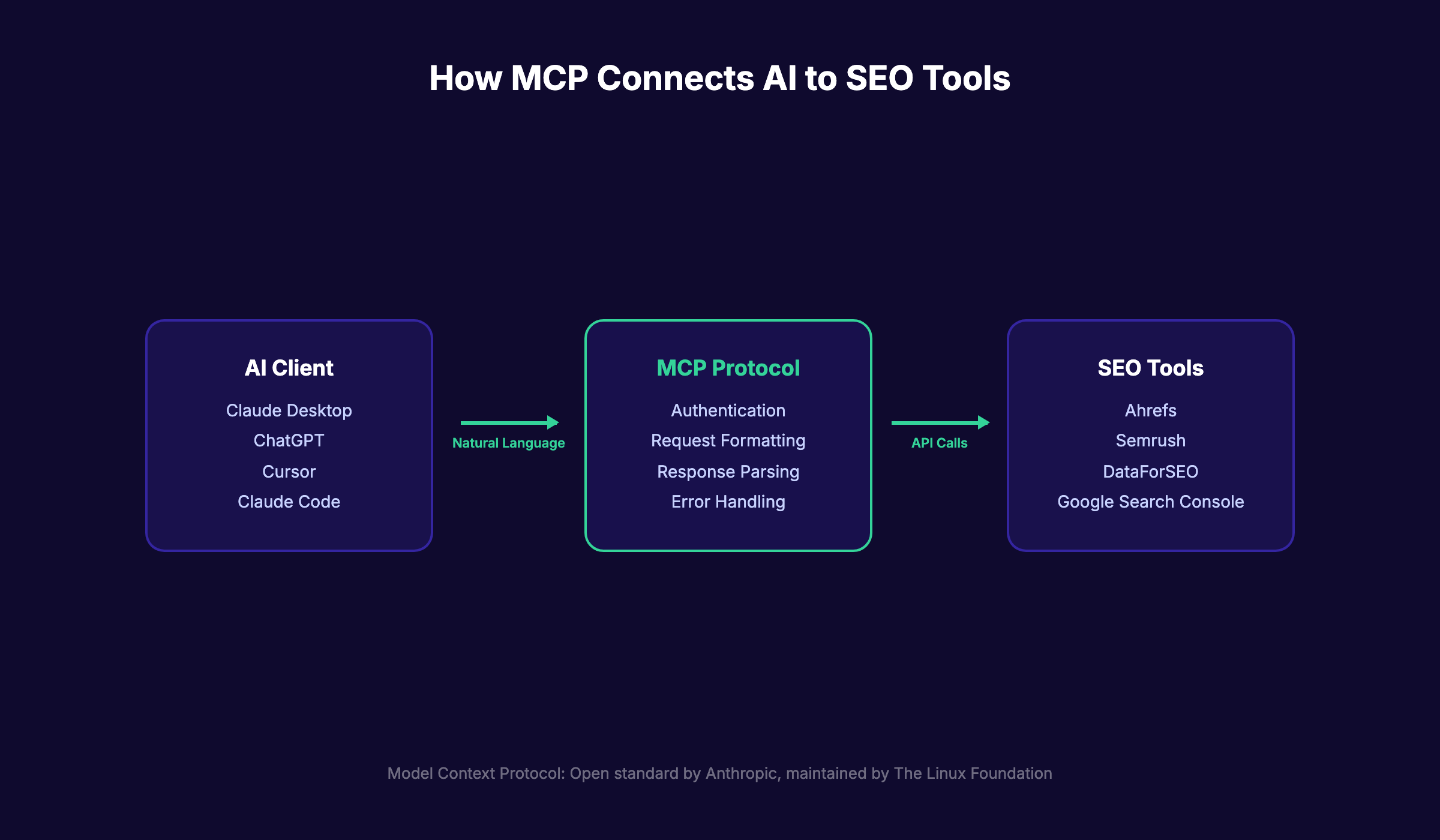
MCP uses a client-server architecture. Your AI assistant (Claude, ChatGPT, Cursor) acts as the client. The SEO tool (Ahrefs, Semrush, DataForSEO) runs an MCP server.
The client sends a request in natural language. The MCP server translates that request into an API call. The tool returns structured data. The AI processes it and responds.
You never leave the chat window. You never open a spreadsheet. The entire workflow happens inside a single conversation.
MCP vs. Traditional API Integrations
Traditional API integrations require developer resources. You write Python scripts. You manage authentication tokens. You parse JSON responses manually.
MCP removes all of that. The protocol specification handles authentication, data formatting, and error handling through a standardized layer. Non-technical SEO professionals can query live keyword data without writing a line of code.
| Feature | Traditional API | MCP |
|---|---|---|
| Setup time | 2-8 hours | 5-10 minutes |
| Coding required | Yes | No |
| Natural language queries | No | Yes |
| Multi-tool switching | Manual | Automatic |
| Data formatting | Manual | AI-handled |
Who Uses MCP for SEO
Three groups benefit most from MCP keyword research. SEO managers at agencies use it to speed up client keyword audits. In-house marketers use it to find content gaps without waiting for an analyst. Freelance SEO professionals use it to handle more clients with less overhead.
The common thread is time. MCP cuts keyword research time by 80% or more according to real-world case studies from SE Ranking users.
Why MCP Changes Keyword Research {#why-mcp-changes-keyword-research}
Keyword research has not changed much in 10 years. You pick a seed keyword. You plug it into a tool. You export the results. You filter and sort in a spreadsheet. You repeat for every competitor.
MCP breaks that loop. It turns keyword research from a multi-tool chore into a single-prompt operation.
Speed: 45 Minutes Down to 5
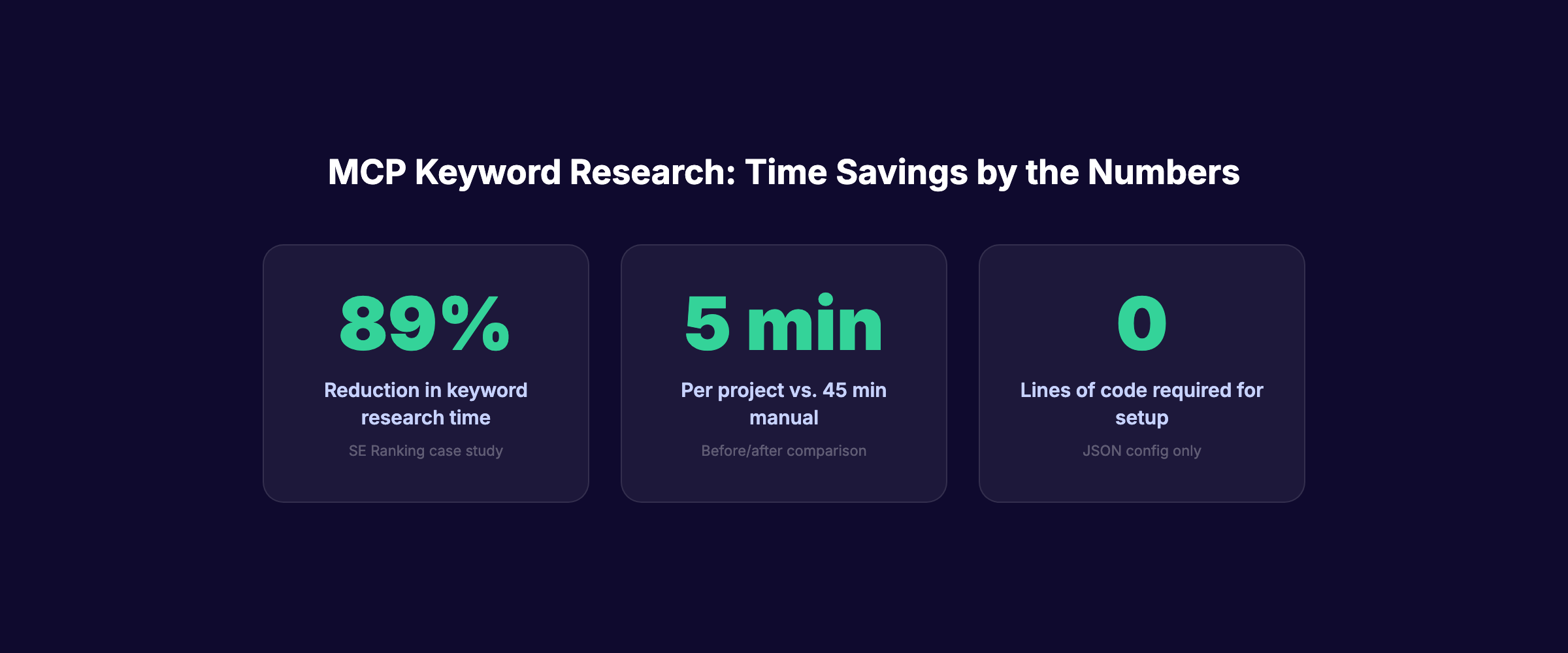
SE Ranking tracked the time savings after connecting their MCP server to Claude. The result was clear. Keyword research that took 45 minutes dropped to under 5 minutes per project. That is an 89% reduction.
The speed gain comes from eliminating context switching. You do not open Ahrefs in one tab, Google Search Console in another, and a spreadsheet in a third. You type one prompt. The AI pulls data from all sources and delivers a formatted report.
Depth: Multi-Source Analysis in One Prompt
A single MCP prompt can pull data from multiple keyword research tools at once. Ask for search volume from Semrush, keyword difficulty from Ahrefs, and click-through rates from Google Search Console. The AI combines all three into one analysis.
Without MCP, that cross-referencing takes 15 to 20 minutes of manual work. With MCP, it takes one sentence.
Intelligence: AI-Driven Pattern Recognition
Raw keyword data is useless without interpretation. MCP lets AI models analyze patterns across thousands of keywords instantly. The AI can identify seasonal trends, spot cannibalization issues, and group keywords by intent. All from a single prompt.
This is where MCP keyword research pulls ahead of any manual process. Human analysis of 500 keywords takes hours. An AI connected via MCP does it in seconds.
Stop writing. Start ranking. Stacc publishes 30 SEO articles per month for $99. Start for $1 →
How MCP Connects AI to SEO Data Sources {#how-mcp-connects-ai-to-seo-data-sources}
Understanding the architecture helps you pick the right setup. MCP has three core components that work together to connect AI to your SEO stack.
The Three Components: Client, Server, Protocol
The MCP client is your AI interface. Claude Desktop, ChatGPT, Cursor, and Claude Code all support MCP connections. The client sends your natural language requests and displays the results.
The MCP server wraps an SEO tool API. Ahrefs runs one. Semrush runs one. Community developers have built servers for DataForSEO, Google Search Console, and Google Keyword Planner.
The protocol is the standardized language between client and server. It handles authentication, request formatting, response parsing, and error management. The official specification is maintained by The Linux Foundation as an open-source project.
Read-Only vs. Read-Write Servers
Not all MCP servers offer the same capabilities. This distinction matters for keyword research workflows.
Read-only servers pull data from SEO tools. You can query keyword volumes, difficulty scores, and ranking positions. Ahrefs, Semrush, and SE Ranking all provide read-only MCP access.
Read-write servers pull data and push actions. Frase offers a read-write MCP server. You can research a keyword, generate a content brief, write a post, optimize it, and publish it. All from one conversation.
For keyword research specifically, read-only servers handle 90% of use cases. You rarely need write access during the research phase.
Supported AI Clients
MCP works with most major AI platforms in 2026. Here is the current compatibility picture.
| AI Client | MCP Support | Best For |
|---|---|---|
| Claude Desktop | Full native support | Keyword analysis and reporting |
| Claude Code | Full native support | Technical SEO workflows |
| ChatGPT | Via plugins/MCP bridge | General keyword research |
| Cursor | Full native support | Developer-oriented SEO |
| Windsurf | Full native support | Code-heavy SEO tasks |
Claude has the strongest MCP integration because Anthropic created the protocol. If you are choosing between ChatGPT and Claude for SEO, MCP support is a major factor favoring Claude.
The 5 Best MCP Servers for Keyword Research {#best-mcp-servers-keyword-research}
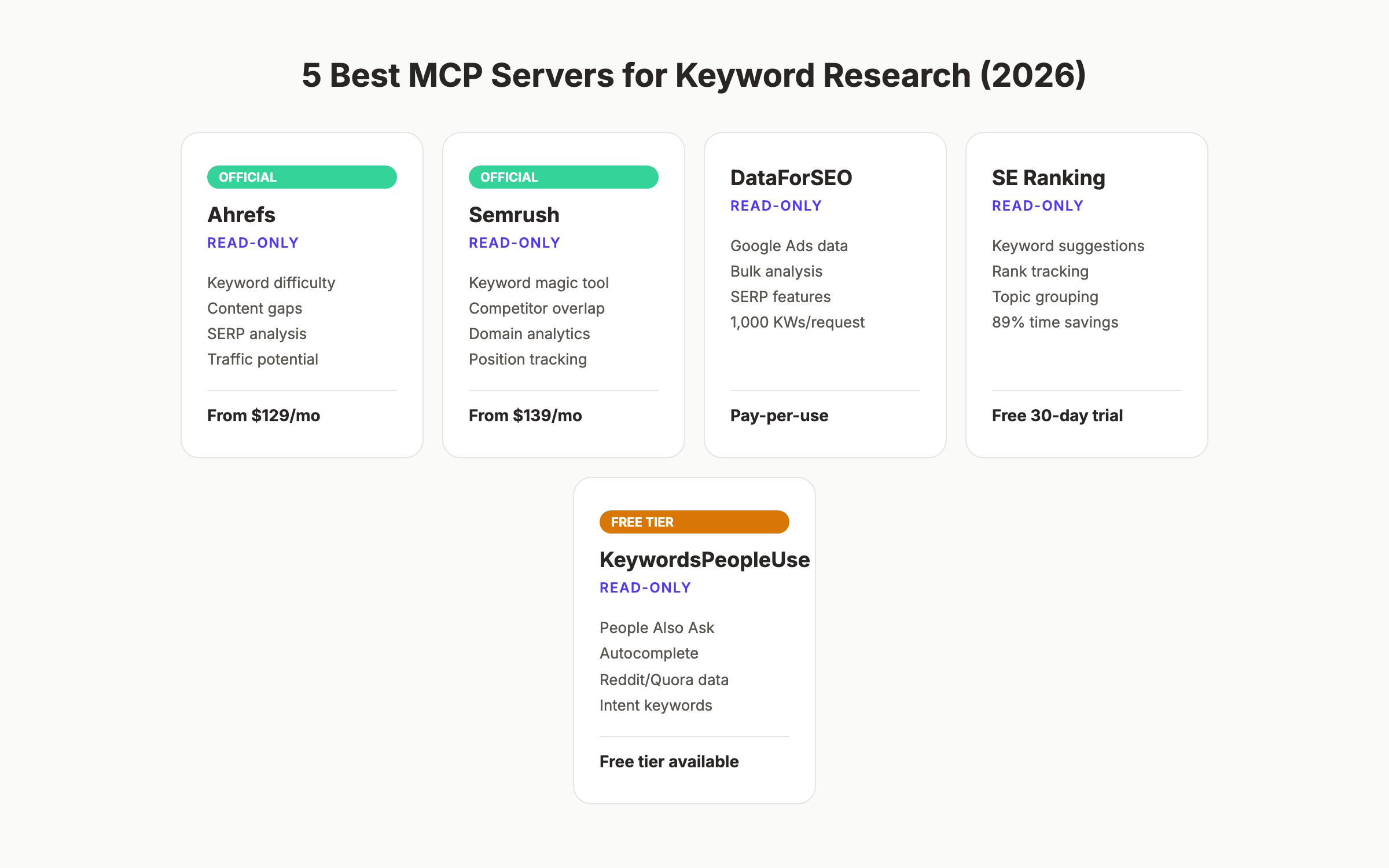
Not every MCP server fits keyword research. Some focus on backlinks. Others specialize in technical audits. These 5 deliver the strongest keyword research capabilities in 2026.
1. Ahrefs MCP Server
Ahrefs launched its official MCP server with remote connection support. It works with Claude, ChatGPT, and Microsoft Copilot Studio.
Keyword research features:
- Keyword difficulty scores with traffic potential
- Keyword suggestions from the full Ahrefs database
- SERP analysis for any keyword
- Content gap identification between domains
Requirements: Ahrefs Starter plan or above ($129/month). Free Webmaster Tools work for limited site-owner queries.
Ahrefs crawls more web pages than any tool except Google. That database depth shows in keyword suggestions. You get long-tail variations that smaller tools miss entirely.
2. Semrush MCP Server
Semrush provides an MCP server included with all Semrush One and SEO Toolkit subscriptions. It connects to Claude Code, Cursor, and ChatGPT.
Keyword research features:
- Domain analytics and organic keyword lists
- Keyword magic tool data (volume, difficulty, CPC)
- Competitor keyword overlap analysis
- Position tracking queries
Requirements: Semrush subscription ($139/month for Pro). The MCP server is included at no extra cost.
Semrush excels at competitive keyword analysis. Its MCP server returns keyword overlap data between up to 5 domains in a single query. That makes competitor analysis trivial.
3. DataForSEO MCP Server
DataForSEO powers over 750 SEO software companies behind the scenes. Its MCP server opens that same database to individual users.
Keyword research features:
- Google Ads search volume data (the same data Google Keyword Planner uses)
- Keyword suggestions with SERP feature data
- Keyword difficulty and competition metrics
- Bulk keyword analysis (up to 1,000 per request)
Requirements: DataForSEO account with API credits. Pay-per-use pricing starts at $0.0006 per keyword query.
The pay-per-use model makes DataForSEO ideal for high-volume keyword research. You pay only for what you query. No monthly subscription locks you in.
4. SE Ranking MCP Server
SE Ranking offers a Docker-based MCP server that connects to Claude Desktop. The documented time savings are the strongest of any MCP server: 45 minutes down to under 5 per project.
Keyword research features:
- Keyword suggestions with volume and difficulty
- Competitive research across domains
- Rank tracking integration
- Keyword grouping by topic
Requirements: SE Ranking subscription. A 30-day free trial is available without a credit card.
5. KeywordsPeopleUse MCP Server
KeywordsPeopleUse focuses on search intent and question-based keywords. Its MCP server pulls live data from Google People Also Ask, Google Autocomplete, Reddit, and Quora.
Keyword research features:
- People Also Ask questions for any seed keyword
- Google Autocomplete suggestions
- Reddit and Quora keyword data
- Question-based keyword clustering
Requirements: KeywordsPeopleUse account. Free tier available with limited queries.
This server fills a gap that Ahrefs and Semrush MCP servers leave open. It surfaces real user questions. Pair it with an Ahrefs or Semrush MCP server for a complete keyword research stack.
| Server | Best For | Price | Setup Difficulty |
|---|---|---|---|
| Ahrefs | Keyword difficulty + content gaps | $129/mo | Easy |
| Semrush | Competitive keyword analysis | $139/mo | Easy |
| DataForSEO | High-volume bulk research | Pay-per-use | Moderate |
| SE Ranking | All-in-one keyword research | Free trial | Moderate |
| KeywordsPeopleUse | Question + intent keywords | Free tier | Easy |
Your SEO team. $99 per month. 30 optimized articles, published automatically. Start for $1 →
How to Set Up MCP for Keyword Research {#setup-mcp-keyword-research}
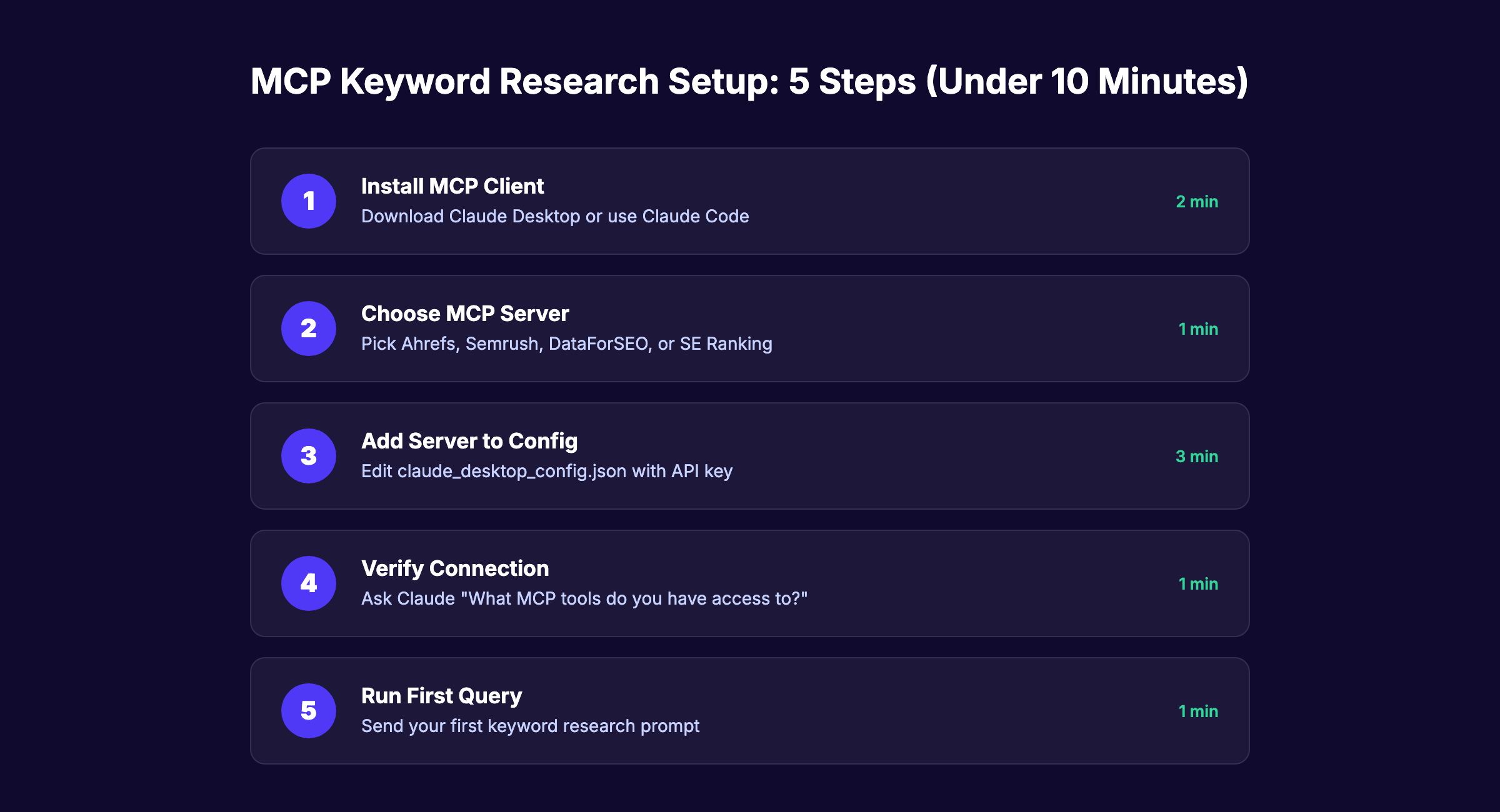
Setup takes 5 to 10 minutes for most MCP servers. The process follows the same pattern regardless of which server you choose. Here is the step-by-step walkthrough.
Step 1: Install an MCP Client
Download Claude Desktop if you do not already have it. Claude offers the deepest MCP integration because Anthropic created both the protocol and the AI model.
Open Claude Desktop. Go to Settings. Check that the Developer tab shows the MCP configuration section. If you see it, your client is ready.
For Claude Code users, MCP works out of the box. No additional installation is needed.
Step 2: Choose and Configure Your MCP Server
Pick your MCP server based on the tools you already pay for. If you have an Ahrefs subscription, start with the Ahrefs MCP server. If you use Semrush, use theirs.
Each server requires an API key. Find yours in your SEO tool account settings. Copy the key. You will paste it into the MCP configuration file in the next step.
Step 3: Add the Server to Your MCP Config
Claude Desktop stores MCP server configurations in a JSON file. Open it from Settings or locate it at ~/Library/Application Support/Claude/claude_desktop_config.json on macOS.
Add your server entry. Here is an example for the Ahrefs MCP server:
{
  "mcpServers": {
    "ahrefs": {
      "command": "npx",
      "args": ["-y", "@ahrefs/mcp-server"],
      "env": {
        "AHREFS_API_KEY": "your-api-key-here"
      }
    }
  }
}
Save the file. Restart Claude Desktop.
Step 4: Verify the Connection
Open a new Claude conversation. Type: “What MCP tools do you have access to?”
Claude should list the connected SEO tool and its available functions. If it does, your setup is complete. You can now run keyword research directly from the chat.
If Claude does not recognize the server, check three things. First, verify the API key is correct. Second, confirm the JSON file has valid syntax. Third, restart Claude Desktop one more time.
Step 5: Run Your First Keyword Query
Start simple. Type a prompt like:
“Find keyword opportunities related to ‘local SEO services’ with search volume above 500 and keyword difficulty below 40.”
Claude will query the connected MCP server, retrieve the data, and present a structured keyword list. No exports. No spreadsheets. Results appear in seconds.
5 MCP Keyword Research Workflows {#mcp-keyword-research-workflows}
These workflows work with any MCP server. Copy the prompts. Adjust the seed keywords. Run them in Claude or your preferred MCP client.
Workflow 1: Seed Keyword Expansion
Goal: Turn 1 keyword into 50+ variations with metrics.
Prompt: “Take the seed keyword ‘[your keyword]’ and find 50 related keyword variations. Include search volume, keyword difficulty, and CPC for each. Group them by search intent: informational, commercial, transactional, and navigational.”
This replaces the manual process of typing a keyword into Ahrefs, exporting the CSV, and sorting in a spreadsheet. The AI groups by intent automatically. That saves an extra 10 to 15 minutes of manual categorization.
Workflow 2: Competitor Keyword Gap Analysis
Goal: Find keywords your competitors rank for that you do not.
Prompt: “Compare the organic keywords of [your domain] against [competitor 1] and [competitor 2]. Show me keywords where both competitors rank in the top 20 but my domain does not appear at all. Sort by search volume.”
This is where MCP shines brightest. Manual competitor keyword analysis requires multiple tool sessions and spreadsheet joins. MCP does it in one prompt. The AI cross-references all domains and returns a clean gap report.
Workflow 3: Content Cluster Mapping
Goal: Build a topic cluster from a pillar keyword.
Prompt: “I am building a content cluster around ‘[pillar keyword].’ Identify the pillar page keyword, 8 to 12 supporting article keywords, and 3 to 5 FAQ keywords. For each, include search volume and keyword difficulty. Organize them in a table with the recommended internal linking structure.”
This workflow produces a full content calendar foundation in 60 seconds. Without MCP, building a content cluster takes 2 to 3 hours of research and mapping.
Stop writing. Start ranking. Stacc publishes 30 SEO articles per month for $99. Start for $1 →
Workflow 4: SERP Feature Opportunity Finder
Goal: Find keywords where SERP features create ranking shortcuts.
Prompt: “Find keywords related to ‘[your topic]’ that trigger featured snippets, People Also Ask boxes, or knowledge panels. Only show keywords with difficulty under 35 and volume above 200. Identify the current featured snippet holder for each.”
Featured snippets represent a shortcut to position zero. This workflow identifies where those opportunities exist and who currently holds them. That data feeds directly into your content strategy for AI search optimization.
Workflow 5: Local Keyword Research at Scale
Goal: Generate location-specific keyword lists across multiple cities.
Prompt: “Generate keyword lists for ‘[service type]’ across these cities: [city 1], [city 2], [city 3], [city 4], [city 5]. For each city, include the top 10 keywords by volume with difficulty scores. Flag any keywords where no strong local competitor ranks in the top 5.”
Local SEO keyword research normally requires running the same query 5 to 10 times. One query per city. MCP collapses that into a single prompt. The AI returns all locations in one structured table. This pairs well with a local SEO strategy built around location pages.
Advanced MCP Techniques for SEO {#advanced-mcp-techniques}
Once you master basic MCP keyword research, these techniques multiply your output.
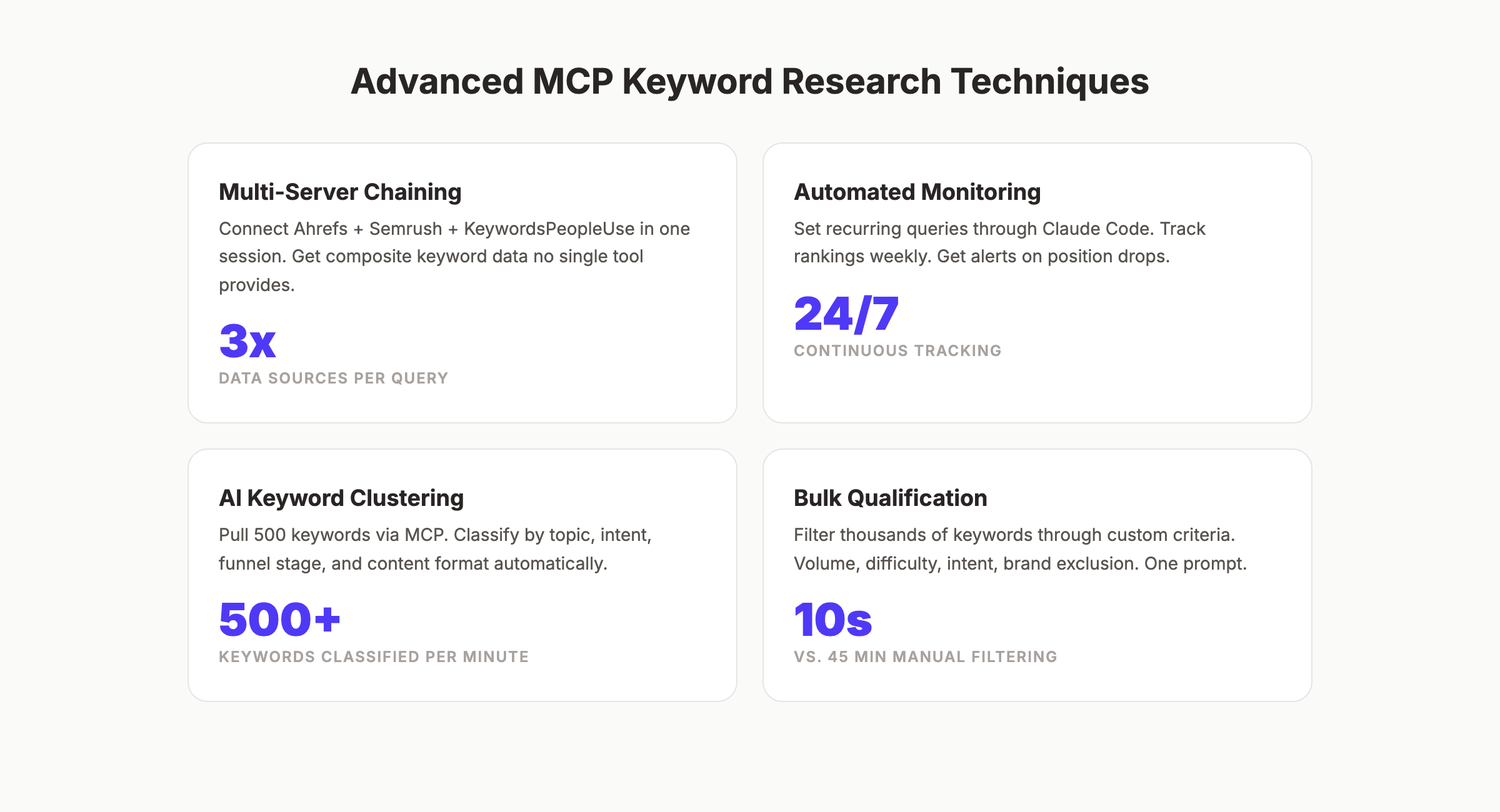
Multi-Server Chaining
Connect 2 or 3 MCP servers to the same Claude session. Query Ahrefs for keyword difficulty. Query Semrush for competitive overlap. Query KeywordsPeopleUse for question-based variations. The AI merges all three data sources into one unified report.
This is not possible without MCP. No single SEO tool contains every data point. Multi-server chaining gives you a composite view that no individual tool provides.
Automated Keyword Monitoring
Set up recurring MCP queries through Claude Code or automation scripts. Track keyword rankings weekly. Flag any keyword that drops more than 5 positions. Generate an automatic alert with recommended actions.
This turns keyword research from a one-time project into a continuous monitoring system. The AI watches your rankings and surfaces opportunities as they appear. That is autonomous SEO in practice.
Keyword Clustering With AI Classification
MCP data combined with AI classification creates keyword clusters that match real user behavior. Here is the technique.
Pull 200 to 500 keywords from your MCP server. Ask the AI to classify each keyword by topic, intent, funnel stage, and content format. The result is a fully mapped keyword universe ready for content planning.
| Cluster | Keywords | Avg. Volume | Avg. KD | Content Type |
|---|---|---|---|---|
| Beginner guides | 45 | 1,200 | 22 | Ultimate guide |
| Tool comparisons | 32 | 800 | 35 | Best-list post |
| How-to tutorials | 58 | 600 | 18 | Step-by-step guide |
| Industry-specific | 28 | 400 | 15 | Landing page |
Bulk Keyword Qualification
Not every keyword deserves content. MCP lets you filter thousands of keywords through qualification criteria instantly.
Prompt: “From this list of 300 keywords, keep only those that meet ALL of these criteria: search volume above 100, keyword difficulty below 45, commercial or informational intent, and no branded terms. Sort the qualified keywords by traffic potential.”
Manual filtering of 300 keywords takes 30 to 45 minutes in a spreadsheet. MCP handles it in under 10 seconds. The time savings compound across every SEO campaign you run.
Your SEO team. $99 per month. 30 optimized articles, published automatically. Start for $1 →
Common Mistakes and How to Fix Them {#common-mistakes}
MCP keyword research is powerful. But it fails when you ignore these patterns.
Mistake 1: Trusting AI-Generated Metrics Without Verification
AI models can hallucinate data points. An MCP query might return a keyword with “1,200 monthly searches” when the actual volume is 120. Always spot-check 5 to 10 keywords by looking them up directly in your SEO tool.
Fix: Cross-reference the top 5 keywords from every MCP report against the source tool. Build verification into your workflow.
Mistake 2: Burning API Credits on Broad Queries
Broad queries like “find all keywords related to marketing” can trigger thousands of API calls. DataForSEO charges per query. Ahrefs and Semrush enforce rate limits.
Fix: Start specific. Use seed keywords with 2 to 3 words. Add filters for volume and difficulty. Narrow before you expand. That keeps API costs under control.
Mistake 3: Using Only One MCP Server
Each MCP server returns different data. Ahrefs and Semrush do not agree on keyword difficulty scores. They use different algorithms. Relying on a single source creates blind spots.
Fix: Connect at least 2 MCP servers. Compare difficulty scores. Use the average when they disagree by more than 10 points.
Mistake 4: Skipping the Human Review Step
MCP automates data collection, not strategy. The AI can find 50 low-difficulty keywords. It cannot tell you which ones align with your business goals, your content strategy, or your conversion funnel.
Fix: Treat MCP output as raw material. Apply business context, audience knowledge, and competitive positioning after the AI delivers its report. The machine gathers data. You make decisions.
Mistake 5: Ignoring Rate Limits
Every MCP server has rate limits. Hit them and your queries fail. Hit them repeatedly and your API key may get suspended.
Fix: Check the rate limit documentation for your MCP server before running bulk queries. Add delays between large requests. Use the --rate-limit parameter when available.
| Mistake | Impact | Fix |
|---|---|---|
| Trusting AI metrics blindly | Wrong keyword targets | Spot-check top 5 keywords |
| Broad queries | Burned API credits | Use specific 2-3 word seeds |
| Single server reliance | Data blind spots | Connect 2+ servers |
| Skipping human review | Misaligned strategy | Apply business context manually |
| Ignoring rate limits | API suspension | Check docs before bulk queries |
FAQ {#faq}
Is MCP keyword research free?
The protocol itself is free and open source. The MCP servers connect to paid SEO tools that require subscriptions. Ahrefs starts at $129 per month. Semrush starts at $139 per month. DataForSEO uses pay-per-use pricing starting at fractions of a cent per query. Some servers like KeywordsPeopleUse offer free tiers with limited queries.
Which AI works best with MCP for keyword research?
Claude Desktop and Claude Code offer the strongest MCP support because Anthropic created both the AI model and the protocol. ChatGPT supports MCP through plugins, but the integration is less native. For pure keyword research, Claude outperforms ChatGPT in structured data analysis and instruction following.
Can I use MCP without coding skills?
Yes. The setup requires editing one JSON configuration file. No Python scripts. No API wrappers. No command-line expertise. If you can copy and paste a text block, you can configure MCP. The SE Ranking MCP server does require Docker Desktop, which adds a small technical step.
Does MCP replace Ahrefs or Semrush?
No. MCP is the connection layer between your AI assistant and these tools. You still need an active subscription to Ahrefs, Semrush, or another SEO platform. MCP changes how you access the data. It does not replace the data source. Read our Ahrefs review or Semrush review for detailed comparisons.
How accurate is keyword data from MCP servers?
MCP servers return the exact same data you would see in the source tool. The Ahrefs MCP server pulls from the Ahrefs database. The Semrush MCP server pulls from Semrush. The accuracy matches the source. The only risk is AI misinterpretation. Always verify high-stakes metrics directly in the tool. See our SEO checklist for a full verification process.
What is the difference between MCP and a regular AI SEO prompt?
A regular prompt sends static text to an AI model. The AI answers based only on its training data. MCP sends a live query to an actual SEO tool database. The AI gets real-time data. Search volumes, difficulty scores, and rankings reflect current conditions. Without MCP, AI keyword advice relies on outdated training data. With MCP, it uses live numbers.
What Comes Next
MCP keyword research is not a future concept. It is a working workflow available today. The tools exist. The servers are live. The setup takes 10 minutes.
The SEO teams adopting MCP now will compound their advantage over the next 12 months. Faster research means more content. More content means more rankings. More rankings mean more traffic.
Start with one MCP server. Run one workflow. Verify the results. Then scale.
Rank Everywhere. Do Nothing. Stacc publishes SEO content on autopilot. 30 articles per month, $99. Start for $1 →
Written and published by Stacc. We publish 3,500+ articles per month across 70+ industries. All data verified against public sources as of March 2026.
