
Programmatic SEO with Claude Code: Complete Guide
How to use Claude Code for programmatic SEO. Covers templates, content at scale, schema automation, and internal linking. Updated April 2026.
Stacc Editorial • 2026-04-04 • SEO Tips
In This Article
Programmatic SEO with Claude Code is how teams build thousands of ranking pages without writing each one by hand. Zapier uses this approach to generate 7,000+ integration pages. Wise runs 8.5 million currency converter pages. Canva indexes 2.2 million template landing pages.
The problem: most businesses do not have engineering teams large enough to build these systems. Traditional programmatic SEO requires developers, data pipelines, and months of infrastructure work. The result is that only well-funded startups and enterprises capture this traffic.
Claude Code changes the math. It reads your codebase, writes files, runs commands, and generates entire page sets from templates and structured data. One operator can now do what used to require a 3-person engineering team.
This guide covers everything you need to build a programmatic SEO engine with Claude Code. We have published 3,500+ SEO articles across 70+ industries and tested these workflows on real production sites.
Here is what you will learn:
- How programmatic SEO works and where Claude Code fits in the stack
- The exact workflow for building page templates that rank
- How to generate unique content at scale without triggering Google penalties
- Automating schema markup, internal linking, and sitemaps
- What Google’s Scaled Content Abuse policy actually penalizes (and how to stay safe)
What Is Programmatic SEO?
Programmatic SEO is the practice of generating large volumes of search-optimized pages from structured data and templates. Instead of writing each page manually, you define a template, feed it data, and publish hundreds or thousands of variations.
Every major platform uses this strategy:
| Company | Programmatic Pages | Monthly Organic Traffic |
|---|---|---|
| Wise | 8.5M+ currency converter pages | 100M+ visits |
| Canva | 2.2M+ template pages | 100M+ visits |
| TripAdvisor | 75M+ indexed pages | 226M+ visits |
| Zapier | 7,000+ integration pages | 5.8M-16.2M visits |
| Nomadlist | 24,000+ city pages | 50K visits |
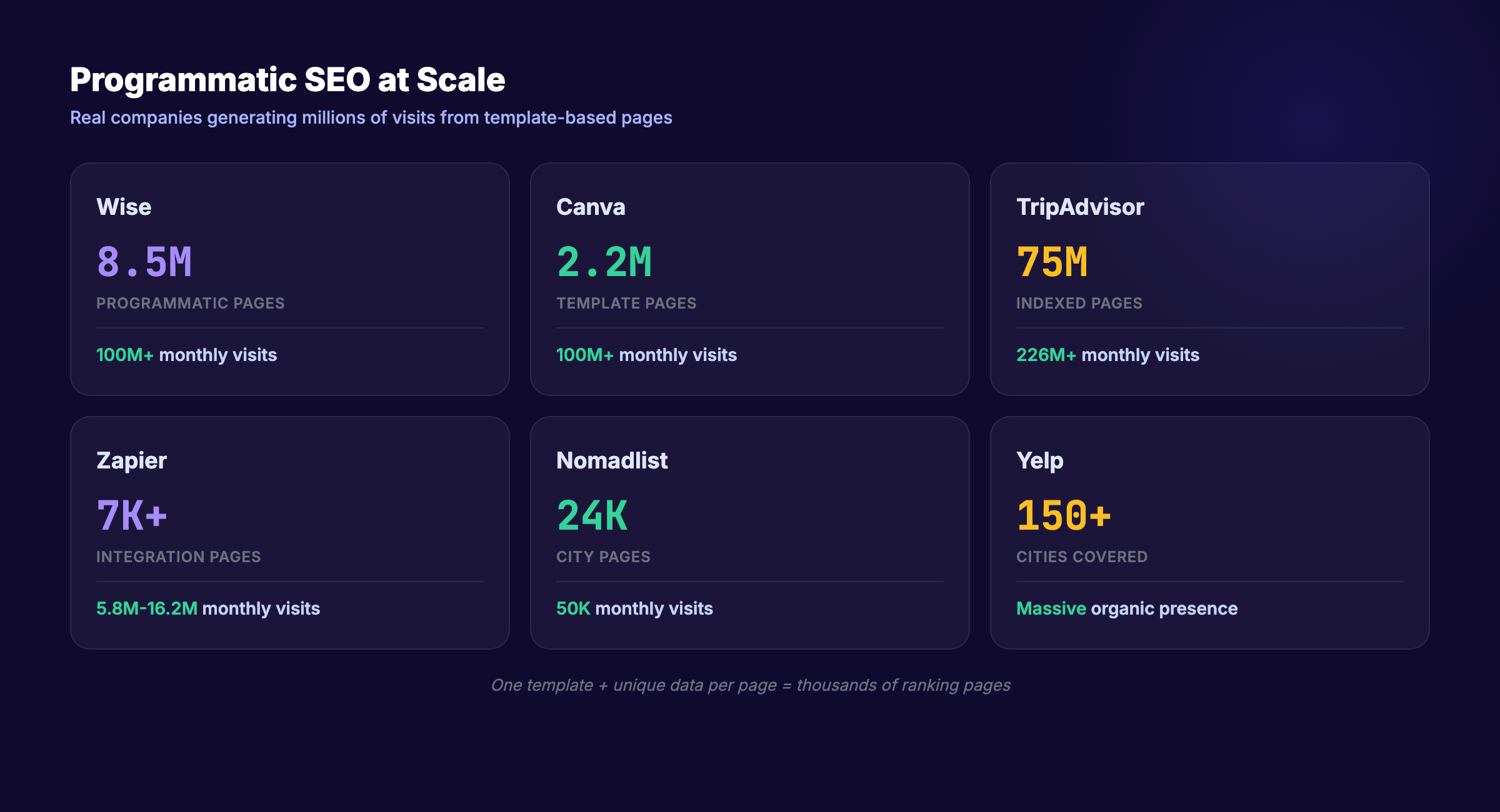
The pattern is the same: one template, many data points, thousands of unique pages.
Why Most Programmatic SEO Fails
Most attempts at programmatic SEO produce thin, duplicate content. The pages rank briefly, then drop after the next Google core update. Google’s March 2026 core update caused 60 to 90% ranking losses overnight for sites that violated the Scaled Content Abuse policy.
The failure is not automation itself. The failure is generating pages that lack genuine user value. A currency converter page for USD to EUR is useful because it shows a real exchange rate. A city page that just swaps “[city name]” into generic paragraphs is not.
For a deeper foundation, read our programmatic SEO guide.
Where Claude Code Fits
Traditional programmatic SEO requires:
- A developer to build templates
- A data pipeline to populate them
- A CMS integration to publish at scale
- A content team to add unique value per page
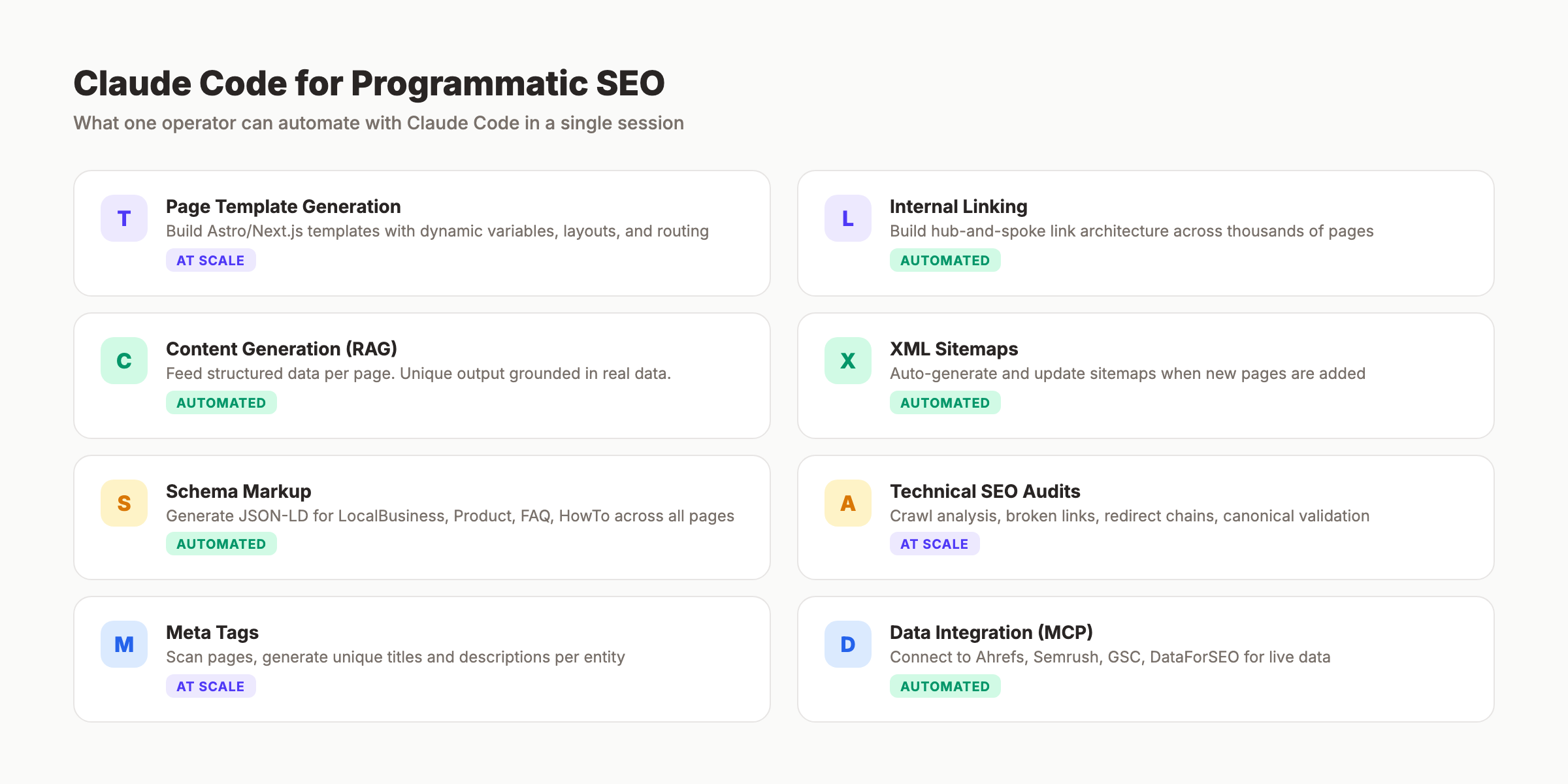
Claude Code collapses the first three into one tool. It reads your project files, generates templates, writes content variations, creates schema markup, and builds internal linking structures. All from the terminal.
Claude Code reached $2.5 billion in annual recurring revenue by early 2026. It is now one of the 3 most widely adopted coding platforms alongside GitHub Copilot and Cursor.
How Claude Code Works for SEO Automation
Claude Code is Anthropic’s agentic CLI tool. It runs in your terminal, reads entire codebases, edits files, and executes shell commands. Think of it as a developer that follows your instructions with full access to your project.
Key Capabilities for Programmatic SEO
| Capability | SEO Application |
|---|---|
| File reading and writing | Generate page files from templates at scale |
| Shell command execution | Run build tools, deploy, validate output |
| Codebase understanding | Navigate existing site architecture and extend it |
| CLAUDE.md project memory | Store SEO rules, brand voice, template specs |
| MCP server integration | Connect to Ahrefs, Semrush, GSC, DataForSEO for live data |
The CLAUDE.md Advantage
Every Claude Code project uses a CLAUDE.md file as persistent memory. For programmatic SEO, this file stores:
- Page template specifications (required fields, formatting rules)
- Brand voice guidelines (tone, banned phrases, writing rules)
- Internal linking rules (which pages link to which clusters)
- Schema markup requirements (JSON-LD templates per page type)
- Publishing workflow (file paths, build commands, validation steps)
This means Claude Code follows your exact SEO standards on every page it generates. It does not need re-prompting for each variation.
What Claude Code Cannot Do
Claude Code does not crawl the web, access Google Search Console directly, or manage your CMS login. For live data, you need MCP server connections. For publishing, you need a static site generator (Astro, Next.js) or CMS API integration.
Claude Code also cannot render JavaScript. It works with the source files, not the browser-rendered output. Keep this in mind when building client-side rendered pages.
For a full list of AI SEO automation tools that complement Claude Code, see our comparison.
Stop writing. Start ranking. Stacc publishes 30 SEO articles per month for $99. Every post follows the same quality standards this guide teaches. Start for $1 →
Choosing the Right Programmatic SEO Strategy
Not every keyword set works for programmatic SEO. The strategy depends on the data you have, the search patterns you target, and the unique value each page delivers.
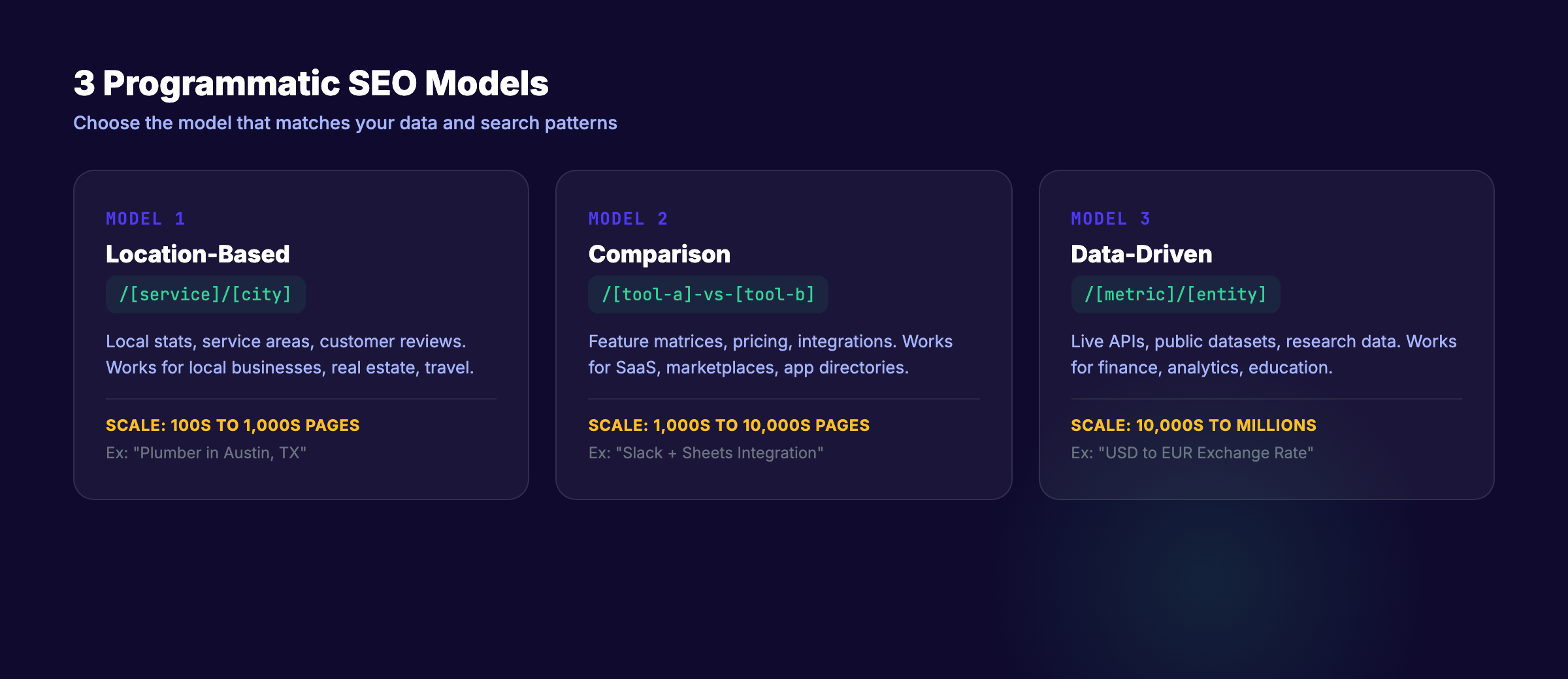
Three Programmatic SEO Models
Model 1: Location-Based Pages
Template: [Service] in [City] or [Product] near [Location]
Works for: Local businesses, service areas, real estate, travel.
Data source: City databases, census data, local business data.
Example: “Plumber in Austin, TX” with unique local stats, service area maps, and real customer reviews.
Model 2: Comparison and Integration Pages
Template: [Tool A] vs [Tool B] or [Tool A] + [Tool B] Integration
Works for: SaaS companies, marketplaces, app directories.
Data source: Product databases, feature matrices, pricing data.
Example: Zapier generates a page for every app combination with real integration details and use cases.
Model 3: Data-Driven Reference Pages
Template: [Metric] for [Entity] or [Topic] Statistics [Year]
Works for: Finance, analytics, research, education.
Data source: APIs, public datasets, research databases.
Example: Wise generates a page for every currency pair with live exchange rates and historical charts.
Choosing Your Model
| Factor | Location | Comparison | Data-Driven |
|---|---|---|---|
| Data availability | Public (census, maps) | Internal (product data) | API or dataset |
| Unique value per page | Local stats, reviews | Feature differences | Live data |
| Scale potential | 100s to 1,000s | 1,000s to 10,000s | 10,000s to millions |
| Technical difficulty | Low | Medium | High |
| Best for | Local SEO | SaaS | Finance, research |
Read our guide on content clusters to understand how programmatic pages fit into a broader SEO architecture.
Building Page Templates with Claude Code
The template is the foundation of every programmatic SEO campaign. A well-built template produces pages that are structurally identical but content-unique.
Template Architecture
Every programmatic page template needs 5 components:
- URL pattern —
/[category]/[entity](e.g.,/integrations/slack-google-sheets) - Title formula —
[Entity A] + [Entity B] Integration | [Brand] - Meta description formula —
Connect [A] to [B] in minutes. [Unique data point]. Updated [date]. - Content blocks — Introduction, features, how-to, data section, FAQ
- Schema template — JSON-LD with dynamic fields per page type
Example: Building a Template with Claude Code
Here is how you instruct Claude Code to generate a page template for an Astro-based site:
Create a page template at src/pages/integrations/[slug].astro that:
- Accepts props: toolA, toolB, features[], pricing, lastUpdated
- Generates a unique H1: "[toolA] + [toolB] Integration Guide"
- Includes a feature comparison table
- Adds FAQ schema with 4 dynamic questions
- Creates an internal link to /integrations/ index page
- Follows the writing rules in CLAUDE.md
Claude Code reads your existing site structure, matches the code style, and generates a production-ready template file.
The Data Layer
Templates need data. For programmatic SEO, store your data in one of these formats:
| Format | Best For | Example |
|---|---|---|
| JSON files | Small datasets (under 1,000 entries) | Product catalogs, city lists |
| CSV/TSV | Medium datasets | Keyword databases, feature matrices |
| API endpoints | Live data | Exchange rates, stock prices, weather |
| Markdown frontmatter | Content-heavy pages | Blog posts, guides, reviews |
| CMS collections | Large content sets | Astro content collections, Sanity, Contentful |
Claude Code can read any of these formats and generate pages from them. For Astro sites, content collections with markdown frontmatter are the most natural fit.
Our automated content creation guide covers additional workflow patterns for content at scale.
Generating Unique Content at Scale
This is where most programmatic SEO fails. Swapping variables into a template produces duplicate content. Google detects it and deindexes it.
The fix: every page must contain genuinely unique information that serves the searcher.
The RAG Approach
RAG (Retrieval-Augmented Generation) is the method that works. Instead of asking Claude Code to generate content from its training data, you feed it specific data for each page.
How it works:
- Prepare a data file for each page entity (JSON, CSV, or markdown)
- Each data file contains unique facts, statistics, or details
- Claude Code reads the data file and generates content grounded in that specific data
- The output is unique because the input is unique
Example workflow:
For each city in cities.json:
  1. Read city data (population, median income, top employers, climate)
  2. Read local business data (number of competitors, avg ratings)
  3. Generate a 600-word page using template + city-specific data
  4. Add 3 FAQ questions specific to that city
  5. Write to src/content/locations/[city-slug].md
The content is not generic because the data is not generic. Each city page references real local statistics that no other page contains.
Content Quality Signals That Matter
Google evaluates programmatic content against the same E-E-A-T standards as manually written content:
- Experience: Does the page reflect first-hand knowledge? (Include real data, not generated claims.)
- Expertise: Does the content demonstrate subject matter depth? (Use precise numbers, not vague statements.)
- Authoritativeness: Is the source credible for this topic? (Match your domain’s authority to the topic.)
- Trustworthiness: Is the information accurate and verifiable? (Cite sources. Link to original data.)
How to Humanize Programmatic Content
Even with unique data, programmatic content can sound mechanical. Apply these rules:
- Vary sentence structure across pages. Do not use the same opening paragraph pattern on every page.
- Add conditional logic to templates. If a city has a population over 500,000, include metro-specific content. If under 50,000, focus on community-specific angles.
- Include at least 1 unique insight per page that cannot be found on any other page in the set.
- Run a content humanization pass on generated output before publishing.
Successful programmatic SEO campaigns see 40 to 60% of published pages earning organic traffic within 6 months. The key differentiator is content uniqueness per page.
Your SEO team. $99 per month. 30 optimized articles, published automatically. Blog SEO, Local SEO, and Social on autopilot. Start for $1 →
Automating Schema Markup and Technical SEO
Programmatic pages need structured data at scale. Manually adding JSON-LD to thousands of pages is not practical. Claude Code generates and validates schema markup across entire page sets in minutes.
Schema Types for Programmatic Pages
| Page Type | Required Schema | Optional Schema |
|---|---|---|
| Location pages | LocalBusiness, GeoCoordinates | AggregateRating, Review |
| Product comparisons | Product, AggregateRating | FAQPage, HowTo |
| Integration pages | SoftwareApplication | FAQPage, BreadcrumbList |
| Data reference pages | Article, Dataset | FAQPage, Table |
| How-to guides | HowTo, Article | FAQPage, VideoObject |
Automating Schema with Claude Code
Tell Claude Code to scan your generated pages and add schema:
Scan all files in src/content/locations/*.md.
For each file:
  1. Read the frontmatter (name, address, phone, hours, rating)
  2. Generate LocalBusiness JSON-LD with all available fields
  3. Add FAQPage schema for the FAQ section
  4. Add BreadcrumbList schema matching the URL hierarchy
  5. Write the schema to the page's frontmatter or layout component
  6. Validate the output against schema.org specs
Claude Code reads the data, generates valid JSON-LD, and writes it to every file. One instruction handles hundreds of pages.
A study found that 61% of pages cited by ChatGPT had rich schema markup, compared to only 25% of Google’s top-ranking pages. Schema does not just help Google. It helps AI search engines find and cite your content.
For a deeper walkthrough, read our schema markup SEO guide and our guide on structured data for AI search.
Technical SEO at Scale
Beyond schema, programmatic pages need:
- Canonical tags — Each page must have a unique canonical URL. Duplicate canonicals kill programmatic SEO.
- XML sitemaps — Generate sitemaps automatically when new pages are added. Claude Code can update your
sitemap.xmlas part of the build process. - Crawl budget management — Thousands of thin pages waste crawl budget. Only publish pages that deliver genuine value. Our crawl budget optimization guide covers this in detail.
- robots.txt configuration — Allow search engine crawlers to access programmatic page directories. Block staging or draft directories.
- Page speed — Programmatic pages should be static HTML. Avoid client-side rendering for content that search engines need to crawl. Our JavaScript SEO guide explains why this matters.
Internal Linking and Sitemap Automation
Internal linking is the hidden advantage of programmatic SEO. When you control thousands of pages, you control the link graph.
Automated Internal Linking with Claude Code
Claude Code can build contextual internal links across your entire page set:
For each page in src/content/locations/*.md:
  1. Identify the city and state from frontmatter
  2. Link to the parent state hub page (/locations/[state])
  3. Link to 3 neighboring city pages (based on geographic proximity)
  4. Link to 2 related service pages (/services/[relevant-service])
  5. Link to the main locations index (/locations)
  6. Use descriptive anchor text (not "click here")
This creates a hub-and-spoke architecture where every page strengthens every other page. The parent hub page passes authority to city pages. City pages link to each other for geographic relevance. Service pages cross-link for topical depth.
Link Architecture Patterns
| Pattern | Structure | Best For |
|---|---|---|
| Hub and spoke | Index → Category → Individual page | Location pages, product catalogs |
| Matrix | Every page links to related pages in a grid | Comparison pages, feature pages |
| Hierarchical | Parent → Child → Grandchild | Documentation, taxonomies |
| Cluster | Pillar page ↔ Supporting pages | Topic clusters, guides |
For full implementation details, see our internal linking strategy guide.
Automated Sitemap Generation
Every time Claude Code generates new pages, it should update the sitemap:
After generating all location pages:
  1. Scan src/content/locations/*.md for all published pages
  2. Generate XML sitemap entries with lastmod dates
  3. Write to public/sitemaps/locations-sitemap.xml
  4. Update the sitemap index at public/sitemap-index.xml
Astro handles this automatically with the @astrojs/sitemap integration. But for custom programmatic page sets, you may need manual sitemap management.
3,500+ blogs published. 92% average SEO score. See what Stacc can do for your site. Every post follows structured data and internal linking best practices. Start for $1 →
Avoiding Google’s Scaled Content Abuse Policy
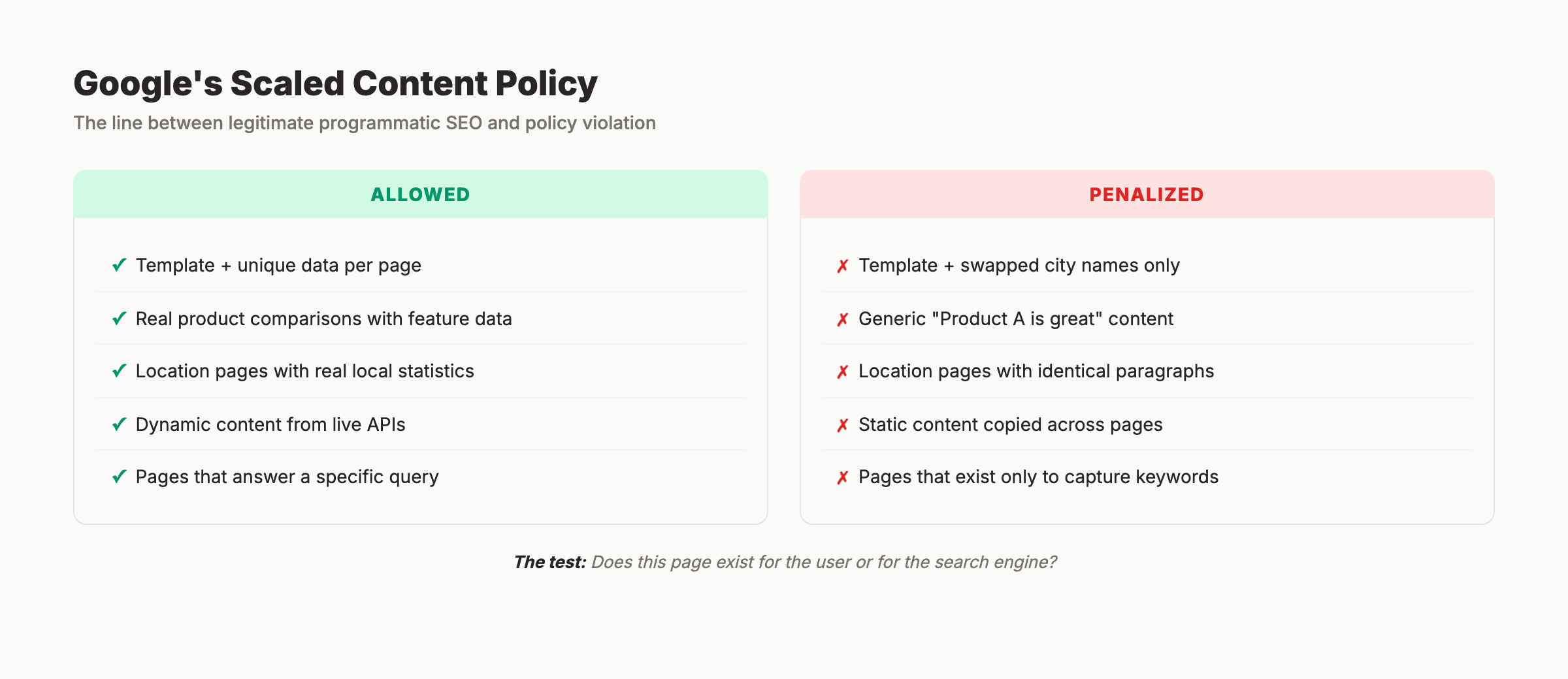
Google’s Scaled Content Abuse policy targets pages generated primarily to manipulate search rankings rather than help users. Understanding the line between legitimate programmatic SEO and policy violation is critical.
What Google Actually Penalizes
Google does not penalize automation. It penalizes low-value content at scale. Here is the distinction:
| Allowed | Penalized |
|---|---|
| Template + unique data per page | Template + swapped city names only |
| Real product comparisons with feature data | Generic “Product A is great, Product B is great” |
| Location pages with real local statistics | Location pages with identical paragraphs |
| Dynamic content from live APIs | Static content copied across pages |
| Pages that answer a specific query | Pages that exist only to capture keywords |
The test is simple: does this page exist for the user or for the search engine?
 If removing the page would make the internet worse, it should stay.
Google’s Official Position on AI Content
Google’s guidance on AI-generated content is clear: “Appropriate use of AI or automation is not against our guidelines.” Quality matters, not production method.
The requirements:
- Content must demonstrate E-E-A-T
- Each page must provide genuine value to the searcher
- Automation must not be used to manipulate search rankings
- Transparency about AI involvement is recommended
Programmatic SEO Safety Checklist
Before publishing a programmatic page set, verify each page against this checklist:
- Does the page contain at least 1 unique data point not found on any other page in the set?
- Would a human find this page useful for the specific query it targets?
- Is the content factually accurate and verifiable?
- Does the page have unique meta title and description (not just variable swaps)?
- Is the schema markup accurate to the page content?
- Does the page earn its place in the index (not just fill a keyword gap)?
Sites that pass this checklist consistently see strong programmatic SEO results. Sites that skip it risk the kind of 60 to 90% traffic losses that the March 2026 core update delivered.
For broader quality standards, review our SEO checklist for 2026.
FAQ
What is programmatic SEO with Claude Code?
Programmatic SEO with Claude Code is the practice of using Anthropic’s CLI tool to generate large numbers of search-optimized pages from templates and structured data. Claude Code reads your project, generates page files, adds schema markup, builds internal links, and automates technical SEO tasks. It replaces the engineering team traditionally required for programmatic SEO.
Is programmatic SEO against Google’s guidelines?
No. Google explicitly states that automation and AI content are not against their guidelines. What Google penalizes is scaled content that lacks genuine user value. Every programmatic page must contain unique data and serve a real search intent.
How many pages can Claude Code generate?
Claude Code can generate hundreds of pages in a single session. The practical limit depends on your data, template complexity, and the amount of unique content per page. For most campaigns, batches of 50 to 200 pages per session work well. Larger sets benefit from splitting into multiple runs.
Do programmatic SEO pages rank as well as manually written pages?
Yes, when done correctly. Successful programmatic SEO campaigns see 40 to 60% of pages earning organic traffic within 6 months. The key is content uniqueness. Each page needs genuinely different information, not just variable swaps in a template. Companies like Zapier and Wise prove that programmatic pages can dominate competitive keywords.
Does Claude Code work with WordPress, Webflow, and other CMS platforms?
Claude Code works with any platform where you can generate files or push content via API. It integrates naturally with static site generators (Astro, Next.js, Hugo) where pages are files. For WordPress and Webflow, Claude Code generates content that you publish through the CMS API or import tools like WP All Import.
How much does Claude Code cost for programmatic SEO?
Claude Code requires a Claude Pro ($20/month) or Claude Max ($100/month) subscription from Anthropic. There are no per-page fees. The total cost for a programmatic SEO campaign is the subscription plus your hosting and data costs. Compare this to the $5,000 to $15,000 a development team would charge for the same work.
Programmatic SEO with Claude Code removes the engineering bottleneck that kept this strategy exclusive to well-funded companies. One operator with the right template, data, and quality standards can build what used to require a team.
The opportunity is real. The risk is also real. Build pages that deserve to exist, and programmatic SEO compounds into a traffic machine. Build pages that exist only to capture keywords, and the next core update will take them away.
Rank everywhere. Do nothing. Stacc handles Blog SEO, Local SEO, and Social Media on autopilot, starting at $99 per month. Start for $1 →
Written and published by Stacc. We publish 3,500+ articles per month across 70+ industries. All data verified against public sources as of March 2026.
