
WordPress vs Ghost: Honest Comparison (2026)
We compare WordPress and Ghost across pricing, speed, SEO, security, and monetization. See which blogging platform fits your goals. Updated April 2026.
Siddharth Gangal • 2026-04-02 • Content Strategy
In This Article
WordPress powers 43% of all websites. Ghost powers some of the fastest blogs on the internet. Choosing between them is not about which is “better.” It is about which one fits how you work.
We have published 3,500+ blogs across 70+ industries using both platforms. Our publishing integrations support WordPress, Ghost, and Webflow. This comparison comes from hands-on publishing experience, not marketing pages.
Here is what you will learn:
- How WordPress and Ghost compare on pricing, speed, SEO, and security
- Which platform is better for monetization and newsletters
- The real total cost of ownership for each platform
- Who should choose WordPress and who should choose Ghost
Quick Verdict
Best for flexibility and scale: WordPress. 60,000+ plugins, full e-commerce, infinite customization.
Best for writing and newsletters: Ghost. Faster out of the box, native memberships, zero plugin management.
If you need a website that does everything, pick WordPress. If you need a blogging and newsletter platform that stays out of your way, pick Ghost.
What Is WordPress?
WordPress is an open-source content management system that launched in 2003. It started as a blogging tool. It now runs everything from personal blogs to enterprise e-commerce stores.
Two versions exist. WordPress.org is the self-hosted, open-source software. WordPress.com is a hosted service run by Automattic. This comparison focuses on WordPress.org (self-hosted) since it offers the full feature set.
WordPress is best for: Businesses that need a website beyond blogging. E-commerce, membership sites, directories, LMS platforms, and complex multi-author publications.
Key stats:
- 43.4% of all websites globally (W3Techs, 2026)
- 60.4% CMS market share among sites with a known CMS
- 60,000+ free plugins
- 9,000+ free themes
What Is Ghost?
Ghost is an open-source publishing platform that launched in 2013. It was built specifically for professional publishers, bloggers, and newsletter creators. Unlike WordPress, Ghost has not expanded into e-commerce or general-purpose website building.
Ghost comes in two forms. Ghost(Pro) is the managed hosting service starting at $18/month. Self-hosted Ghost is free and runs on any server with Node.js.
Ghost is best for: Writers, newsletter publishers, and content creators who want a clean writing experience with built-in memberships and email.
Key stats:
- 0.1% CMS market share (W3Techs, 2026)
- 100,000+ active websites
- 40,000 GitHub stars
- 12,000+ independent publishers using Ghost for newsletters
- Used by Cloudflare, DuckDuckGo, Kickstarter, and Mozilla
Head-to-Head Feature Comparison
| Feature | WordPress | Ghost |
|---|---|---|
| Open source | Yes | Yes |
| Self-hosting option | Yes (free) | Yes (free) |
| Managed hosting | WordPress.com ($4–$45/mo) | Ghost(Pro) ($18–$199/mo) |
| Themes | 9,000+ free | 160+ (20 free) |
| Plugins/extensions | 60,000+ | No plugin system |
| Built-in memberships | No (requires plugin) | Yes (native) |
| Built-in newsletter | No (requires plugin) | Yes (native) |
| Built-in SEO tools | No (requires Yoast/AIOSEO) | Yes (basic) |
| E-commerce | Full (WooCommerce) | Limited (Stripe subscriptions) |
| REST API | Yes | Yes (Content + Admin APIs) |
| Markdown editor | No (Gutenberg blocks) | Yes (native) |
| Multi-author support | Yes | Yes |
| Transaction fees | Plugin-dependent | 0% (Stripe processing only) |
| Average page load | 1.5–3s (unoptimized) | 0.6–1.5s |
Pricing: The Real Cost of Each Platform
Pricing is where most comparisons mislead readers. The software for both platforms is free. The cost comes from hosting, themes, and plugins.
Ghost Pricing
| Plan | Monthly Cost | Members | Staff Users |
|---|---|---|---|
| Self-hosted | $5–$10/mo (server) | Unlimited | Unlimited |
| Starter (Ghost Pro) | $18/mo | 1,000 | 1 |
| Publisher (Ghost Pro) | $29/mo | 1,000 | 3 |
| Business (Ghost Pro) | $199/mo | 10,000 | 15 |
Ghost Pro includes hosting, SSL, CDN, email delivery, and updates. No extra plugins to buy.
WordPress Pricing
| Component | Monthly Cost |
|---|---|
| Shared hosting | $3–$8/mo |
| Domain | ~$1.25/mo (billed annually) |
| Premium theme | $4–$8/mo (billed annually) |
| SEO plugin (Yoast/AIOSEO) | $8–$17/mo (billed annually) |
| Membership plugin | $15–$25/mo (billed annually) |
| Email newsletter tool | $10–$50/mo |
| Backup plugin | $5–$10/mo |
Simple blog cost: $50–$100/year (hosting + free theme + free plugins).
Blog with newsletters and memberships: $80–$220/month when you add membership tools, email delivery, and premium plugins.
Cost Comparison by Use Case
| Use Case | WordPress | Ghost (Pro) | Ghost (Self-Hosted) |
|---|---|---|---|
| Simple blog | $50–$100/year | $216/year | $60–$120/year |
| Blog + newsletter | $80–$150/mo | $29/mo | $10–$20/mo |
| Blog + paid memberships | $120–$220/mo | $29/mo | $10–$20/mo |
| Media publication | $200–$500/mo | $199/mo | $20–$50/mo |
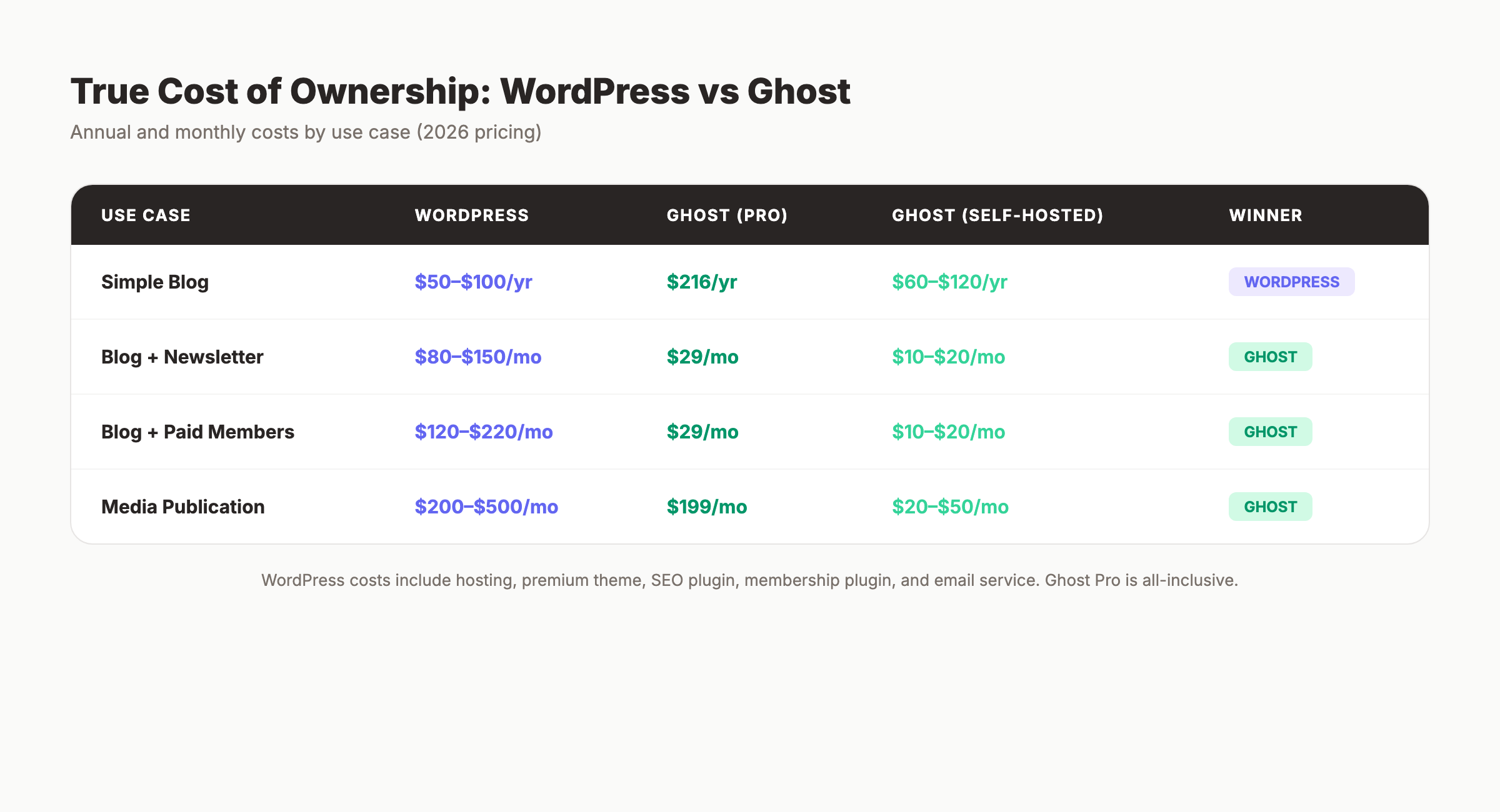
Ghost wins on total cost for anyone who needs memberships or newsletters. WordPress wins for simple blogs that need nothing beyond basic publishing.
Your SEO team. $99/month. Stacc publishes 30 optimized articles per month to WordPress or Ghost. Automatically. Start for $1 →
Performance and Speed
Ghost is faster than WordPress by default. That is not debatable. The question is whether the gap matters after optimization.
Default Performance
| Metric | WordPress (Default) | Ghost (Default) |
|---|---|---|
| Time to First Byte (TTFB) | 200–800ms | 50–200ms |
| Largest Contentful Paint (LCP) | 1.5–3s | 0.8–1.5s |
| Page size | 500KB–2MB | 100–400KB |
| PageSpeed score | 40–60 | 85–95 |
Optimized Performance
| Metric | WordPress (Optimized) | Ghost (Optimized) |
|---|---|---|
| TTFB | 100–300ms | 50–150ms |
| LCP | 0.8–1.5s | 0.6–1.2s |
| PageSpeed score | 85–95 | 95–99 |
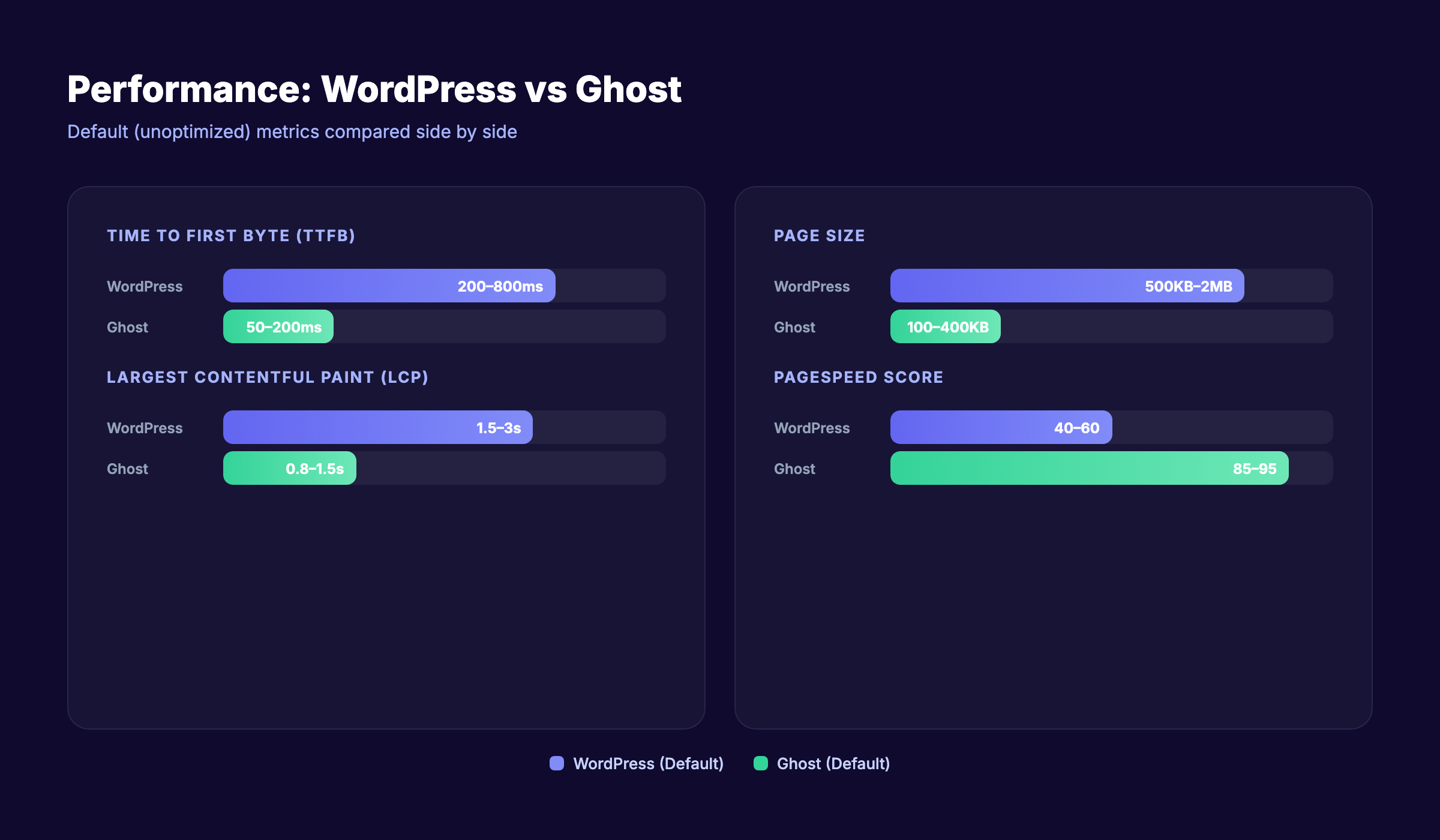
WordPress can match Ghost with the right hosting, caching, and optimization plugins. But that requires work. Ghost ships fast by default because it has no plugin bloat, fewer database queries, and a leaner codebase.
For Core Web Vitals and SEO, both platforms can score well. Ghost just gets there with less effort.
SEO Capabilities
Both platforms can rank on Google. The difference is how you get there.
WordPress SEO
WordPress has the strongest SEO ecosystem of any CMS. Yoast SEO alone has 13 million active installs. The plugin ecosystem gives you:
- Content analysis and readability scoring
- Schema markup generators
- XML sitemap control
- Breadcrumb management
- Redirect managers
- Internal link suggestions
- Canonical tag controls
- Full robots.txt editing
- Table of contents plugins
WordPress gives you total control over every on-page SEO element. The tradeoff is that you need to install and configure multiple plugins to get that control.
Ghost SEO
Ghost includes basic SEO features out of the box:
- Clean URLs and automatic slugs
- Meta titles and descriptions per post
- Automatic XML sitemaps
- JSON-LD structured data (basic)
- Canonical tag support
- Open Graph and Twitter Card tags
- RSS feeds
- Fast page load (direct Core Web Vitals benefit)
What Ghost lacks:
- No table of contents (requires theme-level JavaScript)
- No nofollow link attributes in the editor (must edit raw HTML)
- No FAQ schema automation
- No internal link suggestions
- No keyword density or readability scoring
- Limited redirect management
SEO Verdict
WordPress wins for SEO control and advanced optimization. If keyword research, schema markup, and technical SEO configuration matter to your strategy, WordPress gives you more levers to pull.
Ghost wins for speed-based SEO signals and simplicity. If your strategy is “write great content and publish consistently,” Ghost removes the friction.
3,500+ blogs published. 92% average SEO score. See what Stacc can do for your site. Start for $1 →
Security
This is the most under-discussed comparison point. And it should be one of the first things you evaluate.
WordPress Security
WordPress itself is secure. The problem is the ecosystem. In 2025, researchers identified 11,334 new vulnerabilities in the WordPress ecosystem. That is a 42% increase over 2024.
- 96% of those vulnerabilities came from plugins
- 43% were exploitable without authentication
- 1,614 plugins were removed from the directory in 2024 for security issues
- Over 500,000 WordPress sites were infected with malware in 2024
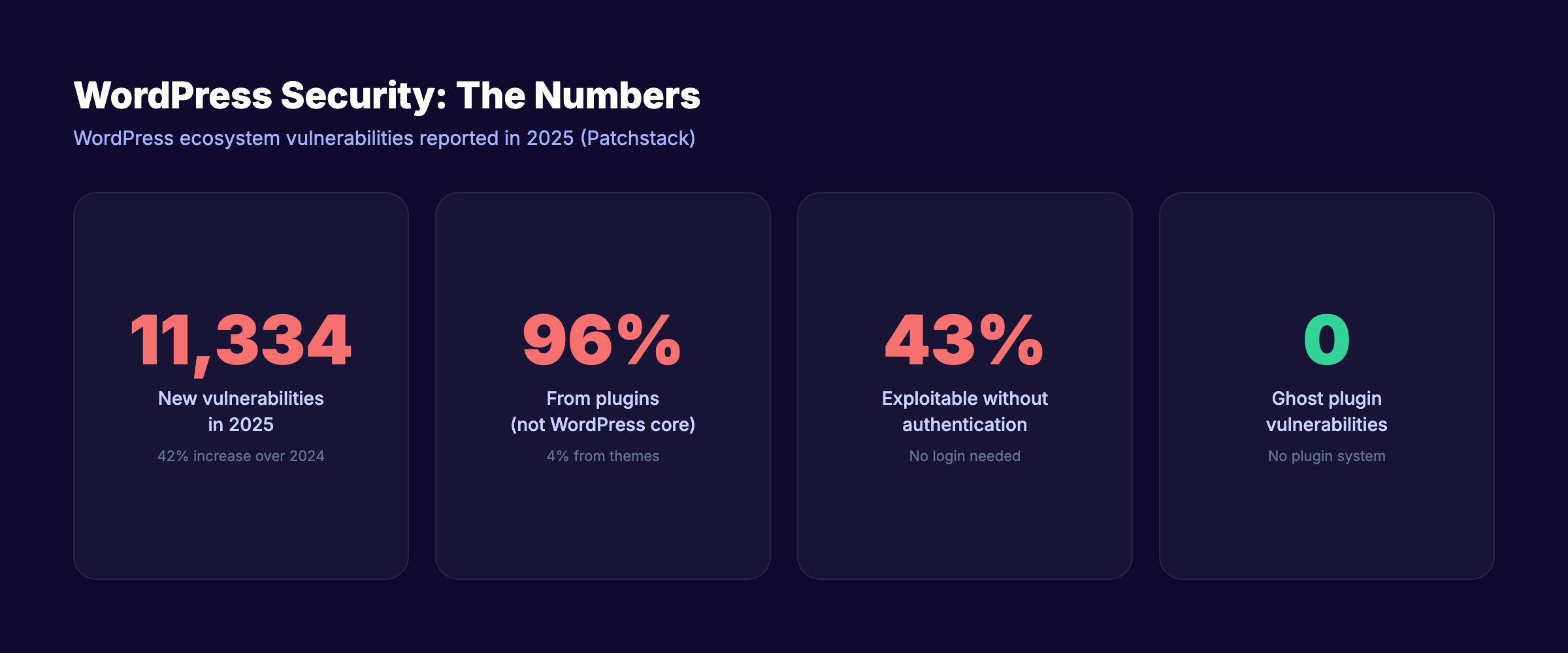
You can run a secure WordPress site. It requires regular updates, a firewall plugin, two-factor authentication, limited plugin usage, and ongoing monitoring. Most site owners do not do all of that.
Ghost Security
Ghost has a smaller attack surface. No plugin system means no plugin vulnerabilities. The codebase is maintained by a single team. Ghost(Pro) handles all server security, updates, and patching.
Self-hosted Ghost still requires server maintenance. But the total number of components to secure is far smaller than a WordPress site with 15–30 plugins.
Security Verdict
Ghost is more secure by default. WordPress can be equally secure with proper maintenance, but most WordPress sites are not properly maintained.
Monetization and Newsletters
This is where Ghost pulls ahead of WordPress for a specific audience: creators who monetize through subscriptions.
Ghost Monetization (Built-in)
Ghost includes native membership and newsletter tools:
- Free and paid membership tiers
- Stripe integration with 0% transaction fees (Stripe charges ~2.9%)
- Built-in email newsletters with 53% average open rate
- Member analytics and segmentation
- Subscriber import/export
- Tiered pricing (multiple membership levels)
- 6.3% average conversion rate from free to paid members
Ghost publishers generated $9.2 million in combined subscription revenue in 2024. The top 10% earn over $50,000 annually. And 36% of Ghost users migrated from Substack or Medium in the past 2 years — with 31% year-over-year growth in Substack-to-Ghost migrations.
WordPress Monetization (Plugin-based)
WordPress handles monetization through plugins:
- MemberPress ($179–$399/year) for memberships
- WooCommerce Subscriptions ($239/year) for recurring payments
- Paid Memberships Pro (free base, $247–$697/year for premium)
- Newsletter plugins (Mailchimp, ConvertKit, MailPoet) at $10–$50/month
- WooCommerce for full e-commerce (products, shipping, inventory)
WordPress offers more monetization flexibility. You can sell physical products, digital downloads, courses, and subscriptions all on one site. Ghost only handles subscription-based monetization natively.
Monetization Verdict
Ghost wins for newsletter and subscription monetization. WordPress wins for e-commerce and diverse revenue models.
Writing and Editing Experience
Ghost was built for writers. WordPress was built for websites. That difference shows up in the editor.
Ghost Editor
Ghost uses a card-based Markdown editor. It is fast, distraction-free, and purpose-built for long-form content. Features include:
- Native Markdown with live preview
- Drag-and-drop image upload
- Embeds for YouTube, Twitter, CodePen, and more
- Content cards (callouts, buttons, toggles, bookmarks)
- Keyboard shortcuts for everything
- No page builder complexity
WordPress Editor (Gutenberg)
WordPress uses the Gutenberg block editor. It is more powerful but more complex:
- Drag-and-drop blocks for every content type
- Full-page design capability (headers, footers, sidebars)
- Reusable blocks and patterns
- 400+ block types across plugins
- Custom CSS per block
- Page builder integration (Elementor, Beaver Builder)
Editor Verdict
Ghost wins for writing-focused workflows. The editor loads instantly and stays out of the way. WordPress wins for complex page layouts and mixed-content pages where design flexibility matters.
Stop writing. Start ranking. Stacc publishes 30 SEO articles per month for $99. Start for $1 →
Themes and Design
WordPress Themes
WordPress offers 9,000+ free themes in the official directory. Premium theme marketplaces (ThemeForest, Elegant Themes, StudioPress) add thousands more. Page builders like Elementor and Beaver Builder give pixel-level design control.
You can make a WordPress site look like anything. The tradeoff is decision paralysis, theme bloat, and potential speed impacts from heavy theme frameworks.
Ghost Themes
Ghost offers roughly 160 official integrations and themes. Around 20 are free. The design options are more limited but more curated. Every Ghost theme is built on Handlebars templates, which means customization requires basic coding knowledge.
Ghost themes are lighter and faster by default. But the design ceiling is lower unless you build a custom theme from scratch.
Design Verdict
WordPress wins for design flexibility. Ghost wins for clean, fast, publication-ready design with less effort.
Community and Support
WordPress Community
WordPress has the largest CMS community in the world:
- Thousands of tutorials on YouTube, blogs, and forums
- Active Stack Overflow presence
- WordCamp conferences globally
- Facebook groups, Reddit communities (r/WordPress), and Discord servers
- Millions of developers building themes and plugins
Finding help for any WordPress problem takes minutes. The ecosystem is massive.
Ghost Community
Ghost has a smaller but growing community:
- Official Ghost Forum for support and discussion
- GitHub community for technical issues
- 28% year-over-year growth among professional writers
- Smaller pool of tutorials and third-party resources
- Ghost(Pro) includes email support
Ghost’s Trustpilot reviews show mixed satisfaction with support quality. Some users report slow resolution times.
Support Verdict
WordPress wins on community size and resource availability. If you get stuck, WordPress has 10 answers for every 1 Ghost answer.
Migration Between Platforms
Moving from WordPress to Ghost is straightforward. Ghost provides a WordPress migration plugin that imports posts, pages, tags, and images.
Key migration considerations:
- SEO equity: A TaxTrends.co.uk case study preserved 98% SEO equity after migrating from WordPress to Ghost, with a 22% organic visibility increase within 3 months
- URL structure: Ghost supports custom routes to match your WordPress URL patterns
- Shortcodes: WordPress shortcodes do not transfer. You need to convert them manually
- Plugins: Any functionality provided by WordPress plugins needs an alternative in Ghost
- Comments: Ghost does not have native comments (requires a third-party service)
Moving from Ghost to WordPress is also possible. Ghost exports content as JSON, and tools exist to convert it to WordPress format.
Who Should Choose WordPress
- Businesses that need e-commerce (WooCommerce)
- Sites that require 10+ plugins for custom functionality
- Teams that want full design control with page builders
- Multi-purpose websites (blog + store + forum + directory)
- Organizations with WordPress developer resources on staff
- Anyone who needs advanced SEO tools and granular control over technical SEO
WordPress is the right choice when your website needs to do more than publish content. If you plan to sell products, build a community platform, or create complex page layouts, WordPress gives you the flexibility to do it all.
Read our full WordPress SEO guide for optimization strategies.
Who Should Choose Ghost
- Writers and bloggers who prioritize the writing experience
- Newsletter publishers who want native email delivery
- Creators monetizing through paid memberships and subscriptions
- Anyone migrating from Substack or Medium for more control
- Publishers who want fast performance without optimization work
- Teams that value simplicity over extensibility
Ghost is the right choice when your primary goal is publishing content and building an audience through email. It removes the overhead of plugin management, security patching, and performance tuning.
The Third Option: Automate Your Blog SEO
Both WordPress and Ghost are publishing platforms. They give you a place to put content. But they do not create the content for you.
The biggest challenge for most businesses is not choosing a CMS. It is producing enough SEO-optimized content to actually rank on Google. The average business publishes 1–2 blog posts per month. The ones ranking on page 1 publish 20–30.
Stacc integrates with both WordPress and Ghost. We write, optimize, and publish 30 SEO articles per month directly to your CMS. No writing. No editing. No uploading. You choose the platform. We handle the content.
That is the difference between having a blog and having a blog that drives organic traffic.
Read more about how to automate blog publishing or explore how to scale blog content with AI.
Rank everywhere. Do nothing. Blog SEO, Local SEO, and Social on autopilot. Stacc starts at $99/mo with a $1 trial. Start for $1 →
FAQ
Is Ghost better than WordPress for blogging?
Ghost offers a faster, cleaner writing experience with built-in newsletters and memberships. WordPress offers more flexibility and a larger plugin ecosystem. Ghost is better for pure blogging and newsletter publishing. WordPress is better for sites that need functionality beyond content.
Is Ghost faster than WordPress?
Yes. Ghost default PageSpeed scores range from 85–95. WordPress defaults score 40–60 without optimization. With caching plugins and managed hosting, WordPress can match Ghost. But Ghost is faster out of the box.
Can I migrate from WordPress to Ghost without losing SEO?
Yes. Ghost provides a WordPress migration tool. One case study showed 98% SEO equity preserved with a 22% organic visibility increase within 3 months. Match your URL structure and set up 301 redirects for any changed paths.
Is Ghost CMS free?
The Ghost software is open source and free to self-host. Ghost(Pro) managed hosting starts at $18/month. Self-hosting on a cloud server costs $5–$10/month.
Which is cheaper: WordPress or Ghost?
For a simple blog, WordPress is cheaper ($50–$100/year on shared hosting). For a blog with newsletters and paid memberships, Ghost is cheaper ($29/month with everything included vs $120–$220/month for WordPress with the required plugins).
Does Ghost have plugins?
No. Ghost does not have a plugin system. It relies on native features, Zapier integrations, webhooks, and custom code injections. This limits extensibility but improves security and performance.
Both platforms work. Both can rank on Google. Both have active communities. The choice comes down to what you need your website to do beyond publishing.
WordPress gives you everything. Ghost gives you exactly what a publisher needs.
Pick the one that matches how you work, not the one with the longer feature list.
Written and published by Stacc. We publish 3,500+ articles per month across 70+ industries. All data verified against public sources as of March 2026.
