
10 Best Social Media Management Tools for Local Business (2026)
We tested 10 social media management tools for local business and ranked them by pricing, features, and ease of use. Updated March 2026.
Siddharth Gangal • 2026-03-28
In This Post
Our Top Picks:
- Best overall: Buffer — simplest interface, free plan, $6/mo per channel
- Best for visual brands: Later — Instagram grid planner and TikTok support
- Best for content recycling: SocialBee — evergreen post categories at $29/mo
- Best budget option: Publer — bulk scheduling with a free plan
- Best for analytics: Metricool — competitor tracking included free
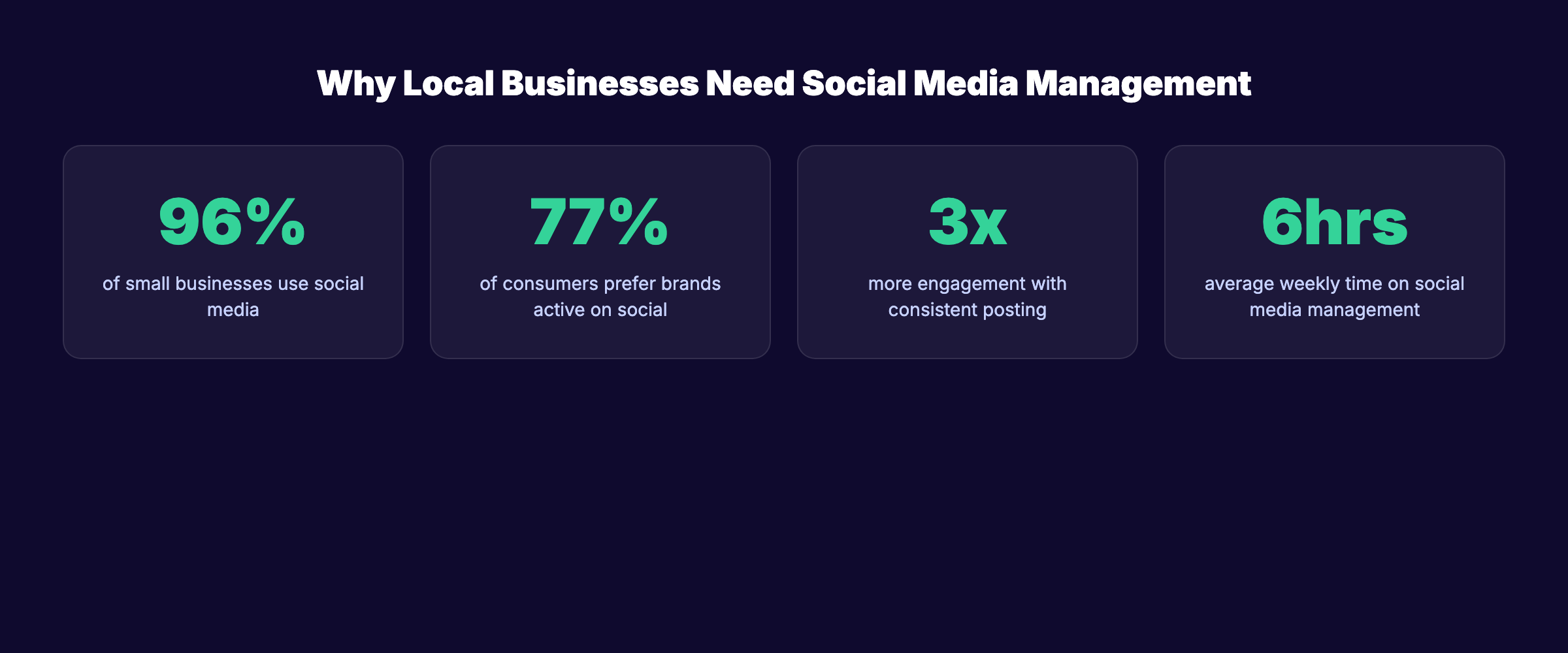
Local businesses spend an average of 6 hours per week managing social media manually. That is 312 hours per year spent copying, pasting, and posting across Facebook, Instagram, and Google Business Profile. The right social media management tools for local business cut that time by 60% or more.
We manage social media content for businesses across 70+ industries. We have tested dozens of scheduling, analytics, and automation platforms. Most “best tools” lists are written by companies selling one of the tools on the list. This one is not.
We evaluated each tool on 5 criteria: scheduling features, analytics depth, pricing per channel, local business fit, and ease of setup. Below is our honest breakdown of 10 tools with real pricing, pros, cons, and exactly who each tool works best for.
What We Looked For in Social Media Management Tools
Local businesses have different needs than enterprise brands or agencies. A dentist in Austin does not need the same features as a Fortune 500 marketing team. We focused on criteria that matter to local businesses running their own social media marketing.
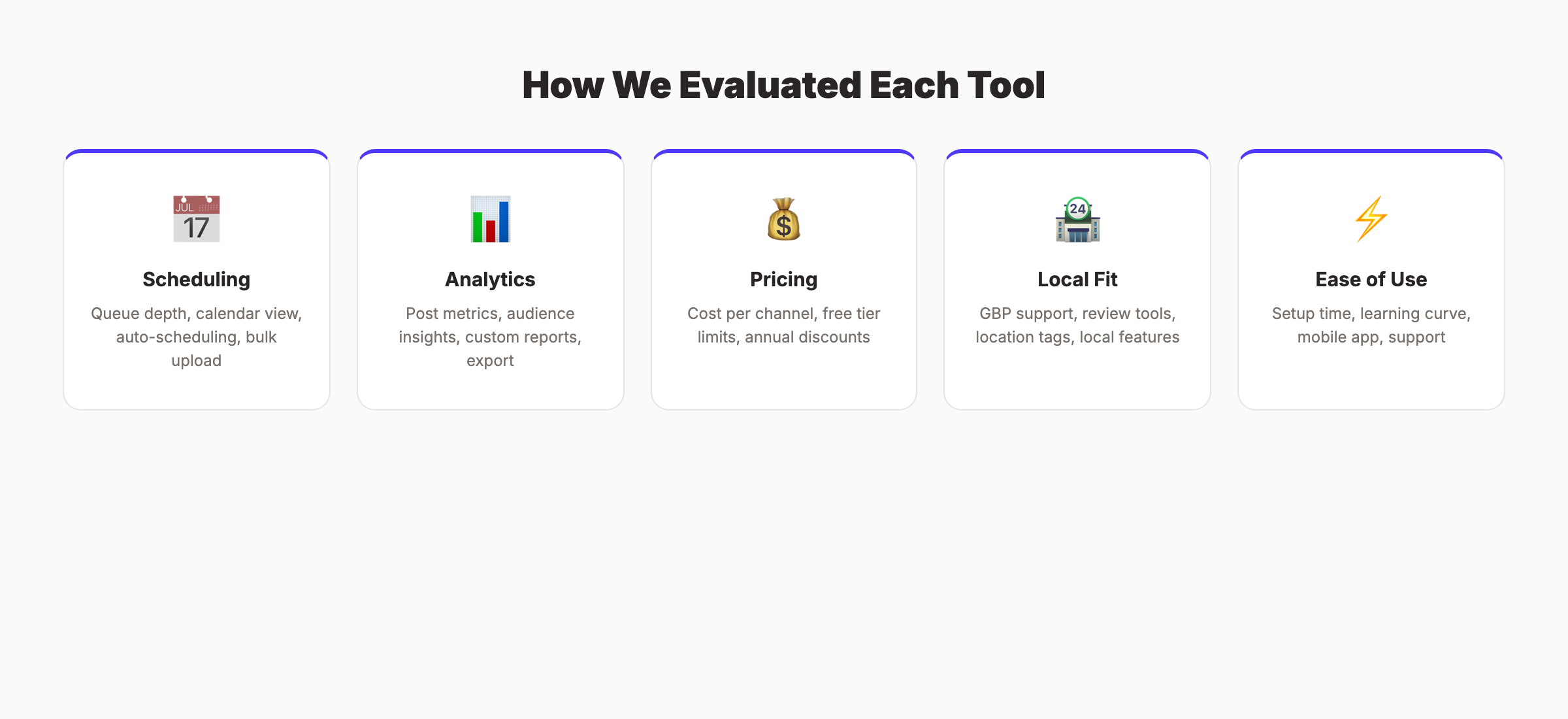
| Criteria | What We Measured |
|---|---|
| Scheduling | Queue depth, calendar view, auto-scheduling, bulk upload |
| Analytics | Post performance, audience insights, custom reports |
| Pricing | Cost per channel, free plan limits, annual discounts |
| Local Fit | GBP support, review tools, location tagging |
| Ease of Use | Setup time, learning curve, mobile app quality |
A tool that scores well for agencies may score poorly for a single-location bakery. We weighted local fit and pricing more heavily than enterprise features like social listening or influencer tracking.
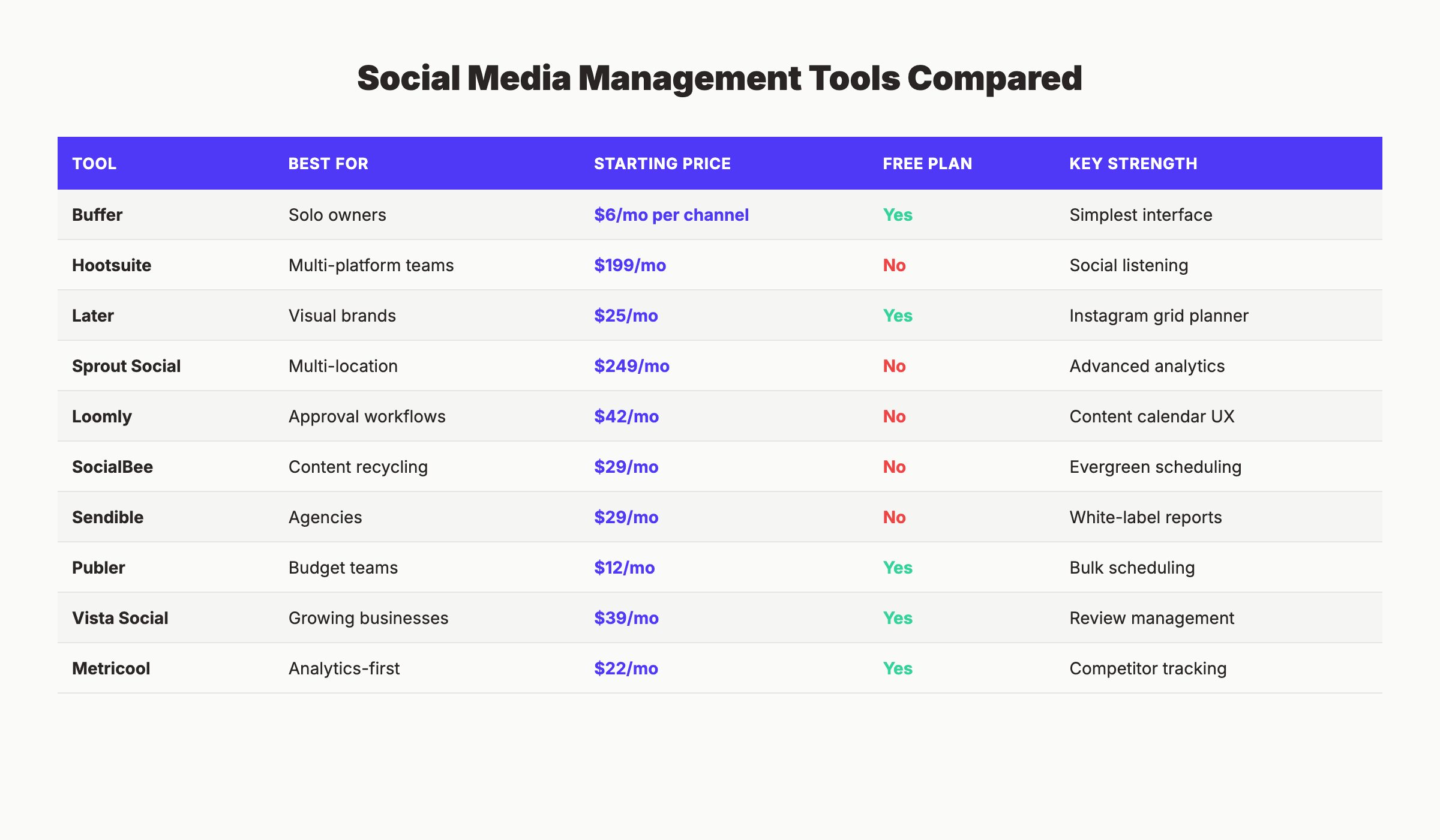
Social Media Management Tools Compared
Here is the full comparison table. Every price was verified against the vendor’s website in March 2026.
| Tool | Best For | Starting Price | Free Plan | Key Strength |
|---|---|---|---|---|
| Buffer | Solo owners | $6/mo per channel | Yes | Simplest interface |
| Hootsuite | Multi-platform teams | $199/mo | No | Social listening |
| Later | Visual brands | $25/mo | Yes | Instagram grid planner |
| Sprout Social | Multi-location businesses | $249/mo per seat | No | Advanced reporting |
| Loomly | Teams with approval workflows | $42/mo | No | Content calendar UX |
| SocialBee | Content recycling | $29/mo | No | Evergreen categories |
| Sendible | Agencies managing clients | $29/mo | No | White-label reports |
| Publer | Budget-conscious teams | $12/mo | Yes | Bulk scheduling |
| Vista Social | Growing local businesses | $39/mo | Yes | Review management |
| Metricool | Analytics-first users | $22/mo | Yes | Competitor tracking |
Five of these 10 tools offer free plans. The paid plans range from $6 per month to $249 per month. For most local businesses, the $12 to $42 range covers everything needed.
1. Buffer — Best Social Media Management Tool for Solo Owners
Buffer is the easiest social media scheduling tool on this list. It does fewer things than Hootsuite or Sprout Social. It does those things better than both.
What It Does Well
The interface loads fast and stays clean. You connect your social accounts, write a post, pick the platforms, and schedule it. No 30-minute onboarding tutorial required.
Buffer’s “Create” tab lets you draft posts with platform-specific previews. You see exactly how the post appears on Instagram, Facebook, LinkedIn, and X before publishing. The AI assistant generates caption ideas, though the output needs editing for local relevance.
The analytics dashboard shows reach, engagement, and clicks per post. The “Answers” feature shows which posts performed best and suggests optimal posting times based on your audience data.
Our Take: Buffer is the tool we recommend to local business owners who have never used a social media scheduler before. The learning curve is close to zero. If scheduling and basic analytics are all you need, Buffer does not waste your time with features you will never use.
Where It Falls Short
Buffer has no social listening, no review management, and no GBP posting. The free plan limits you to 3 channels with 10 posts each. That is tight for a business posting daily across Facebook and Instagram.
Key Features
- Multi-platform scheduling — post to Instagram, Facebook, LinkedIn, X, Pinterest, and TikTok
- AI assistant — generates caption suggestions and rephrases existing text
- Optimal timing — auto-schedules posts when your audience is most active
- Engagement tools — reply to comments from a unified inbox (paid plans)
Pricing
- Free: 3 channels, 10 posts per channel, basic analytics
- Essentials: $6/mo per channel — unlimited posts, engagement tools
- Team: $12/mo per channel — unlimited team members, approval workflows
- Annual discount: Save around 2 months (roughly 16%) with yearly billing
Who Should Use Buffer
Strong fit:
- Solo business owners who want the simplest scheduling tool available
- Local businesses posting 3 to 5 times per week across 2 to 3 platforms
Probably not right for:
- Businesses that need GBP posting or review management in the same tool
2. Hootsuite — Best for Multi-Platform Management
Hootsuite was one of the first social media management platforms. It remains one of the most feature-rich. For local businesses, that richness can be both a strength and a burden.
What It Does Well
Hootsuite connects to every major platform: Instagram, Facebook, X, LinkedIn, Pinterest, TikTok, and YouTube. The Streams feature shows real-time feeds from all connected accounts in a single dashboard.
Social listening is where Hootsuite stands apart. You can track brand mentions, competitor names, and industry keywords across platforms. For a local business monitoring what customers say about them online, this is valuable.
The OwlyWriter AI drafts posts, suggests hashtags, and repurposes content across platforms. Bulk scheduling lets you upload dozens of posts via CSV file.
Our Take: Hootsuite is the Swiss Army knife of social media tools. Local businesses will use about 30% of its features. If you are already paying $199 per month, make sure you are actually using social listening and Streams. Otherwise, you are overpaying for a scheduler.
Where It Falls Short
The pricing increased significantly in recent years. At $199 per month for 1 user and 10 social accounts, Hootsuite is the second most expensive tool on this list. The dashboard feels crowded compared to Buffer or Later.
Key Features
- Streams dashboard — real-time feeds from all social accounts in one view
- Social listening — track brand mentions and industry keywords
- OwlyWriter AI — generate captions and post ideas
- Bulk scheduling — upload via CSV for large content batches
Pricing
- Professional: $199/mo — 1 user, 10 social accounts
- Team: $249/mo — 3 users, 20 social accounts
- Enterprise: Custom pricing
- Free trial: 30 days on Professional and Team plans
Who Should Use Hootsuite
Strong fit:
- Local businesses with 5+ social accounts who need social media automation and monitoring
- Multi-location businesses tracking brand mentions across platforms
Probably not right for:
- Solo owners or small teams on a budget under $100 per month
3. Later — Best Social Media Tool for Visual Local Brands
Later started as an Instagram scheduler. It has expanded to Facebook, X, LinkedIn, TikTok, and Pinterest. The visual-first approach still defines it.
What It Does Well
The visual content calendar shows your Instagram grid layout before you publish. You drag and drop images to rearrange the order. For restaurants, salons, and retail stores that depend on visual branding, this is a real advantage.
Later’s Linkin.bio feature turns your Instagram feed into a clickable landing page. Each post links to a product, service page, or blog post. Local businesses use it as a mini website for Instagram traffic.
The platform supports Reels, Stories, and carousel scheduling. Auto-publishing works for feed posts and Reels on Instagram and Facebook.
Our Take: Later is the best pick for local businesses where visuals drive sales. Restaurants, salons and spas, florists, and boutiques get the most value from the grid planner and Linkin.bio. If your content is mostly text, Later is not the right fit.
Where It Falls Short
Analytics on the Starter plan are basic. You need the Growth plan at $45 per month for advanced insights. The platform has no GBP posting, no social listening, and limited engagement tools.
Key Features
- Visual grid planner — preview your Instagram feed layout before posting
- Linkin.bio — turn Instagram posts into a clickable landing page
- Auto-publish — schedule Reels, Stories, and feed posts to publish automatically
- Media library — store, organize, and label visual assets
Pricing
- Free: 1 social set (1 profile per platform), 5 posts per social profile
- Starter: $25/mo — 1 social set, 30 posts per profile
- Growth: $45/mo — 3 social sets, 150 posts per profile
- Advanced: $80/mo — 6 social sets, unlimited posts
- Annual discount: Save 16% with yearly billing
Who Should Use Later
Strong fit:
- Restaurants, salons, boutiques, and other visual-first local businesses
- Instagram-focused brands that post Reels and Stories regularly
Probably not right for:
- Service businesses (plumbers, accountants, lawyers) where text content matters more than visuals
Social media and SEO work together. Does social media help SEO? Yes. Active social profiles drive branded searches, backlinks, and content distribution that boost organic rankings. Start for $1 →
4. Sprout Social — Best for Multi-Location Local Businesses
Sprout Social is an enterprise-grade platform with analytics, social listening, and team collaboration that justifies its higher price. For single-location businesses, it is likely overkill. For multi-location operations, it earns its cost.
What It Does Well
The Smart Inbox unifies messages, comments, and mentions from every platform into one feed. You respond to customers across Facebook, Instagram, X, and LinkedIn without switching tabs.
Reporting is where Sprout Social shines. Custom reports break down engagement, audience demographics, and posting performance by platform. You can generate presentation-ready PDFs for stakeholders or partners.
The social listening module tracks brand sentiment, competitor mentions, and industry trends. For franchise owners or multi-location businesses, location-level reporting shows how each branch performs.
Our Take: Sprout Social is the best analytics platform on this list. If you need to prove social media ROI to a business partner or investor, no other tool generates reports this clean. But at $249 per seat, a single-location coffee shop should look elsewhere.
Where It Falls Short
Price is the biggest barrier. The Standard plan starts at $249 per month per user. Adding a second team member doubles the cost. There is no free plan and no free trial without contacting sales.
Key Features
- Smart Inbox — unified inbox for all messages and mentions across platforms
- Custom reporting — PDF-ready analytics reports by platform and date range
- Social listening — sentiment tracking and competitor benchmarking
- Publishing calendar — drag-and-drop scheduling with team approval workflows
Pricing
- Standard: $249/mo per seat — 5 social profiles
- Professional: $399/mo per seat — unlimited profiles, competitive reports
- Advanced: $499/mo per seat — chatbots, automated link tracking
- Free trial: 30 days (Standard and Professional only)
Who Should Use Sprout Social
Strong fit:
- Multi-location businesses or franchises managing social across 3+ locations
- Businesses that need detailed content marketing reports for stakeholders
Probably not right for:
- Any local business with fewer than 5 team members or a budget under $200 per month
5. Loomly — Best for Teams With Approval Workflows
Loomly is built for teams where multiple people touch a post before it goes live. If you work with a marketing assistant, a business partner, or a freelance designer, Loomly keeps everyone aligned.
What It Does Well
The content calendar shows every post across every platform in a clean timeline view. Post ideas are suggested based on trending topics, holidays, and RSS feeds. Each post moves through a workflow: draft, pending approval, approved, scheduled.
The collaboration features stand out. Team members can leave comments on posts, request changes, and approve content without email threads. An asset library stores approved brand images and videos.
Loomly also generates post mockups showing exactly how your content will appear on each platform. You catch formatting errors before they go live.
Our Take: Loomly is the best choice for local businesses that have outgrown one-person posting. If your dentist’s office has a front desk manager and a marketing coordinator both creating content, Loomly prevents the “who posted what” confusion that ruins brand consistency.
Where It Falls Short
Analytics are decent but not deep. You do not get social listening, sentiment tracking, or competitive benchmarking. The $42 per month Base plan only covers 2 users and 10 social accounts.
Key Features
- Approval workflows — draft, review, approve, and schedule posts in sequence
- Post mockups — preview how posts appear on each platform before publishing
- Content ideas — trending topics, holidays, and RSS-based suggestions
- Asset library — store brand images, videos, and templates for the team
Pricing
- Base: $42/mo — 2 users, 10 social accounts
- Standard: $80/mo — 6 users, 20 accounts
- Advanced: $175/mo — 14 users, 35 accounts
- 15-day free trial on all plans
Who Should Use Loomly
Strong fit:
- Local businesses with 2 to 5 people involved in social media content
- Teams that need a structured approval process before anything goes live
Probably not right for:
- Solo owners who do not need approval workflows or collaboration features
6. SocialBee — Best for Evergreen Content Recycling
SocialBee takes a different approach to scheduling. Instead of posting once and moving on, it organizes content into categories and recycles high-performing posts automatically.
What It Does Well
Content categories are the core feature. You create categories like “Customer Testimonials,” “Promotions,” “Tips,” and “Behind the Scenes.” SocialBee cycles through each category on a schedule you define.
For local businesses that repurpose blog content for social media, this is a time saver. Write 20 posts in each category and SocialBee rotates them across weeks. Evergreen content stays in circulation without manual rescheduling.
The Canva integration lets you design posts directly inside SocialBee. The AI assistant generates post variations from a single piece of content. Hashtag suggestions are platform-specific.
Our Take: SocialBee solves a specific problem that most local businesses face: running out of content ideas after 2 weeks. The category-based system forces you to build a content library instead of scrambling for ideas every morning.
Where It Falls Short
The interface has a steeper learning curve than Buffer or Later. Setting up categories and posting schedules takes 30 to 60 minutes initially. There is no GBP posting or review management.
Key Features
- Content categories — organize posts by type and rotate automatically
- Evergreen recycling — repost top content on a schedule you control
- Canva integration — design images inside the platform
- AI assistant — generate captions and post variations from a single topic
Pricing
- Bootstrap: $29/mo — 1 user, 5 social accounts, 1,000 posts per category
- Accelerate: $49/mo — 1 user, 10 accounts, 5,000 posts per category
- Pro: $99/mo — 3 users, 25 accounts, unlimited posts
- 14-day free trial on all plans
Who Should Use SocialBee
Strong fit:
- Local businesses that want to schedule a month of content in one sitting
- Businesses with evergreen content that stays relevant for weeks or months
Probably not right for:
- Businesses focused on real-time engagement or trending content
Pair social media with SEO for faster results. We publish 30+ blog posts and 30 social media updates per month for local businesses. The two channels compound each other. Start for $1 →
7. Sendible — Best Social Media Tool for Agencies Serving Local Clients
Sendible is designed for agencies and freelancers managing multiple client accounts. If you run a marketing business serving local clients, this is worth evaluating.
What It Does Well
The white-label dashboard lets you add your own branding to client reports and dashboards. Each client gets a separate workspace. You manage 10 local business clients from one Sendible account without mixing their content.
Sendible connects to GBP for scheduling Google Business Profile posts. That is rare among social media management tools. For local businesses, GBP posting drives calls and direction requests from Google Search and Maps.
The content suggestion engine pulls from RSS feeds, Canva, and Flickr. Smart Compose adapts your message to fit each platform’s character limits and best practices automatically.
Our Take: Sendible is the only tool on this list with GBP posting built in. If your Google Business Profile is a priority, and you also need social scheduling, Sendible handles both. The white-label features only matter if you manage clients.
Where It Falls Short
The interface is dated compared to Buffer or Later. Navigation between workspaces feels slower. The cheapest plan only includes 1 user, which limits team collaboration.
Key Features
- GBP posting — schedule posts directly to Google Business Profile
- White-label reports — branded dashboards for client-facing work
- Smart Compose — auto-adapts content length and format per platform
- Content library — store and reuse posts, images, and templates
Pricing
- Creator: $29/mo — 1 user, 6 social profiles
- Traction: $89/mo — 4 users, 24 profiles
- White Label: $240/mo — 10 users, 60 profiles
- 14-day free trial on all plans
Who Should Use Sendible
Strong fit:
- Marketing agencies managing social media for multiple local businesses
- Local businesses that want GBP posting and social scheduling in one platform
Probably not right for:
- Solo business owners who do not need white-label features or multiple workspaces
8. Publer — Best Budget Social Media Management Tool
Publer covers the basics at a lower price than most competitors. The free plan is generous, and the paid plan starts at $12 per month.
What It Does Well
Bulk scheduling is the standout feature. You upload a CSV file with dozens of posts and schedule them in minutes. For local businesses that batch-create content monthly, this saves hours.
The platform supports Facebook, Instagram, X, LinkedIn, Pinterest, TikTok, YouTube, and Google Business Profile. The GBP integration puts Publer alongside Sendible as one of the few tools with direct Google posting.
Publer’s AI assist generates captions, suggests hashtags, and creates post variations from a single prompt. The Canva integration lets you design visuals without leaving the platform.
Our Take: Publer is the best value on this list for local businesses that want more than a free plan but do not want to spend $40+ per month. The GBP posting and bulk scheduling at $12 per month are hard to beat.
Where It Falls Short
Analytics are basic compared to Metricool or Sprout Social. The calendar view is functional but not as polished as Loomly. Customer support response times can be slow.
Key Features
- Bulk scheduling — upload posts via CSV for batch scheduling
- GBP posting — schedule directly to Google Business Profile
- AI assist — generate captions and hashtag suggestions
- Recurring posts — set evergreen content to repeat on a schedule
Pricing
- Free: 3 social accounts, 10 scheduled posts
- Professional: $12/mo — 1 user, 10 accounts, unlimited posts
- Business: $21/mo — additional users and workspaces
- Annual discount: Save 20% with yearly billing
Who Should Use Publer
Strong fit:
- Local businesses on a budget under $20 per month
- Businesses that want GBP posting and social scheduling in one affordable tool
Probably not right for:
- Teams needing advanced analytics, reporting, or social listening
9. Vista Social — Best for Growing Local Businesses
Vista Social launched as a more affordable alternative to Sprout Social. It has steadily added features that make it a strong pick for local businesses.
What It Does Well
Vista Social includes review management alongside social scheduling. You can monitor and respond to Google reviews, Facebook reviews, and Yelp reviews from a single dashboard. For local businesses, getting more Google reviews and responding quickly matters for rankings and trust.
The publishing suite supports Instagram, Facebook, X, LinkedIn, TikTok, Pinterest, and YouTube. The content calendar includes drag-and-drop rescheduling. AI-generated captions and optimal posting time suggestions are included on all plans.
The reporting module generates professional PDF reports. You track engagement, follower growth, and best-performing content by platform.
Our Take: Vista Social is the most underrated tool on this list. Review management plus social scheduling plus AI caption generation for $39 per month is exceptional value. If your local business cares about reviews and social media equally, Vista Social covers both.
Where It Falls Short
Brand awareness is low compared to Buffer or Hootsuite. The mobile app is functional but less polished than Later or Buffer. Some advanced features require the Professional plan at $79 per month.
Key Features
- Review management — monitor and reply to Google, Facebook, and Yelp reviews
- AI assistant — generate captions and post variations
- Optimal timing — AI-suggested posting times per platform
- PDF reports — professional reporting with custom date ranges
Pricing
- Free: 1 user, limited features
- Standard: $39/mo — 3 users, 15 social profiles
- Professional: $79/mo — 5 users, 25 profiles, advanced analytics
- Annual discount: Save 20% with yearly billing
Who Should Use Vista Social
Strong fit:
- Local businesses that need review management and social scheduling in one platform
- Growing businesses with a team of 2 to 5 people
Probably not right for:
- Solo owners who only need basic scheduling and do not monitor reviews
10. Metricool — Best for Analytics-First Local Businesses
Metricool started as an analytics platform and added scheduling. The data depth still outperforms most competitors in this price range.
What It Does Well
Competitor analysis is included on every plan, including the free tier. Enter a competitor’s Instagram or Facebook handle and Metricool tracks their posting frequency, engagement rate, and top-performing content.
The analytics dashboard goes deeper than Buffer or Later. You see engagement rates, reach, impressions, follower growth, and best posting times broken down by platform. Custom date ranges let you measure campaigns accurately.
Metricool connects to Google Ads and Facebook Ads for unified paid and organic reporting. For local businesses running ads alongside organic social, this is a genuine advantage. The platform supports scheduling to Instagram, Facebook, X, LinkedIn, TikTok, Pinterest, and Google Business Profile.
Our Take: Metricool is the best analytics tool at this price point. The competitor tracking alone is worth the free plan. If you want to know exactly when your audience is online and what your competitors are posting, Metricool gives you that data without a $200 per month price tag.
Where It Falls Short
The scheduling interface is less intuitive than Buffer or Loomly. Content creation features are minimal. There is no content suggestion engine or evergreen recycling.
Key Features
- Competitor tracking — analyze competitor posting frequency and engagement
- Advanced analytics — engagement, reach, impressions, and audience demographics
- Ad reporting — unified Google Ads and Facebook Ads analytics
- GBP scheduling — post directly to Google Business Profile
Pricing
- Free: 1 brand, 50 posts/month, competitor analysis
- Starter: $22/mo — 5 brands, 2,000 posts/month
- Advanced: $54/mo — 15 brands, unlimited posts
- Annual discount: Save 20% with yearly billing
Who Should Use Metricool
Strong fit:
- Local businesses that want data-driven content calendar decisions
- Businesses running paid ads alongside organic social media
Probably not right for:
- Teams that prioritize content creation tools over analytics
Which Social Media Management Tool Is Right for Your Local Business?
Choosing the right tool depends on your budget, team size, and priorities. Here is a decision framework.
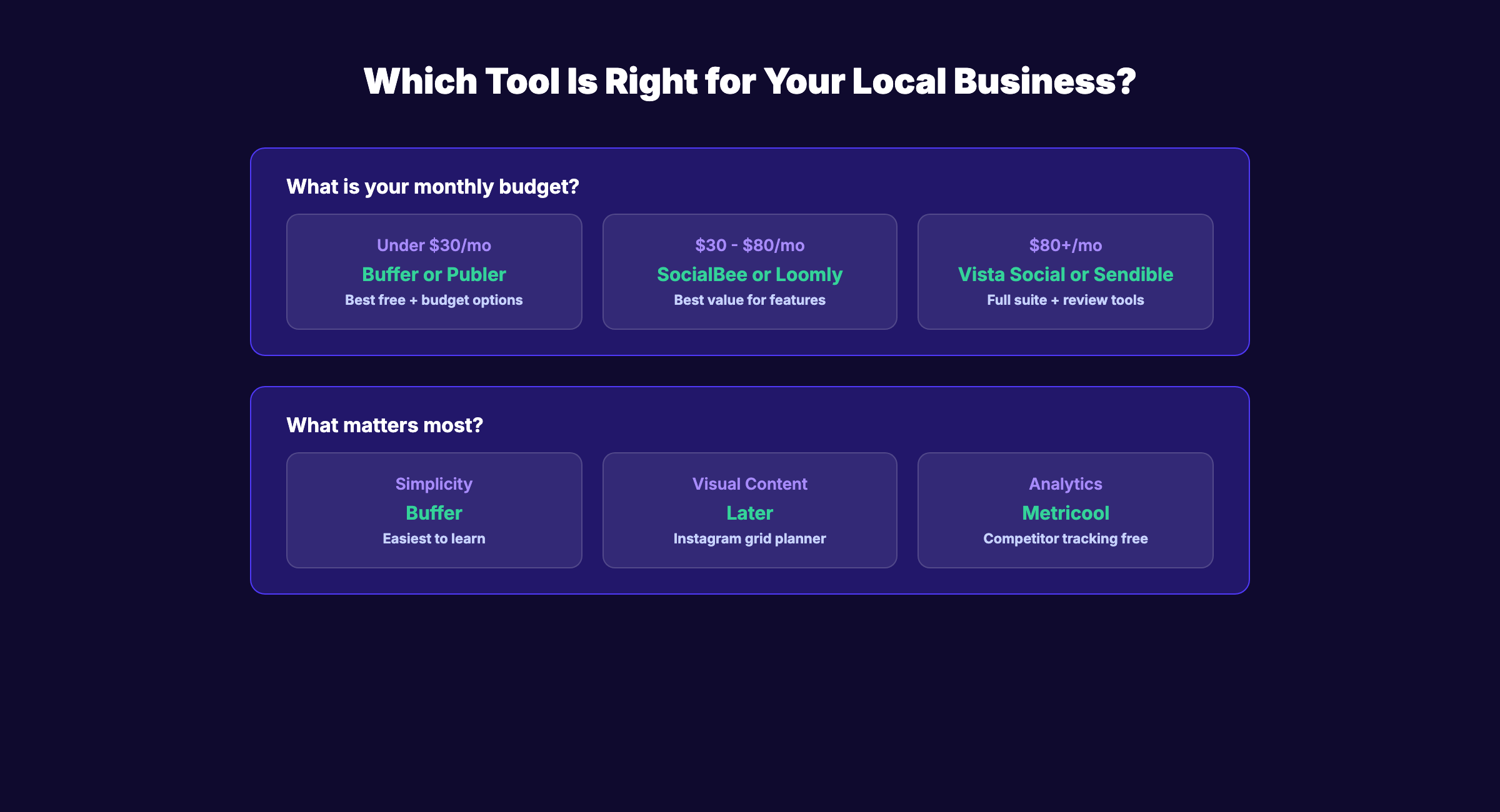
Choose Buffer if:
- You are a solo owner who wants the simplest tool possible
- Your budget is under $30 per month
Choose Later if:
- Your business depends on visual content (food, fashion, interiors)
- Instagram and TikTok are your primary platforms
Choose SocialBee if:
- You want to batch-create a month of content and let it recycle
- Evergreen content is a big part of your social media strategy
Choose Loomly if:
- Multiple people review and approve posts before publishing
- You need a structured content calendar with built-in workflows
Choose Publer or Metricool if:
- Budget is the top priority and you need GBP posting included
- You want the most features per dollar spent
Choose Vista Social if:
- You need review management and social scheduling in one tool
- Your business is growing from 1 to 5 team members
Choose Sendible if:
- You manage social media for multiple local businesses or clients
- White-label reports and separate workspaces are a requirement
Choose Hootsuite or Sprout Social if:
- You manage 5+ social accounts and need social listening
- Budget is not a concern and you need enterprise-level reporting
What Does Social Media Management Actually Cost?
Here is a realistic cost breakdown for local businesses.
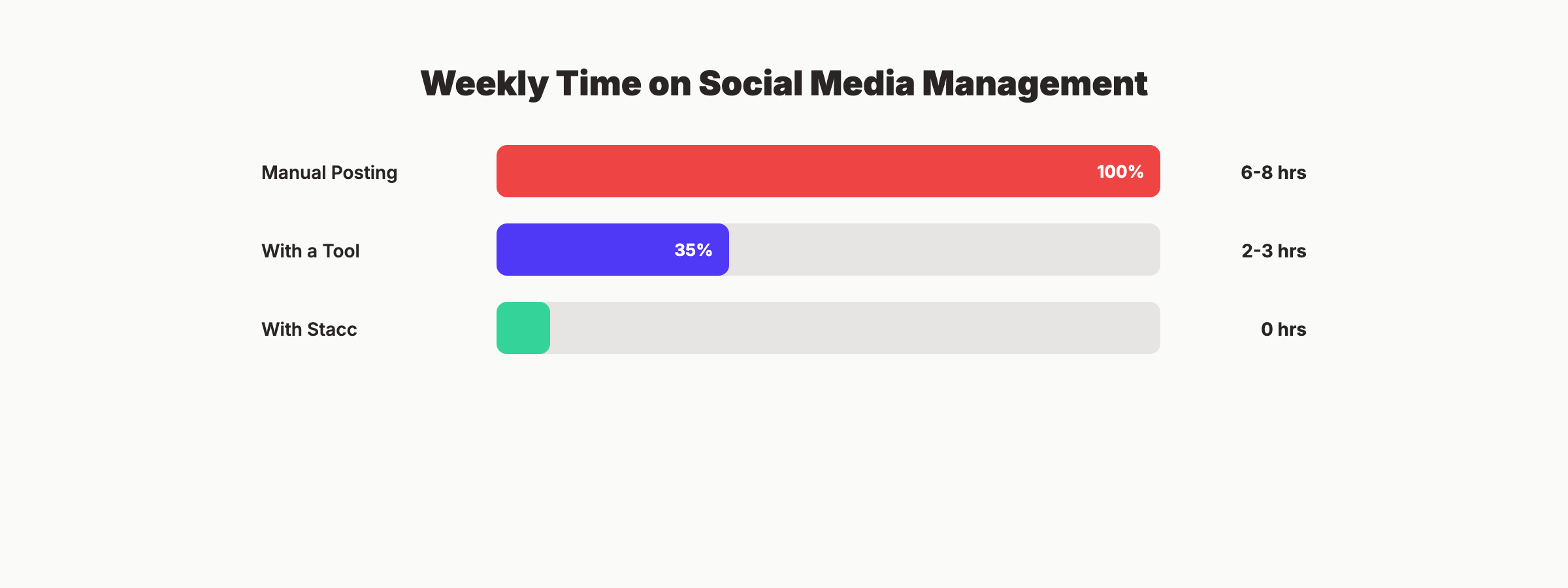
| Approach | Monthly Cost | What You Get | Time Per Week |
|---|---|---|---|
| Manual posting | $0 | Direct platform access | 6-8 hours |
| Free tool plan | $0 | 3 channels, limited posts | 3-4 hours |
| Budget paid tool | $12-$29/mo | 5-10 channels, scheduling | 2-3 hours |
| Mid-range tool | $39-$80/mo | Full features, team support | 1-2 hours |
| Premium tool | $199-$249/mo | Enterprise analytics, listening | 1-2 hours |
| Freelance manager | $500-$2,000/mo | Full management, content creation | 1-2 hours (oversight) |
| Stacc Social | $49/mo | 30 posts/month, 3 platforms | 0 hours |
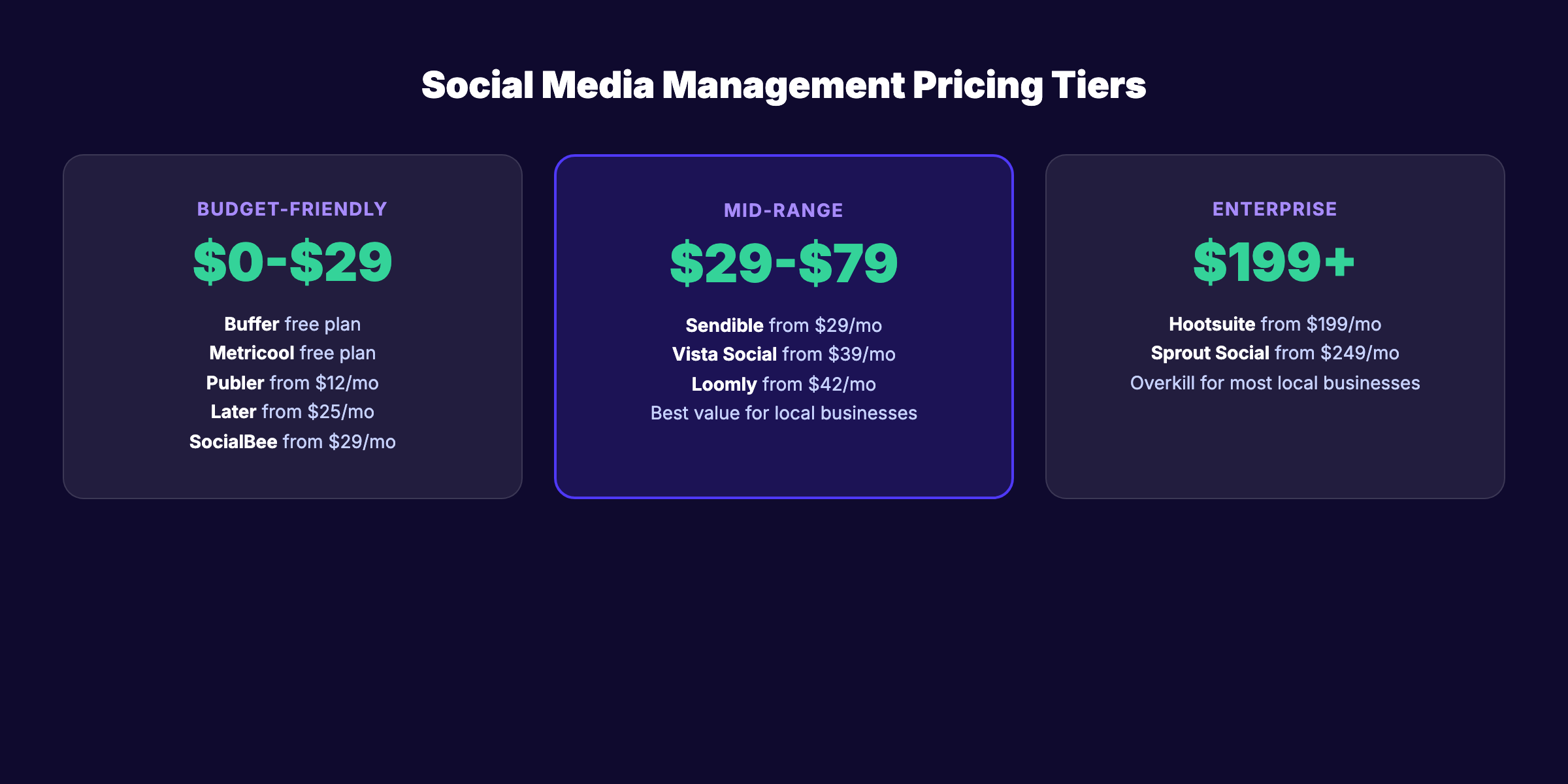
The sweet spot for most local businesses is the $12 to $49 per month range. You get scheduling, analytics, and multi-platform support without paying for features you will not use.
Free Plans vs. Paid Plans: What Local Businesses Get
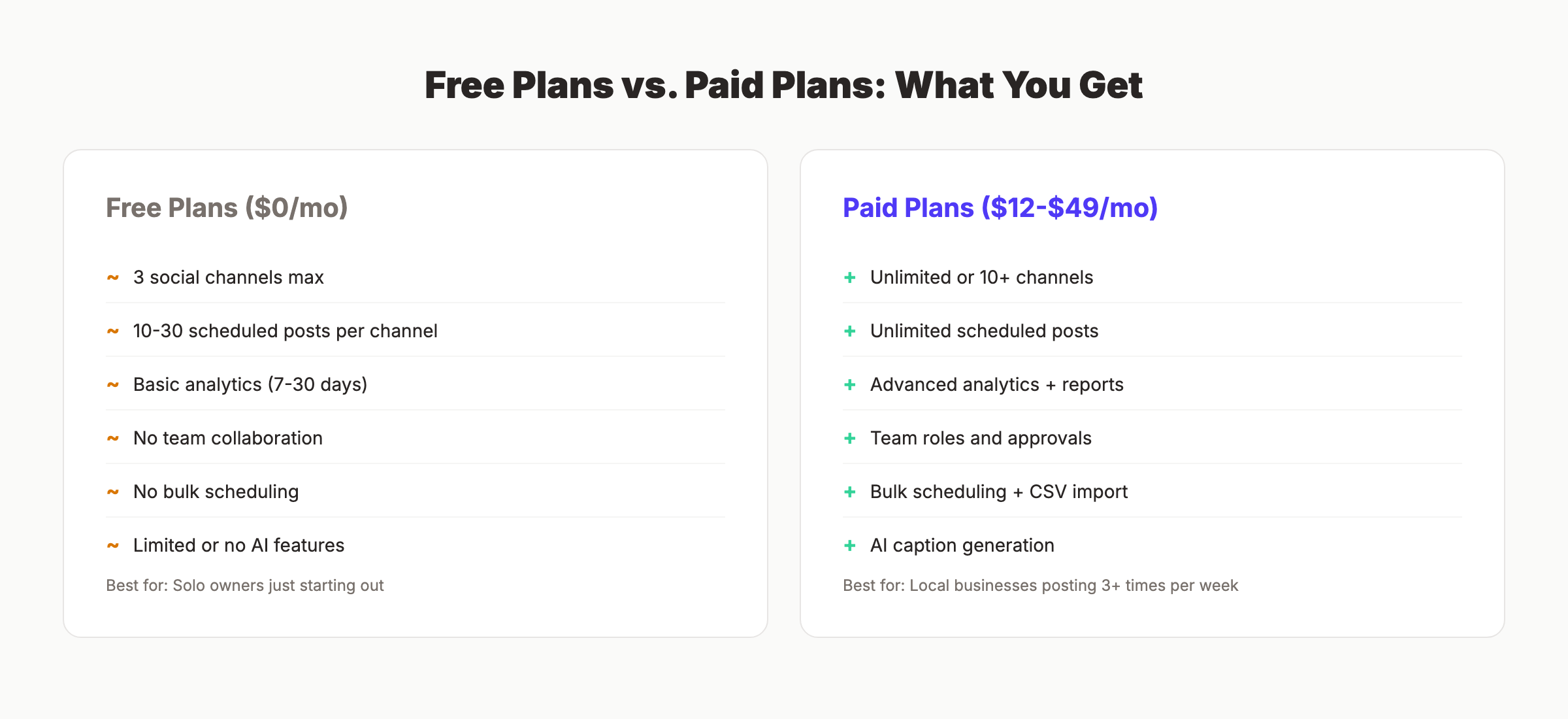
Five tools on this list offer free plans: Buffer, Later, Publer, Vista Social, and Metricool. The free tiers share common limits.
Every free social media scheduling tool caps channels at 3 to 5 and posts at 10 to 50 per month. Analytics are limited to 7 to 30 days of history. Team features are disabled.
For a local business posting 3 times per week across Facebook and Instagram, a free plan works for the first month. By month 2, you will hit the post limit.
Paid plans in the $12 to $29 range unlock unlimited posts, longer analytics history, and bulk scheduling. For most local businesses, that jump delivers the best return on investment.
- Start with a free plan to test the interface
- Upgrade when you hit the post limit or need team features
- Compare annual billing discounts before committing monthly
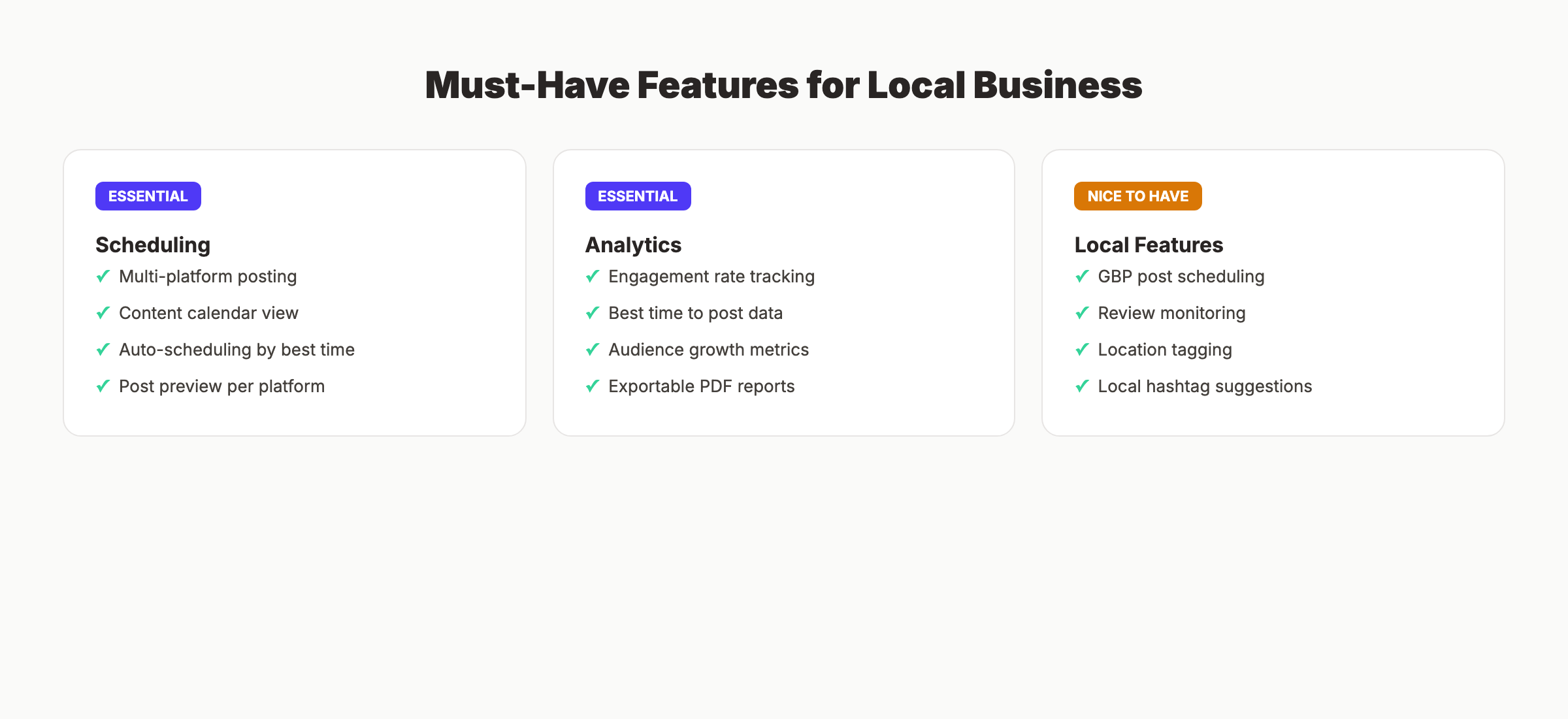
Features That Matter Most for Local Business
Not every feature on a social media management platform matters for local businesses. Here is what to prioritize.
Essential Features
Multi-platform scheduling is non-negotiable. Your business needs to post to at least Facebook and Instagram on a consistent schedule. The tool should let you write once and customize per platform.
Analytics with best-time data help you post when your audience is online. Engagement rates vary by hour and day. Tools like Buffer and Metricool surface this data automatically.
Mobile app access matters because local business owners manage social from their phones. Buffer, Later, and Hootsuite all have strong mobile apps.
Nice-to-Have Features
GBP posting is underrated for local SEO. Google Business Profile posts appear in search results and Maps. Only Sendible, Publer, Metricool, and Vista Social support GBP scheduling.
Review management saves time for businesses that get frequent Google or Yelp reviews. Vista Social handles this inside the social dashboard.
AI caption generation speeds up content creation. Every tool on this list except Loomly now includes some form of AI writing assistance.
Stop managing social media manually. Stacc publishes 30 social media posts per month across 3 platforms for $49/month. No scheduling. No caption writing. No time spent. Start for $1 →
Frequently Asked Questions
What is the best social media management tool for a local business?
Buffer is the best overall pick for most local businesses. It is simple, affordable at $6 per month per channel, and includes a free plan. For businesses that need review management too, Vista Social offers more value at $39 per month.
Are free social media management tools good enough?
Free plans work for solo owners posting a few times per week across 2 to 3 platforms. Buffer’s free plan covers 3 channels with 10 scheduled posts each. Metricool’s free plan includes competitor analysis. Beyond 30 posts per month, you will need a paid plan starting at $12 per month.
Do social media management tools help with local SEO?
Indirectly, yes. Consistent social media posting drives branded searches, website traffic, and backlinks. Tools with GBP posting (Sendible, Publer, Metricool) help maintain your Google Business Profile presence, which directly affects local search rankings.
How much should a local business spend on social media tools?
Most local businesses get excellent results between $12 and $49 per month. That range covers scheduling, analytics, and multi-platform support. Spending $199+ per month on Hootsuite or Sprout Social only makes sense for multi-location businesses or agencies.
Can I manage Google Business Profile posts with these tools?
Four tools on this list support GBP posting: Sendible, Publer, Metricool, and Vista Social. Sendible and Publer are the most affordable options with this feature. For a complete local SEO strategy, pair GBP posting with blog SEO and review management.
What is the difference between a social media management tool and a social media automation tool?
Management tools focus on scheduling, analytics, and engagement. Social media automation tools go further by auto-generating content, recycling posts, and publishing without manual input. SocialBee and Stacc both fall on the automation end of the spectrum.
The Bottom Line
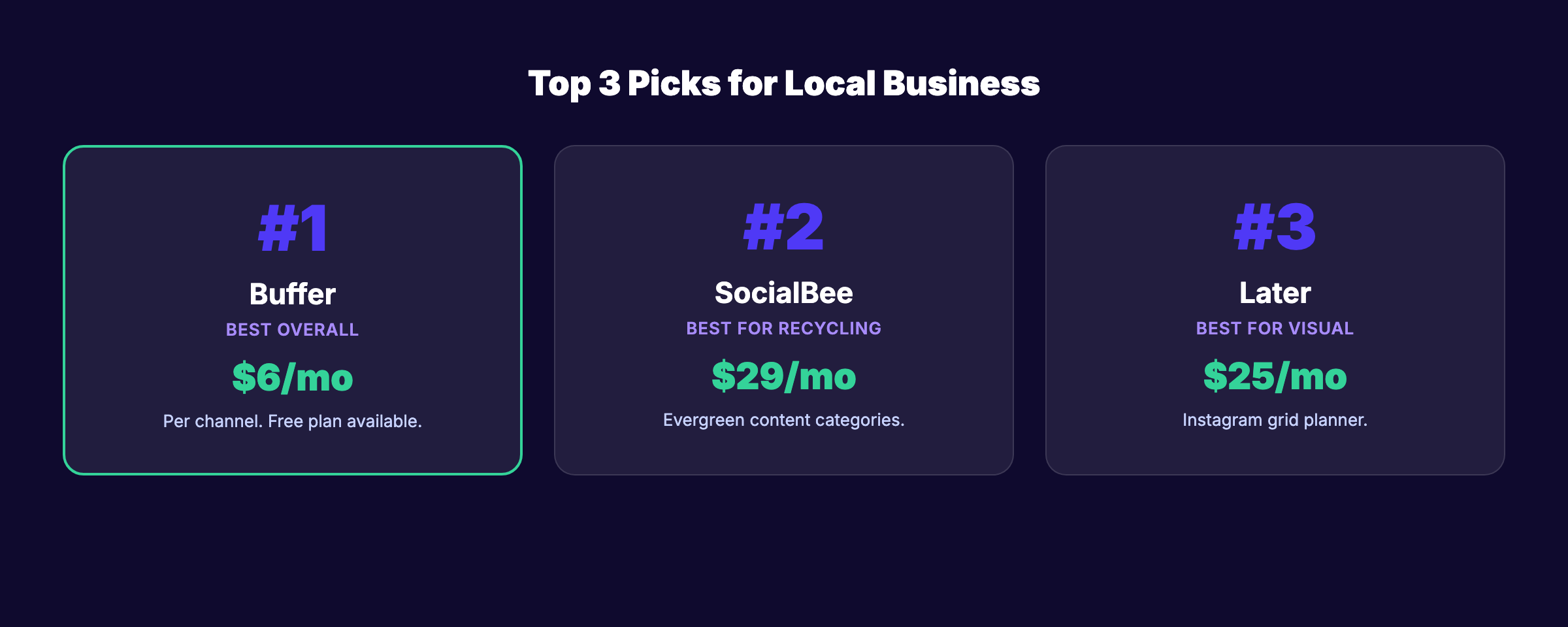
Local businesses have more social media management options than ever. Buffer is the simplest. SocialBee is the best for content recycling. Metricool offers the deepest analytics on a budget. Vista Social combines review management with scheduling in a way no other tool on this list matches.
If you want social media done for you instead of doing it yourself, Stacc publishes 30 posts per month across 3 platforms for $49. Pair it with our Blog SEO module and you get the Content Compound Effect: blog and social content working together to drive organic traffic.
Start for $1 → See the difference in 3 days
This article was researched and published by Stacc. We use several of the tools reviewed above in our own workflow. All pricing and features were verified against public sources as of March 2026.
Related Posts
This post was written and published by Stacc. We compete with several tools reviewed here. All pricing and feature data verified against public sources as of March 2026.
