
7 AI Agent Use Cases (100+ Hours Saved)
See 7 proven AI agent use cases that save businesses 100+ hours per week. Includes real company data, ROI numbers, and implementation steps. Updated 2026.
Siddharth Gangal • 2026-04-02 • Content Strategy
In This Article
A 35,000-worker survey by Adecco Group found that AI saves the average worker 1 hour per day. That number climbs to 2 to 4 hours for the top 25% of users. Across a 5-person marketing team, that is 25 to 100 hours per week.
The difference between companies saving 5 hours and companies saving 100 is not the tools. It is the use cases they pick. Most businesses start with the wrong ones, automate tasks that did not need automating, and abandon the project within 3 months.
These 7 AI agent use cases are the ones that consistently deliver the largest time savings per dollar spent. Each one includes real company data, specific hour counts, and the implementation path that actually works.
We have published 3,500+ SEO articles across 70+ industries. In that process, we have tested every category of AI agent on the market. Here is what we found.
Here is what you will learn:
- 7 AI agent use cases ranked by hours saved per week
- Real company examples with measurable ROI for each use case
- The total time savings when all 7 are running (112+ hours per week)
- Which use case to start with based on your team size
- Common mistakes that kill AI agent ROI before it starts
Use Case 1: Content Marketing and SEO (~20 Hours Per Week Saved)
Content production is the highest-volume repetitive task in most marketing teams. It is also where AI agents deliver the fastest measurable ROI.
What the Agent Does
A content marketing agent handles the full pipeline: keyword research, content brief creation, draft writing, optimization, and publishing. It does not just write a first draft and hand it off. It executes the entire workflow from topic selection to published article.
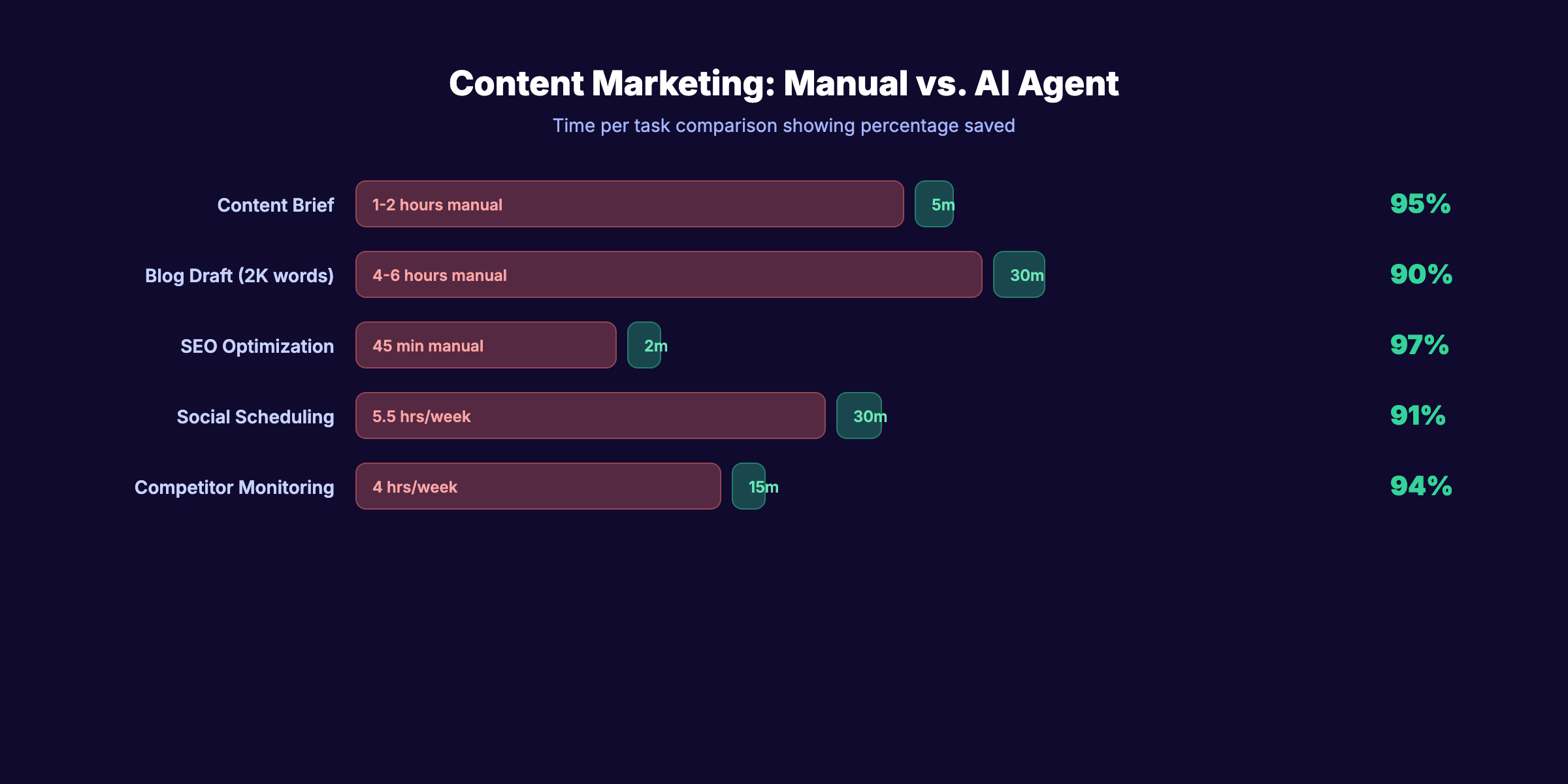
The time savings break down like this:
| Task | Manual Time | Agent Time | Savings |
|---|---|---|---|
| Content brief creation | 1 to 2 hours | 3 to 5 minutes | 95% |
| Blog draft (2,000 words) | 4 to 6 hours | 15 to 30 minutes | 90% |
| SEO optimization pass | 45 minutes | 2 minutes | 97% |
| Social media scheduling | 5.5 hours/week | 30 minutes/week | 91% |
| Competitor content monitoring | 4 hours/week | 15 minutes/week | 94% |
A CPG company reported reducing blog creation costs by 95% and improving speed by 50x. What took 4 weeks now takes 1 day.
Real Example
MindStudio’s efficiency benchmarks show a 90.91% efficiency gain in social media scheduling and a 97.14% gain in analytics compilation. These are not projections. They are measured outputs from production workflows.
For teams that need this exact workflow handled end-to-end, services like Stacc publish 30 optimized SEO articles per month without requiring a content team. That eliminates 80 to 100 hours of manual content work per month.
How to Implement
Start with content briefs. They are the easiest entry point because the input (keyword + intent) and output (structured brief) are both well-defined. Once briefs run reliably, extend the agent to full draft production. Add SEO optimization as the final layer.
Use Case 2: Customer Support and Service (~25 Hours Per Week Saved)
Customer support is where AI agents first proved they could replace entire workflows. The data here is the strongest of any use case.
What the Agent Does
A support agent handles inbound tickets, chats, and calls. It resolves routine questions autonomously, routes complex issues to the right human, and learns from every interaction to improve future responses.
The key distinction: a support agent does not just deflect tickets. It resolves them. That means pulling order data, processing returns, updating accounts, and confirming actions.
Real Examples
Klarna deployed an AI agent that now handles two-thirds of all customer chats. That is 1.3 million conversations per month, equivalent to 853 full-time agents. Resolution time dropped from 11 minutes to under 2 minutes. Repeat inquiries fell 25%. The company saved $60 million in annual costs.
Fooji closed 99.92% of tickets within SLAs and cut average resolution time by 99%.
ServiceNow reduced complex case handling time by 52%. The agents handled 80% of queries without human involvement.
Gartner estimates that conversational AI will save $80 billion in call center labor costs by 2026. That number is not aspirational. The infrastructure is already deployed.
How to Implement
Map your top 10 support ticket categories by volume. Start the agent on the top 3, which typically account for 60 to 70% of total volume. Set a confidence threshold below which the agent escalates to a human. Most teams start at 85% confidence and lower it to 70% as the model improves.
Stop writing. Start ranking. Stacc publishes 30 SEO articles per month for $99. No writers. No editors. No delays. Start for $1 →
Use Case 3: Sales Outreach and Lead Management (~15 Hours Per Week Saved)
Sales teams spend 21% of their day writing emails. Another 17% goes to data entry. AI agents eliminate both.
What the Agent Does
A sales agent researches prospects, personalizes outreach messages, sends multi-channel sequences (email, LinkedIn, phone), scores inbound leads, and updates the CRM after every interaction. The human closes. The agent does everything before and after the close.
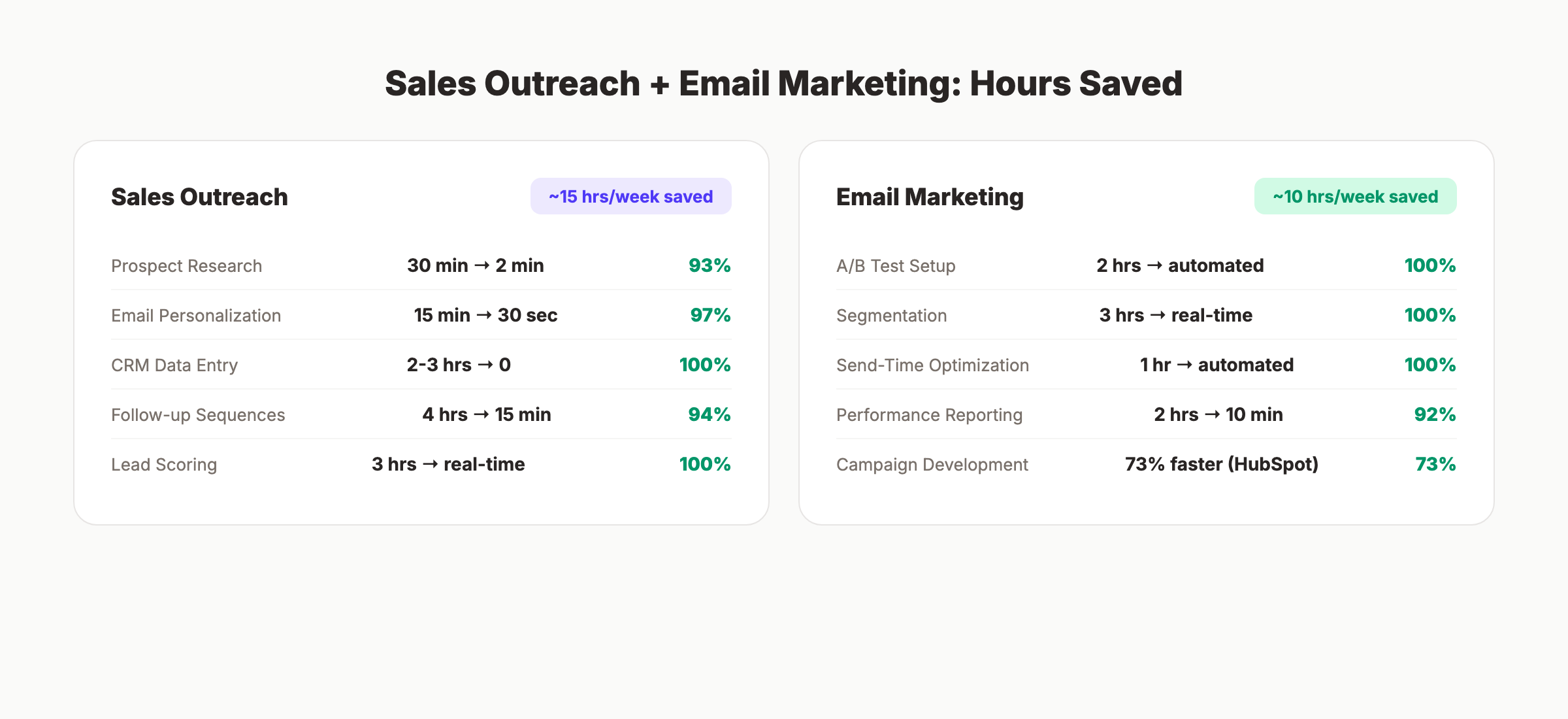
| Task | Manual Time | Agent Time | Savings |
|---|---|---|---|
| Prospect research | 30 minutes per lead | 2 minutes per lead | 93% |
| Email personalization | 15 minutes per email | 30 seconds per email | 97% |
| CRM data entry | 2 to 3 hours/week | 0 (automated) | 100% |
| Follow-up sequencing | 4 hours/week | 15 minutes/week | 94% |
| Lead scoring | 3 hours/week | Real-time (automated) | 100% |
Real Examples
Salesforce reports that customers using Agentforce see a 15% increase in deals closed and a 25% reduction in sales cycle length. That 25% reduction translates to weeks of calendar time recovered per quarter.
Sales development reps using AI outreach agents save 7+ hours per week on prospecting alone. The research phase speeds up 4x because the agent pulls firmographic data, recent news, tech stack information, and social signals in seconds.
How to Implement
Start with the lowest-risk, highest-volume task: follow-up sequences. Most sales teams have a standard 5 to 7 touch cadence that agents can personalize and send without supervision. Once follow-ups run, add prospect research and CRM enrichment. Leave deal negotiation and relationship building to humans.
For teams already running marketing automation, extending into sales outreach agents is a natural next step. The data flows are already in place.
Use Case 4: Email Marketing and Personalization (~10 Hours Per Week Saved)
Most email marketing still runs on static segments and scheduled sends. AI agents turn it into a real-time optimization engine.
What the Agent Does
An email agent handles audience segmentation, send-time optimization, subject line testing, content personalization, and performance analysis. It does not wait for a human to check open rates on Thursday. It adjusts the next send based on the last one.
The biggest time savings come from eliminating the manual optimization loop:
- Human writes 3 subject line variants
- Human sets up A/B test
- Human waits 24 hours
- Human checks results
- Human applies winner to remaining audience
An email agent collapses all 5 steps into a continuous process. HubSpot reports that AI-assisted marketing teams see 73% faster campaign development and 68% shorter content timelines.
Real Example
A mid-market ecommerce brand running an AI email agent saw a 34% increase in open rates and a 22% increase in click-through rates within 60 days. The agent tested 14 subject line variants per campaign (compared to the 2 to 3 a human team would test) and optimized send times at the individual subscriber level.
The time savings: 10 hours per week previously spent on manual segmentation, A/B test setup, and performance reporting.
How to Implement
Most email platforms (Klaviyo, HubSpot, Braze) now include agent-level features. Turn on send-time optimization first. Then enable automated subject line testing. The final step is dynamic content personalization, which requires clean customer data. For a deeper walkthrough, see our AI email writing guide.
Your SEO team. $99 per month. 30 optimized articles, published automatically. No freelancers. No delays. Start for $1 →
Use Case 5: Data Analysis and Reporting (~15 Hours Per Week Saved)
Every business has someone who spends Monday morning pulling last week’s numbers into a spreadsheet. AI agents eliminate that person’s least favorite task.
What the Agent Does
A data agent connects to analytics platforms, CRMs, ad networks, and databases. It pulls metrics, identifies trends, flags anomalies, and generates reports in plain language. No SQL required. No dashboard building. Ask a question. Get an answer.
Real Examples
Suzano, one of the world’s largest pulp producers, deployed AI agents that translate natural language queries into SQL for 50,000 employees. Query time dropped by 95%. Non-technical staff now pull their own data instead of filing tickets with the analytics team.
AES, a global energy company, automated safety audits using AI agents. Audit time dropped from 14 days to 1 hour. Audit costs fell by 99%.
McKinsey deployed 25,000 AI agents internally. The result: 1.5 million hours saved in search and synthesis tasks in a single year. The agents produced 2.5 million data visualizations in 6 months.
MindStudio benchmarks show a 97.14% efficiency gain in analytics compilation. What took 3.5 hours per week now takes 6 minutes.
How to Implement
Start with a single weekly report that someone currently builds manually. Connect the data sources, define the metrics, and let the agent generate the first version. Compare it to the manual version for accuracy. Most teams achieve 90%+ accuracy within the first week and 98%+ within a month.
For marketing-specific analytics, AI agents pair well with SEO workflow automation to combine ranking data, traffic data, and content performance into a single view.
Use Case 6: Social Media Management (~12 Hours Per Week Saved)
Social media management is a time trap. The creative work (strategy, campaign concepts, community engagement) gets buried under scheduling, monitoring, and reporting. AI agents free the creative work.
What the Agent Does
A social media agent handles content scheduling, hashtag optimization, sentiment monitoring, competitor tracking, and performance reporting. Advanced agents also generate post variants, resize content for each platform, and suggest optimal posting times.
| Task | Manual Time | Agent Time | Savings |
|---|---|---|---|
| Content scheduling (3 platforms) | 5.5 hours/week | 30 minutes/week | 91% |
| Competitor monitoring | 4 hours/week | 15 minutes/week | 94% |
| Sentiment analysis | 2 hours/week | Real-time (automated) | 100% |
| Performance reporting | 1.5 hours/week | 5 minutes/week | 94% |
Real Example
Brands using AI-driven social management report a 60% improvement in sentiment analysis accuracy. Employee advocacy programs powered by AI agents see up to 8x reach increases compared to brand-only posting.
The total time savings for a 3-platform operation: 12 hours per week. That is 624 hours per year, or roughly 78 full working days.
For a practical guide to implementing AI-generated social media posts, we cover the exact workflows and prompting strategies that produce platform-native content.
How to Implement
Begin with scheduling and performance reporting. These are fully automatable on day one using tools like Cloud Campaign, Hootsuite, or Buffer’s AI features. Add sentiment monitoring in month 2. Save content generation for last, since it requires the most tuning to match brand voice.
Use Case 7: Operations and Workflow Automation (~15 Hours Per Week Saved)
Operations tasks are invisible until someone counts the hours. Invoice processing, meeting scheduling, document routing, approval workflows. Each one takes 5 to 15 minutes. Multiply by 20 to 50 occurrences per week. The total is staggering.
What the Agent Does
An operations agent automates cross-system workflows. It processes invoices, schedules meetings, routes documents for approval, updates project management tools, and handles procurement requests. The agent works across systems (email, Slack, calendar, ERP, project management) without requiring custom integrations for each one.
Real Examples
JPMorgan Chase automated 360,000 hours of annual manual work using AI agents for document processing and compliance tasks.
Unilever saved $1 million+ annually and reduced time-to-hire by 75% using AI agents for recruitment workflows.
DHL achieved a 15% operational cost reduction and 20% delivery speed improvement through agent-managed logistics.
Uber Freight reduced empty miles by 10 to 15% and cut support wait times from 5 minutes to 30 seconds.
The pattern across all these examples: operations agents deliver their ROI through volume. Each individual task saves only a few minutes. But when the agent handles hundreds of tasks per week, the savings compound fast.
How to Implement
Audit your team’s calendar for recurring administrative tasks. Identify the 3 to 5 tasks that happen most frequently and have the most standardized inputs/outputs. Start there. Meeting scheduling and invoice routing are the two easiest entry points because they follow predictable patterns with clear success criteria.
For teams already using AI marketing automation, extending agents into operational workflows uses the same orchestration layer. The technology is identical. Only the use case changes.
3,500+ blogs published. 92% average SEO score. See what Stacc can do for your site. Start for $1 →
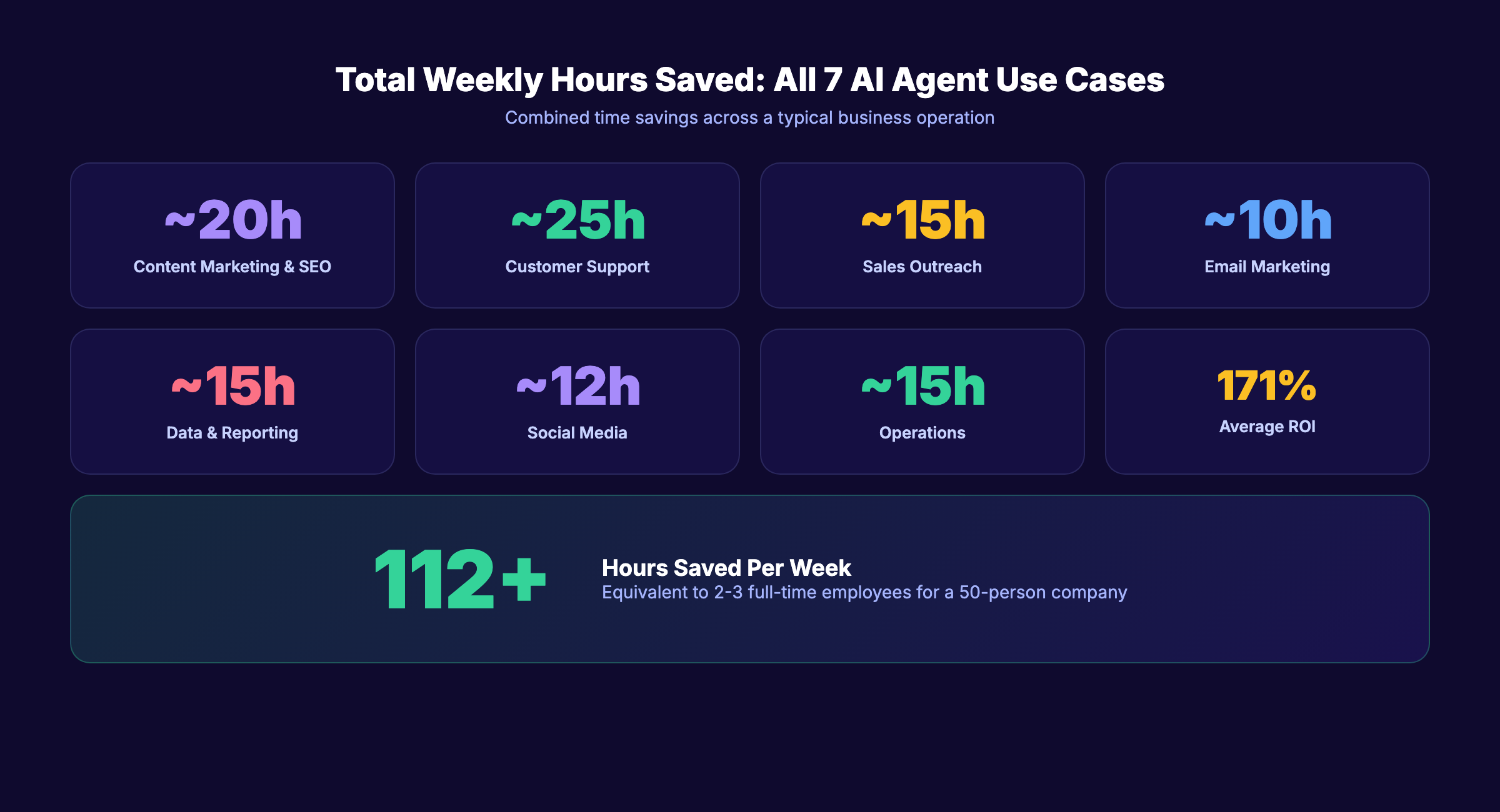
The Total: 112+ Hours Per Week Saved
Here is the full picture when all 7 AI agent use cases run together:
| Use Case | Weekly Hours Saved |
|---|---|
| Content Marketing and SEO | ~20 hours |
| Customer Support and Service | ~25 hours |
| Sales Outreach and Lead Management | ~15 hours |
| Email Marketing and Personalization | ~10 hours |
| Data Analysis and Reporting | ~15 hours |
| Social Media Management | ~12 hours |
| Operations and Workflow Automation | ~15 hours |
| Total | ~112 hours |
That is 112 hours per week. For a 10-person team, it equals more than 1 full-time employee’s worth of output. For a 50-person company, it equals 2 to 3 FTEs.
Deloitte’s State of AI 2026 report confirms the pattern: 66% of organizations report increased productivity from AI agent deployments. The average ROI expectation is 171%, with US enterprises averaging 192%.
The question is not whether these savings are real. The data is clear. The question is which use case to start with.
Where to Start Based on Team Size
| Team Size | Start With | Why |
|---|---|---|
| 1 to 5 people | Content Marketing (Use Case 1) | Highest impact per person. Every hour saved goes directly to revenue-generating work. |
| 5 to 20 people | Customer Support (Use Case 2) | Support volume scales faster than headcount. Agents prevent the need to hire. |
| 20 to 100 people | Data Analysis (Use Case 5) | Reporting bottlenecks slow every department. Removing them creates a multiplier effect. |
| 100+ people | Operations (Use Case 7) | Administrative overhead grows exponentially. Agents keep it linear. |
For a deeper analysis of adoption patterns, see our AI agent adoption statistics page.
5 Mistakes That Kill AI Agent ROI
Knowing the right use cases is half the battle. The other half is avoiding the traps that derail implementation.
Mistake 1: Starting With the Hardest Use Case
Teams that begin with full journey orchestration or autonomous decision-making fail 60% of the time. Start with a single, measurable workflow. Prove ROI. Then expand.
Mistake 2: Automating What Should Not Be Automated
Brand strategy, creative direction, crisis communication, and high-stakes negotiations require human judgment. AI agents excel at pattern recognition and repetitive execution. They fail at tasks requiring empathy, cultural context, or political awareness.
Mistake 3: Deploying on Bad Data
Every use case above depends on clean, unified data. An agent that personalizes emails based on outdated customer profiles will personalize them wrong. Audit your data before deploying any agent.
Mistake 4: Measuring Activity Instead of Outcomes
“The agent sent 500 emails” is activity. “The agent generated 12 qualified leads” is an outcome. Tie every agent to a revenue, retention, or efficiency metric from day one.
Mistake 5: Ignoring the Learning Curve
PwC found that 62% of businesses lack a clear starting point for AI agent implementation. Budget for 2 to 4 weeks of setup and tuning before expecting full ROI. The agents improve with use. The first week is never the best week.
For more on how AI agents fit into a broader marketing stack, see our AI marketing agents guide and agentic AI marketing overview.
Rank everywhere. Do nothing. Blog SEO, Local SEO, and Social on autopilot. Start for $1 →
FAQ
What is the difference between an AI agent and a chatbot?
A chatbot follows a script. It responds to keywords with pre-written answers. An AI agent perceives data, makes decisions, and takes autonomous action across multiple systems. A chatbot answers “What are your hours?” An AI agent resolves a billing dispute by pulling account data, calculating a refund, processing the credit, and sending a confirmation email.
How much do AI agents cost to implement?
Costs range from $0 (open-source frameworks like LangChain) to $10,000+ per month (enterprise platforms like Salesforce Agentforce). Most small and mid-size businesses spend $100 to $500 per month on specialized agent tools. For SEO content specifically, automated publishing starts at $99 per month.
Can small businesses use AI agents effectively?
Yes. Small businesses often see the highest per-person ROI because each team member wears multiple hats. Saving 1 hour per day for a 3-person team equals 15 hours per week. That is the equivalent of hiring a part-time employee for a fraction of the cost.
How long before AI agents show measurable ROI?
Most use cases show measurable results within 2 to 4 weeks. Email send-time optimization and content scheduling show results in days. Customer support and sales outreach typically need 4 to 8 weeks for the model to learn from enough interactions. Full operational workflow automation may take 2 to 3 months to reach peak efficiency.
Will AI agents replace human workers?
No. They replace tasks, not roles. Every company in the examples above (Klarna, Salesforce, McKinsey) still employs humans. The humans shifted from executing repetitive tasks to directing agents, handling exceptions, and making strategic decisions. Adecco’s survey found that workers who use AI report higher job satisfaction because they spend more time on meaningful work.
What tasks should you never automate with AI agents?
Anything requiring empathy, crisis judgment, creative vision, or cultural sensitivity. Firing someone by AI agent is a lawsuit waiting to happen. Responding to a PR crisis with an automated message makes it worse. Use agents for execution and optimization. Keep humans on strategy and relationships.
The 7 AI agent use cases above are not theoretical. They are running in production at companies of every size, saving measurable hours every week. The businesses gaining the most start with one use case, prove the ROI, and expand from there. The ones that fail try to automate everything at once. Pick your first use case. Measure the hours saved. Then stack the next one on top.
Skip the agency. Keep the results. Stacc starts at $99 per month with a $1 AI trial. Start for $1 →
Written and published by Stacc. We publish 3,500+ articles per month across 70+ industries. All data verified against public sources as of March 2026.
