
Marketing Automation (2026): Strategies, Tactics & Examples
Step-by-step marketing automation guide guide for 2026: proven tactics, real examples, common mistakes to avoid, and implementation tips.
Marketing Automation: The Complete Guide (2026)
Most businesses spend 15 or more hours each week on repetitive marketing tasks. Sending follow-up emails. Scheduling social posts. Updating spreadsheets. Tracking leads across 4 different platforms.
That time adds up to roughly 780 hours per year. Those are hours you could spend closing deals, improving your product, or building customer relationships.
Marketing automation eliminates that bottleneck. It handles the repetitive work while you focus on strategy and growth. Companies using automation generate 80% more leads and see a 544% return on investment over 3 years.
We publish 3,500+ blogs across 70+ industries and manage automated content workflows for businesses of every size. This guide covers everything we know about marketing automation.
Here is what you will learn:
- What marketing automation is and how it actually works
- The 5 types of automation every business should know
- Exact ROI data from real companies using automation
- A 6-step strategy framework to build your first workflows
- 7 workflow examples you can copy today
- How small businesses approach automation differently than enterprises
- The 6 mistakes that sabotage most automation efforts
- Which metrics actually matter for measuring performance
Table of Contents
- Chapter 1: What Marketing Automation Is (and What It Is Not)
- Chapter 2: How Marketing Automation Works
- Chapter 3: 5 Types of Marketing Automation
- Chapter 4: The ROI of Marketing Automation
- Chapter 5: How to Build a Marketing Automation Strategy
- Chapter 6: 7 Workflows That Drive Results
- Chapter 7: Marketing Automation for Small Businesses
- Chapter 8: Common Marketing Automation Mistakes
- FAQ
Chapter 1: What Marketing Automation Is (and What It Is Not) {#ch1}
Marketing automation is the use of software to execute repetitive marketing tasks without manual input. It replaces the copy-paste, send-and-schedule grind with workflows that run on triggers, conditions, and timers.
The definition is simple. The misunderstanding is widespread.
What Marketing Automation Actually Does
Marketing automation takes a manual process and makes it automatic. A new subscriber signs up. The system sends a welcome email sequence. The subscriber clicks a link. The system tags them based on interest. Three days later, a follow-up arrives with relevant content.
No human touched any of it.
That same logic applies to social media scheduling, content publishing, lead scoring, ad retargeting, and review requests. Every repetitive marketing action can be automated.
What It Is Not
Marketing automation is not a replacement for strategy. It does not generate ideas. It does not write your brand voice. It does not decide which audience to target.
Automation executes your plan. Without a plan, it just sends bad messages faster.
It is also not the same as a CRM. Customer relationship management tools store contact data. Marketing automation acts on that data. Many platforms combine both, but they serve different functions.
Why It Matters in 2026
The marketing automation market reached $6.7 billion in 2024. Projections place it at $15.5 billion by 2030. That is a 15% compound annual growth rate.
The growth is not driven by hype. It is driven by results. Businesses using automation report 14.5% higher sales productivity and save an average of 2.3 hours per campaign.
96% of marketers have either used or plan to use a marketing automation platform. The question is no longer whether to automate. It is what to automate first.
Automate your content marketing on autopilot. Stacc publishes 30 SEO articles every month without you lifting a finger. Start for $1 →
Chapter 2: How Marketing Automation Works {#ch2}
Every marketing automation workflow operates on 4 components. Understanding these components makes the difference between a workflow that converts and one that annoys.
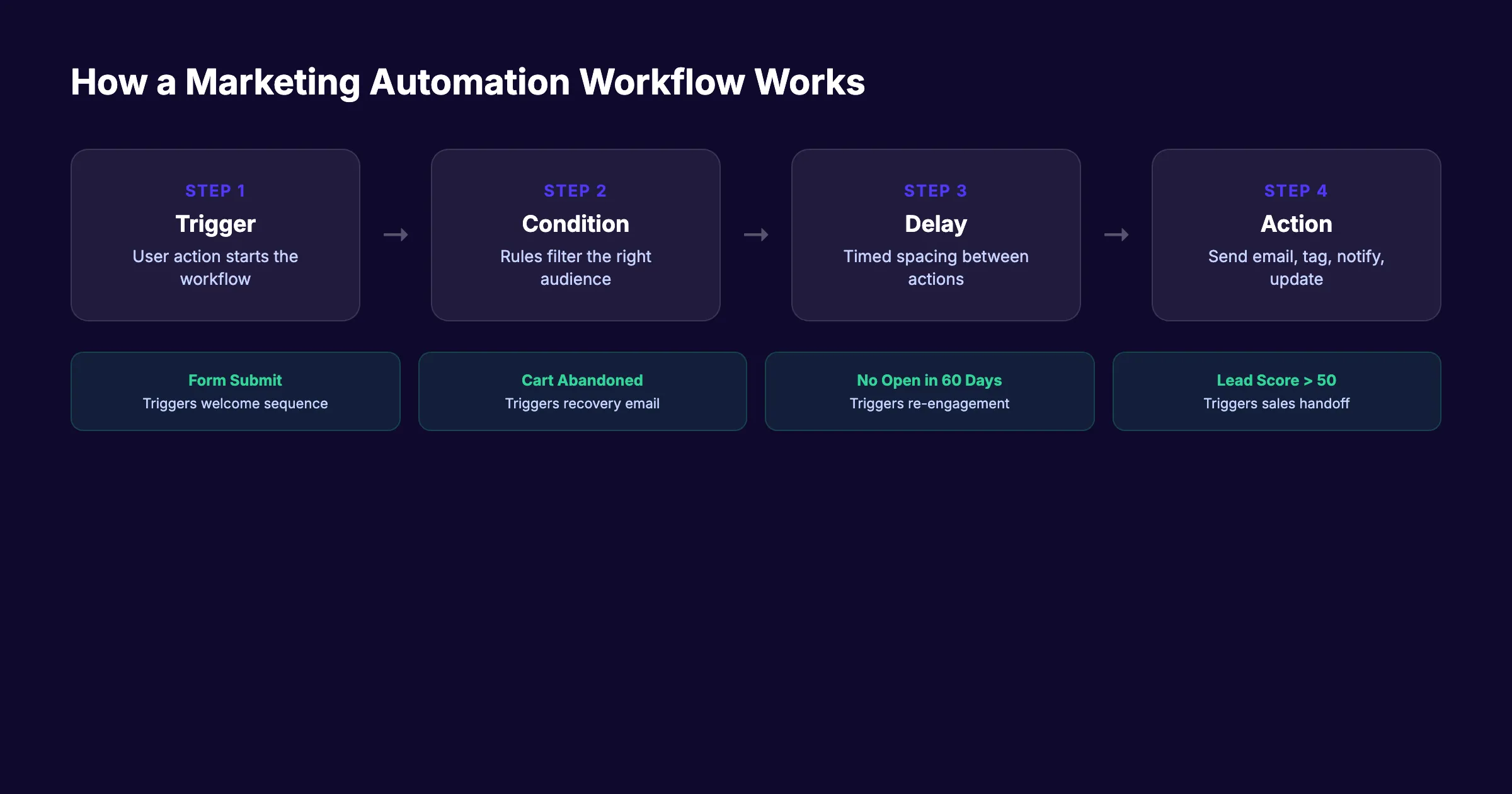
Triggers
A trigger is the event that starts a workflow. It answers the question: “When should this automation begin?”
Common triggers include:
- A visitor submits a form
- A contact opens an email
- A lead visits a pricing page
- A customer abandons a cart
- A subscriber has been inactive for 60 days
Without a clear trigger, workflows fire at random. Every effective automation starts with a specific, measurable event.
Conditions
Conditions filter who moves through the workflow. They answer: “Who should receive this action?”
A trigger might fire for every form submission. But a condition ensures only contacts from a specific segment receive the next step. For example, a lead scoring condition might route high-intent leads to sales and low-intent leads to a nurture email sequence.
Time Delays
Timing controls the pace of your workflow. Sending 5 emails in 5 minutes overwhelms contacts. Spacing them across 7 to 14 days builds familiarity.
The right delay depends on the workflow type. Abandoned cart emails perform best at 1 hour, 24 hours, and 72 hours. Welcome sequences work at 1-day intervals. Lead nurture drips can stretch to 3 to 5 days between messages.
Actions
Actions are what the workflow does. Send an email. Add a tag. Update a CRM field. Notify a sales rep. Create a task. Move a contact to a different list.
Most platforms support dozens of action types. The best workflows use the fewest possible. Each action should serve a clear purpose in the customer journey.
How the 4 Components Work Together
Here is a practical example. A visitor downloads a pricing guide from your website (trigger). The system checks if they are a new contact or existing customer (condition). It waits 2 days (delay). Then it sends a case study email relevant to their industry (action).
If they open the case study, the workflow branches. If they do not, it sends a different follow-up 3 days later. This logic runs 24 hours a day, 365 days a year, without anyone on your team touching it.
Chapter 3: 5 Types of Marketing Automation {#ch3}
Marketing automation is not one thing. It spans every marketing channel. Here are the 5 categories that cover the full spectrum of what you can automate.
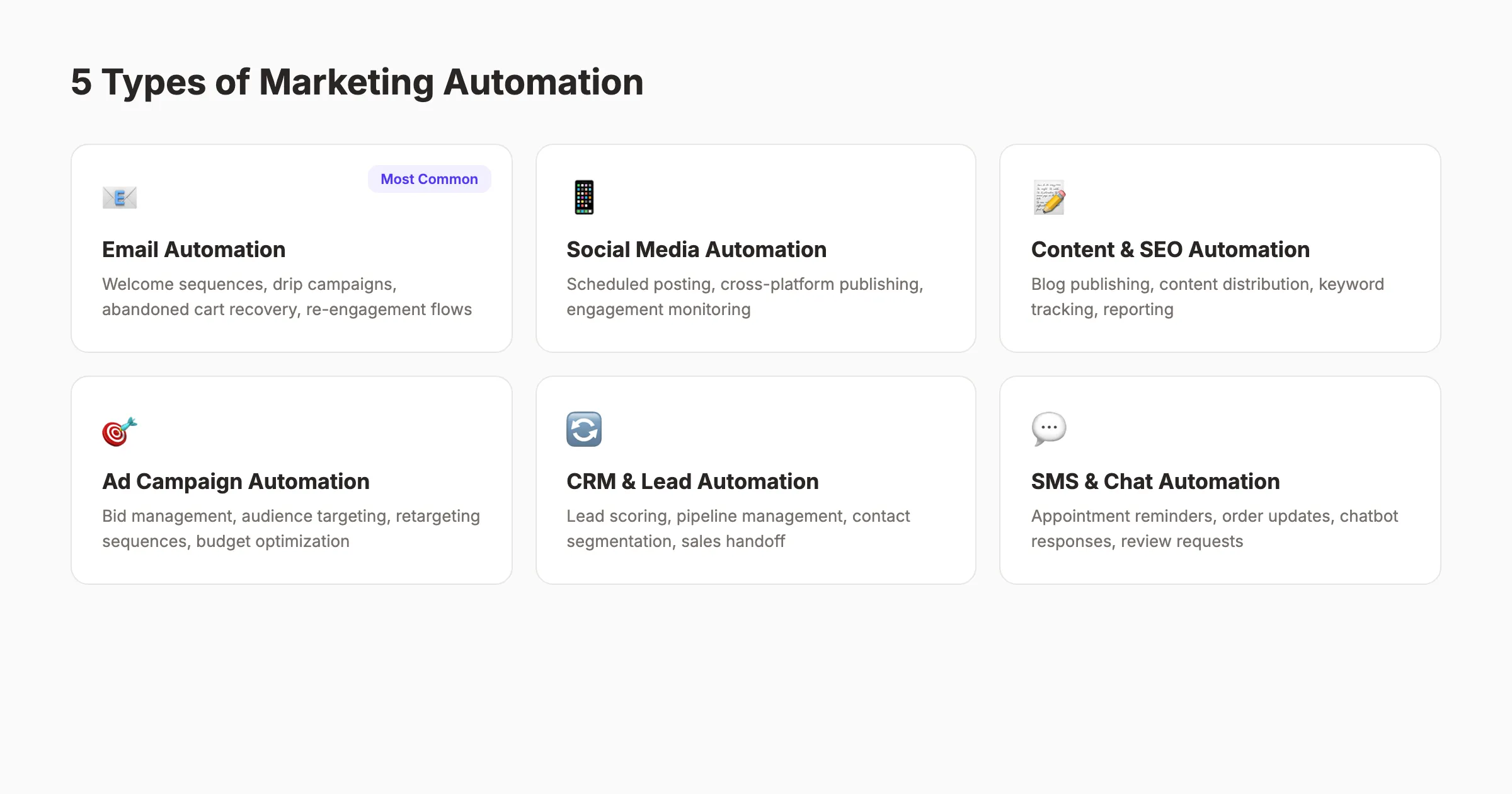
1. Email Automation
Email is the most widely automated channel. 63% of companies automate their email marketing. For B2B companies, that number rises to 71%.
Email automation includes:
| Workflow Type | Trigger | Average Impact |
|---|---|---|
| Welcome series | New subscriber | 320% more revenue per email |
| Abandoned cart | Cart abandonment | 10.5% recovery rate |
| Lead nurture | Form submission | 451% more qualified leads |
| Re-engagement | 60-day inactivity | Saves 5-25x acquisition cost |
Read our full guide on email automation workflows for step-by-step setup instructions. For optimizing the messages inside those workflows, see our email marketing best practices guide.
2. Social Media Automation
50% of marketers automate social media management. This includes scheduling posts, cross-platform publishing, engagement monitoring, and reporting.
Automation handles the distribution. You still need a content strategy behind what gets published. The best approach combines automated scheduling with manual engagement. Let the system post on schedule. Reply to comments yourself.
For more on building a social media system, see our guide on social media for local businesses.
3. Content and SEO Automation
Roughly one-third of companies automate parts of their content marketing process. This covers blog publishing, content distribution, keyword tracking, performance reporting, and content scoring.
Content automation is where the biggest time savings happen. A single blog post involves research, writing, optimization, formatting, publishing, and distribution. Automating the last 3 steps alone saves 2 to 4 hours per post.
At scale, that math changes everything. Publishing 30 articles per month manually requires a full-time content team. Automating the workflow reduces that to a fraction of the effort.
4. Ad Campaign Automation
40% of marketers automate aspects of their paid advertising. By 2027, experts project 80% of the advertising sector will use automation for bid management, audience targeting, budget allocation, and retargeting.
Automated ad platforms adjust bids in real time based on performance data. They shift budget from underperforming campaigns to top performers. They create retargeting audiences from website visitors who did not convert.
5. CRM and Lead Management Automation
35% of businesses use automation to connect marketing and sales workflows. This includes lead scoring (assigning point values based on actions), pipeline management, contact segmentation, and sales handoff triggers.
When a lead hits a score threshold, the system automatically notifies sales. No spreadsheet handoff. No missed follow-ups. The lead moves from marketing to sales at exactly the right moment.
Get 30 SEO articles published every month. No writers. No editors. No content calendar headaches. Stacc handles it all. Start for $1 →
Chapter 4: The ROI of Marketing Automation {#ch4}
Marketing automation is not a cost center. It is one of the highest-ROI investments a marketing team can make. The data backs this up consistently across company sizes and industries.
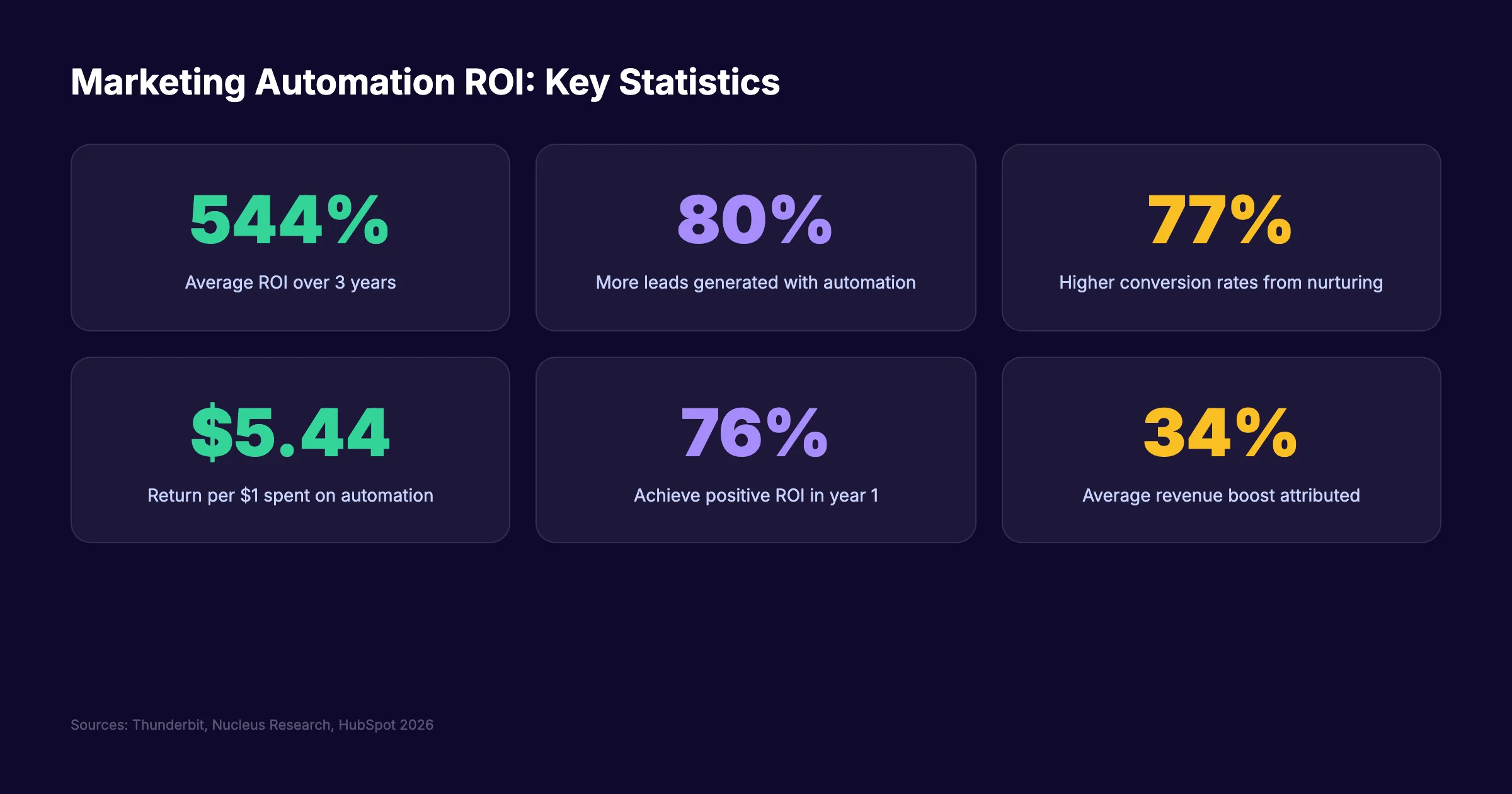
The Core ROI Numbers
For every $1 spent on marketing automation, companies see an average return of $5.44 over 3 years. That is a 544% ROI.
76% of companies achieve positive ROI within the first year. Most recoup their full investment in under 6 months. The typical company attributes a 34% revenue boost directly to marketing automation.
These are not projections. These are measured results from real companies across industries.
Lead Generation Impact
Businesses using automation generate 80% more leads than those that do not. Automated lead nurture workflows produce 451% more qualified leads for sales teams. That increase comes from better timing, better targeting, and better follow-up consistency.
Manual follow-up fails because humans forget. A lead comes in at 3 PM on Friday. By Monday morning, it has gone cold. Automation responds in minutes, regardless of time or day.
Productivity and Cost Savings
91% of marketers report that automation improves their productivity. The average time saved is 2.3 hours per campaign. More than 1 in 10 businesses reduced their marketing headcount costs after adopting automation.
The savings compound over time. One welcome email workflow built once runs forever. One lead nurture sequence, tested and optimized, generates qualified leads month after month without additional labor.
For a deeper look at measuring content marketing ROI, see our dedicated guide. Understanding attribution models is critical when calculating the true impact of automation.
Revenue per Workflow
Not all workflows deliver equal ROI. Here is how common automation workflows rank by revenue impact:
| Workflow | Revenue Impact | Setup Difficulty |
|---|---|---|
| Abandoned cart recovery | Highest | Low |
| Lead nurture drip | High | Medium |
| Welcome email series | High | Low |
| Re-engagement campaign | Medium | Low |
| Post-purchase upsell | Medium | Medium |
| Review request sequence | Low-Medium | Low |
The best starting point for ROI is abandoned cart recovery for ecommerce or lead nurture for B2B. Both deliver measurable revenue with minimal setup complexity.
Chapter 5: How to Build a Marketing Automation Strategy {#ch5}
Building workflows without a strategy is the number one reason automation fails. 85% of B2B marketers admit they are not using automation to its full capacity. The gap is almost always strategic, not technical.
Here is the 6-step framework for building a marketing automation strategy that actually works.
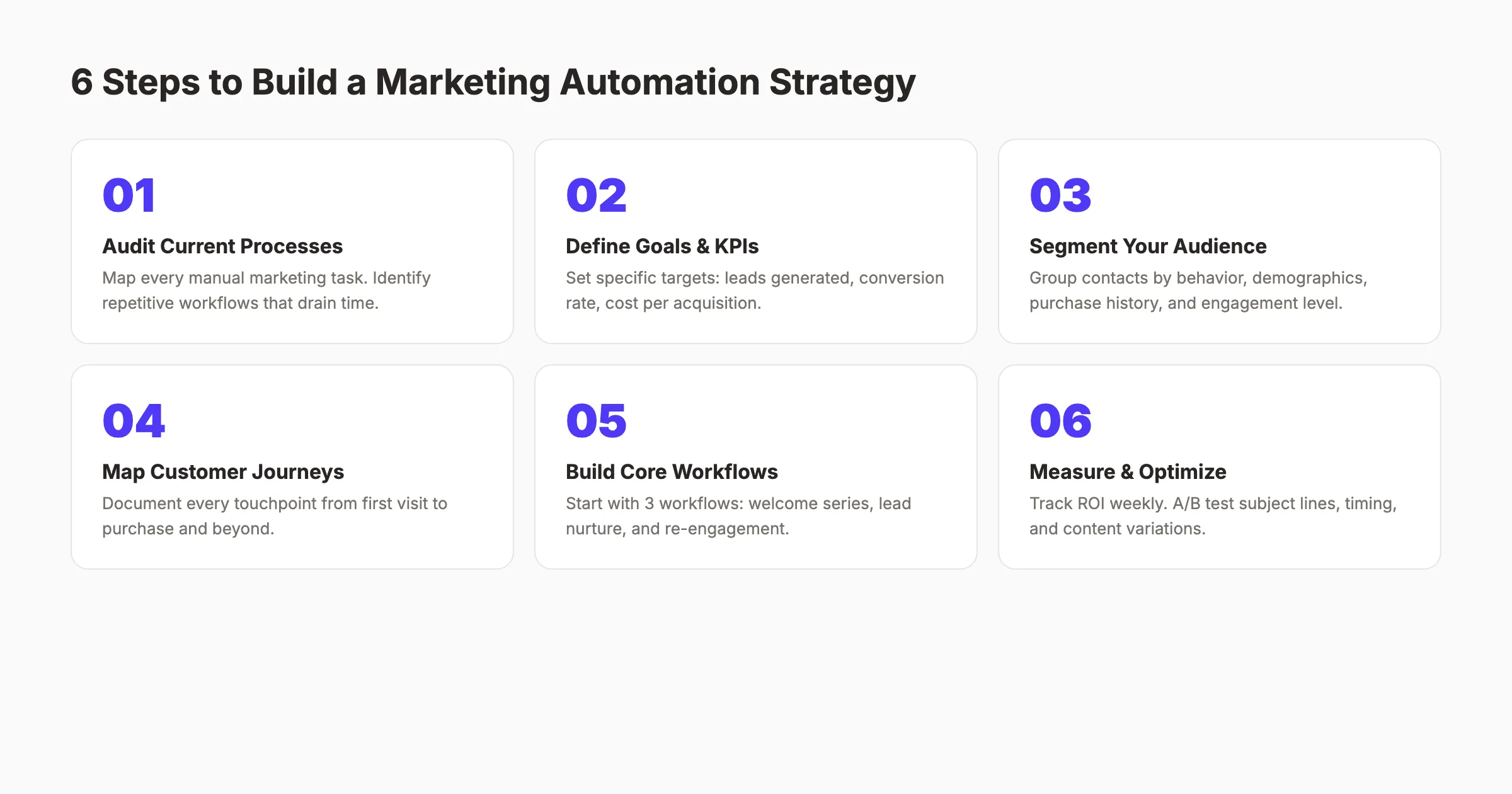
Step 1: Audit Your Current Marketing Processes
Before automating anything, map every manual marketing task your team performs weekly. List them all. Email sends, social posting, lead follow-ups, report building, content calendar updates, and data entry.
Rank each task by 2 criteria: time consumed and repetitiveness. The tasks that score high on both are your automation candidates.
Step 2: Define Goals and KPIs
Vague goals produce vague results. “Improve marketing” is not a goal. “Generate 50 qualified leads per month through automated nurture sequences” is a goal.
Set specific KPIs for every workflow you build:
- Leads generated per workflow
- Lead-to-customer conversion rate
- Cost per acquisition
- Revenue attributed to automation
- Time saved per week
For guidance on which metrics to track across your entire marketing operation, read our SEO reporting guide.
Step 3: Segment Your Audience
Automation without segmentation is just mass messaging with extra steps. 72% of marketers use automation specifically to deliver personalized experiences. Personalization requires segments.
Group your contacts by:
- Behavior (pages visited, emails clicked, products viewed)
- Demographics (location, company size, industry)
- Purchase history (first-time buyer, repeat customer, VIP)
- Engagement level (active, cooling, dormant)
Each segment receives different messaging. A first-time visitor gets an educational welcome series. A returning customer gets a loyalty offer. The workflow logic handles the routing.
Step 4: Map Customer Journeys
Document every touchpoint from first website visit to purchase and beyond. Identify the gaps where leads drop off. Those gaps are where automation adds the most value.
Common journey stages for automation:
- Awareness. Blog content, SEO, social posts
- Consideration. Lead magnets, case studies, nurture emails
- Decision. Product demos, pricing pages, comparison content
- Purchase. Onboarding, welcome, confirmation
- Retention. Follow-ups, upsells, review requests, re-engagement
Map specific automation workflows to each stage. Do not try to automate every stage at once. Start with the stage where you lose the most leads.
Step 5: Build Your First 3 Core Workflows
Start with 3 workflows. Master them before adding more. The 3 highest-impact starting workflows are:
-
Welcome sequence. Introduce your brand to new subscribers over 5 to 7 emails. See our welcome email sequence guide for templates.
-
Lead nurture drip. Move interested contacts toward a purchase decision with education-focused content. Space emails 3 to 5 days apart.
-
Re-engagement campaign. Win back contacts who have not opened an email in 60 days. Send 2 to 3 attempts, then clean your list.
Each workflow should take 2 to 4 hours to build. Test with a small segment first. Optimize based on data before scaling to your full list.
Step 6: Measure, Test, and Optimize
Launch is not the finish line. It is the starting point. Track performance weekly for the first month, then monthly.
A/B test everything: subject lines, send times, content length, CTA placement. Small improvements compound over time. A 10% lift in email click-through rate across 30 automated emails per month translates to hundreds of additional clicks.
Content automation without the complexity. Stacc writes, optimizes, and publishes your blog content on autopilot. Start for $1 →
Chapter 6: 7 Marketing Automation Workflows That Drive Results {#ch6}
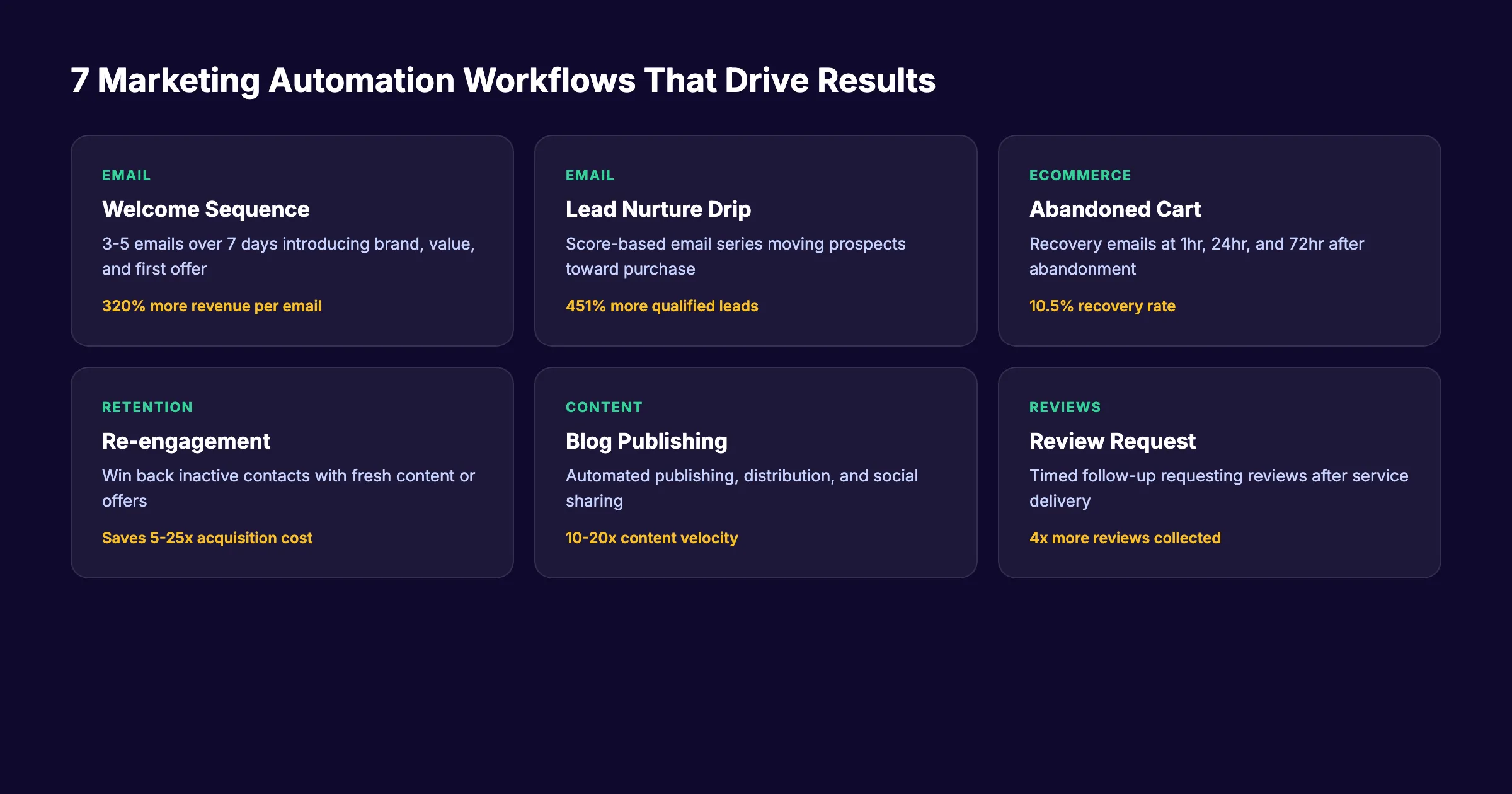
Theory without application is useless. Here are 7 specific marketing automation workflows you can implement. Each includes the trigger, action sequence, and expected impact.
1. Welcome Email Sequence
Trigger: New email subscriber Sequence: 3 to 5 emails over 7 to 14 days Goal: Introduce brand, set expectations, deliver first value
Welcome emails generate 320% more revenue per email than standard promotional messages. Yet 41% of brands do not send one within the first 24 hours of signup.
The ideal welcome sequence covers:
- Email 1 (immediate): Thank you + brand introduction
- Email 2 (day 2): Best content or quick win
- Email 3 (day 4): Social proof or case study
- Email 4 (day 7): Product or service introduction
- Email 5 (day 10): Specific offer or next step
For full templates and examples, read our welcome email sequence guide.
2. Lead Nurture Drip
Trigger: Form submission or content download Sequence: 6 to 10 emails over 30 to 45 days Goal: Move prospects from interest to purchase
Lead nurture workflows produce 451% more qualified leads than manual follow-up. The key is progressive content. Start educational. End with clear calls to action.
Pair this workflow with lead scoring. Assign points for opens, clicks, page visits, and content downloads. When a contact hits a threshold score, trigger the sales handoff.
3. Abandoned Cart Recovery
Trigger: Cart abandonment (no purchase after adding items) Sequence: 3 emails at 1 hour, 24 hours, and 72 hours Goal: Recover lost revenue
This is the highest-ROI workflow for ecommerce businesses. Recovery emails convert 10.5% of abandoned carts. For a store with $50,000 in monthly cart abandonment, that is $5,250 in recovered revenue every month.
4. Re-engagement Campaign
Trigger: No email opens or clicks in 60 days Sequence: 2 to 3 emails over 10 days Goal: Win back inactive contacts or clean the list
Acquiring a new customer costs 5 to 25 times more than retaining an existing one. Re-engagement workflows recover a portion of your dormant list and improve overall deliverability by removing truly inactive contacts.
5. Automated Blog Publishing and Distribution
Trigger: New content created Sequence: Publish to website, distribute to social channels, send to email list Goal: Maximize content reach without manual distribution
This workflow eliminates the 2 to 4 hours per post spent on publishing and promoting. The content gets created once. Automation handles the rest.
At Stacc, we automate the entire content workflow. From writing to optimization to publishing. The result is 30 articles per month without a content team.
6. Review Request Sequence
Trigger: Service delivery or purchase completion Sequence: 1 to 2 emails or SMS at 3 days and 7 days post-purchase Goal: Generate customer reviews
Reviews drive local SEO rankings and buyer trust. Automating the request ensures every customer receives a prompt at the optimal moment. For strategies on managing incoming reviews, see our review management guide.
7. Post-Purchase Upsell
Trigger: Purchase confirmation Sequence: 2 to 3 emails starting 5 to 7 days after purchase Goal: Increase customer lifetime value
Existing customers are 60 to 70% more likely to buy than new prospects. An automated upsell workflow recommends complementary products or services based on purchase history.
Chapter 7: Marketing Automation for Small Businesses {#ch7}
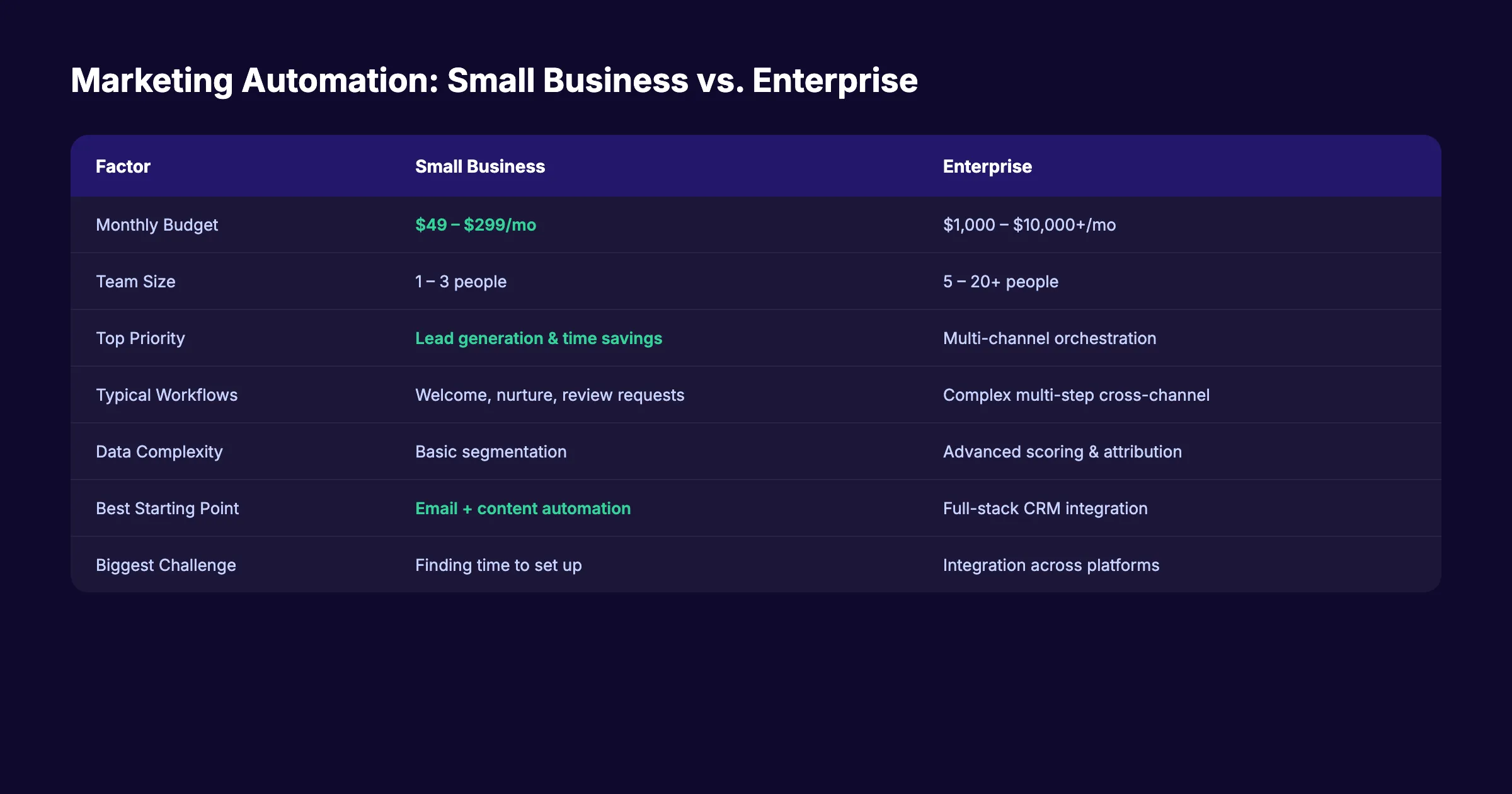
Small businesses face a different automation reality than enterprises. Smaller budgets. Smaller teams. Less technical expertise. But the ROI potential is often higher because the time savings hit harder.
Why Small Businesses Need Automation Most
A 3-person marketing team cannot manually nurture 500 leads, post to 4 social channels, publish weekly blog content, and send targeted email campaigns. The math does not work.
Automation bridges the gap between what a small team can do manually and what the business needs to grow. 47% of small businesses already use automation for social media. The adoption rate is climbing every quarter.
Where to Start
For small businesses, the best first automation is email. It delivers the highest ROI per dollar spent and requires the least technical skill to set up. Email marketing ROI averages $36 for every $1 spent across industries.
Start with these 3 workflows:
- Welcome sequence for new subscribers
- Lead nurture for quote requests or contact form submissions
- Review request after service delivery
These 3 workflows cover the full customer journey. They run on any email platform. They take less than a day to build.
Budget Considerations
Small business automation does not require enterprise pricing. Effective marketing automation tools start at $49 per month. Many platforms offer free tiers for lists under 500 contacts.
The cost comparison makes the case clear:
| Approach | Monthly Cost | Output |
|---|---|---|
| Manual marketing (1 person) | $4,000 – $6,000 | 5 – 10 tasks per day |
| Marketing automation platform | $49 – $299 | Unlimited automated workflows |
| Done-for-you service (Stacc) | $99 – $199 | 30 – 80 articles per month |
For content marketing specifically, done-for-you automation eliminates the largest bottleneck: producing enough content to rank.
The Exception for Small Business
Not everything should be automated. Customer support interactions, personalized proposals, and relationship-building conversations deserve a human touch. Automate the repetitive tasks. Keep the personal tasks personal.
Small business content marketing on autopilot. 30 SEO articles per month. $99. No writers needed. Start for $1 →
Chapter 8: Common Marketing Automation Mistakes {#ch8}
70% of marketers report dissatisfaction with their current automation software. But the problem is rarely the software. It is how the software gets used. Here are the 6 mistakes that undermine most automation efforts.
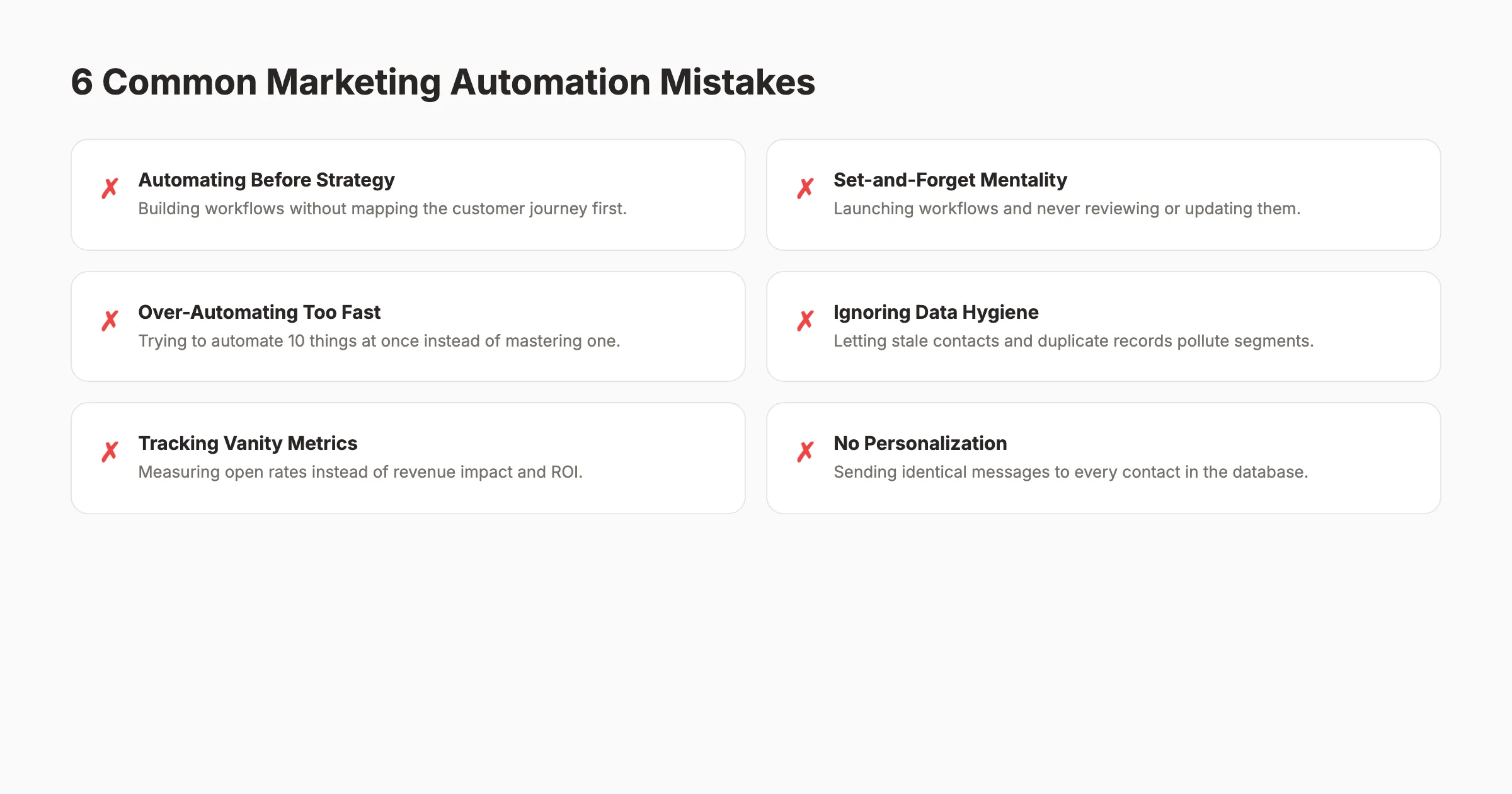
Mistake 1: Automating Before Mapping the Journey
Building workflows before defining the customer journey creates disconnected, random touchpoints. The contact receives a product pitch before they understand the problem. They get a re-engagement email 1 week after subscribing.
The fix: Map every stage of the customer journey first. Then assign one automation workflow per stage. Test each workflow individually before connecting them.
Mistake 2: The Set-and-Forget Approach
Launching a workflow and never reviewing it is the second most common error. Customer expectations shift. What worked 6 months ago may not work today. Content decays. Offers expire. Links break.
The fix: Schedule quarterly reviews of every active workflow. Check completion rates, conversion rates, and unsubscribe rates. Update messaging, offers, and links.
Mistake 3: Over-Automating Too Fast
Trying to automate 10 processes simultaneously leads to half-built workflows and technical debt. Each workflow needs testing, optimization, and monitoring. Running 10 at once means none get proper attention.
The fix: Start with 3 workflows maximum. Master them. Measure their ROI. Then add one more per month. This approach is slower but far more effective.
Mistake 4: Ignoring Data Hygiene
Automation is only as good as the data it runs on. Stale contacts, duplicate records, missing tags, and incorrect segments pollute every workflow. An email sent to the wrong segment destroys trust.
The fix: Clean your contact database monthly. Remove bounced emails. Merge duplicates. Validate segments quarterly. Treat your data like a garden, not a storage room.
Mistake 5: Tracking Vanity Metrics
Open rates and click rates tell you how emails perform. They do not tell you how automation performs. The metrics that matter are revenue per workflow, lead-to-customer conversion rate, and cost per acquisition.
The fix: Build dashboards that connect automation performance to revenue. Track content marketing ROI at the workflow level, not just the campaign level.
Mistake 6: Zero Personalization
Sending identical messages to every contact in your database is not automation. It is spam with extra steps. 77% of marketers use automation for personalized content because personalization drives results.
The fix: Use segmentation to create 3 to 5 audience groups minimum. Customize messaging for each group. Use dynamic content blocks where possible. Even basic personalization (name, industry, past behavior) lifts engagement by 20% or more.
Measuring Marketing Automation Performance
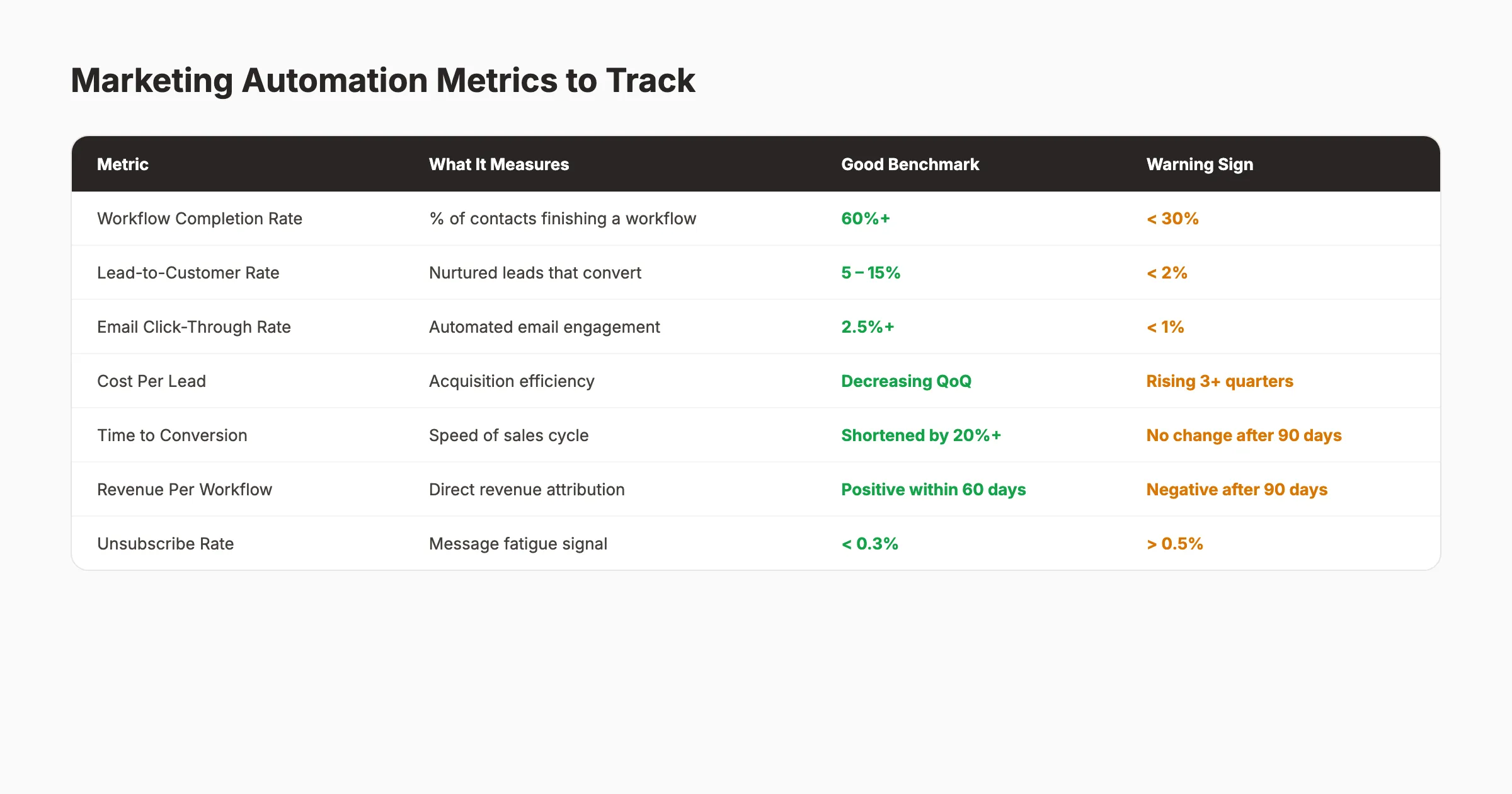
Metrics determine whether automation is working or wasting money. Track these 7 metrics from day one.
| Metric | What It Tells You | Action Threshold |
|---|---|---|
| Workflow completion rate | Are contacts finishing the journey? | Below 30% = fix the flow |
| Lead-to-customer rate | Is nurturing effective? | Below 2% = review content |
| Revenue per workflow | Is automation generating money? | Negative after 90 days = pause |
| Cost per lead | Is efficiency improving? | Rising 3+ quarters = investigate |
| Time to conversion | Is the cycle speeding up? | No change after 90 days = adjust |
| Unsubscribe rate | Are you over-messaging? | Above 0.5% = reduce frequency |
| List growth rate | Is the database healthy? | Flat or declining = fix acquisition |
Review these metrics weekly during the first 30 days of any new workflow. Shift to monthly reviews after the workflow stabilizes.
For a deeper framework on tracking marketing performance and building dashboards, see our reporting guide.
Your marketing content, automated. Blog SEO, local SEO, and social media. One platform. One price. Start for $1 →
Frequently Asked Questions {#faq}
What is the best marketing automation platform for small businesses?
The best platform depends on your primary channel. For email automation, Mailchimp and ActiveCampaign offer strong free or low-cost tiers. For content and SEO automation, done-for-you services like Stacc eliminate the need for a platform entirely. Start with one channel before comparing all-in-one solutions.
How long does it take to see results from marketing automation?
Most businesses see measurable results within 60 to 90 days. Simple workflows like welcome emails and abandoned cart recovery show impact within the first week. Complex lead nurture sequences take 30 to 60 days to generate enough data for optimization. Full ROI realization typically happens within 6 months.
Is marketing automation worth it for businesses with small email lists?
Yes. Automation works at any list size. A welcome email sequence converts better than manual follow-up whether your list has 100 contacts or 100,000. The time savings alone justify the investment. As your list grows, the ROI compounds because the workflow scales without additional effort.
What is the difference between marketing automation and email marketing?
Email marketing is one channel. Marketing automation spans every channel. It includes email, social media, content publishing, ad management, CRM updates, and lead scoring. Email marketing sends messages. Marketing automation orchestrates entire customer journeys across multiple touchpoints.
Can marketing automation replace a marketing team?
No. Automation replaces repetitive tasks, not strategic thinking. You still need humans to define goals, create messaging, analyze results, and make decisions. The right framing is that automation multiplies what a small team can accomplish. A 2-person team with automation can outperform a 5-person team without it.
How much does marketing automation cost?
Costs range from free to $10,000+ per month depending on features and list size. Small business email automation platforms start at $0 to $49 per month. Mid-market platforms run $200 to $800 per month. Enterprise platforms cost $1,000 to $10,000+. Content automation through a done-for-you service like Stacc starts at $99 per month for 30 articles.
Start Automating Your Marketing
Marketing automation is not optional in 2026. It is the baseline for any business that wants to compete for attention, leads, and revenue online.
The companies seeing 544% ROI from automation did not start with complex multi-channel orchestration. They started with one workflow. One trigger. One action. Then they measured, optimized, and expanded.
Start with your highest-impact workflow today. Build it this week. Measure it for 30 days. Then add the next one.
Ready to automate your content marketing? Stacc publishes 30 SEO-optimized articles per month, starting at $99. No writers. No editors. No guesswork. Start for $1 →

Written by
Siddharth GangalSiddharth is the founder of theStacc and Arka360, and a graduate of IIT Mandi. He spent years watching great businesses lose organic traffic to competitors who simply published more. So he built a system to fix that. He writes about SEO, content at scale, and the tactics that actually move rankings.
30 SEO blog articles published every month
Keyword-optimized, scheduled, and live on your site. Automatically.
30-day trial · Cancel anytime
theStacc
Stop writing SEO content manually
30 blog articles, 30 GBP posts, and social media content. Published every month. Automatically.
Start Your $1 Trial$1 for 3 days · Cancel anytime