
Review Management: The Definitive Guide (2026)
Build a review management system that earns trust and ranks higher. Covers Google reviews, response templates, fake review handling, and tools. Updated 2026.
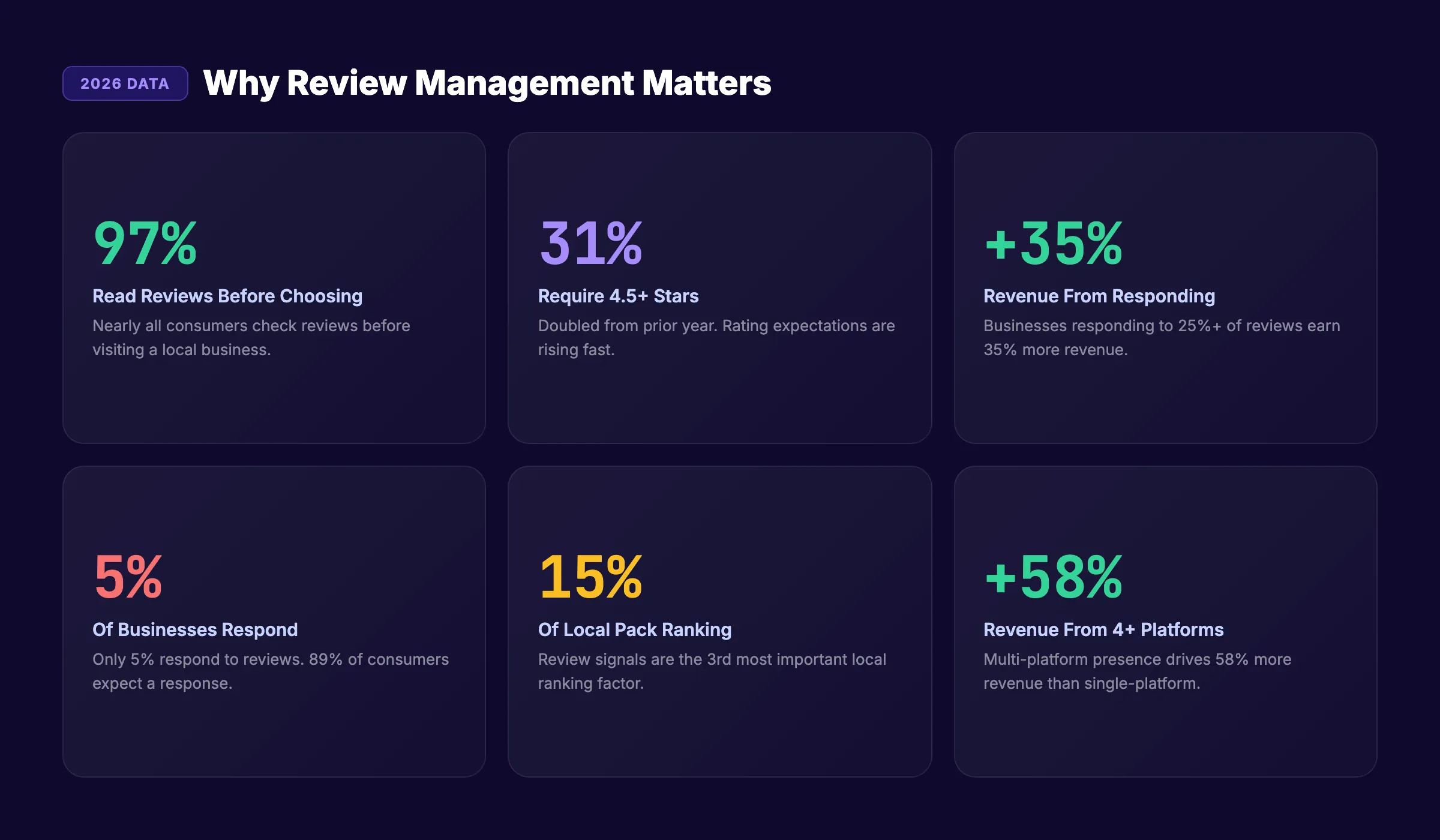
97% of consumers read online reviews before choosing a local business. 31% only consider businesses with a 4.5-star rating or higher. That number doubled from last year.
Review management is the system you use to collect, monitor, respond to, and promote customer reviews across Google, Yelp, Facebook, and industry-specific platforms. Without a system, reviews happen to you. With one, reviews work for you.
Here is the gap most businesses miss: 89% of consumers expect a response when they leave a review. Only 5% of businesses actually respond. That disconnect costs revenue. Businesses that respond to at least 25% of their reviews earn 35% more than those that do not.
This guide covers the exact review management system we recommend across 70+ industries. We have published 3,500+ SEO-optimized articles, and review strategy is part of every local SEO playbook we build.
In this guide, you will learn:
- Why reviews drive local rankings, trust, and revenue
- How to build a review generation system that runs on autopilot
- Response templates for positive, negative, and fake reviews
- How to handle negative reviews without damaging your brand
- The platforms that matter most by industry
- Tools that automate review management
- How reviews affect local SEO and Google Maps rankings
Why Reviews Matter More Than Ever
Reviews are no longer optional. They are a ranking factor, a trust signal, and a revenue driver all at once.
The Numbers Behind Review Impact
| Metric | Statistic |
|---|---|
| Consumers who read reviews before visiting | 97% |
| Consumers who only use 4.5+ star businesses | 31% (doubled year over year) |
| Revenue increase from responding to 25%+ reviews | 35% more revenue |
| Revenue increase from profiles on 4+ review sites | 58% more revenue |
| Consumers who expect a response to their review | 89% |
| Businesses that actually respond to reviews | 5% |
| Review signals in Local Pack ranking | 15% of ranking factors |
The data tells a clear story. Reviews influence whether customers find you (ranking), whether they trust you (social proof), and whether they choose you over competitors (conversion).
Reviews as a Local SEO Ranking Factor
Review signals account for 15% of Local Pack rankings. That makes reviews the third most important local ranking factor, behind Google Business Profile signals and on-page signals.
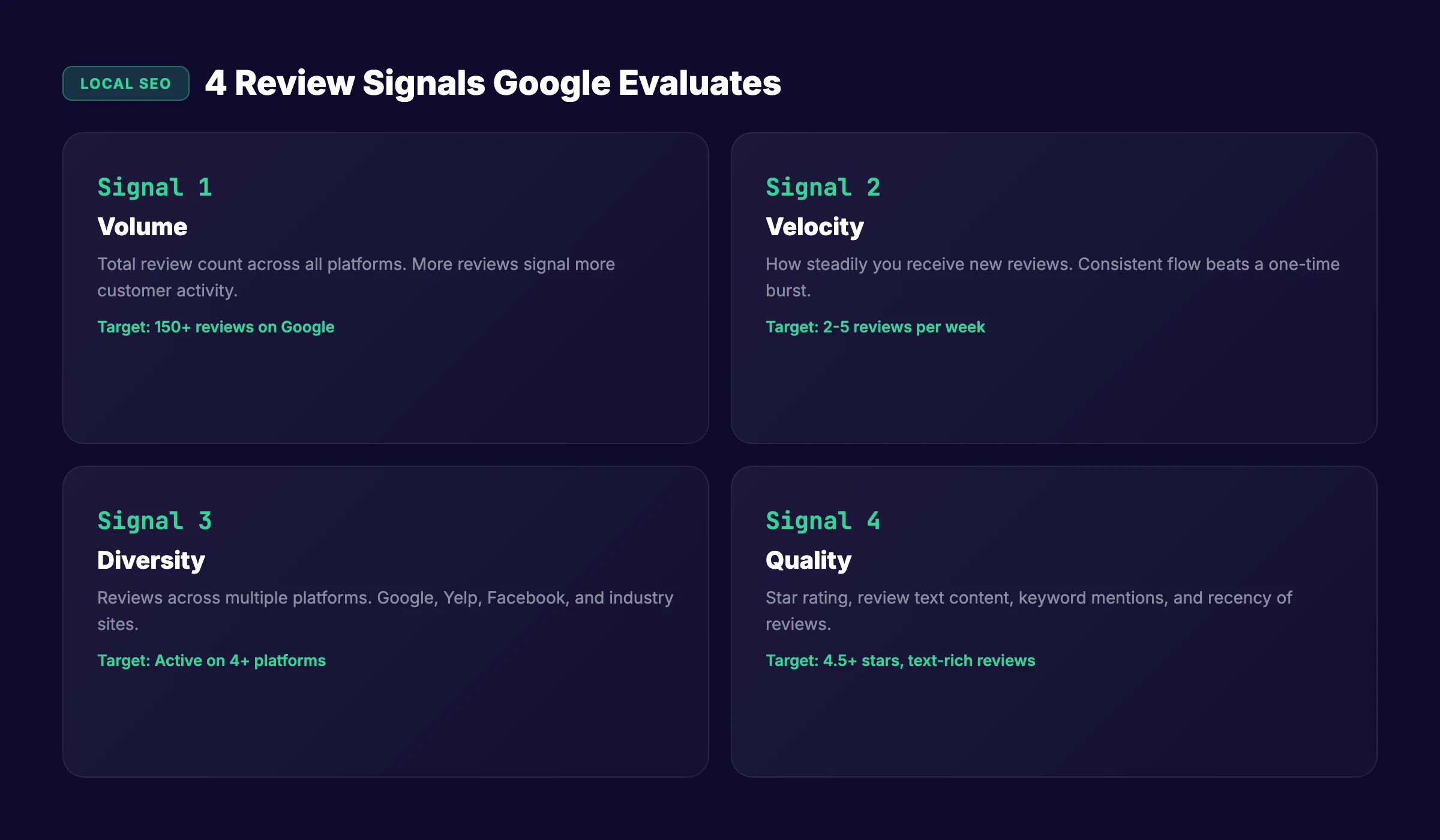
Google evaluates 4 review dimensions:
| Dimension | What Google Measures |
|---|---|
| Volume | Total number of reviews across platforms |
| Velocity | How steadily you receive new reviews |
| Diversity | Reviews across multiple platforms (Google, Yelp, Facebook) |
| Quality | Star rating, review text, keyword mentions, recency |
A burst of 20 reviews in one week followed by silence looks unnatural. A steady flow of 2-3 reviews per week signals an active, healthy business. Velocity matters as much as volume.
For a full breakdown of local ranking factors, see our local SEO guide.
How to Build a Review Generation System
Most businesses wait for reviews to happen. The ones that dominate local search ask for them systematically.
The Review Request Workflow
Step 1: Identify the right moment.
Ask for a review when the customer experience is at its peak. For a restaurant, that is right after the meal. For a dentist, that is right after a pain-free cleaning. For a contractor, that is right after the walk-through.
Never ask before the service is complete. Never ask during a complaint.
Step 2: Make it frictionless.
Every extra step between the ask and the review reduces completion rates by 50% or more.
| Method | Friction Level | Completion Rate |
|---|---|---|
| Direct Google review link (SMS) | Lowest | 15-25% |
| QR code on receipt or card | Low | 10-15% |
| Email with review link | Medium | 5-10% |
| Verbal ask (no link provided) | Highest | 1-3% |
The direct SMS link wins because it opens the review form in one tap. No searching, no navigating, no logging in.
Step 3: Automate the ask.
Manual review requests depend on staff remembering. Automated requests send every time, on schedule. Set up a trigger:
- Transaction completes → wait 2 hours → send SMS or email with review link
- Appointment ends → next morning → send review request
- Project delivered → 24 hours later → send review request
Most review management tools handle this automation out of the box.
Creating Your Google Review Link
- Open Google Maps and search for your business
- Click “Write a review”
- Copy the URL from your browser
- Shorten it using a link shortener for SMS use
Or use this format: https://search.google.com/local/writereview?placeid=YOUR_PLACE_ID
Find your Place ID in your Google Business Profile settings.
What to Say When Asking
Keep the ask simple. Two sentences maximum.
In person: “We appreciate your business. If you have a minute, a Google review would mean a lot to us.”
Via SMS: “Thanks for choosing [Business]. We would love your feedback: [review link]”
Via email: “Hi [Name], thanks for your visit today. If you had a good experience, a quick Google review helps other people find us: [review link]”
Never offer incentives for reviews. Google prohibits this and can remove your reviews or suspend your profile.
Stop writing. Start ranking. Stacc publishes 30 SEO articles per month for $99. Blog SEO + review strategy compound your local visibility. Start for $1 →
How to Respond to Reviews
Responding to every review signals to Google that your business is active. It signals to customers that you care about their experience. Both improve your rankings and your reputation.
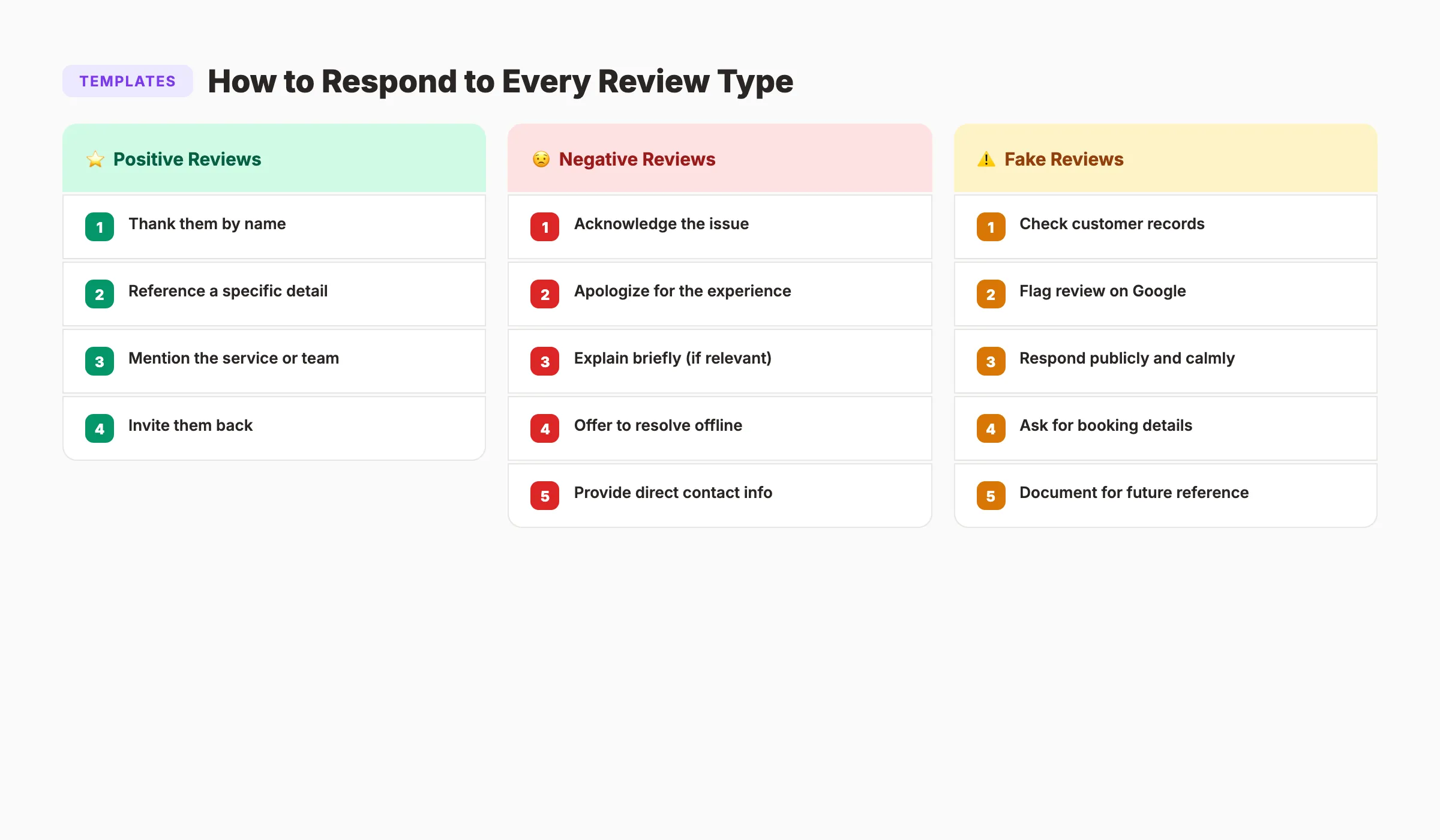
Positive Review Response Template
Keep positive responses short, personal, and specific. Avoid copy-paste generic replies. Google and customers both notice when every response is identical.
Template:
“Thank you, [Name]. We are glad [specific detail from their review]. We appreciate you taking the time to share your experience. Looking forward to seeing you again.”
Example:
Review: “Dr. Smith and his team were amazing. No wait time, painless cleaning, and they explained everything clearly.”
Response: “Thank you, Sarah. We are glad the cleaning went smoothly and that the team made you feel comfortable. We appreciate the kind words. See you at your next visit.”
Negative Review Response Framework
Negative reviews require a careful, structured approach. Never respond emotionally. Never argue. Never blame the customer publicly.
The 5-step framework:
- Acknowledge the issue immediately
- Apologize for the experience (not for being wrong, but for their frustration)
- Explain briefly what happened (if appropriate)
- Offer to resolve the issue offline
- Provide a direct contact method
Template:
“Hi [Name], thank you for sharing your feedback. We are sorry your experience did not meet the standard we aim for. [Brief explanation if relevant]. We would like to make this right. Please contact us at [email/phone] so we can address this directly.”
Example:
Review: “Waited 45 minutes past my appointment time. Nobody apologized. Will not be going back.”
Response: “Hi Mark, thank you for letting us know. A 45-minute wait is unacceptable, and we apologize for the inconvenience. We experienced an emergency appointment that disrupted our schedule that day. That is not typical, and we should have communicated better. Please contact us at [email protected]. We would like to make this right.”
Fake Review Response and Removal
Fake reviews happen. A competitor, a disgruntled ex-employee, or someone who confused your business with another can leave a damaging review.
How to identify fake reviews:
- Reviewer has no other review history
- Review describes services you do not offer
- Reviewer was never a customer (check your records)
- Review appeared during a pattern of suspicious activity
How to remove fake reviews from Google:
- Open Google Maps and find the review
- Click the three dots next to the review
- Select “Report review”
- Choose the violation type (spam, off-topic, conflict of interest)
- Wait 5-10 business days for Google’s decision
If Google does not remove the review, respond publicly:
“We cannot find any record of your visit in our system. We take every review seriously and want to resolve this. Please contact us at [email/phone] with your booking details so we can investigate.”
This response signals to future customers that you are professional and accountable, even when the review may be illegitimate.
Review Platforms by Industry
Google is the most important platform for every local business. But the second and third most important platforms vary by industry.
Platform Priority by Industry
| Industry | Platform 1 | Platform 2 | Platform 3 |
|---|---|---|---|
| Restaurants | Yelp | TripAdvisor | |
| Dentists / Doctors | Healthgrades | Zocdoc | |
| Attorneys | Avvo | Martindale | |
| Home services (plumbing, HVAC) | Yelp | Angi | |
| Real estate | Zillow | Realtor.com | |
| Hotels | TripAdvisor | Booking.com | |
| Auto repair | Yelp | CarFax | |
| Salons / Spas | Yelp | Booksy | |
| Gyms / Fitness | Yelp | ClassPass | |
| Accountants | Yelp | Clutch |
Why Multi-Platform Presence Matters
Businesses with profiles on 4 or more review sites earn 58% more revenue than those on fewer platforms. Each platform serves a different audience segment. Some customers search Google. Others search Yelp. Others check Healthgrades before choosing a doctor.
Claiming and maintaining profiles on 3-4 platforms also creates citation signals that strengthen your local SEO.
Monitoring All Platforms
Checking 4 platforms manually every day is not sustainable. Use a review management tool that aggregates reviews from all platforms into one dashboard. Most tools also send alerts when new reviews appear, so you can respond within 24 hours.
Your SEO team. $99 per month. 30 optimized articles, published automatically. Blog content builds authority. Reviews build trust. Both drive local rankings. Start for $1 →
Review Monitoring and Analysis
Collecting and responding to reviews is half the job. Analyzing patterns in your reviews is the other half.
What to Track Monthly
| Metric | What It Tells You | Target |
|---|---|---|
| Total review count | Review volume across all platforms | Growing month over month |
| Average star rating | Overall customer satisfaction | 4.5+ stars |
| Review velocity | Reviews received per week | 2-5 per week for most businesses |
| Response rate | Percentage of reviews you responded to | 100% (all reviews) |
| Response time | Hours between review and response | Under 24 hours |
| Sentiment trends | Common themes in positive and negative reviews | Identify recurring issues |
| Keyword mentions | Reviews mentioning services, location, staff names | Track for local SEO impact |
Mining Reviews for Business Insights
Reviews contain feedback you would never get from a survey. Customers tell you exactly what they love and hate in their own words.
Look for patterns:
- 3+ reviews mentioning “wait time” = scheduling problem
- 5+ reviews praising a specific staff member = promote them, feature them on your website
- Negative reviews mentioning “parking” = add parking instructions to your GBP and website
- Positive reviews mentioning a specific service = highlight that service in your marketing
This feedback loop turns reviews into actionable business intelligence. Every review is free market research.
Review Audit Checklist
Run this monthly:
- Respond to every new review within 24 hours
- Flag and report any suspected fake reviews
- Update response templates if patterns change
- Check star rating trend (improving, declining, stable)
- Identify top 3 positive themes and top 3 negative themes
- Verify review profiles are claimed on all relevant platforms
- Test your review request link (does it still work?)
- Review competitor ratings and volume for benchmarking
For tracking review performance alongside other local SEO metrics, integrate your review data into your monthly reporting.
How Reviews Affect Google Maps Rankings
Reviews directly influence your visibility in Google Maps and the Local Pack. Understanding exactly how helps you prioritize your review strategy.
The 4 Review Signals Google Evaluates
1. Review quantity.
More reviews signal more customer activity. A business with 150 reviews outranks a business with 15 reviews, assuming other factors are equal. Volume is the baseline signal.
2. Review velocity.
Google prefers businesses that receive reviews consistently. 3 reviews per week for 12 months beats 150 reviews in one month. Steady velocity signals an active, trusted business.
3. Review diversity.
Reviews on Google, Yelp, Facebook, and industry-specific sites create stronger signals than reviews on Google alone. Diversity confirms your business presence across the web.
4. Review quality.
Star rating matters. Review text matters more. Reviews that mention your business name, location, and services by name create keyword signals that help Google match your business to relevant searches.
A review that says “Best dentist in Austin. Dr. Smith did an amazing job on my crown” contains 3 local SEO signals: “dentist,” “Austin,” and “crown.” That is more valuable than a 5-star review with no text.
How to Get Keyword-Rich Reviews
Never tell customers what to write. That violates Google’s guidelines. Instead, prompt naturally:
- “What service did you visit us for today?” (prompts them to mention the service)
- “Would you recommend us to friends in [City]?” (prompts them to mention the location)
When customers naturally mention services and locations, Google connects those terms to your business. This is the organic version of keyword optimization for reviews.
For a deeper guide on ranking in Google Maps, see our Google Maps SEO guide.
Common Review Management Mistakes
These mistakes cost local businesses visibility, trust, and revenue. Each one is fixable.
1. Ignoring Reviews Entirely
89% of consumers expect a response. Only 5% of businesses deliver. Every unanswered review tells potential customers you do not care. Respond to every review. Positive and negative.
2. Using the Same Response for Every Review
“Thank you for your feedback!” copied across 50 reviews looks lazy. Google notices patterns of identical responses. Customers notice too. Personalize every response with the reviewer’s name and a specific detail from their review.
3. Arguing With Negative Reviewers
A public argument in your reviews is worse than the negative review itself. Future customers read the response more carefully than the complaint. Stay professional. Take the conversation offline. Never blame the customer publicly.
4. Incentivizing Reviews
Offering discounts, gift cards, or entries into drawings in exchange for reviews violates Google’s policies. Google can remove all your reviews or suspend your profile. Ask for reviews. Never pay for them.
5. Ignoring Non-Google Platforms
Google is the most important review platform. But it is not the only one. Yelp, Facebook, Healthgrades, and industry-specific platforms all contribute to your online reputation and citation profile.
6. Responding Too Slowly
A response 2 weeks after a negative review looks like an afterthought. Respond within 24 hours. For negative reviews, aim for same-day responses. Speed signals that you take feedback seriously.
7. Not Asking for Reviews
Hoping customers will leave reviews without being asked produces 1-2 reviews per month for most businesses. A systematic ask after every positive interaction produces 8-15 reviews per month. The difference in local ranking impact is enormous.
For a step-by-step review request system, see our guide on getting more Google reviews.
Review Management Tools
Manual review management works for businesses with 5 reviews per month. Beyond that, you need automation.
Tool Comparison
| Tool | Best For | Starting Price | Key Feature |
|---|---|---|---|
| Birdeye | Multi-location businesses | $299/mo | AI response drafting |
| Podium | SMS-based review requests | $399/mo | Text-to-review workflow |
| BrightLocal | Local SEO + reviews | $39/mo | Local rank tracking + reviews |
| GatherUp | Small businesses | $99/mo | Review request automation |
| Reputation.com | Enterprise | Custom pricing | Full reputation suite |
| Google Business Profile | Everyone (free) | Free | Direct review management |
What to Look for in a Review Tool
- Multi-platform monitoring (Google, Yelp, Facebook, industry sites)
- Automated review request sequences (SMS and email)
- Centralized response dashboard
- Sentiment analysis and trend reporting
- Alert notifications for new reviews
- Review widget for your website
- Integration with your CRM or POS system
For small businesses with tight budgets, start with Google Business Profile (free) and add BrightLocal or GatherUp as your review volume grows.
3,500+ blogs published. 92% average SEO score. Blog content drives traffic. Reviews drive trust. Together, they drive local rankings. Start for $1 →
FAQ
How many Google reviews do I need to rank in the Local Pack?
There is no magic number. But businesses in the Local Pack typically have 2-5 times more reviews than businesses below it. Focus on consistent velocity (2-5 reviews per week) rather than a one-time push. A steady flow of recent reviews carries more weight than a large count of old reviews.
Should I respond to positive reviews?
Yes. Every single one. 88% of consumers are more likely to use a business that responds to all reviews. Positive review responses also contain an opportunity to mention your services and location naturally, which creates additional keyword signals for local SEO.
How do I handle a negative review that is unfair?
Respond professionally. Do not argue. Acknowledge the frustration, apologize for their experience, and offer to resolve the issue offline. If the review is factually incorrect, state the facts calmly without being defensive. Future customers judge your response more than the original complaint.
Can I ask customers to update a negative review?
Yes, after you have resolved their issue. Contact the customer privately, fix the problem, and then ask: “We appreciate you giving us the chance to make this right. If you feel our response was fair, we would be grateful if you considered updating your review.” Many customers will update or remove their review after a positive resolution.
How do reviews affect AI search results?
AI search tools like Google AI Overviews, ChatGPT, and Perplexity reference review data when generating answers about local businesses. A business with a high volume of positive, text-rich reviews is more likely to be cited in AI-generated recommendations. Reviews feed the data that AI models use to evaluate business quality.
Is review management part of local SEO or separate?
Review management is a core component of local SEO. Review signals account for 15% of Local Pack rankings and influence Google Maps placement, Knowledge Panel data, and rich snippet eligibility. Treating reviews as separate from SEO creates a gap in your strategy. The most effective approach integrates review management with your local SEO checklist.
The businesses that dominate local search in 2026 share one trait: a review management system that runs automatically. They ask every customer. They respond to every review. They monitor every platform. And they use the feedback to improve their business, not only their star rating. Build that system now. Every review you earn compounds into higher rankings, stronger trust, and more revenue.
Related Tools & Resources
Free SEO Tools:
Best Lists:

Written by
Siddharth GangalSiddharth is the founder of theStacc and Arka360, and a graduate of IIT Mandi. He spent years watching great businesses lose organic traffic to competitors who simply published more. So he built a system to fix that. He writes about SEO, content at scale, and the tactics that actually move rankings.
Automate your Google Business Profile content
30 GBP posts, local SEO articles, and review responses. Published every month automatically.
30-day trial · Cancel anytime
theStacc
Stop writing SEO content manually
30 blog articles, 30 GBP posts, and social media content. Published every month. Automatically.
Start Your $1 Trial$1 for 3 days · Cancel anytime