
Email Marketing Best Practices: The 2026 Guide
Proven email marketing best practices for list building, segmentation, deliverability, and automation. Stats-backed tips that drive results. Updated 2026.
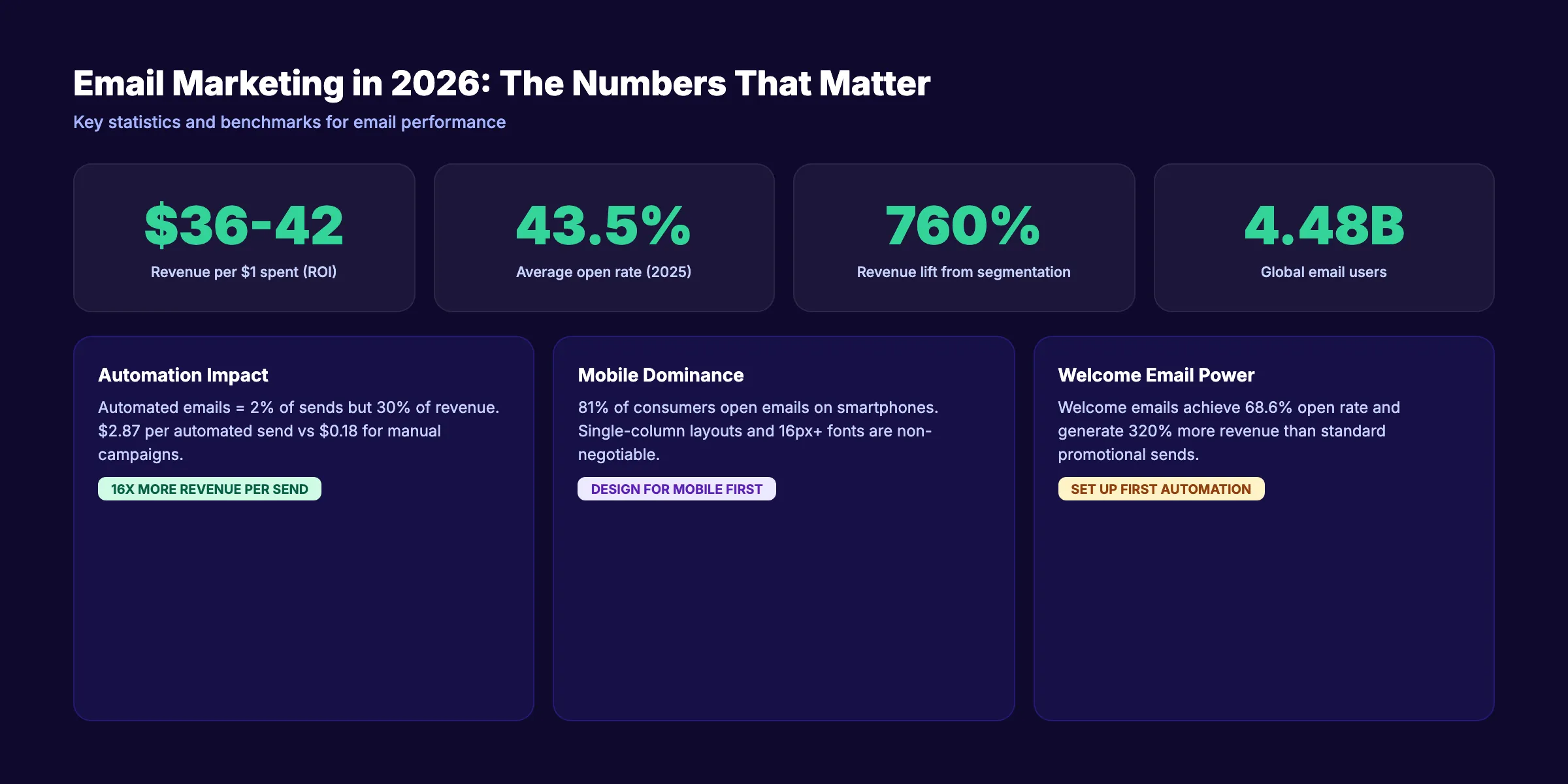
4.48 billion people use email worldwide. That number grows to 4.89 billion by 2027. No other marketing channel reaches more people, converts more reliably, or costs less per acquisition.
Email marketing best practices have shifted dramatically in the past 2 years. Gmail and Yahoo now require authentication for bulk senders. AI handles subject line optimization, send-time prediction, and content personalization. Privacy regulations force first-party data strategies over third-party tracking. The rules changed. The businesses that adapted are winning. The ones still running 2020 playbooks are losing subscribers and landing in spam.
This guide covers the email marketing best practices that actually matter in 2026. We stripped out outdated advice about “writing catchy subject lines” and focused on the practices that move revenue. We publish 3,500+ blog posts per month across 70+ industries, and email is how our clients convert that organic traffic into customers.
Here is what you will learn:
- How to build an email list that grows without purchased contacts
- The segmentation strategy that drives 760% more revenue
- Writing and design rules that increase opens and clicks
- How to pass Gmail and Yahoo authentication requirements
- Which automations generate the highest ROI
- The metrics that matter and how to track revenue attribution
- 7 common mistakes that destroy performance
Chapter 1: Email Marketing Still Delivers the Highest ROI
Email generates $36 to $42 for every $1 spent, according to HubSpot. No other channel comes close. Social media organic reach averages 2 to 5%. Paid ads stop producing the moment you stop spending. Email builds an owned audience that compounds over time.
2026 Benchmarks Worth Knowing
Average open rates across industries hit 43.46% in 2025, up from 42.35% the year before. Click-to-open rates rose 21% year-over-year to 6.81%, according to Omnisend. These are not declining numbers. Email engagement is increasing, not decreasing.
59% of consumers say marketing emails directly influence their purchase decisions. That makes email the only channel where the audience actively asks to hear from you and then acts on what you send.
The 80/20 Rule
The single most important principle in email marketing: 80% of your emails should deliver value. 20% should promote. Businesses that flip this ratio and send mostly promotional content see unsubscribe rates climb above 1% per campaign. The 80/20 balance keeps subscribers engaged and your sender reputation healthy.
Value content includes educational tips, industry news, curated resources, case studies, and behind-the-scenes stories. Promotional content includes product launches, sales, discount codes, and direct CTAs. A monthly newsletter following the 80/20 rule might include 4 useful articles and 1 promotional offer.
Chapter 2: Build and Grow a Quality Email List
A quality list converts. A purchased list destroys your domain reputation. Every legitimate email marketing strategy starts with organic list building.
6 Methods That Work
1. Lead magnets. Offer something valuable in exchange for an email address. Templates, checklists, guides, calculators, and free tools convert at 3 to 10% depending on relevance. Place the form above the fold on your homepage and on every high-traffic blog post.
2. Content upgrades. A content upgrade is a lead magnet specific to one blog post. A post about content marketing strategy offers a downloadable content calendar template. Content upgrades convert 2 to 5 times higher than generic lead magnets because they match the reader’s exact intent.
3. Exit-intent popups. Show a signup form when the visitor moves their cursor toward the browser tab. Exit popups convert at 2 to 4% without disrupting the reading experience. Keep the offer clear and the form to a single field (email only).
4. Double opt-in. Send a confirmation email after signup. Yes, this reduces list size by 20 to 30%. But it eliminates fake addresses, spam traps, and accidental signups. The result is a cleaner list with higher engagement rates and better deliverability.
5. Website footer and sidebar forms. Static forms on every page provide a passive collection point. They convert at lower rates (0.5 to 1%) but accumulate signups over time across your entire site.
6. Social media cross-promotion. Pin your lead magnet link in your Instagram bio, LinkedIn featured section, and X profile. Building an online presence across multiple channels funnels audiences into your owned email list.
What Not to Do
Never purchase an email list. Purchased lists contain spam traps that instantly damage your sender reputation. Gmail and Yahoo track sender behavior across their entire user base. One campaign to a purchased list can tank your deliverability for months.
Never add someone to your list without their explicit consent. Pre-checked boxes do not count as consent under GDPR. Neither does collecting a business card at a conference. Always use an opt-in form.
Stop writing. Start ranking. Stacc publishes 30 SEO-optimized articles per month for your business. Every article drives organic traffic that feeds your email list and grows your subscriber base. Start for $1 →
Chapter 3: Segment Your Audience for Relevance
Segmented campaigns drive 760% more revenue than unsegmented broadcasts. 78% of marketers say subscriber segmentation is their most effective email strategy. These numbers come from aggregate studies across millions of email sends. Segmentation is not optional. It is the single highest-impact practice in this entire guide.
Segmentation Dimensions
| Dimension | What to Segment | Example |
|---|---|---|
| Lifecycle stage | Prospect, new customer, active, at-risk, lapsed | New subscribers get welcome series. Active customers get loyalty offers. |
| Purchase behavior | First-time buyer, repeat, high-value, category preference | Repeat buyers get VIP early access. First-time buyers get onboarding tips. |
| Engagement level | Active opener, occasional, dormant (90+ days inactive) | Dormant subscribers enter re-engagement automation. Active openers get priority sends. |
| Source | Lead magnet, purchase, event, referral | Webinar attendees get a follow-up sequence specific to the topic. |
| Demographics | Location, company size, industry, job title | B2B subscribers see case studies from their industry. |
| Preferences | Self-selected interests via preference center | Subscribers choose which topics they want to receive. |
Start Simple, Add Layers
You do not need 20 segments on day 1. Start with 3:
- Prospects (never purchased)
- Customers (purchased at least once)
- Dormant (no opens or clicks in 90 days)
These 3 segments alone let you send different welcome sequences, different promotional offers, and identify who needs a re-engagement campaign. Add more segments as your list grows and your data improves.
For a detailed breakdown of email automation workflows mapped to each segment, read our dedicated guide.
Chapter 4: Write Emails That Get Opened and Clicked
The subject line determines whether your email gets opened. The body copy determines whether it gets clicked. Both follow specific rules.
Subject Line Best Practices
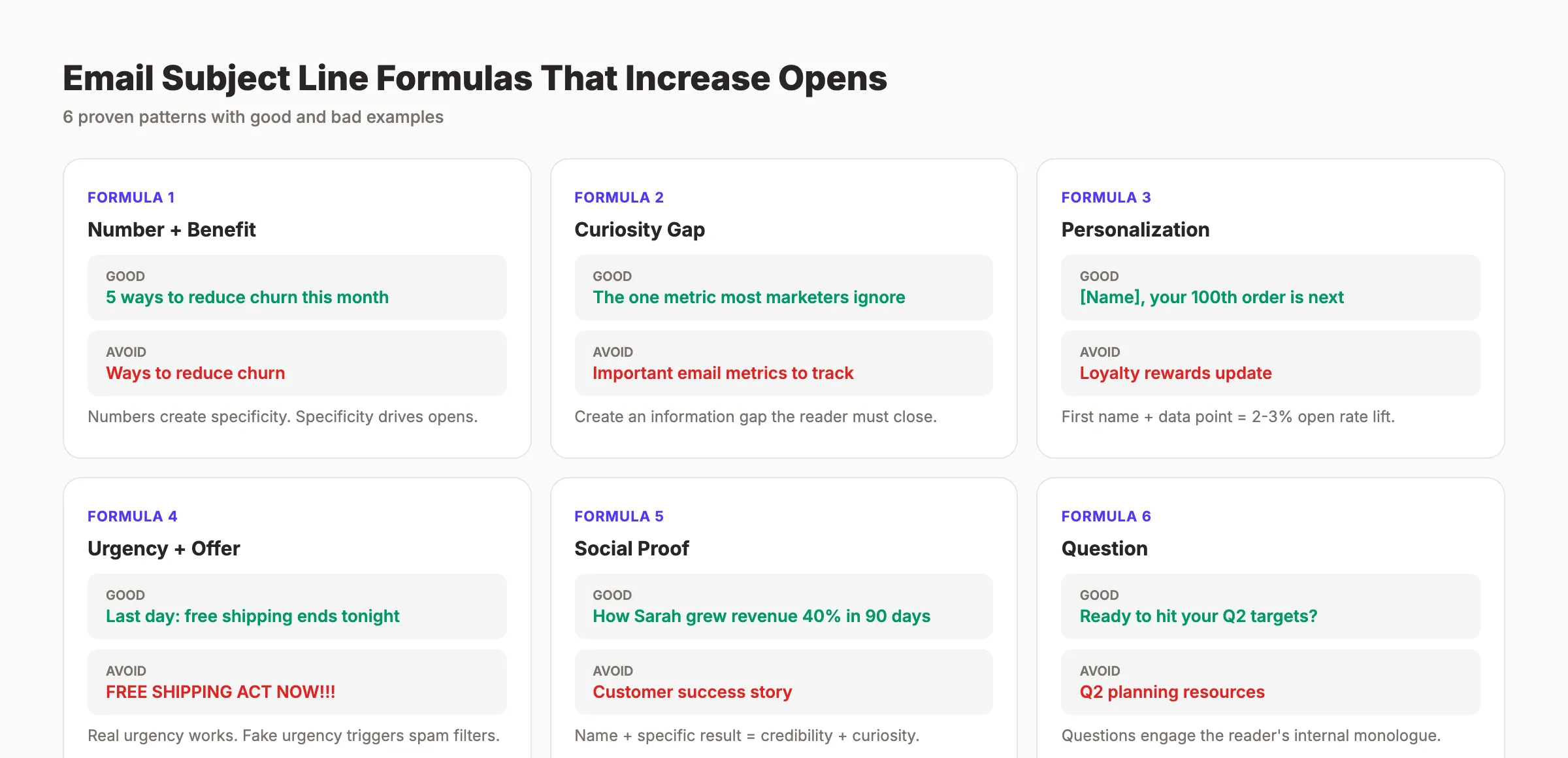
- Keep it under 50 characters. Mobile devices truncate anything longer. 81% of consumers open emails on smartphones, according to Campaign Monitor.
- Use the subscriber’s first name. Personalized subject lines lift open rates by 2 to 3 percentage points.
- Create a curiosity gap. “The one metric most marketers ignore” outperforms “Email metrics guide” because it creates information imbalance.
- Include a number. “5 ways to reduce churn” outperforms “ways to reduce churn.”
- A/B test every campaign. Send 2 subject line variants to 20% of your list. Send the winner to the remaining 80%. 1,000+ recipients per variant for reliable results.
Subject lines to avoid:
- All caps (“FREE OFFER INSIDE”)
- Excessive punctuation (“Don’t miss out!!!”)
- Spam trigger words (“Act now,” “Limited time,” “You’ve been selected”)
- Misleading promises that the email body does not deliver
Body Copy Rules
One topic per email. An email that covers 3 topics gets no clicks because the reader does not know where to focus.
One CTA per email. Multiple competing calls-to-action split attention. Make the primary CTA a button, not a text link. Place it above the fold and repeat it at the bottom.
Keep body copy under 200 words for promotional emails. Newsletters can be longer (300 to 500 words) but should link to blog content for depth. Read our guide on writing headlines that get clicks for principles that apply to email subject lines and body copy.
Use the preview text. The snippet shown after the subject line in inbox view. Do not repeat the subject line. Extend the promise. “Subject: 5 metrics you are tracking wrong. Preview: Number 3 surprised our entire team.”
Chapter 5: Design for Mobile and Dark Mode
81% of email opens happen on smartphones. If your email does not look good on a 375px screen, you lose most of your audience before they read a single word.
Mobile Email Design Rules
- Single-column layout. No multi-column grids. They break on small screens.
- Minimum 16px font size. Anything smaller is unreadable without zooming.
- Button size: 44x44px minimum. Apple’s Human Interface Guidelines set this as the minimum tap target.
- Image width: 600px maximum. Most email clients constrain to this width. Wider images get cropped.
- Test on real devices. Litmus and Email on Acid show how your email renders across 90+ email clients and devices.
Dark Mode Compatibility
40%+ of email users now view emails in dark mode. Dark mode inverts light backgrounds to dark and can make logos with transparent backgrounds disappear.
Dark mode rules:
- Use transparent PNGs with white outlines for logos
- Add background colors to image containers (not just the overall email)
- Test emails in both light and dark mode before sending
- Use
prefers-color-scheme: darkCSS media queries for clients that support them - Avoid pure black (#000000) text on pure white (#FFFFFF) backgrounds. Use #333333 on #FFFFFF for a softer look that adapts better.
Accessibility Standards
6% of the population has some form of color blindness. 15% of the world population lives with a disability. Accessible emails reach more people.
- Write alt text for every image. If the image does not load, the alt text conveys the message.
- Maintain a minimum 4.5:1 color contrast ratio between text and background.
- Use semantic HTML (
<h1>,<p>,<table>) so screen readers can parse your email structure. - Never use images as the only way to convey critical information.
Your SEO team. $99 per month. 30 optimized articles published automatically. Every article drives organic traffic to your site, building your email list while you focus on running your business. Start for $1 →
Chapter 6: Deliverability. Get Into the Inbox
Sending an email does not mean it arrives in the inbox. Deliverability is the percentage of emails that land in the primary inbox versus spam or promotions. A 95% delivery rate does not mean 95% inbox placement. It means 95% were not hard bounced. The actual inbox rate could be 70% or lower.
Email Authentication (Non-Negotiable Since 2024)
Gmail and Yahoo now require 3 authentication protocols for anyone sending more than 5,000 emails per day. Even smaller senders benefit from full authentication.
| Protocol | What It Does | How to Set Up |
|---|---|---|
| SPF | Confirms which servers can send email from your domain | Add a TXT record to your DNS |
| DKIM | Adds a digital signature to verify the email was not altered | Your email platform provides the DNS record |
| DMARC | Tells receiving servers what to do if SPF or DKIM fail | Add a TXT record starting with v=DMARC1 |
Set up all 3. Most email platforms (Mailchimp, ActiveCampaign, Klaviyo) provide step-by-step guides specific to their system. For technical details, Cloudflare’s authentication guide explains each protocol clearly.
List Hygiene
A dirty list kills deliverability. Clean your list every 90 days.
- Remove hard bounces immediately. These are permanently undeliverable addresses.
- Remove soft bounces after 3 consecutive failures. Soft bounces indicate temporary issues (full mailbox, server down).
- Remove inactive subscribers after 90 days of no opens. Send a re-engagement sequence first. If they still do not respond, remove them.
- Monitor your spam complaint rate. Stay below 0.1%. Above 0.3% and Gmail starts throttling your sends.
Sending Reputation
Your sender reputation is a score that inbox providers assign to your domain. High reputation emails land in the inbox. Low reputation emails land in spam.
Factors that improve reputation: consistent send volume, high open rates, low bounce rates, low complaint rates, and authenticated emails. Factors that damage reputation: sudden volume spikes, sending to purchased lists, high complaint rates, and hitting spam traps.
Chapter 7: Automate Your Highest-ROI Workflows
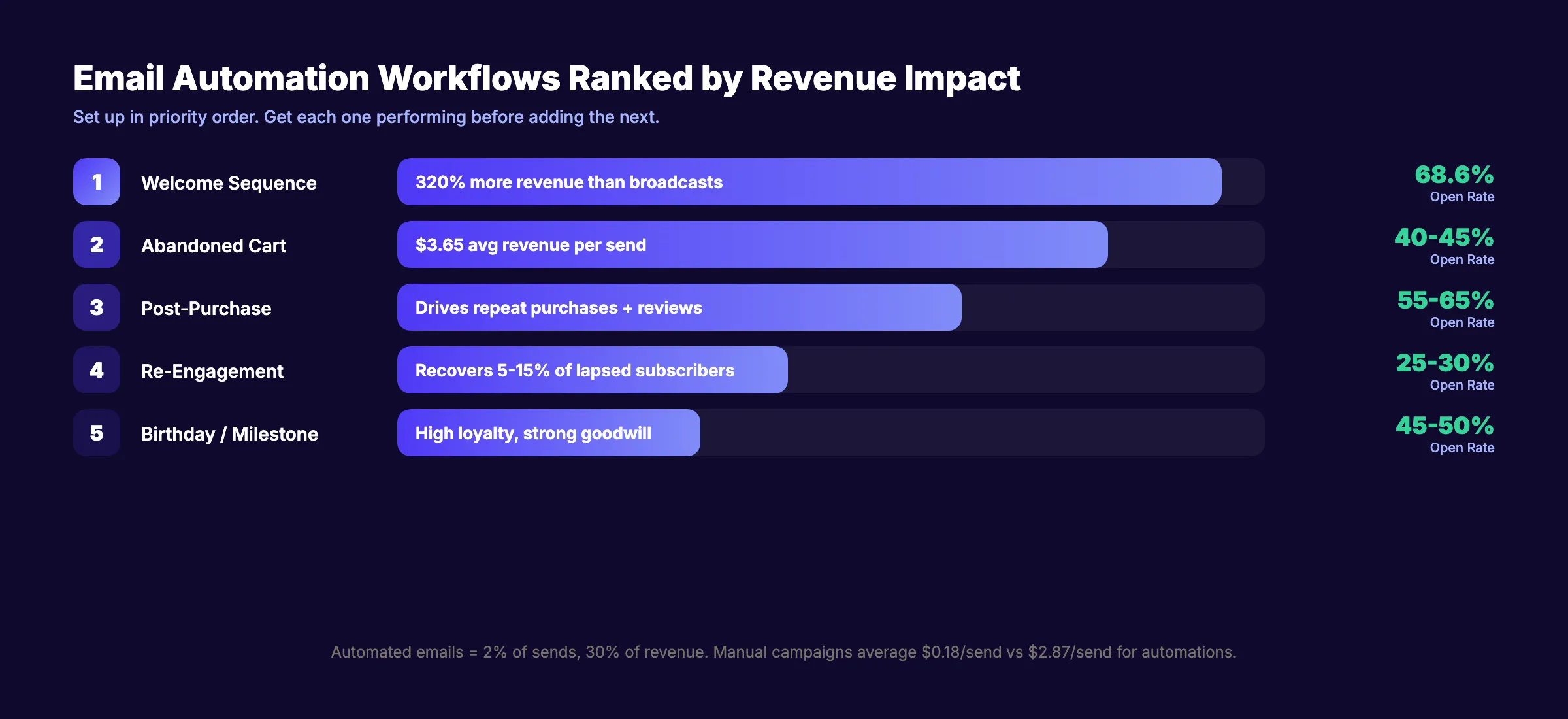
Automated emails account for just 2% of total sends but drive 30% of all email revenue. The revenue per automated send is $2.87 compared to $0.18 for manual campaigns. That is a 16x difference.
Priority Automations to Set Up
| Priority | Workflow | Trigger | Revenue Impact |
|---|---|---|---|
| 1 | Welcome sequence | New subscriber | 320% more revenue than broadcasts |
| 2 | Abandoned cart | Cart left incomplete for 1+ hour | $3.65 avg revenue per send |
| 3 | Post-purchase | Order completed | Drives repeat purchases + reviews |
| 4 | Re-engagement | 60-90 days of inactivity | Recovers 5-15% of lapsed subscribers |
| 5 | Birthday/milestone | Date-based trigger | High open rates, strong loyalty impact |
Welcome emails alone achieve a 68.6% open rate and generate 320% more revenue per email than standard promotional sends.
Set up each automation in priority order. Get one performing before adding the next. For a complete walkthrough of each workflow with email-by-email templates, read our email automation guide.
Test Within Automations
Most businesses set up automations and never touch them again. That is a mistake. A/B test one element per month in each active workflow:
- Subject lines (test 2 per email)
- Send timing (morning vs. evening)
- CTA text (“Shop now” vs. “See the collection”)
- Email length (short vs. detailed)
- Incentive presence (discount vs. no discount)
Run each test to statistical significance. 1,000+ recipients per variant minimum.
Chapter 8: Measure What Matters
Most email marketers track open rates and click rates. These are useful but insufficient. The metric that matters most is revenue per email (RPE). If you cannot connect an email campaign to actual revenue, you cannot optimize for what drives your business.
Key Metrics and Benchmarks
| Metric | 2025 Benchmark | What It Tells You |
|---|---|---|
| Open Rate | 43.46% avg | Subject line + sender reputation effectiveness |
| Click-to-Open Rate | 6.81% avg | Content relevance + CTA strength |
| Unsubscribe Rate | Below 0.3% | Content quality + send frequency balance |
| Spam Complaint Rate | Below 0.1% | List quality + consent practices |
| Revenue Per Email | Varies by industry | Actual business impact |
| List Growth Rate | 2-5% per month | Acquisition funnel health |
Revenue Attribution Setup
- Tag every link with UTM parameters. Use consistent naming:
utm_source=email,utm_medium=campaign_type,utm_campaign=campaign_name. - Connect your email platform to Google Analytics 4. Map email clicks to website sessions to conversions.
- Calculate RPE by campaign type. Divide total attributed revenue by total emails sent.
- Compare RPE across workflows. Identify which automations and campaigns generate the most revenue per send.
- Review monthly. Block 30 minutes on the first Monday of each month. Identify top 3 performing campaigns and bottom 3. Double down on winners. Fix or retire losers.
For a broader framework on tracking marketing performance, read our guide on measuring content marketing ROI.
3,500+ blogs published. 92% average SEO score. Stacc drives organic traffic to your website. More traffic means more subscribers, more automation triggers, and more revenue from email. Start for $1 →
7 Email Marketing Mistakes That Destroy Performance
These are the most common errors we see across the businesses we work with. Each one is fixable.
1. Sending without authentication. Since February 2024, Gmail and Yahoo require SPF, DKIM, and DMARC for bulk senders. Emails without authentication land in spam. Set up all 3 protocols before your next send.
2. No segmentation. Sending the same email to every subscriber wastes your highest-engagement contacts and annoys your least-engaged ones. Start with 3 segments: prospects, customers, dormant.
3. Ignoring mobile. 81% of opens happen on smartphones. An email designed for desktop with tiny text and multi-column layouts loses most of its audience.
4. No welcome sequence. The first 48 hours after signup have the highest engagement rates of the entire subscriber lifecycle. No welcome email means wasted attention.
5. Over-promoting. Breaking the 80/20 rule by sending mostly promotional content trains subscribers to ignore you. Value first. Promotion second.
6. Never cleaning the list. Email lists degrade 25 to 30% per year. Sending to inactive and bounced addresses damages your sender reputation and reduces inbox placement for everyone on your list.
7. No testing. Sending every email with a single subject line, single CTA, and single design means you never learn what works. Test one element per campaign.
FAQ
What are the 5 T’s of email marketing?
The 5 T’s are Targeting, Timing, Tailoring, Testing, and Tracking. Targeting means segmenting your audience. Timing means sending at optimal hours. Tailoring means personalizing content. Testing means A/B testing subject lines, CTAs, and design. Tracking means measuring opens, clicks, revenue, and deliverability metrics.
How often should I send marketing emails?
Most businesses see optimal results at 1 to 2 emails per week. That translates to 5 to 8 campaigns per month. Sending more than 3 times per week increases unsubscribe rates unless your content quality justifies the frequency. Automated lifecycle emails (welcome series, cart recovery) do not count toward this frequency limit.
What is a good open rate for email marketing in 2026?
The cross-industry average open rate is 43.46% as of 2025. A “good” rate depends on your industry. Health and fitness averages 47.81%. Retail averages closer to 35%. If your open rate falls below 30%, your subject lines need work, your list needs cleaning, or your sender reputation needs attention.
How do I improve email deliverability?
Start with email authentication. Set up SPF, DKIM, and DMARC records for your sending domain. Clean your list every 90 days by removing hard bounces, inactive subscribers, and spam traps. Maintain a spam complaint rate below 0.1%. Send consistent volumes (avoid sudden spikes). Use double opt-in for new subscribers.
Does Stacc help with email marketing?
Stacc drives the organic traffic that feeds your email marketing funnel. We publish 30 SEO-optimized blog posts per month to your website. Each article attracts visitors who convert into email subscribers through your lead magnets and signup forms. More organic traffic means a larger, higher-quality email list. Explore our email marketing tools for local businesses comparison for platform recommendations.
Email marketing in 2026 rewards the businesses that authenticate their domains, segment their audiences, automate their highest-value workflows, and measure revenue instead of vanity metrics. Start with authentication and a welcome sequence. Add segmentation and automation as your list grows. The practices in this guide compound over time. Every month you execute them is a month your competitors fall further behind.
Related Tools & Resources
Free SEO Tools:
Best Lists:

Written by
Siddharth GangalSiddharth is the founder of theStacc and Arka360, and a graduate of IIT Mandi. He spent years watching great businesses lose organic traffic to competitors who simply published more. So he built a system to fix that. He writes about SEO, content at scale, and the tactics that actually move rankings.
30 SEO blog articles published every month
Keyword-optimized, scheduled, and live on your site. Automatically.
30-day trial · Cancel anytime
theStacc
Stop writing SEO content manually
30 blog articles, 30 GBP posts, and social media content. Published every month. Automatically.
Start Your $1 Trial$1 for 3 days · Cancel anytime