
Email Automation (2026): Strategies, Tactics & Examples
Step-by-step email automation guide guide for 2026: proven tactics, real examples, common mistakes to avoid, and implementation tips.
Email automation sends the right message to the right person at the right time without manual effort. It is the single highest-ROI marketing activity available to any business with an email list.
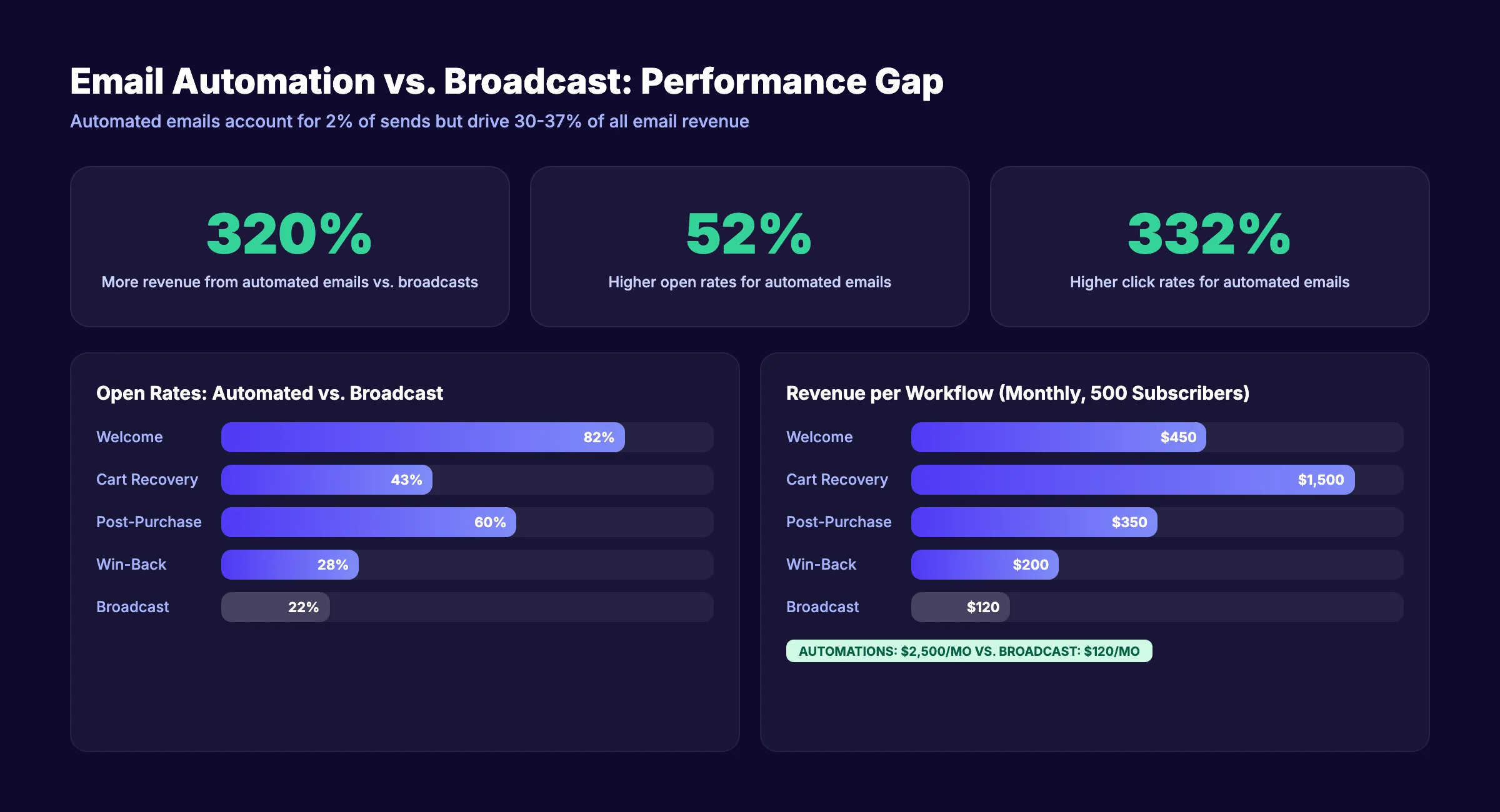
The numbers are hard to argue with. Automated emails account for just 2% of total email sends but drive 30 to 37% of all email revenue, according to Omnisend. They achieve 52% higher open rates and 332% higher click rates than standard broadcast emails. Welcome automations alone generate 320% more revenue than promotional blasts.
Yet most businesses either have no automation in place or run a single welcome email and nothing else. The gap between what email automation can do and what most companies actually execute is enormous. That gap costs revenue every single day.
This guide covers every part of email automation that matters in 2026. We publish 3,500+ blog posts per month across 70+ industries, and email automation is a core part of how our clients turn organic traffic into revenue. This is everything we know about building automation that works.
Here is what you will learn:
- What email automation is and how it differs from manual campaigns
- The 7 essential workflows every business needs running
- How to choose the right email automation platform
- Benchmarks that tell you whether your automation is working
- How AI is changing email automation in 2026
- The 6 most common automation mistakes and how to avoid them
- A step-by-step setup process from zero to fully automated
Chapter 1: What Email Automation Actually Is
Email automation uses triggers, conditions, and pre-written email sequences to send messages automatically based on subscriber behavior, time delays, or data changes. No human clicks “send.” The system handles delivery based on rules you define once.
Manual vs. Bulk vs. Automated Emails
Most businesses confuse these three. They are different operations with different results.
| Type | How It Works | Example | Performance |
|---|---|---|---|
| Manual | One person writes and sends one email | Personal follow-up to a lead | High relevance, zero scale |
| Bulk (Broadcast) | One email sent to entire list at once | Monthly newsletter, sale announcement | Low relevance, high reach |
| Automated | Pre-built email triggered by behavior | Welcome series, abandoned cart | High relevance, high scale |
Automated emails combine the relevance of manual messages with the scale of bulk sends. That is why they outperform both.
How Automation Triggers Work
Every automated email starts with a trigger. A trigger is an event that tells the system to begin a sequence.
Common triggers:
- Sign-up: New subscriber joins your list
- Purchase: Customer completes a transaction
- Abandonment: Visitor leaves items in cart
- Inactivity: Subscriber stops opening emails for 30+ days
- Date-based: Birthday, anniversary, subscription renewal
- Behavioral: Clicked a specific link, visited a specific page, downloaded a resource
- Tag change: Subscriber moves from “prospect” to “customer” in your CRM
After the trigger fires, the automation follows a sequence of steps: send email, wait X days, check a condition (did they open?), branch to email A or email B, and continue until the sequence ends.
This is not complicated technology. Every major email platform supports it. The hard part is knowing which automations to build and what to say in each email.
Chapter 2: Why Email Automation Matters More in 2026
81% of marketing organizations now use automation tools. 58% of marketers say email is their primary automation channel, according to Email Vendor Selection. If you are not automating email, you are competing against businesses that are.
The Revenue Impact
Automated emails generate 320% more revenue than non-automated campaigns. That number comes from aggregate data across millions of sends. The reason is simple: automated emails arrive when the subscriber is most engaged.
A welcome email sent 60 seconds after sign-up reaches someone who just expressed interest. A broadcast email sent on Tuesday at 10 AM reaches someone who may have forgotten you exist. Timing drives performance.
The Efficiency Argument
A business sending 4 broadcast emails per month spends 8 to 12 hours on writing, designing, scheduling, and reviewing. That same business running 5 automated sequences spends 20 to 30 hours on initial setup and then zero hours per month maintaining them.
Over 12 months, manual email campaigns consume 96 to 144 hours of labor. Automated sequences consume 20 to 30 hours total. The automation pays for itself in month 1 and compounds from there.
The Personalization Expectation
71% of consumers expect personalized experiences from brands. 76% get frustrated when they do not receive them. Email automation enables personalization at scale because each message responds to what that specific subscriber did, not what your marketing calendar says.
A content marketing strategy that includes email automation converts traffic into customers far more effectively than one that relies on broadcast emails alone.
Chapter 3: 7 Essential Email Automation Workflows
These 7 workflows cover the full customer lifecycle. Set them up in priority order. Each one builds on the previous.
1. Welcome Sequence
Trigger: New subscriber or customer sign-up Emails: 3 to 5 over 7 to 14 days Goal: Introduce your brand, set expectations, drive first action
Welcome emails achieve an 82% open rate. No other email type comes close. This is your highest-engagement window. Use it.
Sequence structure:
- Email 1 (Immediate): Deliver what you promised (lead magnet, discount code, access). Introduce who you are in 2 sentences.
- Email 2 (Day 2): Share your most valuable piece of content. Link to your best blog post or resource.
- Email 3 (Day 4): Tell your origin story or share a customer success story.
- Email 4 (Day 7): Make your first soft offer. Invite them to try your product or book a call.
- Email 5 (Day 14): Segment them. Ask what topics they care about so future emails are relevant.
Every business needs a welcome sequence. It is the foundation every other automation builds on.
2. Abandoned Cart Recovery
Trigger: Items added to cart, checkout not completed within 1 hour Emails: 3 over 3 days Goal: Recover lost revenue
Abandoned cart emails recover 3.33% of carts on average. The top 10% of senders recover 7.69%, according to Klaviyo’s benchmark data. At an average order value of $100, recovering even 3% of 500 monthly abandoned carts generates $1,500 in monthly revenue from a single automation.
Sequence structure:
- Email 1 (1 hour): Simple reminder. Show the items. One button back to cart.
- Email 2 (24 hours): Address objections. Add a review or testimonial. Create mild urgency.
- Email 3 (72 hours): Final attempt. Consider a small incentive (free shipping, 5% discount).
This workflow applies to ecommerce businesses. For B2B and SaaS, replace “cart” with “free trial not activated” or “demo not booked.”
3. Post-Purchase Follow-Up
Trigger: Purchase completed Emails: 3 to 4 over 14 days Goal: Reduce buyer’s remorse, encourage repeat purchase, collect reviews
Sequence structure:
- Email 1 (Immediate): Order confirmation + delivery timeline. Set expectations.
- Email 2 (Day 3-5): Usage tips. Help them get the most from what they bought.
- Email 3 (Day 7-10): Ask for a review or testimonial. Link directly to your review collection page.
- Email 4 (Day 14): Cross-sell or upsell related products.
4. Re-Engagement (Win-Back)
Trigger: No email opens or clicks for 60 to 90 days Emails: 3 over 14 days Goal: Reactivate dormant subscribers or clean your list
Sequence structure:
- Email 1: “We noticed you have been quiet.” Share your best recent content.
- Email 2 (Day 5): Offer an exclusive incentive. Discount, free resource, or early access.
- Email 3 (Day 14): “Last chance.” Tell them you will remove them from the list if they do not re-engage.
Subscribers who do not respond to the final email should be removed. A smaller, engaged list outperforms a large, inactive one.
Stop writing. Start ranking. Stacc publishes 30 SEO-optimized articles per month for your business. Every article drives traffic to your site and feeds your email automation funnel. Start for $1 →
5. Lead Nurture
Trigger: Subscriber downloads a resource, attends a webinar, or requests information Emails: 5 to 7 over 21 to 30 days Goal: Move prospects from awareness to consideration to decision
This workflow matters most for B2B and SaaS businesses where the sales cycle is longer than a single visit. Each email educates, builds trust, and moves the prospect one step closer to purchasing.
Structure the sequence around your buyer’s journey:
- Emails 1-2: Educational content. Solve a problem they have.
- Emails 3-4: Case studies and social proof. Show results from similar customers.
- Emails 5-6: Product positioning. How your product solves their specific problem.
- Email 7: Direct call-to-action. Book a demo, start a trial, or make a purchase.
For content that feeds lead nurture sequences, read our guide on SEO content writing.
6. Birthday and Milestone
Trigger: Date-based (birthday, signup anniversary, usage milestone) Emails: 1 per event Goal: Build loyalty and drive repeat engagement
These emails cost almost nothing to send and generate disproportionate goodwill. A birthday email with a 10% discount code or a “1 year with us” celebration email keeps customers feeling valued.
7. Renewal and Subscription Reminder
Trigger: 30 days before subscription renewal or contract end Emails: 2 to 3 over 21 days Goal: Reduce involuntary churn and increase retention
- Email 1 (30 days before): Friendly reminder. Summarize value received during the term.
- Email 2 (14 days before): Highlight new features or improvements since they signed up.
- Email 3 (3 days before): Urgency. Confirm payment method is up to date. Offer annual plan upgrade.
Chapter 4: How to Choose an Email Automation Platform
The platform matters less than the strategy. Any modern email tool can run the 7 workflows listed above. Choose based on your business size, budget, and integration needs.
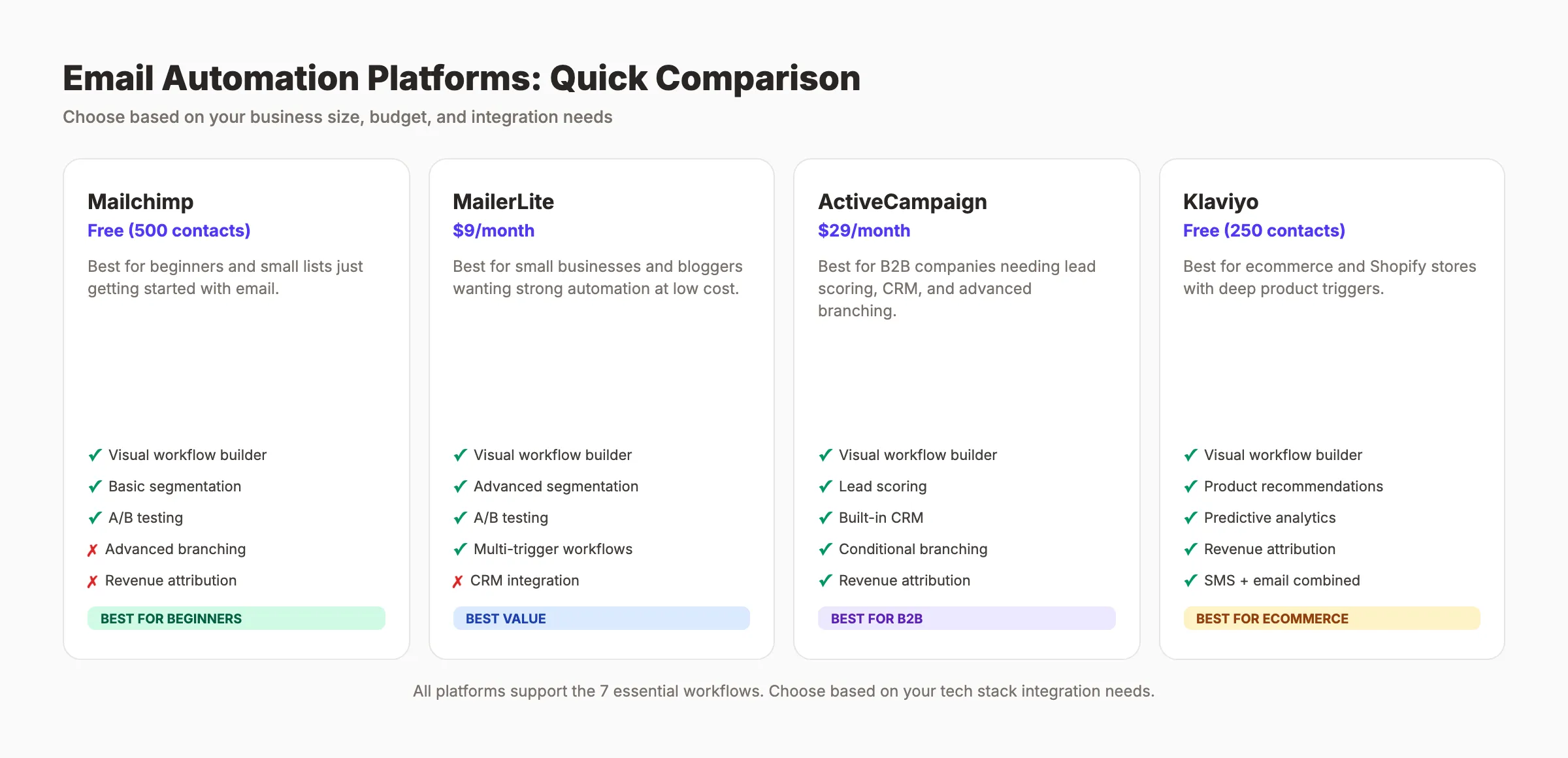
Platform Comparison
| Platform | Starting Price | Best For | Automation Depth |
|---|---|---|---|
| Mailchimp | Free (500 contacts) | Beginners, small lists | Basic workflows |
| MailerLite | $9/month | Small businesses, bloggers | Strong visual builder |
| ActiveCampaign | $29/month | B2B, lead scoring, CRM | Advanced branching |
| Klaviyo | Free (250 contacts) | Ecommerce, Shopify | Deep ecommerce triggers |
| ConvertKit | $29/month | Creators, newsletters | Simple tag-based |
| HubSpot | $20/month (Starter) | B2B, full CRM integration | Enterprise-grade |
| Omnisend | Free (250 contacts) | Ecommerce, multi-channel | SMS + email combined |
Selection Criteria
1. Integration with your tech stack. The platform must connect to your website, CRM, and ecommerce system. Native integrations beat Zapier workarounds for reliability.
2. Automation builder quality. Test the visual workflow builder before committing. Can you create conditional branches? Can you split-test within a workflow? Can you set time delays and conditions?
3. Deliverability reputation. Check third-party deliverability reports. A platform with poor deliverability means your automated emails land in spam folders regardless of how good they are.
4. Pricing at scale. Free tiers work for small lists. But pricing changes dramatically at 1,000, 5,000, and 10,000+ contacts. Calculate your 12-month cost at your projected list size.
5. Reporting depth. You need per-automation revenue tracking, not just open and click rates. If the platform cannot attribute revenue to a specific workflow, you cannot measure ROI.
For businesses looking at broader marketing automation tools, we compare the top options in a dedicated guide.
Chapter 5: Email Automation Benchmarks for 2026
You cannot improve what you do not measure. These benchmarks tell you whether your automation is performing at, above, or below industry standards.
Performance Benchmarks by Email Type
| Email Type | Open Rate | Click Rate | Conversion Rate |
|---|---|---|---|
| Welcome email | 82% | 8-12% | 2-5% |
| Abandoned cart | 40-45% | 5-8% | 3.33% avg |
| Post-purchase | 55-65% | 3-5% | Varies |
| Win-back | 25-30% | 2-4% | 1-3% |
| Birthday/milestone | 45-50% | 4-6% | 3-5% |
| Broadcast (comparison) | 20-25% | 1-2% | 0.5-1% |
Automated emails outperform broadcasts across every metric. The gap is widest for conversion rate, where automated emails convert at 2 to 5 times the rate of manual sends.
How to Track Automation ROI
Revenue attribution is the metric that matters most. Set up tracking with these steps:
-
Tag every link in every automated email with UTM parameters. Use consistent naming:
utm_source=email,utm_medium=automation,utm_campaign=[workflow-name]. -
Connect your email platform to Google Analytics. Map email clicks to website sessions to conversions.
-
Calculate revenue per email. Divide total revenue attributed to a workflow by the number of emails sent in that workflow. This is your RPE (Revenue Per Email).
-
Compare RPE across workflows. Your welcome sequence might generate $0.50 RPE while your abandoned cart generates $3.65 RPE. That tells you where to invest optimization time.
-
Track cost per workflow. Include platform cost (prorated by sends), content creation time, and management time. Subtract from revenue to get true ROI.
For a broader look at tracking marketing performance, read our guide on measuring content marketing ROI.
Your SEO team. $99 per month. 30 optimized articles published automatically. Every article drives organic traffic that feeds your email automation sequences. Start for $1 →
Chapter 6: How AI Changes Email Automation in 2026
92% of marketers now use AI tools in some capacity. Email automation is one of the areas where AI delivers the clearest, most measurable improvements.
Predictive Send Time
AI analyzes each subscriber’s historical open behavior and sends automated emails at the time that specific person is most likely to open. This is not “send at 10 AM on Tuesday for everyone.” It is “send to Sarah at 7:14 AM and to James at 12:42 PM.”
ActiveCampaign, Mailchimp, and Klaviyo all offer predictive send time features. The typical lift is 5 to 15% higher open rates with zero additional effort after setup.
AI Subject Line Generation
AI generates multiple subject line variations and predicts which will perform best based on historical data. Some platforms automatically select the winning variant before the full send. Others let you review and approve.
The key rule: treat AI-generated subject lines as drafts. Review every one. AI optimizes for opens. You optimize for trust and brand voice.
Dynamic Content Blocks
AI selects which content blocks to show each subscriber based on their behavior, purchase history, and segment. One email template serves different content to different people without building separate emails.
Example: An ecommerce brand sends a weekly email. Subscriber A sees running shoes because they browsed running products. Subscriber B sees yoga mats because they purchased yoga gear. Same email, different content blocks. One automation.
Behavioral Scoring
AI assigns engagement scores to each subscriber based on opens, clicks, page visits, and purchase behavior. High-scoring contacts get fast-tracked to sales. Low-scoring contacts enter re-engagement workflows. Mid-scoring contacts receive more educational content.
This replaces manual segmentation with continuous, real-time classification. It is the biggest shift in email automation strategy since triggers replaced manual sends.
Chapter 7: 6 Common Email Automation Mistakes
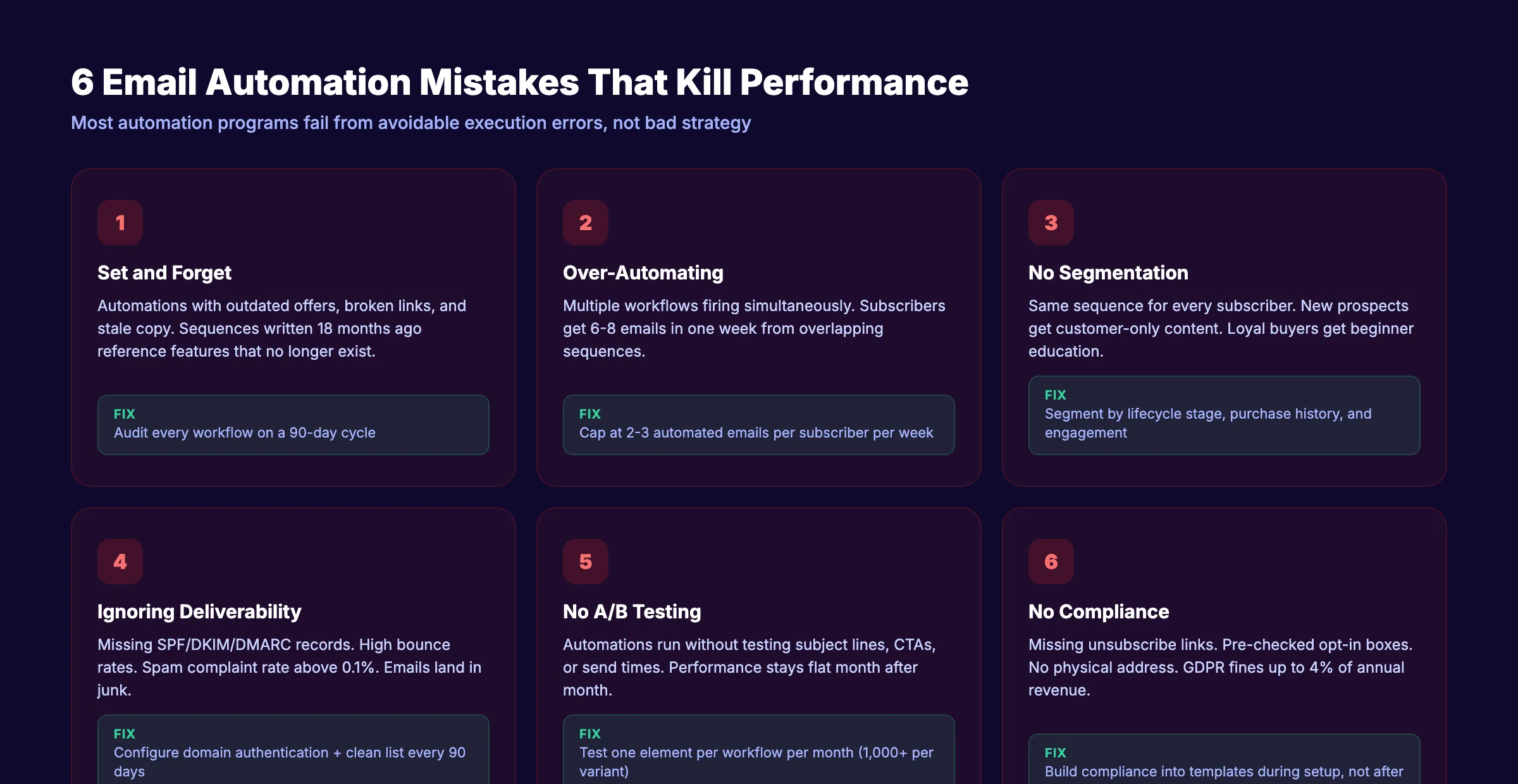
Most automation programs fail not because of bad strategy but because of avoidable execution errors. Fix these 6 first.
Mistake 1: Setting and Forgetting
Automation does not mean “build once and never touch again.” Customer behavior changes. Your product evolves. Competitors shift. Review every active workflow quarterly. Update copy, offers, and sequences based on current data.
A welcome sequence written 18 months ago probably references outdated features, expired offers, or broken links. Audit every automation on a 90-day cycle.
Mistake 2: Over-Automating
More automations is not always better. Subscribers can receive emails from multiple workflows simultaneously. If your welcome sequence, educational drip, and promotional automation all fire in the same week, that subscriber gets 6 to 8 emails. They unsubscribe.
Set frequency caps. Limit any subscriber to 2 to 3 automated emails per week maximum. Prioritize workflows so high-value automations (abandoned cart, renewal) take precedence over lower-priority ones (educational drip).
Mistake 3: No Segmentation
Sending the same automated sequence to every subscriber ignores the single biggest advantage of automation: relevance. At minimum, segment by:
- Lifecycle stage: Prospect, customer, lapsed
- Purchase history: First-time buyer, repeat customer, high-value
- Engagement level: Active opener, occasional, dormant
- Source: How they joined your list (lead magnet, purchase, event)
Even basic segmentation improves open rates by 14 to 20%.
Mistake 4: Ignoring Deliverability
An automation that lands in spam is worse than no automation at all. It trains email providers to distrust your domain.
Deliverability checklist:
- SPF, DKIM, and DMARC records configured for your sending domain
- Custom sending domain (not @gmail.com or @yahoo.com)
- List hygiene: remove hard bounces immediately, soft bounces after 3 attempts
- Clean inactive subscribers every 90 days
- Monitor spam complaint rate (stay below 0.1%)
- Authenticate with the email platform’s domain verification tools
Mistake 5: No A/B Testing
Most businesses set up automation and never test variations. Test these elements in every workflow:
- Subject lines (test 2 per email, send the winner to 80%)
- Send time (morning vs. evening, weekday vs. weekend)
- CTA copy (“Start free trial” vs. “See pricing” vs. “Book a demo”)
- Email length (short 3-sentence vs. detailed 200-word)
- Incentive level (10% off vs. free shipping vs. no incentive)
Run one test at a time. Let each test reach statistical significance before declaring a winner. 1,000+ recipients per variant is the minimum for reliable results.
Mistake 6: No Compliance Framework
Email automation must comply with CAN-SPAM (US), GDPR (EU), and CASL (Canada). Violations carry fines of up to $46,517 per email (CAN-SPAM) or 4% of annual revenue (GDPR).
Non-negotiable compliance rules:
- Every automated email must include a visible unsubscribe link
- Unsubscribe requests must be honored within 10 business days (CAN-SPAM requires this)
- Subscribers must have explicitly opted in before receiving automated emails
- Physical mailing address must appear in every email
- “From” name and email must accurately identify your business
- Pre-checked opt-in boxes do not count as consent under GDPR
Build compliance into your automation templates. Do not rely on memory.
3,500+ blogs published. 92% average SEO score. Stacc drives organic traffic to your site. More traffic means more subscribers, more automation triggers, and more revenue. Start for $1 →
Chapter 8: Set Up Your First Automation in 8 Steps
This chapter walks you through building your first email automation from scratch. Start with a welcome sequence. It has the highest engagement rates and teaches you how your platform’s automation builder works.
Step 1: Define the Goal
Every automation needs one measurable goal. For a welcome sequence, the goal might be “drive first purchase within 14 days” or “get new subscribers to read our top 3 blog posts.”
Write the goal down. Every email in the sequence should move the subscriber toward it.
Step 2: Map the Trigger and Sequence
Draw your automation on paper or a whiteboard first. Define:
- Trigger: What event starts this automation? (Example: new subscriber via website form)
- Sequence: How many emails? What is the time delay between each?
- Conditions: Are there any if/then branches? (Example: If they click the link in email 2, skip email 3)
- Exit conditions: When does the automation stop? (Example: subscriber makes a purchase)
Step 3: Write the Emails
Write all emails in the sequence before building anything in your platform. Follow these rules:
- One topic per email. One call-to-action per email.
- Use the subscriber’s first name in the greeting.
- Keep body copy under 200 words for automated emails.
- Write subject lines under 50 characters for mobile display.
Read our guide on how to write blog posts that rank for content principles that apply to email copy too.
Step 4: Build in Your Platform
Open your email platform’s automation builder. Create the trigger, add each email, set time delays, and configure any conditional branches. Most platforms use a visual drag-and-drop builder.
Test the entire sequence with a test email address before activating.
Step 5: Set Up Tracking
Add UTM parameters to every link. Configure revenue attribution if your platform supports it. Set up a dashboard or report that shows opens, clicks, and conversions for this specific automation.
Step 6: Activate and Monitor
Turn on the automation. Monitor the first 100 sends closely. Check open rates, click rates, and unsubscribe rates for each email in the sequence. If any email underperforms, pause and fix it before continuing.
Step 7: Optimize Monthly
Review automation performance on the first Monday of each month. Compare against the benchmarks in Chapter 5. A/B test one element per month.
Step 8: Add the Next Workflow
Once your welcome sequence is running smoothly, add the next automation in priority order:
- Welcome sequence (done)
- Abandoned cart or post-purchase follow-up
- Re-engagement (win-back)
- Lead nurture
- Birthday/milestone
- Renewal reminder
Build one workflow at a time. Get each one performing before adding the next.
For businesses that want to automate their entire SEO workflow alongside email, we cover that process in a separate guide.
FAQ
What is the difference between email automation and email marketing?
Email marketing is the broader practice of using email to communicate with subscribers. Email automation is a subset of email marketing that uses triggers and pre-built sequences to send messages automatically. Manual campaigns, broadcasts, and newsletters are all email marketing. Automation is the portion that runs without manual intervention.
How much does email automation cost?
Most platforms offer free tiers for small lists (under 500 contacts). Paid plans start at $9 to $29 per month for basic automation. Advanced features like behavioral scoring, predictive send time, and CRM integration typically cost $49 to $149 per month. The ROI of email automation ($36 to $42 per $1 spent) makes even paid plans profitable within the first month for most businesses.
What are the best email automation workflows to set up first?
Start with a welcome sequence. It has the highest open rates (82%) and teaches you how your platform works. Next, set up abandoned cart recovery (ecommerce) or lead nurture (B2B/SaaS). Third, build a re-engagement workflow for inactive subscribers. These 3 automations cover the highest-impact points in the customer lifecycle.
Can small businesses benefit from email automation?
Yes. Email automation scales down. A business with 200 subscribers running a welcome sequence, monthly newsletter, and birthday automation will retain more customers than one relying on social media posts alone. The tools cost $0 to $9 per month at that list size. The time investment is 10 to 15 hours for initial setup and near zero for ongoing maintenance.
Is email automation GDPR compliant?
Email automation can be GDPR compliant if you follow the rules. Subscribers must explicitly opt in (no pre-checked boxes). Every email must include an unsubscribe link. Unsubscribe requests must be honored promptly. You must store consent records. Physical address must appear in every email. Build compliance into your automation templates during setup, not after.
Email automation is not a feature. It is a system that converts traffic into revenue while you focus on other parts of your business. Start with a welcome sequence, add workflows as you grow, and review performance monthly. The businesses that automate email well do not just save time. They build a revenue engine that compounds with every new subscriber.
Related Tools & Resources
Free SEO Tools:
Best Lists:

Written by
Siddharth GangalSiddharth is the founder of theStacc and Arka360, and a graduate of IIT Mandi. He spent years watching great businesses lose organic traffic to competitors who simply published more. So he built a system to fix that. He writes about SEO, content at scale, and the tactics that actually move rankings.
30 SEO blog articles published every month
Keyword-optimized, scheduled, and live on your site. Automatically.
30-day trial · Cancel anytime
theStacc
Stop writing SEO content manually
30 blog articles, 30 GBP posts, and social media content. Published every month. Automatically.
Start Your $1 Trial$1 for 3 days · Cancel anytime