
Email Segmentation: The Definitive Guide (2026)
Segment your email list to get 100% higher clicks and 760% more revenue. Covers 4 types, 15 strategies, tools, and mistakes to avoid. Updated 2026.
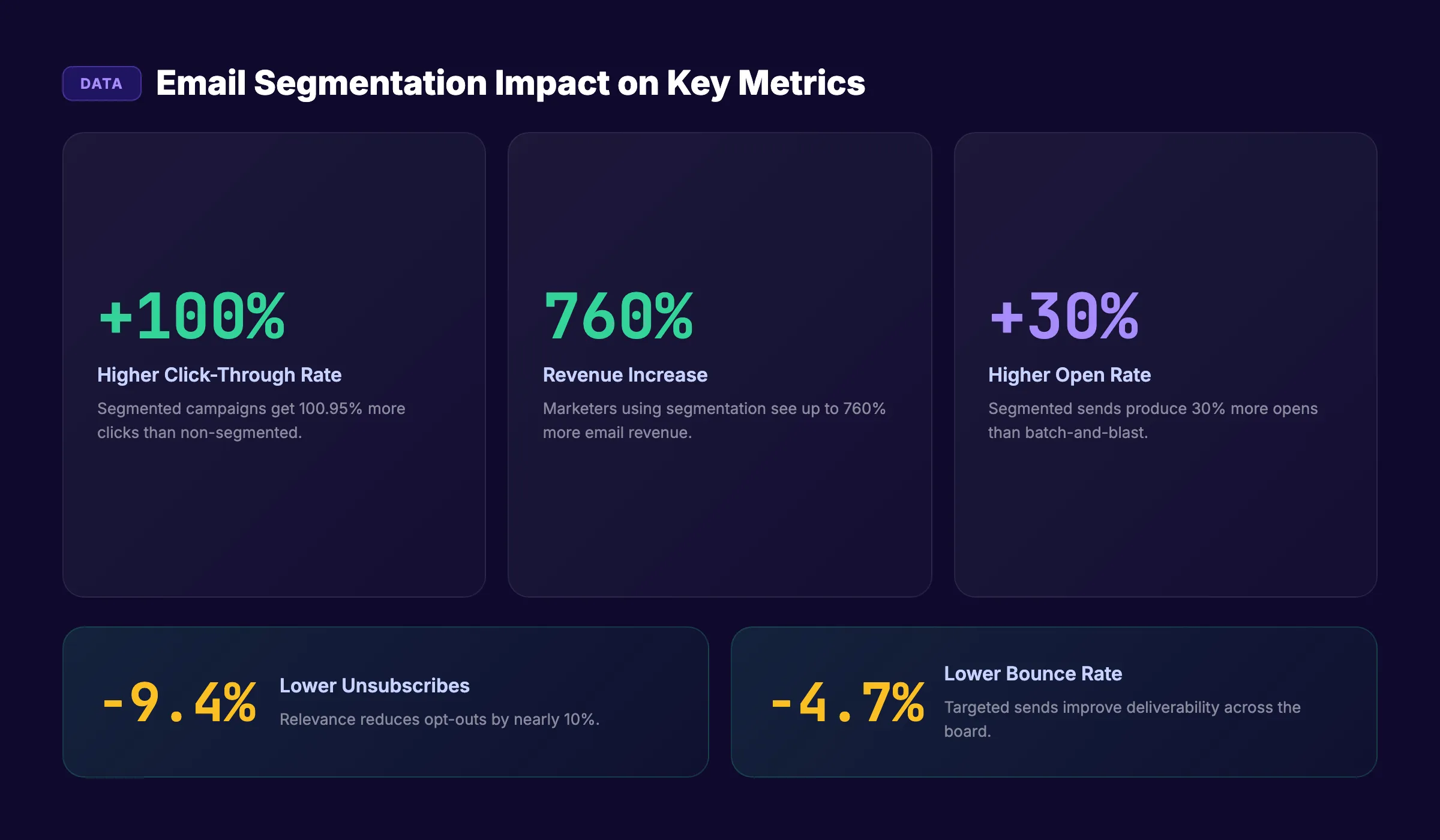
Email segmentation is the difference between emails people read and emails people delete. Segmented campaigns generate 100% higher click-through rates than unsegmented ones. They produce a 760% increase in revenue. Yet most businesses still send the same email to their entire list.
Sending one message to 10,000 people who have nothing in common is not email marketing. It is spam with consent. A first-time website visitor does not need the same email as a 3-year customer. A CEO does not care about the same content as a marketing manager. Treating them identically wastes every email you send.
Email segmentation divides your subscriber list into smaller groups based on shared characteristics. Each group receives content matched to their needs, behavior, or stage in the buying process. The result: higher opens, more clicks, fewer unsubscribes, and more revenue per email.
We have published 3,500+ SEO-optimized articles across 70+ industries. Every content strategy we build includes email segmentation as a core distribution component. This guide covers the exact segmentation system that turns a generic email list into a revenue-generating machine.
In this guide, you will learn:
- What email segmentation is and why it drives more revenue than any other email tactic
- The 4 core segmentation types every business needs
- 15 segmentation strategies with examples for each
- How to implement segmentation step by step
- Tools and platforms that make segmentation easy
- The most common segmentation mistakes and how to avoid them
- How to measure whether your segments are working
Why Email Segmentation Matters
The numbers make the case better than any argument.
The Data Behind Segmentation
| Metric | Unsegmented Campaigns | Segmented Campaigns | Difference |
|---|---|---|---|
| Click-through rate | Baseline | 100.95% higher | 2x clicks |
| Revenue per campaign | Baseline | 760% higher | 7.6x revenue |
| Open rate | Baseline | 30% higher | 1.3x opens |
| Unsubscribe rate | Higher | 9.37% lower | Fewer losses |
| Bounce rate | Higher | 4.65% lower | Better deliverability |
These are not edge cases. These numbers come from studies analyzing millions of campaigns. The lift is consistent across industries, list sizes, and business models.
Why Segmentation Works
Every subscriber joined your list for a different reason. Some want product updates. Others want educational content. Some are ready to buy. Others are 6 months away from a decision.
When you send the same email to all of them, most recipients receive irrelevant content. Irrelevant emails get ignored. Ignored emails train inbox algorithms to deprioritize your future sends. Your deliverability drops. Your list decays.
Segmentation reverses this cycle. Relevant emails get opened. Opens signal engagement. Engaged subscribers receive your emails in their primary inbox. Deliverability improves. Revenue compounds.
For businesses that also invest in content marketing, segmentation is the bridge between creating content and getting it to the right audience.
The 4 Core Types of Email Segmentation
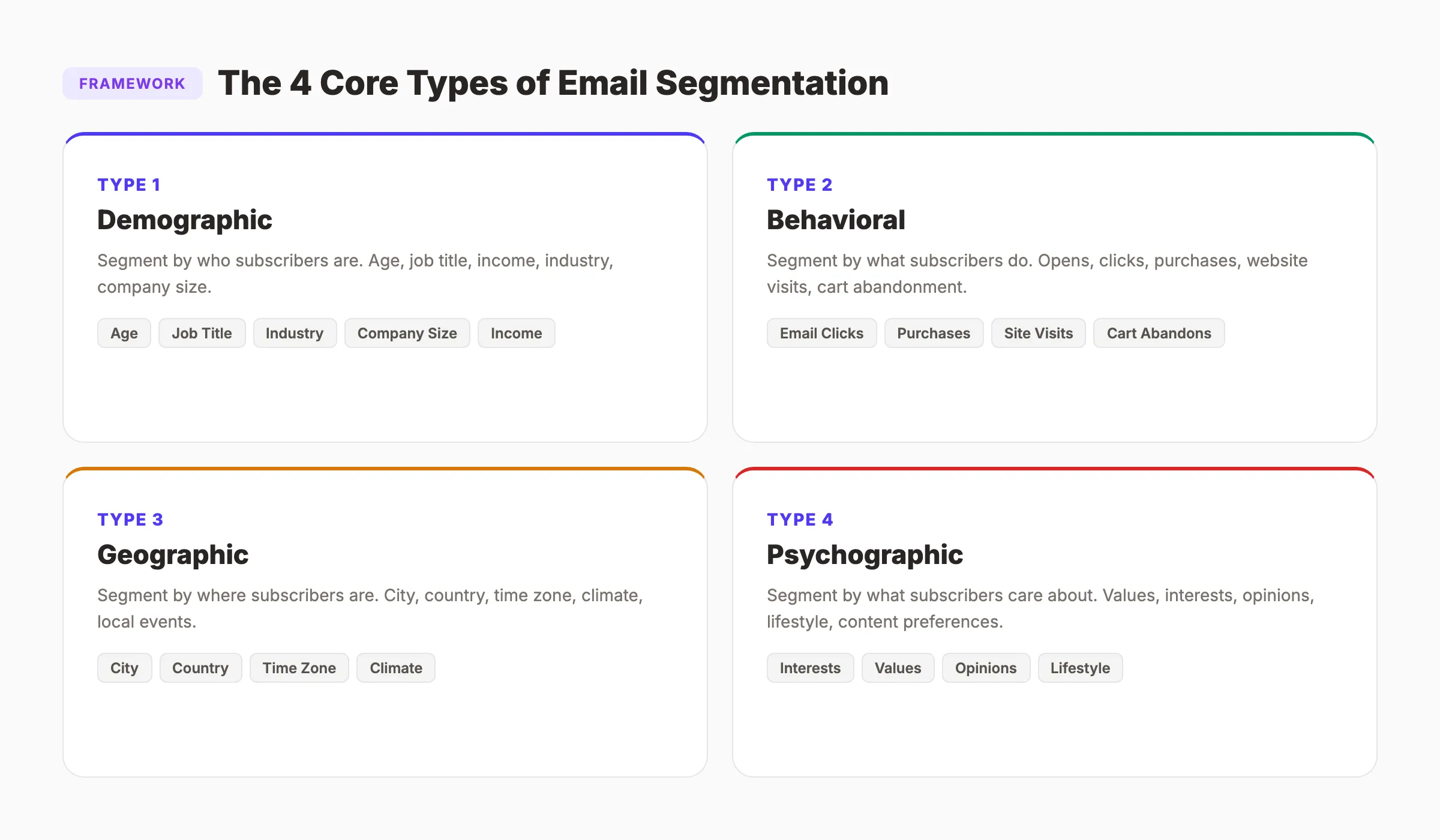
Every segmentation strategy falls into one of four categories. Start with the type that matches your data availability and business model.
1. Demographic Segmentation
Divide subscribers by who they are.
| Data Point | Use Case | Example |
|---|---|---|
| Age | Tone and content matching | Gen Z gets casual copy. Boomers get formal. |
| Job title | B2B relevance | CEOs get ROI content. Managers get how-to content. |
| Income level | Pricing sensitivity | High earners see premium plans. Budget buyers see starter plans. |
| Industry | Vertical-specific content | Healthcare gets HIPAA content. SaaS gets integration content. |
| Company size | Scale-appropriate advice | Solopreneurs need DIY tips. Enterprises need team tools. |
Demographic segmentation is the easiest to implement because most sign-up forms collect this data. The downside: demographics describe who someone is, not what they want. Pair demographics with behavioral data for stronger results.
2. Behavioral Segmentation
Divide subscribers by what they do.
Behavioral data is the strongest predictor of future action. Someone who visited your pricing page 3 times in the last week is closer to buying than someone who signed up 6 months ago and never opened an email.
Key behavioral signals:
- Email engagement: Opens, clicks, replies, forwards
- Website activity: Pages visited, time on site, content downloaded
- Purchase history: What they bought, how much they spent, how often
- Cart abandonment: Added items but did not complete checkout
- Feature usage: For SaaS, which features they use (and which they ignore)
Behavioral segmentation requires tracking tools. Most email platforms (Mailchimp, ActiveCampaign, Klaviyo) track email engagement natively. Website behavior requires integration with analytics or a CRM.
3. Geographic Segmentation
Divide subscribers by where they are.
| Segment | Content Match | Example |
|---|---|---|
| City or state | Local events, local offers | ”New York: Our pop-up is here this weekend” |
| Country | Language, currency, legal compliance | ”GDPR update for our EU subscribers” |
| Time zone | Send time optimization | Send at 9am local time for each zone |
| Climate/weather | Seasonal content | ”Winter maintenance tips” for cold-climate subscribers |
Geographic segmentation matters most for local businesses, multi-location brands, and international companies. For a local business that also runs local SEO, geographic segments align email content with the same location-based strategy.
4. Psychographic Segmentation
Divide subscribers by what they care about.
Psychographics go beyond demographics and behavior to capture values, interests, opinions, and lifestyle choices. This data is harder to collect but creates the most personalized experience.
How to collect psychographic data:
- Preference center (let subscribers choose topics)
- Surveys and polls embedded in emails
- Quiz results from lead magnets
- Content engagement patterns (what topics do they click on?)
- Social media interests and activity
Example segments:
- “Growth-focused” subscribers who click on scaling and revenue content
- “Budget-conscious” subscribers who engage with cost-saving content
- “Data-driven” subscribers who open every statistics and research email
Stop writing. Start ranking. Stacc publishes 30 SEO articles per month for $99. Every article becomes a segmented email touchpoint for your list. Start for $1 →
15 Email Segmentation Strategies With Examples
These strategies range from simple (implementable today) to advanced (requires automation). Start with the first 5 and add complexity as your data improves.
1. Segment by Signup Source
Subscribers who joined from a blog post expect educational content. Subscribers who joined from a product page expect product updates. Tag subscribers by where they signed up and match content accordingly.
2. Segment by Engagement Level
Create 3 tiers: active (opened in the last 30 days), warm (opened in 31-90 days), and cold (no opens in 90+ days). Active subscribers get your best content first. Cold subscribers get a re-engagement sequence or removal.
3. Segment by Funnel Stage
| Stage | Subscriber Type | Content |
|---|---|---|
| Awareness | New subscriber, blog reader | Educational content, guides, tips |
| Consideration | Downloaded lead magnet, visited pricing | Comparisons, case studies, demos |
| Decision | Requested quote, started trial | Testimonials, ROI data, limited offers |
| Retention | Current customer | Onboarding, feature tips, cross-sells |
| Advocacy | Happy customer, high NPS | Referral requests, review requests, exclusives |
This is the single most impactful segmentation strategy for most businesses. It ensures every subscriber receives content appropriate to their stage.
4. Segment by Purchase History
Customers who bought product A get recommendations for product B. Customers who spent over $500 get VIP offers. Customers who have not purchased in 90 days get a win-back campaign.
5. Segment by Industry (B2B)
If you serve multiple industries, send industry-specific content. A healthcare company does not want to read a case study about ecommerce. Tag contacts by industry at sign-up or through enrichment tools.
6. Segment by Job Title or Role
CTOs care about technical implementation. CMOs care about marketing ROI. Sales directors care about pipeline impact. Same product, different angles. Tailor the message to the role.
7. Segment by Company Size
Enterprise clients need different solutions than startups. A 5-person company does not need enterprise pricing emails. A 500-person company does not need solopreneur tips.
8. Segment by Content Interest
Track which blog topics, email links, and resources each subscriber engages with. Create interest-based segments: “SEO interested,” “local marketing interested,” “content strategy interested.” Then match emails to interests.
For example, if someone reads multiple posts about building topical authority, they belong in a content strategy segment, not a local SEO segment.
9. Segment by Email Frequency Preference
Let subscribers choose how often they hear from you. Some want daily updates. Others want a monthly digest. Offering frequency options reduces unsubscribes by giving control to the subscriber.
10. Segment by Device Type
48% of emails are opened on mobile. Subscribers who primarily open on mobile should receive shorter emails with larger CTAs. Desktop openers can handle longer, more detailed content.
11. Segment by Lead Magnet Downloaded
Someone who downloaded “10 Tips for Local SEO” has different interests than someone who downloaded “Enterprise SEO Playbook.” Each lead magnet indicates a specific pain point. Follow up with content that addresses that exact pain point.
12. Segment by Cart Abandonment (Ecommerce)
Send a targeted sequence to subscribers who added items to their cart but did not complete the purchase. Include the specific products they abandoned, not a generic “come back” message.
13. Segment by Customer Lifetime Value
Your top 10% of customers by revenue deserve different treatment than your average customer. Create VIP segments for high-value accounts and deliver exclusive content, early access, and dedicated support.
14. Segment by NPS or Satisfaction Score
Promoters (NPS 9-10) get referral requests and review asks. Passives (NPS 7-8) get engagement content to move them up. Detractors (NPS 0-6) get support outreach and feedback requests.
Collecting reviews from promoters is the same strategy that works for getting more Google reviews. Segment your happiest customers and ask them first.
15. Segment by Time Since Last Purchase
| Time Since Purchase | Segment Name | Email Strategy |
|---|---|---|
| 0-7 days | Recent buyer | Thank you, onboarding, usage tips |
| 8-30 days | Active customer | Cross-sell, feature education |
| 31-90 days | Cooling off | Re-engagement, new content |
| 91-180 days | At risk | Win-back offer, survey |
| 180+ days | Lapsed | Final re-engagement or list removal |
Your SEO team. $99 per month. 30 optimized articles, published automatically. Every article feeds a different email segment. Start for $1 →
How to Implement Email Segmentation Step by Step
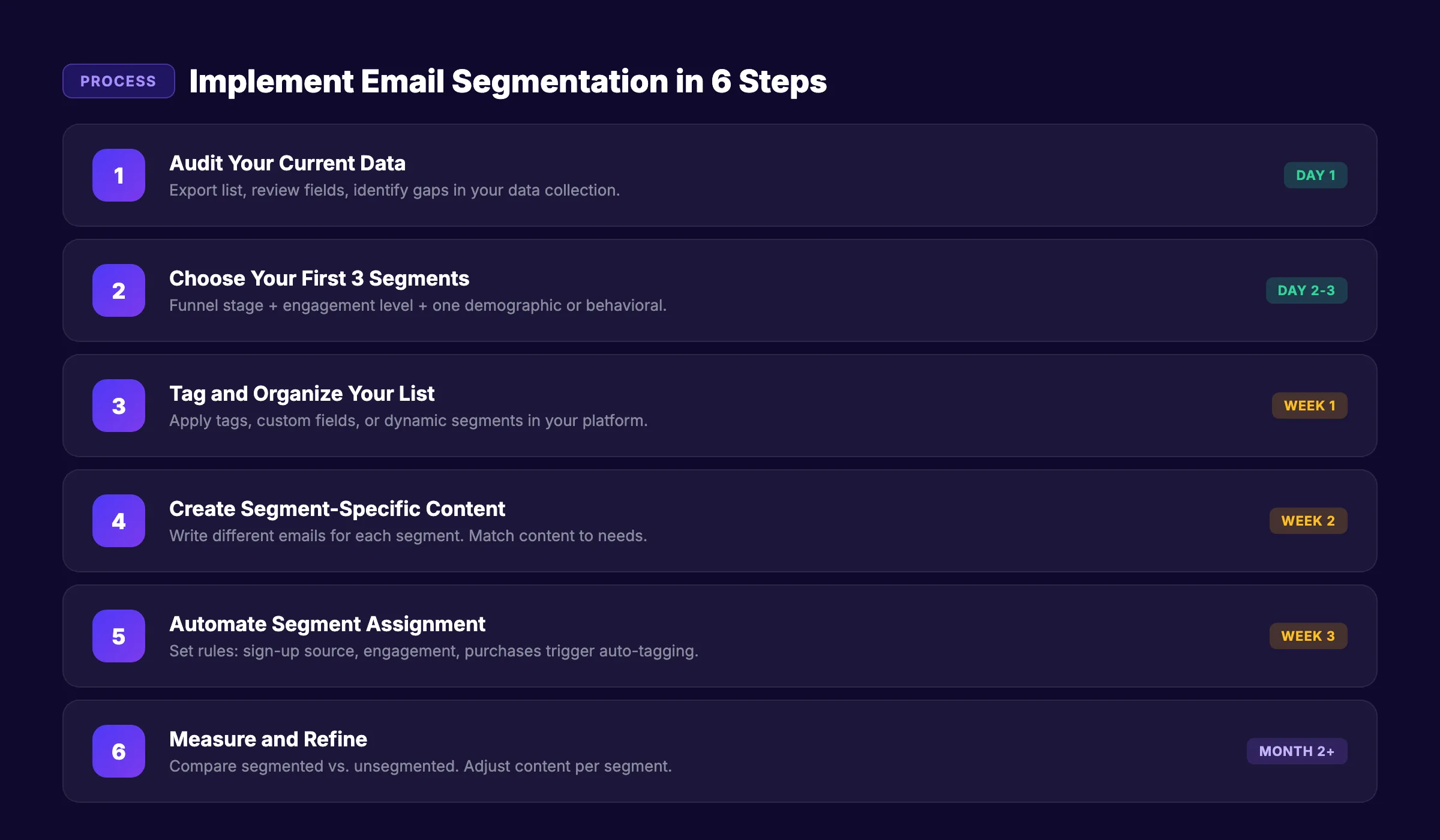
Knowing the strategies is one thing. Implementing them is another. Follow this process to go from zero segmentation to a working system in 30 days.
Step 1: Audit Your Current Data
Before creating segments, understand what data you already have.
- Export your email list and review available fields
- Check which data points your sign-up forms collect
- Review your CRM for enrichment data (industry, company size, role)
- Check your email platform for behavioral data (opens, clicks, engagement history)
- Identify gaps: what data do you need but do not have?
Step 2: Choose Your First 3 Segments
Do not create 15 segments on day one. Start with 3 that cover the largest portion of your list.
Recommended starting segments:
- Funnel stage (new lead vs. customer)
- Engagement level (active vs. cold)
- One demographic or behavioral segment relevant to your business
Three segments is enough to see a meaningful lift in performance. You can add more as you build confidence and data.
Step 3: Tag and Organize Your List
Most email platforms use tags, lists, or custom fields for segmentation.
| Method | Best For | Platforms |
|---|---|---|
| Tags | Flexible, multiple per contact | ActiveCampaign, ConvertKit, Drip |
| Lists | Simple, separate audiences | Mailchimp, Constant Contact |
| Custom fields | Data-rich segmentation | HubSpot, Salesforce, Klaviyo |
| Dynamic segments | Auto-updating based on behavior | ActiveCampaign, Klaviyo, HubSpot |
Dynamic segments are the most powerful because they update automatically. A subscriber who was “cold” last month becomes “active” the moment they open an email. No manual work required.
Step 4: Create Segment-Specific Content
Each segment needs its own email content or at least a customized version. For a content calendar, plan different email topics for each segment every week.
- Segment A (new leads): Educational content, welcome series
- Segment B (active customers): Product tips, cross-sell offers
- Segment C (cold subscribers): Re-engagement campaign, fresh lead magnet
Step 5: Automate Segment Assignment
Manual tagging does not scale. Set up automation rules:
- When someone signs up via [blog post URL] → tag as “content interested”
- When someone opens 3+ emails in 30 days → move to “active” segment
- When someone has not opened in 90 days → move to “cold” segment
- When someone purchases → move to “customer” segment
Most email platforms support these rules natively. Set them once. They run forever.
Step 6: Measure and Refine
After 30 days, compare segmented vs. unsegmented performance. Track:
- Open rate by segment
- Click-through rate by segment
- Revenue per segment
- Unsubscribe rate by segment
If a segment underperforms, the content is wrong for that group. Adjust the content, not the segment.
Tools for Email Segmentation
Every major email platform supports segmentation. The difference is how deep you can go.
Platform Comparison
| Platform | Segmentation Depth | Dynamic Segments | Starting Price | Best For |
|---|---|---|---|---|
| Mailchimp | Basic-Medium | Yes | Free (500 contacts) | Beginners |
| ActiveCampaign | Advanced | Yes | $29/mo | Automation-heavy businesses |
| Klaviyo | Advanced | Yes | Free (250 contacts) | Ecommerce |
| HubSpot | Enterprise | Yes | Free CRM / $20/mo marketing | B2B with large lists |
| ConvertKit | Medium | Yes | Free (10K subscribers) | Creators and bloggers |
| Brevo | Basic-Medium | Yes | Free (300 emails/day) | Budget-conscious |
| Drip | Advanced | Yes | $39/mo | Ecommerce and SaaS |
For businesses starting with segmentation, Mailchimp or Brevo provide enough functionality at no cost. As your list grows past 2,000 contacts and your segments become behavior-based, invest in ActiveCampaign or Klaviyo for stronger automation.
What to Look for in a Segmentation Tool
- Tag and custom field support
- Dynamic segments that auto-update
- Behavior tracking (email engagement + website activity)
- Integration with your CRM and website analytics
- Visual automation builder for segment-based workflows
- A/B testing by segment
- Reporting broken down by segment performance
Common Email Segmentation Mistakes
These mistakes waste time and hurt performance. Avoid them from the start.
1. Over-Segmenting
Creating 50 micro-segments sounds smart. In practice, it means managing 50 different email versions with audiences too small to produce reliable data. Start with 3-5 segments. Add more only when you have the data and resources to serve them.
2. Under-Segmenting
The opposite mistake: keeping one giant list and sending the same email to everyone. If you have 1,000+ subscribers, you need at least 3 segments. The lift from even basic segmentation (new vs. returning) is immediate.
3. Segmenting Without Purpose
Every segment should serve a clear goal. “People who live in Ohio” is not useful unless you have Ohio-specific content or offers. Before creating a segment, ask: “What different email will this group receive?” If the answer is “the same email as everyone else,” the segment is pointless.
4. Relying Only on Demographics
Age and job title tell you who someone is. They do not tell you what they want. A 35-year-old marketing manager could be a hot lead or a cold subscriber. Add behavioral data (email engagement, website visits, purchase history) to make demographics actionable.
5. Ignoring Engagement Data
Your email platform tracks opens, clicks, and activity for every subscriber. Use that data. Subscribers who open every email are your most valuable contacts. Subscribers who have not opened in 6 months are dead weight dragging down your deliverability.
6. Never Cleaning Your Segments
Segments decay. A “new lead” from 6 months ago is no longer new. A “cold” subscriber who starts opening emails is no longer cold. Set up dynamic segments that auto-update based on current behavior, or audit your segments quarterly.
7. Collecting Data You Never Use
If your sign-up form asks for company size, industry, and phone number, but you never use that data to segment, you are creating friction for no benefit. Only collect data you will actually use for segmentation or personalization.
For more on avoiding common marketing pitfalls, see our guide on measuring content marketing ROI.
3,500+ blogs published. 92% average SEO score. Blog content feeds email segments. Email drives traffic. The loop compounds. Start for $1 →
How to Measure Segmentation Success
Segmentation is only valuable if it produces measurable improvements. Track these metrics to prove ROI.
Key Metrics by Segment
| Metric | What It Tells You | Target Improvement |
|---|---|---|
| Open rate by segment | Content relevance to that segment | 20-30% lift vs. unsegmented |
| Click-through rate by segment | CTA and content alignment | 50-100% lift vs. unsegmented |
| Revenue per segment | Which segments drive the most revenue | Identify top 20% of revenue segments |
| Unsubscribe rate by segment | Which segments receive irrelevant content | Below 0.3% per send |
| Conversion rate by segment | Which segments take action | Track by segment monthly |
Monthly Segmentation Audit
- Compare open rates across all segments. Fix underperformers.
- Review segment sizes. Remove or merge segments under 100 contacts.
- Check automation rules. Verify contacts move between segments correctly.
- Review content-to-segment alignment. Is each segment receiving tailored content?
- Clean dead contacts from every segment.
- Test one new segment or segmentation variable this month.
The Compounding Effect
Segmentation compounds over time. Month 1, you segment by funnel stage and see a 30% open rate lift. Month 3, you add behavioral triggers and see another 20% lift. Month 6, you layer in psychographic data from preference surveys and see another 15%.
Each layer of segmentation builds on the last. An email list with 5 well-maintained segments outperforms a list 10 times its size with zero segmentation.
The same compounding principle drives results in SEO content strategy. Consistent, targeted effort compounds into exponential returns.
How to Combine Segmentation With Content and SEO
Email segmentation works best when paired with content marketing and SEO. Every blog post you publish can feed a specific segment. Every segment can drive traffic back to targeted content.
The Content-to-Segment Loop
- Publish a blog post on a specific topic (e.g., how to write SEO blog posts)
- Send the post to the “content strategy interested” segment
- Track who clicks. Add clickers to a deeper interest sub-segment.
- Send follow-up content matched to that deeper interest.
- New blog visitors sign up and enter the segmentation flow.
- Repeat every week.
This loop ensures every piece of content reaches the audience most likely to engage with it. Engagement signals boost deliverability. Better deliverability means more emails land in the primary inbox. More inbox placement means more opens. The flywheel spins faster.
Repurpose Content for Each Segment
One blog post can become 3 different emails for 3 different segments:
- New subscribers: “Here is our beginner guide to [topic]” with full context
- Active customers: “Quick tip from our latest post on [topic]” with a 2-sentence takeaway
- Lapsed subscribers: “[Topic] changed in 2026. Here is what you missed.” with re-engagement angle
For more on maximizing content across channels, see our guide on repurposing content for social media.
FAQ
What is email segmentation?
Email segmentation is the practice of dividing your subscriber list into smaller groups based on shared characteristics like demographics, behavior, location, or purchase history. Each group receives email content tailored to their specific needs and interests. Segmented campaigns produce 100% higher click-through rates and up to 760% more revenue than unsegmented sends.
How many segments should I start with?
Start with 3 to 5 segments. More than that is unmanageable for most teams, and fewer than 3 does not capture enough variation. A good starting set: new subscribers, active customers, and cold/lapsed contacts. Add segments as your data and content capacity grow.
What is the difference between tags, lists, and segments?
Tags are labels you attach to individual contacts (one contact can have many tags). Lists are separate groups of contacts (one contact can be on multiple lists). Segments are dynamic groupings that auto-update based on rules you set. Most modern email platforms use a combination. Dynamic segments are the most powerful because they require no manual maintenance.
How often should I review and update my segments?
Quarterly at minimum. Monthly is better. Check segment sizes, engagement rates, and automation rules. Remove contacts who no longer fit. Merge segments that are too small. Add new segments when you identify untapped data points. Segments decay over time if they are not maintained.
Does segmentation work for small email lists?
Yes, but start simple. Even a list of 500 contacts benefits from 2-3 basic segments (new vs. existing, engaged vs. disengaged). The lift from basic segmentation is proportional. You do not need 10,000 subscribers to see results. You need relevance.
What tools are best for email segmentation?
For beginners, Mailchimp (free up to 500 contacts) or Brevo (free up to 300 emails/day) provide solid segmentation features. For advanced automation, ActiveCampaign ($29/mo) and Klaviyo (free up to 250 contacts) offer behavior-based dynamic segments. For enterprise B2B, HubSpot integrates segmentation with CRM data.
The businesses that win at email marketing in 2026 do not send more emails. They send the right email to the right person at the right time. Segmentation is the system that makes that possible. Start with 3 segments today. Add behavioral data next month. Layer in automation the month after that. Every improvement compounds into higher opens, more clicks, and more revenue from the same list.
Related Tools & Resources
Free SEO Tools:
Best Lists:

Written by
Siddharth GangalSiddharth is the founder of theStacc and Arka360, and a graduate of IIT Mandi. He spent years watching great businesses lose organic traffic to competitors who simply published more. So he built a system to fix that. He writes about SEO, content at scale, and the tactics that actually move rankings.
30 SEO blog articles published every month
Keyword-optimized, scheduled, and live on your site. Automatically.
30-day trial · Cancel anytime
theStacc
Stop writing SEO content manually
30 blog articles, 30 GBP posts, and social media content. Published every month. Automatically.
Start Your $1 Trial$1 for 3 days · Cancel anytime