
AI Email Writer (2026): Strategies, Tactics & Examples
ai email writing guide for 2026: strategies, tactics, real examples, and implementation steps to get results faster.
The average professional sends 40 emails per day. Each one takes 5 to 15 minutes to write. That adds up to 3 to 10 hours every single week spent composing messages that follow predictable patterns.
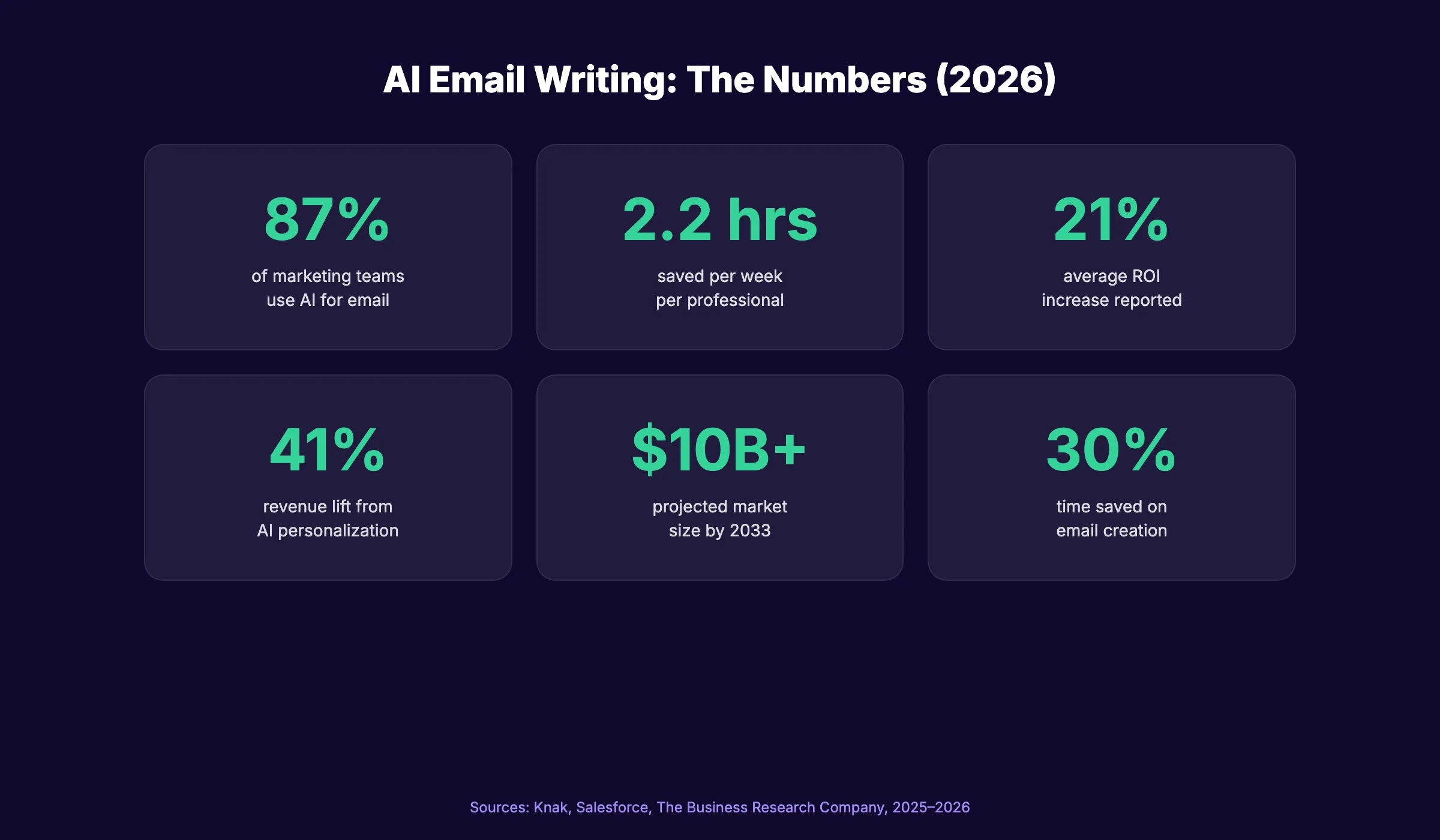
An AI email writer does that work in seconds. It generates drafts for follow-ups, cold outreach, newsletters, and customer responses based on a simple prompt. The technology has moved past novelty. 87% of marketing teams now use AI for email, and the AI email assistant market is growing at 25% per year.
But most guides on this topic are either tool roundups that skip the strategy or shallow overviews that miss the practical details. Business owners and marketers need a guide that covers how AI email writing actually works, where it fits in a workflow, and how to avoid the mistakes that make AI-generated emails sound robotic.
We have published 3,500+ blog posts across 70+ industries and manage email sequences for hundreds of businesses. This guide covers everything we know about AI email writers.
Here is what you will learn:
- What an AI email writer actually does (and does not do)
- The real numbers on time savings, adoption, and ROI
- How to write effective prompts that produce usable drafts
- The 6 types of emails AI handles best
- Common mistakes that kill open rates and trust
- How to maintain brand voice while using AI
- Where AI email writing fits in a full marketing strategy
What an AI Email Writer Actually Does
An AI email writer takes a set of inputs and generates email copy. The inputs include the purpose of the email, the recipient, the tone, and any specific details you want to include. The output is a complete draft ready for review and sending.
How the Technology Works
AI email writers use large language models (LLMs) trained on billions of text examples. These models predict the most relevant next word based on context, producing text that reads naturally.
The practical result is simple. You describe what you need in plain language. The AI produces a draft. You review, edit, and send.
Most AI email writers work as browser extensions, inbox integrations, or standalone web apps. Tools like Grammarly, Google Gemini, and Microsoft Copilot embed directly into Gmail and Outlook.
What AI Does Well
AI excels at structured, repetitive emails. Follow-ups, acknowledgments, status updates, meeting confirmations, and newsletter content all follow predictable patterns that AI handles efficiently.
AI also helps with tone adjustment. A draft that sounds too formal can be softened. A casual message can be tightened for a professional audience. This takes seconds instead of multiple rewrites.
What AI Does Not Do Well
AI struggles with emotional nuance, complex negotiations, and sensitive topics. Performance reviews, conflict resolution, legal communications, and deeply personal messages still require human authorship.
AI also cannot verify facts. It will confidently include incorrect dates, wrong names, or fabricated statistics if the prompt lacks specifics. Every AI-generated email needs human review before sending.
Stop writing. Start ranking. Stacc publishes 30 SEO articles per month for your business, automatically. Start for $1 →
The Numbers Behind AI Email Writing
The data on AI email adoption tells a clear story. Usage is near-universal in marketing teams, and the ROI is measurable.
Adoption Rates
87% of marketing teams now use AI for email. 49% of B2B marketers use generative AI specifically to create email content. 63% of all marketers use AI tools to enhance their email campaigns.
These numbers jumped sharply from 2024 to 2026. AI email writing has moved from early adoption to standard practice.
Time Savings
AI saves email professionals an average of 2.2 hours per week. Top users report saving 4 or more hours weekly. AI can reduce email marketing creation time by up to 30% when applied to design, content, and scheduling.
For a team of 5 marketers, that is 10 to 20 hours reclaimed every week. Those hours go to strategy, analysis, and creative work that AI cannot replace.
Performance Impact
Businesses using AI in email campaigns report a 21% increase in ROI. AI-driven personalization lifts revenue by 41% and click-through rates by 13.44% compared to non-personalized campaigns.
The performance gains come from two sources. AI produces more emails faster, increasing volume. AI also personalizes at scale, increasing relevance per recipient.
Market Size
The AI email writer market reached $2 billion in 2025 and is projected to exceed $10 billion by 2033. The broader AI email assistant market will reach $5.46 billion by 2030, growing at 20.9% per year.
How to Write Prompts That Produce Usable Emails
The quality of AI-generated emails depends entirely on the quality of your prompts. A vague prompt produces a generic email. A specific prompt produces a draft you can send with minimal editing.
The 5-Part Prompt Formula
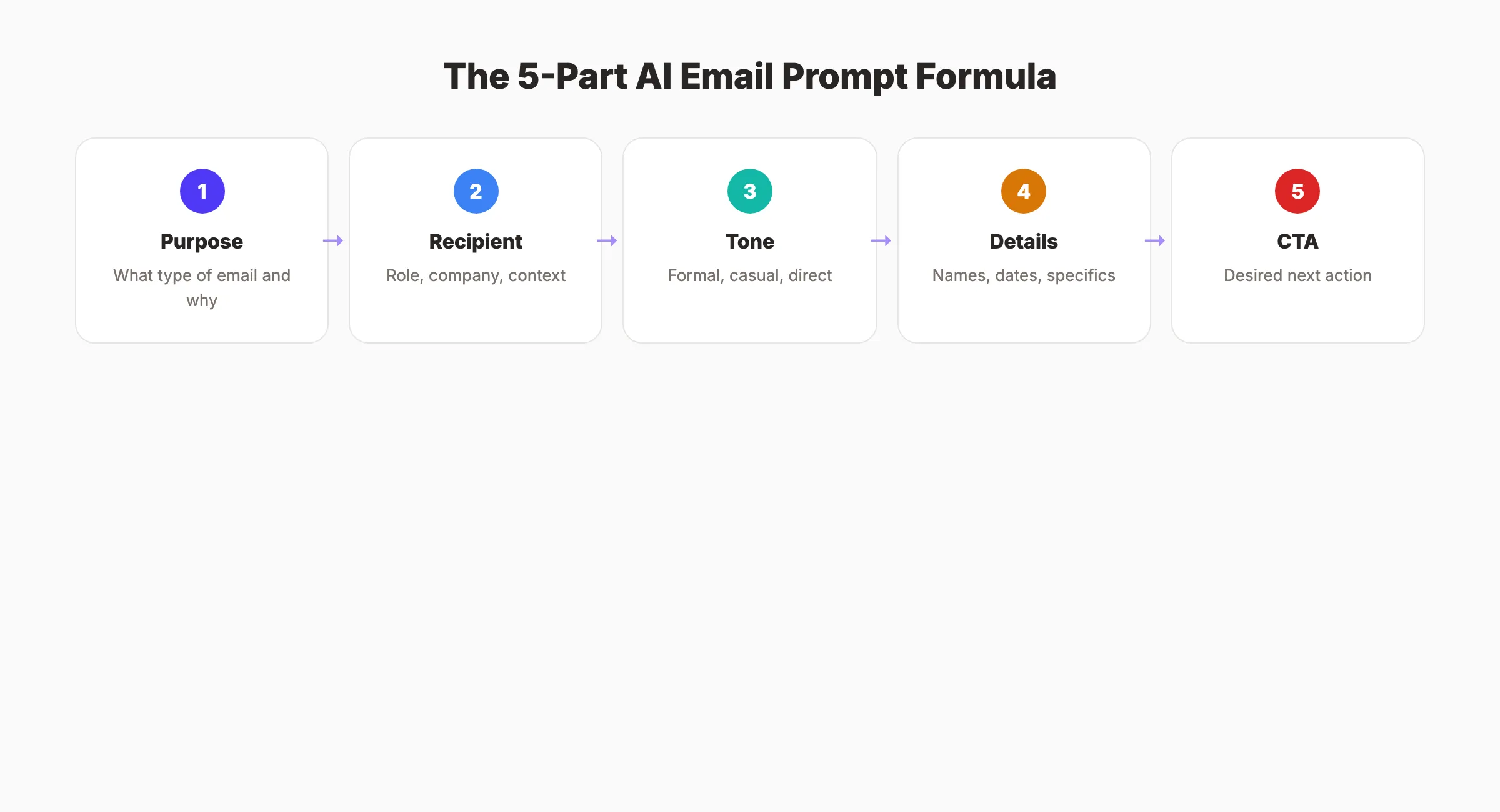
Every effective AI email prompt includes these 5 elements:
| Element | Example |
|---|---|
| Purpose | ”Write a follow-up email to a prospect who attended our webinar” |
| Recipient | ”Marketing director at a mid-size SaaS company” |
| Tone | ”Professional but conversational, not salesy” |
| Key Details | ”Reference the webinar topic: content marketing automation” |
| Call to Action | ”Ask to schedule a 15-minute demo call” |
A prompt that includes all 5 elements produces a draft that needs 1 to 2 minutes of editing. A prompt missing 2 or more elements produces a draft that needs a full rewrite.
Prompt Examples by Email Type
Cold Outreach: “Write a cold email to the owner of a local dental practice. We offer automated SEO content that publishes 30 blog posts per month. Keep it under 100 words. Tone: direct and helpful, not pushy. End with a question about their current content strategy.”
Follow-Up: “Write a follow-up email to a lead who downloaded our SEO checklist 3 days ago. Reference the checklist topic. Suggest a quick call to discuss their current organic traffic. Tone: friendly, not aggressive.”
Customer Thank You: “Write a thank-you email to a customer who just completed their first month. Mention that their first batch of content is live. Include a link to their dashboard. Ask if they have questions.”
The Review-Before-Send Rule
Never send an AI-generated email without reading it first. Check for:
- Correct recipient name and company
- Accurate dates, numbers, and references
- Tone matches the relationship
- Call to action is clear and specific
- No AI tells (see the mistakes section below)
A 2-minute review catches 95% of issues. Skipping this step risks sending emails with wrong names, fabricated details, or awkward phrasing.
Your SEO team. $99 per month. 30 optimized articles, published automatically. No writers. No agencies. Start for $1 →
6 Types of Emails AI Handles Best
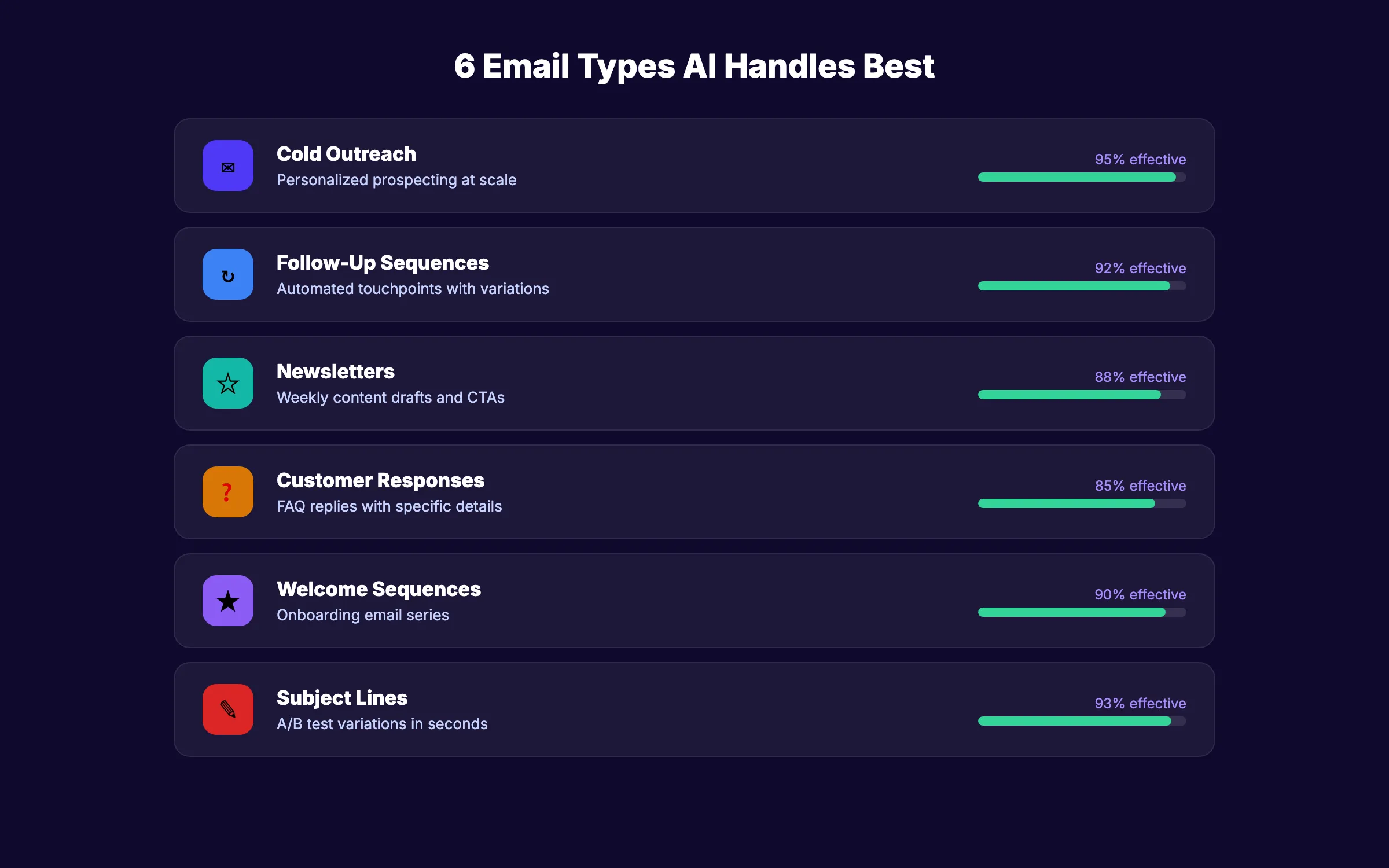
AI does not work equally well for every email type. Some categories produce near-perfect drafts. Others require heavy editing. Focus your AI usage on the types where the output-to-effort ratio is highest.
1. Cold Outreach and Prospecting
AI generates personalized cold emails at scale. Give it the prospect name, company, industry, and pain point. The AI produces a tailored message that avoids the “mass email” feel.
This is the highest-impact use case for sales teams. A rep who writes 20 cold emails per day manually can generate 100 with AI in the same time.
2. Follow-Up Sequences
Follow-ups follow rigid patterns. Day 3 after first contact. Day 7 after a meeting. Day 14 after a proposal. AI generates each touchpoint in a sequence with slight variations in angle and urgency.
Pair this with email automation to run entire follow-up sequences without manual input.
3. Newsletter Content
AI drafts newsletter sections including intros, summaries, and CTAs. Provide the topic, audience, and key takeaway. The AI produces a clean draft that fits your newsletter format.
For businesses that send weekly newsletters, AI reduces production time from 2 hours to 20 minutes.
4. Customer Service Responses
AI generates replies to common customer inquiries. Product questions, return requests, shipping updates, and account issues all follow templates that AI fills with specific details.
The key is pairing AI with your customer data. An AI response that references the customer name, order number, and specific product feels personal. A generic response feels automated.
5. Welcome and Onboarding Emails
Welcome email sequences convert subscribers into engaged users. AI generates the full sequence: welcome message, product intro, tips email, and re-engagement follow-up.
Give the AI your product features, user benefits, and brand voice guidelines. It produces a 4 to 6 email sequence in minutes.
6. Subject Lines and Preview Text
Subject lines determine whether an email gets opened. AI generates 10 to 20 variations in seconds. A/B test the top 2 to find the highest-performing option.
AI-generated subject lines perform on par with human-written ones when the prompt includes the target audience, email purpose, and desired tone.
Common Mistakes That Kill Email Performance
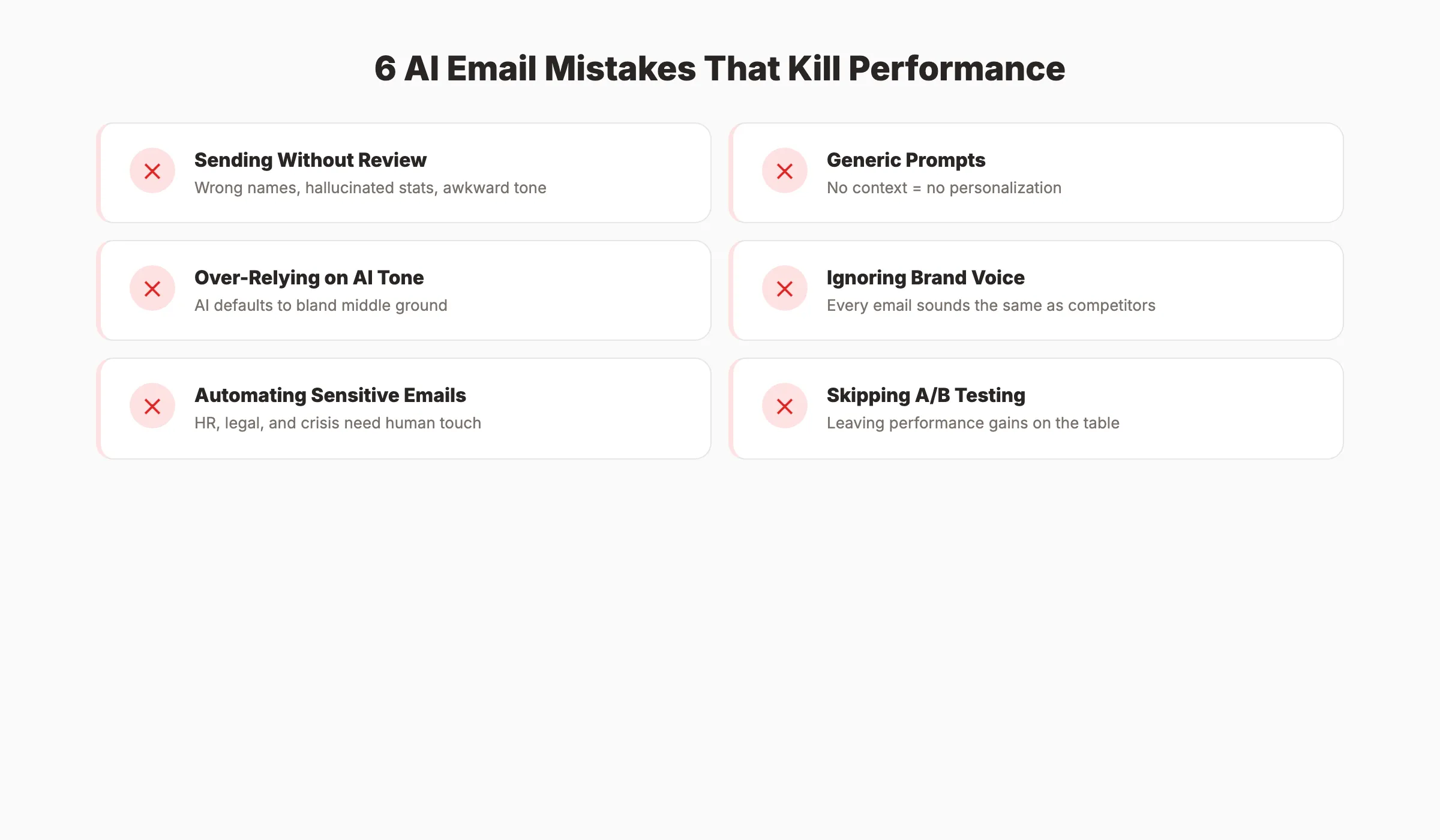
87% of marketing teams use AI for email. Only 6% qualify as high performers. That gap exists because most teams make the same avoidable mistakes.
1. Sending Without Reviewing
The number one mistake. AI produces plausible-sounding text that contains errors you would never make yourself. Wrong names, hallucinated statistics, and awkward phrasing slip through when you skip the review step.
Every AI email needs a human read-through. 2 minutes of review prevents the credibility damage of sending an email that references the wrong company name or cites a made-up study.
2. Using Generic Prompts
“Write a follow-up email” is a bad prompt. It gives the AI nothing to work with. The result is a template so generic it could apply to any business, any recipient, and any context.
Specific prompts include the recipient role, the previous interaction, the desired outcome, and the tone. The more context you provide, the less editing the draft needs.
3. Over-Relying on AI for Tone
AI defaults to a middle-of-the-road professional tone. That works for routine messages. It fails for emails that require empathy, humor, urgency, or personality.
If the email matters, write the first draft yourself and use AI to refine it. For routine emails, AI writes the draft and you adjust the tone.
4. Ignoring Brand Voice
AI produces text that sounds like AI. Every team using the same tool produces emails that sound the same. Without brand voice guidelines, your outreach blends into the noise.
Create a brand voice document that specifies vocabulary, sentence length, prohibited phrases, and tone rules. Feed it to the AI with every prompt. Consistency in voice builds recognition and trust over time.
5. Automating Sensitive Communications
Performance feedback, termination notices, legal matters, and crisis communications should never be AI-generated. These emails require empathy, precision, and accountability that AI cannot provide.
Use AI for volume. Use humans for judgment.
6. Skipping A/B Testing
AI makes testing easy because it generates multiple versions in seconds. Teams that skip A/B testing leave performance gains on the table.
Test subject lines, CTAs, email length, and send times. Even small improvements compound across thousands of sends.
3,500+ blogs published. 92% average SEO score. See what Stacc can do for your site. Start for $1 →
How to Maintain Brand Voice With AI
Most AI-generated emails sound identical. They use the same filler phrases, the same structure, and the same safe-but-bland tone. Maintaining a distinct brand voice requires deliberate effort.
Build a Voice Profile
Document your brand voice in a format the AI can use. Include:
| Element | Specify |
|---|---|
| Tone | Formal, conversational, direct, playful |
| Vocabulary | Words you always use, words you never use |
| Sentence length | Short (under 15 words) or varied |
| Personality | Confident, helpful, blunt, warm |
| Prohibited phrases | ”Just checking in,” “Hope this finds you well” |
Feed this profile into every prompt. Some AI tools let you save custom voice profiles that apply automatically.
The 3-Pass Editing Process
- AI Draft: Generate the initial email with a detailed prompt
- Voice Pass: Read the draft aloud and replace any phrase that does not sound like your brand
- Action Pass: Verify the CTA is clear and the email achieves its purpose
This process takes 3 to 5 minutes per email. It produces output that sounds human and on-brand.
Train AI on Your Best Emails
Paste your top-performing emails into the AI prompt. Tell it to match the style, structure, and tone of those examples. AI learns patterns from examples faster than from abstract instructions.
Save your 10 best emails by category (cold outreach, follow-up, newsletter, customer reply). Use them as reference material in every prompt for that category.
AI Email Writing for Different Business Functions
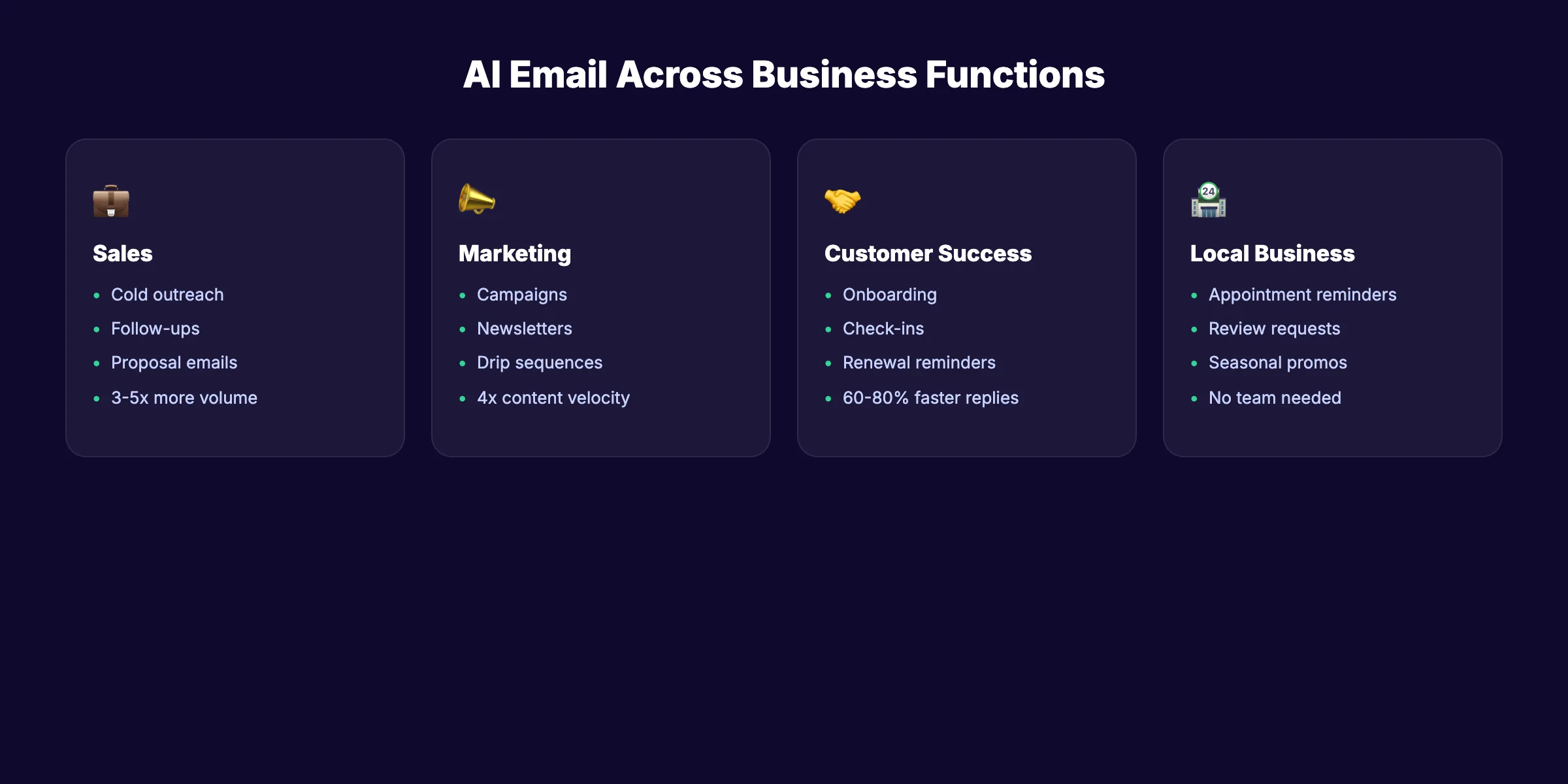
AI email writing serves different purposes across sales, marketing, and customer success. Each function has unique requirements.
Sales Teams
Sales reps use AI for cold outreach, follow-ups, and proposal emails. The biggest gain is volume. A rep using AI can send 3 to 5 times more personalized emails per day without sacrificing quality.
AI also helps sales teams with research-based personalization. Feed the AI a prospect LinkedIn summary or company news. It generates an email that references specific details about the recipient business.
Marketing Teams
Marketers use AI for email campaigns, newsletters, drip sequences, and promotional announcements. AI handles the repetitive production work. Marketers focus on strategy, segmentation, and analysis.
The biggest impact is on content velocity. A marketing team that produces 4 email campaigns per month manually can produce 12 to 16 with AI assistance.
Customer Success
Customer success teams use AI for onboarding sequences, check-in emails, renewal reminders, and support responses. AI ensures every customer receives timely communication regardless of team capacity.
The key metric is response time. AI-assisted teams respond to customer emails 60 to 80% faster than teams writing every response manually.
Local Businesses
Local businesses use AI for appointment reminders, review requests, seasonal promotions, and list building campaigns. AI makes email marketing accessible to businesses without a dedicated marketing team.
A dentist, plumber, or salon owner can set up a complete email program in an afternoon. The AI writes the content. An automation platform handles the sending.
Where AI Email Writing Fits in Your Marketing Stack
AI email writing does not replace your marketing strategy. It accelerates the execution of that strategy. Understanding where it fits prevents both over-reliance and under-utilization.
The Content Production Pipeline
AI email writing sits in the middle of a 4-step pipeline:
- Strategy (human). Define audience, goals, and campaign calendar
- Production (AI + human). Generate drafts, review, and refine
- Distribution (automation). Schedule and send via email platform
- Analysis (human + AI). Review metrics, test variations, optimize
AI handles step 2. It does not handle steps 1, 3, or 4 alone. Teams that try to automate the entire pipeline lose strategic direction and produce generic output.
Combining AI Email With AI Content
Email marketing works best when it connects to a broader content marketing strategy. AI writes the blog posts that drive traffic. AI writes the emails that nurture those visitors. AI writes the social posts that amplify both.
This creates a compounding loop. More content drives more subscribers. More subscribers receive more emails. More emails drive more conversions. Each channel reinforces the others.
For businesses using Stacc, this loop runs automatically. We publish the blog content, GBP posts, and social media content. You add email to the mix and every channel compounds together.
Email Metrics to Track
| Metric | Benchmark | What AI Affects |
|---|---|---|
| Open rate | 20-25% | Subject line quality |
| Click-through rate | 2-5% | CTA clarity and relevance |
| Reply rate (cold) | 5-15% | Personalization depth |
| Unsubscribe rate | Under 0.5% | Content relevance |
| Time to draft | Under 5 min | AI vs manual comparison |
| Emails sent per week | Varies | Volume capacity |
Track these before and after implementing AI. The comparison quantifies the exact ROI of your AI email investment.
Rank everywhere. Do nothing. Blog SEO, Local SEO, and Social on autopilot. Start for $1 →
FAQ
Is AI email writing safe for business communications?
Yes, for routine and marketing emails. AI handles follow-ups, newsletters, outreach, and customer responses effectively. Avoid using AI for legal, financial, or highly sensitive communications. Always review every AI-generated email before sending.
How much time does an AI email writer save?
The average professional saves 2.2 hours per week. Top users save 4 or more hours weekly. For teams, the savings multiply. A 5-person marketing team using AI for email production reclaims 10 to 20 hours per week.
Will recipients know the email was written by AI?
Not if you follow best practices. Review every draft, maintain your brand voice, and personalize with specific details. Generic, unedited AI emails are easy to spot. Edited and personalized AI emails are indistinguishable from human-written ones.
What is the best AI email writer for small businesses?
For marketing emails and campaigns, tools like Grammarly, Copy.ai, and Jasper handle most use cases. For a fully automated content marketing program that includes email-ready blog content, Stacc publishes 30 articles per month without requiring you to write anything.
Does AI email writing improve open rates?
AI improves open rates primarily through better subject lines. AI generates multiple variations that you A/B test to find the highest performer. Businesses using AI for subject line optimization report measurable improvements in open rates compared to single-version sends.
Can AI replace my email marketing team?
No. AI replaces the repetitive writing work, not the strategy. Your team defines the audience, plans the campaigns, analyzes the results, and makes creative decisions. AI handles the production. Think of it as adding 2 to 3 extra writers to your team at a fraction of the cost.
AI email writing is standard practice in 2026. The 87% of teams already using it will not go back to writing every email by hand. The question is not whether to adopt AI for email. The question is how well you use it.
Start with one email type. Build your prompt template. Review every draft. Track the results. Then expand.
Related Tools & Resources
Free SEO Tools:
Best Lists:

Written by
Siddharth GangalSiddharth is the founder of theStacc and Arka360, and a graduate of IIT Mandi. He spent years watching great businesses lose organic traffic to competitors who simply published more. So he built a system to fix that. He writes about SEO, content at scale, and the tactics that actually move rankings.
30 SEO blog articles published every month
Keyword-optimized, scheduled, and live on your site. Automatically.
30-day trial · Cancel anytime
theStacc
Stop writing SEO content manually
30 blog articles, 30 GBP posts, and social media content. Published every month. Automatically.
Start Your $1 Trial$1 for 3 days · Cancel anytime