
SEO Automation: The Definitive Guide (2026)
Everything you need to know about SEO automation in one 9-chapter guide. Covers tools, strategies, content, technical SEO, and ROI. Updated for 2026.
Most businesses treat SEO like a manual assembly line. Someone pulls keyword data. Someone else writes content. Another person checks for broken links. A fourth builds reports. Every task happens by hand, every week, with no end in sight.
That manual approach costs real money. Agencies using automation report saving 6.3 hours per client account per week, according to SEO.com research. Over 12 months, that is 327 hours freed per account. For teams managing 10 clients, the math hits 3,270 hours. That is not a small inefficiency. That is a full-time employee lost to spreadsheets.
This SEO automation guide covers everything: what automation actually means, which tasks you can hand off to machines, which tools handle each category, and how to measure your return. It is not a tool listicle. It is a reference resource you can use to build an automation strategy from scratch.
We publish 3,500+ blogs across 70+ industries every month. Automation is not a convenience for us. It is the operating system. Every strategy in this guide comes from workflows we run at scale.
Here is what you will learn:
- What SEO automation is (and what it cannot replace)
- The 7 categories of SEO tasks ready for automation
- How to choose tools that fit your budget and workflow
- Content automation strategies that maintain quality
- Technical SEO checks you should never run manually
- How to measure automation ROI with real numbers
- The mistakes that derail most automation efforts
- What SEO automation looks like heading into 2027
What Is SEO Automation (and What It Is Not)
SEO automation means using software to handle repetitive search optimization tasks without manual input each time. It covers everything from rank tracking and site crawls to content briefs and report generation. The goal is simple: do in minutes what used to take hours.
But the definition matters less than the boundary. Knowing what automation cannot do is more valuable than knowing what it can.
What Automation Handles Well
Automation excels at tasks with clear rules and predictable inputs. Pulling keyword research data from an API is a perfect candidate. So is checking 10,000 pages for broken links. So is scheduling a weekly rank tracking report.
These tasks share 3 traits:
| Trait | Example |
|---|---|
| Repetitive cadence | Weekly rank checks, daily crawl monitoring |
| Rule-based logic | Flag pages with missing meta descriptions |
| High data volume | Audit 50,000 URLs for redirect chains |
If a task repeats on a schedule, follows a set of rules, and involves large datasets, it belongs in the automation column.
What Automation Cannot Replace
Strategy, creativity, and judgment still require a human brain. No software can decide whether your brand should target “seo automation guide” or “seo automation tools” first. No crawl tool can write a product positioning statement. No AI model can sense that a competitor just shifted their entire content strategy.
The line is clear: machines execute. Humans decide.
84% of professionals now automate keyword research tasks, according to WeAreTenet. But the decision of which keywords to pursue, which clusters to build, and which pages to kill still requires someone who understands the business.
The Human-Machine Split
Think of SEO automation as a staff multiplier, not a staff replacement. A 3-person SEO team with the right automation stack can produce the output of a 10-person team doing everything by hand. The humans still make every strategic call. The machines handle the execution at speed.
This distinction matters because the biggest automation failures happen when teams try to remove humans entirely. We cover those failures later in this guide.
Why SEO Automation Matters in 2026
Three forces make automation non-negotiable right now: search complexity, content velocity requirements, and the cost of manual SEO labor.
Search Is More Complex Than Ever
Google now processes over 8.5 billion searches per day. The algorithm evaluates Core Web Vitals, E-E-A-T signals, topical depth, entity relationships, and hundreds of other factors. Monitoring all of these manually is not difficult. It is impossible.
A single site audit for a 5,000-page website produces thousands of data points. No human can review every crawl error, every thin content page, and every orphan URL each week. Automation makes this a background process that runs while your team sleeps.
Content Velocity Separates Winners and Losers
Companies that publish 16+ blog posts per month get 3.5x more traffic than those publishing 0 to 4, according to HubSpot research. The gap keeps widening. In 2026, building topical authority demands consistent, high-volume publishing across entire keyword clusters.
Manual content production caps out fast. One writer produces 4 to 8 articles per month. An automated content workflow using AI drafting, automated briefs, and scheduled publishing can produce 30 to 80 articles at the same quality bar.
That is not a marginal improvement. It is a category shift.
The Cost Gap Is Too Large to Ignore
| Approach | Monthly Cost for 30 Articles | Time Investment |
|---|---|---|
| Freelance writers | $2,400 to $7,500 | 15 to 20 hours of management |
| SEO agency | $3,000 to $10,000 | 5 to 10 hours of oversight |
| Automated workflow (e.g., Stacc) | $99 | Under 1 hour |
The economics are not close. Teams that automate content production spend 70 to 90% less while publishing 10 to 20x more. Every month you operate manually is a month your competitors pull further ahead.
Your SEO team. $99 per month. Stacc publishes 30 SEO-optimized blog posts every month, on autopilot. No writers to manage. No briefs to write. Start for $1 →
The 7 Categories of SEO Tasks You Can Automate
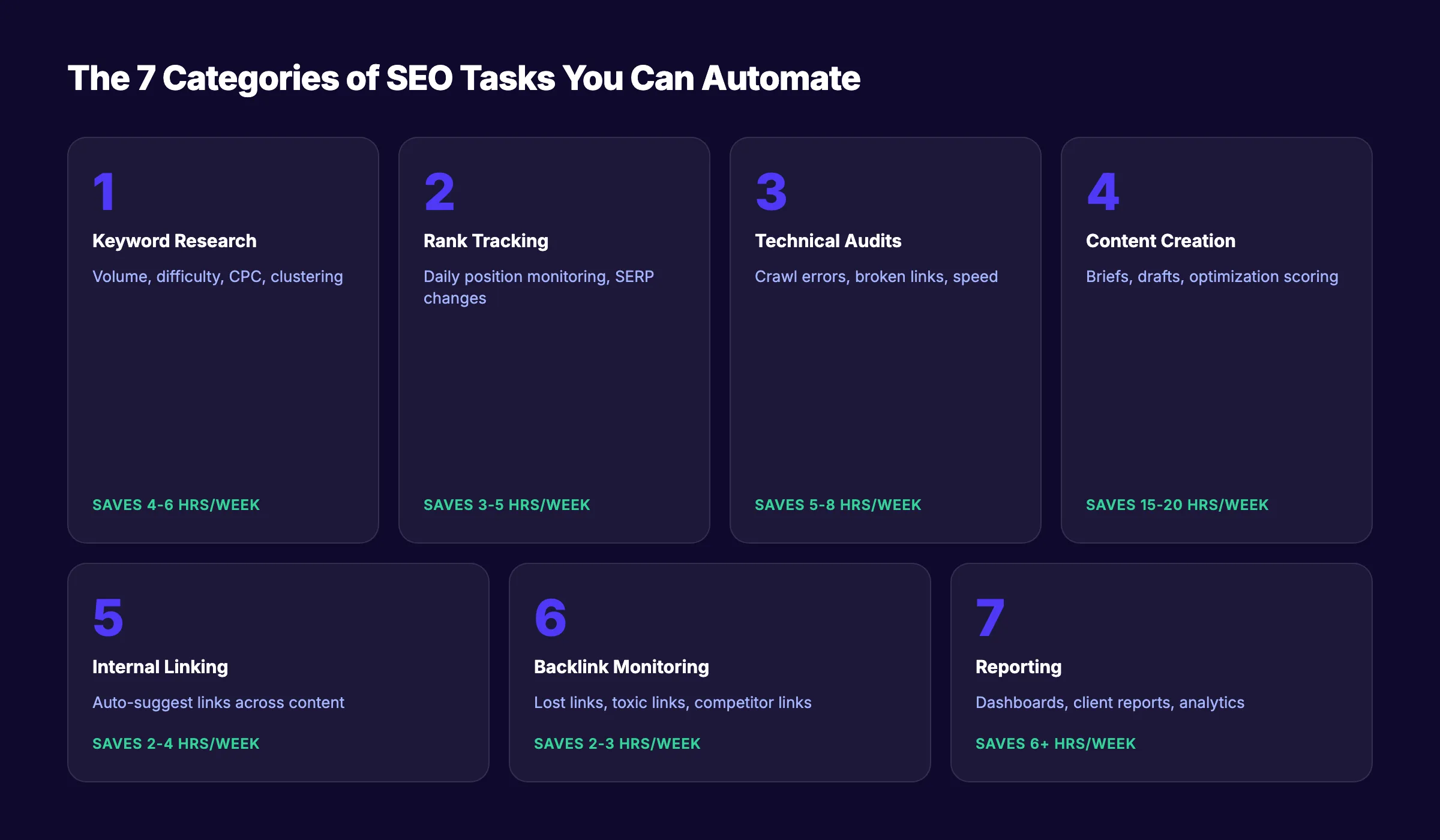
Not all SEO tasks benefit equally from automation. Some categories save 5 minutes per week. Others save 5 hours. Prioritize the categories with the highest time savings and lowest risk of quality loss.
1. Keyword Research and Clustering
Automated keyword tools pull search volume, difficulty scores, CPC data, and SERP features in seconds. Clustering algorithms group hundreds of keywords by topic automatically.
Manual alternative: 4 to 6 hours per keyword set. Automated: 10 to 15 minutes.
Use tools like Semrush or Ahrefs to automate discovery. Then apply human judgment to pick which clusters align with your business goals.
2. Rank Tracking and SERP Monitoring
Automated rank trackers monitor your positions daily. They detect SERP feature changes, track competitors, and flag drops before they become crises.
71% of SEO experts use automated rank tracking, per WeAreTenet data. This is the most universally automated SEO task, and for good reason. Checking rankings by hand across hundreds of keywords is a waste of skilled labor.
3. Technical SEO Audits
Automated crawlers scan your entire site on a schedule. They flag broken links, missing meta tags, slow pages, orphan content, redirect chains, and schema markup errors.
A technical audit that takes a human 40 hours takes an automated crawler 2 hours. Read our full SEO audit guide for the complete checklist.
4. Content Creation and Optimization
This is the fastest-growing automation category. AI writing tools generate drafts. Optimization platforms score content against SERP competitors. Publishing systems push articles live on schedule.
The key word is “drafts.” AI blog writing produces raw material. Human editors shape it into something that reads well and ranks. Fully unedited AI content rarely outperforms edited content.
5. Internal Linking
Internal linking across hundreds of posts is tedious manual work. Automation tools scan your content library and suggest link opportunities based on keyword relevance and anchor text patterns.
For sites with 100+ pages, manual internal linking misses at least 30% of valid opportunities. Automated tools catch nearly all of them.
6. Backlink Monitoring
Automated tools track your backlink profile, alert you to lost links, identify toxic links, and monitor competitor link acquisition. This runs entirely in the background with zero manual effort.
7. Reporting and Analytics
Weekly and monthly SEO reports should generate themselves. Automated dashboards pull data from Google Search Console, Google Analytics 4, rank trackers, and crawl tools into a single view.
Agencies report saving 6.3 hours per client per week on reporting alone. For in-house teams, that time goes straight back to strategy.
How to Choose the Right SEO Automation Tools
The SEO automation tool market will hit $4.97 billion by 2033. That means hundreds of tools competing for your budget. Most teams buy too many tools, use 20% of each, and waste money on overlapping features.
Here is a framework for choosing the right stack.
Match Tools to Your Biggest Time Drains
Start by identifying where your team spends the most hours. If 40% of your week goes to content production, that is where automation delivers the highest ROI. If technical audits eat 6 hours per week, prioritize crawl automation first.
Do not buy a tool because it looks impressive. Buy it because it solves your most expensive problem.
- List your top 5 SEO tasks by time spent
- Identify which tasks are fully automatable vs. partially automatable
- Map each automatable task to a tool category
- Compare 2 to 3 tools per category before committing
Evaluate Integration Depth
A rank tracker that does not connect to your reporting dashboard creates more work, not less. Every tool in your stack should pass data to the next without manual export.
Check for native integrations with Google Search Console, Google Analytics 4, your CMS, and your project management tool. API access matters for custom workflows.
Consider the All-in-One vs. Best-of-Breed Decision
| Approach | Pros | Cons |
|---|---|---|
| All-in-one (Semrush, Ahrefs) | Single dashboard, unified data | Jack of all trades, weaker in specific areas |
| Best-of-breed (Screaming Frog + Surfer + separate tracker) | Best tool for each job | Multiple subscriptions, integration overhead |
| Done-for-you service (Stacc) | Zero management, output delivered | Less granular control over individual tools |
For small teams without a dedicated SEO specialist, a done-for-you service eliminates the tool selection problem entirely. Browse SEO automation software options to compare.
Price Is Not the Only Cost
A $49/month tool that saves 3 hours per week has a different ROI than a $299/month tool that saves 4 hours. Factor in setup time, learning curve, and maintenance overhead. The cheapest tool often costs the most when you count the hours spent configuring it.
Use our SEO ROI calculator to model the actual return on any tool investment.
30 articles per month. Zero tool management. Stacc handles keyword research, writing, optimization, and publishing. You handle approvals. Start for $1 →
Setting Up Your SEO Automation Stack
Buying tools is the easy part. Configuring them into a system that runs without daily babysitting is where most teams fail.
Start With a Single Workflow
Do not automate 7 categories at once. Pick the category with the highest time savings. Set it up fully. Run it for 2 weeks. Fix the gaps. Then move to the next.
Most teams should start with rank tracking and reporting. These categories have the lowest risk and the fastest payoff.
Build the Data Pipeline
Every automation stack needs a clean data flow:
- Data collection. Crawlers, rank trackers, and Search Console pull raw data
- Processing. Rules and algorithms filter, categorize, and prioritize
- Action. Automated tasks execute (publish content, fix redirects, send alerts)
- Reporting. Dashboards update and reports generate on schedule
If any stage breaks, the downstream stages produce garbage. Test each connection before adding the next.
Set Up Alerts, Not Just Reports
Reports tell you what happened. Alerts tell you what needs attention right now.
Configure alerts for:
- Ranking drops greater than 5 positions for target keywords
- New 404 errors or broken links detected
- Core Web Vitals thresholds breached
- Significant traffic drops (more than 15% week over week)
- New backlinks from high-authority domains
Alerts turn your automation stack from passive monitoring into active problem detection.
Document Everything
Write down every automation you set up: what it does, where data flows, what triggers it, and who is responsible when it breaks. Teams that skip documentation rebuild their stack every time someone leaves. Teams that document it scale without friction.
Content Automation. The Biggest Opportunity
Content production is the single largest time investment in any SEO program. It is also the area where automation delivers the most dramatic gains.
65% of marketers now automate at least half of their SEO tasks, and content is the primary focus for most of them.
The Content Automation Spectrum
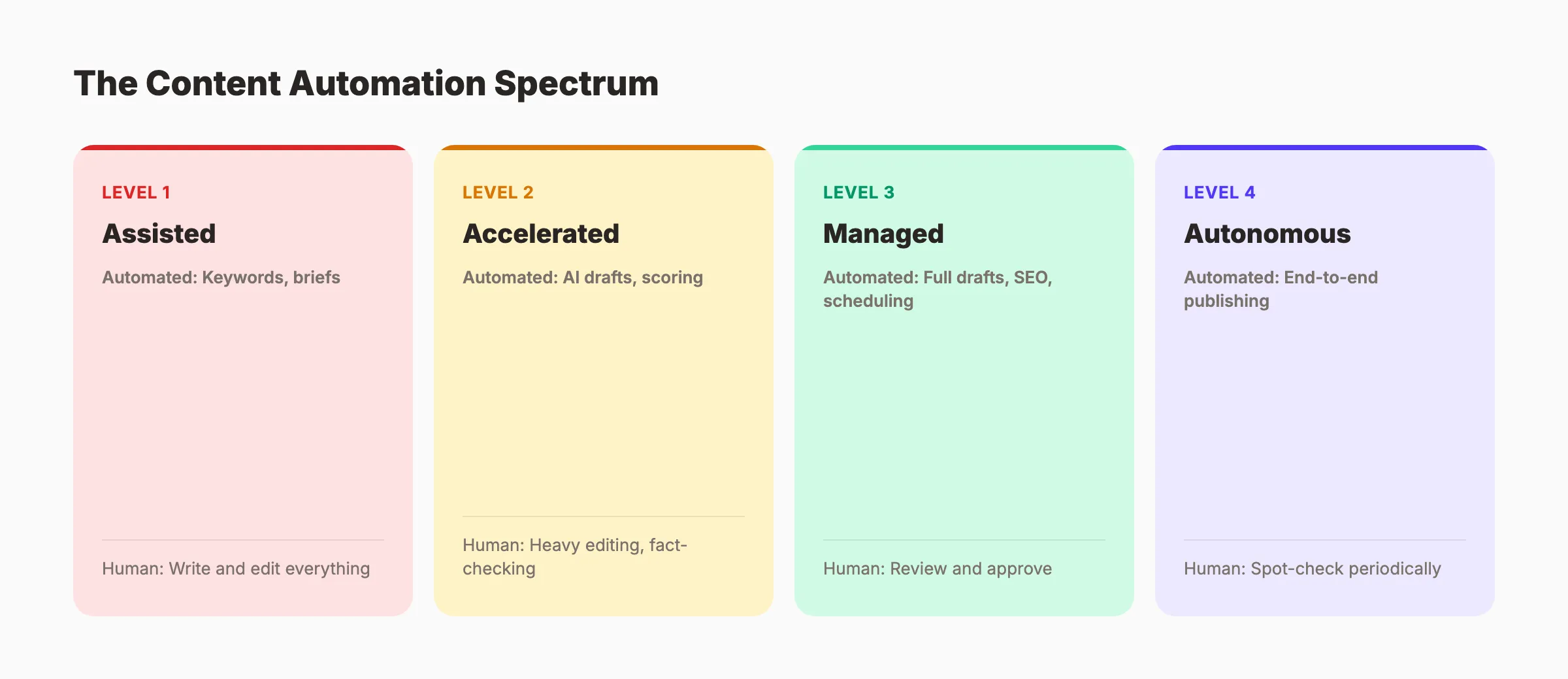
Not all content automation is equal. There is a spectrum from minimal to full automation:
| Level | What Is Automated | Human Role |
|---|---|---|
| Level 1: Assisted | Keyword research, brief generation | Write and edit everything |
| Level 2: Accelerated | AI first drafts, optimization scoring | Heavy editing and fact-checking |
| Level 3: Managed | Full drafts, SEO optimization, scheduling | Review and approve |
| Level 4: Autonomous | End-to-end from keyword to published post | Spot-check periodically |
Most companies operate at Level 1 or 2. Companies using services like Stacc operate at Level 3. Getting finished articles that still go through an approval step before publishing.
Level 4 exists but carries risk. Fully autonomous content with no human review produces errors that damage trust.
Building an Automated Content Pipeline
A complete content automation pipeline has 5 stages:
- Topic discovery. Automated tools identify keyword gaps and trending topics
- Brief generation. AI builds content briefs with target keywords, headers, and word counts
- Draft creation. AI writes the initial draft based on the brief
- Optimization. Scoring tools check keyword density, readability, and SERP alignment
- Publishing. CMS integration pushes approved content live on schedule
Each stage can run independently. The power comes from connecting them so each stage feeds the next automatically.
For step-by-step implementation, read our guide on how to automate your SEO workflow.
Quality Control in Automated Content
The exception to the “automate everything” mindset is quality. Automated content that reads like a robot wrote it does not rank well and does not convert readers.
SEO content writing requires a human voice, original insights, and factual accuracy. The best automated workflows use AI for the 80% (research, structure, first draft) and humans for the 20% (voice, expertise, fact-checking).
We have tested this split across thousands of published articles. The 80/20 model consistently outperforms both fully manual and fully automated approaches.
Scaling Content Without Scaling Your Team
The real unlock of content automation is output volume. A single content manager using an automated pipeline can oversee 30 to 80 articles per month. That same person working manually produces 4 to 6.
Read about how to scale blog content with AI for the complete playbook.
Automate your blog entirely. Stacc writes, optimizes, and publishes 30 SEO blog posts per month. Your approval is the only manual step. Start for $1 →
Technical SEO Automation
Technical SEO is the most automatable branch of search optimization. Most technical tasks follow strict rules, process large datasets, and repeat on fixed schedules. Machines handle all 3 better than humans.
Site Crawling and Error Detection
Automated crawlers check every page on your site for issues. They run on daily or weekly schedules and flag problems the moment they appear.
Key checks that should run automatically:
- Broken links and 404 errors (see our guide to fix broken links)
- Redirect chains and loops
- Missing or duplicate meta titles and descriptions
- Pages blocked by robots.txt that should be indexed
- Missing XML sitemaps or sitemap errors
- Orphan pages with no internal links
A manual crawl of a 10,000-page site takes weeks. An automated crawler finishes in hours and catches issues a human would miss.
Schema Markup Validation
Schema markup errors prevent rich results from appearing in search. Automated validators test your structured data against Google requirements every time you publish or update a page.
Use our schema markup generator to create valid markup. Then set up automated validation to catch regressions.
Page Speed Monitoring
Core Web Vitals change as you add content, update plugins, or modify templates. Automated monitoring catches performance regressions before they affect rankings.
Set thresholds for Largest Contentful Paint, First Input Delay, and Cumulative Layout Shift. When any metric crosses the line, the system alerts your team immediately.
Index Coverage Monitoring
Google Search Console reports index coverage issues, but it does not send you a push notification when 500 pages suddenly drop from the index. Automated monitoring tools do.
Connect your Google Search Console data to an alerting system. Track indexed page counts daily. A sudden drop signals a crawl issue, a robots.txt change, or a manual action.
Reporting and Analytics Automation
If your team spends more than 30 minutes per week building SEO reports, your reporting process is broken. Automated reporting should be invisible until someone needs the data.
What to Automate in Reporting
Every recurring report should generate on schedule without anyone pressing a button:
| Report Type | Frequency | Data Sources |
|---|---|---|
| Keyword ranking report | Weekly | Rank tracker + Search Console |
| Technical health report | Weekly | Crawl tool + Core Web Vitals API |
| Content performance report | Monthly | Google Analytics 4 + Search Console |
| Backlink profile report | Monthly | Ahrefs or Semrush API |
| Competitor movement report | Monthly | Rank tracker + competitor monitoring |
Building Automated Dashboards
The best reporting setups use live dashboards rather than static PDF exports. Dashboards update in real time and let stakeholders filter by date range, page group, or keyword cluster.
Connect your analytics stack to a dashboard tool. Map each data source to a visualization. Set the refresh schedule. The dashboard then requires zero maintenance unless you change data sources.
Track your content marketing ROI directly in the dashboard alongside traffic and ranking data.
Client Reporting for Agencies
Agencies waste the most time on reporting. Building custom reports for 20 clients every month consumes entire days.
Automated client reporting pulls each client data into a branded template and delivers it by email on the first of each month. The agency team reviews for anomalies before sending. Review time: 5 minutes per client instead of 45.
Connecting Reporting to Action
Reports that sit in someone inbox do not improve SEO. The most effective automated reporting systems connect insights to action.
When the ranking report shows a drop for a priority keyword, the system creates a task in your project management tool. When the crawl report flags 50 new broken links, it triggers an alert to the technical team. Data without action is noise.
Common SEO Automation Mistakes (and How to Avoid Them)
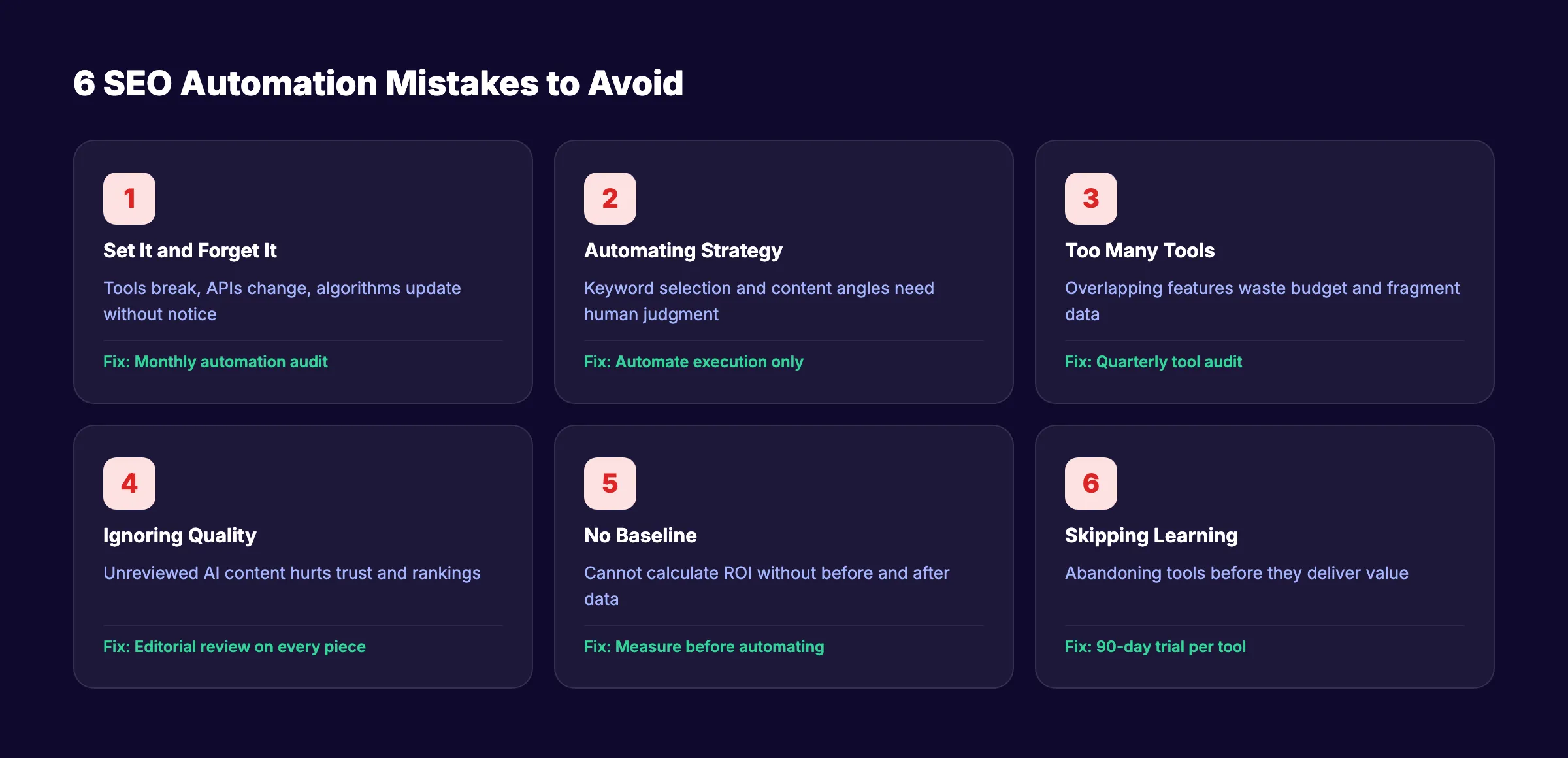
83% of marketers at companies with 200+ employees report improved performance from SEO automation, per SEO.com data. But the other 17% made mistakes that canceled out the gains. Here are the most common ones.
Mistake 1: Set It and Forget It
Automation does not mean abandonment. Tools break. APIs change. Algorithms update. A rank tracker that worked perfectly in January might report stale data by March if the provider changes their API.
Fix: Schedule a monthly automation audit. Check every tool. Verify data accuracy. Confirm alerts fire correctly. 30 minutes per month prevents hours of cleanup.
Mistake 2: Automating Strategy
Keyword selection, content angle decisions, link building outreach messaging, and brand positioning are not automatable. These require context that no tool possesses: your competitive position, your business goals, your audience pain points.
Teams that hand strategic decisions to machines produce generic output that ranks for nothing.
Fix: Draw a hard line between execution (automate) and strategy (keep human). Review the on-page SEO guide for areas where human judgment matters most.
Mistake 3: Buying Too Many Tools
The average marketing team uses 12 different software tools. Most overlap significantly. Three rank trackers do not track ranks 3x better than one.
Fix: Audit your tool stack quarterly. If 2 tools serve the same purpose, cut one. Check our list of best SEO automation tools to find tools that consolidate multiple functions.
Mistake 4: Ignoring Content Quality
AI-generated content without human review produces factual errors, off-brand tone, and duplicate angles. Google helpful content system specifically targets low-quality automated content.
61% of marketers say AI for SEO is effective, but that number only holds when humans review the output.
Fix: Never publish automated content without editorial review. Build a quality checklist that every piece passes before going live. Our optimize content for SEO guide covers the complete review process.
Mistake 5: No Baseline Measurement
Teams that automate without measuring their starting point cannot calculate ROI. They feel faster but cannot prove it.
Fix: Before automating any task, record the current time, cost, and output quality. After 90 days of automation, compare. Use our SEO ROI calculator to quantify the difference.
Understanding how long SEO takes helps set realistic timelines for measuring automation impact.
Mistake 6: Skipping the Learning Phase
New automation tools require setup time. Teams that expect full ROI in week one get frustrated and abandon tools before they deliver value. Initial implementations require several months for teams to adapt and optimize workflows.
Fix: Give every new automation tool a 90-day trial. Measure results at 30, 60, and 90 days. Most tools hit their stride around day 60.
Skip the learning curve entirely. Stacc runs your entire blog SEO program. No tools to configure. No workflows to build. We handle everything from keyword research to publishing. Start for $1 →
FAQ
Can SEO be fully automated?
No. About 70 to 80% of routine SEO tasks can run on autopilot: rank tracking, site audits, reporting, content drafts, and internal linking. The remaining 20 to 30%. Strategy, brand positioning, audience understanding, and creative angles. Requires human expertise. The goal is not full automation. The goal is automating execution so humans focus on decisions.
What is the best SEO automation tool for small businesses?
It depends on your biggest bottleneck. For content production, a done-for-you service like Stacc delivers 30 articles per month for $99. For technical monitoring, Screaming Frog or Sitebulb handles site crawls. For all-in-one needs, Semrush covers keyword tracking, audits, and content tools in one platform. Browse AI SEO tools for small business for a full comparison.
How much does SEO automation cost?
Individual tools range from free (Google Search Console) to $400+ per month (enterprise Semrush or Ahrefs plans). A complete automation stack of 3 to 4 tools typically costs $150 to $500 per month. Done-for-you services that automate content production start at $99 per month. The cost nearly always pays for itself through time savings within the first 60 days.
How long does it take to see results from SEO automation?
Automation itself delivers time savings immediately. You will see efficiency gains in the first week. SEO results from the content and optimizations that automation produces take longer. Typically 60 to 90 days for initial ranking movement and 3 to 6 months for meaningful organic traffic growth. Read more about SEO timelines.
What SEO tasks should I automate first?
Start with rank tracking and reporting. These tasks deliver the highest time savings with the lowest risk. Then move to technical audit automation. Content automation comes third because it requires more setup and quality control. Save link building outreach for last. It benefits least from full automation.
Will Google penalize automated SEO content?
Google does not penalize content for being automated. Google penalizes content for being unhelpful, regardless of how it was produced. Automated content that provides genuine value, answers search intent, and demonstrates expertise ranks the same as manually written content. The risk comes from publishing unreviewed AI output that contains errors or adds no original value.
What Comes Next
SEO automation is not a trend. It is the operating model for every competitive SEO program in 2026 and beyond. The teams that automate execution and invest human time in strategy will outproduce and outrank teams that do everything by hand.
Start with one category. Automate it fully. Measure the result. Then expand. Within 90 days, your team will produce more output in less time than you thought possible.
If you want the entire process handled for you, that is exactly what we built Stacc to do. 30 articles per month, published on your site, optimized for search. Your only job is to approve.
Rank Everywhere. Do Nothing. Stacc is your SEO team for $99 per month. Blog SEO, local SEO, and social media. All on autopilot. Start for $1 →
Related Tools & Resources
Free SEO Tools:
Best Lists:

Written by
Siddharth GangalSiddharth is the founder of theStacc and Arka360, and a graduate of IIT Mandi. He spent years watching great businesses lose organic traffic to competitors who simply published more. So he built a system to fix that. He writes about SEO, content at scale, and the tactics that actually move rankings.
30 SEO blog articles published every month
Keyword-optimized, scheduled, and live on your site. Automatically.
30-day trial · Cancel anytime
theStacc
Stop writing SEO content manually
30 blog articles, 30 GBP posts, and social media content. Published every month. Automatically.
Start Your $1 Trial$1 for 3 days · Cancel anytime