The blog post structure that ranks: 8 steps covering the title, intro, H2 hierarchy, formatting, internal links, schema, and meta tags. Updated 2026.
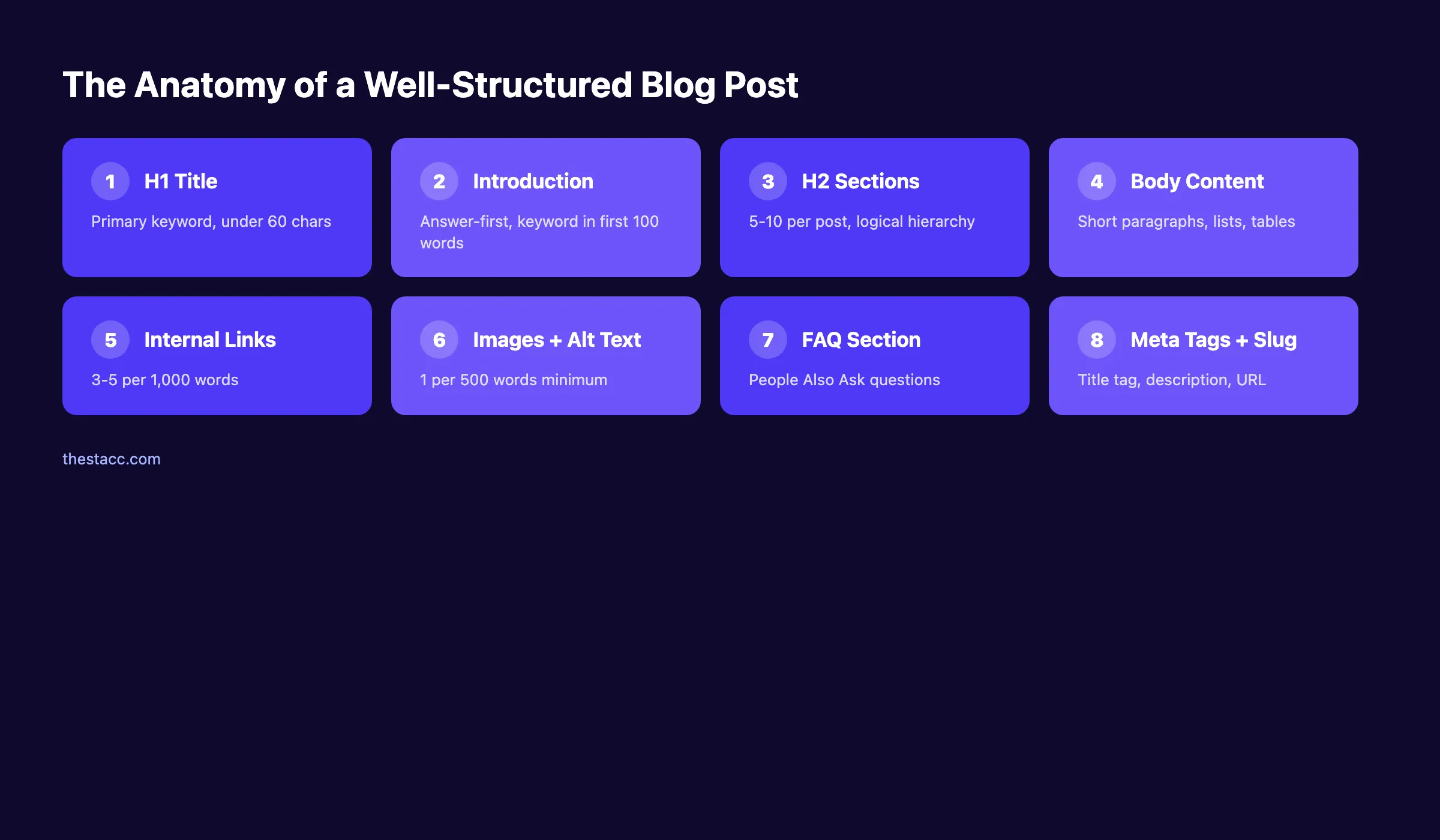
Blog post structure for SEO is the order and formatting of a page: the title, an answer-first intro, H2 and H3 hierarchy, short paragraphs, internal links, and schema. Structure decides whether well-written work is readable by people and extractable by search engines. Eight steps build that structure.
A well-written blog post with no structure is a page that never ranks. 96.55% of all pages get zero traffic from Google. The most common reason is not weak content. It is poor blog post structure for SEO.
Bad structure costs you rankings, clicks, and revenue. A page buried on page 2 gets less than 1% of all clicks for its target keyword. Meanwhile, position 1 captures 27.6% of all clicks. The difference between those outcomes is not talent. It is structure.
This guide gives you the exact 8-step blog post structure for SEO that we use across 3,500+ articles published for 70+ industries. Our average on-page SEO score is 92%. These are not theories. They are patterns we see working every day.
We publish 3,500+ blogs across 70+ industries. Every article follows the same structural framework you will learn here. Whether you run a dental practice or a SaaS company, the principles apply.
Here is what you will learn:
- How to select and validate a keyword before structuring your post
- How to map search intent so your structure matches what Google expects
- How to write an H1 title that earns clicks from the SERP
- How to build a heading hierarchy that search engines and readers both follow
- How to write an answer-first introduction that hooks readers in 5 seconds
- How to format body sections for maximum scannability
- How to place internal links, external links, and images
- How to optimize meta tags and your URL slug
Why Blog Post Structure Matters for SEO
Google does not rank pages based on word count alone. It ranks pages that match intent, answer questions clearly, and keep readers engaged. Structure is the vehicle that delivers all 3.
A structured post tells Google what your content covers. Headings act as a table of contents for crawlers. Paragraphs broken into scannable sections reduce bounce rates. Internal links signal topical relationships between your pages.
The data supports this. Pages that rank in the top 3 positions on Google share structural patterns. They use clear heading hierarchies. They front-load answers. They break content into digestible sections with visuals every 300 to 400 words.
| Structural Element | Impact on SEO |
|---|---|
| Clear H1 with keyword | Tells Google the page topic |
| Logical H2/H3 hierarchy | Improves crawlability and featured snippet eligibility |
| Short paragraphs (1-3 sentences) | Reduces bounce rate, increases dwell time |
| Answer-first introduction | Increases chance of AI Overview citation |
| Internal links (3-5 per 1,000 words) | Passes authority and builds topical clusters |
| Images with alt text | Adds context for image search and accessibility |
Structure is not decoration. It is the difference between a page that ranks and a page that sits on page 5 forever.
What You Need Before You Start
Time required: 20 to 40 minutes per post (structure only, not writing)
Difficulty: Beginner-friendly
What you will need:
- A target keyword (or a list of keyword candidates)
- Access to Google Search (for SERP analysis)
- A text editor or content management system
- Basic understanding of on-page SEO concepts
You do not need paid tools. Everything in this guide works with free resources. Paid tools speed things up but are not required.
Step 1: Start With a Single Target Keyword
Every blog post needs one primary keyword. Not 3. Not 7. One keyword that defines the page topic and tells Google exactly what query this content answers.
Choosing the right keyword before you structure your post prevents the most common blogging mistake: writing content that targets nothing specific.
How to select your keyword:
- Pick a keyword with clear search volume (even 50 monthly searches works for niche topics)
- Verify the keyword has informational intent (people searching want to learn, not buy)
- Check that no existing page on your site already targets this exact keyword
- Confirm you can realistically rank by reviewing the competition level
For a full walkthrough, see our guide on keyword research for blog posts.
Where your keyword must appear in the final post:
| Placement | Example |
|---|---|
| H1 title | "Blog Post Structure for SEO: 8 Steps" |
| First 100 words | "...blog post structure for SEO that we use..." |
| At least 1 H2 heading | "Why Blog Post Structure Matters for SEO" |
| Meta description | "Learn the exact blog post structure for SEO..." |
| URL slug | /blog/blog-post-structure-seo |
| At least 1 image alt text | "Blog post structure for SEO diagram" |
Do not stuff the keyword into every sentence. Use it naturally in these 6 placements and let secondary keywords fill the rest.
Why this step matters: Without a keyword, you are guessing. You might write 2,000 words that no one searches for. A keyword anchors every structural decision that follows.
Step 2: Map Search Intent Before Writing
Search intent is the reason behind a query. Google matches pages to intent, not just keywords. If your blog post structure does not align with what searchers expect, you will not rank. Period.
There are 4 types of search intent:
- Informational. The searcher wants to learn ("how to structure a blog post")
- Navigational. The searcher wants a specific page ("Yoast SEO blog")
- Commercial. The searcher is comparing options ("best SEO tools")
- Transactional. The searcher wants to buy ("Surfer SEO pricing")
For blog posts, you are almost always targeting informational intent. Here is how to confirm:
The 60-second SERP test:
- Search your keyword in Google (incognito mode)
- Look at the top 5 results
- Note the content type (guide, list, tutorial, video)
- Note the average word count (use a word counter extension)
- Note the H2 headings (these reveal what Google expects)
If the top 5 results are all step-by-step guides averaging 2,500 words, your post needs to be a step-by-step guide of at least 2,500 words. Do not publish a 600-word overview and expect to compete.
Why this step matters: Mismatched intent is the number 1 reason good content fails to rank. A 3,000-word tutorial will not rank for a query where Google shows product pages. Match the format first.
Pro tip: Open the top 3 ranking pages and list every H2 heading. Your structure should cover the same subtopics plus at least 1 angle they miss. That gap is your competitive edge. Use our content gap finder guide to identify these opportunities.
Step 3: Write an H1 Title That Earns Clicks
Your H1 title does 2 jobs. It tells Google what the page is about. And it convinces searchers to click your result instead of the 9 others on the page.
A weak title kills a well-structured post. Organic CTR at position 1 is 27.6%. But a compelling title can push that number higher. A generic title can drop it below 15%.
Title formulas that work for blog posts:
| Formula | Example |
|---|---|
| [Topic]: How to [Outcome] ([Year]) | Blog Post Structure: How to Rank Higher (2026) |
| How to [Outcome] in [N] Steps | How to Structure a Blog Post in 8 Steps |
| [N] [Topic] Tips That [Benefit] | 8 Blog Structure Tips That Improve Rankings |
| The [Adjective] Guide to [Topic] | The Complete Guide to Blog Post Structure |
Title rules:
- Keep it under 60 characters (Google truncates longer titles)
- Place your primary keyword near the front
- Include a number when possible (numbers increase CTR by up to 36%)
- Add the year for freshness signals on evergreen content
- Avoid clickbait that the content cannot deliver
For deeper strategies, read our blog headlines guide. You can also test your titles with our free headline analyzer tool.
Why this step matters: Your title is the first thing Google reads and the first thing searchers see. A bad title means zero clicks regardless of how good your content is.
Step 4: Build Your Heading Hierarchy (H2s and H3s)
Headings are the skeleton of your blog post. They tell Google what each section covers. They tell readers where to find specific information. And they determine whether your content is eligible for featured snippets.
Every blog post should follow this hierarchy:
- H1. One per page. Your main title. Contains the primary keyword.
- H2. Major sections. 5 to 10 per post. Each covers a distinct subtopic.
- H3. Subsections under an H2. Use when an H2 section has multiple parts.
- H4. Rare. Only for deep sub-subsections within an H3.
Never skip levels. Do not jump from H2 to H4. Do not use H3 without a parent H2.
Heading rules for SEO:
- Each H2 should be able to stand alone as a potential featured snippet
- Use your primary keyword in at least 1 H2
- Use secondary keywords naturally in other H2s and H3s
- Make headings descriptive, not clever ("Build Your Heading Hierarchy" not "The Secret Sauce")
- Front-load the most important word in each heading
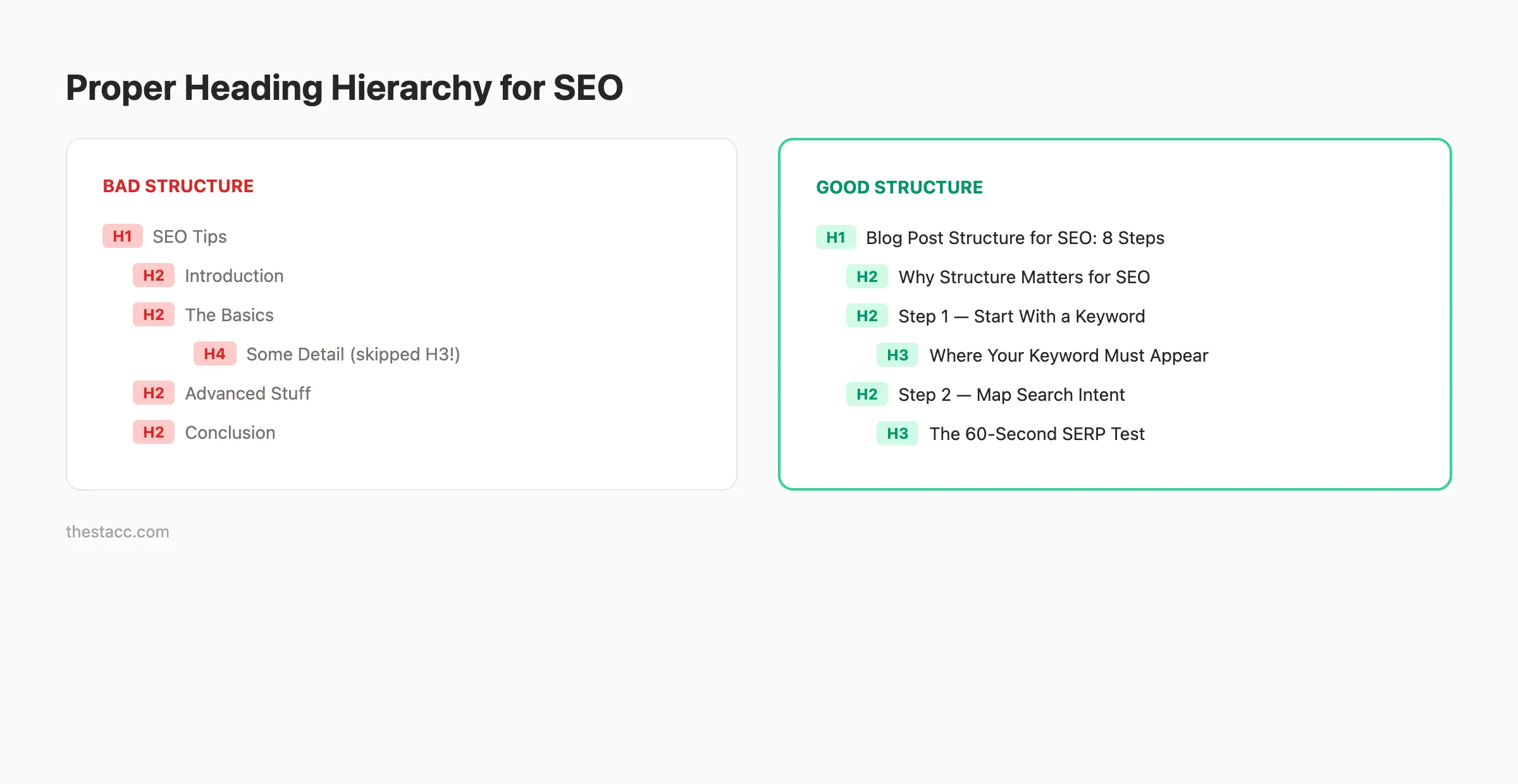
Here is a real example of good vs bad heading structure:
Bad structure: ``` H1: SEO Tips H2: Introduction H2: The Basics H2: Advanced Stuff H2: Conclusion ```
Good structure: ``` H1: Blog Post Structure for SEO: An 8-Step 2026 Template H2: Why Blog Post Structure Matters for SEO H2: Step 1. Start With a Single Target Keyword H2: Step 2. Map Search Intent Before Writing H2: Step 3. Write an H1 Title That Earns Clicks ```
The good structure tells Google (and readers) exactly what each section delivers. The bad structure tells no one anything.
For a complete walkthrough of planning your headings before writing, see our blog post outline guide.
Why this step matters: Google uses headings to understand page structure. AI Overviews pull answers from clearly labeled H2 sections. Without a logical hierarchy, your content is harder to crawl, harder to read, and harder to rank.
Step 5: Write an Answer-First Introduction
The introduction is the most important paragraph in your blog post. It determines whether the reader stays or bounces. It also determines whether AI search engines cite your page.
In 2026, AI engines extract answers from the top of the page. Content grounding plateaus at roughly 540 words. If your direct answer is not in the first section, you are losing citations to pages that put it there.
The PASBA introduction framework:
- P. Problem: Name the reader's exact pain (1 to 2 sentences)
- A. Agitate: What this pain costs them (time, money, rankings)
- S. Solution: What this article delivers
- B. Bridge: Establish credibility (your experience or data)
- A. Action: "Here is what you will learn:" followed by a bullet list
This framework works because it hooks the reader with their problem, builds urgency, and delivers a clear promise. The bullet list at the end gives both readers and search engines a scannable preview of the content.
Introduction rules:
- Keep it under 200 words
- Include your primary keyword in the first 100 words
- State the benefit of reading within the first 3 sentences
- Use a specific number or stat in the opening (not a vague claim)
- End with a bulleted list of what the reader will learn
Do not start with "In this article, we will discuss..." That is the fastest way to lose a reader. Start with their problem.
Why this step matters: 55% of visitors spend fewer than 15 seconds on a page. Your introduction is either a hook or a goodbye. Front-loading the answer also makes your page more likely to appear in Google AI Overviews.
Want blog posts with perfect structure, published automatically? theStacc writes and publishes SEO-optimized articles for your business every week. No writers. No editors. No effort.
Step 6: Structure Body Sections for Scannability
Nobody reads blog posts word by word. Readers scan. They jump between headings, skim bold text, and stop at visuals. Your body sections must be built for this behavior.
Nielsen Norman Group research confirmed that 79% of web users scan rather than read. If your blog is a wall of text, readers leave. When readers leave, Google notices. Rankings drop.
Formatting rules for every body section:
- Paragraphs: Maximum 3 sentences. Prefer 1 to 2.
- Sentences: Maximum 20 words. Mix short (5-word) and medium (18-word) sentences.
- Lists: Use bullet points for unordered items. Use numbered lists for sequential steps.
- Bold text: Bold the first use of key terms and important takeaways.
- Tables: Use for any comparison or multi-column data.
- Images: At least 1 per 500 words with descriptive alt text.
The anatomy of a strong body section:
- Open with a claim, stat, or observation. Not a transition word. Not "Now let us look at..."
- Support with evidence. Data, examples, or a specific scenario.
- Close with an actionable takeaway. Tell the reader what to do with this information.
Here is an example:
Weak opening: "Now let us discuss paragraph length."
Strong opening: "Paragraphs over 4 sentences kill mobile readability."
The strong version makes a claim. It hooks the reader. It gives them a reason to keep reading.
Checklist for body section formatting:
- ✓ No paragraph exceeds 3 sentences
- ✓ At least 1 visual element per section (table, list, image, or blockquote)
- ✓ Bold text highlights key terms
- ✓ Each section opens with a claim, not a transition
- ✓ Sections average 200 to 400 words
For more on writing body content that ranks, see our guide on SEO content writing.
Why this step matters: Formatting directly affects dwell time. Longer dwell time signals to Google that your content satisfies the query. Scannable formatting keeps readers on the page longer.
Step 7: Add Internal Links, External Links, and Media
Links and images are not optional. They are structural components that affect how Google crawls, indexes, and ranks your page.
Internal Links
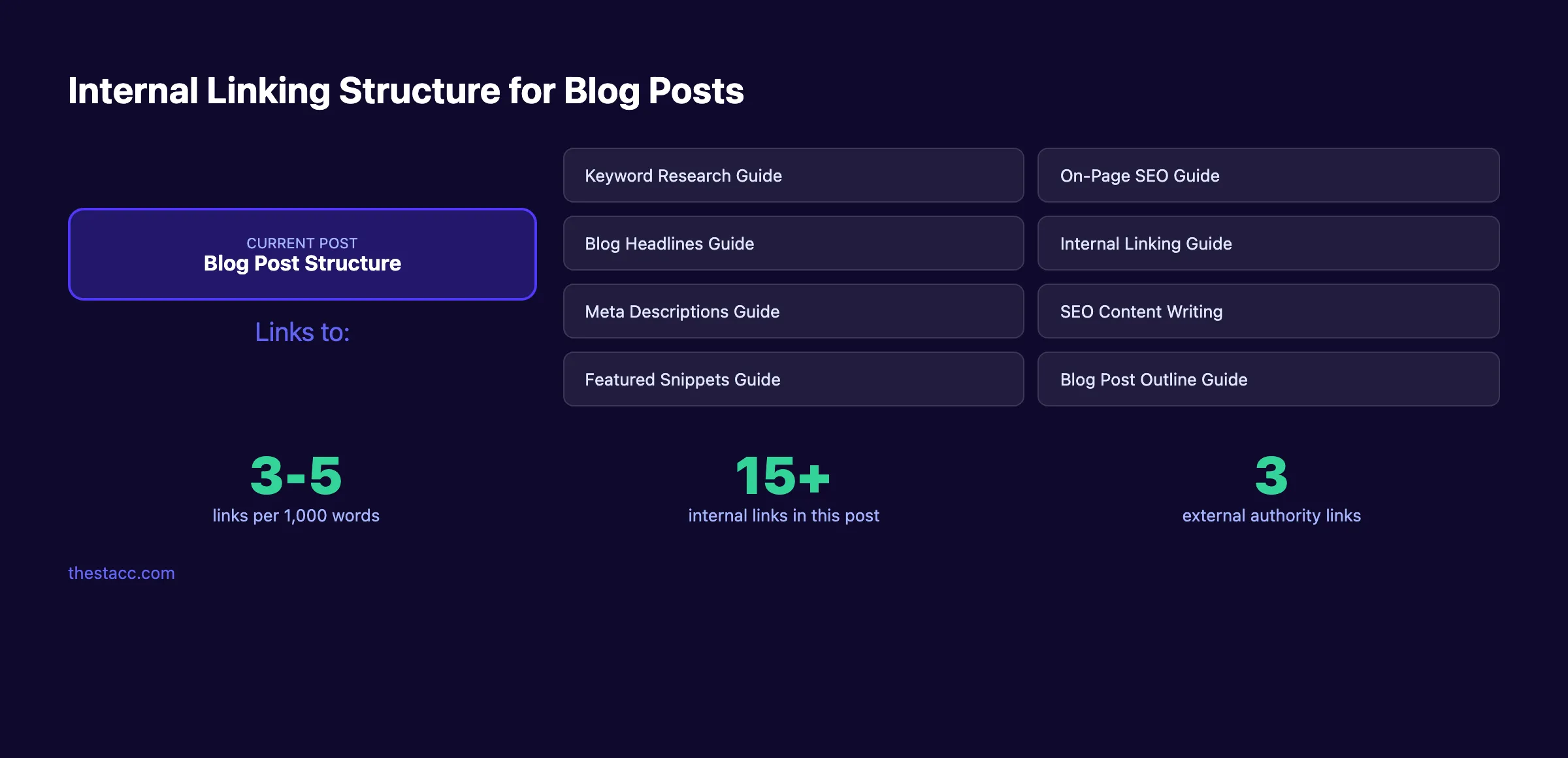
Internal links connect your blog post to other pages on your site. They pass authority. They build topical authority. And they keep readers on your site longer.
Internal linking rules:
- 3 to 5 internal links per 1,000 words
- Use descriptive anchor text ("keyword research for blog posts" not "click here")
- Link to pages that are genuinely relevant to the section topic
- Distribute links across the full article (not all in the introduction)
- Link to both blog posts and key pages (tools, pricing, guides)
For a complete strategy, read our internal linking for blog posts guide.
External Links
External links point to authoritative sources outside your site. They support your claims with evidence and signal to Google that your content is well-researched.
External linking rules:
- 2 to 3 external links minimum per post
- Link to specific pages with data (not homepages)
- Prioritize .edu, .gov, and recognized industry sources (Ahrefs, Semrush, Google docs)
- Do not link to direct competitors
Images and Media
Images break up text, illustrate concepts, and create additional ranking opportunities through Google Image Search.
Image rules:
- At least 1 image per 500 words
- Every image must have descriptive alt text (include the keyword in at least 1 alt tag)
- Use original images when possible (screenshots, diagrams, charts)
- Compress images to keep page speed fast (under 200KB per image)
- Name files descriptively:
heading-hierarchy-seo.pngnotIMG_4532.png
Why this step matters: Pages with strong internal linking rank higher. Google confirmed that internal links help with crawling and understanding site structure. External links build trust. Images increase engagement and reduce bounce rate.
Step 8: Optimize Meta Tags and URL Slug
Meta tags and your URL slug are the final structural elements. They do not appear in the blog post itself. But they control how your page appears in search results.
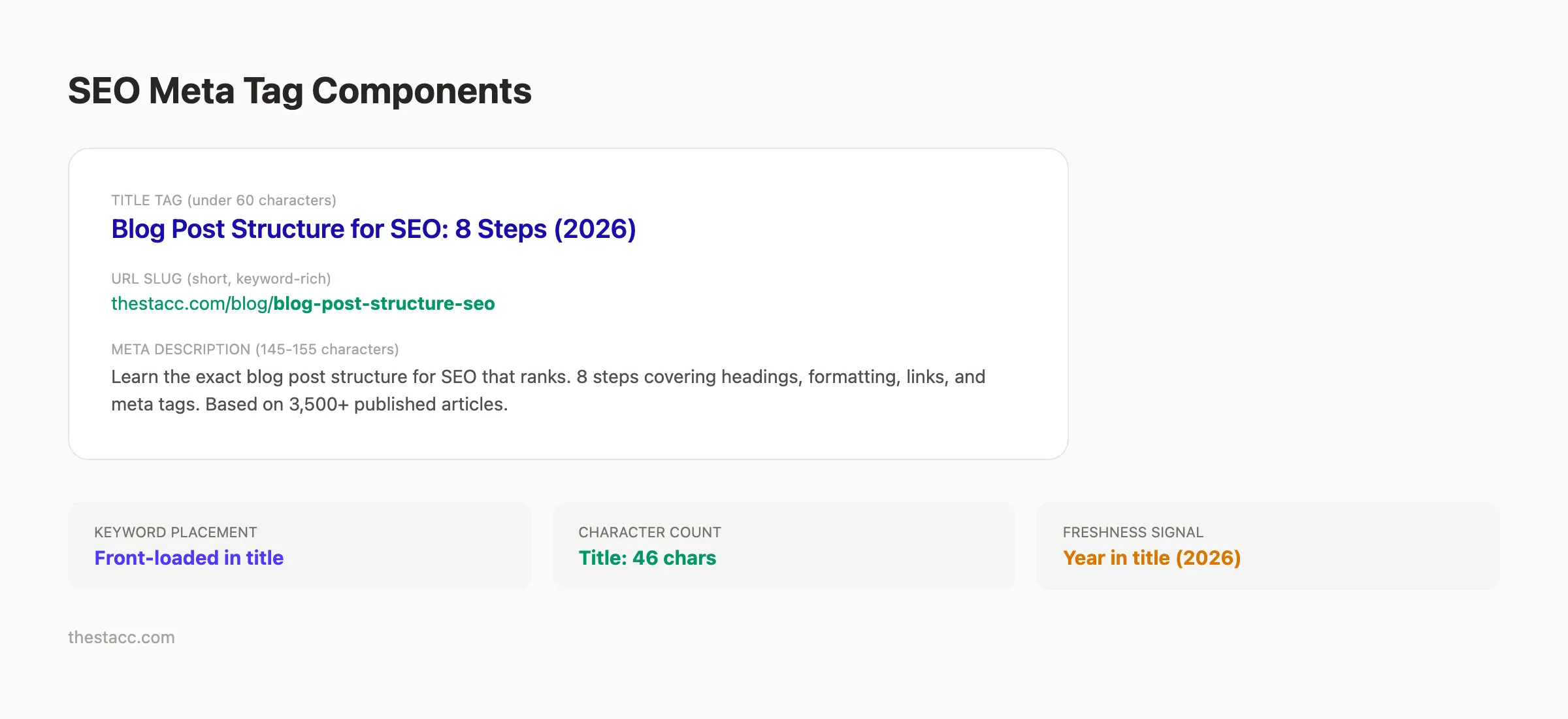
Title Tag
The title tag appears in the browser tab and the search results. It is often different from your H1.
Title tag rules:
- Under 60 characters
- Primary keyword near the front
- Include a benefit or number
- Add the year for evergreen content
Example: Blog Post Structure for SEO: An 8-Step 2026 Template
Meta Description
The meta description is the 2-line summary below your title in search results. Google does not always use it. But when it does, a strong description increases CTR.
For a complete walkthrough, see our guide on how to write meta descriptions.
Meta description rules:
- 145 to 155 characters
- Include the primary keyword
- State the benefit of clicking
- Add a freshness signal (year, "updated," specific data point)
Example: The blog post structure that ranks: 8 steps covering the title, intro, H2 hierarchy, formatting, internal links, schema, and meta tags. Updated 2026.
URL Slug
The URL slug is the last part of your page URL. It should be short, descriptive, and include the primary keyword.
Slug rules:
- Use hyphens between words
- Keep it under 5 words when possible
- Include the primary keyword
- Remove stop words (the, a, an, for, in)
| Element | Good Example | Bad Example |
|---|---|---|
| Title tag | Blog Post Structure for SEO: An 8-Step 2026 Template | How to Write Good Blog Posts |
| Meta description | Learn the exact blog post structure for SEO... | This article talks about blog structure |
| URL slug | /blog/blog-post-structure-seo | /blog/2026/03/how-to-structure-your-blog-posts-for-seo-rankings |
You can check all of these elements with our free on-page SEO checker.
Why this step matters: Meta tags are your ad copy in search results. A strong title tag and meta description can double your CTR without changing your ranking position. The URL slug gives Google another keyword signal.
Results: What to Expect
After implementing this 8-step structure across your blog posts, here are realistic outcomes:
- Immediate: Your posts will be more organized, easier to read, and properly optimized from day 1
- 30 to 60 days: Google crawls and indexes your structured content. Initial ranking improvements appear for lower-competition keywords.
- 90 to 180 days: Consistent publishing of well-structured posts builds topical authority. Higher-competition keywords start moving to page 1.
- 6 to 12 months: The compounding effect kicks in. Each new structured post strengthens your entire site. This is the Content Compound Effect in action.
Do not expect overnight results. SEO compounds over time. But the structure you build today is the foundation for every future ranking.
For a detailed breakdown of timelines, read how many blog posts you need to rank.
Blog Post Structure Checklist
Use this checklist every time you publish a new post:
- ✓ One primary keyword selected and validated
- ✓ Search intent mapped (SERP analysis complete)
- ✓ H1 title under 60 characters with primary keyword
- ✓ Heading hierarchy follows H1 > H2 > H3 (no skipped levels)
- ✓ Primary keyword in first 100 words
- ✓ Introduction under 200 words with PASBA framework
- ✓ Body paragraphs 1 to 3 sentences max
- ✓ At least 1 table in the post
- ✓ At least 1 image per 500 words with alt text
- ✓ 3 to 5 internal links per 1,000 words
- ✓ 2 to 3 external links to authoritative sources
- ✓ Meta description 145 to 155 characters with keyword
- ✓ URL slug is short and contains the keyword
- ✓ Primary keyword in at least 1 image alt text
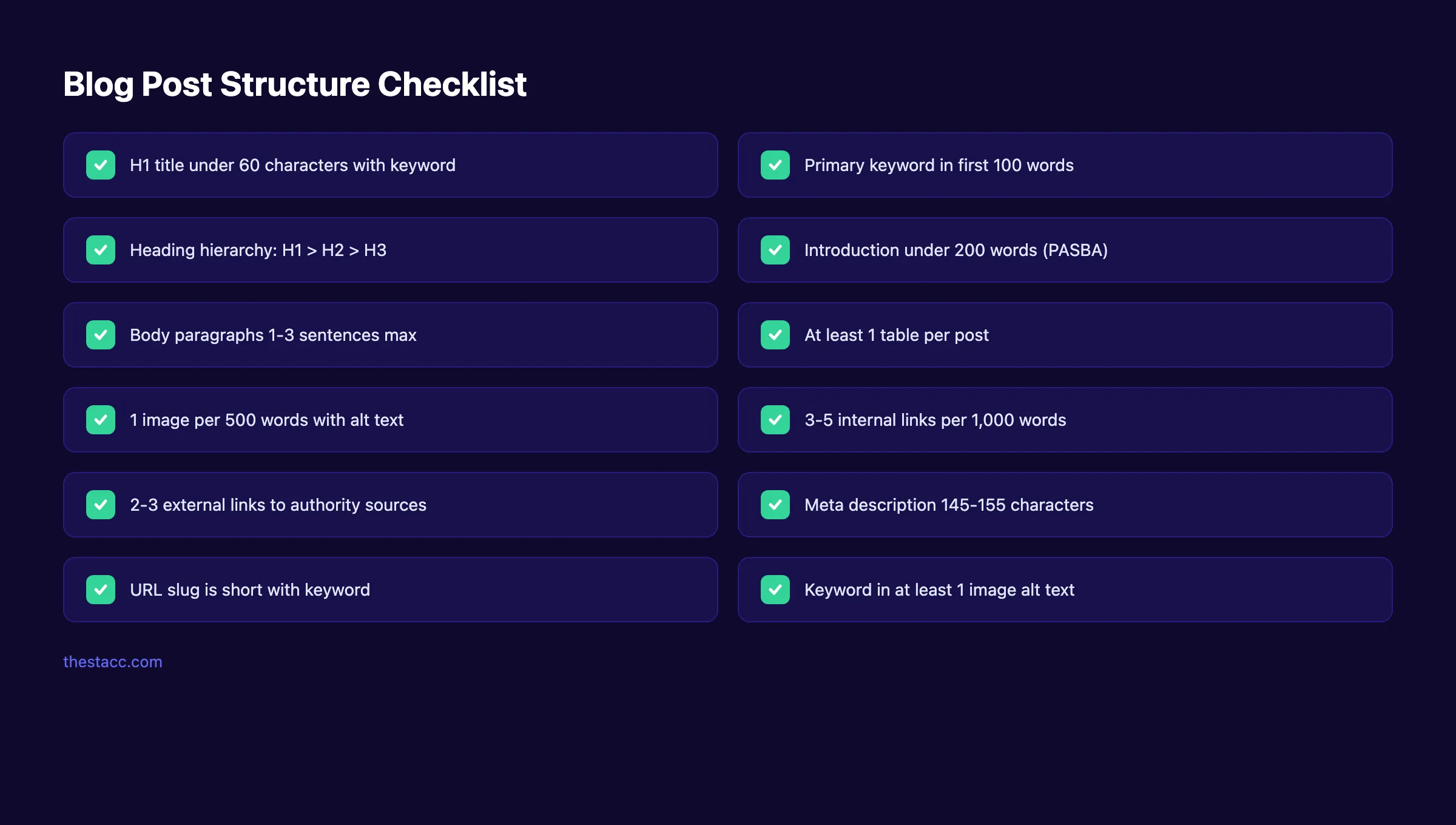
Tired of checking all these boxes manually? theStacc handles blog post structure, optimization, and publishing for you. 92% average SEO score. Zero effort on your part.
What practitioners are saying on X
AI search advice ages quickly. Here is high-signal public discussion from SEO and growth operators — context for your roadmap, not a substitute for primary data.
- @varunram (Jul 2026): Critique of GEO slopfarm products that combine SEO clickbait with unresearched content marketing — quality and research still separate winners from farms. See the post on X.
- @jakezward (Feb 2026): 2026 SEO predictions emphasize AI Overview share-of-SERP, schema for LLM token efficiency, brand mentions in AI answers as a KPI, proprietary data as a moat, and content refresh beating net-new AI slop. See the post on X.
- @HlynurStefDev (Jul 2026): Public case: niche site traffic jumped from ~18 to 4,162 Google visits/month after focused technical/on-page SEO work (GSC screenshots claimed) — reminds that fundamentals still move numbers. See the post on X.
Grok, AI Overviews, and multi-engine visibility
Content topics like “blog post structure seo” get AI citations when process steps, quality bars, and examples are concrete. Operator consensus on X is clear: research-backed pages beat unedited bulk generation — reflect that honestly.
- Google AI Overviews: Use passage-ready answers, tables, and FAQ schema where relevant.
- ChatGPT / Perplexity: Cite named sources next to key claims.
- Grok: Maintain accurate entity facts on-site and in high-signal X posts.
Publish content built for Google and AI citations. theStacc’s Content SEO module ships SEO-scored articles structured for rankings and generative engines — including clearer entity pages models like Grok can quote.
Frequently Asked Questions
The best structure follows a clear pattern: one H1 with the primary keyword, 5 to 10 H2 sections covering distinct subtopics, an answer-first introduction, scannable body sections with short paragraphs, internal and external links, and optimized meta tags. This structure helps Google understand your content and helps readers find answers fast. Follow the 8 steps in this guide for a repeatable framework.
There is no magic number. The right length depends on search intent and competition. Top-ranking pages for competitive keywords average 1,500 to 2,500 words. Long-form content over 3,000 words earns 3 times more backlinks than shorter posts. Match or exceed the word count of the top 5 results for your target keyword.
Aim for 5 to 10 H2 headings per post. Each H2 should cover a distinct subtopic related to your primary keyword. Use H3 headings when an H2 section needs subsections. Avoid using more than 3 H3s under a single H2. Too many headings fragment your content. Too few make it a wall of text.
No. Place your primary keyword in the H1 and at least 1 H2. Use secondary keywords and natural variations in other headings. Keyword stuffing in headings makes your content look spammy and can trigger Google penalties. Write headings for readers first, search engines second.
Featured snippets pull from clearly structured content. Use a heading that matches the search query (H2 or H3). Follow it immediately with a direct answer in 40 to 60 words. Use tables, numbered lists, or definition-style paragraphs. Our guide on getting featured snippets covers the full process.
Yes. Formatting affects user engagement metrics like dwell time and bounce rate. Short paragraphs, bullet lists, bold text, tables, and images all keep readers on the page longer. Pages with higher engagement tend to rank better. Google does not rank formatting directly, but the behavioral signals it creates matter.
Structure is not a creative constraint. It is a ranking advantage.
Every blog post you publish with proper structure compounds your site authority, earns more traffic, and moves you closer to page 1. The 8 steps in this guide work for any industry, any topic, and any business size.
Start with Step 1. Pick your keyword. Build the structure. Publish.
Want this done for you? theStacc plans, writes, and publishes SEO-optimized blog posts straight to your CMS. Every article follows the structure outlined in this guide.
Related Tools & Resources
Free SEO Tools:
Best Lists:
Sources & references
- [1] Princeton / Georgia Tech et al. — GEO research (arXiv:2311.09735)
- [2] @varunram on X — Critique of GEO slopfarm products that combine SEO clickbait with unresearched content marketing — quality and research
- [3] @jakezward on X — 2026 SEO predictions emphasize AI Overview share-of-SERP, schema for LLM token efficiency, brand mentions in AI answers
- [4] @HlynurStefDev on X — Public case: niche site traffic jumped from ~18 to 4,162 Google visits/month after focused technical/on-page SEO work (G
- [5] Referenced source — ahrefs.com

Plan topics, review article drafts, and publish to a connected CMS.
Weekly local SEO teardowns
One practical email a week. Map Pack, GBP, AI Overviews — no fluff. Unsubscribe anytime.
Explore this topic: Blog Post.