Build an autonomous AI SEO agent using Claude Code and MCP servers. Step-by-step setup with Google Search Console, DataForSEO, and real workflows.
An AI SEO agent built with Claude Code and MCP servers connects the model directly to your own data sources, so it can pull Search Console numbers, check rankings, and audit pages without a separate subscription. This guide covers the server setup, the tools worth wiring up, and the workflows that pay for themselves.
Most SEO professionals spend 60% of their week on tasks a machine could handle. Pulling keyword data from one tool, checking rankings in another, and exporting Google Search Console reports into a spreadsheet that no one reads. The work is repetitive, fragmented, and expensive.
An AI SEO agent built with Claude Code and MCP servers changes that equation entirely. Instead of buying a $200 per month tool that wraps the same APIs you already own, you connect Claude Code directly to your data sources. The agent reads your Search Console data, queries competitor rankings, audits your site structure, and writes the fix. All from a single terminal window.
We have published 3,500+ SEO articles across 70+ industries. In that process, we have built and tested dozens of agentic workflows. This guide covers the exact setup we use to run SEO audits, keyword research, and content optimization through Claude Code with MCP integrations.
Here is what you will learn:
- What an AI SEO agent is and why Claude Code plus MCP is the right stack
- How to install Claude Code and configure MCP servers for SEO data
- The exact MCP servers you need: Google Search Console, DataForSEO, and site crawlers
- How to build a repeatable SEO audit workflow that runs in minutes
- How to automate keyword research, content briefs, and on-page optimization
- The limitations of AI SEO agents and what still requires human judgment
What Is an AI SEO Agent and Why Claude Code Plus MCP?
An AI SEO agent is an autonomous system that connects an AI model to live SEO data sources, executes multi-step workflows, and produces actionable output without human intervention at every step. It is not a chatbot that answers SEO questions. It is a system that performs SEO tasks.
The difference matters. A chatbot tells you what to do. An agent does it. It pulls your Search Console data, identifies pages with declining clicks, checks competitor rankings for those queries, generates a content refresh plan, and writes the updated meta descriptions. The human reviews the output and approves. The machine does the work.
Claude Code is Anthropic's command-line AI agent. It runs in your terminal, reads your project files, executes commands, and connects to external services through MCP servers. Unlike a web chat interface, Claude Code can write files, run scripts, and chain operations together in a single session.
MCP stands for Model Context Protocol. It is an open standard that lets AI assistants connect directly to external tools and data sources. Think of it as a universal adapter. An MCP server exposes your Google Search Console data, your Semrush account, or your site crawl results as tools that Claude Code can call automatically.
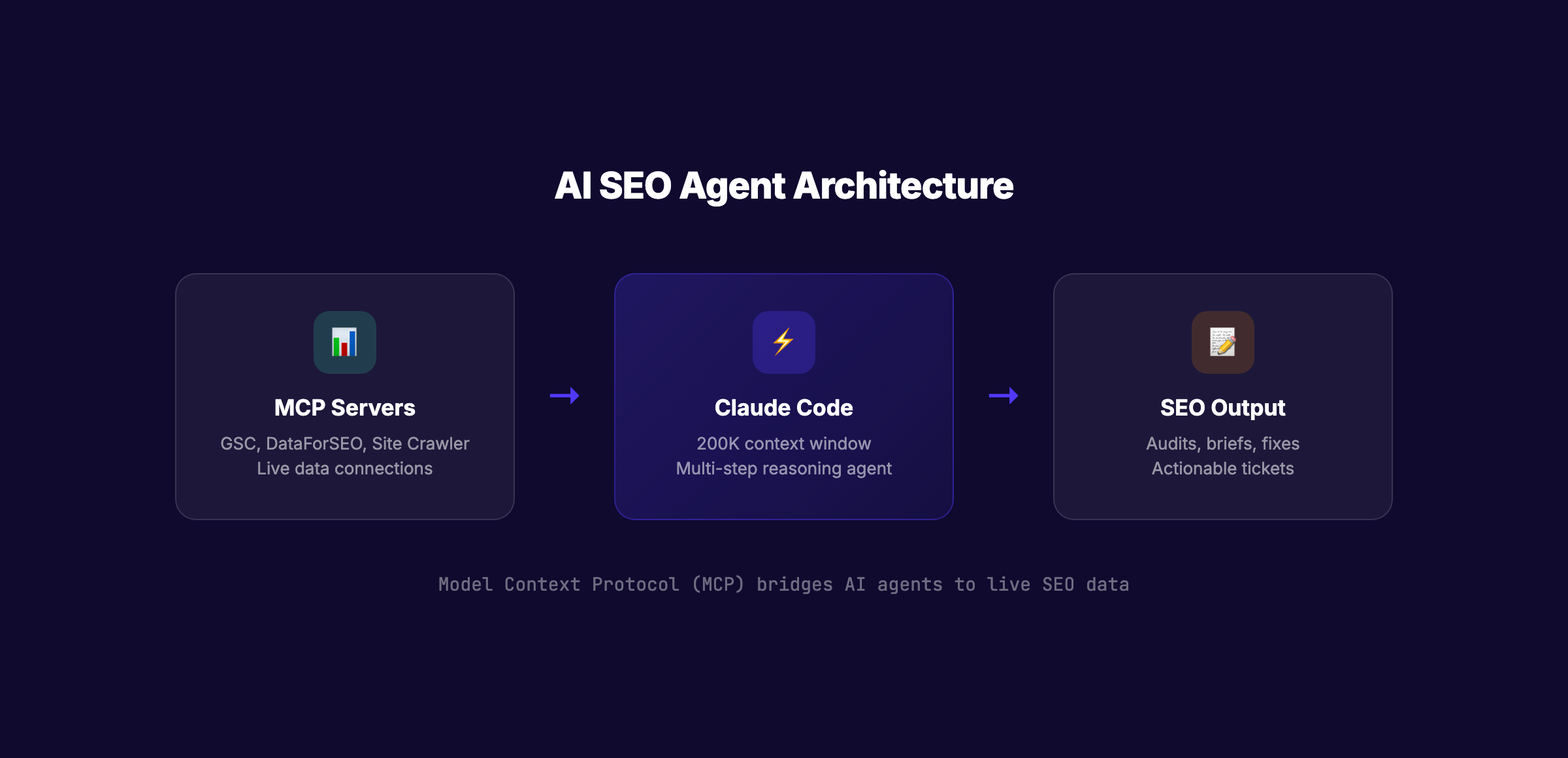
The combination is powerful for three reasons.
First, Claude Code has a 200,000 token context window. That means it can process an entire site audit, a full keyword export, or a complete content brief in a single conversation. No more copying and pasting chunks of data into a chat box.
Second, MCP servers give Claude access to live data, not static exports. When you ask "show me pages with declining clicks over the last 14 days," Claude queries your Search Console in real time through the MCP connection. The answer is current, not from last week's CSV download.
Third, the entire workflow is repeatable. Once you build an audit script or a content brief template, you save it as a Claude Skill. Next month, you run the same command and get an updated report. The agent remembers your site structure, your brand voice, and your priorities.
According to a 2026 Gartner report, 60% of brands will use agentic AI for customer interactions by 2028. SEO is following the same trajectory. The teams that build agentic workflows now will operate at 3× the output of teams still working tool-to-tool.
Stop switching between 5 tools to answer one SEO question. Claude Code with MCP connects your Search Console, rank tracker, and site crawler into a single interface. Most teams cut their SEO reporting time by 70% in the first week. See how theStacc automates SEO workflows
What You Need Before You Start
This guide assumes you have basic familiarity with the command line and a working knowledge of SEO concepts. You do not need to be a developer. Every command is copy-and-paste ready.
Here is what you need:
| Requirement | Purpose | Cost |
|---|---|---|
| Claude Code CLI | The AI agent that runs your workflows | $20/month (Claude Pro) or $100/month (Max) |
| Node.js 18+ | Required to run Claude Code and MCP servers | Free |
| Google Search Console access | Your site's real search performance data | Free |
| DataForSEO API key | Keyword volume, SERP data, and competitor analysis | Pay-as-you-go (~$0.001 per query) |
| A code editor (VS Code recommended) | To edit configuration files | Free |
The total monthly cost for this setup is approximately $20 to $30. Compare that to Ahrefs ($99/month), Semrush ($119/month), or an SEO agency ($2,000+/month). The economics are not close.
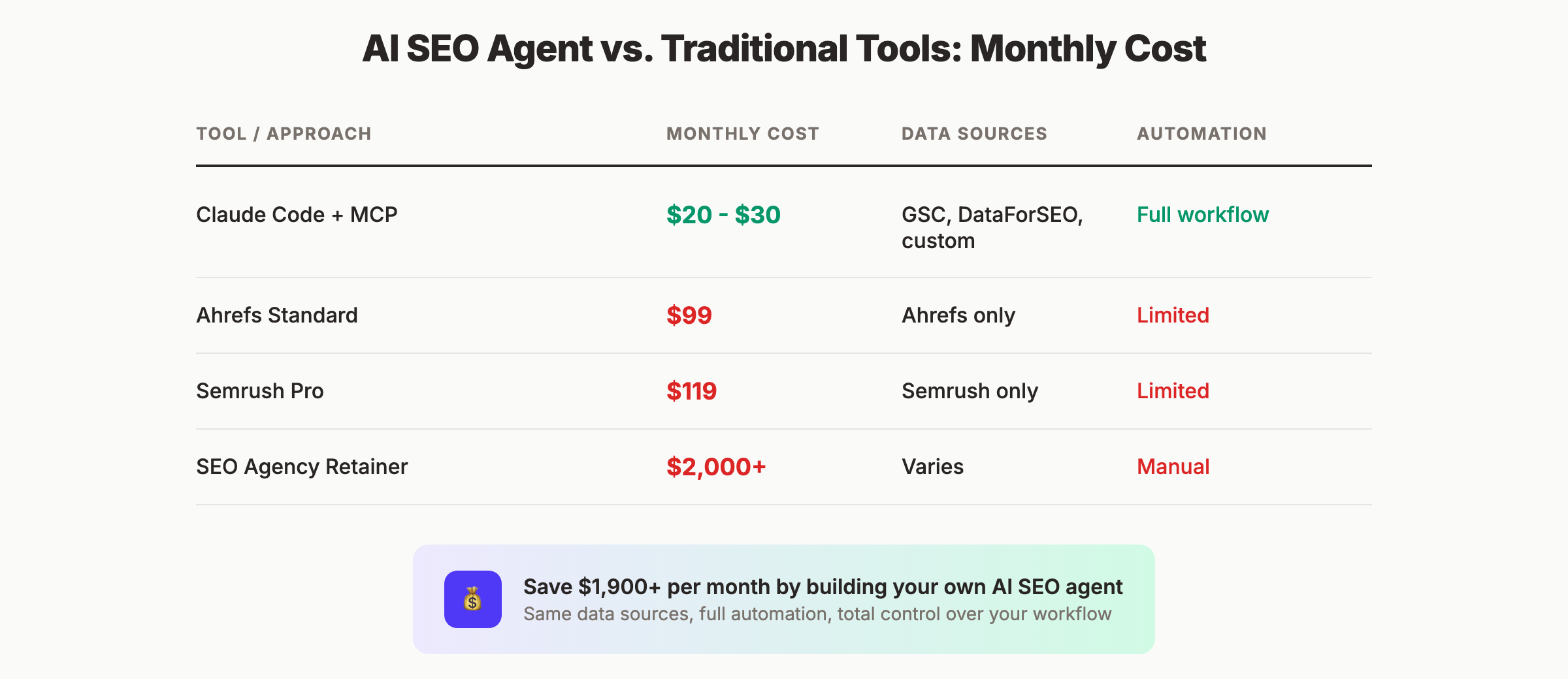
Time to complete this guide: 45 to 60 minutes for initial setup, 15 minutes per audit once configured.
Difficulty: Intermediate. No coding required, but you will edit JSON configuration files and run terminal commands.
Step 1: Install Claude Code and Verify Your Setup
Claude Code is a command-line tool that brings Claude directly into your development workflow. It is available for macOS, Linux, and Windows (via WSL).
Specifically:
- Install Node.js 18 or higher if you do not have it already
- Install Claude Code using npm:
npm install -g @anthropic-ai/claude-code - Run
claudein your terminal to start the interactive session - Authenticate with your Anthropic account when prompted
After installation, verify everything works by running a simple command. Type claude in your terminal, then ask: "What files are in this directory?" Claude should list the files in your current folder. This confirms the CLI is installed and authenticated correctly.
Why this step matters: If Claude Code is not installed correctly, nothing that follows will work. The MCP servers connect to Claude Code, not to a web browser. A broken installation here means a broken pipeline later.
Pro tip: Create a dedicated folder for your SEO agent project. Something like ~/seo-agent/. All your configuration files, audit outputs, and content briefs will live here. Keeping everything in one place makes the agent more effective because Claude Code can read and reference files across your project.
Step 2: Install and Configure MCP Servers for SEO Data
MCP servers are the bridge between Claude Code and your SEO tools. Each server exposes a set of tools that Claude can call. For SEO work, you need three MCP servers minimum: Google Search Console, DataForSEO, and a site crawler.
Google Search Console MCP Server
The GSC MCP server lets Claude query your search performance data in real time. You can ask natural language questions like "show me top queries by CTR for the past 28 days" and Claude will fetch the data directly from your Search Console account.
Specifically:
- Install the GSC MCP server:
npx -y @anthropic-ai/mcp-installeror clonegithub.com/ahonn/mcp-server-gsc - Create a Google Cloud project and enable the Search Console API
- Generate OAuth credentials or a service account key
- Add the MCP server configuration to your Claude Code settings
The server supports up to 25,000 rows of performance data per query, regex filtering, and automatic quick-win detection. It is read-only, so there is no risk of Claude accidentally modifying your Search Console data.
For a complete walkthrough of the GSC MCP setup, including OAuth configuration and service account creation, see our dedicated guide: How to Connect GSC to Claude via MCP.
DataForSEO MCP Server
DataForSEO provides keyword volume, SERP analysis, backlink data, and competitor intelligence. Their MCP server connects all of that to Claude Code.
Specifically:
- Sign up for a DataForSEO account at dataforseo.com
- Generate API credentials from your dashboard
- Install the DataForSEO MCP server following their documentation
- Add your API credentials to the MCP configuration file
DataForSEO uses a pay-as-you-go model. Most SEO queries cost between $0.001 and $0.01. A full keyword research session for 100 keywords costs less than $1.
Site Crawler MCP Server
For technical SEO audits, you need a crawler that can scan your site and report issues. Several options exist:
- Screaming Frog MCP wrapper: If you already own Screaming Frog, you can wrap its CLI output for Claude
- Custom Python crawler: Build a lightweight crawler with
requestsandBeautifulSoup - Sitebulb MCP integration: Available for Sitebulb users
For most users, a simple Python crawler is sufficient. Create a file called crawler.py in your project folder that fetches a URL, extracts the title, meta description, H1, and status code, and returns the results as JSON. Claude Code can run this script on demand.
Why this step matters: Without MCP servers, Claude Code has no access to your data. It is just a chatbot. The MCP connection is what transforms Claude from a conversational AI into an SEO agent that can act on real information.
Pro tip: Test each MCP server individually before combining them. Ask Claude to "show my top 10 queries from Search Console" and verify the data comes back correctly. Then test DataForSEO with "what is the search volume for [your target keyword]." Only after each server works independently should you build multi-step workflows.
Step 3: Build Your First SEO Audit Workflow
With Claude Code and MCP servers installed, you can now build a repeatable SEO audit workflow. This workflow will become your template for every site you manage.
The audit has three phases: technical foundation, content quality, and topical authority. Each phase uses a different MCP server or tool.
Phase 1: Technical Foundation Audit
Start by asking Claude to crawl your site and identify technical issues.
Prompt: "Crawl https://example.com and check for: missing title tags, duplicate meta descriptions, pages with no H1, 404 errors, and redirect chains. Return the results as a table with URL, issue type, and severity."
Claude will run your crawler script, analyze the output, and present a prioritized table. The agent can also generate the fix. Ask: "Write the .htaccess rules to fix the redirect chains" or "Generate the missing meta descriptions for these pages."
Phase 2: Content and E-E-A-T Quality Audit
Next, connect your Search Console data to identify content issues.
Prompt: "From my Search Console data, show me pages with impressions above 1,000 but CTR below 2% in the last 28 days. For each page, suggest a title tag and meta description improvement."
This query finds pages that show up in search results but no one clicks. The fix is almost always the title tag or meta description. Claude can rewrite both, preserving your target keywords while making them more compelling.
Phase 3: Topical Authority Map
Finally, use DataForSEO to map your content gaps against competitors.
Prompt: "Using DataForSEO, find the top 20 keywords my competitor ranksfor.com ranks for that I do not. Filter for keywords with volume above 500 and difficulty below 40. Group them by topic cluster."
Claude returns a list of keyword clusters your competitor owns and you do not. Each cluster becomes a content brief. The agent can even write the briefs.
Why this step matters: Most SEO audits die in a PDF. An agentic audit produces tickets. Every issue Claude finds comes with a specific fix, a priority level, and sometimes the actual code or copy to implement it. The gap between "we found a problem" and "here is the fix" collapses to zero.
Your SEO audit should not end with a report. It should end with a to-do list. Claude Code generates both: the findings and the fixes. Most audits that used to take 4 hours now finish in 20 minutes. See how theStacc runs automated SEO audits
Step 4: Automate Keyword Research and Content Briefs
Keyword research is the most time-consuming part of content planning. An AI SEO agent reduces it from hours to minutes.
The Keyword Research Workflow
Step A: Seed keyword expansion
Ask Claude: "Using DataForSEO, expand my seed keyword [topic] into 50 long-tail variations. Include search volume, keyword difficulty, and CPC for each. Filter out anything with volume below 100 or difficulty above 50."
Claude returns a structured table. No more exporting from one tool and filtering in Excel.
Step B: SERP analysis
Prompt: "For the top 10 keywords from the list above, pull the current SERP top 5. For each result, extract the title, word count, content type, and dominant angle. Identify the content gap: what is no one covering?"
Claude analyzes the SERP data and identifies angles your competitors missed. This is where the agent adds real strategic value. It does not just collect data. It interprets it.
Step C: Content brief generation
Prompt: "Create a content brief for [target keyword]. Include: target word count, H2 structure, must-answer questions from People Also Ask, internal link suggestions, and a unique angle based on the SERP gap analysis."
Claude generates a complete brief in under 2 minutes. The brief includes everything a writer needs: structure, angle, questions to answer, and links to include.
Making It Repeatable
Save this workflow as a Claude Skill. Create a file called keyword-research.md in your project folder with the full prompt sequence. Next time you need keyword research, type claude and say "run the keyword research workflow for [new topic]." The agent follows the same steps every time.
For a deeper dive into building MCP servers that connect your marketing data, see our guide: Build an MCP Server for Marketing in 7 Steps.
Why this step matters: Keyword research is where most content strategies stall. The research takes too long, the data lives in too many places, and the insights get lost in translation between researcher and writer. An agentic workflow compresses the entire pipeline into one session with one consistent output format.
Step 5: Automate On-Page Optimization and Content Refresh
Existing content is your fastest path to more traffic. An AI SEO agent can identify refresh candidates and execute the updates.
Finding Refresh Candidates
Prompt: "From my Search Console data, show me pages where clicks declined more than 20% month-over-month. For each page, check if the content is older than 12 months. Return a prioritized list of refresh candidates."
Claude identifies pages that lost traffic and are due for an update. The agent can then:
- Check the current word count and compare it to the SERP average
- Identify new questions from People Also Ask that the original article does not answer
- Suggest new sections, updated statistics, and expanded coverage
- Rewrite the introduction to match current search intent
Executing the Refresh
Prompt: "Refresh the article at [URL]. Add 3 new H2 sections covering [topic 1], [topic 2], and [topic 3]. Update all statistics to 2026. Expand the conclusion with a clear next step. Keep the existing URL and target keyword."
Claude reads the current article, plans the changes, and writes the updated version. You review and publish. The entire process takes 15 minutes per article instead of 2 hours.
Schema Markup Generation
One of the most powerful agentic tasks is schema markup. Claude can read a page, identify the content type, and generate the correct JSON-LD schema.
Prompt: "Generate FAQPage schema for this article. Extract 5 questions and answers from the content. Return the JSON-LD block."
Claude produces valid schema markup that you paste into your page header. No more schema generators or manual JSON editing.
Why this step matters: Content refresh is the highest-ROI SEO activity most teams ignore. It is faster than writing new content, it targets keywords you already rank for, and it compounds over time. An agent that automates refresh identification and execution turns a quarterly backlog into a weekly habit.
Step 6: Build a Monthly Reporting Loop
One-time audits are useful. Monthly loops are transformative. The final step is building a reporting workflow that runs on a schedule.
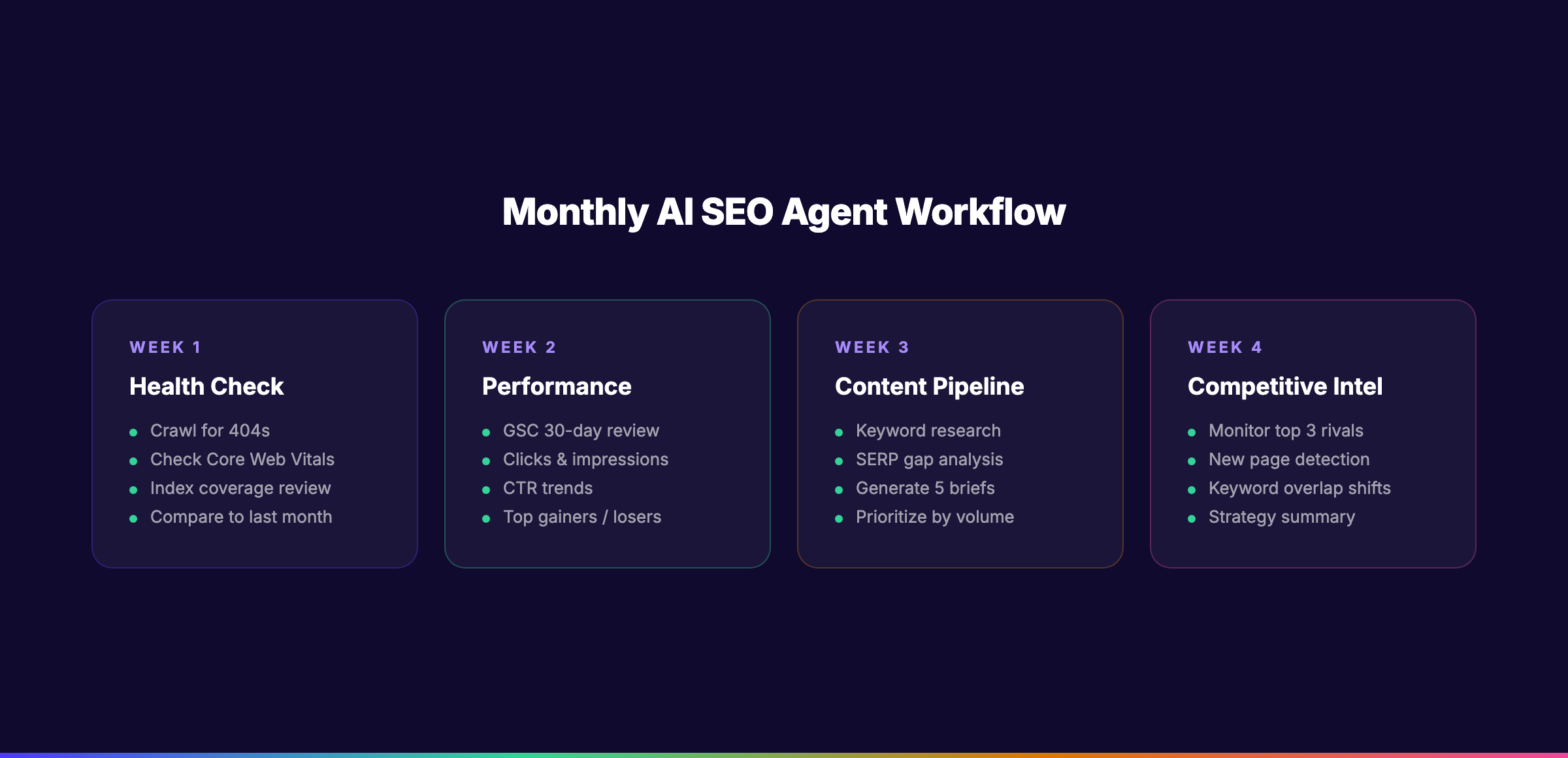
The Monthly SEO Report Workflow
Week 1: Health check
Prompt: "Run a technical health check on my site. Check for new 404s, crawl errors, Core Web Vitals changes, and index coverage issues. Compare to last month's results and highlight new problems."
Week 2: Performance review
Prompt: "Pull my Search Console data for the last 30 days. Compare to the previous 30 days. Show me: total clicks, total impressions, average CTR, average position, top 10 gaining queries, top 10 losing queries."
Week 3: Content pipeline
Prompt: "Run the keyword research workflow for my next content batch. Generate 5 content briefs for keywords with volume above 500 and difficulty below 45."
Week 4: Competitive monitoring
Prompt: "Using DataForSEO, check my top 3 competitors. Identify any new pages they published that rank for keywords I target. Summarize their content strategy changes."
Scheduling the Loop
Claude Code does not have built-in scheduling, but you can automate the trigger. Options include:
- Cron jobs: Schedule a shell script that runs
claudewith a pre-written prompt - GitHub Actions: Trigger a workflow that runs Claude Code in a CI environment
- Make.com or n8n: Use a no-code automation tool to trigger Claude Code via API
For most teams, a simple weekly reminder in your calendar with a link to your saved prompts is sufficient. The real automation is in the prompt, not the trigger.
Why this step matters: SEO is not a one-time project. It is a continuous process. An agentic workflow that runs monthly keeps your site healthy, your content fresh, and your competitive intelligence current. The teams that treat SEO as a system, not a campaign, are the ones that win long term.
SEO is a system, not a campaign. An AI SEO agent turns that system into a repeatable process that runs every week without your direct involvement. The best teams spend their time on strategy, not spreadsheets. Explore theStacc's automated content system
What an AI SEO Agent Cannot Do (The Honest Limitations)
No tool replaces judgment. An AI SEO agent is powerful, but it has clear boundaries.
Strategy and brand voice. The agent can suggest what to write. It cannot decide what your brand should sound like. It cannot weigh the strategic importance of ranking for one keyword versus another. Those decisions require human context about business goals, competitive positioning, and customer relationships.
Real experience and expertise. Google's E-E-A-T guidelines emphasize experience. An AI agent has never used your product, visited your location, or talked to your customers. It can research and synthesize. It cannot generate genuine first-hand insight. Content that claims expertise without backing it up gets flagged by both readers and search engines.
Link building relationships. The agent can identify link opportunities and even draft outreach emails. It cannot build relationships with journalists, bloggers, and industry partners. Link building is still a human game of trust and reciprocity.
Validation and fact-checking. AI models hallucinate. They cite statistics that do not exist and recommend tactics that violate Google's guidelines. Every output from your agent requires human review. The agent is a draft writer, not a publisher.
JavaScript-rendered and gated content. Most simple crawlers cannot execute JavaScript or bypass authentication. If your site is a single-page application or has gated content, the agent's crawl data will be incomplete. You may need a more sophisticated crawling setup.
According to Search Engine Land's analysis of Claude Code for SEO, the most effective use of AI agents is as an "operator" for multi-step workflows, not a replacement for strategic thinking. The agent handles execution. You handle direction.
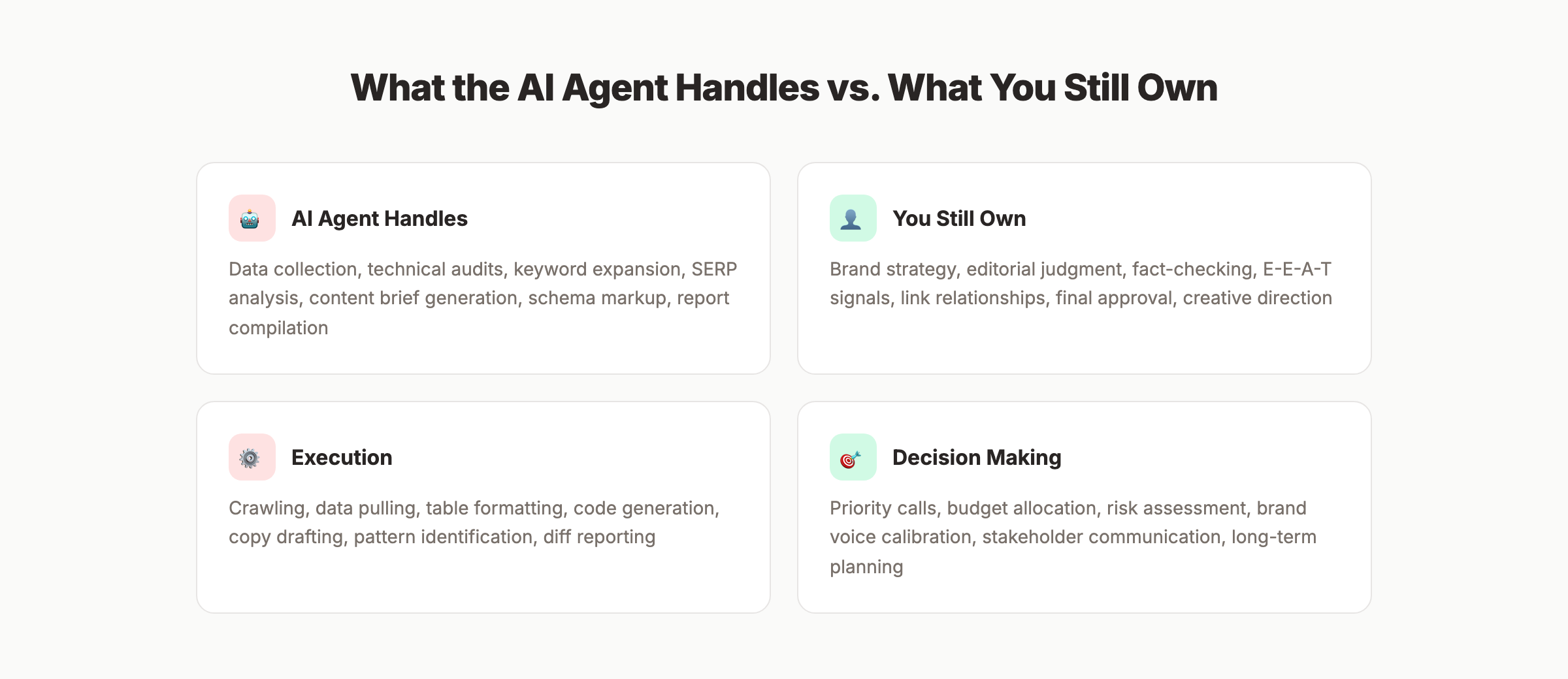
Why this matters: Understanding limitations prevents disappointment and bad decisions. Teams that treat AI agents as magic wands end up publishing inaccurate content and making technical mistakes. Teams that treat agents as force multipliers for skilled practitioners get the best results.
Troubleshooting Common Setup Problems
Even with clear instructions, things go wrong. Here are the three most common problems and their fixes.
Problem: MCP server not found by Claude Code
Solution: Check your MCP configuration file (usually ~/.config/claude/mcp.json or similar). Verify the server path is correct and the server executable has the right permissions. Restart Claude Code after any configuration change.
Problem: Google Search Console data returns empty results
Solution: Confirm your OAuth credentials have the correct scopes. The GSC MCP server needs https://www.googleapis.com/auth/webmasters.readonly access. If using a service account, verify the account has been added as a user in your Search Console property.
Problem: DataForSEO queries time out or return errors
Solution: Check your API credit balance. DataForSEO returns errors when credits are depleted. Also verify your API credentials are correctly formatted in the MCP configuration. The login and password must match your DataForSEO dashboard exactly.
Results: What to Expect After Building Your AI SEO Agent
After completing this guide, you should expect the following outcomes:
- Technical audits complete in 15 to 20 minutes instead of 2 to 4 hours
- Keyword research for 50 keywords finishes in under 5 minutes instead of 45 minutes
- Content briefs generate in 2 minutes each with consistent structure and SERP-informed angles
- Monthly SEO reports compile automatically from live data, not stale exports
- Content refresh identification happens weekly instead of quarterly
The real benefit is not speed alone. It is consistency. An agentic workflow produces the same quality output every time. No more "this researcher is better than that one." No more forgotten steps. The process is documented, repeatable, and improvable.
Most teams see a 50% to 70% reduction in SEO reporting and research time within the first month. That time gets reinvested into strategy, creative work, and relationship building. The activities that actually move rankings.
Conclusion
Building an AI SEO agent with Claude Code and MCP servers is not about replacing SEO professionals. It is about removing the repetitive work that consumes most of their week.
The setup takes under an hour. The return is a system that audits your site, researches keywords, generates content briefs, and monitors competitors on a schedule you control. The human still makes the strategic decisions. The agent handles the execution.
The teams that adopt agentic SEO workflows now will have a structural advantage. They will publish more content, refresh more pages, and catch more technical issues than teams working manually. The gap will widen every month.
Which step will you start with: installing Claude Code, connecting your first MCP server, or building your audit workflow?
Ready to automate your entire SEO content pipeline? theStacc handles keyword research, content writing, on-page optimization, and publishing on autopilot. No MCP setup required. Learn how theStacc works
What practitioners are saying on X
Systems and fundamentals still move numbers; AI search adds measurement layers.
- @jakezward (Feb 2026): 2026 SEO predictions emphasize AI Overview share-of-SERP, schema for LLM token efficiency, brand mentions in AI answers as a KPI, proprietary data as a moat, and content refresh beating net-new AI slop. See the post on X.
- @hridoyreh (Mar 2026): Widely shared SEO skill tree: foundations, research, technical, on-page, content, links, AI SEO/GEO, analytics, UX, brand, programmatic — useful map for stats and how-to posts. See the post on X.
- @HlynurStefDev (Jul 2026): Public case: niche site traffic jumped from ~18 to 4,162 Google visits/month after focused technical/on-page SEO work (GSC screenshots claimed) — reminds that fundamentals still move numbers. See the post on X.
Grok, AI Overviews, and multi-engine visibility
AI/search topics like “build ai seo agent claude mcp” need multi-engine notes: AI Overviews, ChatGPT/Perplexity, and Grok. Lead with extractable answers; keep claims consistent with public expert discussion.
- Google AI Overviews: Use passage-ready answers, tables, and FAQ schema where relevant.
- ChatGPT / Perplexity: Cite named sources next to key claims.
- Grok: Maintain accurate entity facts on-site and in high-signal X posts.
Publish content built for Google and AI citations. theStacc’s Content SEO module ships SEO-scored articles structured for rankings and generative engines — including clearer entity pages models like Grok can quote.
Frequently Asked Questions
Claude Code is a command-line tool that runs in your terminal. It can read files, execute commands, and connect to external services through MCP servers. Regular Claude is a web chat interface. Claude Code is designed for workflows that involve files, code, and external data. For SEO work, Claude Code is the better choice because it can run scripts, save outputs, and chain operations together.
No. This guide uses copy-and-paste commands for every step. You will edit JSON configuration files and run terminal commands, but you do not need to write code from scratch. If you can follow a WordPress plugin installation guide, you can follow this setup.
The minimum cost is approximately $20 per month for Claude Pro plus DataForSEO API usage. Most SEO teams spend $5 to $15 per month on DataForSEO credits. The total is under $40 per month. Compare that to Ahrefs ($99/month), Semrush ($119/month), or an agency retainer ($2,000+/month).
Partially. An AI SEO agent with MCP can replace the data collection and analysis functions of most SEO tools. It cannot fully replace rank tracking history, backlink monitoring over time, or competitive intelligence dashboards. Many teams use the agent for audits and research while keeping one paid tool for historical data.
Yes. The Google Search Console MCP servers referenced in this guide are read-only. They cannot modify your Search Console data, submit URLs, or change settings. They only query performance and index data. Always verify the permissions of any MCP server before installation.
AI agents can hallucinate and produce incorrect analysis. Every output requires human review before implementation. The agent is a draft writer and researcher, not a publisher. Always verify technical recommendations against Google's documentation and test changes in a staging environment before pushing to production.
Yes. The MCP ecosystem is growing rapidly. Servers exist for Google Analytics, Semrush, Ahrefs, Screaming Frog, Webflow, WordPress, and dozens of other tools. Any service with an API can potentially have an MCP server. Check the official MCP server registry for the latest list.
Save your prompts as Claude Skills. Create a SKILL.md file in your project folder with your audit prompts, research workflows, and content brief templates. Claude Code discovers these automatically and can run them on command. You can also save prompt sequences as shell scripts or use automation tools like Make.com to trigger them on a schedule.
This article was written by Sarah Chen, Content Strategist at theStacc, and reviewed by the theStacc Editorial Team. Sarah specializes in AI SEO agents, Claude Code workflows, and MCP integrations for marketing automation.
Related Tools & Resources
Free SEO Tools:
Best Lists:
Sources & references
- [1] Princeton / Georgia Tech et al. — GEO research (arXiv:2311.09735)
- [2] @jakezward on X — 2026 SEO predictions emphasize AI Overview share-of-SERP, schema for LLM token efficiency, brand mentions in AI answers
- [3] @alexgroberman on X — Case narrative: organic value plus multi-engine citations (ChatGPT, Perplexity, Grok) from knowledge-hub pages, category
- [4] @varunram on X — Critique of GEO slopfarm products that combine SEO clickbait with unresearched content marketing — quality and research
- [5] Referenced source — www.gartner.com

Plan topics, review article drafts, and publish to a connected CMS.
Weekly local SEO teardowns
One practical email a week. Map Pack, GBP, AI Overviews. No fluff. Unsubscribe anytime.