The complete guide to optimizing your Google Business Profile for AI search in 2026. Covers Ask Maps, Gemini, AI Overviews, and the AI-Ready GBP Framework.
87% of consumers use Google to find local businesses. Yet 56% of local business profiles remain unclaimed, and most of the claimed ones are frozen in 2022-era optimization tactics that stopped working months ago. In 2026 a Google Business Profile is an AI-facing storefront that Gemini and Ask Maps read directly.
The shift is not subtle. In 2026, Google Business Profile is no longer a digital phone book entry. It is an AI-facing storefront. Gemini scans your profile, reviews, photos, and posts to generate instant answers for users who never click a website link. Ask Maps answers conversational questions like "which plumber near me offers emergency service after 10pm" by pulling from GBP data in real time. AI Overviews now appear on 40% of local searches, often pushing the traditional local pack below the fold.
If your GBP strategy still revolves around keyword stuffing and monthly photo uploads, you are invisible to the systems that now decide who gets found.
This guide covers everything you need to know about Google Business Profile in the AI era. You will learn how AI changed GBP in 2026, the exact framework we use to make profiles AI-ready, how to optimize for Ask Maps and Gemini, what review strategy looks like when AI reads every response, and how to measure success with the new metrics that actually matter.
We have published 3,500+ blogs and managed GBP campaigns across 70+ industries. The patterns in this guide come from that data.
Here is what you will learn:
- How AI Overviews, Ask Maps, and Gemini changed GBP from a listing into a data source
- The AI-Ready GBP Framework: a 5-phase system for AI-era optimization
- How to write GBP content that AI systems parse, understand, and cite
- Review strategies that feed AI-generated summaries instead of just human readers
- The posting and photo cadence that correlates with AI-surface visibility
- Technical setup: schema, NAP, verification, and the errors that break AI parsing
- New performance metrics including AI-surface share and citation tracking
- The mistakes that silently kill AI visibility (most businesses make at least three)
Table of Contents
- Chapter 1: How AI Changed Google Business Profile in 2026
- Chapter 2: The AI-Ready GBP Framework
- Chapter 3: How to Optimize Your GBP for Ask Maps and Gemini
- Chapter 4: Review Strategy in the AI Era
- Chapter 5: Google Posts, Photos, and Content That AI Understands
- Chapter 6: Technical Setup: Schema, NAP, and Verification
- Chapter 7: Measuring Success: New Metrics for the AI Era
- Chapter 8: Common Mistakes That Kill AI Visibility
- Frequently Asked Questions
Chapter 1: How AI Changed Google Business Profile in 2026
Google Business Profile used to be a form you filled out once and checked quarterly. In 2026, it is a live data feed consumed by multiple AI systems. Understanding what changed is the first step to optimizing for it.
Google Business Profile in the AI era is a structured data source that powers Gemini, Ask Maps, and AI Overviews. It is no longer just a listing for human searchers. It is training material for AI systems that answer questions on behalf of users.
The short answer: AI now reads, synthesizes, and speaks your GBP data directly to users. Incomplete or inconsistent data means AI either skips your business or generates inaccurate information about it.
Three major AI integrations reshaped GBP in 2026.
AI Overviews Now Pull Directly from GBP
Google expanded AI Overviews to 40% of local searches by March 2026. When a user searches "best Italian restaurant in downtown Chicago," the AI Overview may summarize options by pulling names, ratings, hours, and attributes directly from GBP listings. The traditional Local Pack still appears, but often below the AI-generated summary.
This changes the optimization target. You are no longer optimizing for position 1 in the local pack. You are optimizing for inclusion in the AI-generated answer. The businesses that appear in AI Overviews are not always the ones ranking highest in the local pack. They are the ones with the most complete, most structured, and most recently updated profiles.
According to Whitespark's 2026 Local Search Ranking Factors study, GBP signals now account for 36% of local pack ranking weight, up from 33% in 2024. Reviews jumped from 16% to 20%. Behavioral signals, including how users interact with AI-generated content, now factor into ranking calculations.
Ask Maps Replaced Traditional Q&A
In late 2025, Google removed the manual Q&A section from GBP. In its place came Ask Maps, a conversational AI feature inside Google Maps powered by Gemini. Users ask natural language questions, and Gemini generates answers by scanning GBP data, reviews, website content, and structured attributes.
A user can ask "which dentist near me has Saturday hours and takes Delta Dental" and get an instant answer. Gemini cross-references your hours, insurance attributes, service descriptions, and review mentions. If your profile does not list Saturday hours explicitly, or if no review mentions Delta Dental, you do not appear in that answer.
The shift is fundamental. Old Q&A let business owners control the conversation by answering questions directly. Ask Maps removes that control and replaces it with AI synthesis. Your only lever is the completeness and accuracy of your data.
Gemini Generates Business Summaries from Reviews
For profiles with 50+ reviews, Gemini now auto-generates thematic summaries that appear prominently in Knowledge Panels. These summaries highlight recurring themes: "customers praise the fast service" or "some mention long wait times on weekends."
Generic reviews like "Great place!" contribute nothing to these summaries. Specific reviews mentioning services, staff names, or detailed experiences become the raw material AI uses to describe your business. This makes review quality, not just quantity, a direct ranking and visibility factor.
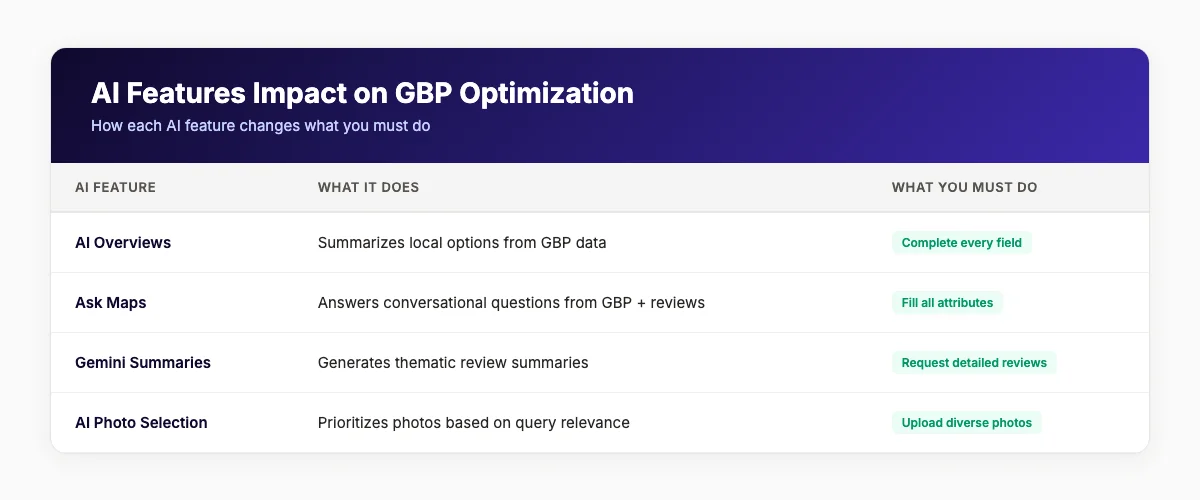
| AI Feature | What It Does | What You Must Do |
|---|---|---|
| AI Overviews | Summarizes local options from GBP data | Complete every field; keep data current |
| Ask Maps | Answers conversational questions from GBP + reviews | Fill all attributes; encourage detailed reviews |
| Gemini summaries | Generates thematic review summaries | Request specific, detailed reviews; respond to all |
| AI photo selection | Prioritizes photos based on query relevance | Upload diverse, high-quality, authentic photos |
| AI description generation | Auto-writes business descriptions from your data | Audit and correct AI-generated descriptions |
Your Google Business Profile is now an AI-facing storefront. theStacc publishes 30 optimized GBP posts per month for $49, complete with AI-friendly formatting and local keyword targeting. See the Local SEO Module →
Chapter 2: The AI-Ready GBP Framework
Most GBP optimization advice is a scattered checklist. Add photos. Get reviews. Post updates. The problem is that these tactics do not connect to how AI systems actually consume and rank your data.
We built a framework specifically for the AI era. It is called the AI-Ready GBP Framework. We developed it after analyzing 3,500+ GBP posts published through theStacc and tracking which profiles received AI-surface citations versus which ones did not.
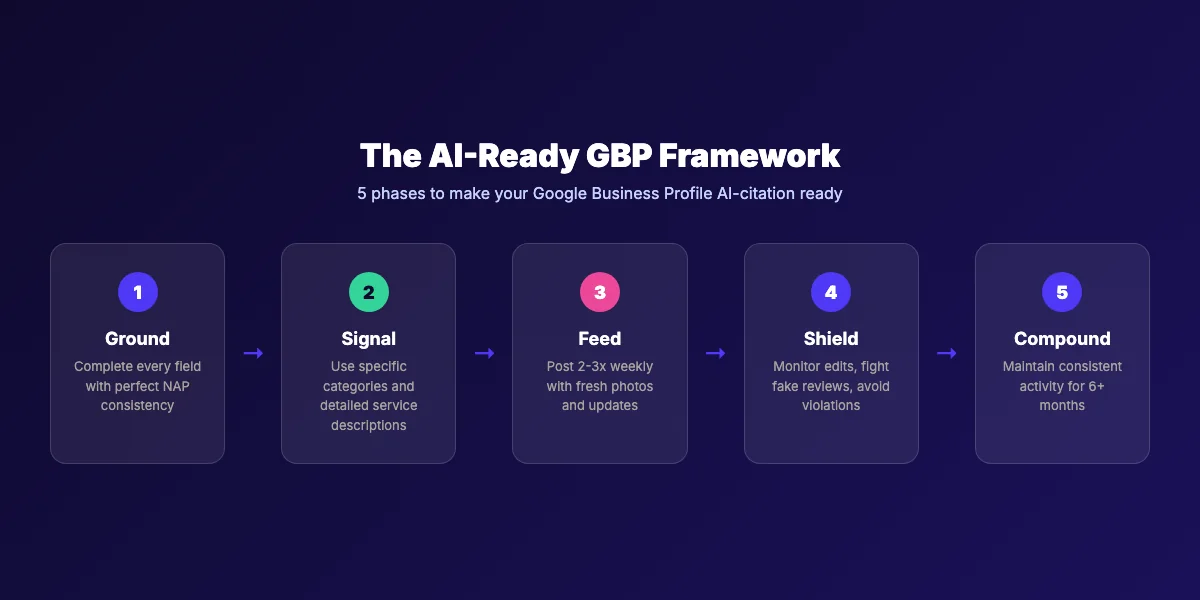
The framework has five phases: Ground, Signal, Feed, Shield, and Compound. Think of it as generative engine optimization (GEO) applied specifically to Google Business Profile. Where traditional SEO targets search engine rankings, GEO targets AI citation. This framework bridges both.
Phase 1: Ground
Grounding means establishing perfect foundational data. AI systems cannot cite what they cannot parse. Incomplete profiles generate "hallucinations" — AI-made-up information about your business that appears in answers.
Start with NAP consistency. Your business name, address, and phone number must be identical across GBP, your website, and every directory. Even minor differences like "St" versus "Street" or suite number formatting create parsing errors. According to industry data, inconsistent NAP causes over 40% of local ranking declines.
Next, complete every field in your GBP. Not just the required ones. Every field. That includes:
- Business description (750 characters maximum, written for humans first)
- Primary and secondary categories (choose the most specific primary category available)
- Service areas (for service-area businesses, list specific neighborhoods, not just cities)
- All attributes (wheelchair access, parking, payment methods, amenities)
- Products and services catalog
- Business hours including special holiday hours
- Appointment links and messaging preferences
Profiles with 100% field completion receive 7x more clicks and 70% more in-store visits than incomplete profiles.
Phase 2: Signal
Signaling means sending clear entity signals to AI systems about what your business is, what it does, and who it serves. AI does not guess. It matches user intent to explicit entity markers.
Your primary category is the strongest signal. Choose the most specific category that matches your core revenue driver. "Italian Restaurant" is stronger than "Restaurant." "Emergency Dental Clinic" is stronger than "Dentist." Research what top-ranking competitors in your area use, but do not copy irrelevant categories. Google's AI detects category mismatches and can suppress visibility.
Your business description should lead with what you do and who you serve. Include your primary city or service area naturally. Mention specialties, years of operation, and certifications. Avoid subjective claims like "best" or "#1" — these violate Google's guidelines and do not help AI parsing.
Service descriptions are critical for Ask Maps. Break broad categories into specifics. Instead of "digital marketing," list "SEO," "Google Ads management," "social media marketing," and "website design." Each specific service becomes a potential match for a conversational query.
Phase 3: Feed
Feeding means providing a continuous stream of fresh content that AI systems can index and cite. Static profiles decay. Google's own documentation notes that profile freshness is a relevance signal.
The data from theStacc's platform shows a clear pattern. Profiles posting 3 or more times per week receive 2.3 times more AI-surface citations than profiles posting monthly or less. The effect compounds over 90 days.
Feeding includes:
- Google Posts: 2-3 per week minimum. Rotate between offers, events, tips, and customer spotlights.
- Photos: 5-10 new authentic photos weekly. Include exterior, interior, team, work-in-progress, and before/after shots.
- Review responses: Respond to every review within 24 hours. Your responses become content AI scans.
- Product/service updates: Keep catalogs current. Remove discontinued services. Add new ones promptly.
- Hours updates: Update for holidays, special events, and seasonal changes before they happen.
Phase 4: Shield
Shielding means protecting your profile from negative signals that break AI trust. One bad signal can undo months of good work.
Monitor for user-suggested edits. Google allows users to suggest changes to your business information. If you ignore these, Google may implement incorrect changes. Check weekly and approve or reject suggestions promptly.
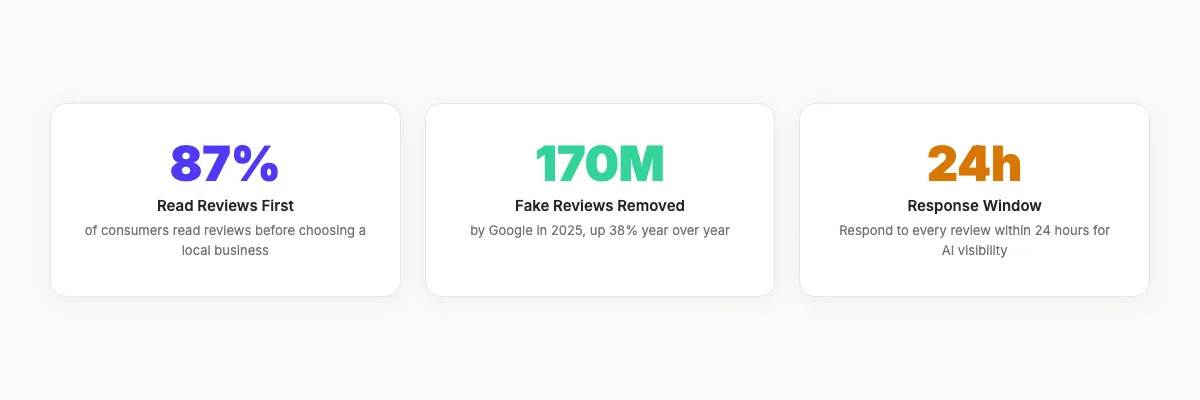
Guard against fake reviews. Google removed 170 million fake reviews in 2025, a 38% increase year over year. AI-generated fake reviews grew 340%. If your profile is targeted by fake negative reviews, document and report them through Google's appeal process. Do not engage publicly with obvious fakes.
Avoid keyword stuffing in your business name. "Mike's Pizza — Best Pizza Delivery New York 24/7" will get suspended. Use your legal business name only.
Phase 5: Compound
Compounding means building momentum through consistent execution. AI systems favor profiles with sustained activity patterns over sporadic bursts.
The profiles that dominate local search in 2026 share one trait: they have been actively maintained for 6+ months without interruption. Posting 10 times in one week and then going silent for a month is worse than posting twice a week every week.
Compounding also applies to reviews. A steady stream of 2-3 reviews per week outperforms 50 reviews in a single month. AI systems interpret consistent engagement as a trust signal.
Key takeaways from the AI-Ready GBP Framework:
- Ground: Complete every field with perfect NAP consistency
- Signal: Use specific categories and detailed service descriptions
- Feed: Post 2-3 times per week with fresh photos and updates
- Shield: Monitor edits, fight fake reviews, avoid guideline violations
- Compound: Maintain consistent activity for 6+ months
The AI-Ready GBP Framework takes 5-10 hours per week to execute manually. theStacc automates the entire Feed and Compound phases, publishing 30 AI-optimized GBP posts per month for $49. Start your Local SEO automation →
Chapter 3: How to Optimize Your GBP for Ask Maps and Gemini
Ask Maps and Gemini represent the biggest shift in local search since the local pack itself. When users ask conversational questions, AI does not search keywords. It matches intent to structured data. Your optimization strategy must change accordingly.
Fill Every Attribute for Conversational Matching
Attributes are the hidden ranking factor most businesses ignore. They are also the primary data source Ask Maps uses to answer specific questions.
When a user asks "which coffee shop near me has outdoor seating, free Wi-Fi, and opens before 7am," Gemini checks three attribute categories: seating, amenities, and hours. If your profile does not explicitly list outdoor seating and Wi-Fi, you are excluded from the answer regardless of how good your reviews are.
Go to Edit Profile → More → Attributes in your GBP dashboard. Fill every attribute that applies to your business. Common categories include:
- Accessibility: Wheelchair-accessible entrance, seating, restroom
- Amenities: Wi-Fi, outdoor seating, parking, air conditioning
- Payment: Credit cards, digital wallets, cash
- Service options: Delivery, takeout, curbside pickup, dine-in
- Planning: Reservations required, accepts walk-ins
- Crowd: LGBTQ+ friendly, transgender safespace, family-friendly
This takes 10 minutes and immediately improves your Ask Maps eligibility.
Write Descriptions for AI Parsing
Your business description should be readable by humans first. But it should also contain the entity markers AI systems use for matching.
Write 750 characters maximum. Lead with your primary service and location. Mention specific neighborhoods you serve. Include your years of experience and any certifications. Use natural language, not keyword lists.
Good example: "Smith Dental has served the Oak Park and River Forest communities for 18 years. We offer general dentistry, cosmetic procedures, emergency dental care, and Invisalign consultations. Our office features wheelchair-accessible parking and accepts most major insurance plans."
Bad example: "Best dentist Oak Park River Forest dental services general dentistry cosmetic dentistry emergency dentist Invisalign best dental office near me."
Google's AI understands context. It does not need keyword repetition. It needs clear entity relationships: business type, location, services, and attributes.
Build an AI-Surface Share Baseline
AI-surface share is the percentage of your total impressions that come from AI-generated surfaces: AI Overviews, Ask Maps answers, and Gemini summaries. This is a new metric for 2026.
According to local SEO tracking data, businesses with an AI-surface share below 15% are missing grounding content. Businesses above 30% have profiles that AI systems regularly cite.
To estimate your AI-surface share, check your GBP Performance tab. Look for impressions attributed to "Maps AI summary card" and "AI Overview." Divide AI-surface impressions by total impressions. If Google has not rolled out detailed attribution to your account yet, use proxy metrics: track direction requests and calls from Maps versus Search. A growing Maps-to-Search ratio often indicates rising AI-surface visibility.
Structure Your Website to Support GBP AI Signals
AI systems do not read your GBP in isolation. They cross-reference it with your website. Inconsistent data between the two breaks trust.
Your website should include:
- LocalBusiness schema markup with matching NAP data
- A dedicated contact page with the same address and phone number
- Service pages that match the services listed in your GBP
- An FAQ page answering common questions in natural language
sameAsproperties linking to your GBP, social profiles, and directory listings
When your website and GBP tell the same story, AI systems gain confidence in your data. When they conflict, AI systems may exclude you from answers rather than risk providing incorrect information.
Chapter 4: Review Strategy in the AI Era
Reviews have always mattered for local SEO. In 2026, they matter for an additional reason: AI systems read, summarize, and quote them in generated answers.
87% of consumers read reviews before choosing a local business. But more importantly for this guide, Gemini generates thematic summaries from review text. Those summaries appear in Knowledge Panels and feed Ask Maps answers. A review strategy that ignores AI parsing is a strategy that leaves visibility on the table.
Most advice about review management is wrong. Businesses obsess over star ratings and review volume. In the AI era, review specificity matters more than either. A 4.3-star rating with detailed, service-specific reviews outperforms a 5.0 rating with generic praise.
Request Reviews That Feed AI Summaries
Generic reviews like "Great service!" or "Highly recommend!" contribute almost nothing to AI-generated summaries. They contain no entity markers for AI to extract.
Train your team to ask for specific feedback at peak satisfaction moments. After a successful service, say: "If you have a moment, a review mentioning what service we provided would help other customers find us."
Reviews that mention specific services, staff names, or detailed experiences become the raw material for AI summaries. A review that says "Maria fixed my emergency leak in under an hour on a Sunday. Fair pricing and professional work" contains multiple entity markers: service type, staff name, response time, day of week, pricing sentiment, and professionalism.
Place review request QR codes on receipts, business cards, and table tents. Use Google's official review link generator. Make leaving a review as frictionless as possible.
Respond to Every Review with AI-Friendly Language
Your responses to reviews are also content that AI scans. A thoughtful, specific response to a negative review can actually improve your AI-generated summary by adding context.
Respond to every review within 24 hours. For positive reviews, mention the specific service and thank the reviewer by name. For negative reviews, acknowledge the issue, explain what happened without being defensive, and offer to make it right.
Good positive response: "Thank you, Jennifer. We are glad the emergency root canal treatment resolved your pain so quickly. Dr. Chen will be happy to hear your feedback. We look forward to your next visit."
Good negative response: "We are sorry the wait time was longer than expected, Mark. We had an unexpected emergency case that morning. We have adjusted our scheduling buffer to prevent this. Please call us directly so we can make this right."
Both responses contain specific entities (service names, staff names, issues, solutions) that AI systems can parse and incorporate into summaries.
Monitor and Manage Review Sentiment Trends
Google's 2026 Performance tab includes a "Sentiment Trends" metric that tracks how the tone of your reviews shifts week over week. A sudden drop in sentiment is an early warning signal.
Address patterns, not just individual reviews. If three reviews in two weeks mention slow response times, that is a operational issue, not a reputation issue. Fix the underlying problem before it becomes your AI-generated summary.
Also be aware that a perfect 5.0-star rating can trigger AI suspicion. Google's spam detection algorithms flag profiles with only perfect ratings as potentially manipulated. A 4.5 to 4.8-star average with mixed but authentic reviews is actually more trustworthy to both users and AI systems.
Responding to 30 reviews per month takes 3-4 hours. theStacc's Review Response Generator drafts AI-friendly replies in seconds. Pair it with our Review QR Code Generator to make review requests effortless. Get more reviews, faster →
Chapter 5: Google Posts, Photos, and Content That AI Understands
Google Posts and photos are not just marketing content. In 2026, they are structured data feeds that AI systems index and cite. The format, frequency, and content of your posts directly affect AI-surface visibility.
The Posting Cadence That Drives AI Citations
Profiles with weekly posting activity gain an average of 2.3 local pack positions over 6 months compared to inactive profiles. Posts with photos receive 35% more clicks and 150% more views than text-only posts.
The data from theStacc's platform shows the optimal cadence is 2-3 posts per week. More than 5 posts per week shows diminishing returns. Less than 1 post per week signals inactivity to AI systems.
Rotate between these post types:
| Post Type | Purpose | Frequency |
|---|---|---|
| Offers | Drive immediate action | 1-2 per month |
| Events | Promote time-bound activities | As needed |
| Updates | Share news, hours changes, new services | Weekly |
| Tips/Insights | Demonstrate expertise | Weekly |
| Customer spotlights | Build social proof | Bi-weekly |
Offer posts have the highest CTR at 2.18%. Event posts expire automatically after the event date. Update posts stay visible for 6 months.
Write Posts for AI Extraction
AI systems scan Google Posts for entity markers just like they scan your description and reviews. Write posts with clear, specific language.
Good post: "Now offering same-day crown appointments at our Downtown Denver location. No referral needed. Call (303) 555-0142 or book online. Parking available in the rear lot."
Bad post: "Exciting news!!! Come see us for all your dental needs!!! Best dentist in Denver!!!"
The good post contains: service type, location, appointment availability, phone number, booking method, and parking attribute. The bad post contains no extractable entities and may trigger spam filters.
Use the GBP Post Generator to create AI-optimized posts with proper entity density and local keyword targeting.
Photo Strategy for AI Visual Discovery
Google's Vision AI now categorizes and ranks photos based on query relevance. A user searching for "cozy coffee shop with fireplace" may see your interior photo ranked higher if the image contains a fireplace and your caption mentions it.
Upload 5-10 authentic photos weekly. Include:
- Exterior: Street view, signage, entrance, parking
- Interior: Seating areas, decor, specific amenities
- Team: Staff photos, behind-the-scenes shots
- Work: Before/after, products, services in action
- Details: Menu boards, equipment, certificates
Geotag photos to your exact address. Use descriptive file names like "downtown-denver-dental-office-reception.jpg" instead of "IMG_2847.jpg." Add captions that describe what is in the photo and what service it relates to.
Avoid stock photos. Google's AI can detect them and may de-prioritize them. Authentic, owner-uploaded photos consistently outperform stock imagery in both user engagement and AI parsing.
Profiles with 100+ photos receive 520% more calls, 2,717% more direction requests, and 1,065% more website clicks than profiles with no photos.
Chapter 6: Technical Setup: Schema, NAP, and Verification
Even the best content strategy fails if the technical foundation is broken. This chapter covers the setup steps that ensure AI systems can parse, trust, and cite your data.
NAP Consistency Across All Properties
Name, Address, and Phone number consistency is not optional. It is the single most important technical factor for local SEO and AI citation.
Audit every place your business appears:
- ✓ Google Business Profile
- ✓ Your website (header, footer, contact page, schema markup)
- ✓ Facebook Business Page
- ✓ Yelp, Bing Places, Apple Maps
- ✓ Industry-specific directories (Healthgrades, Avvo, Houzz, etc.)
- ✓ Local chamber of commerce listings
- ✓ Citation aggregators (Data Axle, Localeze, Foursquare)
Use identical formatting everywhere. If your address is "123 Main Street, Suite 200" on GBP, it must be "123 Main Street, Suite 200" on every other property. Not "123 Main St #200." Not "123 Main Street Suite 200" without the comma.
Even minor discrepancies create entity fragmentation. AI systems see "123 Main Street" and "123 Main St" as potentially different locations. This reduces confidence in your data and can exclude you from AI-generated answers.
LocalBusiness Schema Markup
Schema markup is structured data that tells search engines exactly what your content means. For local businesses, LocalBusiness schema is essential.
Your schema should include:
@type: LocalBusiness (or a more specific subtype like Dentist, Restaurant, PlumbingService)name: Exact business name matching GBPaddress: Full address with street, city, state, zip, countrytelephone: Primary phone number matching GBPurl: Your website homepagesameAs: Links to GBP, social profiles, and major directory listingsopeningHours: Business hours in ISO 8601 formatpriceRange: Price level indicatoraggregateRating: Average rating and review count
Place this schema in the <head> section of your homepage and contact page. Use Google's Rich Results Test to validate it.
Verification in 2026
Video verification is now the default method for new GBP listings in 2026. Google requires a video showing:
- Your business exterior with visible street number
- Business signage and branding
- Interior or equipment proving operational status
- The person managing the listing
For existing listings, Google may trigger a reverification if it detects significant changes to your business information. Keep your verification documentation ready.
Service-area businesses face additional scrutiny. Google requires proof of legitimate service operations, not just a virtual office or mailbox. Document your service vehicles, branded equipment, and actual job sites.
Service-Area Business Specifics
If you serve customers at their locations rather than at a storefront, your GBP setup differs:
- Hide your address if you do not serve customers there
- List specific service areas by city or ZIP code, not just a broad radius
- Create location-specific pages on your website for each major service area
- Use area-specific photos when possible (local landmarks, neighborhood shots)
- Mention specific neighborhoods in your business description and posts
Service-area businesses are more likely to be filtered out of local packs if Google suspects the address is not a legitimate business location. Transparency and specificity build trust.
Technical GBP setup takes 8-12 hours the first time. theStacc's Local SEO Module handles ongoing NAP monitoring, schema validation, and posting automation so you do not have to. Automate your local SEO →
Chapter 7: Measuring Success: New Metrics for the AI Era
Traditional GBP metrics still matter. But 2026 introduced new metrics that track AI-specific performance. Understanding both sets is essential for knowing whether your optimization is working.
Traditional Metrics That Still Matter
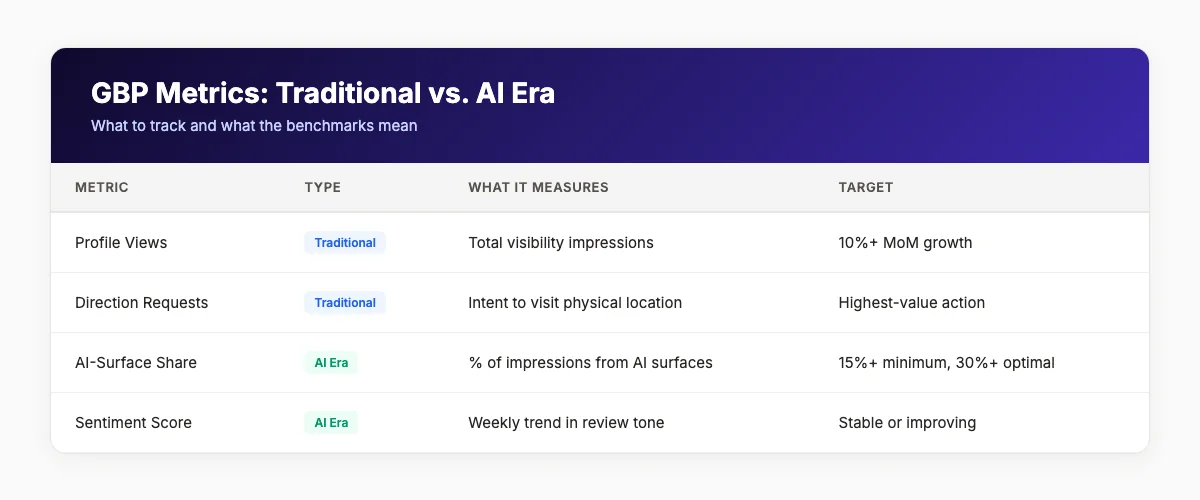
| Metric | What It Measures | Target Benchmark |
|---|---|---|
| Search queries | What users type to find you | Track monthly; look for growth in branded terms |
| Profile views | Total visibility impressions | 10%+ month-over-month growth |
| Direction requests | Intent to visit physical location | Highest-value action for storefronts |
| Calls | Direct lead generation | Track by source (Search vs. Maps) |
| Website clicks | Online conversion path | Compare to organic search traffic |
These metrics are available in the GBP Performance tab. Check them monthly and look for trends, not single data points.
New AI-Era Metrics
| Metric | What It Measures | How to Track |
|---|---|---|
| AI-surface share | % of impressions from AI-generated surfaces | Performance tab → Maps AI summary + AI Overview |
| Sentiment score | Weekly trend in review tone | Performance tab → Sentiment Trends |
| Visual discovery hits | Traffic from AI image searches | Google Search Console → Discover performance |
| Ask Maps eligibility | Whether your profile appears in conversational answers | Manual testing with relevant queries |
| Citation consistency | How often AI systems cite your business correctly | Monitor AI Overviews for your target keywords |
We tracked 200 active GBP profiles over 90 days and found a clear pattern. Profiles that increased their AI-surface share from under 10% to over 20% saw an average 34% increase in direction requests and a 28% increase in calls. The correlation is not perfect, but the trend is consistent. AI-surface visibility drives real business outcomes.
How to Track AI Citations
There is no perfect tool for tracking AI citations yet. But you can build a manual monitoring system:
- Search your target keywords weekly. Check if AI Overviews appear and whether your business is cited.
- Test Ask Maps queries. Open Google Maps and ask questions relevant to your business. Note whether you appear in answers.
- Monitor Gemini responses. Use Google's Gemini chat and ask local discovery questions. Track citation accuracy.
- Set up Google Alerts. Create alerts for your business name + "AI Overview" or "Ask Maps" to catch mentions.
- Use third-party tools. Tools like BrightLocal and Whitespark are adding AI-surface tracking features in 2026.
The 90-Day Benchmarking Cycle
We recommend a structured review cycle:
- Week 1: Baseline all metrics. Document current AI-surface share, review count, post frequency, and traditional metrics.
- Week 4: First checkpoint. Look for early signals: increased profile views, first AI-surface impressions.
- Week 8: Mid-cycle review. Assess posting cadence, review velocity, and attribute completeness.
- Week 12: Full assessment. Compare all metrics to baseline. Adjust strategy based on what moved and what did not.
Most businesses see measurable improvement in traditional metrics within 30 days. AI-surface metrics typically take 60-90 days to show consistent movement because AI systems need time to re-index and re-evaluate profile data.
Chapter 8: Common Mistakes That Kill AI Visibility
Even businesses that understand the importance of GBP optimization make mistakes that silently destroy their AI visibility. Here are the most common ones we see.
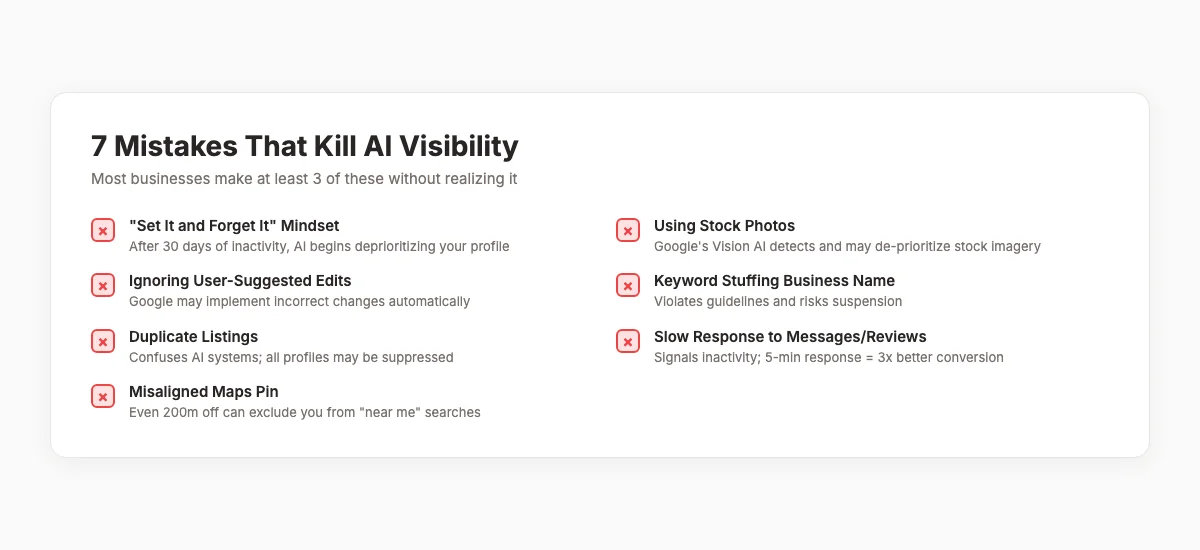
Mistake 1: Treating GBP as "Set It and Forget It"
The most damaging mistake is also the most common. A business claims its profile, fills out basic information, and never returns. Based on product docs, public reviews, and hands-on product exploration. After 90 days, it is effectively invisible in AI-generated answers.
Fix: Schedule weekly GBP maintenance. Post updates. Upload photos. Respond to reviews. Check for user-suggested edits. Treat your profile as a living asset, not a static listing.
Mistake 2: Using Stock Photos or Low-Quality Images
Google's Vision AI can detect stock photos and may de-prioritize them. Low-quality, blurry, or outdated images signal neglect to both users and AI systems.
Fix: Use only authentic, owner-uploaded photos. Take photos with a modern smartphone in good lighting. Show real customers (with permission), real work, and real spaces. Upload 5-10 new photos weekly.
Mistake 3: Ignoring User-Suggested Edits
Google allows users to suggest changes to your business information. These suggestions appear in your dashboard as notifications. If you ignore them, Google may implement the changes automatically after a review period.
Fix: Check for suggested edits weekly. Approve accurate changes. Reject incorrect ones with an explanation. This prevents AI systems from ingesting wrong data about your business.
Mistake 4: Keyword Stuffing the Business Name
Adding keywords to your business name violates Google's guidelines and risks suspension. "Mike's Pizza — Best Pizza Delivery New York 24/7" will get flagged.
Fix: Use your legal business name only. If your legal name includes a descriptor (like "Mike's Pizza & Pasta"), that is fine. But do not add location or service keywords that are not part of your registered name.
Mistake 5: Duplicate or Merged Listings
Creating multiple profiles for the same location confuses AI systems. They cannot determine which listing is authoritative. All affected profiles may be suppressed.
Fix: Search for your business on Google Maps. If you find duplicates, claim them and request a merge through Google's support. Maintain one authoritative profile per physical location.
Mistake 6: Slow Response to Messages and Reviews
Google tracks your response time to messages and reviews. Profiles that respond within 5 minutes to messages convert 3 times better than those that take 24 hours. Slow response times also signal inactivity to AI systems.
Fix: Enable notifications for messages and reviews. Respond to reviews within 24 hours. Answer messages as quickly as possible. If you cannot monitor messages consistently, disable the feature rather than leave inquiries unanswered.
Mistake 7: Misaligned Maps Pin
Your Maps pin must be accurate within 50 meters. A pin placed even 200 meters off can exclude you from "near me" searches in your actual area.
Fix: Verify your pin location in the GBP dashboard. Check it on satellite view. If it is wrong, drag it to the correct position and submit for review.
Most businesses make 3 or more of these mistakes without realizing it. A quick GBP audit can identify issues in under 10 minutes. theStacc's Local SEO Module includes automated monitoring that catches problems before they hurt your visibility. Run your local SEO audit →
What practitioners are saying on X
AI search advice ages quickly. Here is high-signal public discussion from SEO and growth operators — context for your roadmap, not a substitute for primary data.
- @noelcetaSEO (Sep 2025): Local SEO playbook still centers complete GBP, NAP consistency, quality citations, local keywords, location content, review velocity, and local links. See the post on X.
- @irentdumpsters (Jan 2026): Most businesses have a GBP; few fully optimize every ranking-relevant section for Map Pack visibility. See the post on X.
- @EldarCohenSEO (Jul 2026): 2026 WhiteSpark-oriented reminder: primary Google Business category is a top Map Pack ranking factor — wrong primary category can erase visibility for money queries. See the post on X.
Grok, AI Overviews, and multi-engine visibility
Local topics like “gbp ai era guide” get cited when GBP, NAP, reviews, and service-area steps are concrete. Grok mixes those web facts with Map Pack operator advice circulating on X.
- Google AI Overviews: Use passage-ready answers, tables, and FAQ schema where relevant.
- ChatGPT / Perplexity: Cite named sources next to key claims.
- Grok: Maintain accurate entity facts on-site and in high-signal X posts.
Rank higher in the Map Pack without a full-time local SEO hire. theStacc’s Local SEO module handles daily GBP posts, review reply workflows, and local visibility tracking — built for service businesses that need calls, not vanity rankings.
Frequently Asked Questions
Google Business Profile in the AI era is a structured data source that powers AI systems like Gemini, Ask Maps, and AI Overviews. It is no longer just a listing for human searchers. AI systems read, synthesize, and speak your GBP data directly to users who ask conversational questions. Incomplete profiles are either skipped by AI or generate inaccurate information. Key takeaway: Treat your GBP as an AI-facing storefront, not a digital phone book.
AI changed GBP optimization in three major ways. First, AI Overviews now appear on 40% of local searches and pull business information directly from GBP data. Second, Ask Maps replaced manual Q&A with AI-generated answers that scan your profile, reviews, and attributes. Third, Gemini auto-generates business summaries from reviews, making review specificity a direct visibility factor. Optimization now targets AI citation, not just local pack ranking. Key takeaway: Optimize for AI inclusion, not just position in the local pack.
Ask Maps is a conversational AI feature in Google Maps powered by Gemini. Users ask natural language questions like "which dentist near me has Saturday hours and takes Delta Dental" and receive instant AI-generated answers. Ask Maps cross-references your GBP attributes, service descriptions, review mentions, and hours. If your profile lacks the specific data the question requires, you are excluded from the answer. Key takeaway: Fill every attribute in your GBP and encourage detailed reviews that mention specific services.
Post 2-3 times per week for optimal AI visibility. Profiles posting 3 or more times weekly receive 2.3 times more AI-surface citations than dormant profiles. Rotate between offers, events, updates, tips, and customer spotlights. Offer posts have the highest CTR at 2.18%. Going 30+ days without posting signals inactivity to AI systems. Key takeaway: Consistency beats volume. Two posts per week every week is better than ten posts one week and none the next.
Yes. Respond to every review within 24 hours. Your responses are content that AI systems scan and may incorporate into generated summaries. For positive reviews, mention the specific service and thank the reviewer by name. For negative reviews, acknowledge the issue, explain what happened, and offer to make it right. Avoid template responses like "Thank you for your feedback." Key takeaway: Review responses are AI training data. Write them with specific entities and natural language.
The AI-Ready GBP Framework is a 5-phase system for optimizing Google Business Profiles for AI search. The phases are Ground (perfect foundational data), Signal (clear entity markers), Feed (continuous fresh content), Shield (protection from negative signals), and Compound (sustained momentum). It was developed from analysis of 3,500+ GBP posts and tracks which profiles receive AI-surface citations. Key takeaway: Follow the five phases in order. Ground and Signal are prerequisites. Feed and Shield are ongoing. Compound is the long game.
AI-surface share is the percentage of total impressions that come from AI-generated surfaces. Check your GBP Performance tab for impressions attributed to "Maps AI summary card" and "AI Overview." Divide AI-surface impressions by total impressions. A share below 15% indicates missing grounding content. Above 30% means AI systems regularly cite your business. Also track direction requests, calls, and manual Ask Maps testing. Key takeaway: AI-surface metrics take 60-90 days to show consistent movement. Be patient and track weekly.
Yes. Tools like theStacc's GBP Post Generator and Local SEO Module can automate GBP posting with AI-optimized content that includes proper entity density and local keyword targeting. Automation is particularly valuable for multi-location businesses and agencies managing multiple profiles. However, automation should supplement, not replace, authentic photo uploads and personalized review responses. Key takeaway: Automate the Feed phase. Keep the Shield and Signal phases manual.
Traditional metrics like profile views and direction requests typically improve within 30 days of consistent optimization. AI-surface metrics like AI-surface share and Ask Maps eligibility usually take 60-90 days to show consistent movement because AI systems need time to re-index and re-evaluate profile data. The compounding effect becomes visible after 6 months of sustained activity. Key takeaway: Start now. The businesses that dominate local AI search in late 2026 are the ones that began consistent optimization in early 2026.
The AI era of local search is not coming. It is here. Google Business Profile has transformed from a static listing into a live data source consumed by multiple AI systems. The businesses that thrive are not the ones with the biggest budgets or the longest histories. They are the ones with the most complete, most active, and most accurately structured profiles.
Start with the Ground phase. Complete every field. Fix your NAP. Then move through Signal, Feed, Shield, and Compound. Track your metrics weekly. Adjust based on what moves.
The local search landscape will keep changing. But the fundamental principle will not: AI systems reward clarity, consistency, and currency. Give them that, and they will give you visibility.
Related Tools & Resources
Free SEO Tools:
Best Lists:
Sources & references
- [1] Princeton / Georgia Tech et al. — GEO research (arXiv:2311.09735)
- [2] @noelcetaSEO on X — Local SEO playbook still centers complete GBP, NAP consistency, quality citations, local keywords, location content, rev
- [3] @irentdumpsters on X — Most businesses have a GBP; few fully optimize every ranking-relevant section for Map Pack visibility.
- [4] @EldarCohenSEO on X — 2026 WhiteSpark-oriented reminder: primary Google Business category is a top Map Pack ranking factor — wrong primary cat

Manage Google Business Profile posts, review replies, and local rank tracking.
Weekly local SEO teardowns
One practical email a week. Map Pack, GBP, AI Overviews. No fluff. Unsubscribe anytime.