JavaScript SEO explained: how Google renders and indexes JS, the common rendering failures, and how to choose between CSR, SSR, and prerendering.
JavaScript SEO is the work of making sure Google can crawl, render, and index content that a browser builds with JavaScript. Client-side rendering delays processing and can leave content unindexed. This guide covers how rendering works, the failures that hide pages, and when to choose CSR, SSR, or prerendering.
JavaScript powers 98% of modern websites. Yet most developers ship JavaScript-heavy apps without checking if Google can actually read the content.
That blind spot costs real rankings. Pages that render only on the client side take up to 9 times longer for Google to process than static HTML. And 25% of JavaScript content on popular sites never gets indexed at all.
This guide covers everything you need to know about javascript SEO in one place. We publish 3,500+ blog posts across 70+ industries, and JavaScript rendering issues are one of the most common technical SEO problems we see.
Here is what you will learn:
- How Google crawls, renders, and indexes JavaScript pages
- The real differences between CSR, SSR, SSG, and ISR for SEO
- 8 common JavaScript SEO problems and how to fix each one
- How to handle structured data, internal links, and metadata in JS apps
- A complete JavaScript SEO checklist you can use today
What Is JavaScript SEO?
JavaScript SEO is the practice of making JavaScript-rendered content discoverable, crawlable, and indexable by search engines. It sits at the intersection of front-end development and technical SEO.
Why JavaScript Creates SEO Challenges
Traditional HTML pages deliver content immediately. The browser (or Googlebot) reads the HTML, finds the text, and indexes it.
JavaScript apps work differently. The server sends a mostly empty HTML shell. Then the browser downloads, parses, and executes JavaScript to build the page content. Search engine crawlers must do the same.
This extra step introduces delays, rendering failures, and indexing gaps. Google must spend more resources on every JavaScript page compared to static HTML.
Which Frameworks Are Affected
Every major JavaScript framework uses client-side rendering by default:
| Framework | Default Rendering | SEO-Friendly Option |
|---|---|---|
| React | Client-side (CSR) | Next.js (SSR/SSG/ISR) |
| Vue.js | Client-side (CSR) | Nuxt.js (SSR/SSG) |
| Angular | Client-side (CSR) | Angular Universal (SSR) |
| Svelte | Client-side (CSR) | SvelteKit (SSR/SSG) |
React, Angular, and Vue all ship client-rendered apps out of the box. Without a meta-framework like Next.js or Nuxt, search engines receive a blank <div id="app"></div> and must execute JavaScript to see any content.
How Google Renders JavaScript
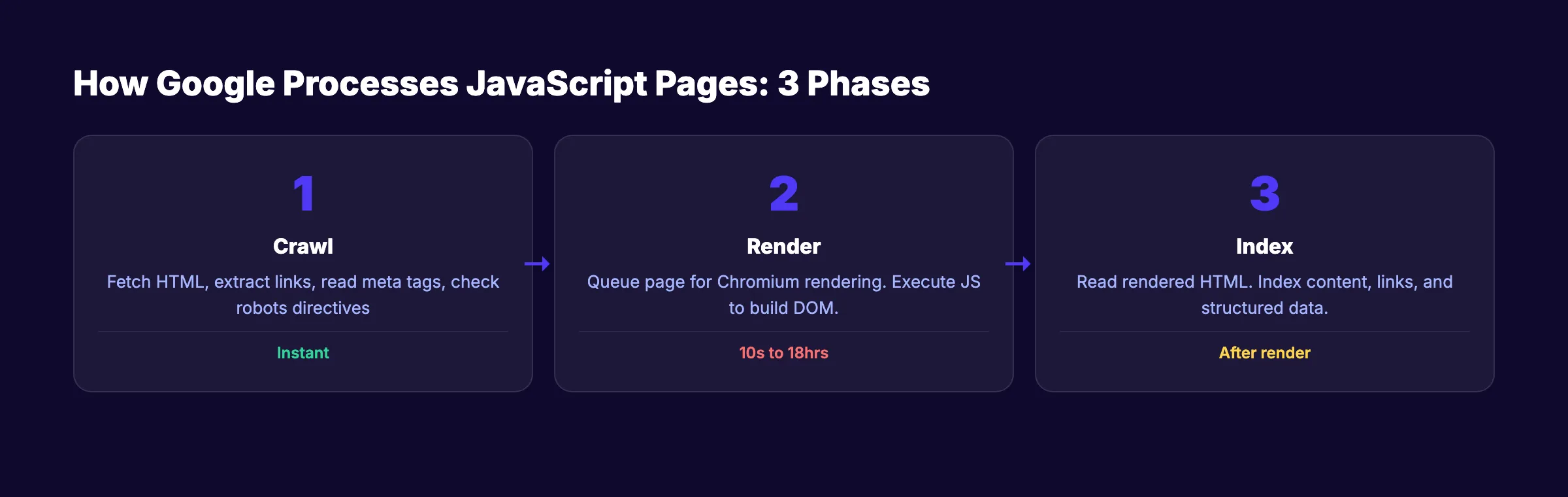
Google processes JavaScript pages in 3 distinct phases. Understanding this pipeline is the foundation of every JavaScript SEO decision.
Phase 1: Crawling
Googlebot fetches the URL and receives the initial HTML response. At this stage, Google extracts links, reads <meta> tags, checks HTTP status codes, and looks for robots directives.
If the initial HTML contains a noindex tag, Google stops here. It will not render the page. Google confirms that removing noindex via JavaScript does not work.
Phase 2: Rendering
Google queues the page for rendering using a headless version of Chrome. Googlebot uses an up-to-date version of Chromium that supports modern JavaScript APIs, ES modules, and Web Components.
Key facts about the rendering phase:
- Google renders every page with a
200status code - Each page renders in a fresh browser session with no cookies or stored state
Googlebotdoes not click buttons, dismiss banners, or interact with the page
A study of 100,000+ Googlebot fetches found that 100% of pages received full renders. The median rendering delay was 10 seconds. But the 90th percentile stretched to about 3 hours, and the 99th percentile reached 18 hours.
Phase 3: Indexing
After rendering, Google reads the fully rendered HTML and indexes the content. Any text, links, or structured data generated by JavaScript becomes visible at this stage.
The gap between Phase 1 and Phase 3 is the core risk. If critical content only exists after JavaScript execution, Google might index an incomplete version of your page first.
The Rendering Budget
Google has finite computational resources. Every page that requires JavaScript execution costs more to process than a static HTML page.
Research from Onely found that Google needs roughly 9 times more time to crawl JavaScript pages than plain HTML. On large sites with 10,000+ pages, this rendering cost directly impacts your crawl budget.
Stop guessing if Google can read your site. theStacc publishes SEO-optimized content that search engines index on day one.
CSR vs SSR vs SSG vs ISR: Which Is Best for SEO?
The rendering strategy you choose determines how search engines experience your site.
Client-Side Rendering (CSR)
With CSR, the server sends a minimal HTML document. The browser downloads JavaScript bundles, executes them, and builds the page in the user's browser.
SEO impact: Googlebot sees an empty page until rendering completes. Social media platforms like Twitter, Facebook, and LinkedIn do not execute JavaScript at all. Your Open Graph metadata must be in the initial HTML or social previews will fail.
CSR works for authenticated dashboards. It is a poor choice for any page that needs organic search traffic.
Server-Side Rendering (SSR)
With SSR, the server executes JavaScript and sends fully rendered HTML to the browser. The client then "hydrates" the page to add interactivity.
SEO impact: Search engines receive complete content immediately. No rendering delay. No risk of missing content. SSR is the safest choice for on-page SEO.
Static Site Generation (SSG)
With SSG, pages are pre-rendered at build time. The server delivers static HTML files with zero runtime computation.
SEO impact: Fastest possible page delivery. Perfect Core Web Vitals. Best crawl efficiency. Content is always available in the initial HTML.
Incremental Static Regeneration (ISR)
ISR combines SSG with on-demand updates. Pages are pre-rendered at build time but regenerate in the background when content changes.
SEO impact: Static-level performance with dynamic-level freshness.
Rendering Strategy Comparison
| Strategy | Initial HTML | SEO Safety | Performance | Best For |
|---|---|---|---|---|
| CSR | Empty shell | Risky | Fast after load | Dashboards, apps |
| SSR | Full content | Excellent | Server-dependent | Dynamic pages |
| SSG | Full content | Excellent | Fastest | Blogs, docs |
| ISR | Full content | Excellent | Fast + fresh | E-commerce, CMS |
Modern frameworks like Next.js and Nuxt support all 4 strategies in the same project. The best approach mixes SSG for blog posts, SSR for dynamic pages, ISR for products, and CSR only for authenticated sections.
Common JavaScript SEO Problems
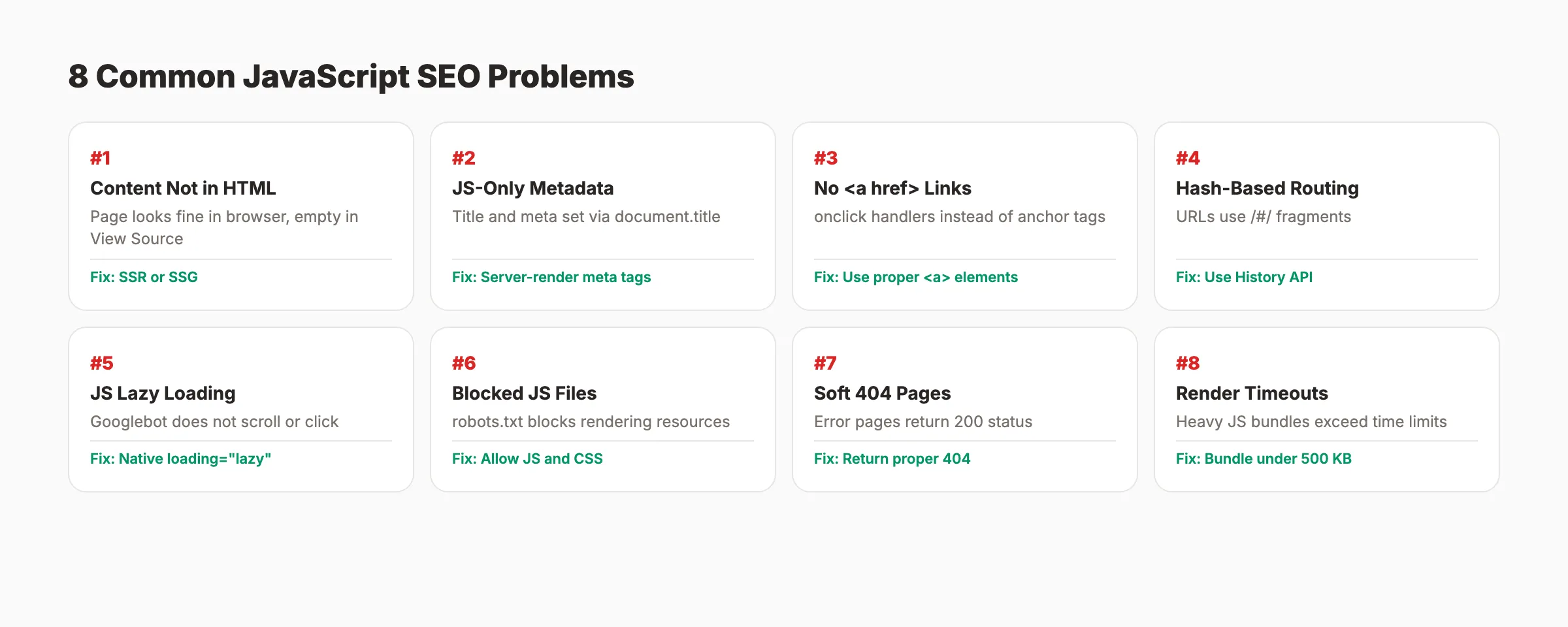
These 8 issues account for most JavaScript SEO failures.
1. Content Not in Initial HTML
Your page looks perfect in the browser but Googlebot sees nothing in the source HTML. The content loads only after JavaScript executes.
Fix: Move critical content to server-rendered HTML using SSR or SSG. Use View Source (not Inspect Element) to verify what the server delivers.
2. Metadata Injected Only via JavaScript
Title tags, meta descriptions, and canonical URLs set through document.title or JavaScript DOM manipulation may not be processed reliably.
Fix: Set <title>, <meta name="description">, and <link rel="canonical"> in the server-rendered HTML.
// Next.js: server-rendered metadata
import Head from 'next/head'

export default function ProductPage({ product }) {
  return (
    <>
      <Head>
        <title>{product.name} | Your Store</title>
        <meta name="description" content={product.summary} />
      </Head>
      <main>{/* page content */}</main>
    </>
  )
}
3. Links Without Proper <a href> Tags
Google can only discover links through <a> elements with href attributes. JavaScript click handlers and window.location are invisible to crawlers.
Fix: Always use standard <a href="/page"> tags. This directly affects internal linking across your site.
<!-- Google CAN follow this -->
<a href="/products/shoes">Shop Shoes</a>

<!-- Google CANNOT follow these -->
<span onclick="move through('/products/shoes')">Shop Shoes</span>
4. Hash-Based Routing
Single-page apps using URL fragments (example.com/#/products) prevent Google from treating each view as a separate page.
Fix: Use the History API with pushState for clean URLs. Every major framework supports this by default in their router.
5. Lazy-Loaded Content Below the Fold
If Googlebot does not scroll or interact, JavaScript-based lazy-loaded content may never load.
Fix: Use native loading="lazy" on <img> tags. This attribute is supported by Googlebot. Always include a valid src attribute for image optimization.
6. Blocked JavaScript Resources
If your robots.txt blocks CSS or JavaScript files, Googlebot cannot render the page.
Fix: Remove any Disallow rules for essential .js and .css files. Use Google Search Console to test which resources are blocked.
7. Error Pages Returning 200 Status Codes
JavaScript SPAs often show "Page Not Found" while returning a 200 HTTP status. Google indexes these as valid content.
Fix: Return proper 404 status codes from the server. In SSR setups, check the route server-side and set the correct status.
8. JavaScript Render Timeouts
Large JavaScript bundles or slow third-party scripts can cause rendering timeouts.
Fix: Keep your main JavaScript bundle under 500 KB. Code-split aggressively. Move data fetching to the server.
Technical SEO problems drain rankings quietly. theStacc handles content creation so you can focus on fixing what matters.
Server-Side Rendering for SEO
SSR is the single most reliable fix for JavaScript SEO problems.
Next.js (React)
Next.js App Router uses React Server Components that render on the server by default.
// Next.js App Router: Server Component (default)
export default async function BlogPost({ params }) {
  const post = await fetch(`https://api.example.com/posts/${params.slug}`)
  const data = await post.json()

  return (
    <article>
      <h1>{data.title}</h1>
      <p>{data.content}</p>
    </article>
  )
}
Vercel's research confirmed that Google fully renders RSC-streamed content without issues.
Nuxt (Vue)
Nuxt 3 provides SSR by default. Pages render on the server unless you explicitly disable it.
Angular Universal
Angular Universal adds SSR to Angular applications. It requires more setup than Next.js or Nuxt but delivers the same SEO benefits.
SSR Performance Tips
- Cache rendered HTML for repeated requests
- Use streaming SSR to send content progressively
- Implement stale-while-revalidate patterns for dynamic content
- Monitor server response times in Google Search Console
Your page speed directly impacts both user experience and rankings.
Structured Data in JavaScript Applications
Schema markup drives rich results in search. JavaScript apps can implement structured data, but the approach matters.
JSON-LD Injection via JavaScript
Google supports JSON-LD structured data injected through JavaScript. Google's documentation confirms this explicitly.
// Next.js: Inject JSON-LD structured data
export default function BlogPost({ post }) {
  const jsonLd = {
    '@context': 'https://schema.org',
    '@type': 'Article',
    headline: post.title,
    datePublished: post.publishedAt,
    author: { '@type': 'Organization', name: 'Your Company' }
  }

  return (
    <>
      <script
        type="application/ld+json"
        dangerouslySetInnerHTML={{ __html: JSON.stringify(jsonLd) }}
      />
      <article><h1>{post.title}</h1></article>
    </>
  )
}
Server-Rendered Structured Data Is Safer
While JavaScript-injected JSON-LD works, server-rendered structured data is more reliable. It does not depend on the rendering queue. For critical schema markup, include the JSON-LD in the initial server response.
Testing Structured Data
Use Google Rich Results Test (renders JavaScript before checking), Google URL Inspection Tool, and our schema markup generator to create valid JSON-LD.
Link Discovery and Internal Linking in JS Apps
Google discovers links during both crawling and rendering. But server-rendered links have an advantage in speed and reliability.
Rules for SEO-Safe Links in JavaScript
- ✓ Use
<a>elements withhrefattributes - ✓ Include full relative or absolute paths (not fragments)
- ✓ Use descriptive anchor text with relevant keywords
- ✓ Avoid
onclickhandlers as the only navigation method - ✓ Ensure links render in the initial HTML when possible
Pagination and Infinite Scroll
Infinite scroll is a JavaScript SEO trap. Googlebot does not scroll the page, so content beyond the initial viewport stays hidden.
Fix: Implement paginated URLs (/blog?page=2) alongside infinite scroll. Use <a href> links to each paginated page. Include paginated URLs in your XML sitemap.
Testing and Debugging JavaScript SEO
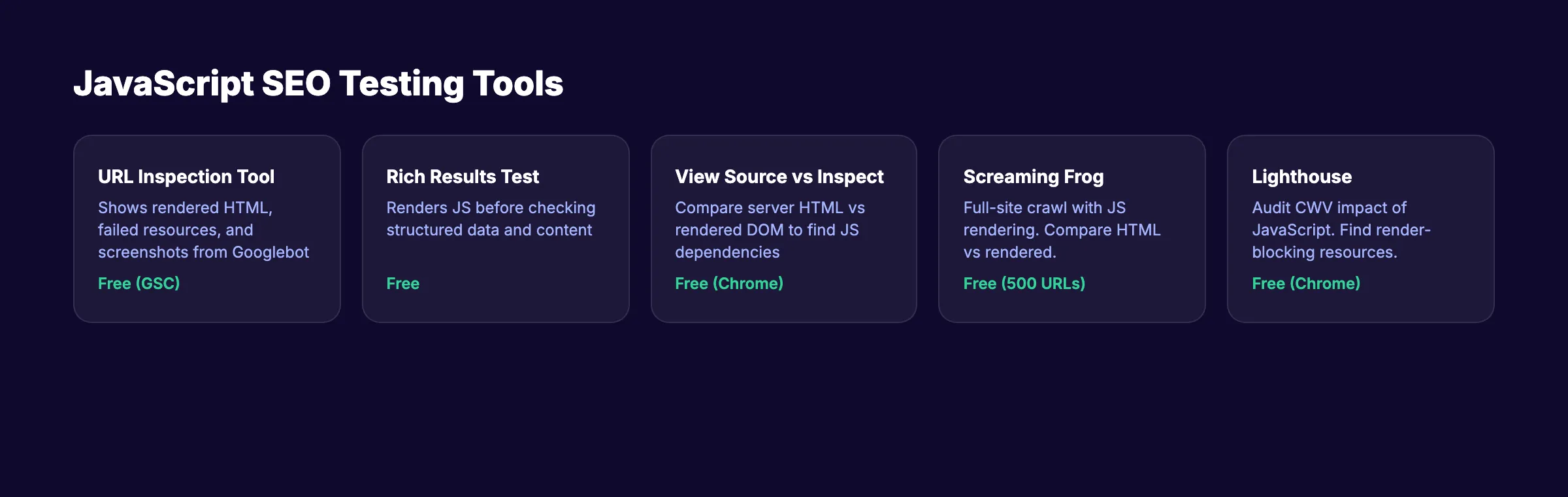
You cannot fix what you cannot see. These tools reveal exactly how search engines experience your JavaScript pages.
Google URL Inspection Tool
The most authoritative testing method inside Google Search Console. It shows rendered HTML, failed resources, screenshots, and JavaScript console errors.
View Source vs Inspect Element
Right-click and "View Page Source" shows the raw HTML the server delivers. Chrome DevTools Elements panel shows the rendered DOM after JavaScript execution. If critical content appears in Elements but not in View Source, that content depends on JavaScript rendering.
Lighthouse and Core Web Vitals
Heavy JavaScript directly impacts Core Web Vitals. Run Lighthouse audits to check LCP, INP, and CLS. Use the on-page SEO checker and website SEO score checker for quick checks.
Screaming Frog JavaScript Rendering
Enable JavaScript rendering in Screaming Frog's spider settings to compare server-rendered HTML vs rendered HTML across your entire site. This catches broken links in JavaScript-rendered navigation.
JavaScript SEO Checklist
Use this checklist for every JavaScript-powered website. Run it during your next SEO audit.
Rendering and Content:
- ✓ Critical content visible in View Source (not just Inspect Element)
- ✓ Title tags and meta descriptions server-rendered
- ✓ Canonical tags in the initial HTML response
- ✓ Error pages return proper
404status codes - ✓ Content does not depend on user interaction to appear
Links and Navigation:
- ✓ All internal links use
<a href>elements - ✓ Navigation menus render server-side
- ✓ No hash-based routing for SEO-critical pages
- ✓ Paginated content has crawlable page links
- ✓ XML sitemap includes all important URLs
Performance:
- ✓ Main JavaScript bundle under 500 KB
- ✓ Code splitting enabled for route-based chunks
- ✓ Third-party scripts loaded asynchronously
- ✓ Core Web Vitals pass on mobile
- ✓ Server response time under 500 ms
Structured Data and Metadata:
- ✓ JSON-LD structured data renders correctly
- ✓ Open Graph tags in the initial HTML for social sharing
- ✓ Image alt attributes present in rendered HTML
- ✓ Schema markup validates without errors
Resources and Access:
- ✓ robots.txt does not block essential JS or CSS files
- ✓ API endpoints return data without authentication for public pages
- ✓ Service workers do not interfere with
Googlebot
Monitoring:
- ✓ Google Search Console coverage report shows no rendering errors
- ✓ URL Inspection confirms rendered content matches expectations
- ✓ Regular audits catch new JavaScript SEO regressions
Run this alongside your technical SEO checklist for complete coverage.
Building links between pages should not be an afterthought. theStacc structures every blog post with strategic internal links from day one.
What practitioners are saying on X
Fundamentals plus AI-search measurement remain the dual stack.
- @jakezward (Feb 2026): 2026 SEO predictions emphasize AI Overview share-of-SERP, schema for LLM token efficiency, brand mentions in AI answers as a KPI, proprietary data as a moat, and content refresh beating net-new AI slop. See the post on X.
- @hridoyreh (Mar 2026): Widely shared SEO skill tree: foundations, research, technical, on-page, content, links, AI SEO/GEO, analytics, UX, brand, programmatic — useful map for stats and how-to posts. See the post on X.
- @HlynurStefDev (Jul 2026): Public case: niche site traffic jumped from ~18 to 4,162 Google visits/month after focused technical/on-page SEO work (GSC screenshots claimed) — reminds that fundamentals still move numbers. See the post on X.
Grok, AI Overviews, and multi-engine visibility
Technical topics like “javascript seo” win AI citations when steps, code samples, and failure modes are explicit. Grok and other engines prefer ordered fix lists over vague “best practices” marketing language.
- Google AI Overviews: Use passage-ready answers, tables, and FAQ schema where relevant.
- ChatGPT / Perplexity: Cite named sources next to key claims.
- Grok: Maintain accurate entity facts on-site and in high-signal X posts.
Publish content built for Google and AI citations. theStacc’s Content SEO module ships SEO-scored articles structured for rankings and generative engines — including clearer entity pages models like Grok can quote.
FAQ
Yes. Google uses an up-to-date version of Chromium to render JavaScript on every page with a 200 status code. Research from Vercel shows a 100% rendering success rate across 100,000+ pages. The exception is pages with noindex in the initial HTML. Google skips rendering those entirely.
The median rendering delay is about 10 seconds. But 10% of pages take over 3 hours, and 1% take over 18 hours. Server-rendered content avoids this delay completely.
Pure CSR is risky for SEO-critical pages. Google can render CSR content, but the delay creates a window where your page might be indexed with missing content. Social media platforms and AI search bots do not render JavaScript at all. SSR or SSG eliminates these risks.
No framework is inherently bad for SEO. React, Vue, Angular, and Svelte all support server-side rendering through meta-frameworks (Next.js, Nuxt, Angular Universal, SvelteKit). The rendering strategy determines SEO performance, not the framework itself.
Google can discover links in both rendered HTML and raw JavaScript payloads. But links must use <a> elements with href attributes. onclick handlers and programmatic navigation are invisible to crawlers.
Google still supports dynamic rendering but recommends SSR or SSG instead. Dynamic rendering adds complexity and creates cloaking risk if the bot version differs significantly from the user version.
JavaScript SEO is not optional for sites built with modern frameworks. The rendering strategy you choose today determines whether Google sees your content tomorrow or next week.
Pick SSR or SSG for every page that matters. Test with Google's own tools. Run the checklist above during every release cycle.
Related Tools & Resources
Free SEO Tools:
Best Lists:
Sources & references
- [1] Princeton / Georgia Tech et al. — GEO research (arXiv:2311.09735)
- [2] @hridoyreh on X — Widely shared SEO skill tree: foundations, research, technical, on-page, content, links, AI SEO/GEO, analytics, UX, bran
- [3] @jakezward on X — 2026 SEO predictions emphasize AI Overview share-of-SERP, schema for LLM token efficiency, brand mentions in AI answers
- [4] @HlynurStefDev on X — Public case: niche site traffic jumped from ~18 to 4,162 Google visits/month after focused technical/on-page SEO work (G
- [5] Referenced source — developers.google.com

Plan topics, review article drafts, and publish to a connected CMS.
Weekly local SEO teardowns
One practical email a week. Map Pack, GBP, AI Overviews — no fluff. Unsubscribe anytime.
Explore this topic: JavaScript SEO.