
Noindex and Nofollow: The Complete SEO Guide
Learn how noindex and nofollow directives work, when to use each, and how to avoid common mistakes. Includes code examples. Updated March 2026.
Two meta tags control whether Google shows your page and follows your links. Use them wrong and important pages disappear from search results. Use them right and you control exactly what gets indexed, what gets ignored, and where link equity flows.
Noindex and nofollow are the most misunderstood directives in technical SEO. Site owners confuse them constantly. They add noindex to pages that should rank. They use nofollow on internal links thinking it saves crawl budget. They combine noindex with robots.txt disallow and accidentally prevent Google from reading either instruction.
The cost of these mistakes is invisible. Traffic drops slowly. Pages vanish from search with no error message. Link equity leaks through the wrong paths. By the time someone notices, the damage has compounded for months.
This guide covers exactly how noindex and nofollow work, when to use each directive, and the specific mistakes that hurt rankings. We have published 3,500+ blogs across 70+ industries and audit these directives on every site before content goes live.
Here is what you will learn:
- What noindex and nofollow actually do at the crawler level
- How to implement each directive with code examples
- Every directive Google supports in the robots meta tag
- A decision matrix for choosing the right directive
- The 7 most common mistakes and how to fix them
- How to audit your site for directive errors
- How noindex and nofollow interact with robots.txt and canonical tags
What Noindex Does
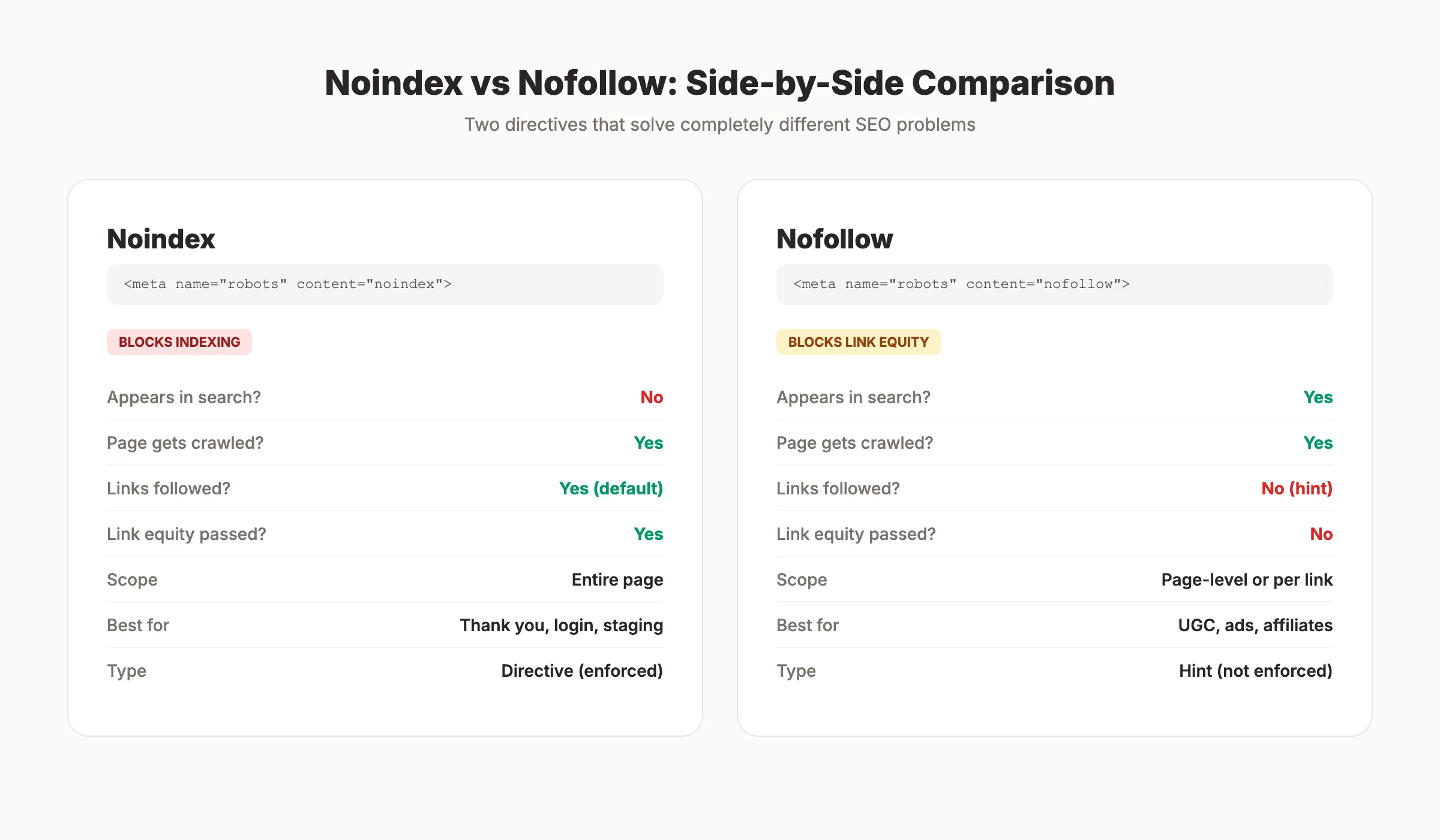
The noindex directive tells search engines not to include a page in their search results. Google will still crawl the page. It will still read the content and follow the links. But the page will not appear in any search result for any query.
This is the key distinction most people miss. Noindex does not block crawling. It blocks indexing.
How Noindex Works
When Googlebot visits a page and finds a noindex directive, it processes the page normally but marks it as excluded from the index. On the next index refresh, the page gets removed from search results. This removal can take days to weeks depending on how frequently Google crawls your site.
When to Use Noindex
Apply noindex to pages that serve a purpose on your site but should not appear in search results:
| Page Type | Why Noindex | Example |
|---|---|---|
| Thank you pages | No search value after conversion | /thank-you |
| Login and account pages | Private user content | /login, /my-account |
| Internal search results | Thin, duplicate content | /search?q=widgets |
| Tag and archive pages | Duplicate of main category content | /tag/seo, /author/admin |
| Staging and test pages | Not ready for public indexing | staging.example.com/* |
| Print-friendly versions | Duplicate of the original page | /blog/post?print=true |
| Privacy policy and terms | Low SEO value, required legally | /privacy-policy |
| Filtered and faceted pages | Parameter variations of the same content | /shoes?color=red&size=10 |
The important detail: when you noindex a page, Google still follows the links on that page by default. This means noindexed pages can still pass link equity to other pages on your site.
What Nofollow Does
The nofollow directive tells search engines not to follow links on a page or not to pass link equity through a specific link. Unlike noindex, nofollow has nothing to do with whether a page appears in search results.
A page with nofollow in its meta robots tag will still get indexed and can still rank. The directive only affects outbound links from that page.
Page-Level vs Link-Level Nofollow
There are two ways to use nofollow:
Page-level applies to every link on the page:
<meta name="robots" content="nofollow">Link-level applies to a single link:
<a href="https://example.com" rel="nofollow">Example</a>Since 2019, Google treats nofollow as a hint, not a strict directive. Google may still choose to follow nofollow links for discovery purposes. Two additional link attributes now exist alongside nofollow:
| Attribute | Purpose | Use Case |
|---|---|---|
rel="nofollow" | General “do not endorse” signal | Untrusted content, user-generated links |
rel="sponsored" | Identifies paid or sponsored links | Ads, affiliate links, paid placements |
rel="ugc" | Identifies user-generated content | Comments, forum posts, profile links |
You can combine them: rel="nofollow sponsored" or rel="nofollow ugc".
When to Use Nofollow
Apply nofollow in these situations:
- User-generated content. Blog comments, forum posts, and wiki edits where you cannot verify link quality.
- Paid and sponsored links. Any link you received compensation for. Google requires this.
- Affiliate links. Product links where you earn commission.
- Untrusted external links. Links to sites you reference but do not endorse.
- Login-required pages. Links pointing to gated content that crawlers cannot access.
Do not use nofollow on internal links to try sculpting PageRank. Google deprecated PageRank sculpting years ago. The equity from nofollowed internal links simply evaporates instead of redistributing to other links.
Stop writing. Start ranking. Stacc publishes 30 SEO articles per month for $99. Every page gets proper meta directives from day one. Start for $1 →
How to Implement Noindex and Nofollow
Both directives can be added through HTML meta tags or HTTP response headers. Choose based on your content type and server access.
Method 1: HTML Meta Tag
Place the tag in the <head> section of your HTML:
<!-- Noindex only (links still followed) -->
<meta name="robots" content="noindex">

<!-- Nofollow only (page still indexed) -->
<meta name="robots" content="nofollow">

<!-- Both directives combined -->
<meta name="robots" content="noindex, nofollow">

<!-- Shorthand for noindex + nofollow -->
<meta name="robots" content="none">
The name="robots" attribute applies to all search engines. To target a specific crawler, replace robots with the crawler name:
<!-- Only block Googlebot from indexing -->
<meta name="googlebot" content="noindex">
Method 2: X-Robots-Tag HTTP Header
Use HTTP headers for non-HTML content like PDFs, images, and video files. Add the header in your server configuration:
Apache (.htaccess):
<Files "internal-report.pdf">
  Header set X-Robots-Tag "noindex, nofollow"
</Files>
Nginx:
location /private/ {
  add_header X-Robots-Tag "noindex, nofollow";
}
Node.js / Express:
app.get('/private/*', (req, res, next) => {
  res.set('X-Robots-Tag', 'noindex, nofollow');
  next();
});
Method 3: WordPress
Most WordPress SEO plugins provide noindex and nofollow options per page. In Yoast SEO, scroll to the “Advanced” tab on any post or page editor. In Rank Math, find the robots meta settings in the sidebar panel.
For bulk changes, use the plugin settings to noindex entire post types, taxonomies, or archive pages.
Method 4: Astro, Next.js, and Static Site Generators
For JavaScript frameworks, add meta tags in the component head:
<!-- Astro -->
<head>
  <meta name="robots" content="noindex, nofollow" />
</head>
For dynamic pages, set the tag conditionally based on route or page status.
Every Robots Meta Tag Directive Google Supports
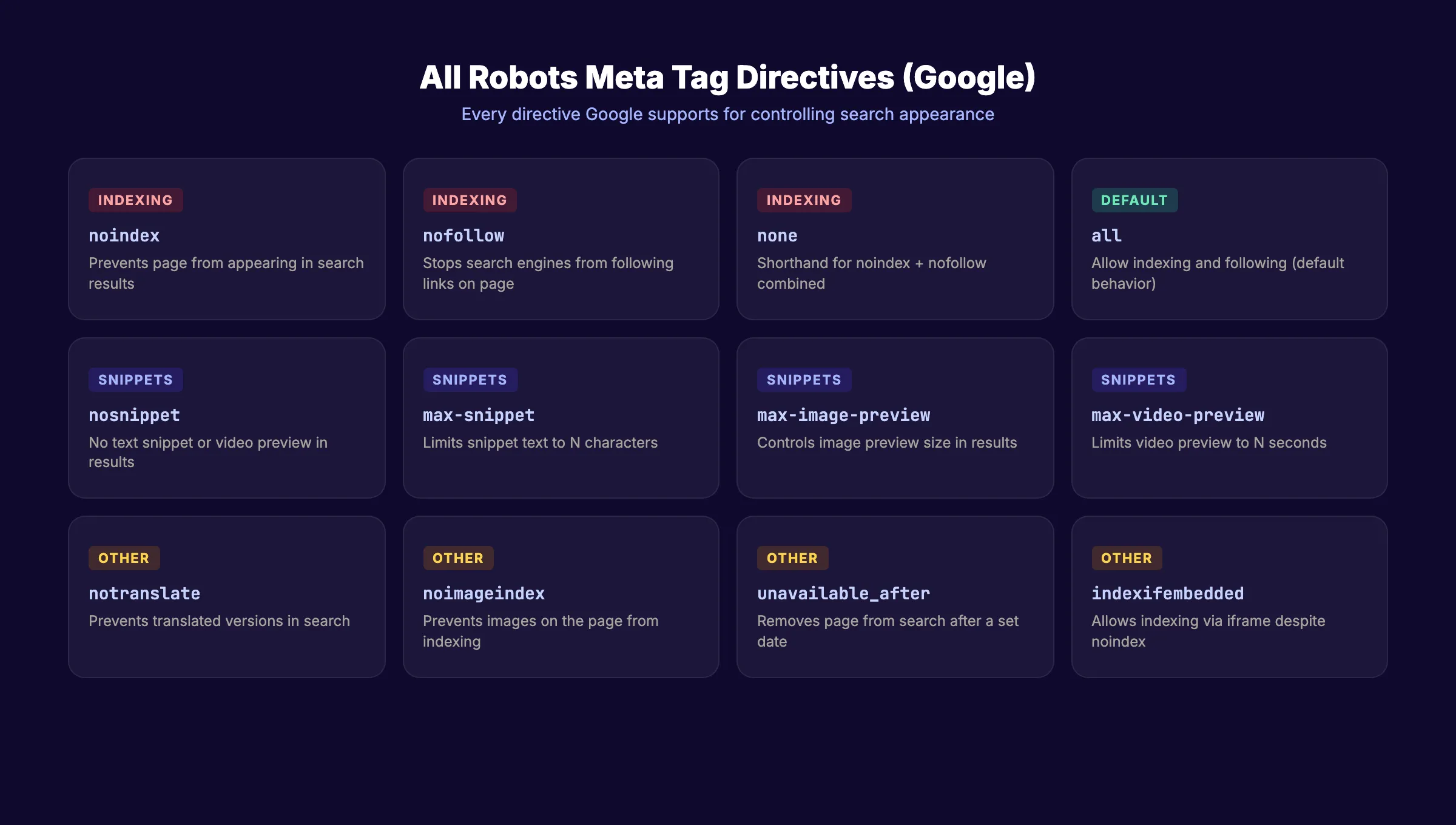
Google recognizes more directives than just noindex and nofollow. Here is the complete list:
| Directive | What It Does | Default |
|---|---|---|
index | Allows indexing | Yes (default) |
noindex | Prevents indexing | No |
follow | Allows following links | Yes (default) |
nofollow | Prevents following links | No |
all | Same as index, follow | Default behavior |
none | Same as noindex, nofollow | , |
nosnippet | Prevents text snippets in search results | No |
max-snippet:[N] | Limits snippet to N characters | Unlimited |
max-image-preview:[size] | Controls image preview size (none, standard, large) | Large |
max-video-preview:[N] | Limits video preview to N seconds | Unlimited |
notranslate | Prevents translated versions in search results | No |
noimageindex | Prevents images on the page from being indexed | No |
unavailable_after:[date] | Removes page from search after a specific date | Never |
indexifembedded | Allows indexing when embedded via iframe, even with noindex | No |
Combining Multiple Directives
Separate directives with commas:
<meta name="robots" content="noindex, nofollow, nosnippet">When conflicting directives exist, Google applies the most restrictive rule. If one tag says index and another says noindex, Google treats it as noindex.
The Noindex and Nofollow Decision Matrix
Choosing the right directive depends on two questions: Should this page appear in search results? Should search engines follow the links on this page?
| Scenario | Directive | Reasoning |
|---|---|---|
| Page should rank, links should pass equity | index, follow (default) | Standard behavior. No tag needed. |
| Page should NOT rank, but links should pass equity | noindex | Thank you pages, filtered views, login pages. Links still distribute authority. |
| Page should rank, but links should NOT pass equity | nofollow | Pages with untrusted outbound links, comment sections. |
| Page should NOT rank, links should NOT pass equity | noindex, nofollow | Staging pages, test URLs, temporary content. Use sparingly. |
| Page should NOT be crawled at all | Disallow in robots.txt | Blocks crawling entirely. Different from noindex. |
Noindex vs Robots.txt Disallow
This distinction trips up more site owners than any other directive decision.
Noindex removes a page from search results but still allows crawling. Google must crawl the page to see the noindex tag.
Robots.txt disallow blocks crawling entirely. Google never visits the page. But the page can still appear in search results if external links point to it.
Never use both together on the same URL. If robots.txt blocks crawling, Google cannot read the noindex tag. The noindex becomes invisible. The page may stay indexed with a “URL is blocked by robots.txt” notice in Google Search Console.
Noindex vs Canonical Tags
A canonical tag tells Google which version of a page is the original. A noindex tag tells Google not to index the page at all.
Do not put both on the same page. A page that says “I am the canonical version” and “Do not index me” sends contradictory signals. Google may ignore one or both directives. If the noindex carries over to the canonical target, you lose indexing on both pages.
Rule: Use canonical for duplicate pages you want consolidated. Use noindex for pages you want removed from search entirely.
Your SEO team. $99 per month. 30 optimized articles, published automatically. Proper directives on every page. Start for $1 →
7 Common Noindex and Nofollow Mistakes
Most directive errors happen during site launches, redesigns, or plugin changes. They go unnoticed because the site looks fine to visitors. Only search visibility suffers.
Mistake 1: Leaving Noindex on After Launch
Development and staging sites use noindex to prevent early indexing. After launch, teams forget to remove it. The site stays invisible to search for weeks or months.
This happens more often than most teams admit. A WordPress staging environment with noindex set in Settings > Reading carries that setting to production during migration. A developer adds a global noindex header to the staging server config and copies the config to production without reviewing it. The result is the same: zero search visibility on a fully functional site.
Always check robots meta tags as part of your launch SEO checklist. Crawl the live site after launch and filter for noindex tags. Verify in Google Search Console that pages are being submitted for indexing.
Mistake 2: Blocking Crawling and Using Noindex Together
If robots.txt blocks a URL, Google cannot see the noindex tag on that page. The instruction gets ignored. Remove the robots.txt disallow first. Let Google crawl the page and read the noindex. After deindexing completes (4 to 8 weeks), you can optionally re-add the disallow.
Mistake 3: Noindexing Pages With Valuable Backlinks
Some pages accumulate backlinks over time. Noindexing them removes the page from search results and wastes the link equity those backlinks provide. Before adding noindex, check the page for backlinks using Google Search Console or a tool like Ahrefs. If the page has valuable backlinks, redirect it to a relevant indexed page instead.
Mistake 4: Using Nofollow on Internal Links
Internal nofollow does not redistribute PageRank to other internal links. The equity assigned to nofollowed links simply disappears. This practice, called PageRank sculpting, was popular in the late 2000s. Google explicitly discouraged it and changed how nofollow works to make the tactic ineffective.
If a page has 10 links and 5 are nofollowed, each followed link does not receive more equity. The total equity is divided by 10, and the 5 nofollowed shares vanish. Use proper internal linking architecture instead of nofollow to control how authority flows through your site.
Mistake 5: Including Noindexed URLs in the XML Sitemap
Your XML sitemap signals which pages you want indexed. Including noindexed URLs creates a contradiction. Google receives “index this page” from the sitemap and “do not index this page” from the meta tag. Remove noindexed URLs from your sitemap immediately.
Mistake 6: Using Noindex Instead of 301 for Moved Content
When you move content to a new URL, noindexing the old page removes it from search but does not transfer its ranking signals to the new page. Use a 301 redirect instead. The redirect preserves link equity and sends users to the correct page.
Mistake 7: Applying Nofollow to All External Links
Some site owners add nofollow to every outbound link thinking it hoards PageRank. It does not. Google expects natural linking patterns that include followed external links to authoritative sources. Nofollowing everything looks unnatural and removes the trust signal that proper outbound linking provides.
How to Audit Your Noindex and Nofollow Directives
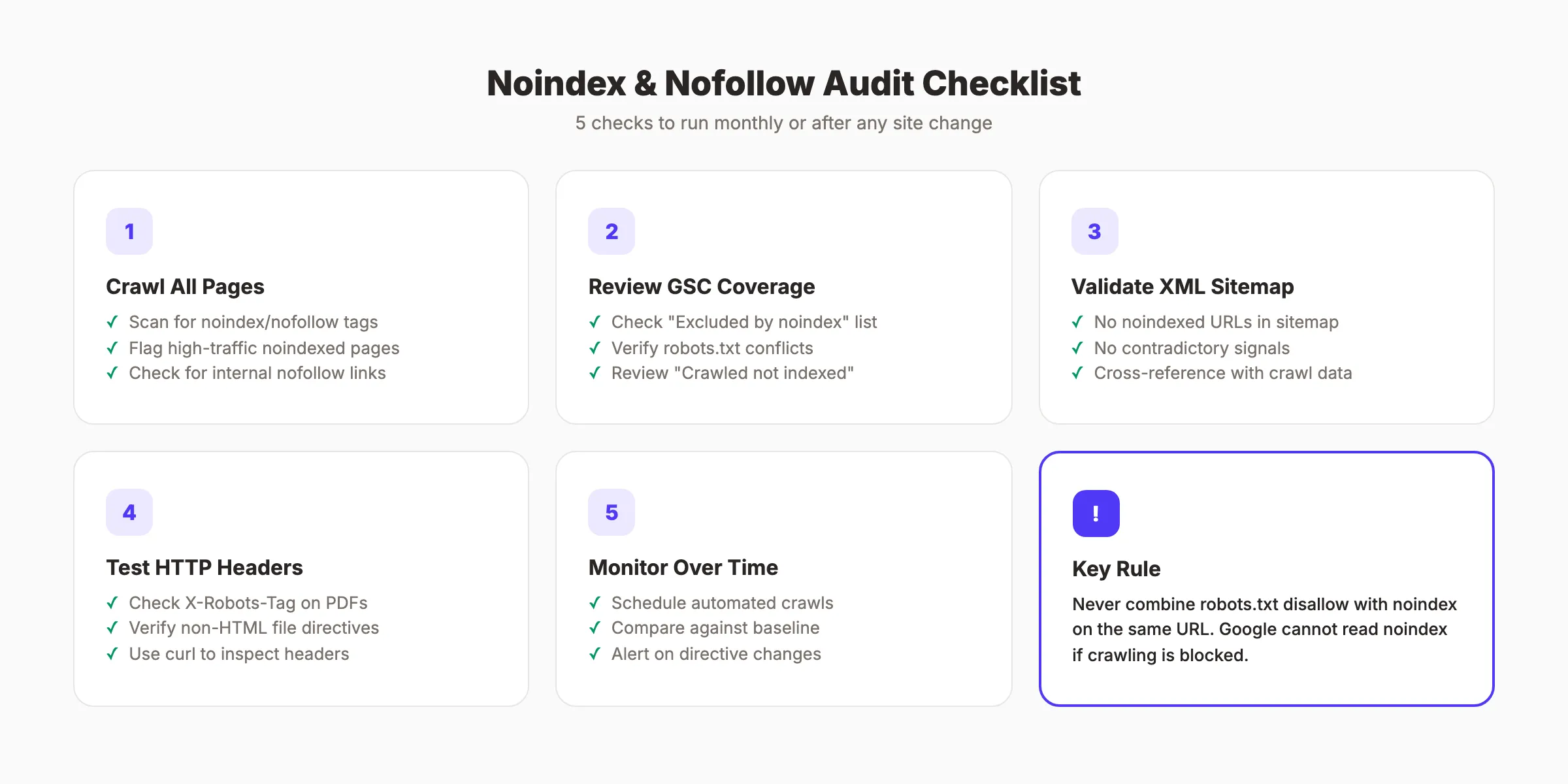
Regular audits catch directive errors before they cause ranking damage. Run these checks monthly or after any site change.
Check 1: Crawl Your Site
Use Screaming Frog, Sitebulb, or a similar crawler to scan all pages. Filter for pages with noindex or nofollow in the meta robots tag. Review each one:
- Is noindex intentional on this page?
- Does this noindexed page have valuable backlinks?
- Are any high-traffic pages accidentally noindexed?
- Are nofollow tags on internal links? (They should not be.)
- Do any pages have conflicting canonical and noindex tags?
Check 2: Review Google Search Console
In GSC, go to “Pages” (formerly Coverage). Look for:
- “Excluded by noindex tag”. Verify every page listed here should be noindexed.
- “Blocked by robots.txt”. Check if any of these pages also have noindex tags. If so, remove the robots.txt block.
- “Crawled but not indexed”. These may need noindex if they are truly low-value, or they may need content improvements if they should rank.
Check 3: Validate the XML Sitemap
Compare your sitemap URLs against your noindexed pages. No URL should appear in both lists. Tools like Screaming Frog can cross-reference your sitemap against crawl data automatically.
Check 4: Test HTTP Headers
For non-HTML files, check X-Robots-Tag headers using browser developer tools or curl:
curl -I https://example.com/file.pdf | grep -i x-robotsIf the header returns noindex, the file will not appear in search results.
Check 5: Monitor Changes Over Time
Set up automated crawls to track directive changes. A single plugin update or server configuration change can add noindex to hundreds of pages without warning. Log file analysis confirms whether Google is actually crawling and processing your directive changes.
Schedule weekly or bi-weekly crawls and compare results against your baseline. Watch for sudden increases in noindexed pages. Flag any page with more than 1,000 monthly impressions that gains a noindex tag. These are the mistakes that cause the largest traffic losses because they remove pages that already rank well.
A full SEO audit should always include a directive review as one of its core checks.
3,500+ blogs published. 92% average SEO score. See what Stacc can do for your site. Start for $1 →
FAQ
What is the difference between noindex and nofollow?
Noindex prevents a page from appearing in search results. Nofollow prevents search engines from following links on a page or passing link equity through them. They solve different problems and can be used independently or together.
Does noindex save crawl budget?
Not directly. Google’s John Mueller confirmed that noindexed pages do not adversely impact crawl budget. Google still crawls the page to read the noindex directive. Over time, Google may reduce crawl frequency on consistently noindexed pages, which indirectly frees resources.
Should I use noindex or robots.txt disallow?
Use noindex when you want Google to see the page but not include it in search results. Use robots.txt disallow when you want to block crawling entirely. Never combine both on the same URL because Google cannot read a noindex tag on a page it is blocked from crawling.
Is nofollow still relevant in 2026?
Yes. Google changed nofollow from a strict directive to a hint in 2019, but it still signals that you do not endorse a link. Google respects nofollow for sponsored and user-generated content. The rel="sponsored" and rel="ugc" attributes provide more specific signals.
Can noindex hurt my SEO?
Yes, if applied to the wrong pages. Noindexing a page with valuable backlinks or organic traffic removes it from search results and wastes its authority. Always audit which pages have noindex before making changes.
How long does noindex take to remove a page from Google?
It depends on crawl frequency. High-authority pages may be deindexed within days. Lower-priority pages can take 4 to 8 weeks. You can request faster processing by submitting the URL in Google Search Console’s URL Inspection tool and requesting reindexing.
Noindex and nofollow are simple directives with complex consequences. Every page on your site should have an intentional indexing strategy. Audit your directives quarterly, fix conflicts between robots.txt and meta tags, and treat every noindex as a deliberate choice rather than a default. The sites that control their crawling and indexing at this level are the ones that rank.

Written by
Siddharth GangalSiddharth is the founder of theStacc and Arka360, and a graduate of IIT Mandi. He spent years watching great businesses lose organic traffic to competitors who simply published more. So he built a system to fix that. He writes about SEO, content at scale, and the tactics that actually move rankings.
30 SEO blog articles published every month
Keyword-optimized, scheduled, and live on your site. Automatically.
30-day trial · Cancel anytime
theStacc
Stop writing SEO content manually
30 blog articles, 30 GBP posts, and social media content. Published every month. Automatically.
Start Your $1 Trial$1 for 3 days · Cancel anytime