Learn SEO for a new website with this 10-step guide. From domain setup to backlinks, get your site ranking on Google in 2026.
A new website starts invisible because Google does not know it exists. This guide gives ten steps in order, from indexing and technical setup through keyword selection, page structure, first content, and early links, so a new site has a realistic path to ranking.
You just launched a new website. Traffic sits at zero. Google does not know you exist yet.
That is the reality for every new site owner. An Ahrefs study found that only 5.7% of newly published pages rank in the top 10 within 1 year. The rest stay invisible because they skip the SEO fundamentals that search engines need to find, crawl, and trust a brand new domain.
SEO for a new website does not require a massive budget or a full marketing team. It requires a clear process, executed in the right order. That is what this guide delivers.
We publish 3,500+ blog posts across 70+ industries every month. We have watched hundreds of new websites go from zero impressions to consistent organic traffic. The pattern is always the same: the sites that follow a structured SEO setup outperform the ones that wing it.
Here is what you will learn:
- How to pick a domain and hosting that support SEO from day 1
- How to structure your site so Google can crawl every page
- How to find low-competition keywords you can actually rank for
- How to optimize every page for on-page and technical SEO
- How to build content, links, and authority over time
- What realistic results look like at 3, 6, and 12 months
Overview: What You Will Need
Time required: 4-6 hours for initial setup. Ongoing weekly maintenance after that.
Difficulty: Beginner-friendly. No coding required.
What you will need:
- A domain name and hosting provider
- A Google account (for Search Console and Analytics)
- A keyword research tool (free options work fine)
- A text editor or CMS (WordPress, Webflow, etc.)
- 2-4 hours per week for content creation
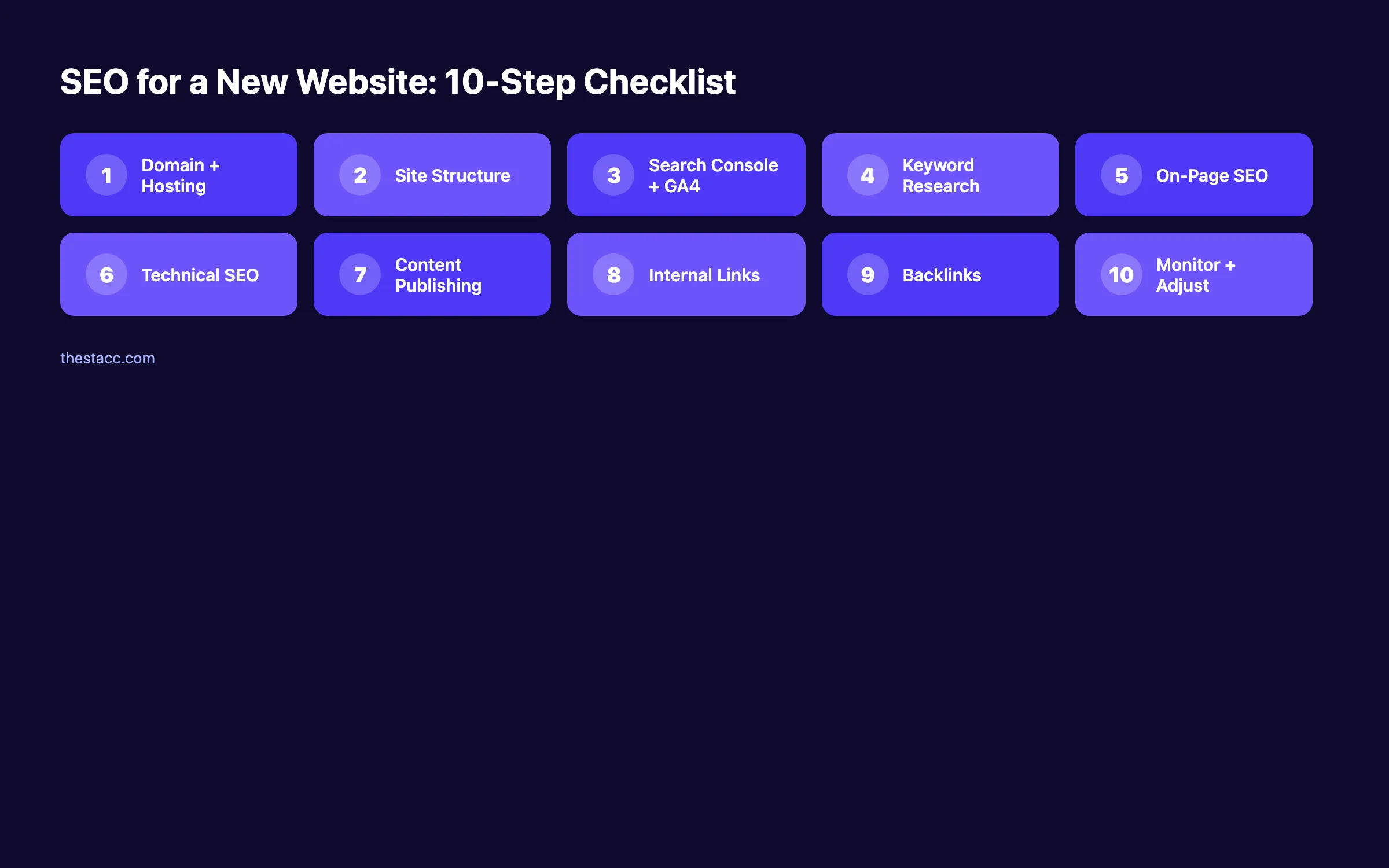
Step 1: Choose the Right Domain and Hosting
Your domain name and hosting provider form the foundation of your site's SEO. Get these wrong and you will fight an uphill battle on every step that follows.
For your domain name:
- Keep it short, memorable, and easy to spell
- Include your brand name (exact-match keyword domains no longer carry weight)
- Choose .com when possible (users trust it most)
- Avoid hyphens, numbers, and unusual TLDs like .xyz or .info
For your hosting provider:
- Pick a host with servers close to your target audience
- Ensure the plan includes a free SSL certificate (HTTPS is a Google ranking signal)
- Look for 99.9% uptime guarantees
- Choose a host that supports server-side caching
| Factor | Good Choice | Bad Choice |
|---|---|---|
| Domain length | 6-14 characters | 25+ characters |
| TLD | .com, .co, .org | .xyz, .info, .biz |
| SSL included | Yes (free) | No or paid add-on |
| Server location | Near your audience | Random data center |
| Uptime | 99.9%+ guaranteed | No SLA provided |
Why this step matters: Google uses page speed and security (HTTPS) as ranking factors. A slow host with no SSL certificate puts you at a disadvantage before you publish a single page.
Pro tip: Register your domain for 2+ years. While Google says registration length is not a ranking factor, it signals long-term commitment and prevents accidental expiration.
Step 2: Set Up a Clean Site Structure
A logical site structure helps Google understand what your website is about. It also helps visitors find what they need without clicking 5 pages deep.
Build your structure around these principles:
- Keep every important page within 3 clicks of the homepage
- Use descriptive, keyword-rich URLs (example: /services/plumbing-repair not /page?id=47)
- Group related pages into categories or directories
- Create a flat hierarchy rather than a deep nested one
A strong structure looks like this:
Homepage
├── /services/
│   ├── /services/plumbing-repair
│   ├── /services/drain-cleaning
│   └── /services/water-heater-install
├── /blog/
│   ├── /blog/how-to-fix-leaky-faucet
│   └── /blog/water-heater-maintenance-guide
├── /about/
└── /demo/
Create a navigation menu that reflects this structure. Include your most important pages in the top nav. Add a footer with links to key service pages and blog categories.
Your blog post structure matters just as much as your site structure. Each post should follow a clear heading hierarchy with H1, H2, and H3 tags.
Why this step matters: Google crawls your site by following links. A messy structure with orphan pages (pages with no internal links pointing to them) means those pages may never get indexed.
Step 3: Install Google Search Console and Analytics
You cannot improve what you do not measure. Google Search Console (GSC) and Google Analytics 4 (GA4) are free tools that tell you exactly how your site performs in search.
Set up Google Search Console:
- Go to search.google.com/search-console
- Add your property (use the "URL prefix" method for simplicity)
- Verify ownership with an HTML tag, DNS record, or file upload
- Submit your XML sitemap (typically at yoursite.com/sitemap.xml)
Our full Google Search Console guide walks through every setting in detail.
Set up Google Analytics 4:
- Create a GA4 property at analytics.google.com
- Install the tracking code in your site's head section
- Configure your key events (form submissions, phone calls, purchases)
- Link GA4 to your Search Console property
For a detailed walkthrough, read our Google Analytics 4 setup guide.
After setup, submit your website to Google directly through Search Console. This tells Google your site exists and triggers the first crawl.
| Tool | What It Tells You | Cost |
|---|---|---|
| Google Search Console | Keywords, impressions, clicks, indexing issues | Free |
| Google Analytics 4 | Traffic sources, user behavior, conversions | Free |
| PageSpeed Insights | Core Web Vitals, performance scores | Free |
| Google Business Profile | Local search visibility, reviews | Free |
Why this step matters: Without Search Console, you will not know which keywords drive impressions or which pages have indexing errors. Without Analytics, you cannot track whether your SEO work translates into actual business results.
Step 4: Run Keyword Research for Low-Competition Terms
New websites cannot compete for high-volume keywords like "plumber" or "dentist near me" right away. You need to start with long-tail keywords that established sites ignore.
Long-tail keywords have 3+ words, lower search volume, and much less competition. They also convert better because they signal specific intent.
How to find them:
- ✓ Use Google's autocomplete (type your service and note suggestions)
- ✓ Check "People Also Ask" boxes for question-based keywords
- ✓ Use free tools like Google Keyword Planner or Ubersuggest
- ✓ Analyze competitor blogs for keyword ideas
- ✓ Look at Reddit and Quora for questions your audience asks
Our keyword research for blog posts guide covers this process in full detail.
Prioritize keywords by these criteria:
| Criteria | Target Range for New Sites |
|---|---|
| Monthly search volume | 50-500 |
| Keyword difficulty | Under 30 (on a 100-point scale) |
| Search intent | Matches your content type |
| Business relevance | Directly related to your service |
Group your keywords into topic clusters. Each cluster needs 1 pillar page and 5-10 supporting pages. This approach helps you build topical authority faster than publishing random, unrelated articles.
Why this step matters: Targeting the wrong keywords wastes months of effort. A new site ranking on page 1 for a 200-volume keyword gets more traffic than ranking on page 5 for a 10,000-volume keyword.
Pro tip: Start with "how to" and question-based keywords. They attract top-of-funnel traffic, build trust, and give you content to link between.
Step 5: Optimize On-Page SEO for Every Page
On-page SEO is the set of optimizations you make on each individual page. It tells Google what the page is about and whether it matches what searchers want.
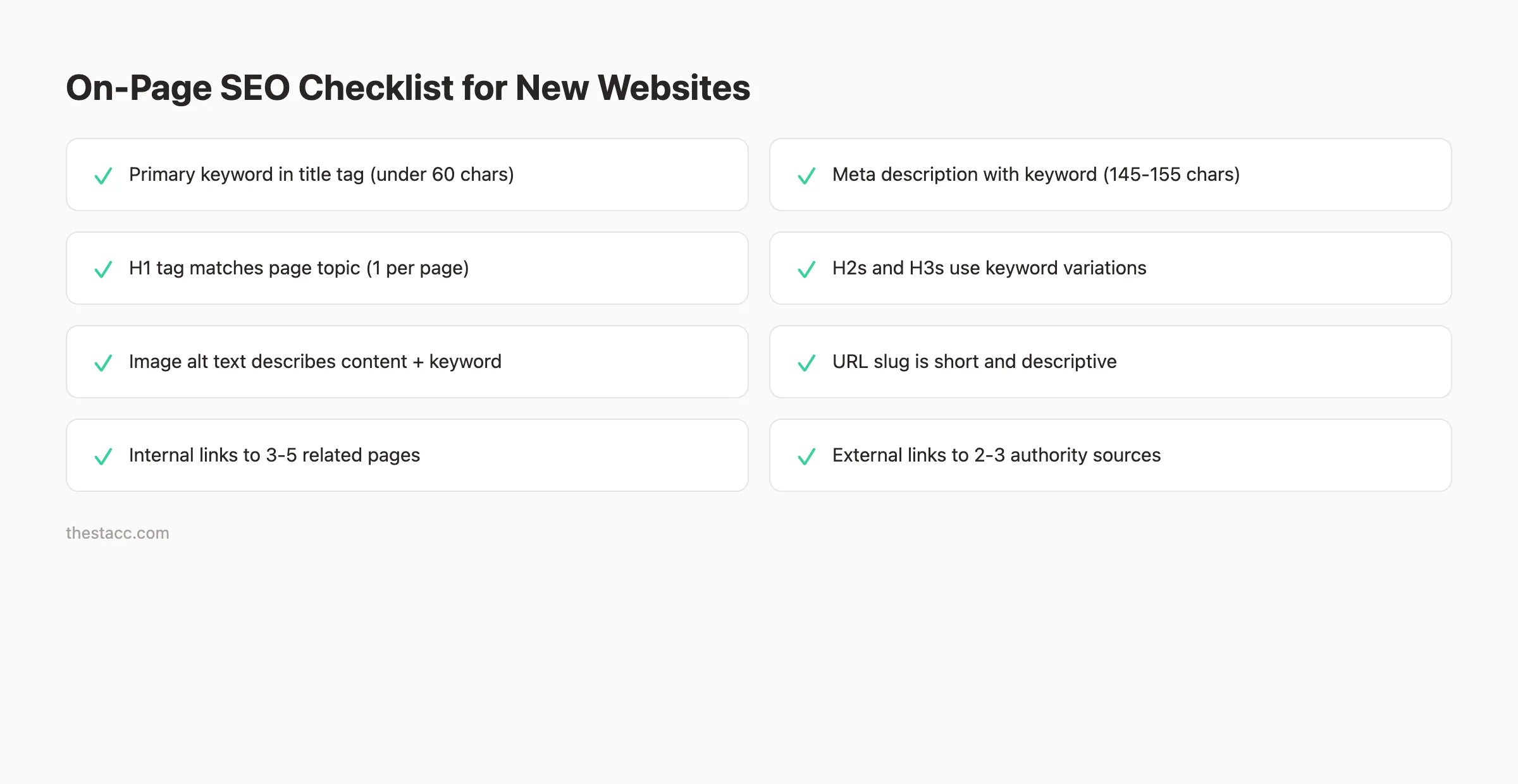
Title tag: Place your primary keyword near the front. Keep it under 60 characters. Make it specific and compelling. "Drain Cleaning in Austin TX | 24/7 Service" beats "Home - ABC Plumbing."
Meta description: Write 145-155 characters that include your keyword and a clear benefit. This text appears below your title in search results. Our guide on how to write meta descriptions covers the exact formula.
Heading tags: Use 1 H1 per page (your page title). Use H2s for main sections. Use H3s for subsections under each H2. Never skip heading levels.
URL structure: Keep URLs short and descriptive. Use hyphens between words. Include your primary keyword. Remove filler words like "and," "the," and "of."
Image optimization: Compress images before uploading. Add descriptive alt text that includes relevant keywords. Use modern formats like WebP for smaller file sizes.
Content quality: Google's Helpful Content system rewards pages that satisfy search intent. Write for real people, not search engines. Answer the question the searcher actually asked.
Read our full on-page SEO guide for a complete breakdown of every element.
Why this step matters: On-page SEO is the single factor you control completely. Even with zero backlinks, strong on-page optimization can push a new page into the top 20 for low-competition terms.
Want your SEO done automatically? theStacc publishes 30 optimized blog posts per month, handles on-page SEO, and builds internal links for you.
Step 6: Fix Technical SEO Before Launch
Technical SEO ensures search engines can access, crawl, and index your site without errors. Think of it as the plumbing behind the walls. Visitors never see it, but everything breaks without it.
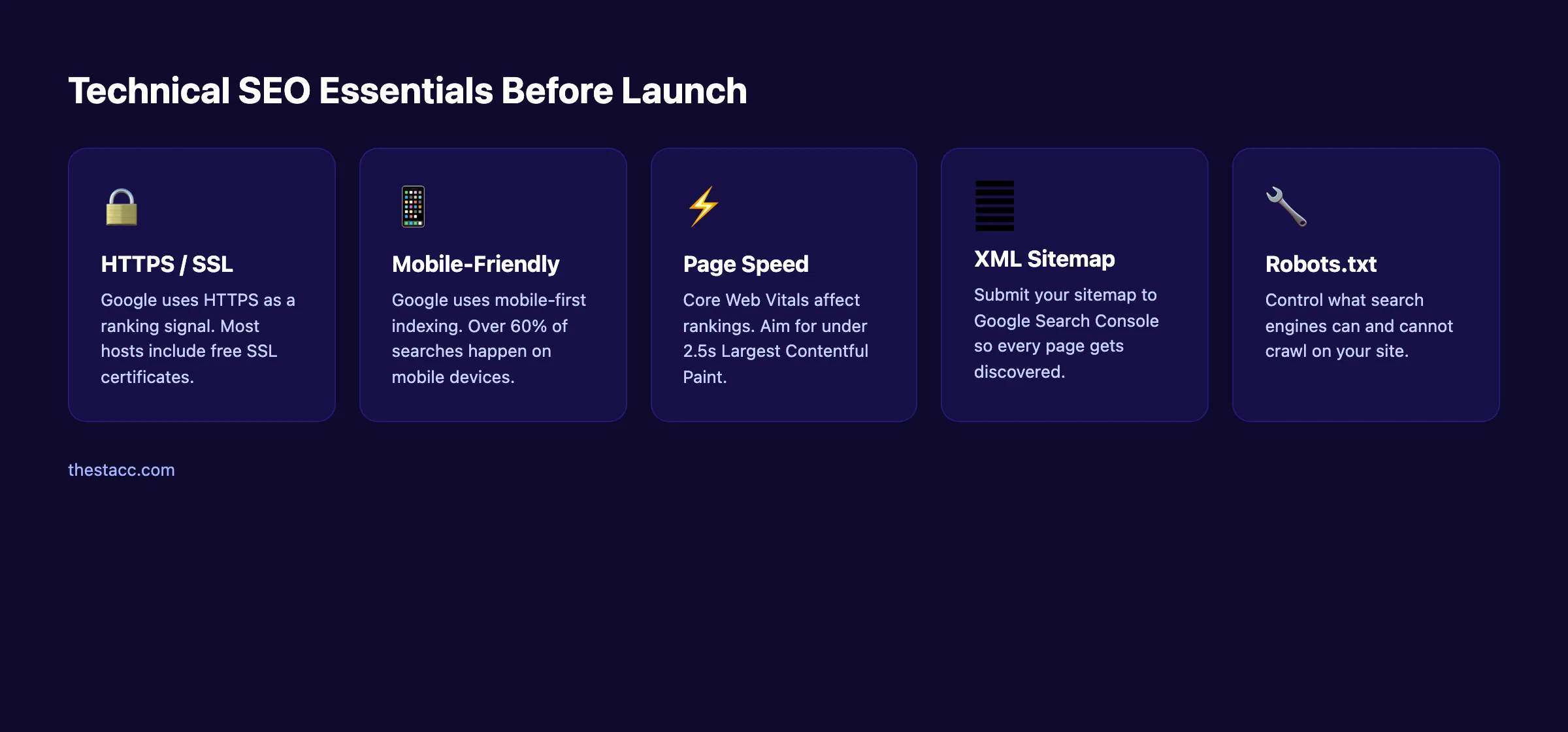
HTTPS: Confirm your SSL certificate is active. Every page should load over HTTPS. Set up a redirect from HTTP to HTTPS so no insecure versions exist.
Mobile responsiveness: Google uses mobile-first indexing. That means Google evaluates the mobile version of your site first. Test your pages on multiple devices and screen sizes.
Page speed: Run your site through Google PageSpeed Insights. Fix the biggest issues first. Common fixes include compressing images, enabling browser caching, and minimizing JavaScript. Our guide on improving Core Web Vitals breaks down each metric.
XML sitemap: Generate and submit your sitemap through Google Search Console. Most CMS platforms create sitemaps automatically.
Robots.txt: Create a robots.txt file that allows search engines to crawl your important pages. Block admin pages, staging environments, and duplicate content. Read our robots.txt optimization guide for the right configuration.
Canonical tags: Add canonical tags to every page. This tells Google which version of a URL is the "official" one and prevents duplicate content issues.
Run a full check: Use our free SEO audit tool to scan your site for technical issues before launch.
Why this step matters: A single misconfigured robots.txt file can block your entire site from Google's index. Technical SEO mistakes are invisible to visitors but devastating to your rankings.
Step 7: Publish High-Quality Content Consistently
Content is what actually ranks in search results. Without pages targeting specific keywords, your site has nothing to show Google.
The biggest mistake new site owners make is publishing 5 pages at launch and then going silent for months. Google rewards consistency. Sites that publish regularly build authority faster.
What to publish first:
- ✓ Core service or product pages (1 per offering)
- ✓ An about page with E-E-A-T signals (experience, expertise, authority, trust)
- ✓ 5-10 blog posts targeting your lowest-competition keywords
- ✓ A FAQ page answering common customer questions
Content standards that matter:
- Write 1,500+ words for blog posts targeting informational keywords
- Include original insights, data, or examples (not just rewritten competitor content)
- Add images, tables, and lists to break up text
- Optimize every piece of content for SEO before publishing
The question of how many blog posts you need to rank depends on your niche. But the data is clear: more quality content means faster results.
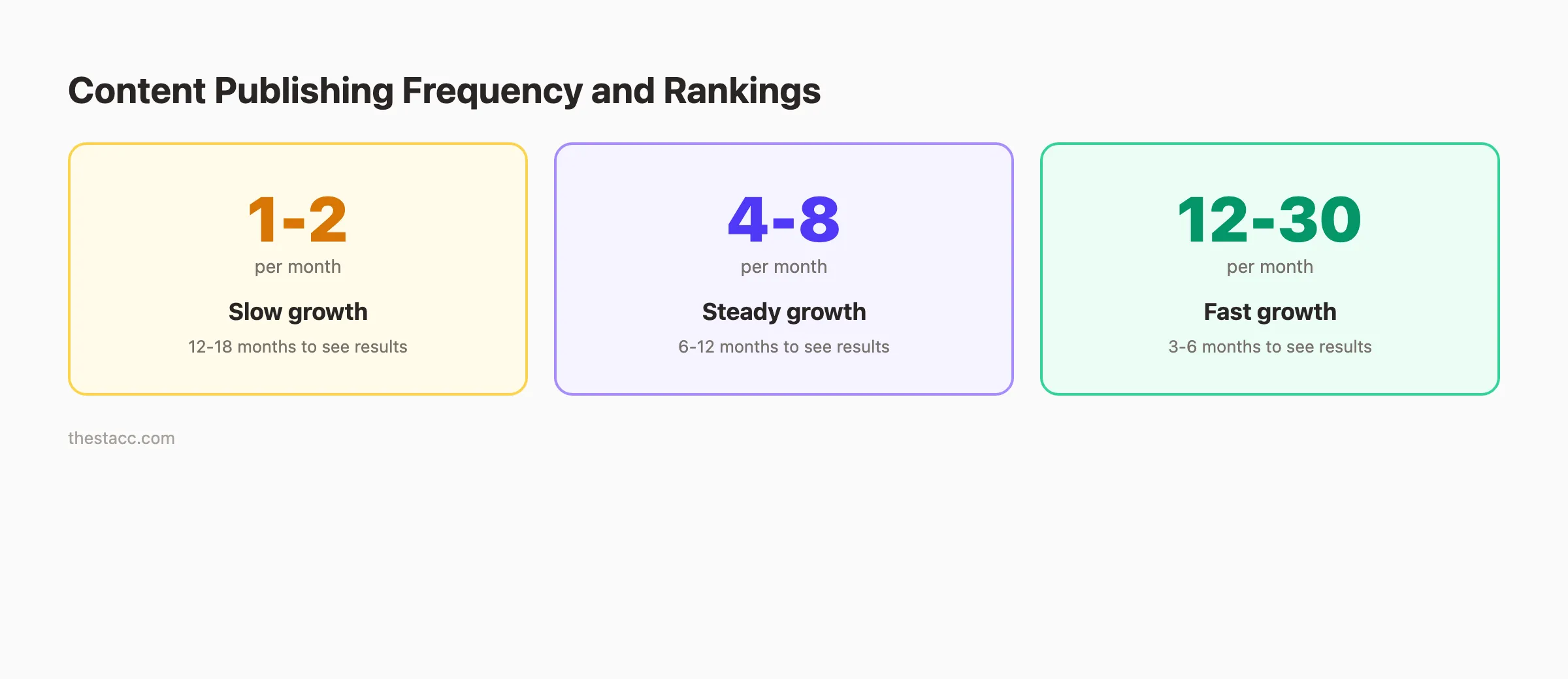
Publish at least 4-8 articles per month. That pace builds topical authority within 3-6 months for most niches. Sites publishing 1-2 articles per month often wait 12-18 months for the same results.
Why this step matters: Google cannot rank pages that do not exist. Every article you publish is another chance to appear in search results for a new keyword.
Pro tip: Batch your content creation. Write 4 articles in 1 day rather than 1 article per week. This keeps your publishing schedule consistent even during busy periods.
Step 8: Build Internal Links Across Your Site
Internal links connect your pages to each other. They pass authority from stronger pages to weaker ones. They also help Google understand your site's topic hierarchy.
Most new site owners skip internal linking entirely. That is a major missed opportunity.
Internal linking rules for new sites:
- Every page should have at least 3 internal links pointing to it
- Every page should link out to 3-5 other pages on your site
- Use descriptive anchor text (not "click here" or "read more")
- Link from high-authority pages (homepage, top blog posts) to important pages
- Create topic clusters where supporting posts link to a central pillar page
Our complete internal linking guide walks through 12 strategies that work for any site size.
| Internal Link Type | Example | SEO Benefit |
|---|---|---|
| Navigation links | Main menu, footer | Distributes authority sitewide |
| Contextual links | In-content links to related posts | Passes topical relevance |
| Breadcrumbs | Home > Blog > SEO Tips | Helps Google understand hierarchy |
| Related posts | "You might also like" section | Reduces bounce rate |
Why this step matters: Internal links are one of the few ranking factors you control 100%. A strong internal link structure can lift a page from position 15 to position 8 without earning a single backlink.
Building links across 30 blog posts per month is tedious. theStacc handles content creation and internal linking on autopilot. Every article links to your existing pages automatically.
Step 9: Earn Your First Backlinks
Backlinks are links from other websites pointing to yours. They remain one of Google's strongest ranking signals. A new website with zero backlinks will struggle to rank for anything beyond the easiest keywords.
The exception: you do not need hundreds of backlinks to rank. For low-competition keywords, even 5-10 quality backlinks to your domain can make a measurable difference.
Backlink strategies that work for new sites:
- ✓ List your business in relevant directories (Google Business Profile, Yelp, industry directories)
- ✓ Create original data, studies, or surveys that others want to reference
- ✓ Write guest posts for industry blogs with a link back to your site
- ✓ Build relationships with complementary (not competing) businesses
- ✓ Create free tools or resources that attract natural links
Our guide on how to build backlinks for your blog covers 15 proven methods with examples.
What to avoid:
- Buying links from link farms or PBNs (Google penalizes this)
- Exchanging links with unrelated sites
- Using automated link building software
- Spamming blog comments or forums with your URL
Why this step matters: Backlinks signal trust to Google. A link from a respected industry site tells Google your content is worth recommending. Without any external links, your domain authority stays near zero.
Pro tip: Focus on earning links to your best content pages first. Then use internal links to distribute that authority across your entire site.
Step 10: Monitor, Measure, and Adjust Your SEO
SEO is not a one-time project. It is an ongoing process that requires regular measurement and adjustment. The sites that rank highest are the ones that consistently review their data and act on it.
Weekly checks (15 minutes):
- Review Google Search Console for new indexing errors
- Check which keywords gained or lost positions
- Monitor page speed scores for any drops
Monthly reviews (1-2 hours):
- Analyze top-performing pages and identify patterns
- Find pages losing traffic and run a content audit
- Research new keyword opportunities in your niche
- Review your competitor keywords for gaps you can fill
Quarterly deep dives (half day):
- Perform a full SEO audit of your site
- Update old content with fresh data and examples
- Reassess your keyword strategy based on what is ranking
- Evaluate your backlink profile and plan new outreach
| Metric | Where to Find It | What It Tells You |
|---|---|---|
| Organic impressions | Google Search Console | How often Google shows your pages |
| Click-through rate | Google Search Console | How compelling your titles and descriptions are |
| Average position | Google Search Console | Where you rank for each keyword |
| Organic sessions | Google Analytics 4 | How many visitors come from search |
| Bounce rate | Google Analytics 4 | Whether visitors find your content useful |
| Core Web Vitals | PageSpeed Insights | Whether your site meets performance standards |
Track your progress over 90-day windows, not daily fluctuations. Rankings jump around in the first few months. That is normal for new domains.
Why this step matters: The difference between sites that rank and sites that stall is iteration. Data shows you what works. Acting on that data compounds your results over time.
Results: What to Expect
SEO for a new website is a long game. Set realistic expectations so you do not abandon the process too early.
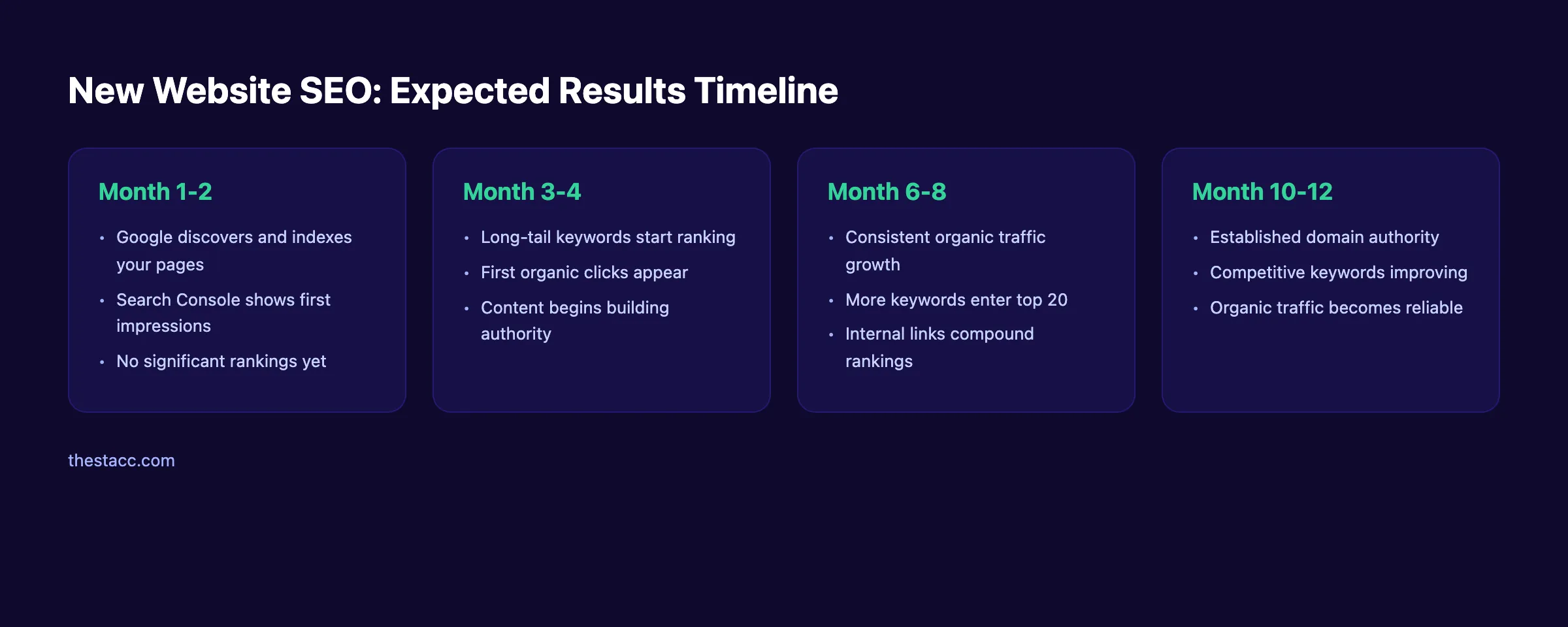
After completing these steps, expect:
- Month 1-2: Google indexes your pages. Search Console shows first impressions. Rankings remain low or non-existent for most terms.
- Month 3-4: Long-tail keywords start entering the top 50. First organic clicks trickle in. You see which content topics perform best.
- Month 6-8: Consistent publishing pays off. Several keywords reach the top 20. Organic traffic becomes a measurable channel.
- Month 10-12: Domain authority builds. Competitive keywords start improving. Organic traffic becomes a reliable source of leads.
The Ahrefs study we mentioned earlier found that the average page ranking in Google's top 10 is over 2 years old. Patience is not optional. It is the strategy.
Sites that publish 12-30 articles per month reach these milestones 2-3 times faster than sites publishing 1-2 per month. Consistency compounds.
What practitioners are saying on X
AI search advice ages quickly. Here is high-signal public discussion from SEO and growth operators — context for your roadmap, not a substitute for primary data.
- @hridoyreh (Mar 2026): Widely shared SEO skill tree: foundations, research, technical, on-page, content, links, AI SEO/GEO, analytics, UX, brand, programmatic — useful map for stats and how-to posts. See the post on X.
- @jakezward (Feb 2026): 2026 SEO predictions emphasize AI Overview share-of-SERP, schema for LLM token efficiency, brand mentions in AI answers as a KPI, proprietary data as a moat, and content refresh beating net-new AI slop. See the post on X.
Grok, AI Overviews, and multi-engine visibility
For “seo new website”, multi-engine visibility still starts with clear definitions, sourced numbers, and extractable section answers. Grok additionally factors live X discussion — keep public claims consistent with this page.
- Google AI Overviews: Use passage-ready answers, tables, and FAQ schema where relevant.
- ChatGPT / Perplexity: Cite named sources next to key claims.
- Grok: Maintain accurate entity facts on-site and in high-signal X posts.
Frequently Asked Questions
You can do basic SEO for free using Google Search Console, Google Analytics, and free keyword tools. Paid tools like Ahrefs or Semrush run $99-$449 per month. Hiring an agency costs $1,000-$5,000 per month. A service like theStacc publishes 30 SEO-optimized articles for $99 per month, making it the most cost-effective option for consistent content.
Yes. Every step in this guide works without technical expertise. The biggest barrier is not skill. It is time. Keyword research, content creation, and link building each require hours of weekly effort. Many business owners start doing it themselves and then automate or delegate after 3-6 months.
Most new websites see initial ranking movement within 3-6 months for low-competition keywords. Competitive keywords take 6-12 months or longer. Domain age, content quality, backlinks, and publishing frequency all affect the timeline. The Semrush SEO checklist recommends setting 6-month milestones rather than expecting quick wins.
Publish your core service pages first. These target bottom-of-funnel keywords and convert visitors into customers. Then start blogging to target informational keywords that bring top-of-funnel traffic. The blog content builds authority that lifts your service pages in rankings over time. Read our guide on how to increase organic traffic for the full strategy.
Backlinks help significantly, but they are not the only factor. New sites can rank for low-competition keywords with strong on-page SEO and consistent content alone. As you target more competitive terms, backlinks become essential. Focus on earning 5-10 quality links in your first 6 months rather than chasing hundreds.
Local SEO adds a layer on top of everything in this guide. You also need a Google Business Profile, consistent NAP (name, address, phone) citations, and location-specific content. Our local SEO guide covers the full process. If you serve a specific geographic area, local SEO should be your first priority.
Start Building Your SEO Foundation Now
You now have a clear 10-step process for SEO on a new website. The order matters. Domain and hosting come first. Monitoring and adjustment never stop.
The sites that win at SEO are not the ones with the biggest budgets. They are the ones that start early, publish consistently, and iterate based on data. Every article you publish stacks on the last one. SEO compounds.
Skip the learning curve. theStacc publishes 30 SEO-optimized blog posts per month for $99. We handle keyword research, content creation, on-page SEO, and internal linking. You focus on running your business. Sign up for free →
Related Tools & Resources
Free SEO Tools:
Best Lists:
Sources & references
- [1] Princeton / Georgia Tech et al. — GEO research (arXiv:2311.09735)
- [2] @hridoyreh on X — Widely shared SEO skill tree: foundations, research, technical, on-page, content, links, AI SEO/GEO, analytics, UX, bran
- [3] @jakezward on X — 2026 SEO predictions emphasize AI Overview share-of-SERP, schema for LLM token efficiency, brand mentions in AI answers
- [4] Referenced source — ahrefs.com

Plan topics, review article drafts, and publish to a connected CMS.
Weekly local SEO teardowns
One practical email a week. Map Pack, GBP, AI Overviews — no fluff. Unsubscribe anytime.