Build a complete SEO project management template from scratch. Covers all 7 sections, workflow phases, KPI tracking, and how to scale it. Updated 2026.
SEO projects fail for one reason more than any other: nobody knows what is supposed to happen next. A keyword list lives in one spreadsheet. The content calendar lives in another. Technical fixes get tracked in a Slack thread. Nobody owns the reporting. By month 3, the client asks where their traffic is. And the answer is spread across 6 tools and 4 people.
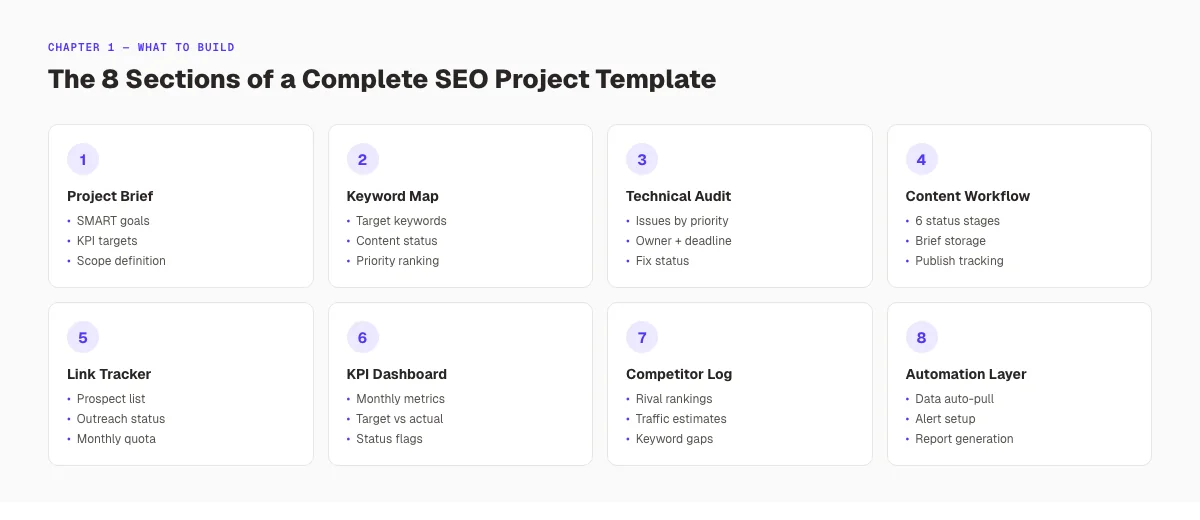
An SEO project management template fixes this by putting everything in one structured system: goals, tasks, tracking, and reporting. Done right, it reduces the setup time for every new campaign, prevents critical steps from being skipped, and makes it possible for any team member to pick up where another left off.
theStacc has published over 3,500 SEO articles across 70+ industries. This guide covers every section your SEO project management template needs, what goes in each one, and how to build a system that scales past your first 3 clients.
Here is what you will learn:
- What a strong SEO project management template actually contains
- How to structure goals, scope, and KPIs before any work begins
- The keyword research and content planning section format
- How to build a technical SEO audit tracker that closes tickets
- The content production workflow that handles briefs to published posts
- How to track link building and report results
- How to automate the repetitive parts of your SEO workflow
Table of Contents
- Chapter 1: What Makes a Good SEO Project Management Template
- Chapter 2: Project Brief and Goal Definition
- Chapter 3: Keyword Research and Content Map
- Chapter 4: Technical SEO Audit Tracker
- Chapter 5: Content Production Workflow
- Chapter 6: Link Building Tracker
- Chapter 7: Performance Reporting and KPIs
- Chapter 8: Scaling and Automation
Chapter 1: What Makes a Good SEO Project Management Template
Most SEO teams use a template that only solves one problem. They have a keyword spreadsheet or a site audit checklist, but not a single document that connects all work phases together. A strong SEO project management template is not a collection of sheets. It is a connected system where every section feeds the next.
The 3 Functions Every SEO Template Must Serve
A well-built SEO project management template serves 3 functions simultaneously:
Tracking. Every task has a status, an owner, and a deadline. Nothing lives in someone's head or a chat thread. You can open the template at any point and know the exact state of every campaign component.
Accountability. Every task is assigned to a specific person, not a role or a team. "SEO team" is not an owner. "Maya Chen, due Friday, March 28" is. Accountability is binary: a task is either owned or it is not.
Communication. The template is the source of truth for client conversations, internal reviews, and reporting. When a client asks "what did you do this month?" the answer comes directly from the template's completed task log.
Spreadsheet vs. Project Management Tool vs. Notion
All 3 formats work. The choice depends on team size and client volume.
| Format | Best for | Limit |
|---|---|---|
| Google Sheets | Solo or 2-person teams, 1-5 clients | Manual updates, no task dependencies |
| Asana / ClickUp / Monday | Teams of 3+, 5-20 clients | Requires setup time per client |
| Notion | Content-heavy SEO teams | Less suited for deadline management |
Start with Google Sheets if you are managing fewer than 5 clients. Move to a dedicated project management tool when you hit 10+ active campaigns and manual updates become the bottleneck. The sections in this guide work in any format.
Chapter 2: Project Brief and Goal Definition
Every SEO project needs a written brief before any keyword research or audit work begins. The project brief section is the most skipped step in agency SEO. And the single biggest cause of scope disputes at the 90-day mark.
A brief that takes 30 minutes to write saves 5 hours of misaligned work and one uncomfortable client call later.
What Goes in the Project Brief Section
Client business summary: Industry, primary service or product, target customer, average transaction value, and geographic focus. This context shapes every keyword and content decision downstream.
Campaign goals (SMART format): Each goal needs to be specific, measurable, achievable, relevant, and time-bound. "Increase organic traffic" is not a goal. "Rank in the top 5 for 'HVAC repair Chicago' within 6 months" is a goal. Write 3-5 specific targets with measurement criteria and deadlines.
Competitor baselines: 3-5 direct competitors, their estimated monthly organic traffic, and their top-ranked keyword clusters. The SEO competitor analysis guide covers how to pull this data systematically. Competitor data turns the project brief into a benchmark document. You can show the client their gap on day 1 and their progress toward closing it in every subsequent report.
KPIs and success metrics: Define before starting which metrics determine success. Organic sessions, keyword position targets, lead conversion rate from organic, domain authority trend. Define thresholds: "Below target," "On track," "Exceeding target." This prevents the common month-3 dispute where the client expected a ranking that was never formally committed to.
Scope definition: What is included and what is not. "This engagement covers blog content publishing and technical SEO auditing. It does not include paid ads, social media management, or website redesign." Written scope prevents scope creep more reliably than any conversation.
Stop writing. Start ranking. theStacc publishes 30 SEO-optimized articles per month automatically. No briefs, no writers, no delays. 3,500+ blogs published, 92% average SEO score.
Chapter 3: Keyword Research and Content Map
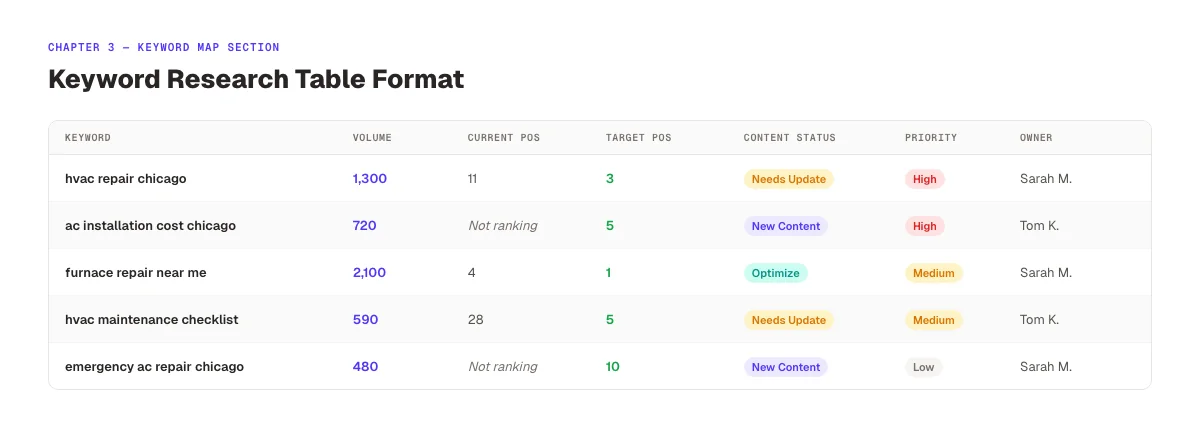
The keyword research section of your SEO project management template is where strategy becomes a task list. This section bridges what the client wants to rank for and what content needs to be created.
Keyword Tracking Table Structure
The keyword table should include these columns:
| Column | What to Track |
|---|---|
| Keyword | Exact keyword phrase |
| Monthly Volume | From Ahrefs, Semrush, or Google Keyword Planner |
| Current Position | Client's current rank (or "not ranking") |
| Target Position | Realistic 6-month position goal |
| Content Status | Exists / Needs update / Needs creation |
| Target URL | The page that should rank for this keyword |
| Priority | High / Medium / Low based on volume + intent + competition |
| Owner | Who is responsible for the content piece |
Keep the keyword table to 20-30 priority keywords per client. Managing 200 keywords in a project template creates noise. Focus on the 20-30 that connect directly to the client's revenue-driving pages first.
Content Map Integration
The content map connects keywords to content pieces. Every keyword in the table maps to one of 3 outcomes:
- Existing page to optimize. A page already on the site that ranks in positions 10-30 and needs a content update and on-page optimization
- Existing page to merge: 2-3 thin pages targeting the same keyword that should be consolidated into one authoritative page
- New content to create. A keyword with no current page on the site
The content map becomes the source list for the content production workflow in Chapter 5. For content calendar management, the SEO content calendar template provides the scheduling structure that sits alongside the keyword map.
Chapter 4: Technical SEO Audit Tracker
Technical SEO issues are the most commonly lost tasks in SEO projects. A critical crawl error gets flagged in an audit, added to a Slack message, acknowledged with a thumbs-up emoji, and then forgotten. Three months later, the client has a crawl budget problem that was known in week 2.
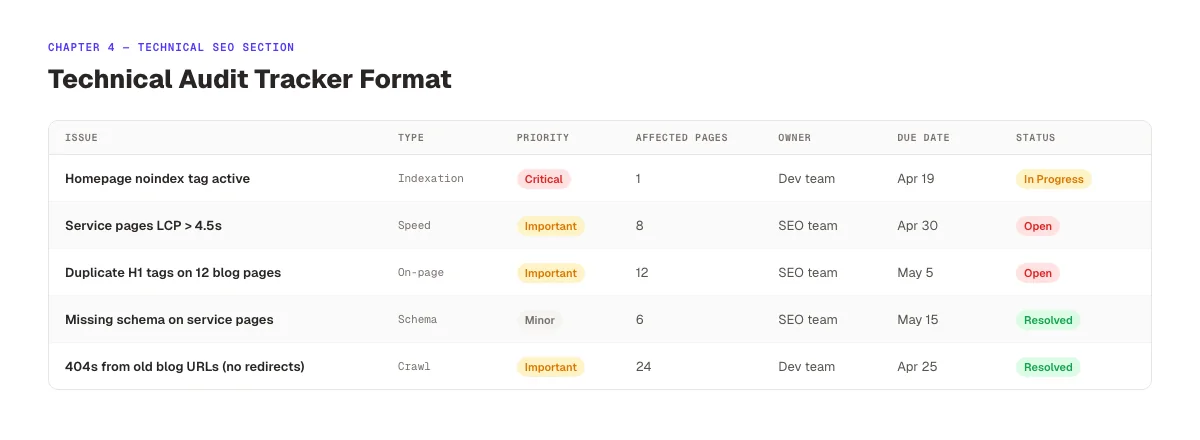
The technical SEO audit tracker section prevents this by converting audit findings into structured tasks with owners, priorities, and statuses.
Technical Audit Tracker Structure
| Column | Purpose |
|---|---|
| Issue | Specific technical problem (e.g., "404 on /services/hvac-repair/") |
| Type | Category: Crawl / Indexation / Speed / Schema / Mobile / Security |
| Priority | Critical / Important / Minor |
| Affected URLs | Number of pages impacted |
| Fix | What needs to happen to resolve it |
| Owner | Who is responsible for the fix (SEO team or client dev) |
| Due Date | Deadline for resolution |
| Status | Open / In Progress / Resolved / Deferred |
| Notes | Any dependencies, CMS limitations, or context |
Run a full site audit using the SEO audit tool at the start of every new project to populate this section. Then update it monthly as fixes are completed and new issues surface.
Priority Classification
Not all technical SEO issues deserve equal urgency.
Critical: Issues that directly block Google from crawling or indexing key pages. A noindex tag on the homepage, a disallow rule in robots.txt that blocks product pages, or pages returning 500 errors. These get fixed in week 1, no exceptions.
Important: Issues that hurt rankings or user experience without completely blocking indexation. Slow page speed on service pages, missing title tags, duplicate meta descriptions, broken internal links. Target resolution within 30-60 days.
Minor: Issues that affect long-tail performance or technical cleanliness without significant current impact. Missing schema markup on blog posts, image alt text gaps, excessive redirect chains on low-traffic pages. Address during lower-demand periods.
Clients with developer teams need a clear "Client Action Required" column to separate tasks the SEO team can fix from those requiring development resources.
Your SEO team. $99/month. 30 optimized articles published automatically. Clients get ranking content every week. Without managing a single writer or brief. See how theStacc works →
Chapter 5: Content Production Workflow
Content is the highest-volume, highest-complexity section of most SEO projects. A single campaign producing 4-8 articles per month involves keyword research, brief writing, drafting, SEO optimization review, client approval, and publishing. With multiple handoffs at each stage.
Without a workflow section in your template, content production becomes the bottleneck for the entire project.
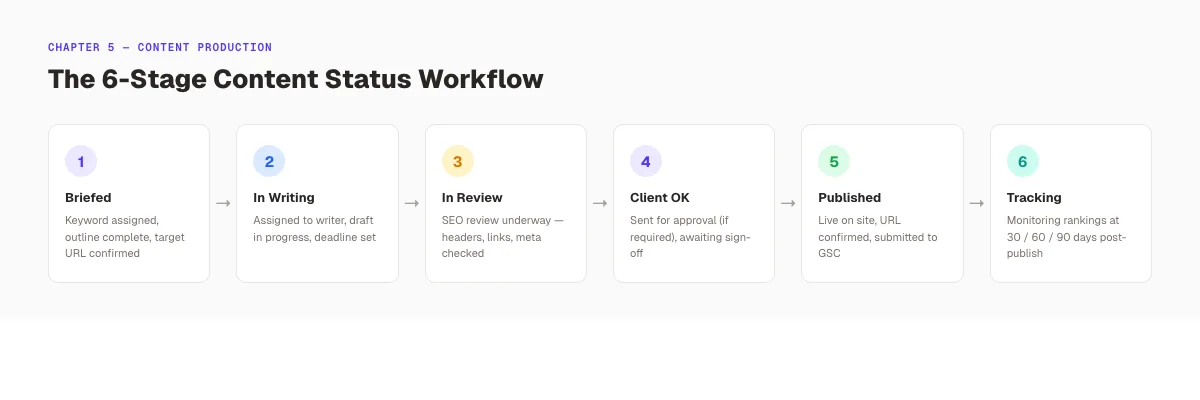
The 6-Stage Content Status System
Track every content piece through these stages:
- Briefed. Keyword assigned, article brief written, target URL and outline confirmed
- In Writing. Assigned to writer, draft in progress
- In Review. Draft complete, SEO review underway (checking keyword placement, internal links, meta description, headers)
- Client Approval. Draft sent to client, awaiting sign-off (if applicable)
- Published. Article live on site, URL confirmed, indexed
- Tracking. Article in post-publish monitoring, checking ranking movement at 30/60/90 days
Every content piece in the production workflow should show its current stage, the responsible owner at each stage, and the expected date for the next stage transition.
Article Brief Section Within the Template
Each content piece in the workflow links to or contains a brief. A minimal brief includes:
- Target keyword + 2-3 secondary keywords
- Target URL (new page slug or existing URL to update)
- Target word count
- Key points to cover (3-5 bullets from SERP research)
- Internal links to include (verified URLs only)
- CTA or conversion goal for the page
- Competitor pages to reference (structure and content gaps to address)
The blog post outline guide covers brief writing in depth if your team is building the brief creation process from scratch.
Chapter 6: Link Building Tracker
Link building is the SEO task most frequently skipped entirely. Not because agencies forget, but because it lacks a structured tracking system. Without a tracker, link building becomes random and unrepeatable.
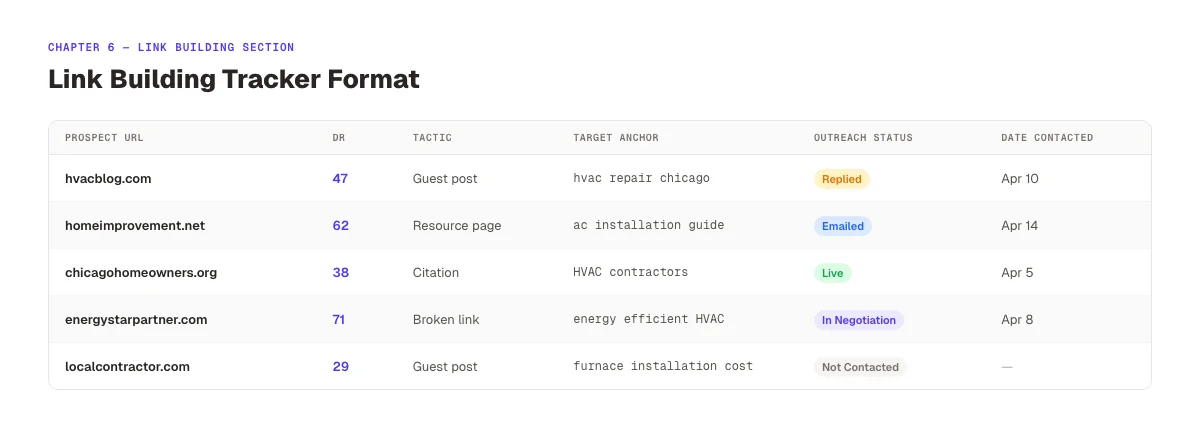
Link Building Tracker Structure
| Column | What to Track |
|---|---|
| Prospect URL | The site being targeted for a link |
| Domain Rating | DR or DA score from Ahrefs or Moz |
| Tactic | Guest post / resource page / broken link / citation |
| Contact Name | Decision-maker's name if known |
| Contact Email | Verified email |
| Outreach Status | Not contacted / Emailed / Replied / In negotiation / Published / Declined |
| Target Anchor Text | The preferred anchor text for the link |
| Target Page | The client page this link should point to |
| Date Contacted | For follow-up timing |
| Notes | Any context about the relationship or negotiation |
Track prospects through to result. Not just outreach. A link prospect marked "Emailed" on day 1 and never updated is a dead entry. Review the link building tracker weekly to follow up on live conversations and advance stalled prospects.
Minimum Monthly Link Targets
Define a monthly link-building quota in the project brief. The quota should be realistic based on the client's industry competition and the team's available time. For most local service businesses, 3-5 new referring domains per month produces meaningful results over 6-12 months. For competitive B2B or national campaigns, the target may be 8-15 per month. Write the target into the project brief section. And report against it monthly.
Chapter 7: Performance Reporting and KPIs
The reporting section of an SEO project management template serves two purposes: it gives the team a weekly dashboard for monitoring progress, and it generates the data that goes into client reports.
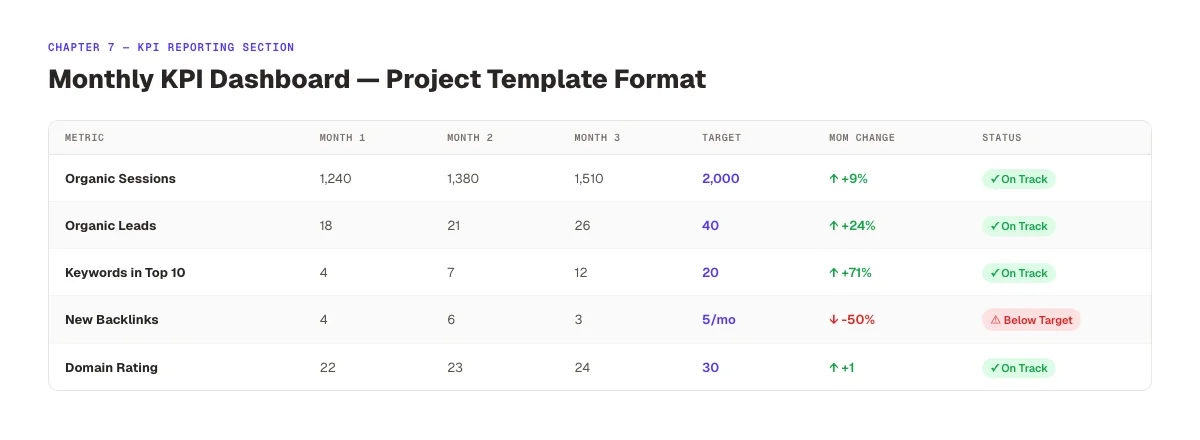
Monthly KPI Dashboard
Build a monthly KPI table that updates every 30 days:
| Metric | Month 1 | Month 2 | Month 3 | Target | Status |
|---|---|---|---|---|---|
| Organic Sessions | 1,240 | 1,380 | 1,510 | 2,000 | On Track |
| Organic Leads | 18 | 21 | 26 | 40 | On Track |
| Keywords in Top 10 | 4 | 7 | 12 | 20 | On Track |
| Keywords in Top 3 | 0 | 1 | 3 | 8 | On Track |
| Domain Rating | 22 | 23 | 24 | 30 | On Track |
| New Backlinks | 4 | 6 | 5 | 5/mo | On Track |
The "Target" and "Status" columns are set at project kick-off in the project brief section. Every month, the team updates the data and the status automatically reflects whether the campaign is on track or needs a strategy adjustment.
Connecting the Template to Client Reports
The KPI dashboard in the template is the source for client-facing reports. The SEO reporting guide covers how to translate this internal tracking data into a client-facing report format. For SEO monitoring at the technical level, the audit tracker feeds directly into the fixes-this-month section of the report.
The connection between internal template and external report ensures reporting takes 20-30 minutes rather than 2 hours. Every number in the report comes from the template. No manual data hunting.
Chapter 8: Scaling and Automating Your SEO Template System
A template that works for 3 clients will break at 10. The sections above cover what to build. This chapter covers how to operationalize it so the system runs without every answer going through one person.
Document the Template Setup Process
Write a 1-page setup guide for every new client project. It should specify: which sections to complete at kick-off, which are populated automatically (from audit tools), and which require client input. A standardized setup process reduces new client onboarding from a 4-hour manual effort to a 45-minute structured walkthrough.
Automate Data Collection
Manual data entry into the KPI dashboard is a significant time drain. Most data in the template can be pulled automatically:
- Keyword rankings: Connected via Semrush, Ahrefs, or SEOmonitor API
- Organic traffic: Connected via Google Analytics 4 data export
- Backlink data: Connected via Ahrefs or Semrush scheduled exports
- Site health score: Connected via Semrush Site Audit scheduled crawls
The SEO workflow automation guide covers the specific integration setup for each data source. Automating data collection reduces monthly reporting work by an estimated 60-80% per client.
Build a Template Library, Not a One-Size System
Different client types need different template configurations. A local service business template emphasizes GBP management, local citation tracking, and review monitoring. A B2B SaaS template emphasizes blog content velocity, lead conversion tracking, and category keyword dominance. A national e-commerce template emphasizes product page optimization, category SEO, and site structure.
Build 2-3 specialized templates from the base structure. Keep the same sections but adjust the KPIs, the keyword research table scope, and the content production volume for each client type. The SEO for B2B guide covers the specific adjustments that B2B campaigns need.
The theStacc Layer: Content on Autopilot
The most time-consuming section of any SEO project template is the content production workflow. Briefing, writing, optimizing, and publishing 8-12 articles per month per client is a 20-40 hour commitment. Most agencies hit their capacity ceiling here long before they hit it elsewhere.
theStacc handles the content production layer of your SEO template automatically: 30 SEO-optimized articles per month, published directly to the client's CMS, with zero manual writing required. The articles map to your existing keyword research section. theStacc generates content against the same keyword targets tracked in the template. The SEO automation guide covers how to build the automation layer across the full project management workflow.
What practitioners are saying on X
AI search advice ages quickly. Here is high-signal public discussion from SEO and growth operators — context for your roadmap, not a substitute for primary data.
- @hridoyreh (Mar 2026): Widely shared SEO skill tree: foundations, research, technical, on-page, content, links, AI SEO/GEO, analytics, UX, brand, programmatic — useful map for stats and how-to posts. See the post on X.
- @jakezward (Feb 2026): 2026 SEO predictions emphasize AI Overview share-of-SERP, schema for LLM token efficiency, brand mentions in AI answers as a KPI, proprietary data as a moat, and content refresh beating net-new AI slop. See the post on X.
Grok, AI Overviews, and multi-engine visibility
For “seo project management template”, multi-engine visibility still starts with clear definitions, sourced numbers, and extractable section answers. Grok additionally factors live X discussion — keep public claims consistent with this page.
- Google AI Overviews: Use passage-ready answers, tables, and FAQ schema where relevant.
- ChatGPT / Perplexity: Cite named sources next to key claims.
- Grok: Maintain accurate entity facts on-site and in high-signal X posts.
Frequently Asked Questions
A complete SEO project management template includes 6 core sections: a project brief with SMART goals and KPIs, a keyword research and content map, a technical SEO audit tracker with priority classification, a content production workflow with 6 status stages, a link building tracker with outreach status, and a monthly KPI dashboard that feeds directly into client reporting. Each section links to the next. Keyword research drives content production, technical audits drive fix tasks, and both flow into the reporting dashboard.
The right tool depends on team size. For solo operators or small teams managing 1-5 clients, Google Sheets works well because it is flexible and requires no setup fee. For agencies with 5-20 clients and 3+ team members, ClickUp or Asana handle task dependencies, deadline notifications, and multi-client views more efficiently. Notion works well for content-heavy teams where documentation and briefing live alongside task tracking. The template structure in this guide works in any of these platforms.
Track progress against the KPIs defined in the project brief section. Not against effort. Effort metrics (articles published, tasks completed) measure activity. Outcome metrics (keyword positions, organic sessions, organic leads) measure results. Review the KPI dashboard weekly for internal tracking. Review it monthly with clients. Set status thresholds at project kick-off: what counts as "on track" vs. "below target" for each metric in each month. This prevents interpretation disputes in reporting.
Track 20-30 primary keywords per client in the project template. More keywords create noise and spread team focus. Prioritize the 10-15 keywords most directly tied to revenue-generating pages, plus 10-15 secondary keywords for content cluster development. Each keyword should map to a specific target URL. For SEO forecasting purposes, this focused set is more accurate and more manageable than a 200-keyword master list.
Categorize technical tasks by priority (critical/important/minor) and by owner (SEO team vs. client developer). Critical issues blocking crawling or indexation go into the first 2-week sprint, no exceptions. Set a resolution status for each item. Open, in progress, resolved, or deferred. And review the tracker weekly. Use the SEO checklist to ensure the initial audit covers all technical categories before populating the tracker.
An SEO project management template is not a document. It is an operating system for your campaigns. The agencies and consultants who scale past 10 active clients without adding proportional overhead are the ones who built a template system in the first 6 months, then refined it with every new client type. Start with the 6 sections in this guide. Customize for your first 3 clients. By client 10, the template runs the campaign setup. And you run the strategy.
3,500+ blogs published. Every article is SEO-scored before publish. Let theStacc handle the content production section of your SEO template automatically. 30 optimized articles per month, published to your client's CMS. Try theStacc for free →
Related Tools & Resources
Free SEO Tools:
Best Lists:
Sources & references
- [1] Princeton / Georgia Tech et al. — GEO research (arXiv:2311.09735)
- [2] @hridoyreh on X — Widely shared SEO skill tree: foundations, research, technical, on-page, content, links, AI SEO/GEO, analytics, UX, bran
- [3] @jakezward on X — 2026 SEO predictions emphasize AI Overview share-of-SERP, schema for LLM token efficiency, brand mentions in AI answers

Plan topics, review article drafts, and publish to a connected CMS.
Weekly local SEO teardowns
One practical email a week. Map Pack, GBP, AI Overviews — no fluff. Unsubscribe anytime.