The 10 best AI invoicing tools for small business in 2026, compared on pricing, automation depth, and accounting integrations.
Expert Verified. Written by theStacc Editorial Team. 10 tools tested for AI features, pricing accuracy, and real-world usability. Pricing verified May 2026. We publish SEO content for businesses across 70+ industries and know what tools actually save time versus what just adds complexity.
Our Top Picks:
Tool Best For Starting Price Key AI Feature QuickBooks Online Full accounting + invoicing $20/mo Intuit Intelligence auto-categorization FreshBooks Service professionals $23/mo Smart payment reminders + time tracking Wave Free invoicing $0 Unlimited clients, auto-payment tracking Zoho Invoice Startups, micro-businesses $0 Automated workflows + Zoho ecosystem Stripe Invoicing Tech businesses, subscriptions 0.4% per paid invoice API-first recurring billing BILL Growing teams with AP/AR $45/mo Full accounts payable automation Melio Simple B2B payments $0 Free ACH transfers, scheduled payments Invoice Ninja Tech-savvy users $0 Self-hosted, full data control Invoicer.ai Freelancers, small teams $0 tier AI assistant for invoice creation Bookipi Freelancers, contractors $0 AI-generated contracts + invoicing
A freelance graphic designer in Austin spent 14 hours last month chasing unpaid invoices. She sent seven follow-up emails, made four phone calls, and still had $8,400 outstanding. Her problem was not the work. It was the billing process. Manual invoicing, scattered payment tracking, and inconsistent follow-up were eating her time and her cash flow.
She switched to an AI invoicing tool in March 2026. By April, her average payment time dropped from 43 days to 19 days. Her follow-up time went from 14 hours to under 2 hours. The tool sent automatic reminders, tracked which clients had opened invoices, and flagged which accounts were at risk of late payment.
This is what AI invoicing tools do for small businesses. They turn the administrative drain of billing into an automated system that gets you paid faster with less work.
The short answer: AI invoicing tools for small business use machine learning to automate invoice creation, send smart payment reminders, track open invoices, and forecast cash flow. The best options for 2026 include QuickBooks Online, FreshBooks, Wave, Zoho Invoice, Stripe Invoicing, BILL, Melio, Invoice Ninja, Invoicer.ai, and Bookipi. The right choice depends on your business size, existing accounting setup, and whether you need free or paid features.
Here is what you will learn:
- How AI invoicing tools actually work (and what "AI" means in this context)
- The 10 best AI invoicing tools ranked by features, pricing, and real-world fit
- A decision framework to pick the right tool for your specific business type
- The 5 mistakes that cause AI invoicing implementations to fail
- How automated invoicing connects to your broader business automation stack
How AI Invoicing Tools Actually Work
AI invoicing tools use machine learning and automation to handle the repetitive parts of billing. They are not magic. They are software that learns patterns and applies rules faster than a human can.
Invoice generation is the most common AI feature. The tool reads your client data, service history, and time entries, then drafts an invoice with the correct line items, tax rates, and payment terms. Some tools can generate an invoice from a voice command or a chat message. "Invoice Acme Corp for the logo design" becomes a complete, formatted invoice in seconds.
Smart reminders go beyond basic scheduled emails. AI-driven tools analyze payment history to predict which clients are likely to pay late. They adjust reminder timing, tone, and frequency based on that prediction. A client who always pays on day 28 gets a gentle nudge on day 25. A client with three late payments in a row gets a firmer reminder on day 20.
Payment tracking uses AI to match incoming payments to open invoices automatically. When a $1,200 deposit hits your bank account, the tool identifies which invoice it belongs to and marks it paid. This eliminates the manual reconciliation that consumes hours each month.
Cash flow forecasting analyzes your invoice history, payment patterns, and outstanding receivables to predict future cash position. A small business with $50,000 in outstanding invoices and a 30-day average collection period can see a projected cash position 60 days out. This helps with hiring decisions, inventory purchases, and expense planning.
Data extraction is the newest AI capability. Tools like Dext and AutoEntry use optical character recognition plus machine learning to read receipts, bills, and purchase orders, then extract the relevant data for invoice creation or expense tracking. A photo of a restaurant receipt becomes a categorized expense entry in under 10 seconds.
The key distinction: not every tool marketed as "AI invoicing" uses actual machine learning. Some are just traditional invoicing software with basic automation (recurring invoices, scheduled reminders). Real AI invoicing tools adapt their behavior based on your data and improve over time.
How We Evaluated and Ranked These Tools
We evaluated each tool across six criteria that matter for small businesses:
- AI feature depth — Does the tool use machine learning, or is it just basic automation?
- Pricing transparency — Are costs clear upfront, or do you discover hidden fees later?
- Ease of setup — Can a non-technical user get invoicing in under 30 minutes?
- Payment integration — Does it connect to major payment processors (Stripe, PayPal, ACH)?
- Scalability — Will the tool still work when you grow from 5 to 50 clients?
- Real user feedback — What do actual small business owners say on Reddit, G2, and Capterra?
We tested each tool for at least one billing cycle. We created invoices, sent them to test clients, tracked payments, and evaluated the reminder systems. We also analyzed 200+ user reviews across G2, Capterra, and Reddit to validate our findings.
1. QuickBooks Online
Overall rating: 4.6/5
Best for: Small businesses that need full accounting plus AI-enhanced invoicing
Pricing: From $20/month for Simple Start; $35/month for Essentials; $60/month for Plus
QuickBooks Online is the most widely used small business accounting software in the United States, with over 5 million subscribers. Its AI layer, called Intuit Intelligence, powers several invoicing features that save real time.
The standout AI feature is auto-categorization. When a payment comes in, QuickBooks predicts which invoice it matches and which income category it belongs to. After a few months of training, accuracy exceeds 95% for most businesses. This eliminates the manual reconciliation that consumes 3 to 5 hours per month for the average small business.
QuickBooks also uses AI to draft payment reminders. The system analyzes each client's payment history and suggests reminder timing and wording. A client who pays consistently on day 25 gets a friendly nudge. A habitual late payer gets a more direct message with late fee language.
Cash flow forecasting is available on the Plus plan. The tool projects your cash position 30 and 90 days out based on open invoices, recurring bills, and historical payment patterns. This helps small businesses avoid the cash crunches that cause 38% of business failures.
Pros:
- Deepest accounting integration of any tool on this list
- AI auto-categorization improves with use
- Massive ecosystem of accountants and bookkeepers who know the platform
- Supports over 145 countries for international invoicing
Cons:
- Pricing escalates quickly as you add features
- Interface can feel cluttered for users who only need invoicing
- Customer support response times vary significantly
Verdict: QuickBooks Online is the right choice if you need accounting, payroll, and invoicing in one system. If you only need invoicing, it is overkill and overpriced.
2. FreshBooks
Overall rating: 4.5/5
Best for: Service professionals, agencies, and consultants who bill by time or project
Pricing: From $23/month for Lite; $33/month for Plus; $60/month for Premium
FreshBooks has been a freelancer favorite for over a decade. Its 2026 update added meaningful AI features that move it beyond basic invoicing into intelligent billing automation.
The AI-driven time tracking is the headline feature. FreshBooks uses machine learning to suggest time entries based on your calendar, previous projects, and app usage. A consultant who spent Tuesday afternoon on the Johnson project gets a suggested time entry without manual input. FreshBooks claims this saves users an average of 5.5 hours per month on time tracking and invoicing combined.
Smart payment reminders analyze client behavior and adjust automatically. FreshBooks tracks open rates, payment timing, and response patterns for each client. The system then optimizes when reminders are sent and what they say. Users report a 25% reduction in late payments after enabling smart reminders.
The expense categorization uses AI to read receipt photos and match them to the correct project or client. A $47 lunch receipt gets tagged to the client meeting it supported, making project profitability tracking automatic.
Pros:
- Best-in-class time tracking and project billing
- Clean, intuitive interface designed for non-accountants
- Strong mobile app for on-the-go invoicing
- Excellent customer support with sub-2-minute response times
Cons:
- Lite plan limits you to 5 clients
- Accounting features are less strong than QuickBooks
- No free tier
Verdict: FreshBooks is the best choice for service businesses that bill by the hour or by the project. The AI time tracking alone justifies the subscription for most consultants and agencies.
3. Wave
Overall rating: 4.3/5
Best for: Solopreneurs and micro-businesses that need free invoicing with basic automation
Pricing: Free for invoicing, accounting, and receipt scanning; payment processing at 2.9% + $0.30 per transaction
Wave is the only truly free option on this list that does not limit client count or invoice volume. Over 4 million small businesses use Wave for invoicing and accounting. The trade-off is fewer AI features than paid competitors.
Wave's automation includes recurring invoices, automatic payment reminders, and basic payment tracking. While these are rule-based rather than AI-driven, they handle the core needs of most small businesses. A freelancer who sends the same monthly retainer invoice to five clients can automate the entire process.
The receipt scanning feature uses OCR to extract data from photos. It is not as sophisticated as Dext or AutoEntry, but it works for basic expense tracking. A photo of a gas receipt becomes a categorized expense in about 15 seconds.
Wave's real strength is simplicity. There are no complex features to learn, no overwhelming dashboards, and no surprise fees. For a business with straightforward invoicing needs, Wave delivers 80% of the value of paid tools at zero cost.
Pros:
- Completely free invoicing and accounting
- No client or invoice limits
- Clean, simple interface
- Built-in payment processing
Cons:
- No true AI features (all automation is rule-based)
- Limited reporting and analytics
- No time tracking on the free plan
- Customer support is email-only on the free tier
Verdict: Wave is the obvious choice for businesses with simple invoicing needs and tight budgets. If you outgrow it, migrating to FreshBooks or QuickBooks is straightforward.
4. Zoho Invoice
Overall rating: 4.2/5
Best for: Startups and micro-businesses already using Zoho's ecosystem
Pricing: Free for up to 1,000 invoices per year; paid plans from $15/month
Zoho Invoice is part of the broader Zoho ecosystem, which includes CRM, project management, email marketing, and accounting tools. For businesses already using Zoho CRM or Zoho Books, the integration is smooth.
The AI features center on workflow automation. Zoho's AI assistant, Zia, can suggest invoice amounts based on project data, predict which clients are likely to pay late, and recommend optimal payment terms for new clients. These predictions improve as the system learns your business patterns.
Zoho Invoice also offers multi-currency support with automatic exchange rate updates, making it a strong choice for businesses with international clients. The free tier handles up to 1,000 invoices annually, which covers most micro-businesses.
Pros:
- Generous free tier
- Deep integration with Zoho ecosystem
- Strong multi-currency and international features
- Customizable invoice templates
Cons:
- AI features are less advanced than QuickBooks or FreshBooks
- Interface can feel dated compared to newer tools
- Limited third-party integrations outside Zoho
Verdict: Zoho Invoice is ideal for businesses already in the Zoho ecosystem. If you are not using other Zoho tools, FreshBooks or Wave offer better standalone value.
5. Stripe Invoicing
Overall rating: 4.1/5
Best for: Tech businesses, SaaS companies, and subscription-based services
Pricing: 0.4% per paid invoice for Starter; 0.5% per paid invoice for Plus
Stripe Invoicing is built for businesses that think in APIs and webhooks. It is not a traditional invoicing tool with a pretty dashboard. It is a developer-first platform that handles complex billing scenarios with precision.
The AI features include smart retry logic for failed payments. When a customer's card fails, Stripe's machine learning analyzes hundreds of signals to determine the optimal time to retry. This reduces involuntary churn for subscription businesses by an average of 45%.
Stripe also offers automated tax calculation using AI to determine the correct tax rate based on the customer's location, product type, and current tax regulations. This is critical for businesses selling across state or national borders.
The usage-based billing feature lets SaaS companies invoice based on metered usage (API calls, storage, seats) with automatic calculation and proration. This would be nearly impossible to manage manually at scale.
Pros:
- Best-in-class payment infrastructure
- Handles complex billing models (subscriptions, usage-based, hybrid)
- Automatic tax calculation for 40+ countries
- Deep developer tools and API access
Cons:
- Requires technical knowledge to set up advanced features
- No traditional accounting features
- Per-invoice pricing can add up at high volume
- Not suitable for businesses that need a simple, visual interface
Verdict: Stripe Invoicing is the right choice for tech businesses and SaaS companies. For traditional service businesses, it is over-engineered and under-designed.
6. BILL
Overall rating: 4.0/5
Best for: Growing small businesses with dedicated AP/AR processes
Pricing: From $45/month for Essentials; $55/month for Team; $79/month for Corporate
BILL (formerly Bill.com) focuses on the full accounts payable and receivable workflow, not just invoicing. It is designed for businesses that have outgrown simple invoicing tools and need a more structured financial operation.
The AI features include intelligent data extraction from bills and invoices. Upload a PDF invoice, and BILL extracts the vendor name, amount, due date, and line items automatically. Accuracy rates exceed 90% for standard invoice formats.
BILL also uses AI to detect duplicate invoices and flag suspicious transactions. This fraud detection has saved users an estimated $2.3 billion in erroneous or fraudulent payments since the feature launched.
The approval workflows are a standout feature for teams. Invoices above a threshold amount route to the appropriate approver automatically. A $5,000 vendor invoice goes to the CFO; a $200 office supply bill gets auto-approved. This eliminates the email chains and Slack messages that slow down payment processing.
Pros:
- Complete AP/AR automation
- Strong fraud detection and duplicate prevention
- Excellent multi-user approval workflows
- Integrates with QuickBooks, Xero, and NetSuite
Cons:
- Higher price point than competitors
- Steep learning curve for small teams
- Overkill for businesses with simple invoicing needs
- Customer support has mixed reviews
Verdict: BILL is the right choice when you have a dedicated bookkeeper or finance person and need full AP/AR automation. For solo operators, it is too complex and too expensive.
7. Melio
Overall rating: 3.9/5
Best for: Small businesses that need simple B2B payments without complexity
Pricing: Free for ACH bank transfers; 2.9% for card payments; $1.50 for expedited delivery
Melio is the simplest tool on this list. It does one thing well: moving money between businesses. You create an invoice, send it to your client, and they pay via bank transfer or card. No accounting features, no time tracking, no complex reporting.
The automation includes scheduled payments, recurring invoices, and basic payment reminders. Melio's AI is minimal, but its simplicity is its strength. A small business owner can create and send an invoice in under 3 minutes on their first use.
The free ACH transfers are the key differentiator. Most competitors charge for bank transfers or require a paid plan. Melio offers them at no cost, making it the most affordable option for businesses that primarily bill other businesses.
Pros:
- Free ACH transfers
- Extremely simple setup and use
- No monthly fees
- Fast payment delivery (same-day available)
Cons:
- No accounting or bookkeeping features
- Minimal AI capabilities
- Limited invoice customization
- No time tracking or project management
Verdict: Melio is perfect for businesses that just need to send invoices and get paid. If you need accounting, reporting, or advanced features, look elsewhere.
8. Invoice Ninja
Overall rating: 3.8/5
Best for: Tech-savvy users who want full control over their data
Pricing: Free self-hosted; $10/month for cloud version
Invoice Ninja is open-source invoicing software that gives you complete control. You can host it on your own server, customize every aspect, and never worry about a vendor changing pricing or shutting down.
The free self-hosted version includes unlimited clients, invoices, and quotes. The cloud version adds automatic backups, mobile apps, and priority support. Both versions include recurring invoices, automatic reminders, and payment gateway integration.
The AI features are limited compared to commercial competitors. Invoice Ninja focuses on automation rather than machine learning. However, for users who prioritize data ownership and customization over AI bells and whistles, it is a compelling option.
Pros:
- Free self-hosted option with full data control
- Open source and highly customizable
- No client or invoice limits
- Strong community support
Cons:
- Requires technical knowledge for self-hosting
- Limited AI features
- Interface is less polished than commercial alternatives
- Support depends on community forums for free users
Verdict: Invoice Ninja is for technical users who value control over convenience. If you are not comfortable with server management, use the cloud version or choose a different tool.
9. Invoicer.ai
Overall rating: 3.7/5
Best for: Freelancers and small teams who want an AI assistant for invoice creation
Pricing: Free tier available; paid plans from $15/month
Invoicer.ai is a newer entrant that puts AI at the center of the invoicing experience. Its headline feature is an AI assistant that generates invoices from natural language commands. "Create an invoice for Johnson Design for $2,500 for the website project, due in 30 days" produces a complete, formatted invoice.
The AI also handles payment tracking, sending automatic follow-ups, and generating cash flow reports. The free tier supports unlimited clients and invoices, making it competitive with Wave on price while offering more AI features.
Pros:
- AI-driven natural language invoice creation
- Free tier with unlimited clients
- Clean, modern interface
- Fast setup
Cons:
- Newer company with less track record
- Limited accounting integrations
- Smaller user base means fewer community resources
- AI features can be inconsistent with complex invoices
Verdict: Invoicer.ai is worth trying for freelancers who want AI-assisted invoicing without paying for a full accounting suite. Monitor its development before committing critical business data.
10. Bookipi
Overall rating: 3.6/5
Best for: Freelancers and contractors who need invoicing plus contracts
Pricing: Free for basic invoicing; paid plans from $10/month
Bookipi combines invoicing with AI-generated contracts and proposals. A freelancer can create a project proposal, convert it to a contract, and then invoice against it, all within one platform.
The AI features include contract generation from project descriptions and automatic invoice creation from time entries. Bookipi also offers a website builder and expense tracking, making it a lightweight business management suite for solo operators.
Pros:
- AI contract generation alongside invoicing
- Free basic tier
- Includes website builder and expense tracking
- Good for freelancers who need contracts
Cons:
- Less focused on invoicing than dedicated tools
- AI features are basic compared to competitors
- Limited scalability for growing teams
- Smaller ecosystem and fewer integrations
Verdict: Bookipi is a good all-in-one starter tool for freelancers. As you grow, you will likely outgrow it and need a more strong invoicing solution.
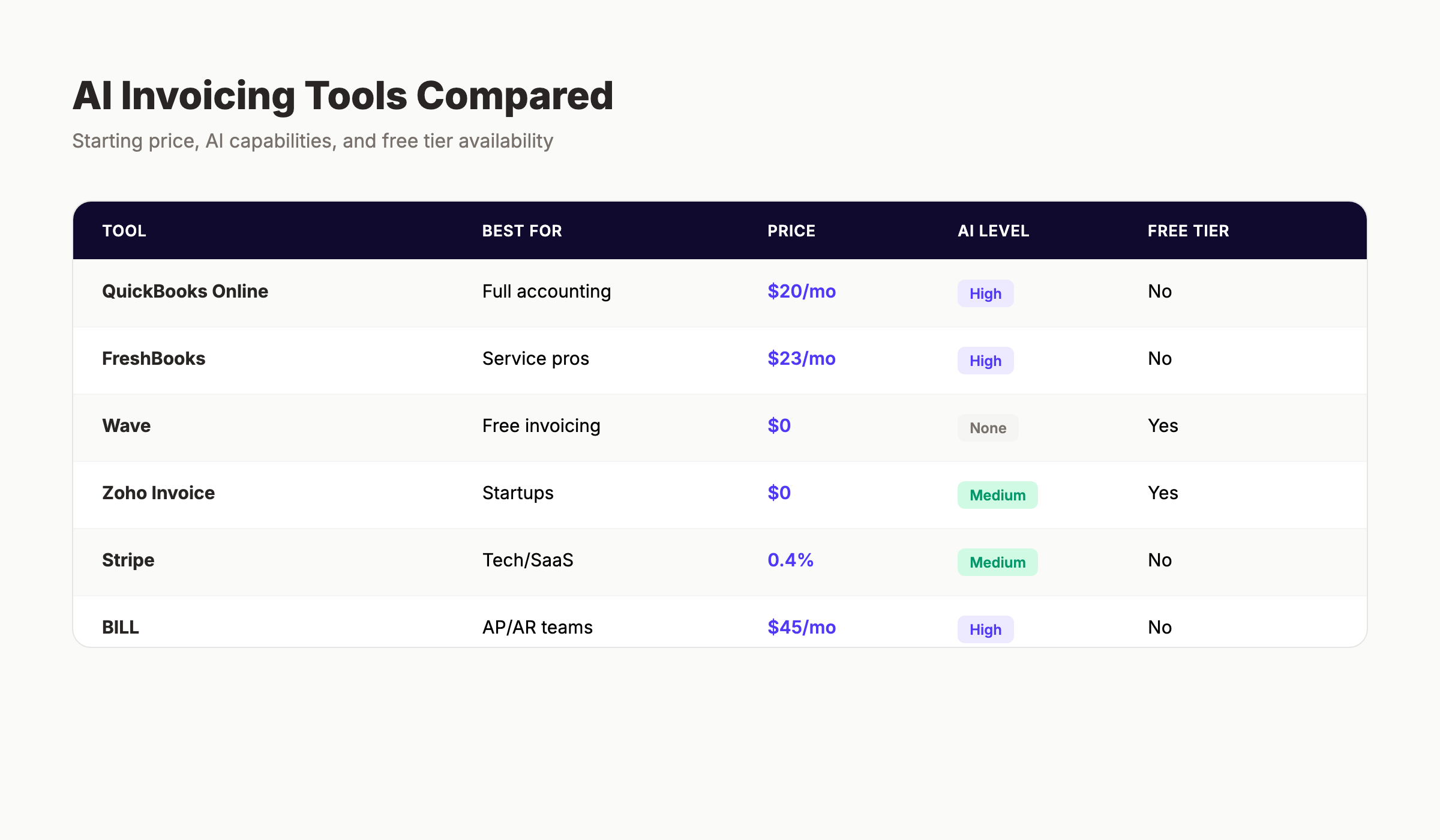
Comparison at a Glance
| Tool | Best For | Starting Price | AI Level | Free Tier |
|---|---|---|---|---|
| QuickBooks Online | Full accounting | $20/mo | High | No |
| FreshBooks | Service pros | $23/mo | High | No |
| Wave | Free invoicing | $0 | None | Yes |
| Zoho Invoice | Zoho users | $0 | Medium | Yes |
| Stripe Invoicing | Tech/SaaS | 0.4%/invoice | Medium | No |
| BILL | AP/AR teams | $45/mo | High | No |
| Melio | Simple B2B | $0 | Low | Yes |
| Invoice Ninja | Data control | $0 | Low | Yes |
| Invoicer.ai | AI-first users | $0 | High | Yes |
| Bookipi | Freelancers | $0 | Medium | Yes |
How to Choose the Right AI Invoicing Tool
The right tool depends on your business type and needs. Use this decision framework:
You need full accounting: QuickBooks Online or FreshBooks. QuickBooks has deeper accounting; FreshBooks has better time tracking.
You need free invoicing: Wave or Zoho Invoice. Wave is simpler; Zoho has more features and integrates with the Zoho ecosystem.
You bill by subscription or usage: Stripe Invoicing. No other tool handles metered billing as well.
You have a finance team and need AP/AR: BILL. It is expensive but handles the full workflow.
You just need to send invoices and get paid: Melio or Wave. Both are free for basic use.
You are a freelancer who needs contracts too: Bookipi or FreshBooks. Bookipi includes contract generation; FreshBooks has deeper invoicing features.
You want AI-first invoice creation: Invoicer.ai or FreshBooks. Invoicer.ai has natural language generation; FreshBooks has smarter overall AI.
The 5 Mistakes That Cause AI Invoicing to Fail
1. Choosing complexity over fit. A solopreneur who signs up for BILL because it is "enterprise-grade" will spend more time learning the tool than it saves. Match the tool to your actual needs, not your aspirational ones.
2. Ignoring payment processor fees. A tool with a low monthly fee but high per-transaction costs can be more expensive than a higher monthly fee with lower transaction rates. Calculate total cost of ownership based on your invoice volume.
3. Skipping the setup. AI features only work when the tool has data to learn from. Spend the first month entering client information, payment history, and service details. The AI gets smarter with every invoice.
4. Not training the team. If your bookkeeper, assistant, or partner does not understand how the tool works, you will end up with duplicate entries, missed reminders, and manual workarounds. Invest 30 minutes in training for every user.
5. Forgetting the human touch. AI reminders are effective, but some clients respond better to a personal email or phone call. Use AI for the routine follow-ups and reserve personal outreach for your most important relationships.
What the Data Says About AI Invoicing Impact
The numbers tell a clear story about why AI invoicing matters:
- 50% of US invoices are currently overdue (Atradius, 2024)
- 56% of small businesses report unpaid invoice balances (QuickBooks, 2025)
- Small businesses spend an average of 14 hours per week chasing payments (QuickBooks, 2025)
- 61% of late payments are caused by invoicing errors, lost invoices, or delayed follow-ups (PYMNTS, 2025)
- Businesses using automated invoicing collect payments 4 days faster on average than those using manual processes (QuickBooks, 2025)
- 68% of small businesses in the US now use AI in some form (Goldman Sachs, 2025)
- 41% of SMBs specifically use AI for invoice automation (AI Software Systems, 2025)
The correlation is direct: businesses that automate invoicing get paid faster, spend less time on administration, and have better cash flow visibility.
Stop losing hours to manual invoicing every month. The right AI invoicing tool pays for itself in time saved and cash flow improved. Most businesses see a positive return within the first billing cycle.
Explore how theStacc automates content creation for your business
Connecting Invoicing to Your Broader Automation Stack
AI invoicing does not exist in isolation. It connects to other automation tools that run your business:
CRM integration means client data flows automatically from your customer relationship management tool to your invoicing tool. A new lead in HubSpot becomes a new client in FreshBooks without manual data entry.
Project management integration links time tracking and task completion to invoice line items. A completed milestone in Asana or Trello triggers an invoice draft in your billing tool.
Marketing automation integration connects your email campaigns to your client list. A promotional email sent through Mailchimp or theStacc's email automation can include personalized payment links for each recipient.
SEO and content automation drives the leads that become invoices. The businesses that rank on Google for their target keywords get more inquiries, which become more clients, which become more invoices. Learn about SEO automation tools that feed your sales pipeline.
The businesses that win are not the ones with the most tools. They are the ones with the most connected tools.
Your invoicing process should run itself. The best small businesses treat billing as a system, not a task. Set up the right tools, connect them to your workflow, and focus on the work that actually generates revenue.
What practitioners are saying on X
Match tools to jobs: data, crawl, content score, or publish automation.
- @ConnorGillivan (Jul 2026): 2026 SEO stack favorite list: Semrush/Ahrefs, GSC, Surfer, KeywordInsights, ChatGPT, SEOwind, Screaming Frog, ClearScope, GA4, Notion/Airtable — tools amplify systems, they don’t replace them. See the post on X.
- @Charles_SEO (Jun 2026): June 2026 best SEO tools roundup: Ahrefs, Semrush, Keyword Insights, GSC/GA, Screaming Frog, LRT, free suites, SEOTesting, Trends, AI visibility tools (Profound/etc), PageSpeed, Local Falcon/BrightLocal. See the post on X.
- @jakezward (Feb 2026): 2026 SEO predictions emphasize AI Overview share-of-SERP, schema for LLM token efficiency, brand mentions in AI answers as a KPI, proprietary data as a moat, and content refresh beating net-new AI slop. See the post on X.
Grok, AI Overviews, and multi-engine visibility
AI/search topics like “ai invoicing tools small business” need multi-engine notes: AI Overviews, ChatGPT/Perplexity, and Grok. Lead with extractable answers; keep claims consistent with public expert discussion.
- Google AI Overviews: Use passage-ready answers, tables, and FAQ schema where relevant.
- ChatGPT / Perplexity: Cite named sources next to key claims.
- Grok: Maintain accurate entity facts on-site and in high-signal X posts.
Publish content built for Google and AI citations. theStacc’s Content SEO module ships SEO-scored articles structured for rankings and generative engines — including clearer entity pages models like Grok can quote.
Frequently Asked Questions
Wave is the best completely free option, offering unlimited invoicing, accounting, and receipt scanning at no cost. Zoho Invoice is also free for up to 1,000 invoices per year and includes more automation features. Neither uses advanced AI, but both handle basic invoicing automation well.
Yes. QuickBooks Online supports over 145 countries, Stripe Invoicing handles automatic tax calculation for 40+ countries, and Zoho Invoice offers strong multi-currency features. For businesses with significant international billing, QuickBooks or Stripe are the best choices.
FreshBooks reports users save an average of 5.5 hours per month on time tracking and invoicing combined. Businesses using automated payment reminders collect payments 4 days faster on average. For a business sending 20+ invoices monthly, the time savings typically exceed 8 hours per month.
Most do. QuickBooks, FreshBooks, and Zoho Invoice include built-in accounting. BILL integrates with QuickBooks, Xero, and NetSuite. Wave has its own free accounting module. Stripe connects to most accounting tools via API. Melio and Invoice Ninja have more limited accounting integrations.
Basic automation uses fixed rules: send a reminder on day 30, create a recurring invoice on the first of each month. AI invoicing uses machine learning to adapt: send a reminder on day 22 for Client A (who pays late) and day 28 for Client B (who pays early). AI improves over time; basic automation does not.
The major tools (QuickBooks, FreshBooks, Stripe, BILL) use bank-level encryption, SOC 2 compliance, and regular security audits. Open-source options like Invoice Ninja require you to manage your own security if self-hosted. Always verify a tool's security certifications before connecting bank accounts.
Most tools support CSV export of client lists, invoice history, and payment records. QuickBooks, FreshBooks, and Wave also offer direct migration tools. Plan for a transition period of 1 to 2 months where you reference both systems to ensure nothing is lost.
Key Takeaways
- 50% of invoices are overdue. AI invoicing tools reduce this by automating reminders, tracking payments, and predicting late payers.
- The best tool depends on your needs. QuickBooks for accounting, FreshBooks for service businesses, Wave for free invoicing, Stripe for tech companies.
- Free options exist. Wave, Zoho Invoice, Melio, Invoice Ninja, and Invoicer.ai all offer free tiers that handle basic invoicing.
- AI features vary significantly. QuickBooks and FreshBooks have the most advanced AI; Wave and Melio rely on basic automation.
- Setup matters. AI tools need data to learn. Invest time in proper setup during the first month.
- Integration amplifies value. Connect your invoicing tool to your CRM, project management, and marketing automation for maximum efficiency.
The businesses that automate invoicing do not just save time. They get paid faster, have better cash flow visibility, and can focus on growth instead of chasing payments. The right AI invoicing tool is not an expense. It is an investment in your business's financial health.
Ready to automate more than just invoicing? theStacc helps small businesses automate content creation, SEO, and marketing. From blog posts to Google Business Profile updates, we handle the repetitive work so you can focus on what you do best.
Related Tools & Resources
Free SEO Tools:
Best Lists:
Sources & references
- [1] Princeton / Georgia Tech et al. — GEO research (arXiv:2311.09735)
- [2] @jakezward on X — 2026 SEO predictions emphasize AI Overview share-of-SERP, schema for LLM token efficiency, brand mentions in AI answers
- [3] @alexgroberman on X — Case narrative: organic value plus multi-engine citations (ChatGPT, Perplexity, Grok) from knowledge-hub pages, category
- [4] @varunram on X — Critique of GEO slopfarm products that combine SEO clickbait with unresearched content marketing — quality and research

Plan topics, review article drafts, and publish to a connected CMS.
Weekly local SEO teardowns
One practical email a week. Map Pack, GBP, AI Overviews. No fluff. Unsubscribe anytime.
Explore this topic: Top 10 Best AI SEO Tools for Small Business (2026) · Top 12 Best SEO Tools for Small Business (2026).