
10 Best Instagram Scheduling Tools (2026)
We tested 10 Instagram scheduling tools for Reels, Stories, and carousel support. See pricing, features, and which fits your workflow. Updated March 2026.
Our Top Picks:
- Best overall: Later. Visual grid planner built for Instagram
- Best free option: Buffer , 3 channels, auto-publish Reels and posts
- Best for creators: Pallyy , 15 free posts/month, Instagram-first design
- Best AI captions: SocialBee. AI Copilot generates on-brand copy
- Best for agencies: SocialPilot. White-label dashboards, bulk scheduling
How We Tested These Instagram Scheduling Tools
Most “best Instagram scheduler” lists rank tools by affiliate commission. We tested each tool by connecting real Instagram accounts, scheduling real Reels and Stories, and evaluating what actually works for consistent Instagram publishing.
We manage social content across 70+ industries. We evaluated each tool on 5 criteria: Instagram-specific features (Reels, Stories, carousel support), visual planning quality, analytics depth, pricing, and auto-publish reliability.
The best Instagram scheduling tools in 2026 all support Reels auto-publishing. That is table stakes now. The differentiators are visual grid planning, AI caption generation, and analytics depth.
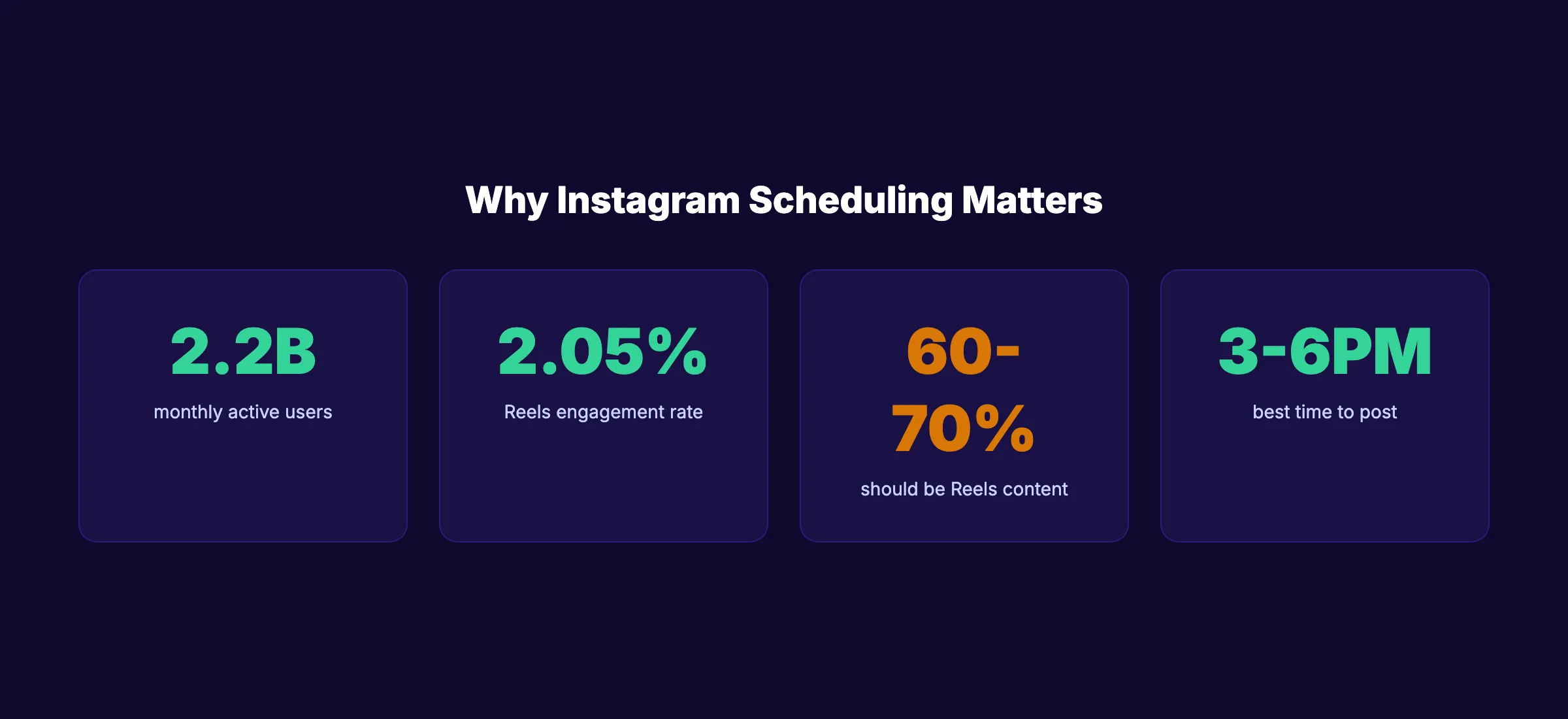
Instagram engagement rates dropped 24% year-over-year in 2025 according to Social Insider’s benchmarks. Carousel posts now lead at 1.92% engagement, while Reels reach 2.05%. The right scheduling tool helps you post the right format at the right time. Below is our honest breakdown of 10 tools with real pricing and feature details.
What We Looked For
| Criteria | What We Measured |
|---|---|
| Reels and Stories Support | Auto-publish capability for all Instagram formats |
| Visual Grid Planner | Preview how your feed will look before publishing |
| Analytics | Instagram-specific engagement data and insights |
| AI Features | Caption generation, hashtag suggestions, best time to post |
| Pricing | Cost per channel, free plan limits, value at scale |
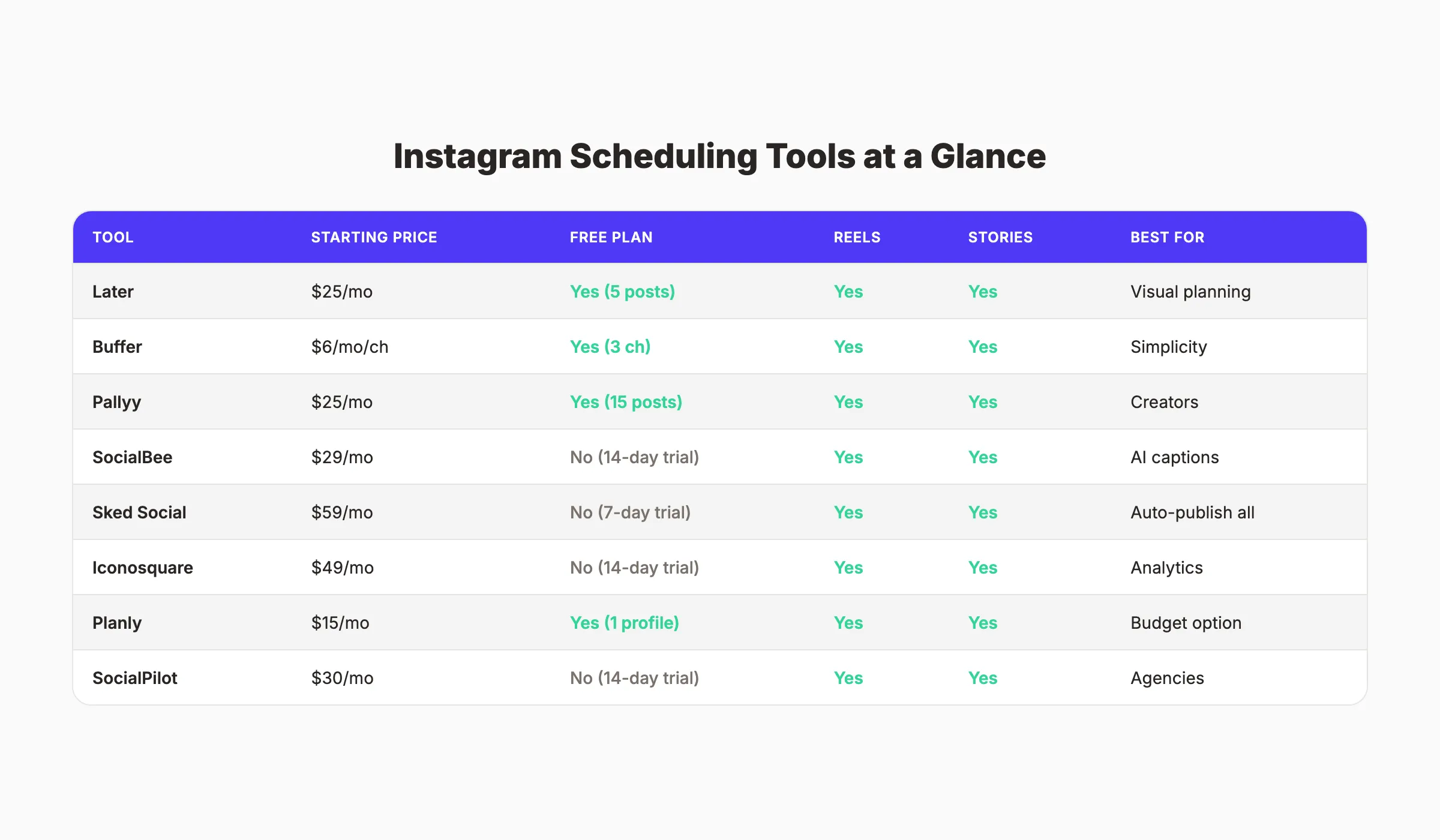
Instagram Scheduling Tools Compared
| Tool | Starting Price | Free Plan | Reels | Stories | Best For |
|---|---|---|---|---|---|
| Later | $25/mo | Yes (5 posts) | ✅ | ✅ | Visual planning |
| Buffer | $6/mo/channel | Yes (3 channels) | ✅ | ✅ | Simplicity |
| Pallyy | $25/mo | Yes (15 posts) | ✅ | ✅ | Creators |
| SocialBee | $29/mo | No (14-day trial) | ✅ | ✅ | AI captions |
| Sked Social | $59/mo | No (7-day trial) | ✅ | ✅ | Full auto-publish |
| Iconosquare | $49/mo | No (14-day trial) | ✅ | ✅ | Analytics |
| Planly | $15/mo | Yes (1 profile) | ✅ | ✅ | Budget |
| SocialPilot | $30/mo | No (14-day trial) | ✅ | ✅ | Agencies |
| Tailwind | $20/mo | Yes (limited) | ✅ | ❌ | Pinterest + Instagram |
| Hootsuite | $99/mo | No (30-day trial) | ✅ | ✅ | Enterprise |
1. Later. Best Instagram Scheduling Tool Overall
Later started as “Latergramme” and was built specifically for Instagram before expanding to other platforms. That Instagram DNA shows in every feature. The visual grid planner is the best in the category. You drag and drop posts to see exactly how your feed will look before anything publishes.
What It Does Well
Later’s visual content calendar lets you plan your Instagram grid with precision. Drag photos into position, rearrange them, and preview the final feed layout. For brands where Instagram aesthetics drive sales, the grid planner alone justifies the price.
Later auto-publishes feed posts, carousels, Stories, and Reels. The Linkin.bio feature creates a clickable landing page from your Instagram bio link. The analytics dashboard shows engagement by post type, best posting times, and audience demographics.
Our Take: Later is the default choice for Instagram-focused brands. The grid planner is genuinely useful. If your Instagram feed aesthetic matters to your business, no other tool matches this.
Where It Falls Short
The free plan limits you to 5 posts per profile per month. That is barely 1 post per week. The inbox feature only covers Instagram, Facebook, and TikTok. And analytics are locked behind the Growth plan at $33/month.
Key Features
- Visual Instagram grid planner (drag-and-drop)
- Auto-publish Reels, Stories, and carousels
- Linkin.bio clickable landing page
- Best time to post suggestions
- Hashtag analytics and suggestions
Pricing
- Free: 1 social set, 5 posts/profile/month
- Starter: $25/month , 30 posts/profile, 1 social set
- Growth: $33/month , 150 posts, 3 social sets, full analytics
- Advanced: $66/month. Unlimited posts, 6 social sets
Who Should Use Later
Strong fit:
- Instagram-focused brands and creators who care about grid aesthetics
- E-commerce brands using Linkin.bio to drive traffic from Instagram
- Small businesses that plan 2 to 4 weeks of visual content in advance
Probably not right for:
- Businesses that need a multi-platform scheduler with equal depth across all networks
- Budget-conscious users who need more than 5 free posts per month
2. Buffer. Best Free Instagram Scheduler
Buffer offers the cleanest, simplest Instagram scheduling experience. The free plan covers 3 channels with auto-publish for posts and Reels. For someone who needs basic scheduling without complexity, Buffer is the fastest path from signup to scheduled post.
What It Does Well
Buffer’s post composer is minimal and fast. Write a caption, add an image or video, pick a time, and schedule. The AI assistant suggests caption variations. The analytics dashboard shows per-post performance. And the landing page builder (included free) creates a simple bio link page.
The drag-and-drop calendar shows all scheduled posts at a glance. Buffer recently added Reels auto-publishing and Stories scheduling with push notifications.
Our Take: Buffer is the best starting point for anyone new to Instagram scheduling. The free plan is genuinely usable. The paid plans are the cheapest per-channel option on this list.
Where It Falls Short
No visual grid planner. Buffer shows a calendar, not your Instagram feed layout. The 10-post limit per channel on the free plan is restrictive for daily posters. And the analytics are basic compared to Later or Iconosquare.
Key Features
- Auto-publish posts, Reels, and carousels
- AI caption assistant
- Landing page builder (free)
- Basic post analytics
- Browser extension for quick sharing
Pricing
- Free: 3 channels, 10 posts per channel
- Essentials: $6/month per channel. Unlimited posts
- Team: $12/month per channel. Collaboration features
Who Should Use Buffer
Strong fit:
- Beginners who want the simplest onboarding experience
- Solopreneurs managing 1 to 3 social channels
- Anyone who values clean design over feature depth
Probably not right for:
- Brands that need a visual grid planner to preview their Instagram feed
- Marketing teams that require deep Instagram analytics and competitor benchmarking
3. Pallyy. Best Instagram Scheduler for Creators
Pallyy was designed for creators and freelancers who need an Instagram-first scheduler at a reasonable price. The free plan includes 15 posts per month. The paid plan at $25/month unlocks everything.
What It Does Well
Pallyy includes a visual grid planner similar to Later. You preview your Instagram feed before publishing. The interface is clean, fast, and focused on Instagram. Pallyy also supports bio link pages and basic analytics on the free tier.
The 15-post monthly free limit is 3 times what Later offers for free. For a creator posting 3 to 4 times per week, the free plan covers the basics.
Our Take: Pallyy is the best value for Instagram creators. The grid planner and 15 free posts per month make it more generous than Later for free users.
Where It Falls Short
1 social set on the free plan. No team collaboration. Analytics are basic. The platform is less established than Later or Buffer, so expect occasional UI updates.
Key Features
- Visual Instagram grid planner
- 15 posts/month free
- Bio link page builder
- Auto-publish Reels and carousels
- Hashtag research tool
Pricing
- Free: 1 social set, 15 posts/month
- Premium: $25/month per social set. Unlimited posts, full features
Who Should Use Pallyy
Strong fit: Solo creators, freelancers, Instagram-first brands on a budget.
Probably not right for: Agencies or teams needing collaboration and approval workflows.
4. SocialBee. Best for AI-Generated Instagram Captions
SocialBee stands out for its AI Copilot feature. The AI generates Instagram captions, groups them into content categories, and builds a posting schedule. For businesses that struggle with what to write, SocialBee removes the blank-page problem.
What It Does Well
SocialBee’s AI Copilot analyzes your brand and generates a full content strategy: captions, posting schedule, and category groups. The content recycling feature re-queues evergreen posts automatically. And the visual grid planner shows your upcoming Instagram feed.
SocialBee supports auto-publishing for feed posts, Reels, Stories, and carousels. The collaboration features include approval workflows for teams.
Our Take: SocialBee is the best option for businesses that need AI to handle caption writing. The Copilot saves hours per week for teams that lack a dedicated copywriter.
Where It Falls Short
No free plan. The 14-day trial is generous but time-limited. The interface is more complex than Buffer or Pallyy. And the starting price of $29/month is higher than simpler alternatives.
Key Features
- AI Copilot caption generation
- Content category grouping
- Evergreen content recycling
- Visual Instagram grid planner
- Team collaboration and approvals
Pricing
- Bootstrap: $29/month , 5 profiles, 1 workspace
- Accelerate: $49/month , 10 profiles, 1 workspace
- Pro: $99/month , 25 profiles, 5 workspaces
Who Should Use SocialBee
Strong fit: Small businesses that need AI caption help, content teams managing multiple categories.
Probably not right for: Solo creators who prefer simpler, cheaper tools.
Your social media team. $49/month. Stacc publishes 30 Instagram posts per month. No scheduling. No caption writing. Just done. Start for $1 →
5. Sked Social. Best for Full Instagram Auto-Publishing
Sked Social auto-publishes everything Instagram supports: feed posts, Reels, Stories (with link stickers), and carousels. Most schedulers require push notifications for Stories. Sked handles them automatically.
What It Does Well
Sked Social’s auto-publish coverage is the most complete on this list. Every Instagram content format publishes without manual intervention. The drag-and-drop grid planner shows your upcoming feed. And the built-in image editor handles basic crops and filters.
Our Take: If your top priority is “set it and forget it” for every Instagram format, Sked Social delivers. The Stories auto-publish with link stickers is a feature most competitors lack.
Where It Falls Short
The starting price of $59/month is higher than most alternatives. No free plan. The interface is functional but not as polished as Later or Pallyy.
Key Features
- Auto-publish all Instagram formats (including Stories with link stickers)
- Visual feed planner
- Built-in image editor
- Hashtag manager
- Multi-platform scheduling
Pricing
- Fundamentals: $59/month , 1 Instagram account, unlimited posts
- Essentials: $99/month , 3 accounts, collaboration
- Professional: $199/month , 5 accounts, advanced analytics
Who Should Use Sked Social
Strong fit:
- Businesses that post Stories daily with link stickers and need full automation
- E-commerce brands running Story-based promotions and product launches
- Teams that want zero manual steps between scheduling and publishing
Probably not right for:
- Budget-conscious users who can live with push notification reminders for Stories
- Solo creators with basic scheduling needs
6. Iconosquare. Best Instagram Analytics With Scheduling
Iconosquare combines deep Instagram analytics with scheduling. The analytics dashboard tracks engagement, reach, follower growth, and competitor benchmarks. For data-driven brands, the insights justify the price.
What It Does Well
Iconosquare’s analytics are the deepest on this list. Track engagement by content type, compare performance against competitors, and identify the best posting times based on your specific audience data. The scheduling calendar is visual and intuitive.
Our Take: Iconosquare is the best choice for brands that make decisions based on data. The competitor benchmarking feature reveals gaps in your Instagram strategy.
Where It Falls Short
No free plan. Starting at $49/month, it is one of the pricier options. The scheduling features are solid but not as Instagram-specialized as Later’s grid planner.
Key Features
- Deep Instagram analytics and reporting
- Competitor benchmarking
- Best time to post (audience-specific)
- Content scheduling calendar
- Hashtag tracking
Pricing
- Single: $49/month , 5 profiles
- Teams: $79/month , 10 profiles, collaboration
- Custom: Contact for pricing. Unlimited profiles
Who Should Use Iconosquare
Strong fit: Data-driven brands, marketing teams that need reporting, competitive analysis.
Probably not right for: Solo creators or businesses that prioritize scheduling over analytics.
7. Planly. Best Budget Instagram Scheduler
Planly offers Instagram scheduling at $15/month with a free plan that covers 1 profile. For businesses that need basic scheduling at the lowest possible price, Planly delivers without feature bloat.
What It Does Well
Planly auto-publishes feed posts, Reels, carousels, and Stories. The interface is straightforward. The pricing is the most affordable paid option on this list. And the free plan covers 1 Instagram profile with basic scheduling.
Planly also supports TikTok, Facebook, LinkedIn, X, Pinterest, and YouTube. The content calendar shows all scheduled posts across platforms. For a $15 tool, the multi-platform coverage is solid.
Our Take: Planly is the most affordable paid Instagram scheduler. If you need Reels and Stories auto-publish at $15/month, this is it.
Where It Falls Short
Limited analytics. No visual grid planner. The platform is less established with a smaller user community. No AI caption features.
Key Features
- Auto-publish all Instagram formats
- Multi-platform support (7+ networks)
- Content calendar view
- First comment scheduling
- Hashtag groups
Pricing
- Free: 1 profile, basic scheduling
- Starter: $15/month , 4 profiles
- Pro: $40/month , 10 profiles, advanced features
Who Should Use Planly
Strong fit: Budget-conscious businesses, freelancers managing a few accounts.
Probably not right for: Brands needing grid planning, analytics, or AI features.
8. SocialPilot. Best Instagram Scheduler for Agencies
SocialPilot supports white-label dashboards, client management, and bulk scheduling. For agencies managing 10+ Instagram accounts, SocialPilot provides the operational features that solo-focused tools lack.
What It Does Well
SocialPilot’s bulk scheduling uploads up to 500 posts at once via CSV. The white-label reports carry your agency’s branding. Client approval workflows streamline the review process. And the AI assistant generates Instagram captions across all accounts simultaneously.
The content library stores reusable assets, captions, and templates. Teams share content across client accounts without recreating assets. For agencies managing seasonal campaigns across 20+ Instagram accounts, SocialPilot reduces publishing time by 60 to 70%.
Our Take: SocialPilot is the best agency-grade Instagram scheduler under $50/month. The bulk scheduling and white-label features save agencies hours per week.
Where It Falls Short
No free plan. The interface prioritizes function over design. The Instagram-specific features (grid planner, Linkin.bio) are less developed than Later or Pallyy.
Key Features
- Bulk scheduling (500 posts via CSV)
- White-label reports and dashboards
- Client approval workflows
- AI caption generator
- Content library for reusable assets
Pricing
- Essentials: $30/month , 10 profiles, 1 user
- Standard: $50/month , 25 profiles, 3 users
- Premium: $100/month , 50 profiles, 6 users
Who Should Use SocialPilot
Strong fit: Marketing agencies managing 5+ client Instagram accounts, teams needing approval workflows.
Probably not right for: Solo creators or businesses with a single Instagram account.
9. Tailwind. Best for Pinterest and Instagram Combined
Tailwind serves brands that market on both Pinterest and Instagram. The built-in design tool (Tailwind Create) generates Instagram post templates from your brand colors and fonts. The SmartSchedule feature picks optimal posting times automatically based on when your specific followers are most active.
What It Does Well
Tailwind’s design tool creates Instagram posts from templates without leaving the scheduler. Upload your logo and brand colors once. Tailwind generates dozens of post designs that match your visual identity. The hashtag finder suggests relevant hashtags based on your content. And SmartSchedule optimizes posting times using your audience’s real activity data.
Tailwind also offers a Ghostwriter AI tool for caption writing and a Communities feature for cross-promotion with other creators in your niche.
Our Take: Tailwind is the right choice if Pinterest is part of your strategy alongside Instagram. The design tool saves 1 to 2 hours per week on visual content creation.
Where It Falls Short
No Stories auto-publish. The Instagram features are secondary to Pinterest. The interface feels less modern than Later or Pallyy. And the per-profile pricing gets expensive for multi-account users.
Key Features
- Built-in design tool (Tailwind Create)
- SmartSchedule auto-timing
- Hashtag finder
- AI caption writer (Ghostwriter)
- Pinterest + Instagram unified dashboard
Pricing
- Free: 1 profile, limited posts
- Pro: $20/month , 1 profile, unlimited posts
- Advanced: $40/month , 2 profiles
- Max: $80/month , 3 profiles
Who Should Use Tailwind
Strong fit: Brands marketing on both Pinterest and Instagram, visual brands that need design help.
Probably not right for: Instagram-only users who need Stories support.
10. Hootsuite. Best Enterprise Instagram Scheduler
Hootsuite is the largest social media management platform. It supports Instagram alongside every major social network. For enterprise teams managing 20+ social accounts across multiple brands, Hootsuite provides the scale that smaller tools cannot.
What It Does Well
Hootsuite manages Instagram, Facebook, X, LinkedIn, TikTok, YouTube, and Pinterest from one dashboard. The approval workflows support large teams. The analytics cover cross-platform performance. And the Hootsuite Inbox centralizes all social messages.
Our Take: Hootsuite is overkill for most small businesses. But for enterprise teams that need one platform for everything, it remains the category leader.
Where It Falls Short
$99/month starting price. The Instagram-specific features are not as deep as Later or Iconosquare. The interface can feel overwhelming for simple scheduling needs.
Key Features
- Cross-platform management (7+ networks)
- Unified social inbox for all messages
- Advanced approval workflows
- OwlyWriter AI caption generation
- Custom analytics and reporting
Pricing
- Professional: $99/month , 10 profiles, 1 user
- Team: $249/month , 20 profiles, 3 users
- Enterprise: Custom pricing
Who Should Use Hootsuite
Strong fit: Enterprise teams managing 10+ social accounts, organizations needing strict approval workflows and compliance.
Probably not right for: Small businesses, solo creators, or anyone focused primarily on Instagram.
How to Choose the Right Instagram Scheduler
With 10 options on this list, narrowing the field requires asking 3 questions.
Question 1: Do You Need a Visual Grid Planner?
If your Instagram feed aesthetic drives business (fashion, food, beauty, real estate), choose a tool with a grid planner: Later, Pallyy, or Iconosquare. If you do not care about grid layout, Buffer or SocialBee are simpler choices.
Question 2: What Is Your Monthly Budget?
- $0/month: Buffer (3 channels) or Pallyy (15 posts)
- Under $30/month: Later ($25), SocialBee ($29), or Planly ($15)
- $30 to $100/month: SocialPilot ($30), Iconosquare ($49), Sked Social ($59)
- $100+/month: Hootsuite ($99) for enterprise needs
Question 3: Do You Want to Schedule or Outsource?
Scheduling tools help you post at the right time. They do not write captions, design graphics, or plan your content strategy. If you want someone to handle all of that, consider a done-for-you service instead of a scheduling tool.
What Instagram Scheduling Actually Costs
The tool subscription is only part of the cost. The real expense is time.
| Approach | Tool Cost | Time Investment | Total Monthly Cost |
|---|---|---|---|
| Free tool (Buffer/Pallyy) | $0 | 8-12 hrs/month | Time only |
| Paid tool (Later/SocialBee) | $25-49/mo | 5-8 hrs/month | $25-49 + time |
| Agency management | $750-3,000/mo | 1-2 hrs/month | $750-3,000 |
| Done-for-you (Stacc) | $49/mo | 0 hrs/month | $49 |
A scheduling tool helps you post at the right time. It does not create the content for you. You still need to write captions, design graphics, film Reels, and plan your content strategy. The tool handles the “when.” You handle the “what.”
For businesses that want both the “what” and the “when” handled automatically, a done-for-you service removes the scheduling tool entirely. Stacc publishes 30 social posts per month across Instagram and 3 other platforms. No tool to manage. No content to create.
Which Instagram Scheduler Is Right for You?
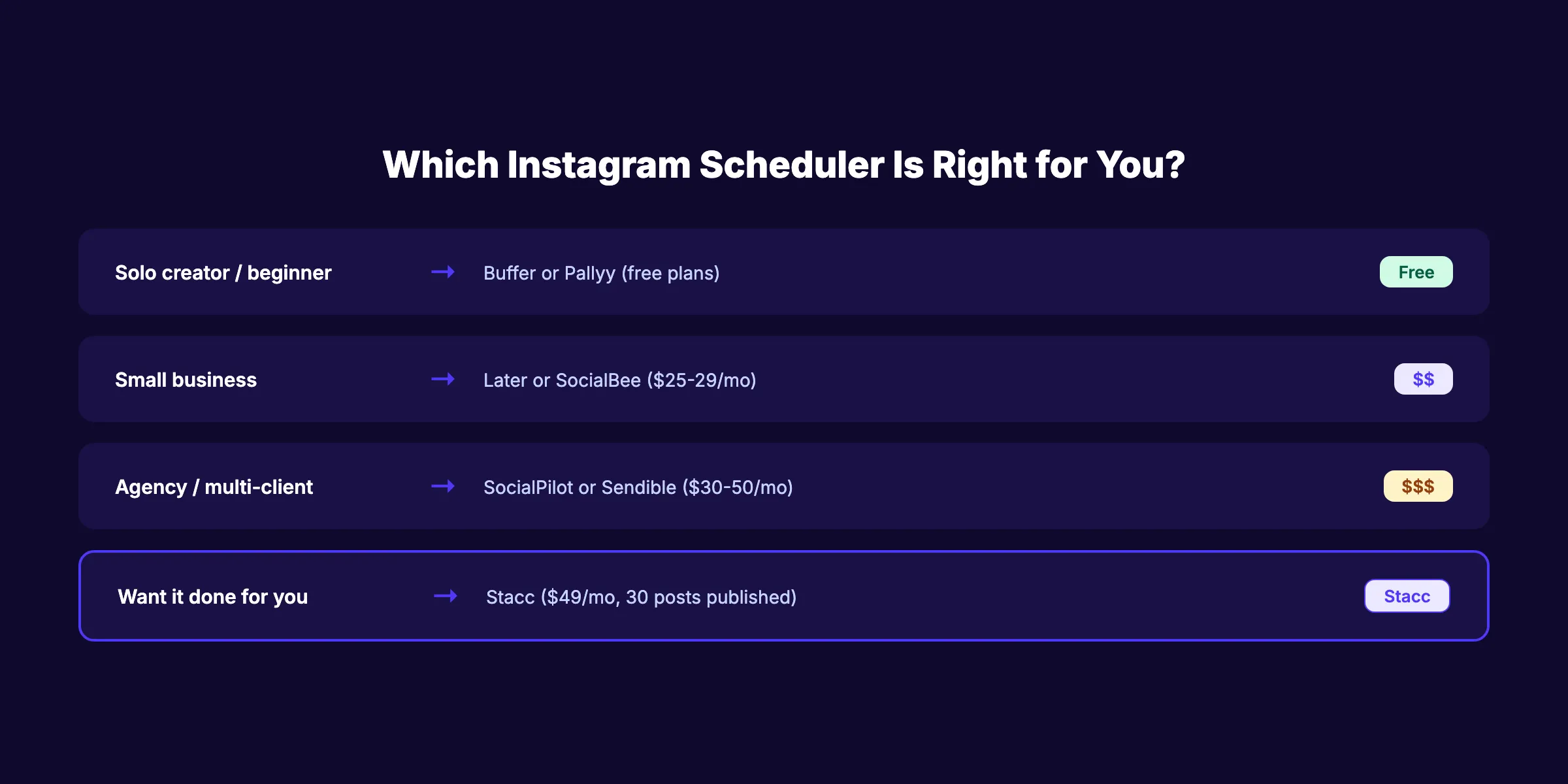
Solo creator or beginner? Start with Buffer (free, simple) or Pallyy (free, grid planner). Both cover basic Instagram scheduling at no cost.
Small business? Choose Later ($25/month for grid planning and Linkin.bio) or SocialBee ($29/month for AI captions). Both handle Reels, Stories, and carousels.
Agency managing multiple clients? Go with SocialPilot ($30/month for white-label and bulk scheduling) or Sked Social ($59/month for full auto-publish).
Data-driven brand? Pick Iconosquare ($49/month for analytics + scheduling). The competitor benchmarking reveals what content types drive engagement in your niche.
Want Instagram handled for you? Stacc publishes 30 social media posts per month across Instagram, LinkedIn, X, and Facebook for $49/month. No scheduling tools. No caption writing. No managing a dashboard. Posts are created and published automatically. For businesses that also want blog SEO and local SEO, Stacc bundles all 3 channels starting at $167/month.
3,500+ blogs published. 92% average SEO score. Stacc handles blog content, social media, and local SEO on autopilot. Start for $1 →
FAQ
What is the best free Instagram scheduling tool?
Buffer is the best free Instagram scheduling tool for its simplicity (3 channels, auto-publish Reels). Pallyy is the best free option with a visual grid planner (15 posts/month). Both handle basic Instagram scheduling without requiring payment.
Can you schedule Instagram Reels in advance?
Yes. All 10 tools on this list support Reels scheduling with auto-publish. In 2026, Reels auto-publish is standard across all major Instagram schedulers. You upload the video, write the caption, set the time, and the tool publishes automatically.
How often should you post on Instagram?
3 to 5 feed posts per week is the minimum for consistent growth. The ideal mix in 2026 is 60 to 70% Reels, 20 to 30% carousels, and 10% single images. Daily Stories keep you visible between posts. Consistency matters more than volume.
Can you schedule Instagram Stories?
Most schedulers support Stories scheduling with either auto-publish or push notifications. Sked Social, Later, Buffer, and SocialBee all auto-publish Stories directly. Tailwind does not support Stories auto-publish. Check each tool’s current feature list before committing.
What is the cheapest Instagram scheduler?
Planly at $15/month is the cheapest paid option with Reels and Stories support. Buffer Essentials at $6/month per channel is cheaper if you only need 1 Instagram account. Both Buffer and Pallyy offer free plans for basic scheduling.
Can Stacc handle Instagram posting automatically?
Yes. Stacc’s Social Media module publishes 30 posts per month across Instagram, LinkedIn, X, and Facebook for $49/month. No scheduling tool needed. No content creation required. Posts are written, designed, and published automatically. For businesses that also need blog content, add the Blog SEO module ($99/month) for 30 articles. Start with a $1 trial.
The best Instagram scheduling tool depends on your budget, team size, and feature priorities. Start with Buffer or Pallyy if you want free. Choose Later if you need grid planning. Pick SocialBee for AI captions. And if you want Instagram handled entirely without managing any tool, Stacc publishes 30 posts per month for $49.

Written by
Siddharth GangalSiddharth is the founder of theStacc and Arka360, and a graduate of IIT Mandi. He spent years watching great businesses lose organic traffic to competitors who simply published more. So he built a system to fix that. He writes about SEO, content at scale, and the tactics that actually move rankings.
Stop researching. Start ranking.
30 SEO blog articles published to your site every month. No writers, no workflow, no waiting.
30-day trial · Cancel anytime
theStacc
Stop writing SEO content manually
30 blog articles, 30 GBP posts, and social media content. Published every month. Automatically.
Start Your $1 Trial$1 for 3 days · Cancel anytime