Content pruning guide for 2026. The decision framework for keep, update, merge, redirect, or delete — plus the exact 5-step workflow we use at scale.
A documented content pruning case study found a 32% traffic boost after removing low-value pages. CNET saw a 29% organic traffic increase after pruning roughly 3,000 articles. A B2B site we work with recovered 47% of lost traffic in 60 days after pruning 213 zero-traffic posts.
Content pruning is the strategic removal, consolidation, or redirection of pages that no longer serve your SEO goals. The point is not to delete content. The point is to concentrate authority on pages that drive results.
Most teams get pruning wrong in two ways. They delete too aggressively and lose ranking pages. Or they refuse to delete anything and let dead weight drag the whole site down. Both failures come from skipping the decision framework.
This guide gives you the framework. We publish 3,500+ blogs across 70+ industries and run quarterly pruning audits on every client site. Our average SEO score is 92%. The process below is the one we use.
Here is what you will learn:
- What content pruning is and the 4 outcomes it produces
- The 6 signs a page is ready for the pruning queue
- The decision framework: keep, update, merge, redirect, or delete
- The exact 5-step workflow with tools and timelines
- Pruning mistakes that cost rankings, and how to avoid them
- How AI Overviews change pruning strategy in 2026
- The 90-day measurement plan after a pruning round
What Is Content Pruning
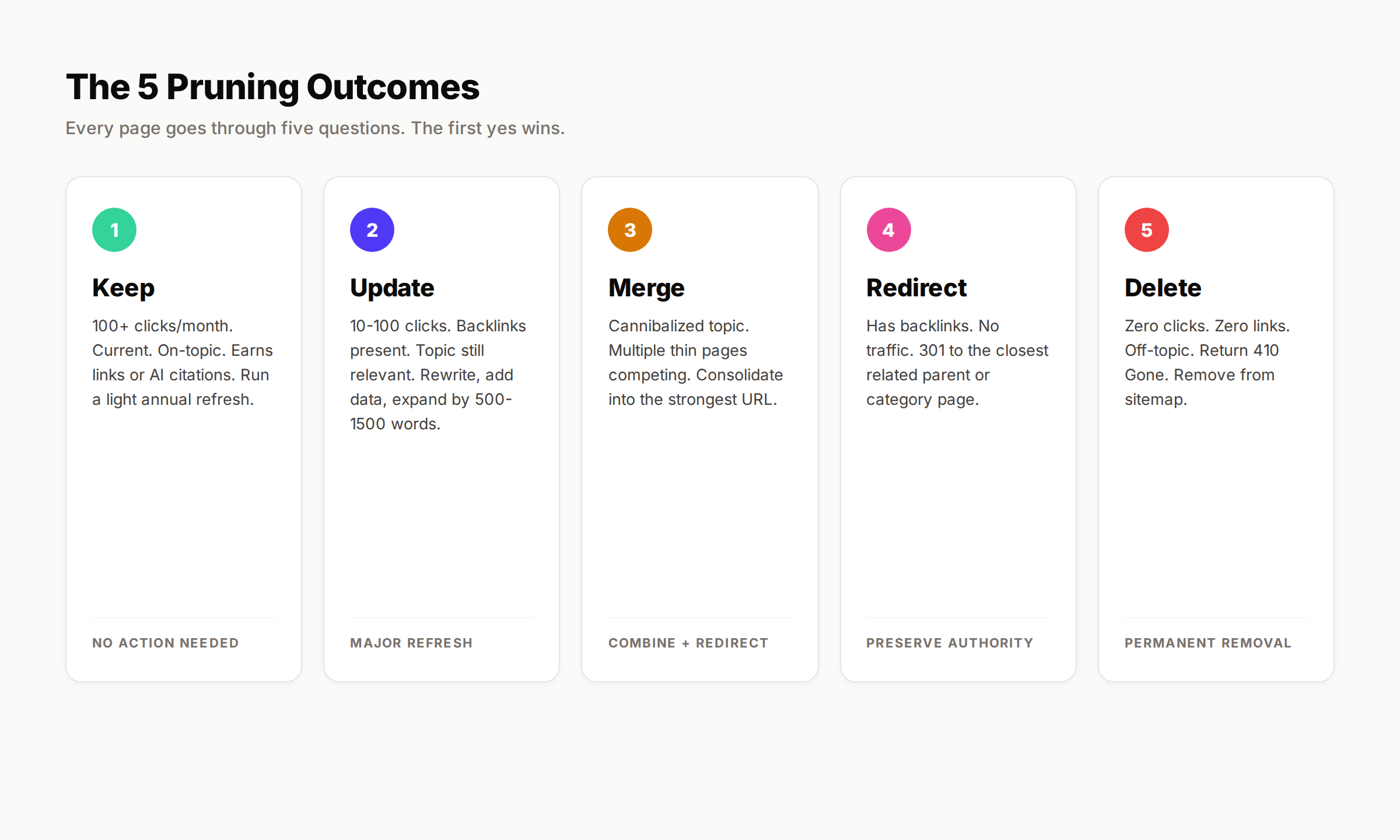
Content pruning is the systematic process of evaluating every page on your site and assigning one of five actions: keep, update, merge, redirect, or delete. The goal is to focus crawl budget, link equity, and topical authority on pages that earn traffic, links, or revenue.
The gardening metaphor is apt. A tree with too many branches starves the productive ones. Cutting dead branches sends energy to the fruit-bearing limbs. Sites with hundreds of zero-traffic pages dilute their authority across noise. Removing the noise lets the signal rank.
Pruning is not a one-time cleanup. It is a quarterly or biannual maintenance cycle. Google's helpful content guidelines treat the entire domain as a quality signal. Low-value pages drag down high-value ones, even if the high-value ones are written perfectly.
The opposite of pruning is hoarding. Teams hoard content because they believe more pages always equal more traffic. That belief broke in 2023 with the helpful content update. It broke harder in 2024 with the March core update. By 2026, hoarding is the default reason for site-wide ranking decline.
Pruning vs Content Refresh vs Content Audit
These three terms get confused. They are not the same thing.
| Term | What It Means | Output |
|---|---|---|
| Content audit | Inventory and analysis of all content | Spreadsheet with metrics per page |
| Content refresh | Updating an existing page for relevance and depth | Improved page that stays live |
| Content pruning | Deciding which pages to remove, merge, or redirect | Smaller, more focused site |
An audit feeds a pruning decision. A refresh is one possible outcome of pruning (the keep-and-update path). For the broader process, see our content audit guide and grab our content audit template.
Why Content Pruning Works in 2026
The mechanism behind pruning is not magic. Three forces compound when you remove low-value pages.
1. Crawl Budget Reallocation
Googlebot has limited time on every site. When it spends that time on outdated 2019 news posts or thin category pages, your important content gets crawled less often. Updates take longer to reflect in rankings. Newly published content sits unindexed.
Pruning frees crawl budget. The bot visits fewer URLs, more often. For sites over 10,000 pages this matters a lot. For smaller sites it matters less, but the effect is real. See our crawl budget optimization guide for the technical details.
2. Topical Authority Concentration
Google's algorithms reward sites that demonstrate depth in specific topics. A site with 50 strong articles on local SEO outranks a site with 500 mediocre articles spread across 30 topics. The reason is concentration. Authority signals stack when content clusters tightly.
When you delete or consolidate the off-topic pages, the remaining ones inherit a higher topical density score. Internal links also concentrate. The remaining pages link to fewer destinations, sending more equity per link.
3. Site-Wide Quality Signal Improvement
Google measures site quality at the domain level. The helpful content system treats the entire site as a single signal. If 30% of your pages are thin, the algorithm assumes the rest probably are too. Removing the bottom 30% raises the perceived average quality of what remains.
Pruning compounds. Removing 200 zero-traffic posts can lift the entire site. Stop hoarding. Start cutting. Book a demo →
6 Signs a Page Is Ready for Pruning
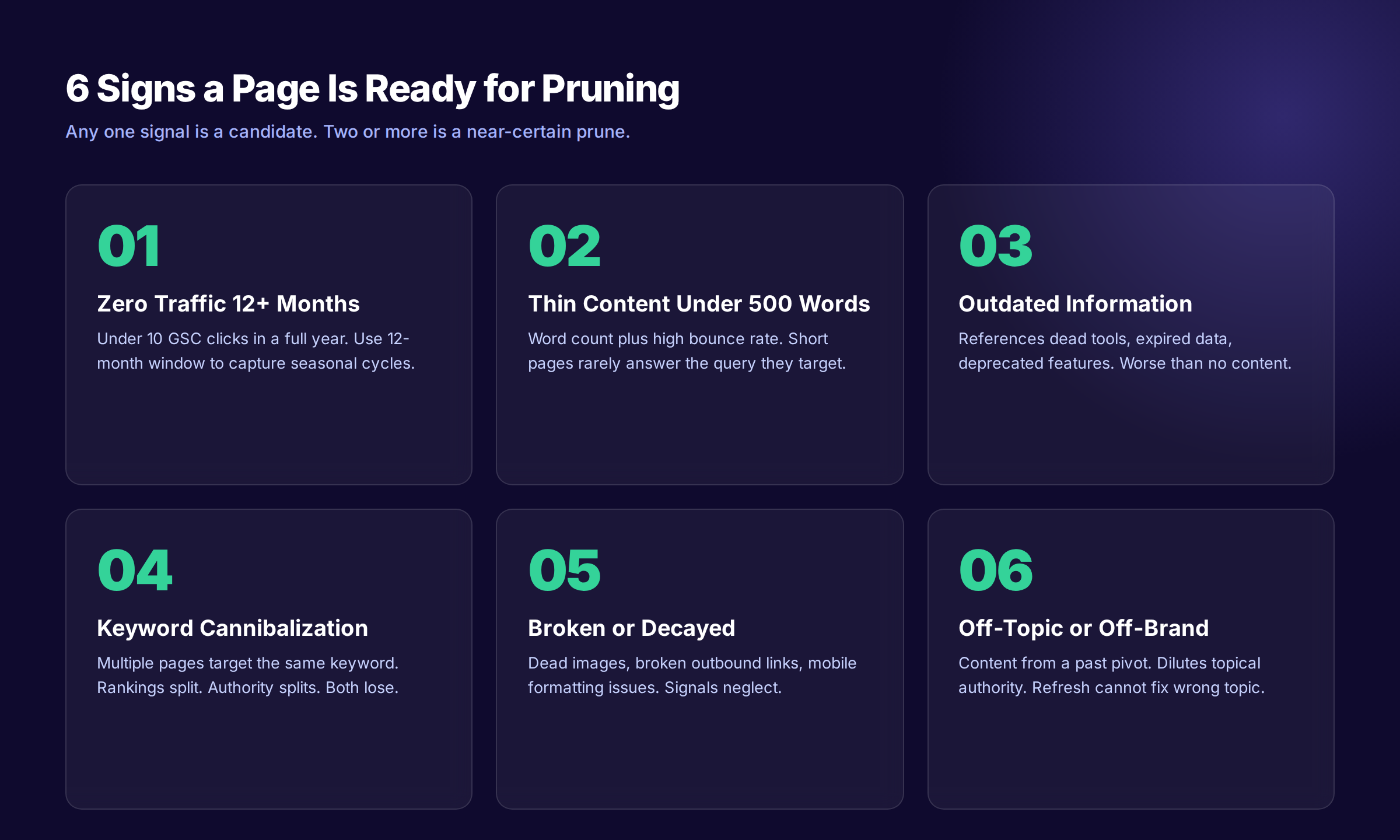
Not every underperforming page belongs in the pruning queue. Use these six signals to identify candidates.
1. Zero Organic Traffic for 12+ Months
Pull Google Search Console data for the past 12 to 16 months. Filter for pages with under 10 clicks total. If a page has not earned a click in a full year, it is a candidate. Not an automatic delete, but a candidate.
The 12-month window matters. Some content is seasonal. Tax guides spike in March. Holiday gift guides spike in November. A 3-month window would flag both as failures. A 12-month window captures the full cycle.
2. Thin Content Under 500 Words
Thin content is content that fails to answer the query it targets. Word count alone does not define thin, but pages under 500 words rarely have room to answer anything well. Cross-reference word count with bounce rate and dwell time. Short pages with high bounce are the strongest candidates.
For a deeper diagnostic, see our guide on how to fix thin content.
3. Outdated Information You Will Not Update
Some pages reference data, tools, or policies that no longer exist. A 2021 review of a tool that shut down in 2023. A guide to a Google feature that was deprecated. If you do not have the bandwidth to update the page properly, you have two choices: delete it or let it actively mislead readers.
Outdated content is worse than no content. It signals neglect to both users and search engines.
4. Keyword Cannibalization
Multiple pages targeting the same keyword split rankings. Instead of one page ranking at position 5, you get three pages bouncing between positions 18, 22, and 31. The fix is to merge or prune the weaker pages.
Our keyword cannibalization fix guide walks through the detection process. The pruning version is simpler: identify the strongest page on the topic, merge useful content from the others into it, then 301 redirect the others.
5. Broken or Decayed Pages
Pages with broken images, dead outbound links, or formatting that breaks on mobile signal neglect. If the page has earned traffic in the past, fix it. If it has not, prune it.
Two thirds of links on the web are dead. Pages that depend on broken sources lose trust. Pages with formatting issues lose UX scores. Both feed into ranking decline.
6. Off-Topic or Off-Brand Content
Pages that no longer match your current focus dilute topical authority. A B2B SaaS company that pivoted from consumer to enterprise still has 80 consumer-focused blog posts from year one. Those posts confuse Google about what the site is actually about.
Off-topic content is hard to fix. You cannot refresh it into relevance because the topic itself is wrong. Prune it or move it to an archive subdomain.
The Pruning Decision Framework
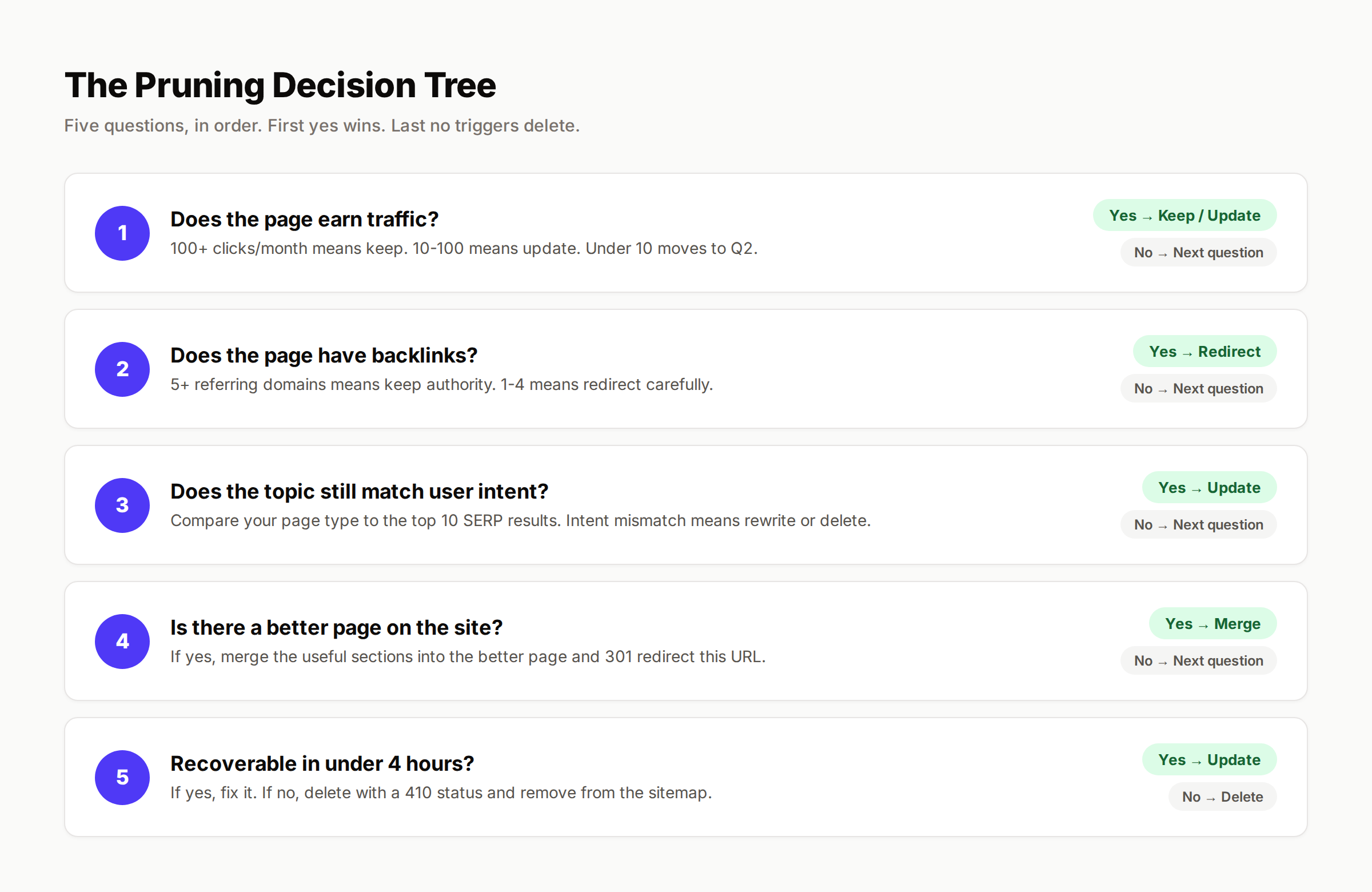
Once a page hits the pruning queue, run it through five questions in order. The first yes wins.
Question 1: Does the Page Earn Traffic?
Pull the last 12 months from Google Search Console. Look at clicks, not impressions.
- 100+ clicks per month → Keep and update
- 10-100 clicks per month → Update or consolidate
- 1-10 clicks per month → Investigate intent and links
- 0 clicks per month → Move to next question
The 100-click threshold protects pages that are working. Even if a page looks thin or old, traffic is real. Improvement first. Deletion never.
Question 2: Does the Page Have Backlinks?
Run the URL through Ahrefs, Semrush, or Moz. Count referring domains, not raw backlinks.
- 5+ referring domains → Update and redirect carefully if removing
- 1-4 referring domains → Redirect to closest related page
- 0 referring domains → Move to next question
Backlinks are durable. A page with 8 referring domains and zero traffic still passes authority. Deleting it kills that authority. Redirecting it transfers the authority to a related page. The wrong move here loses real ranking power.
For redirect best practices, see our 301 redirects guide.
Question 3: Does the Topic Still Match User Intent?
Search the primary keyword the page targets. Look at the top 10 results. Are they the same content type as your page? A how-to guide on a SERP full of comparison tables is intent-mismatched.
- Intent matches and your page is competitive → Update
- Intent matches but your page is far behind → Major rewrite or consolidate
- Intent has shifted entirely → Repurpose for new intent or delete
Intent shift is the trickiest signal. A keyword that triggered informational results in 2023 might trigger commercial results in 2026. Your tutorial cannot compete on a tutorial-free SERP. See our guide on content decay for the full intent shift playbook.
Question 4: Is There a Better Page on the Site?
If another page on your site covers the same topic better, the weaker page should not exist. Merge the useful sections into the better page. Redirect the weaker URL.
- Yes, a better page exists → Merge and redirect
- No, this is the only page on the topic → Move to next question
Merging is undervalued. It preserves the best parts of every version while concentrating ranking signals on a single URL. The merged page is almost always stronger than any of its components.
Question 5: Is the Page Recoverable With Reasonable Effort?
If a page reached questions 4 with no traffic, no links, intent mismatch, and no better page on-site, you have one decision left. Can you make this page worth keeping in under 4 hours of effort?
- Yes, under 4 hours → Update
- No, more than 4 hours → Delete and accept the loss
The 4-hour rule prevents sunk cost thinking. If a page needs 12 hours of work to become competitive, that time goes further into building a new page on a higher-priority topic. Delete the old, redirect to a category, move on.
The Decision Matrix at a Glance
| Outcome | Conditions | Action |
|---|---|---|
| Keep | 100+ clicks/mo, current, on-topic | Light refresh annually |
| Update | 10-100 clicks/mo or 5+ links | Major rewrite, new data, expand |
| Merge | Cannibalization, duplicate topic | Consolidate into strongest page |
| Redirect | Has links, no better page | 301 to closest related parent |
| Delete | No traffic, no links, off-topic | Return 410 Gone, remove from sitemap |
The 5-Step Pruning Workflow
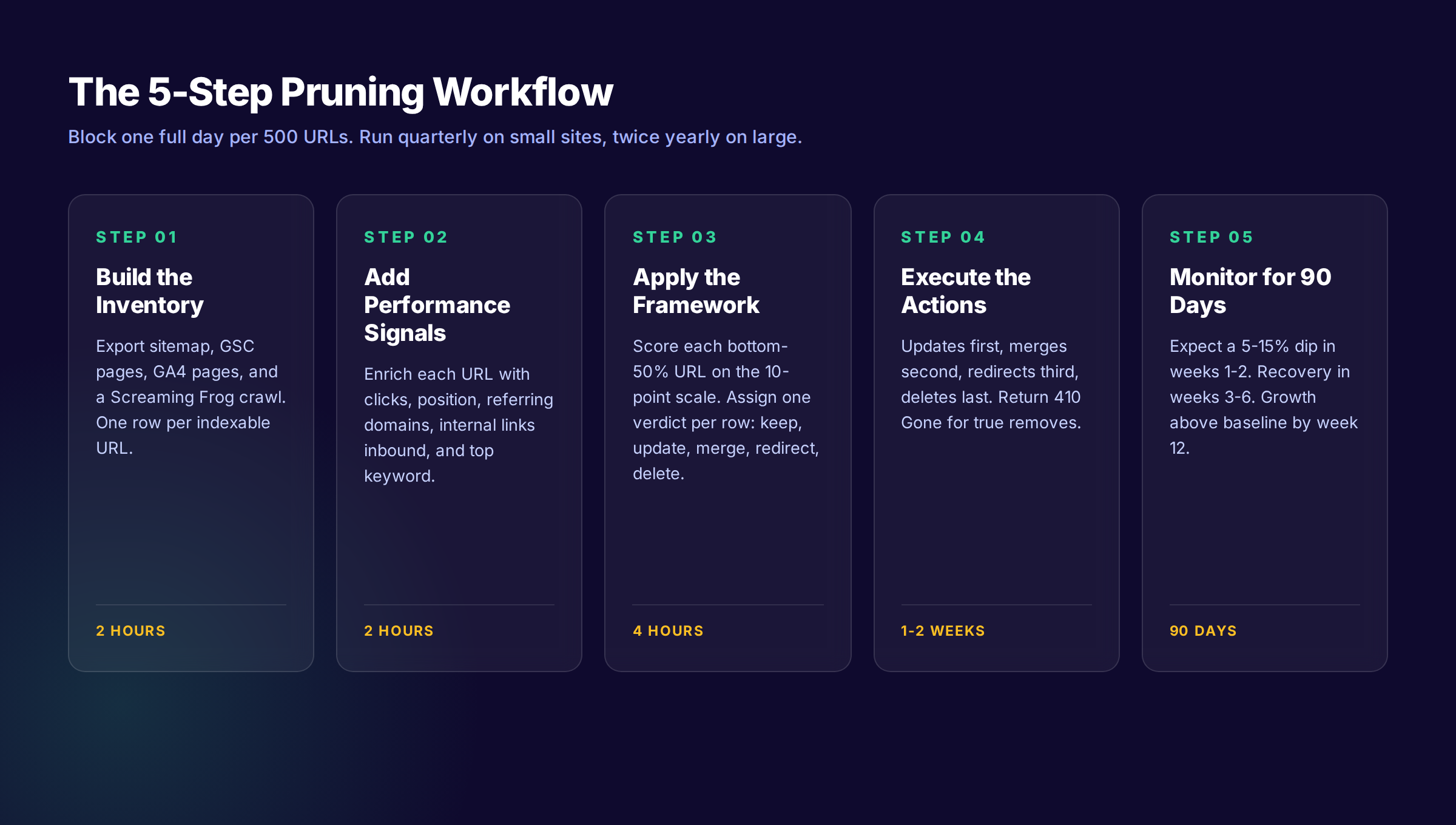
Run this workflow once per quarter on small sites, twice per year on large sites. Block one full day per 500 URLs.
Step 1: Build the Inventory (Day 1, 2 Hours)
Pull every indexable URL into a single spreadsheet. Sources:
- ✓ XML sitemap export
- ✓ Screaming Frog crawl
- ✓ Google Search Console "Pages" report (last 16 months)
- ✓ Google Analytics 4 page report (last 12 months)
The output is one row per URL with columns for traffic, impressions, position, word count, last updated date, and content type. This is the audit step. Our content audit template has the exact column structure we use.
Step 2: Add Performance Signals (Day 1, 2 Hours)
For each URL, enrich the row with:
- Clicks last 12 months (GSC)
- Average position (GSC)
- Referring domains (Ahrefs or Semrush)
- Internal links inbound
- Top organic keyword
- Crawl status (200, 301, 404, 410)
Sort by clicks descending. The top 20% of pages drive 80% of traffic. The bottom 50% drive almost nothing. The pruning queue lives in the bottom 50%.
Step 3: Apply the Decision Framework (Day 2, 4 Hours)
Walk every bottom-50% URL through the 5 questions. Assign one verdict per row: Keep, Update, Merge, Redirect, Delete.
Use a scoring shortcut to speed this up. Score each page 0-10:
- Clicks last 12 months: 0-3 points (0 = none, 3 = 100+)
- Referring domains: 0-3 points (0 = none, 3 = 5+)
- Topical fit: 0-2 points (0 = off-topic, 2 = core topic)
- Recoverability: 0-2 points (0 = needs full rewrite, 2 = light edit)
| Score | Action |
|---|---|
| 8-10 | Keep |
| 6-7 | Update |
| 4-5 | Merge or redirect |
| 0-3 | Delete |
Step 4: Execute the Actions (Days 3-10)
Sequence matters. Run deletes last, after all updates and merges are live.
Order of operations:
- Update high-priority pages first (these recover fastest)
- Merge cannibalized pages into the chosen winner
- Set up 301 redirects from merged URLs to the winner
- Set up 301 redirects from pages with links but low traffic
- Return 410 Gone for true deletes (no traffic, no links, off-topic)
- Remove deleted URLs from the XML sitemap
- Submit the updated sitemap to Google Search Console
The 410 status code signals intentional removal. Google treats 410 differently than 404. A 410 page exits the index faster. Use 410 only when you have no relevant page to redirect to.
Step 5: Monitor for 90 Days (Ongoing)
Pruning produces a predictable performance curve:
- Weeks 1-2: Traffic dips 5-15% as deleted pages drop from the index
- Weeks 3-6: Traffic flattens as 301 redirects process
- Weeks 7-12: Traffic rises above baseline as remaining content ranks better
Track these metrics weekly in GSC:
- ✓ Total clicks (should drop then rise above baseline by week 12)
- ✓ Total impressions (should stay flat or rise)
- ✓ Average position (should improve site-wide)
- ✓ Indexed pages (should decrease by the prune count)
- ✓ Crawl stats (crawl frequency on remaining pages should increase)
If clicks have not recovered to baseline by week 12, you pruned too aggressively. Audit the deletes, find pages with retained authority, and republish or redirect.
Want pruning, refreshing, and new content handled monthly without hiring? theStacc publishes 30 SEO-optimized posts per month and maintains the rest. See pricing →
Common Pruning Mistakes That Cost Rankings
The five mistakes below account for most failed pruning rounds.
Mistake 1: Deleting Pages With Backlinks Without Redirecting
A page with 12 referring domains and zero organic traffic is not dead weight. It is a backlink magnet that happens to target the wrong keyword. Deleting it without a 301 redirect throws away the authority those 12 domains conferred.
The fix: always check backlinks before deleting. If a page has even one referring domain, 301 redirect it to the closest related page on the site.
Mistake 2: Pruning Too Aggressively in One Pass
Pruning 40% of a site in one weekend triggers a major site-wide signal change. Google interprets sudden mass deletion as a possible site compromise or rapid pivot. The result is a 4-8 week ranking instability period that may have been avoidable.
The fix: cap pruning rounds at 15% of total URLs per quarter. Run multiple smaller rounds rather than one large one.
Mistake 3: Ignoring Internal Link Cleanup
When you delete or redirect a page, every internal link pointing to it now points to a redirect or a 410. Excessive internal redirects slow crawl and waste authority. Internal links to 410 pages waste anchor text equity entirely.
The fix: run a Screaming Frog crawl after every pruning round. Find internal links pointing to redirected or deleted URLs. Update each link to point to the final destination directly.
Mistake 4: Confusing Low Impressions With Low Value
A page with 8 clicks per month and 200 impressions per month is not dead. It is ranking on the second page for terms it could reach the first page on. Pruning it deletes a recovery opportunity.
The fix: filter by both clicks and impressions. Pages with low clicks but meaningful impressions belong in the update queue, not the delete queue.
Mistake 5: No Tracking of What Was Pruned
Six months after a pruning round, you cannot remember which pages were deleted. A new team member or freelance writer republishes a page on a topic you intentionally killed. The new page underperforms for the same reasons the old one did.
The fix: keep a permanent pruning log. URL, date pruned, action taken, reason. Reference it before every new content brief.
How AI Overviews Change Pruning in 2026
Pruning frameworks built before 2024 assumed Google traffic was the main success metric. That assumption broke when AI Overviews launched.
AI Overviews now appear on 25%+ of Google searches and reduce click-through to underlying pages by 34.5% on average. A page that holds position 3 can still lose 40% of its clicks year over year because the AI Overview ate the click.
This shifts pruning decisions in three ways.
Citations Matter More Than Clicks
If your page is cited inside an AI Overview, it earns brand exposure even when click-through drops. Pages with zero clicks but consistent AI citations are now keep candidates, not delete candidates.
Check citations using prompts in ChatGPT, Perplexity, and Google AI Mode. Run the target keyword. Note which pages get named or linked. Any page cited in 3+ AI tools is a keep regardless of click volume.
Thin Pages Still Cannot Earn AI Citations
AI models cite pages with clear definitions, fresh data, named sources, and structured Q&A blocks. Thin pages with vague claims do not get cited even when they rank. Pruning thin pages is now a citation strategy, not just a ranking strategy.
For the technical structure that AI engines prefer, see our FAQ content for AI Overviews guide.
Freshness Has a Shorter Half-Life
Pages cited by AI engines need updates more often than pages that rank in classic blue links. Source decay research shows AI citation persistence drops 50% within 4.5 weeks without refresh. Pruning rounds in 2026 should include a "refresh queue" specifically for pages that earned AI citations last quarter but are about to lose them.
Pruning at Scale: When You Have 1,000+ Pages
Small sites can prune manually. Large sites need a tiered approach.
Tier 1: Auto-Delete Candidates
Run automated rules to flag the obvious deletes:
- ✓ Zero clicks last 16 months AND zero referring domains AND under 500 words
- ✓ 404 or 410 status with no inbound links
- ✓ Duplicate or near-duplicate of another page on site
- ✓ Off-topic pages from acquired domains never migrated
These are safe deletes. Process them in batches of 50-100 per week.
Tier 2: Review Queue
Pages that fail one but not all auto-delete rules go into a review queue. A human reviewer applies the 5-question framework to each. Budget 5-10 minutes per page in this queue.
Tier 3: Strategic Keep
Pages that earn 100+ clicks per month, 5+ referring domains, or AI citations skip the queue entirely. They go into the quarterly refresh schedule instead.
The tiered approach lets a single SEO operator handle pruning on a 10,000+ page site in 2-3 weeks. Without tiers, the same job takes 3 months and most of it never gets done.
For sites this large, consider also building a content cluster strategy to organize the keeps around topical hubs.
Pruning Calendar: When to Run Each Round
| Round | Timing | Scope | Focus |
|---|---|---|---|
| Q1 | January-February | 10-15% of URLs | Year-end performance review |
| Q2 | April-May | 5-10% of URLs | Spring algorithm response |
| Q3 | July-August | 5-10% of URLs | Mid-year cleanup |
| Q4 | October-November | 10-15% of URLs | Pre-holiday consolidation |
Avoid pruning in December (holiday traffic season) or during a major algorithm rollout. Both periods amplify the short-term traffic dip pruning produces.
The Q1 and Q4 rounds are larger because performance data resets at year boundaries and you have the most signal to act on.
Tools You Need for a Pruning Round
You do not need expensive software. The basic stack:
| Tool | Purpose | Cost |
|---|---|---|
| Google Search Console | Clicks, impressions, position | Free |
| Google Analytics 4 | Behavioral data, conversions | Free |
| Screaming Frog | Crawl, internal links, status codes | $259/year |
| Ahrefs or Semrush | Backlink data per URL | $129-$199/mo |
| Google Sheets | Decision tracking | Free |
You can run a complete pruning round with just GSC, Sheets, and the free Screaming Frog tier (up to 500 URLs). The paid tools speed up sites over 500 pages.
For complementary maintenance work like keyword tracking and refresh scheduling, see our SEO audit checklist.
Pruning Case Study: 213 Posts, 47% Recovery
Here is what a typical pruning round looks like in practice.
Site: B2B SaaS, 1,847 indexed pages, 31 months old, declining traffic for 14 months Problem: Site lost 38% of organic traffic year over year despite publishing 12 new posts per month Diagnosis: 41% of pages had zero clicks in 12 months. 23% targeted off-brand consumer topics from an early pivot.
Pruning actions over 6 weeks:
- 213 pages deleted (returned 410, removed from sitemap)
- 89 pages merged into 31 stronger pages
- 67 pages refreshed with new data and expanded by 500-1500 words each
- 142 redirects implemented (89 from merges, 53 from off-brand pages)
Results at day 90:
- Total indexed pages: 1,847 → 1,512 (down 18%)
- Organic clicks: +47% vs pre-pruning baseline
- Average position: improved from 24.2 to 17.8
- Crawl frequency on top pages: doubled
The 47% click recovery did not come from the new pruned-state alone. It came from the combination of focused authority, faster crawl, and the refresh work the team could do once the dead weight was gone.
For a parallel case study focused on refresh rather than delete, see our content refresh case study.
What practitioners are saying on X
Systems and fundamentals still compound; AI search adds new KPIs.
- @jakezward (Feb 2026): 2026 SEO predictions emphasize AI Overview share-of-SERP, schema for LLM token efficiency, brand mentions in AI answers as a KPI, proprietary data as a moat, and content refresh beating net-new AI slop. See the post on X.
- @hridoyreh (Mar 2026): Widely shared SEO skill tree: foundations, research, technical, on-page, content, links, AI SEO/GEO, analytics, UX, brand, programmatic — useful map for stats and how-to posts. See the post on X.
- @HlynurStefDev (Jul 2026): Public case: niche site traffic jumped from ~18 to 4,162 Google visits/month after focused technical/on-page SEO work (GSC screenshots claimed) — reminds that fundamentals still move numbers. See the post on X.
Grok, AI Overviews, and multi-engine visibility
Content topics like “content pruning guide” get AI citations when process steps, quality bars, and examples are concrete. Operator consensus on X is clear: research-backed pages beat unedited bulk generation — reflect that honestly.
- Google AI Overviews: Use passage-ready answers, tables, and FAQ schema where relevant.
- ChatGPT / Perplexity: Cite named sources next to key claims.
- Grok: Maintain accurate entity facts on-site and in high-signal X posts.
Frequently Asked Questions
Quarterly for small to medium sites (under 1,000 pages). Twice per year for large sites. Once per year is the minimum. Skipping a year lets dead pages compound and makes the eventual cleanup three times harder.
Yes, by 5-15% for 4-8 weeks. Pages exit the index and redirects take time to process. By week 12 the remaining content typically ranks higher and total traffic exceeds the pre-pruning baseline. If traffic has not recovered by week 12, the pruning was too aggressive or removed pages that had retained authority.
Delete when the page has no traffic and no links. Use a 410 status code. Noindex is appropriate when the page has internal utility (such as a customer-facing resource) but should not appear in search. Noindex still consumes crawl budget. Delete is the cleaner outcome for pure SEO purposes.
Use 410 (Gone) when the removal is intentional and permanent. Google removes 410 pages from the index faster than 404 pages. Use 404 when the page disappeared accidentally and might come back. For pruning, 410 is almost always the right answer.
At minimum, 12 months. Some SEOs recommend leaving redirects permanently. The cost of keeping a redirect is essentially zero. The cost of removing one too early can be the loss of all backlink authority pointing to that URL.
Both. Ecommerce sites often have hundreds of out-of-stock or discontinued product pages that should be pruned, merged, or redirected to category pages. The framework is the same. The decision tree just runs against product metrics instead of blog metrics.
That usually means the pruned page was passing authority via internal links to the affected pages. Audit your internal linking. The remaining pages need to inherit those internal links from somewhere else. Add the missing internal links from cluster hub pages and the recovery usually completes within 30 days.
The Bottom Line
Content pruning is not deletion. It is the deliberate reallocation of authority, crawl budget, and topical depth toward the pages that earn results. The framework is keep, update, merge, redirect, delete. Apply it quarterly. Track every decision. Expect a 60-90 day recovery curve.
If you have not pruned in over a year, you are operating with significant dead weight whether you can see it or not. The next core update will compound the cost. The next AI search shift will compound it again.
Start with the 213-page case study workflow above. Pull the inventory this week. Make the calls next week. Execute the deletes the week after. Measure for 90 days. Run the next round on schedule.
Or hand the whole workflow to a team that runs it monthly on autopilot. theStacc publishes 30 SEO-optimized blog posts per month, maintains the rest, and runs quarterly pruning audits across every client site. Average SEO score 92%. See pricing.
Related Tools & Resources
Free SEO Tools:
Best Lists:
Sources & references
- [1] Princeton / Georgia Tech et al. — GEO research (arXiv:2311.09735)
- [2] @varunram on X — Critique of GEO slopfarm products that combine SEO clickbait with unresearched content marketing — quality and research
- [3] @jakezward on X — 2026 SEO predictions emphasize AI Overview share-of-SERP, schema for LLM token efficiency, brand mentions in AI answers
- [4] @HlynurStefDev on X — Public case: niche site traffic jumped from ~18 to 4,162 Google visits/month after focused technical/on-page SEO work (G
- [5] Referenced source — insightsavvys.com

Plan topics, review article drafts, and publish to a connected CMS.
Weekly local SEO teardowns
One practical email a week. Map Pack, GBP, AI Overviews. No fluff. Unsubscribe anytime.
Explore this topic: Content Pruning.