Optimize for People Also Ask boxes with 8 proven steps. PAA appears in 52% of searches. Get visible without ranking on page 1. Updated 2026.
People Also Ask boxes appear in 52% of mobile searches, according to a Semrush study of one million keywords. Ranking on page two while competitors hold those slots costs clicks every day. These eight steps cover the question research, answer length, and formatting that Google actually rewards.
We publish 3,500+ blogs across 70+ industries at Stacc. PAA optimization is built into every article we produce. These 8 steps reflect what we see working at scale in 2026.
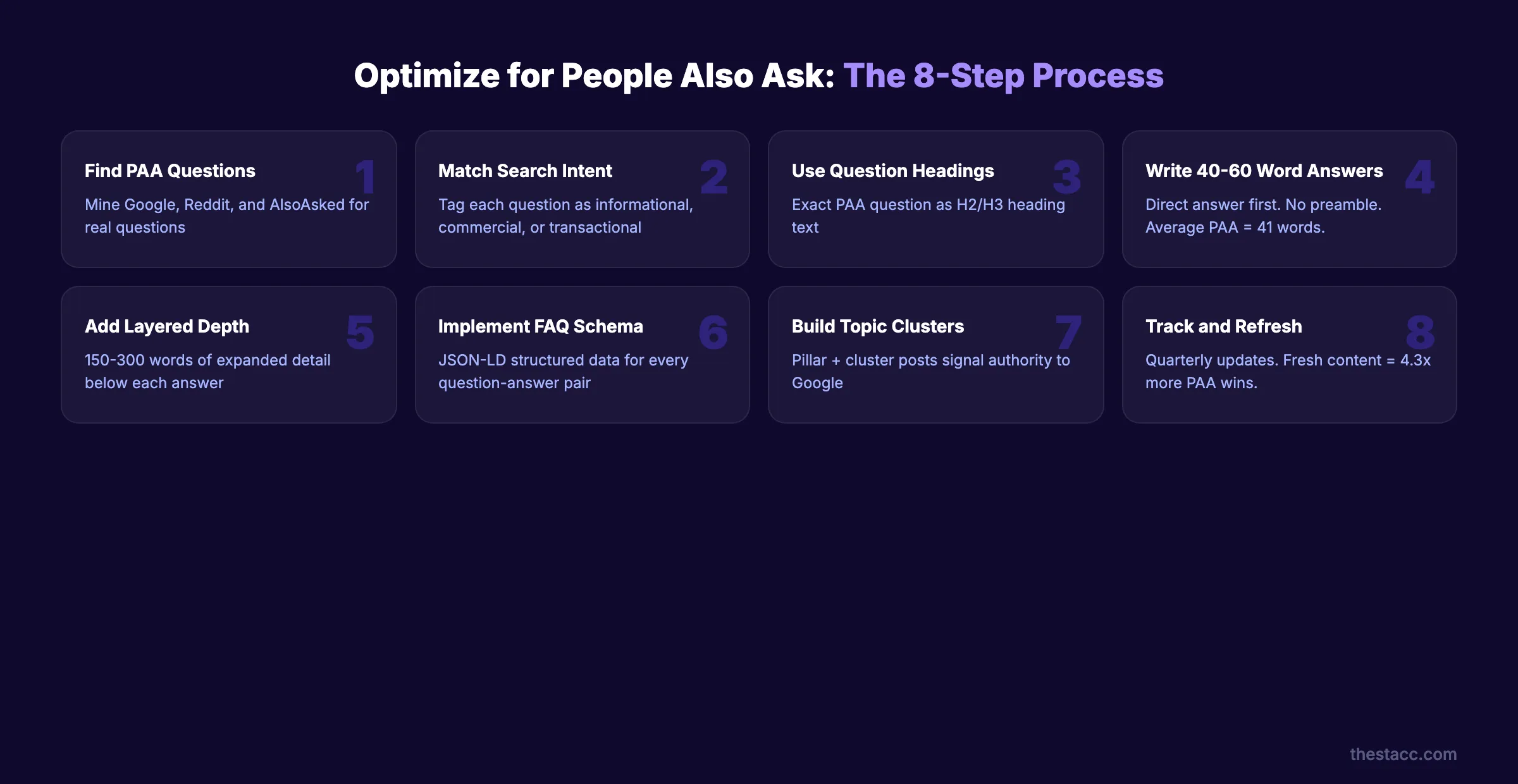
Here is what you will learn:
- How to find PAA questions your audience actually asks
- The exact answer length Google prefers (it is shorter than you think)
- Why 74% of PAA results come from pages that do not rank on page 1
- How to implement FAQ schema that qualifies your content
- A quarterly refresh system that keeps you in PAA boxes long-term
What You Will Need
Before you start, gather these resources:
| Resource | Purpose | Free Option |
|---|---|---|
| Keyword research tool | Find PAA questions at scale | Google Search (manual), AlsoAsked |
| Google Search Console | Track impressions and clicks | Free |
| Schema markup plugin or generator | Add FAQ structured data | Schema markup generator |
| Content calendar | Schedule quarterly refreshes | Google Sheets |
| Rank tracking tool | Monitor PAA appearances | Semrush, Ahrefs, or seoClarity |
Skill level: Intermediate. You should understand basic on-page SEO and keyword research.
Time commitment: 2 to 4 hours for initial optimization. 1 hour per quarter for refreshes.
Step 1: Find PAA Questions Your Audience Is Asking
Open Google and type your target keyword. Scroll to the People Also Ask box. Click each question. Google loads 2 to 4 new questions every time you expand one.
Repeat this process 5 to 6 times per keyword. You will uncover 15 to 25 related questions in minutes.
Record every question in a spreadsheet with these columns:
| Column | What to Track |
|---|---|
| PAA Question | The exact question text |
| Parent Keyword | The keyword that triggered it |
| Current Top Answer Source | The domain Google pulls from |
| Answer Format | Paragraph, list, or table |
| Your Existing Content | URL if you already cover it |
Do not stop at Google. Check Reddit threads, Quora, and AnswerThePublic for questions Google has not surfaced yet. These become content gaps you can fill before competitors.
Longer queries trigger PAA more often. Semrush data shows 72% of 10-word queries trigger PAA boxes, compared to 47% of 3-word queries. Target specific, long-tail questions over broad terms.
Also check industry variation. PAA prevalence ranges from 9.5% in real estate to 64.2% in computers and electronics. If you operate in a high-PAA vertical, this channel deserves more resources.
Why this step matters: You cannot optimize for questions you have not identified. The data shows 86% of question-word queries trigger PAA boxes. Finding these questions first gives you a target list. Without it, you are writing content and hoping Google picks it up.
Step 2: Match Each Question to Search Intent
Every PAA question carries a specific search intent. Group your questions into 4 categories:
- Informational: "What is People Also Ask?" (Wants a definition or explanation)
- Navigational: "Google PAA guidelines" (Wants a specific resource)
- Commercial: "Best tools for PAA tracking" (Comparing options before buying)
- Transactional: "PAA optimization service pricing" (Ready to purchase)
Match your answer format to the intent. Informational questions need concise definitions. Commercial questions need comparison tables. Transactional questions need clear calls to action.
Google's machine learning ranks PAA questions by relevance and popularity. The algorithm studies user behavior patterns to determine which follow-up questions appear.
This means your answer must satisfy the exact intent behind the question. A mismatch kills your chances. Google measures whether users click away immediately or stay engaged.
Review each question on your spreadsheet. Add an "Intent" column. Tag every question. Then prioritize informational and commercial questions first. These represent the highest volume of PAA appearances.
Why this step matters: Intent alignment determines whether Google selects your answer. A page answering "what is PAA" with 2,000 words of theory will lose to a page delivering a 45-word direct definition. Matching intent also improves your broader SEO content writing.
Step 3: Structure Your Content With Question-Based Headings
Use the exact PAA question as your H2 or H3 heading. Do not rephrase it. Do not make it clever. Google matches headings to questions almost literally.
For example, if the PAA question is "How do you get into People Also Ask," your heading should be:
Correct: "How Do You Get Into People Also Ask?"
Wrong: "Getting Into PAA Boxes" or "The Secret to PAA Placement"
Google wants precision.
Structure your page so each question heading follows a logical order. Group related questions under a parent H2. Use H3 tags for sub-questions.
A strong blog post structure for PAA optimization looks like this:
- H1: Primary topic (your main keyword)
- H2: First major PAA question
- H3: Related follow-up question
- H3: Second follow-up question
- H2: Second major PAA question
- H2: Third major PAA question
This structure tells Google your page answers multiple related questions. It also creates natural anchor points for the algorithm to extract answers from.
Use your on-page SEO checker to verify heading hierarchy before publishing.
Why this step matters: Google's algorithm scans headings to identify which questions a page answers. Pages without question-based headings force the algorithm to parse body text. That is harder and less reliable. 79% of PAA results use paragraph-based format pulled directly from sections below a matching heading.
Step 4: Write Concise Answers in the PAA Sweet Spot (40 to 60 Words)
This is where most content fails. Writers produce 200-word answers when Google wants 41 words.
The average PAA answer length is 41 words, according to Semrush research. Your target range is 40 to 60 words. That means 2 to 3 sentences maximum.
Place your direct answer immediately below the question heading. No preamble. No context-setting. Answer first.
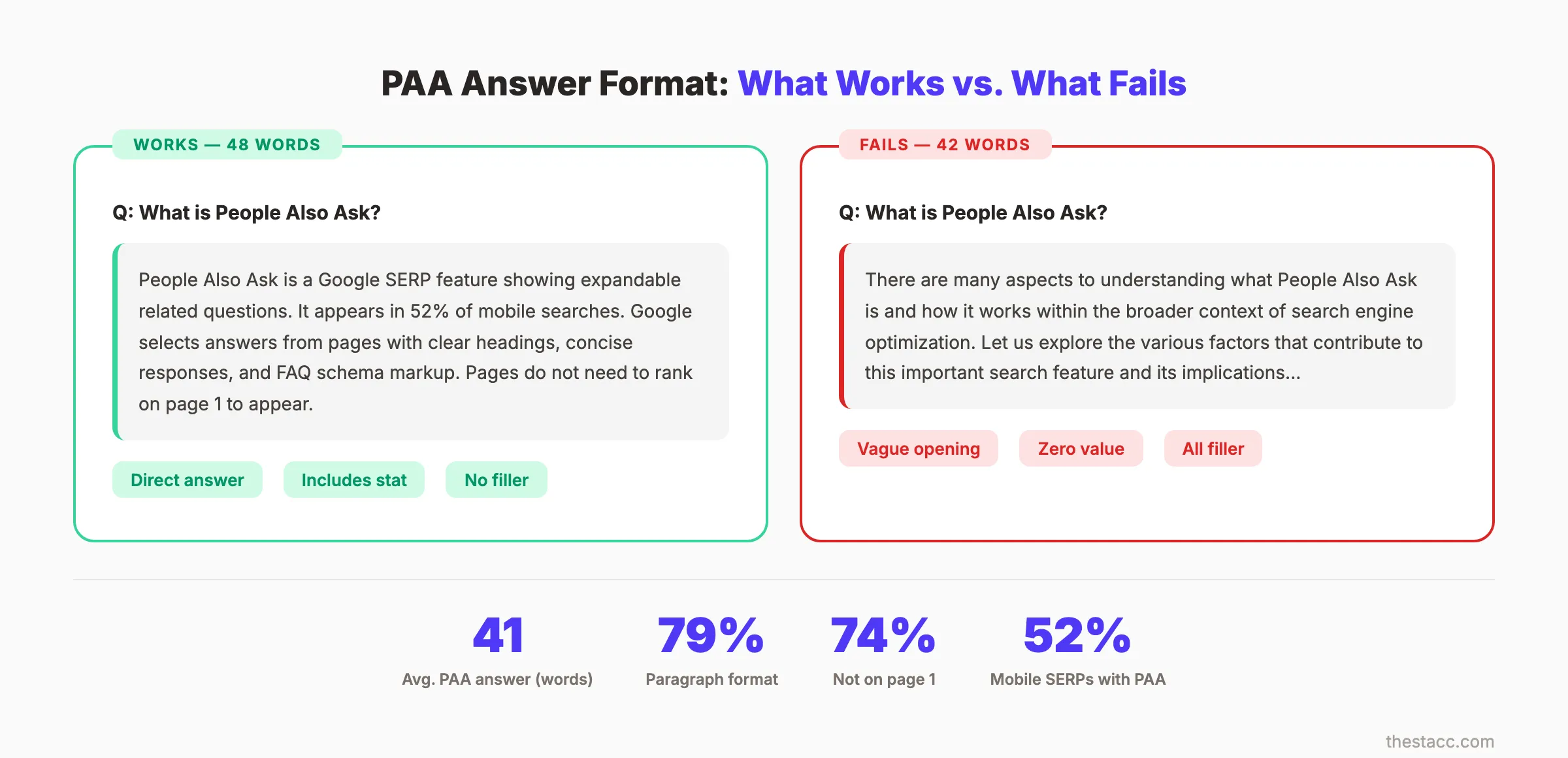
Here is the formula:
- State the answer directly (1 sentence)
- Add one supporting detail (1 sentence)
- Include a specific number or example (1 sentence, optional)
Example PAA answer (48 words):
People Also Ask boxes appear in 52% of mobile searches. Google selects answers from pages that match question intent, use clear heading structure, and provide concise responses under 60 words. Pages do not need to rank on page 1 to earn PAA placements.
Notice: no filler words, no hedging, no "it depends." Google wants definitive answers.
Compare that to what does not work:
There are many factors that go into appearing in People Also Ask boxes. Search engines use various signals to determine which content appears. Let us explore some of the key considerations that can help your content get selected...
The second version says nothing in 40 words. The first version delivers value in 48. Google picks the first version every time.
Why this step matters: PAA boxes show a preview of 2 to 3 lines. If your answer does not deliver value in that preview, users will not click to expand. Short, direct answers also align with how featured snippets work. Winning PAA often means winning snippet placements too.
Stop writing. Start ranking. theStacc publishes 30 SEO articles per month for $99. Every article is optimized for PAA, featured snippets, and organic search.
Step 5: Add Depth Below Each Answer
The 40 to 60 word answer earns the PAA placement. The expanded content below it earns the click.
After your concise answer, add 150 to 300 words of supporting depth. This is the "Layered Depth" formula:
- Layer 1. Direct answer (40 to 60 words, immediately below heading)
- Layer 2. Expanded explanation (100 to 150 words with examples, data, or steps)
- Layer 3. Related context (50 to 100 words linking to related topics)
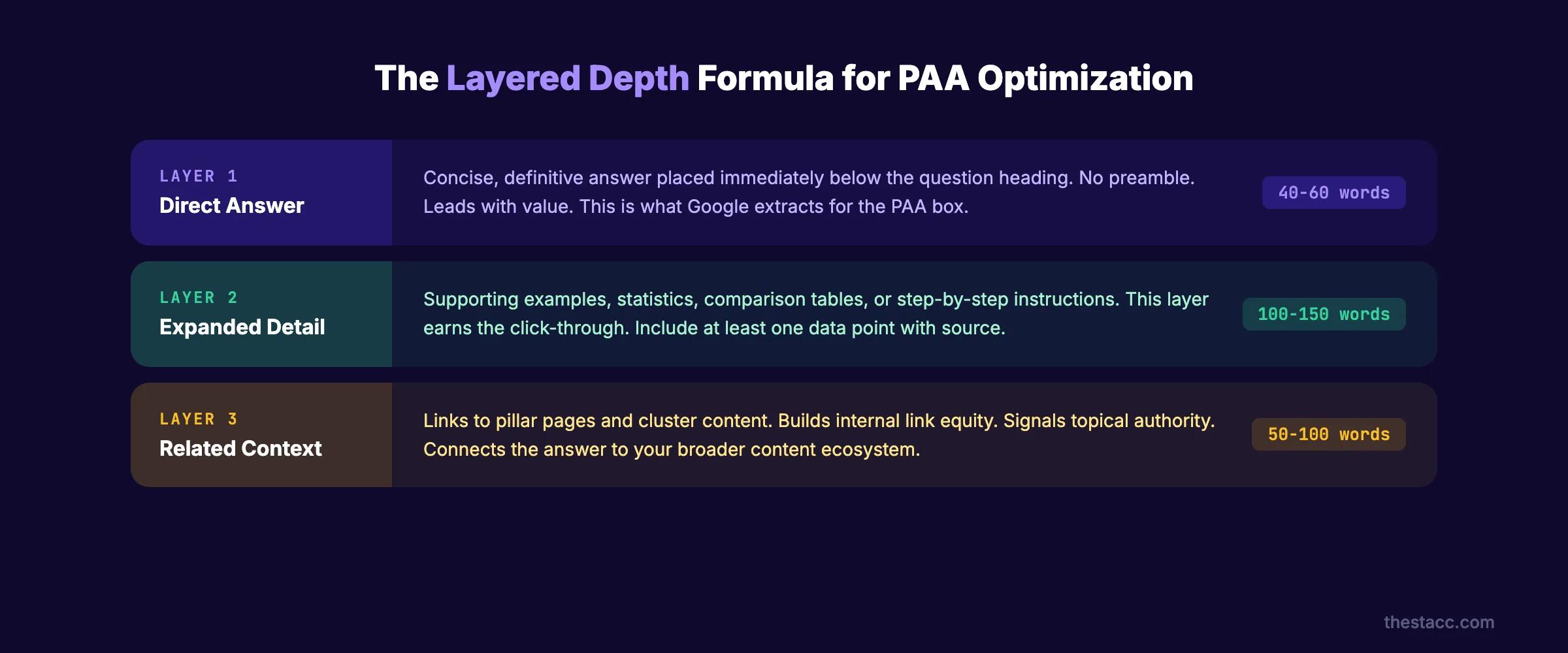
Layer 2 should include at least one of these elements:
- ✓ A specific statistic with source attribution
- ✓ A real-world example or case reference
- ✓ A comparison table or bullet list
- ✓ An actionable step the reader can take immediately
Layer 3 connects the question to your broader content. Link to your pillar page or related cluster content. This builds internal link equity and signals topical authority to Google.
The depth layer also serves a second purpose. PAA answers often feed voice assistant responses. Mobile accounts for 63% of PAA interactions. Your expanded content becomes the source material for voice search answers.
Think of it as writing for 2 audiences simultaneously. Google's algorithm reads the 41-word answer. Human readers consume the 200-word expansion. Both get what they need from a single page section.
Why this step matters: A PAA placement without a click is a vanity metric. The concise answer gets you into the box. The depth below it gives users a reason to visit your page. Sites with high domain authority are 62% more likely to secure PAA snippets. But depth content is how lower-authority sites compete.
What practitioners are saying on X
AI search advice ages quickly. Here is high-signal public discussion from SEO and growth operators — context for your roadmap, not a substitute for primary data.
- @hridoyreh (Mar 2026): Widely shared SEO skill tree: foundations, research, technical, on-page, content, links, AI SEO/GEO, analytics, UX, brand, programmatic — useful map for stats and how-to posts. See the post on X.
- @jakezward (Feb 2026): 2026 SEO predictions emphasize AI Overview share-of-SERP, schema for LLM token efficiency, brand mentions in AI answers as a KPI, proprietary data as a moat, and content refresh beating net-new AI slop. See the post on X.
- @alexgroberman (Jul 2026): Case narrative: organic value plus multi-engine citations (ChatGPT, Perplexity, Grok) from knowledge-hub pages, category authority links, commercial intent content, and tight internal linking — not thin product copy. See the post on X.
Grok, AI Overviews, and multi-engine visibility
Analytics and SEO setup pages should keep entity names and steps extractable for AI Overviews, ChatGPT, Perplexity, and Grok.
- Google AI Overviews: Use passage-ready answers, tables, and FAQ schema where relevant.
- ChatGPT / Perplexity: Cite named sources next to key claims.
- Grok: Maintain accurate entity facts on-site and in high-signal X posts.
Publish content built for Google and AI citations. theStacc Content SEO ships SEO-scored articles structured for rankings and generative engines.
Step 6: Implement FAQ Schema Markup
FAQ schema markup tells Google explicitly that your page contains questions and answers. This is not optional for PAA optimization.
Add FAQ schema to every page targeting PAA questions. The markup follows this JSON-LD format:
```json { "@context": "https://schema.org", "@type": "FAQPage", "mainEntity": [ { "@type": "Question", "name": "How do you optimize for People Also Ask?", "acceptedAnswer": { "@type": "Answer", "text": "Your 40-60 word answer here." } } ] } ```
Follow these rules for FAQ schema:
- ✓ Include 4 to 8 questions per page (not more)
- ✓ Use the exact question text from your headings
- ✓ Keep the answer text under 60 words
- ✓ Place the JSON-LD script in the page head or before the closing body tag
- ✓ Validate with Google's Rich Results Test before publishing
Read our full guide on schema markup for blog posts for implementation details.
You can also use our free schema markup generator to create the JSON-LD without writing code.
Google evaluates 4 factors when selecting PAA answers: relevance, content quality and structure, headings, and schema. FAQ schema addresses 2 of those 4 factors directly.
Why this step matters: Schema markup does not guarantee a PAA placement. But it removes ambiguity. Without schema, Google must interpret your content structure. With schema, you declare it explicitly. Pages with FAQ schema also qualify for rich results in standard search.
Step 7: Build Topical Authority Around Question Clusters
A single page answering 5 questions will not outperform a site with 20 pages covering an entire topic cluster. Google rewards topical depth.
Build topical authority by creating content clusters around your PAA questions. Here is the structure:
| Content Type | Purpose | Example |
|---|---|---|
| Pillar page | Covers the broad topic | "Complete Guide to SEO" |
| Cluster posts | Answer specific questions in depth | "How to Optimize for PAA" |
| Supporting posts | Cover related sub-topics | "What Is a Featured Snippet?" |
Start by creating a topical map from your PAA question spreadsheet. Group questions by theme. Each theme becomes a cluster.
For every cluster, publish:
- 1 pillar page (2,000+ words covering the broad topic)
- 4 to 6 cluster posts (1,000 to 2,000 words each, targeting specific questions)
- Internal links connecting every cluster post back to the pillar
This approach works because Google's algorithm evaluates site-level authority, not just page-level relevance. A page at position 12 can win a PAA placement over pages at positions 1 to 3 if the site demonstrates deeper topic coverage.
The data confirms this. 74% of sites appearing in PAA do not rank on page 1 organically. They earn PAA boxes through topical authority and content structure, not raw ranking power.
This is also your hedge against AI Overviews. As zero-click searches grow (60% of searches now end without a click), PAA remains one of the few SERP features that drives actual site visits.
Why this step matters: Google increasingly views sites as topic experts or generalists. Experts get PAA placements. PAA is 6 times more likely to appear than a featured snippet. Capturing it at scale requires a publishing strategy that demonstrates authority across an entire subject area.
Your SEO team. $99 per month. 30 optimized articles, published automatically. Every article builds topical authority for your site.
Step 8: Track PAA Appearances and Refresh Quarterly
PAA optimization is not a one-time task. Google rotates answers based on freshness, engagement, and competing content. You must track and refresh.
Set up tracking with these tools:
- Semrush or Ahrefs. Track SERP feature appearances for your target keywords
- Google Search Console. Monitor impressions and CTR for question-based queries
- seoClarity. Track PAA-specific metrics and trends
Create a quarterly refresh schedule:
| Quarter | Action |
|---|---|
| Q1 | Audit all PAA-targeted pages. Update stats and examples. |
| Q2 | Expand content depth. Add new PAA questions discovered since Q1. |
| Q3 | Refresh schema markup. Revalidate with Rich Results Test. |
| Q4 | Full content audit. Remove outdated sections. Republish with current date. |
Recently updated articles appear 4.3 times more frequently in PAA boxes, according to Search Engine Land. That single stat justifies the quarterly refresh investment.
US mobile PAA prevalence increased 34.7% year-over-year, according to seoClarity. The opportunity is growing. Sites that refresh consistently will capture an increasing share of these placements.
Use our guide on how to update old blog posts for a complete refresh framework.
Track these specific metrics each quarter:
- ✓ Number of PAA appearances (by keyword)
- ✓ Click-through rate from PAA boxes
- ✓ New PAA questions appearing for your keywords
- ✓ Competitor PAA wins (which domains are displacing you)
- ✓ Content freshness score (days since last update)
Why this step matters: PAA boxes are dynamic. Google tests different answers and rotates sources. A placement you earn today can disappear in 90 days if a competitor publishes fresher content. Quarterly refreshes also compound. Each update signals freshness to Google.
Results: What to Expect
PAA optimization follows a predictable timeline:
| Timeframe | Expected Result |
|---|---|
| Week 1 to 2 | Schema indexed. No visible PAA changes yet. |
| Month 1 | First PAA appearances for long-tail questions. |
| Month 2 to 3 | PAA placements stabilize. CTR data becomes meaningful. |
| Month 3 to 6 | Cluster content compounds. Broader PAA coverage. |
| Month 6 to 12 | Topical authority signals strengthen. High-volume PAA wins. |
Set realistic expectations. PAA optimization is not instant. The compound effect of publishing SEO blog posts consistently, building clusters, and refreshing quarterly produces results over months, not days.
80% of PAA boxes show exactly 4 questions initially. Your goal is to own 1 of those 4 slots for every target keyword. At scale, that means hundreds of PAA placements driving incremental traffic.
A realistic benchmark: sites publishing 20 to 30 optimized articles per month see PAA placements for 15% to 25% of target keywords within 6 months.
The connection to generative engine optimization is worth noting. PAA-optimized content also performs well in AI-generated search results. The same concise, structured format that wins PAA boxes feeds large language models. One optimization strategy serves 2 search paradigms.
Troubleshooting
Problem: You implemented everything but you are not appearing in PAA.
Fix: Check 3 things. First, verify your FAQ schema passes the Rich Results Test. Invalid schema is the most common technical blocker. Second, confirm your answer length is under 60 words. Third, check your domain authority. Sites with high domain authority are 62% more likely to secure PAA snippets. If all 3 check out, publish 4 to 6 more cluster posts. Run a full SEO audit to identify authority gaps.
Problem: You won a PAA placement but lost it after 2 weeks.
Fix: Google tests PAA answers constantly. A temporary loss is normal. Check whether a competitor published fresher content on the same question. If yes, update your content immediately with newer data. Also check if Google changed the PAA questions for that keyword. PAA boxes evolve based on user behavior. Re-optimize for the new question set.
Problem: Your PAA click-through rate is below 2%.
Fix: The answer preview is not compelling enough. Rewrite your opening answer to lead with a surprising stat or a definitive statement. Avoid starting with "Yes" or "No." Open with the most valuable piece of information. Also check your title tag and meta description. Read our guide on optimizing content for SEO for title and meta best practices.
3,500+ blogs published. Every article is SEO-scored before publish. See what theStacc can do for your site. Every article targets PAA, snippets, and organic rankings.
Frequently Asked Questions
People Also Ask is an expandable SERP feature that shows related questions for a search query. PAA appears in 52% of mobile searches and 49% of desktop searches. Each question expands to reveal a short answer pulled from a web page, with a link to the source.
Yes. 74% of sites appearing in PAA do not rank on page 1 organically. Google selects PAA answers based on content quality, structure, schema markup, and topical authority. A page at position 12 can win a PAA box over pages ranked 1 through 3.
The average PAA answer is 41 words long. Target 40 to 60 words for your direct answer. Place this concise answer immediately below a question-formatted heading. Add expanded detail (150 to 300 words) below the direct answer for readers who click through.
FAQ schema signals to Google that your page contains structured questions and answers. It does not guarantee a PAA placement, but it removes ambiguity about your content format. Pages with valid FAQ schema qualify for both PAA boxes and rich results in standard search.
Refresh PAA-targeted content every quarter. Recently updated articles appear 4.3 times more frequently in PAA boxes. Each quarterly update should include new statistics, refreshed examples, and any new PAA questions Google has added for your target keywords.
PAA answers frequently feed voice assistant responses, especially on mobile. Mobile accounts for 63% of PAA interactions. Writing concise, direct answers in the 40 to 60 word range optimizes your content for both PAA boxes and voice search results simultaneously.
Start Winning PAA Placements This Week
PAA appears in more than half of all mobile searches. It is the largest SERP feature opportunity available in 2026.
Start with Step 1 today. Find 15 PAA questions for your primary keyword. Structure your next article around them. Write 41-word answers. Add schema. Publish and track.
If you want PAA-optimized content published for you every month, theStacc handles the entire process. 30 articles, full schema, question-based structure, and quarterly refreshes. See pricing and
Sources & references

Plan topics, review article drafts, and publish to a connected CMS.
Weekly local SEO teardowns
One practical email a week. Map Pack, GBP, AI Overviews — no fluff. Unsubscribe anytime.
Explore this topic: People Also Ask (PAA).