
Rich Snippets: How to Get Them in 7 Steps (2026)
Rich snippets boost CTR by 58%. Learn how to get rich snippets with schema markup in 7 steps — with JSON-LD examples. Updated April 2026.
Stacc Editorial • 2026-04-04 • SEO Tips

In This Article
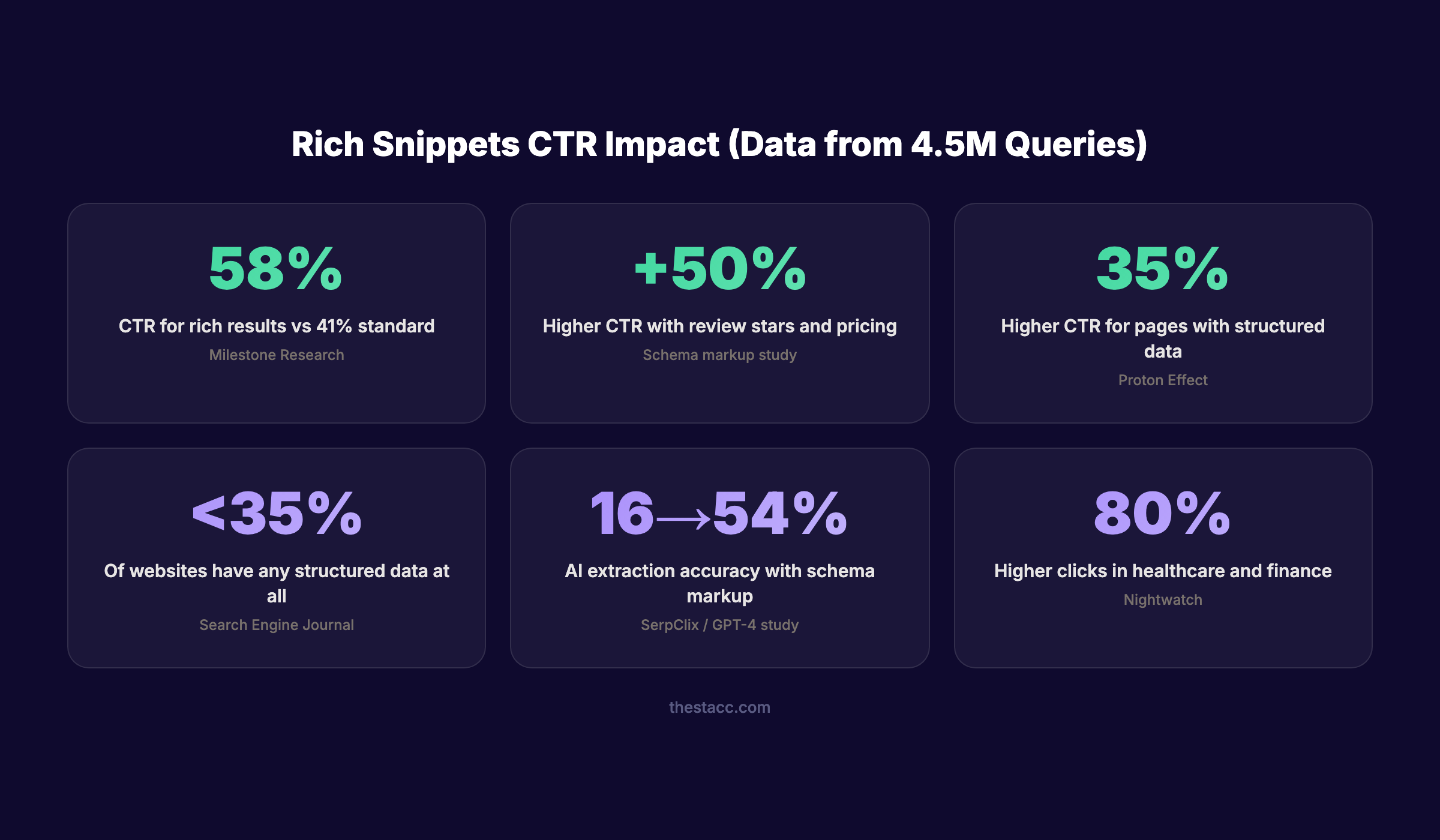
Rich snippets increase click-through rates by 58% compared to standard search results. Yet fewer than 35% of websites have any structured data at all.
That means most businesses hand free clicks to competitors who took 30 minutes to add schema markup.
Rich snippets are the enhanced search results that display star ratings, prices, FAQ dropdowns, event dates, and other visual elements directly in Google. They pull this data from structured markup in your page’s HTML. No markup means no rich snippets.
This guide walks you through the exact 7-step process to earn rich snippets for your site. We have published 3,500+ blogs across 70+ industries, and every article includes structured data that qualifies for rich results.
Here is what you will learn:
- The difference between rich snippets, featured snippets, and SERP features
- Which schema types Google still supports in 2026 (and which ones it dropped)
- How to write JSON-LD markup for the 6 most valuable rich result types
- How to test, deploy, and monitor your structured data
- Common mistakes that prevent rich snippets from appearing
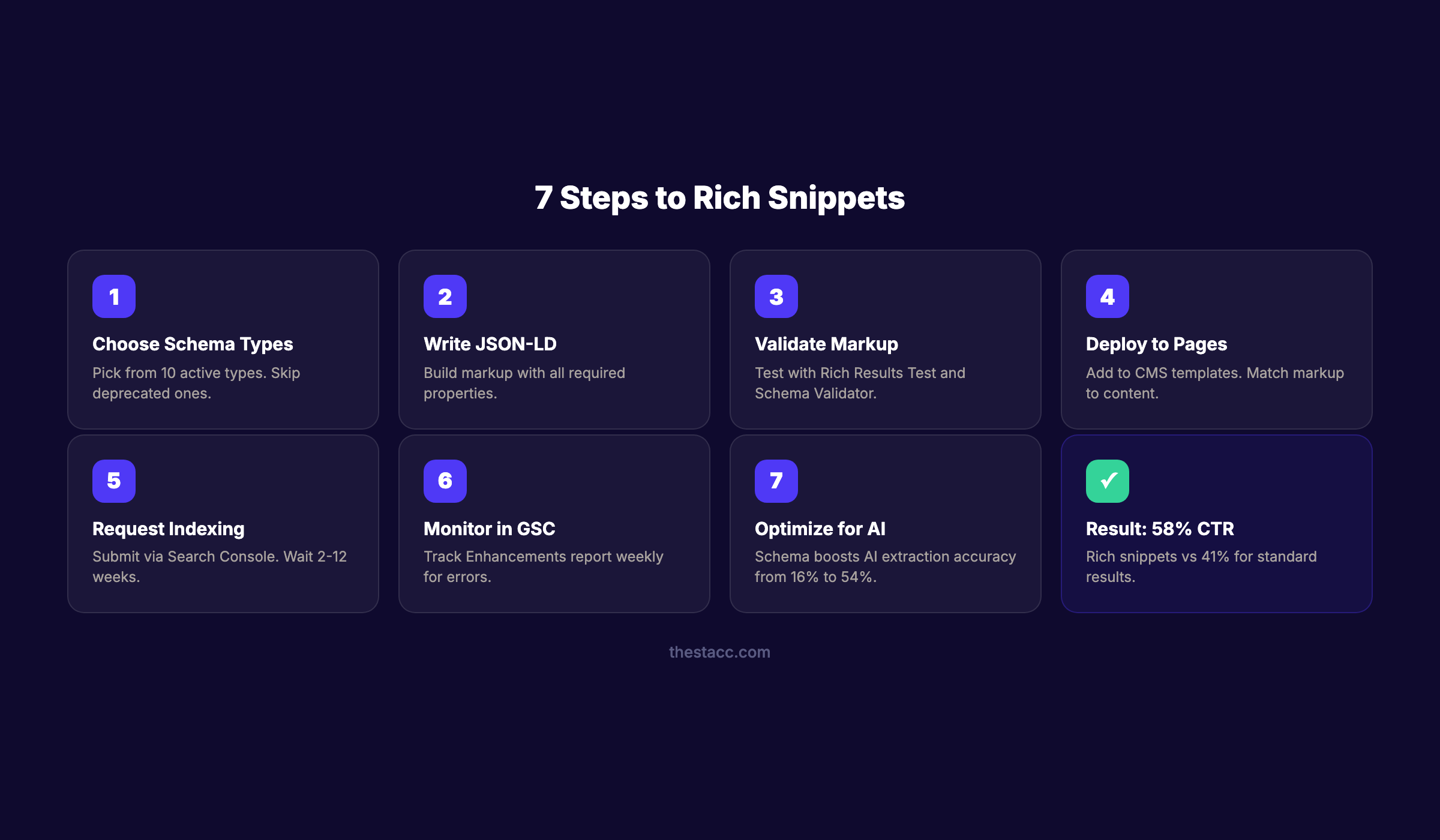
Time required: 30-60 minutes per page Difficulty: Beginner to Intermediate What you need: Access to your site’s HTML or CMS, Google Search Console
Rich Snippets vs Featured Snippets vs SERP Features
Before implementing anything, understand the terminology. These three terms describe different things.
| Term | What It Is | How You Earn It |
|---|---|---|
| Rich snippets | Enhanced results with ratings, prices, dates pulled from structured data | Add JSON-LD schema markup to your pages |
| Featured snippets | ”Position zero” answer boxes at the top of search results | Structure content with clear answers, lists, and tables |
| SERP features | Any non-standard result (rich snippets, featured snippets, PAA, knowledge panels, local packs) | Varies by feature type |
Rich snippets require structured data. Featured snippets do not. Both improve visibility, but the implementation is completely different.
Step 1: Choose the Right Schema Types for Your Pages
Google supports over 25 structured data types. Not all of them generate visible rich snippets. Focus on the types that produce visual enhancements in search results.
Schema Types That Generate Rich Snippets in 2026
| Schema Type | Visual Enhancement | Best For |
|---|---|---|
| Product | Price, availability, review stars | E-commerce, SaaS pricing pages |
| Review / AggregateRating | Star ratings, review count | Product pages, service pages |
| Article | Author, date, image thumbnail | Blog posts, news content |
| Local Business | Hours, address, ratings, map | Service businesses, restaurants |
| Event | Date, location, ticket links | Events, webinars, conferences |
| Video | Thumbnail, duration, upload date | Video content, tutorials |
| Breadcrumb | Navigation path in SERPs | All pages (improves site structure display) |
| Organization | Logo, contact info, social profiles | Homepage, about page |
| Software Application | Rating, price, download info | App pages, tool landing pages |
| Recipe | Cook time, ratings, calories | Food and cooking content |
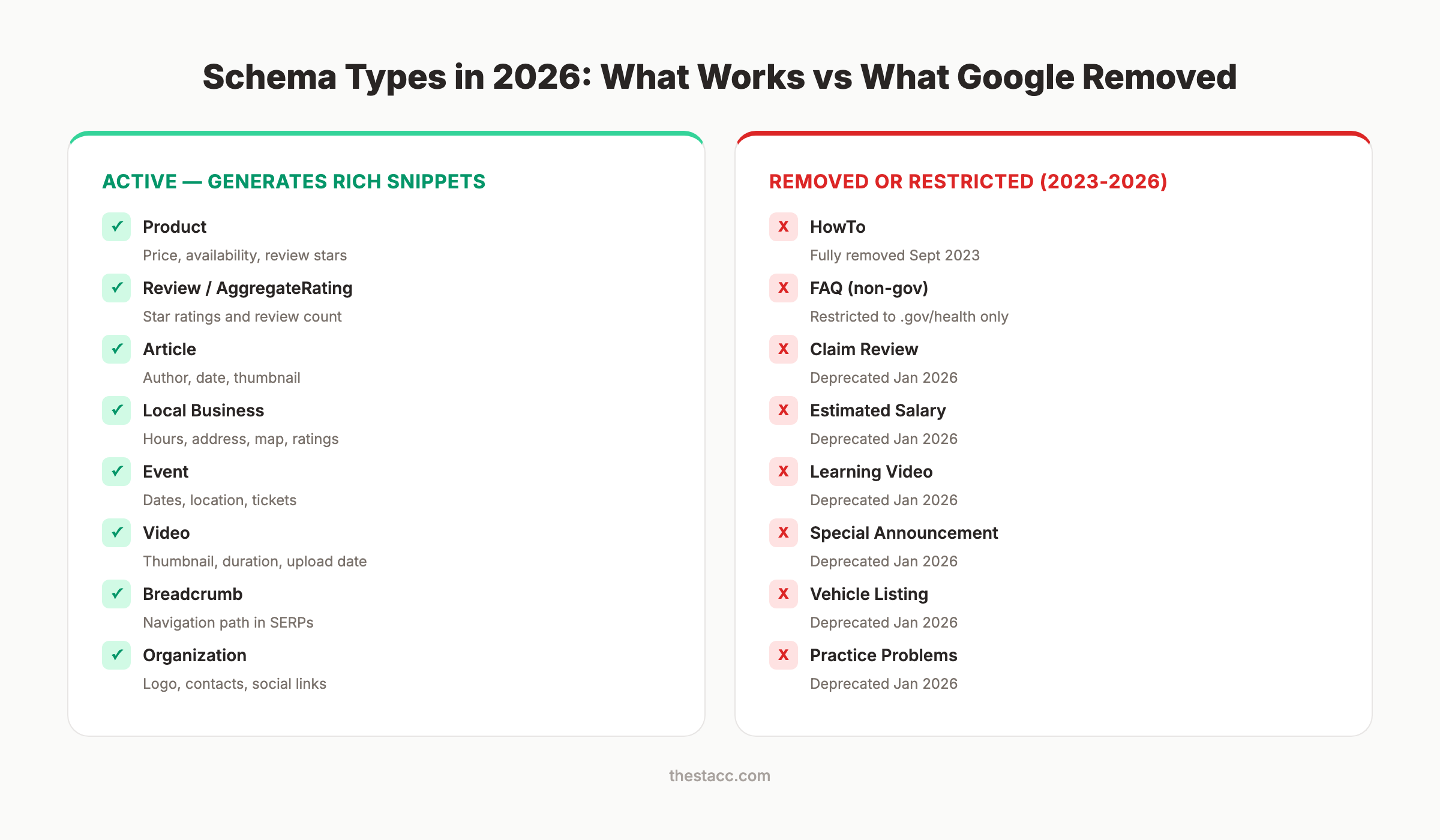
Schema Types Google Removed or Restricted
Google made significant changes in 2025-2026. Do not waste time implementing these:
| Schema Type | Status | Date Removed |
|---|---|---|
| HowTo | Fully removed | September 2023 (desktop), 2024 (mobile) |
| FAQ | Restricted to .gov and health authority sites only | August 2023 |
| Claim Review / Fact Check | Deprecated | January 2026 |
| Estimated Salary | Deprecated | January 2026 |
| Learning Video | Deprecated | January 2026 |
| Special Announcement | Deprecated | January 2026 |
| Vehicle Listing | Deprecated | January 2026 |
Why this step matters: Implementing deprecated schema wastes development time and creates validation warnings. Focus only on types that produce visible results in 2026.
Pro tip: Even though FAQ rich results no longer display for most sites, FAQ schema markup for blog posts still helps AI systems like ChatGPT and Perplexity parse your content. The markup has value beyond Google’s visual display.
Step 2: Write Your JSON-LD Markup
Google recommends JSON-LD as the preferred format for structured data. It sits in a <script> tag in your page’s <head> section. It does not interfere with your visible HTML.
Here are copy-paste templates for the 4 most common schema types.
Product Schema
{
  "@context": "https://schema.org",
  "@type": "Product",
  "name": "Your Product Name",
  "description": "Brief product description.",
  "brand": {
    "@type": "Brand",
    "name": "Your Brand"
  },
  "offers": {
    "@type": "Offer",
    "price": "99.00",
    "priceCurrency": "USD",
    "availability": "https://schema.org/InStock",
    "url": "https://yoursite.com/product"
  },
  "aggregateRating": {
    "@type": "AggregateRating",
    "ratingValue": "4.7",
    "reviewCount": "142"
  }
}
Article Schema
{
  "@context": "https://schema.org",
  "@type": "Article",
  "headline": "Your Article Title",
  "author": {
    "@type": "Organization",
    "name": "Your Brand"
  },
  "datePublished": "2026-04-04",
  "dateModified": "2026-04-04",
  "image": "https://yoursite.com/image.jpg",
  "publisher": {
    "@type": "Organization",
    "name": "Your Brand",
    "logo": {
      "@type": "ImageObject",
      "url": "https://yoursite.com/logo.png"
    }
  }
}
Local Business Schema
{
  "@context": "https://schema.org",
  "@type": "LocalBusiness",
  "name": "Business Name",
  "address": {
    "@type": "PostalAddress",
    "streetAddress": "123 Main St",
    "addressLocality": "City",
    "addressRegion": "State",
    "postalCode": "12345"
  },
  "telephone": "+1-555-123-4567",
  "openingHours": "Mo-Fr 09:00-17:00",
  "aggregateRating": {
    "@type": "AggregateRating",
    "ratingValue": "4.8",
    "reviewCount": "89"
  }
}
Organization Schema
{
  "@context": "https://schema.org",
  "@type": "Organization",
  "name": "Your Company",
  "url": "https://yoursite.com",
  "logo": "https://yoursite.com/logo.png",
  "sameAs": [
    "https://www.linkedin.com/company/yourcompany",
    "https://twitter.com/yourcompany"
  ]
}
Why this step matters: Invalid or incomplete JSON-LD produces zero rich snippets. Every schema type has required properties. Missing even one means Google ignores the entire block.
Stop writing. Start ranking. Stacc publishes 30 optimized SEO articles per month for $99. Every article includes structured data. Start for $1 →
Step 3: Validate Your Markup Before Deploying
Never push schema markup live without testing. Two tools catch errors before they cost you.
Google Rich Results Test
The Rich Results Test is Google’s official validator. Paste your URL or code snippet. It shows:
- Whether your markup qualifies for rich results
- Which specific rich result types are detected
- Errors (blocks rich results) and warnings (may limit display)
- A preview of how your result will appear
Schema Markup Validator
The Schema.org Validator checks syntax against the full Schema.org specification. It catches issues the Rich Results Test may miss, including:
- Incorrect property names
- Wrong data types (string where number is expected)
- Missing recommended properties
- Nesting errors
Run both tools on every page before deployment. A page can pass one and fail the other.
For batch testing, crawl your site with Screaming Frog or Sitebulb. Both tools detect structured data across all pages in a single crawl. They flag validation errors, missing required properties, and pages without any schema. This is faster than testing one URL at a time.
If you use WordPress, Rank Math and Yoast include built-in schema validation in the post editor. Check the schema tab before publishing every page.
Why this step matters: Google’s structured data policies state that incorrect markup can result in manual actions. Validation takes 2 minutes and prevents penalties that take months to resolve.
Pro tip: Use our free Schema Markup Generator to create valid JSON-LD without writing code. It covers LocalBusiness, FAQ, Service, and Organization types.
Step 4: Deploy Schema to Your Pages
Where you place your JSON-LD depends on your platform. The markup goes inside a <script type="application/ld+json"> tag.
By Platform
WordPress: Use Rank Math, Yoast SEO, or All In One SEO. These plugins generate schema automatically for posts and pages. Configure default schema types in plugin settings, then customize per page.
Shopify: Product schema generates automatically from product data. Add Organization and Breadcrumb schema through your theme.liquid file or an app like JSON-LD for SEO.
Astro / Static Sites: Add JSON-LD directly in your page template’s <head> section. Use dynamic data from your content collections to populate fields automatically.
Any CMS: If your CMS does not support plugins, add the <script> tag directly to your page template. Place it in the <head> or at the end of <body>.
Deployment Checklist
- Schema markup matches visible page content exactly
- Every required property is populated (no empty fields)
- URLs are absolute (include full domain, not relative paths)
- Prices and ratings reflect current, accurate data
- One primary schema type per page (avoid conflicting types)
- Breadcrumb schema on all pages with multi-level navigation
Why this step matters: Schema that mismatches page content violates Google’s policies. If your markup says a product costs $49 but the page shows $99, Google may issue a manual action and remove all your rich results.
Step 5: Request Indexing and Wait
After deploying schema, Google needs to recrawl your pages to detect the new markup.
Speed Up Discovery
- Open Google Search Console
- Enter your page URL in the URL Inspection tool
- Click “Request Indexing”
- Repeat for each page with new schema
Google typically detects new structured data within 2-12 weeks. Pages with higher authority and more frequent crawling get picked up faster.
What Affects Speed
| Factor | Impact |
|---|---|
| Site crawl frequency | High-authority sites: days. New sites: weeks |
| Page importance | Homepage and top pages get crawled first |
| Sitemap inclusion | Pages in XML sitemap are discovered faster |
| Schema validity | Errors delay or prevent rich result display |
Why this step matters: Rich snippets do not appear instantly. Patience is required. But if 12 weeks pass with no rich results, revisit Steps 2 and 3 for errors.
Your SEO team. $99 per month. 30 optimized articles, published automatically. Start for $1 →
Step 6: Monitor Rich Results in Google Search Console
Google Search Console provides direct reporting on your rich result performance.
Where to Check
Go to Search Console > Enhancements. You will see individual reports for each detected schema type (Product, Article, FAQ, Breadcrumbs, etc.). Each report shows:
- Valid items: Pages with correctly implemented schema
- Items with warnings: Schema that works but has issues
- Errors: Schema that prevents rich results from appearing
Key Metrics to Track
Monitor these in the Performance report. Filter by “Search appearance” and select specific rich result types.
| Metric | What It Tells You |
|---|---|
| Impressions with rich results | How often your enhanced listings appear |
| CTR for rich result pages | Whether enhancements improve clicks |
| CTR comparison | Rich result pages vs non-rich result pages |
| Error count trend | Whether new errors are appearing over time |
Check this report weekly. Schema can break when content changes, pages move, or CMS updates modify template code. Set a recurring calendar reminder. Problems caught early take minutes to fix. Problems caught months later can mean weeks of lost rich snippet visibility.
Why this step matters: Schema markup is not set-and-forget. Content updates, price changes, and CMS migrations can silently break your structured data. The Enhancement report catches problems before they erase your rich snippets.
Step 7: Optimize Schema for AI Search Visibility
Rich snippets are no longer just about Google’s visual display. Structured data for AI search helps ChatGPT, Perplexity, Claude, and Gemini understand and cite your content.
Research shows GPT-4 information extraction accuracy jumps from 16% to 54% when pages include proper schema markup. AI systems use structured data as a signal of content quality and trustworthiness.
Schema Types That Help AI Visibility
| Schema Type | AI Benefit |
|---|---|
| Organization | Entity recognition across AI platforms |
| Article | Content attribution and freshness signals |
| FAQ (still useful for AI) | Direct question-answer extraction |
| Review / AggregateRating | Trust and social proof signals |
| Breadcrumb | Content hierarchy and topic relationships |
| sameAs (property) | Cross-platform entity verification |
Additional AI Optimization Steps
- Add
sameAslinks to all social profiles and directory listings on your Organization schema - Include
dateModifiedon every Article schema for freshness signals - Use E-E-A-T signals in your author and publisher schema
- Implement
speakableschema for content you want voice assistants to read - Link your schema markup strategy to your broader on-page SEO approach
Why this step matters: AI platforms are the fastest-growing source of referral traffic. Schema markup is a direct signal to these systems. Ignoring AI search means ignoring the channel with the highest conversion rates.
3,500+ blogs published. 92% average SEO score. See what Stacc can do for your site. Start for $1 →
Results: What to Expect
After completing these 7 steps, here is a realistic timeline:
- Week 1: Schema deployed and validated on all key pages
- Weeks 2-4: Google recrawls pages and detects structured data
- Weeks 4-8: First rich snippets begin appearing in search results
- Weeks 8-12: Full rich result coverage across implemented pages
- Ongoing: CTR improvements of 20-58% on pages with rich snippets
A Milestone Research study of 4.5 million queries found rich results achieve 58% CTR versus 41% for standard results. Product pages with review stars and pricing see up to 50% higher click-through rates.
Google does not guarantee rich snippets for every page. But pages with valid, accurate structured data consistently outperform those without it.
The most important thing: do not stop after implementing schema on 5 pages. Apply it systematically across every page template on your site. Product pages, blog posts, location pages, and your homepage should all have appropriate schema types. The cumulative effect of rich snippets across hundreds of pages compounds your organic CTR advantage significantly.
Sites in healthcare and finance see 80% higher click rates with rich snippets than without. E-commerce product pages with review stars and pricing information perform up to 50% better. The data is consistent across industries and site sizes.
Common Mistakes That Block Rich Snippets
These 5 errors prevent rich snippets from appearing. Check your implementation against each one.
Mistake 1: Missing required properties. Every schema type has mandatory fields. A Product without offers or a LocalBusiness without address will not generate rich results. Check the Google Search Gallery for required fields per type.
Mistake 2: Schema does not match page content. If your markup says 4.8 stars but the page shows 4.2, Google treats this as deceptive. Every data point in your schema must match what users see.
Mistake 3: Self-serving review markup. Adding Review schema to your own product on your own site violates Google’s structured data policies. Review markup must come from genuine third-party reviews.
Mistake 4: Using deprecated schema types. HowTo and FAQ (for non-government sites) no longer generate rich results. Implementing them wastes time and clutters your code.
Mistake 5: JSON-LD syntax errors. A single missing comma or bracket invalidates the entire schema block. Always validate with both the Rich Results Test and Schema.org Validator before deploying.
Mistake 6: Schema drift over time. Your markup was correct at launch. But prices changed, products were discontinued, and business hours shifted. Now the schema no longer matches reality. Set a quarterly audit schedule to compare markup against live page content.
Mistake 7: Ignoring the AI dimension. Schema markup is no longer just about Google’s visual display. AI platforms use structured data to identify entities, verify facts, and decide which sources to cite. Pages without schema are harder for AI systems to parse. This means less visibility in ChatGPT, Perplexity, and Google AI Overviews. Build your structured data strategy with both Google and AI platforms in mind.
FAQ
Are rich snippets a ranking factor?
No. Google has confirmed through John Mueller and Danny Sullivan that structured data is not a direct ranking signal. However, rich snippets improve click-through rates by up to 58%, and higher CTR sends positive engagement signals that indirectly support rankings. The CTR benefit alone makes schema markup worth implementing.
What is the difference between rich snippets and featured snippets?
Rich snippets display enhanced information (stars, prices, dates) pulled from schema markup in your HTML. Featured snippets are answer boxes at the top of search results that Google extracts from page content without any markup. Rich snippets require structured data. Featured snippets require well-structured content.
Is FAQ schema still worth implementing in 2026?
For Google visual display, no. Google restricted FAQ rich results to government and health authority sites in August 2023. For AI search, yes. FAQ schema still helps ChatGPT, Perplexity, and other AI platforms extract question-answer pairs from your content. The AI citability benefit remains strong.
How long does it take for rich snippets to appear?
Google says 2-12 weeks after recrawling your pages. Higher-authority sites with frequent crawling see results faster. Submit updated pages through Google Search Console’s URL Inspection tool to speed up discovery.
What is the best schema format — JSON-LD, Microdata, or RDFa?
Google recommends JSON-LD. It sits in a separate script tag, does not interfere with your HTML, and is the easiest to implement and maintain. All code examples in this guide use JSON-LD format.
Can Stacc add structured data to my blog posts automatically?
Yes. Every article Stacc publishes includes Article schema, Organization schema, and Breadcrumb markup. Our technical SEO checklist covers all structured data requirements. Stacc publishes 30 optimized articles per month starting at $99.
Rich snippets turn standard search results into visual, clickable listings that earn more traffic. The 7 steps above take under an hour per page. The CTR improvement compounds across every page you optimize. Start with your highest-traffic pages and expand from there.
Rank everywhere. Do nothing. Blog SEO, Local SEO, and Social on autopilot. Start for $1 →
Written and published by Stacc. We publish 3,500+ articles per month across 70+ industries. All data verified against public sources as of March 2026.
