
SEO Silo Structure Explained (2026 Guide)
SEO silo structure organizes content into themed groups for topical authority. Learn physical vs virtual silos, when to use them, and modern alternatives.
Stacc Editorial • 2026-04-04 • SEO Tips

In This Article
Most websites publish content randomly. A blog post about email marketing sits next to one about local SEO, which sits next to a product update. Google crawls these pages and sees no clear thematic organization. The result: weak topical authority and pages that struggle to rank.
An SEO silo structure fixes this. It groups related content into themed categories with strategic internal linking that tells Google exactly what your site is about. Sites with well-structured internal linking see a 40% increase in organic traffic compared to those without it.
But the silo concept has evolved significantly since Bruce Clay coined the term in 2002. Strict siloing rules that once dominated SEO are now outdated. Modern site architecture blends silo principles with content cluster flexibility.
We have published 3,500+ blogs across 70+ industries. We build content architecture for every client. This guide covers the full picture.
Here is what you will learn:
- What an SEO silo structure is and how it works
- Physical silos versus virtual silos (and when to use each)
- Why strict siloing is outdated and what replaced it
- How to build a modern silo structure step by step
- Real case studies with traffic data
- The 5 most common silo mistakes and how to avoid them
Chapter 1: What Is an SEO Silo Structure?
An SEO silo structure is a method of organizing website content into themed groups. Each group (or “silo”) focuses on a single topic. Pages within a silo link to each other but link sparingly to pages in other silos.
Bruce Clay introduced the concept in 2002. He drew an analogy from agriculture, where different grain types are stored in separate silos to maintain value. The same principle applies to websites: separating content by theme preserves topical clarity.
How Silos Work
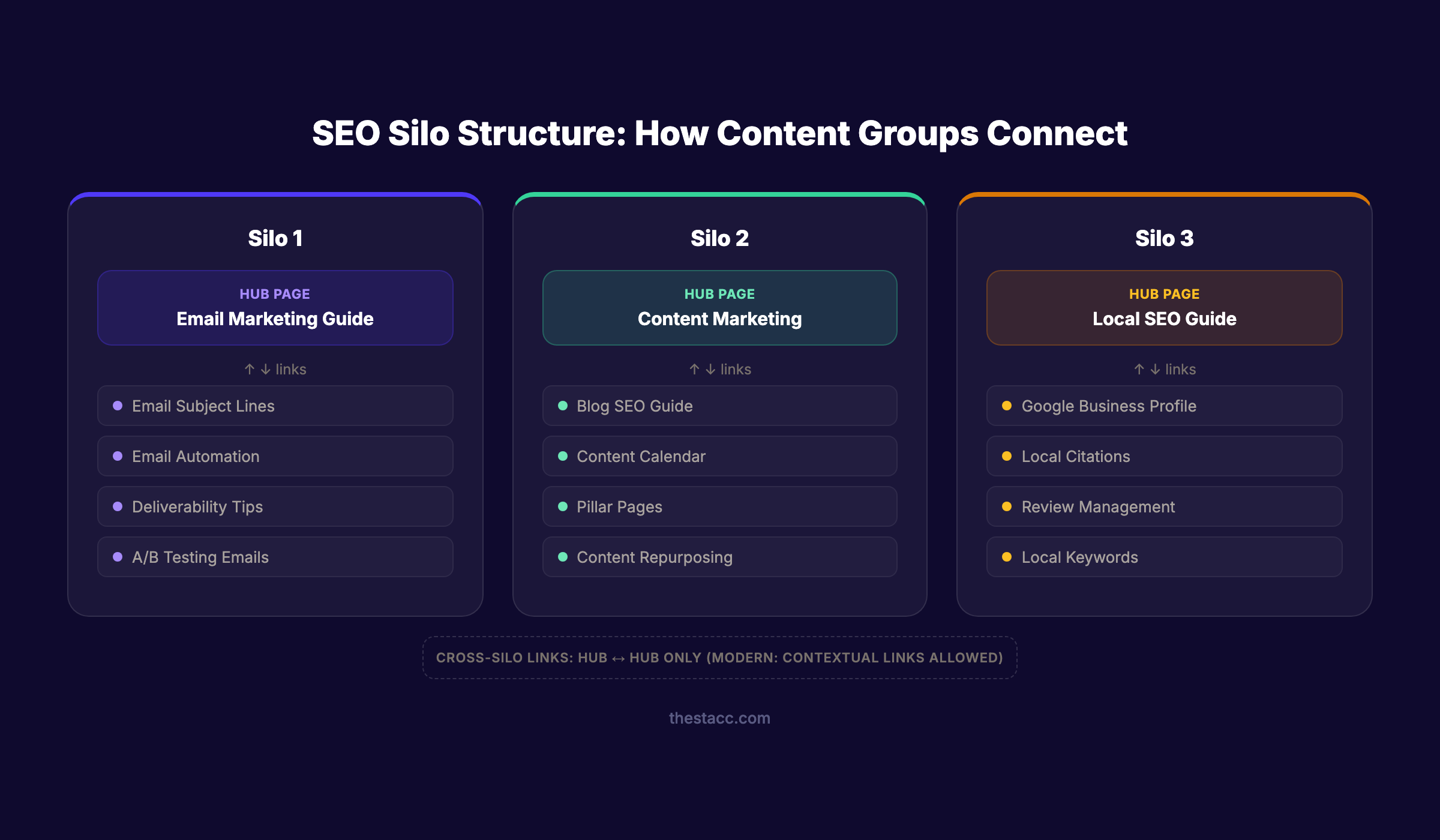
A silo has 3 layers:
- Silo landing page. The top-level page targeting the broadest keyword (e.g., “Email Marketing”).
- Supporting pages. Deeper pages targeting specific subtopics (e.g., “Email Subject Lines,” “Email Automation,” “Email Deliverability”).
- Internal links. Supporting pages link up to the silo landing page. The landing page links down to supporting pages. Cross-silo links are restricted.
This creates a clear topical hierarchy. Google sees a group of related pages all reinforcing the same theme. The silo landing page accumulates authority from every supporting page that links to it.
The Core Principle
John Mueller from Google confirmed the logic: “The top-down approach or pyramid structure helps us a lot more to understand the context of individual pages within the site.” Google uses internal linking structure to understand page relationships. When related pages cluster together, Google assigns stronger topical relevance to the entire group.
Chapter 2: Physical Silos vs Virtual Silos
Bruce Clay defined two approaches to building silos. The distinction matters because it determines how much restructuring your site needs.
Physical Silos
Physical silos use URL directory structure to group content.
Example:
domain.com/email-marketing/ (silo landing page)
domain.com/email-marketing/subject-lines/
domain.com/email-marketing/automation/
domain.com/email-marketing/deliverability/
The theme is visible in the URL path. Search engines and users can see the hierarchy at a glance.
When to use physical silos: New websites where you control the URL structure from the start. E-commerce sites with clear product categories. Sites with fewer than 500 pages where restructuring is manageable.
Virtual Silos
Virtual silos use internal linking patterns to create thematic groups. The URLs can be flat.
Example:
domain.com/email-marketing/ (silo landing page)
domain.com/email-subject-lines/ (links to silo landing page)
domain.com/email-automation/ (links to silo landing page)
domain.com/email-deliverability/ (links to silo landing page)
The theme relationship exists through links, not folders.
When to use virtual silos: Existing websites where changing URLs would break backlinks and traffic. WordPress blogs where posts live under /blog/. Sites migrating from flat architecture.
| Factor | Physical Silo | Virtual Silo |
|---|---|---|
| Theme visibility | Clear in URL path | Only visible through links |
| Setup effort | High (requires URL planning) | Lower (linking changes only) |
| Restructuring risk | URL changes can break links | No URL changes needed |
| Google understanding | Reinforced by both URL and links | Depends entirely on link patterns |
| Best for | New sites, e-commerce | Existing sites, blogs |
Google’s John Mueller clarified: “If you have a URL structure that doesn’t have any subdirectories at all, Google will still see that structure based on the internal linking.” Virtual silos work. Physical silos reinforce the signal.
Stop writing. Start ranking. Stacc publishes 30 optimized SEO articles per month for $99. Start for $1 →
Chapter 3: Silos vs Content Clusters vs Topic Authority
The silo concept from 2002 has evolved. Three related but different approaches exist in 2026. Understanding the differences prevents implementing the wrong one.
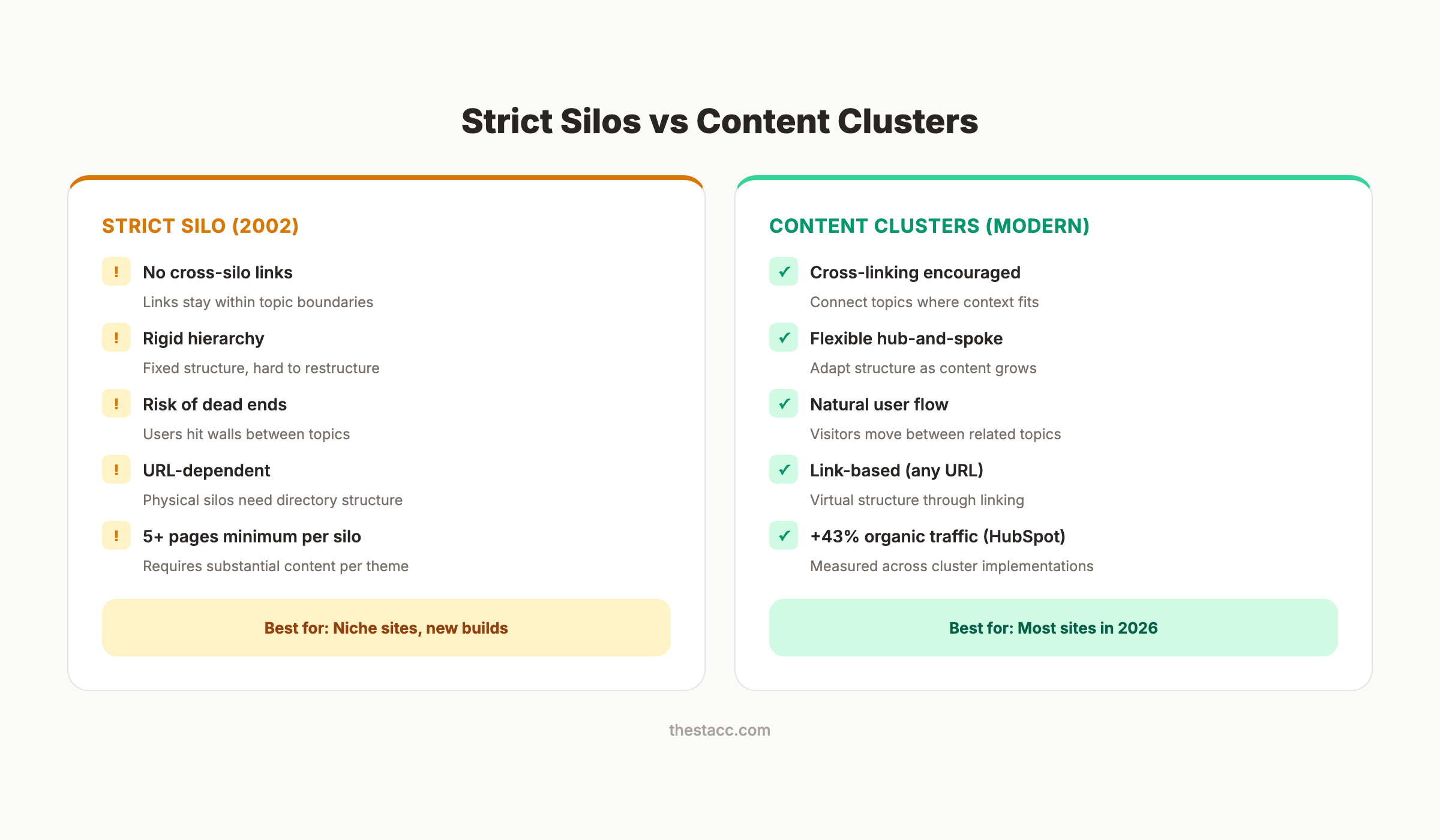
Strict Silos (Bruce Clay, 2002)
- Pages within a silo link only to each other
- Cross-silo links are prohibited (or limited to landing pages only)
- Each silo needs at least 5 supporting pages
- Goal: isolate topical themes for maximum clarity
Content Clusters (HubSpot, 2016)
- A pillar page serves as the hub
- Cluster pages link to the pillar and to each other
- Cross-cluster linking is encouraged when contextually relevant
- Goal: build topical authority through thorough coverage
The Key Difference
Strict silos prohibit cross-linking. Content clusters encourage it.
| Aspect | Strict Silos | Content Clusters |
|---|---|---|
| Cross-linking | Prohibited | Encouraged when relevant |
| Structure | Rigid isolation | Flexible hub-and-spoke |
| Navigation | Can create dead ends | Supports natural browsing |
| Authority signal | Topic-focused | Topic + cross-topic |
HubSpot studied the impact: sites using topic clusters see a 10-20% improvement in SERP rankings and an average 43% increase in organic traffic.
Which Should You Use?
Most advice about silo structure is outdated because it recommends strict isolation. That approach creates UX dead ends and prevents link equity from flowing across your site.
The modern best practice: organize content like silos, link like clusters. Group pages by theme. Build clear hierarchies. But allow cross-theme linking whenever the context supports it. A page about “email deliverability” should link to “SPF records” even if SPF lives in a “technical SEO” silo. The user needs that link. Google rewards content that serves users.
Chapter 4: How to Build an SEO Silo Structure
Here is the step-by-step process for implementing a silo structure on your site.
Step 1: Map Your Topics
Start with keyword research. Group all target keywords into 4-8 core themes. Each theme becomes a silo.
Example for a marketing SaaS company:
| Silo | Landing Page Keyword | Supporting Keywords |
|---|---|---|
| Email Marketing | email marketing guide | subject lines, automation, deliverability, A/B testing |
| Content Marketing | content marketing strategy | blog SEO, content calendar, repurposing, pillar pages |
| Local SEO | local SEO guide | Google Business Profile, citations, reviews, local keywords |
| Social Media | social media marketing | Instagram growth, LinkedIn strategy, scheduling tools |
Use a topical map to visualize the relationships.
Step 2: Create Silo Landing Pages
Each silo needs one authoritative landing page. This page targets the broadest keyword in the group. It links down to every supporting page. It receives links from every supporting page.
The landing page should be the most in-depth resource on your site for that topic. Target 2,000-4,000 words. Cover the subject broadly and link to supporting pages for deeper dives.
Step 3: Build Supporting Content
Each silo needs a minimum of 5 supporting pages. More is better. Each supporting page targets a specific long-tail keyword within the silo theme.
Supporting content links back to the silo landing page using relevant anchor text. It also links to 1-2 other supporting pages within the same silo.
Step 4: Implement Internal Links
This is where silos succeed or fail. Follow these linking rules:
- Every supporting page links to its silo landing page
- The silo landing page links to every supporting page
- Supporting pages link to 1-2 siblings within the same silo
- Cross-silo links go between landing pages (not subpages to subpages)
- Use descriptive, keyword-relevant anchor text
- Aim for 3-10 internal links per page
A study of 23 million internal links by Zyppy found that pages with 40-44 internal links get 4x more clicks from Google Search than pages with 0-4 links. But after 45-50 links, returns diminish.
Step 5: Add Navigation and Breadcrumbs
Reinforce your silo structure through site navigation. Each silo should be accessible from the main menu. Breadcrumbs show the hierarchy: Home > Email Marketing > Subject Lines.
John Mueller recommends pages be reachable within 2-3 clicks from the homepage. Deeper pages lose crawl priority. He also warned that linking every page to every other page makes it impossible for Google to determine which pages matter most. Selective, structured linking is the point. Link with intention, not volume.
Your SEO team. $99 per month. 30 optimized articles, published automatically. Start for $1 →
Chapter 5: Real Case Studies with Data
Silo and site architecture changes produce measurable results. Here are documented cases.
Ariamo (Bridal Fashion): +404% Organic Traffic
Ariamo restructured their categories from brand-focused to search-behavior-aligned. Instead of organizing by designer name, they built silos around silhouette, neckline, and dress style. These matched how brides actually search. Result: 404% organic traffic growth.
Retail E-commerce: +9,500 Weekly Visits in 3 Weeks
A large retail site implemented strategic internal linking between category and product pages. Within 3 weeks, organic traffic increased by 9,500 visits per week. That is 150,000 additional visits annually from internal linking changes alone.
E-commerce Category Pages: +24% Organic Traffic
An e-commerce brand added deep links from blog content to category pages. The internal links treated category pages as silo hubs. Result: 24% increase in organic traffic to those category pages.
Real Estate Site: +33% Year 1, +34% Year 2
A real estate company created neighborhood-level pages with proper hierarchy. City pages linked to neighborhood pages. Neighborhood pages linked to listing pages. Year 1 saw 33% organic traffic increase and 19% conversion improvement. Year 2 continued with 34% traffic growth.
The Counter-Example
These case studies share a common pattern. The traffic gains came from reorganizing content around how users search, not from the silo structure itself. Structure is the vehicle. User intent alignment is the fuel.
Not every silo implementation works. Promodo tested strict silo structures on 4 major e-commerce projects and found no significant traffic growth. Their conclusion: organizing by internal categories instead of search behavior produces zero results. The architecture must match how users actually search, not how your company is organized internally.
Chapter 6: Common Mistakes and How to Avoid Them
These errors derail most silo implementations.
Mistake 1: Organizing by internal logic, not search behavior.
Your company has departments. Your customers have questions. Build silos around how people search, not how your org chart looks. The Ariamo case study (+404%) proves this. They switched from brand-based categories to search-behavior categories.
Mistake 2: Creating silos with thin content.
Each silo needs depth. Bruce Clay recommends a minimum of 5 supporting pages per silo. If you cannot write 5 substantive pages about a topic, it does not deserve its own silo. Merge it into a related one.
Mistake 3: Completely blocking cross-silo links.
This was the original rule. It is now counterproductive. Google’s algorithm understands semantic relationships between topics. A page about “email deliverability” linking to “DNS records” (in a different silo) is natural and helpful. Block cross-silo links only when the connection is forced or irrelevant.
Mistake 4: Restructuring URLs without 301 redirects.
Moving from flat URLs to siloed directory URLs destroys existing backlink value and organic traffic if you skip redirects. Map every old URL to its new location. Test every redirect. Monitor Search Console for crawl errors after the migration.
Mistake 5: Building silos and forgetting them.
Silos need maintenance. New content must be placed in the correct silo. Old content needs updated links when new supporting pages publish. Keyword cannibalization creeps in when silos overlap. Audit your structure quarterly.
3,500+ blogs published. 92% average SEO score. See what Stacc can do for your site. Start for $1 →
Chapter 7: SEO Silo Structure for Different Site Types
The right silo approach depends on your site type and scale.
E-commerce Sites
E-commerce silos follow product taxonomy: Category > Subcategory > Product. Each category page is a silo hub. Product pages are supporting content. Blog posts about related topics link back to category hubs.
Example structure:
/running-shoes/(silo hub)/running-shoes/trail/(subcategory)/running-shoes/trail/nike-pegasus-trail-5/(product)/blog/best-trail-running-shoes/(supporting blog, links to hub)
SaaS and B2B Sites
SaaS silos organize around use cases or product features. Each use case gets a silo with a landing page, feature pages, and supporting blog content.
Example structure:
/email-marketing/(silo hub)/email-marketing/automation/(feature page)/blog/email-automation-workflows/(supporting blog)/blog/email-drip-campaigns/(supporting blog)
Content Publishers and Blogs
Blog silos use categories as silo boundaries. Each category has a pillar page and 10-20+ supporting posts. The content marketing strategy determines which silos to build and in what order.
Local Business Sites
Local silos organize around services and locations. Each service gets a silo. Location pages cross-link where relevant (a dentist in 3 cities has service silos that link to city-specific pages).
Chapter 8: Auditing Your Existing Silo Structure
Most sites already have some structure. An audit reveals what is working and what needs fixing.
An audit takes 2-4 hours for a site under 500 pages. For larger sites, use crawl tools to automate the analysis. The goal is to identify orphan pages, broken link patterns, and silos that lack depth.
Audit Checklist
- Every page belongs to a clear thematic group
- Each silo has at least 5 supporting pages
- Silo landing pages receive links from all supporting pages
- No orphan pages exist (pages with zero internal links pointing to them)
- Cross-silo links are contextually relevant, not random
- Breadcrumbs reflect the silo hierarchy
- The XML sitemap mirrors the silo structure
- No keyword cannibalization between pages in different silos
Tools for Auditing
Run Screaming Frog or Sitebulb to visualize your internal link graph. Look for clusters (good) and isolated nodes (bad). Check Google Search Console for pages with zero impressions. These are often orphaned pages outside any silo.
Use our free SEO Audit Tool for a quick-start assessment. For deeper analysis, Ahrefs Site Audit and Semrush Site Audit both map internal linking patterns across your entire site.
FAQ
What is an SEO silo structure?
An SEO silo structure organizes website content into themed groups. Each group focuses on one topic. Pages within a group link to each other, creating a clear topical hierarchy. This helps Google understand what your site is about and assigns stronger relevance to grouped content. Bruce Clay introduced the concept in 2002.
Is silo structure still relevant in 2026?
The concept of thematic content organization is more relevant than ever. But strict siloing (prohibiting all cross-theme links) is outdated. Modern best practice blends silo organization with content cluster flexibility. Group content by theme, build clear hierarchies, but allow cross-theme linking when contextually relevant.
What is the difference between silos and content clusters?
Strict silos prohibit internal links between different topic groups. Content clusters encourage cross-linking when the context supports it. Content clusters use a hub-and-spoke model where a pillar page connects to cluster pages. Both approaches organize content thematically. Clusters offer more flexibility and better user experience.
How many silos should a website have?
Most sites need 4-8 core silos. Each silo should have a minimum of 5 supporting pages. If you cannot write 5 substantive pages about a topic, merge it into a related silo. Too many silos with thin content weaken the structure instead of strengthening it.
Should I use physical silos or virtual silos?
For new websites, use physical silos (directory-based URLs) for clarity. For existing websites, use virtual silos (linking-based) to avoid URL changes that break existing traffic and backlinks. John Mueller confirmed that Google understands site structure through internal links regardless of URL format.
Can Stacc help build content for silo structures?
Stacc publishes 30 optimized SEO articles per month for $99. Each article targets a specific keyword, includes strategic internal linking, and fits into your content architecture. Consistent publishing fills out your silos with the supporting content that builds topical authority. The Content Compound Effect accelerates results as each new article reinforces your existing silos.
The SEO silo structure is a site architecture principle, not a rigid formula. Organize content by theme. Link related pages together. Build depth within each topic. Allow cross-theme connections when they serve the reader. The sites that treat structure as a living system rather than a one-time setup are the ones that rank. Every new article you publish should strengthen an existing silo. Every internal link should reinforce your topical hierarchy. Architecture is not a project. It is an ongoing practice.
Start with one silo. Build it to 10+ supporting pages. Measure the ranking improvement. Then expand to the next silo. This iterative approach produces faster results than trying to restructure everything at once.
Rank everywhere. Do nothing. Blog SEO, Local SEO, and Social on autopilot. Start for $1 →
Written and published by Stacc. We publish 3,500+ articles per month across 70+ industries. All data verified against public sources as of March 2026.
