
SEO Workflow Automation (2026): Strategies, Tactics & Examples
Practical seo workflow automation strategies for 2026: step-by-step tactics, real examples, and tools to improve rankings and drive organic traffic.
The average SEO team spends 60% of their time on tasks a machine can do. Keyword research spreadsheets. Technical audit reports. Rank tracking dashboards. Content brief creation. Publishing workflows. All repetitive. All automatable.
SEO workflow automation eliminates that manual overhead. It connects your tools, triggers actions based on events, and publishes content without human bottlenecks.
We publish 3,500+ blog posts across 70+ industries. Our entire pipeline runs on automated workflows. This guide covers every SEO task you can automate, the tools to do it, and a step-by-step framework to build your own system.
Here is what you will learn:
- The 7 SEO tasks that benefit most from automation
- How to connect tools like Ahrefs, Semrush, and Google Search Console into automated workflows
- Specific automation examples using Zapier, Make, and n8n
- Which tasks you should never automate (and why)
- A complete framework for building your automation stack from scratch
- How done-for-you services compare to DIY automation
What SEO Workflow Automation Actually Means
SEO workflow automation is the process of connecting SEO tools and triggering actions without manual intervention. A keyword research finding triggers a content brief. A published article triggers an IndexNow ping. A ranking drop triggers an alert.
The goal is not to remove humans from SEO. It is to remove humans from the repetitive parts so they can focus on strategy and creativity.
Manual vs. Automated Workflows
| Task | Manual Process | Automated Process |
|---|---|---|
| Keyword research | Export CSV, filter in sheets, assign to writers | Tool auto-identifies gaps, creates brief |
| Technical audit | Run crawl, export report, create tickets | Crawl runs weekly, alerts on new issues |
| Content publishing | Writer submits, editor reviews, dev publishes | CMS auto-publishes on approval |
| Rank tracking | Check dashboard daily, screenshot changes | Weekly digest email with wins and drops |
| Internal linking | Manually search for link opportunities | Tool suggests links during writing |
| Reporting | Pull data from 5 tools, build slides | Dashboard auto-updates, emails stakeholders |
| Indexing | Submit URLs in Search Console manually | IndexNow pings on every publish event |
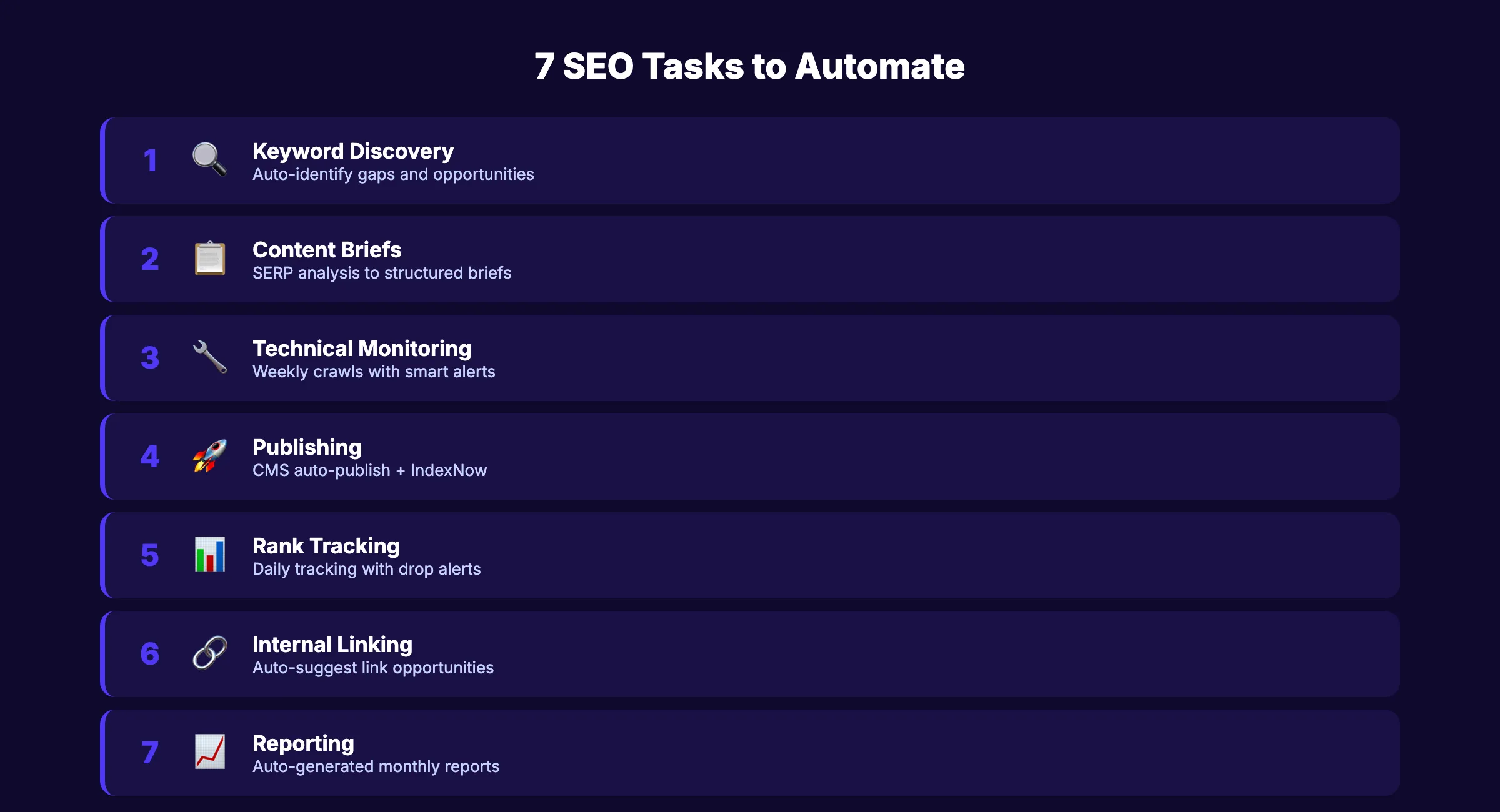
Most teams already automate 1-2 of these. The opportunity is automating all 7 into one connected system.
The 7 SEO Tasks You Should Automate
Not every SEO task benefits from automation. Strategy, creative direction, and editorial judgment require human input. But these 7 tasks are prime candidates.
1. Keyword Research and Opportunity Discovery
Manual keyword research takes 3-5 hours per topic cluster. Automated keyword discovery runs continuously.
What to automate:
- Keyword gap analysis between your site and competitors
- New keyword opportunities based on search trend data
- Content gap identification from SERP changes
- Automatic keyword clustering by intent and topic
Tools: Ahrefs API, Semrush, DataForSEO, SEOmonitor
Example workflow: Ahrefs identifies 15 new keyword opportunities weekly. The data flows into Google Sheets via API. A formula scores each keyword by volume, difficulty, and business relevance. The top 5 become content briefs automatically.
For a deeper dive into keyword strategy, read our keyword research guide for blog posts.
2. Content Brief Generation
A content brief takes 45-90 minutes to create manually. Automated briefs take seconds.
What to automate:
- SERP analysis for target keywords
- Competitor heading extraction
- People Also Ask question collection
- Suggested word count and heading structure
- Required internal and external link targets
Tools: Frase, Surfer SEO, MarketMuse, custom GPTs
Example workflow: When a keyword is marked “approved” in your project management tool, a Zapier trigger fires. It sends the keyword to Frase API, which generates a content brief. The brief auto-populates in your writing template with headings, questions, and link targets.
3. Technical SEO Monitoring
Technical issues kill rankings silently. Automated monitoring catches them before they cause damage.
What to automate:
- Weekly site crawls checking for 404s, redirect chains, and missing meta tags
- Core Web Vitals monitoring with alerts on threshold breaches
robots.txtand sitemap change detection- SSL certificate expiration warnings
- Mobile usability regression alerts
Tools: Screaming Frog (scheduled crawls), Sitebulb, Google Search Console API, ContentKing
Example workflow: Screaming Frog runs a crawl every Monday at 6 AM. The results export to Google Sheets. A script compares this week to last week. Any new 404s, missing meta descriptions, or orphaned pages trigger a Slack alert to the SEO team.
For a full technical SEO checklist, see our dedicated guide.
Stop writing. Start ranking. Stacc publishes 30 SEO articles per month for $99. Start for $1 →
4. Content Publishing and Distribution
Publishing a blog post involves 8-12 manual steps. Formatting, adding images, setting meta tags, scheduling social posts, submitting to Google. All of it can be automated.
What to automate:
- CMS publishing from approved drafts
- Meta tag and schema markup insertion
- Image compression and alt text generation
- Social media post scheduling on publish
- Email newsletter inclusion
- IndexNow submission for instant indexing
Tools: WordPress REST API, Webflow API, Zapier, Make, n8n, Buffer
Example workflow: When a draft status changes to “approved” in your CMS, a webhook fires. It compresses all images, adds schema markup, publishes the post, pings IndexNow, creates 3 social media posts (LinkedIn, X, Facebook), and logs the URL in your content calendar spreadsheet. Zero manual steps.
5. Rank Tracking and Alerting
Checking rankings manually is a waste of time. Automated tracking with smart alerts tells you what matters.
What to automate:
- Daily position tracking for target keywords
- Alerts when rankings drop 5+ positions
- Alerts when new keywords enter page 1
- Competitor ranking change notifications
- SERP feature appearance/loss tracking
Tools: Ahrefs Rank Tracker, Semrush Position Tracking, AccuRanker, SEOmonitor
Example workflow: AccuRanker tracks 500 keywords daily. When any keyword drops 5+ positions, a Slack message fires with the keyword, old position, new position, and the URL. When a keyword enters the top 3, a celebration message posts to the team channel. Weekly summary emails go to stakeholders every Monday.
6. Internal Linking Optimization
Manual internal linking is tedious and error-prone. Automated suggestions save hours and improve link equity distribution.
What to automate:
- Identifying orphaned pages with zero internal links
- Suggesting relevant internal links during content creation
- Detecting broken internal links
- Mapping link equity flow across the site
Tools: Screaming Frog, Ahrefs Site Audit, Link Whisper, custom scripts
Example workflow: After every new publish, a script crawls the site and identifies 5 existing pages that should link to the new post. It suggests specific anchor text and paragraph locations. An editor reviews and approves the additions in batch.
7. SEO Reporting
Manual SEO reports take 4-8 hours per month per client. Automated reports take zero hours after initial setup.
What to automate:
- Monthly traffic and ranking data pulls
- Comparison to previous periods (MoM, YoY)
- Goal progress tracking
- Content performance scoring
- Executive summary generation
Tools: Google Looker Studio, Databox, AgencyAnalytics, Supermetrics, Google Sheets + API
Example workflow: Looker Studio pulls data from Google Analytics 4, Search Console, and Ahrefs every day. On the 1st of each month, a Make scenario generates a PDF summary with traffic trends, top-performing content, keyword movements, and next month recommendations. The PDF emails to stakeholders automatically.
For more on building SEO reporting dashboards, see our dedicated guide.
The SEO Automation Stack: Tools and Platforms
Building an automated SEO workflow requires 3 layers: data sources, automation platforms, and output destinations.
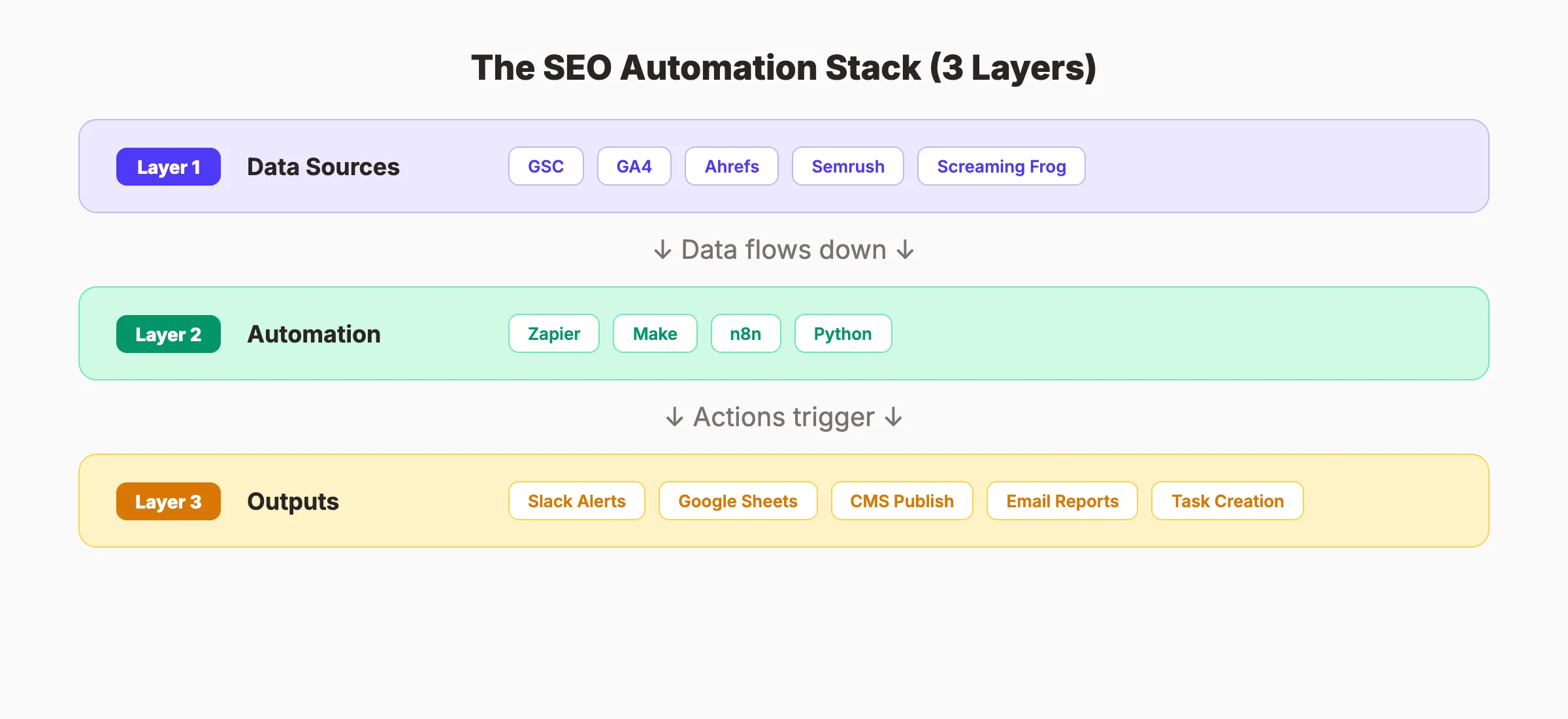
Layer 1: Data Sources (Where Information Comes From)
| Tool | Data It Provides |
|---|---|
| Google Search Console | Rankings, clicks, impressions, indexing status |
| Google Analytics 4 | Traffic, conversions, user behavior |
| Ahrefs | Backlinks, keyword data, competitor analysis |
| Semrush | Keyword research, position tracking, audits |
| Screaming Frog | Technical crawl data, on-page issues |
| ContentKing | Real-time site monitoring, change detection |
Layer 2: Automation Platforms (The Connectors)
| Platform | Best For | Pricing |
|---|---|---|
| Zapier | Simple automations, largest app library | Free / $29.99/mo |
| Make (Integromat) | Complex multi-branch workflows, visual builder | Free / $10.59/mo |
| n8n | Self-hosted, developer-friendly, unlimited | Free (self-hosted) / $24/mo (cloud) |
| Python scripts | Custom logic, API integrations, data processing | Free (hosting costs only) |
Zapier is the easiest starting point. Connect 2 apps with a trigger and action. No code needed. Best for teams without developers.
Make offers more complex workflow logic. Branch paths, routers, and conditional logic make it better for multi-step SEO workflows. The visual canvas shows exactly how data flows.
n8n gives maximum flexibility. Self-host it for free. Build any workflow with any API. Best for teams with a developer who can maintain custom workflows.
Layer 3: Output Destinations (Where Results Go)
- Slack/Teams. Alerts and notifications
- Google Sheets. Data storage and dashboards
- CMS (WordPress/Webflow). Content publishing
- Email. Reports and summaries
- Project management (Asana/ClickUp). Task creation
Your SEO team. $99 per month. 30 optimized articles, published automatically. Start for $1 →
How to Build Your SEO Automation System (Step by Step)
Follow this 5-step framework to go from manual workflows to a fully connected automation stack.
Step 1: Audit Your Current Workflow
Document every SEO task your team performs weekly and monthly. For each task, record:
- How long does it take?
- How often does it happen?
- Does it follow a predictable pattern?
- Does it require creative judgment or is it procedural?
Tasks that are frequent, time-consuming, and procedural are your automation candidates.
Step 2: Identify Your Highest-ROI Automations
Start with the tasks that save the most time. For most teams, that means:
- Reporting (4-8 hours saved per month)
- Rank tracking alerts (2-3 hours saved per month)
- Content publishing (1-2 hours saved per article)
- Technical monitoring (3-5 hours saved per month)
Do not try to automate everything at once. Pick the top 2 tasks and build those first.
Step 3: Choose Your Automation Platform
For most SEO teams, Zapier or Make handles 80% of needs. Use this decision matrix:
| Scenario | Best Platform |
|---|---|
| Non-technical team, simple workflows | Zapier |
| Multi-step workflows with logic branches | Make |
| Developer on team, API-heavy workflows | n8n or Python |
| Enterprise with compliance requirements | n8n (self-hosted) |
Step 4: Build and Test One Workflow
Start with a single workflow. Build it. Test it with real data. Run it for 2 weeks before adding more.
Best first workflow for most teams: Automated rank tracking with Slack alerts. It is simple to build, provides immediate value, and builds confidence in automation.
Step 5: Scale Gradually
Once your first automation runs reliably, add the next one. Connect workflows so outputs from one feed into another.
Example chain: Rank tracking detects a keyword dropping → triggers a content brief for an updated article → writer receives the brief → published update triggers IndexNow → rank tracker monitors the recovery.
That chain replaces 6+ hours of manual work per incident.
What You Should Never Automate
Automation fails when applied to tasks that require judgment, creativity, or context.
Do not automate:
- Content strategy decisions. Which keywords to target, what tone to use, and how to position against competitors requires human insight.
- Editorial review. AI can draft. Humans must verify accuracy, voice, and brand alignment.
- Link building outreach. Personalized outreach works. Automated spam does not. The difference in response rates is 10-15x.
- Crisis response. When a Google algorithm update drops traffic 40%, you need a human analyzing what happened.
- Client communication. Automated reports are great. Automated relationship management is not.
The rule: automate the data collection, processing, and distribution. Keep humans in charge of decisions and relationships.
3,500+ blogs published. 92% average SEO score. See what Stacc can do for your site. Start for $1 →
Real-World SEO Automation Examples
These are specific workflows teams use in production. Each one replaces a manual process.
Example 1: Automated Content Pipeline (Zapier + WordPress)
Trigger: New row added to Google Sheets “Approved Keywords” tab.
Actions:
- Zapier sends the keyword to Frase API to generate a content brief
- Brief populates in a Google Doc template
- Writer receives a Slack notification with the doc link
- When the writer changes the doc status to “ready,” a second Zap fires
- The content publishes to WordPress via REST API
- IndexNow pings Google with the new URL
- Buffer schedules 3 social media posts
- The content calendar spreadsheet updates with the live URL
Result: 8 manual steps become zero. The writer focuses only on writing.
Example 2: Rank Drop Recovery (Ahrefs + Make)
Trigger: Ahrefs Rank Tracker detects a keyword dropping 5+ positions.
Actions:
- Make pulls the URL, keyword, old position, and new position
- A Google Sheets log records the event
- Make checks if the page has been updated in the last 90 days
- If not updated, it creates a content refresh task in Asana
- Slack alerts the SEO team with all details
Result: Ranking drops get caught within 24 hours. Recovery starts immediately instead of being discovered weeks later.
Example 3: Weekly Technical SEO Digest (Screaming Frog + Python)
Trigger: Screaming Frog scheduled crawl completes every Monday.
Actions:
- Python script compares this week’s crawl to last week’s data
- New 404 errors, missing meta descriptions, and orphan pages flagged
- A summary email generates with issue count, severity, and affected URLs
- Critical issues (10+ new 404s) trigger immediate Slack alerts
Result: Technical SEO problems surface within hours. No manual dashboard checking needed.
Example 4: Automated Content Performance Reports (GA4 + Looker Studio)
Trigger: First of every month.
Actions:
- Looker Studio pulls GA4 traffic, engagement, and conversion data
- Search Console data adds keyword and impression metrics
- A Make scenario generates a PDF with top performers and underperformers
- The PDF emails to stakeholders with a 3-sentence executive summary
- Underperforming pages (traffic dropped 30%+) get added to a refresh queue
Result: Monthly reporting takes zero hours after initial setup. Stakeholders get insights without meetings.
For more examples of automating your SEO workflow, see our full automation playbook.
The Done-for-You Alternative
Building an SEO automation system takes time. You need tools, integrations, testing, and ongoing maintenance.
The alternative: skip the tooling entirely and use a service that handles everything.
Stacc publishes 30 optimized blog posts per month. Keyword research, writing, optimization, images, and publishing. All automatic. No workflow to build. No tools to manage.
| Approach | Monthly Cost | Setup Time | Ongoing Maintenance |
|---|---|---|---|
| DIY automation stack | $200-500/mo in tools | 20-40 hours | 5-10 hrs/month |
| Freelancers + tools | $2,500-7,500/mo | 10-20 hours | 10-20 hrs/month |
| SEO agency | $3,000-10,000/mo | 5-10 hours | 2-5 hrs/month |
| Stacc | $99/mo | 15 minutes | 0 hrs/month |
For teams who want to automate their entire SEO workflow without building the system themselves, Stacc is the fastest path.
SEO Workflow Automation Checklist
Use this before and after building your automation stack:
Before automating:
- Document all current SEO tasks and time spent
- Identify the 3 highest-ROI automation candidates
- Choose an automation platform (Zapier, Make, or n8n)
- Verify API access for all tools in your stack
- Set up error handling and notification channels
After automating:
- Test each workflow with real data for 2 weeks
- Verify output accuracy against manual baseline
- Set up monitoring for workflow failures
- Document each workflow for team knowledge sharing
- Review and optimize quarterly (remove unused, add new)
Skip the agency. Keep the results. Stacc starts at $99/mo with a $1 trial. Start for $1 →
FAQ
What is SEO workflow automation?
SEO workflow automation connects your SEO tools and triggers actions without manual intervention. For example, a new published article can automatically trigger IndexNow submission, social media posts, and rank tracking. It eliminates repetitive tasks like reporting, technical monitoring, and content distribution.
What SEO tasks can be automated?
The most impactful tasks to automate are rank tracking and alerts, technical SEO monitoring, content publishing and distribution, internal linking suggestions, keyword opportunity discovery, and SEO reporting. Creative tasks like strategy, editorial review, and outreach personalization should stay manual.
What tools do I need for SEO automation?
You need 3 layers: data sources (Google Search Console, Ahrefs, Semrush), an automation platform (Zapier, Make, or n8n), and output destinations (Slack, Google Sheets, CMS). Zapier is the easiest starting point. Make is better for complex workflows. n8n is best for developer-led teams.
How much time does SEO automation save?
Most teams save 15-30 hours per month by automating reporting, rank tracking, technical monitoring, and content distribution. The exact savings depend on team size, content volume, and current manual processes. A typical team publishing 20+ articles per month saves 20+ hours.
Can I automate content creation for SEO?
Partially. AI tools can generate drafts, create content briefs, and optimize existing content. But human review is essential for accuracy, voice, and brand alignment. Services like Stacc handle the full pipeline (research, writing, optimization, publishing) so you get automation without sacrificing quality.
Is SEO automation worth the investment?
Yes, for teams publishing consistently. If you spend 20+ hours per month on repetitive SEO tasks, even a $50/month automation platform pays for itself immediately. The ROI increases with content volume. Teams publishing 30+ articles per month see the largest time savings.
SEO workflow automation is not about replacing SEO professionals. It is about freeing them from spreadsheets, screenshots, and copy-paste publishing. Build the system once. Let it run. Spend your time on strategy and content that machines cannot create.
Related Tools & Resources
Free SEO Tools:
Best Lists:

Written by
Siddharth GangalSiddharth is the founder of theStacc and Arka360, and a graduate of IIT Mandi. He spent years watching great businesses lose organic traffic to competitors who simply published more. So he built a system to fix that. He writes about SEO, content at scale, and the tactics that actually move rankings.
30 SEO blog articles published every month
Keyword-optimized, scheduled, and live on your site. Automatically.
30-day trial · Cancel anytime
theStacc
Stop writing SEO content manually
30 blog articles, 30 GBP posts, and social media content. Published every month. Automatically.
Try for free$1 for 3 days · Cancel anytime