
How to Build City + Service Pages That Survive Updates
Build city service landing pages that rank without doorway penalties. 8 steps covering architecture, content, schema, and proof. Updated April 2026.
Siddharth Gangal • 2026-04-02 • Local SEO
In This Article
You built 40 city pages last quarter. Google flagged half of them as doorway pages. Traffic dropped 63% in 30 days.
That is not a hypothetical. It happened to a regional HVAC company after the March 2024 core update. The pattern repeats every algorithm cycle. Businesses build thin city pages, rank briefly, then lose everything.
City service landing pages SEO is one of the highest-impact local strategies available. 46% of all Google searches carry local intent. But the gap between a page that ranks for years and one that triggers a penalty comes down to 8 decisions.
We publish 3,500+ blog and location pages across 70+ industries. The pages that survive algorithm updates share the same architecture. This guide breaks it down step by step.
Here is what you will learn:
- How to pick cities worth targeting (and skip the ones that waste crawl budget)
- The URL structure that scales to 100+ pages without duplicate content flags
- What “unique content” actually means for city pages (it is not swapping city names)
- On-page SEO elements that signal geographic relevance to Google
- How to add local proof that separates your pages from doorway spam
- Schema markup that earns rich results for each location
- An internal linking pattern that distributes authority across every page
- The exact line between a legitimate location page and a doorway page
What Are City Service Landing Pages?
A city service landing page targets a specific “[service] + [city]” query. Think “plumbing repair Austin” or “personal injury lawyer Tampa.”
These pages exist for businesses that serve multiple cities but do not have a physical office in each one. Service area businesses — plumbers, roofers, attorneys, dentists with satellite locations — use them to capture local search traffic beyond their home base.
The concept is straightforward. The execution is where most businesses fail.
Google treats city pages on a spectrum. On one end: a genuinely useful page with local content, reviews, and service details. On the other end: a doorway page with identical copy and a swapped city name.
The difference matters. Doorway pages violate Google’s spam policies. Legitimate location pages can rank in the organic results and the local pack.
| Feature | Legitimate City Page | Doorway Page |
|---|---|---|
| Content | Unique per city | Copy-paste with city swap |
| Local proof | Reviews, photos, case studies | None |
| User value | Answers local questions | Redirects to main page |
| Internal links | Part of site architecture | Orphaned or mass-linked |
| Google treatment | Indexed and ranked | Filtered or penalized |
The 8 steps below build pages that land on the left side of that table.
Step 1: Audit Your Service Area and Pick Target Cities
Not every city deserves a page. Building 50 pages for towns you rarely serve looks spammy because it is spammy.
Start with your actual service data. Pull the last 12 months of jobs, clients, or appointments by city. Rank cities by revenue, job count, or lead volume.
Then layer in search demand. Use Google Keyword Planner, Ahrefs, or Semrush to check monthly search volume for your core “[service] + [city]” terms. A city with 10 monthly searches for your primary service probably does not justify a dedicated page.
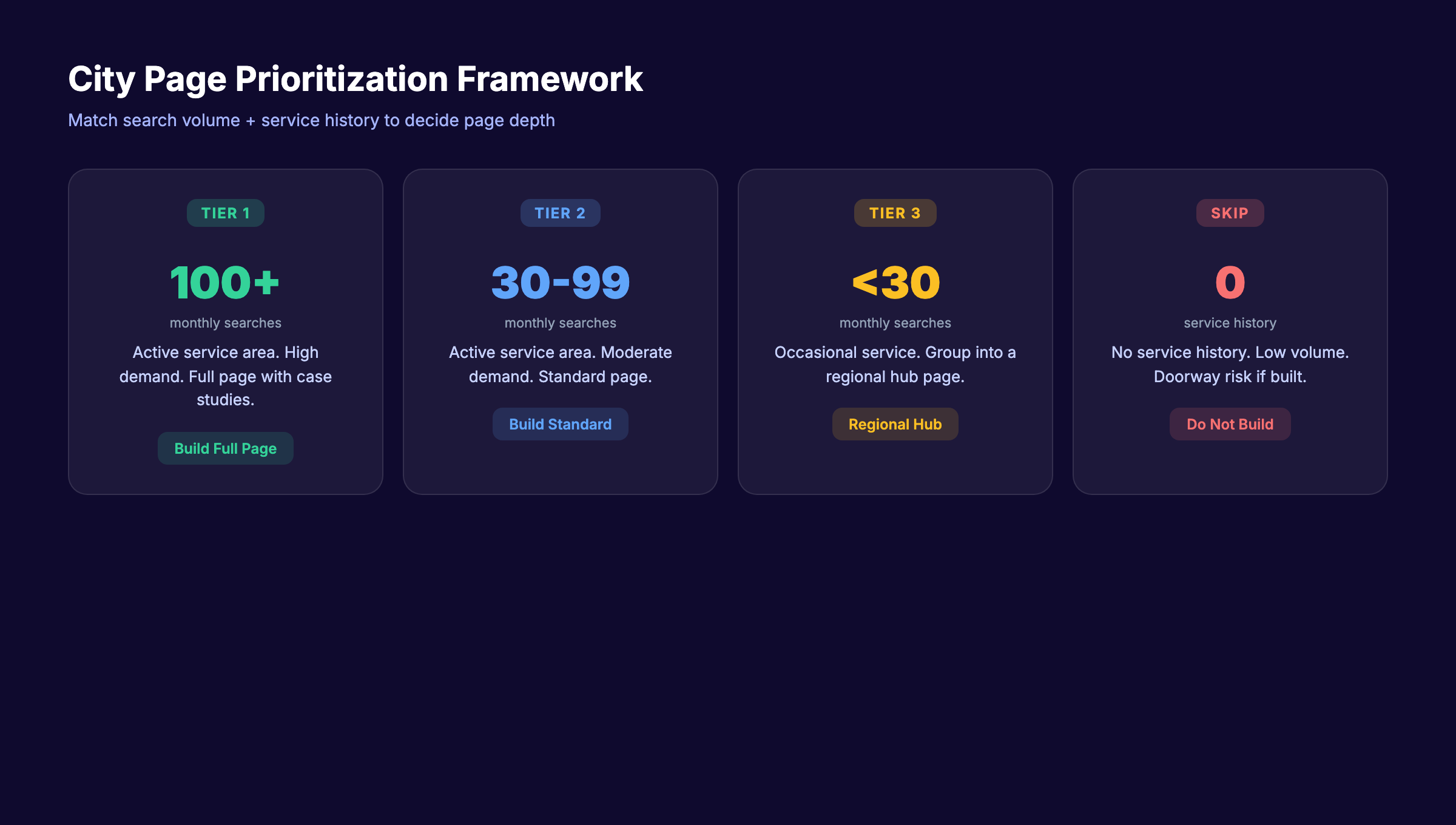
Here is the prioritization framework:
| Priority | Criteria | Action |
|---|---|---|
| Tier 1 | Active service area + 100+ monthly searches | Build a full page immediately |
| Tier 2 | Active service area + 30-99 searches | Build a page with moderate depth |
| Tier 3 | Occasional service + under 30 searches | Group into a regional page |
| Skip | No service history + low search volume | Do not build a page |
Specifically:
- Export your CRM or invoicing data by city for the last 12 months
- Cross-reference with keyword research for “[service] + [city]” volume
- Eliminate cities where you have zero service history and under 30 monthly searches
- Group remaining cities into Tier 1, 2, and 3
Why this step matters: Google’s John Mueller has confirmed that building city pages for locations you do not actively serve is a doorway page signal. Starting with real service data protects you from penalties and focuses your budget on pages that convert.
Pro tip: Check Google Business Profile insights for the cities where people already find your listing. That data reveals demand you are already capturing — and cities where a landing page would accelerate it. Read our GBP optimization guide for the full setup process.
Step 2: Build a URL and Site Architecture That Scales
Your URL structure determines how Google understands the relationship between your city pages, service pages, and homepage. Get this wrong and you create crawl confusion that compounds with every new page.
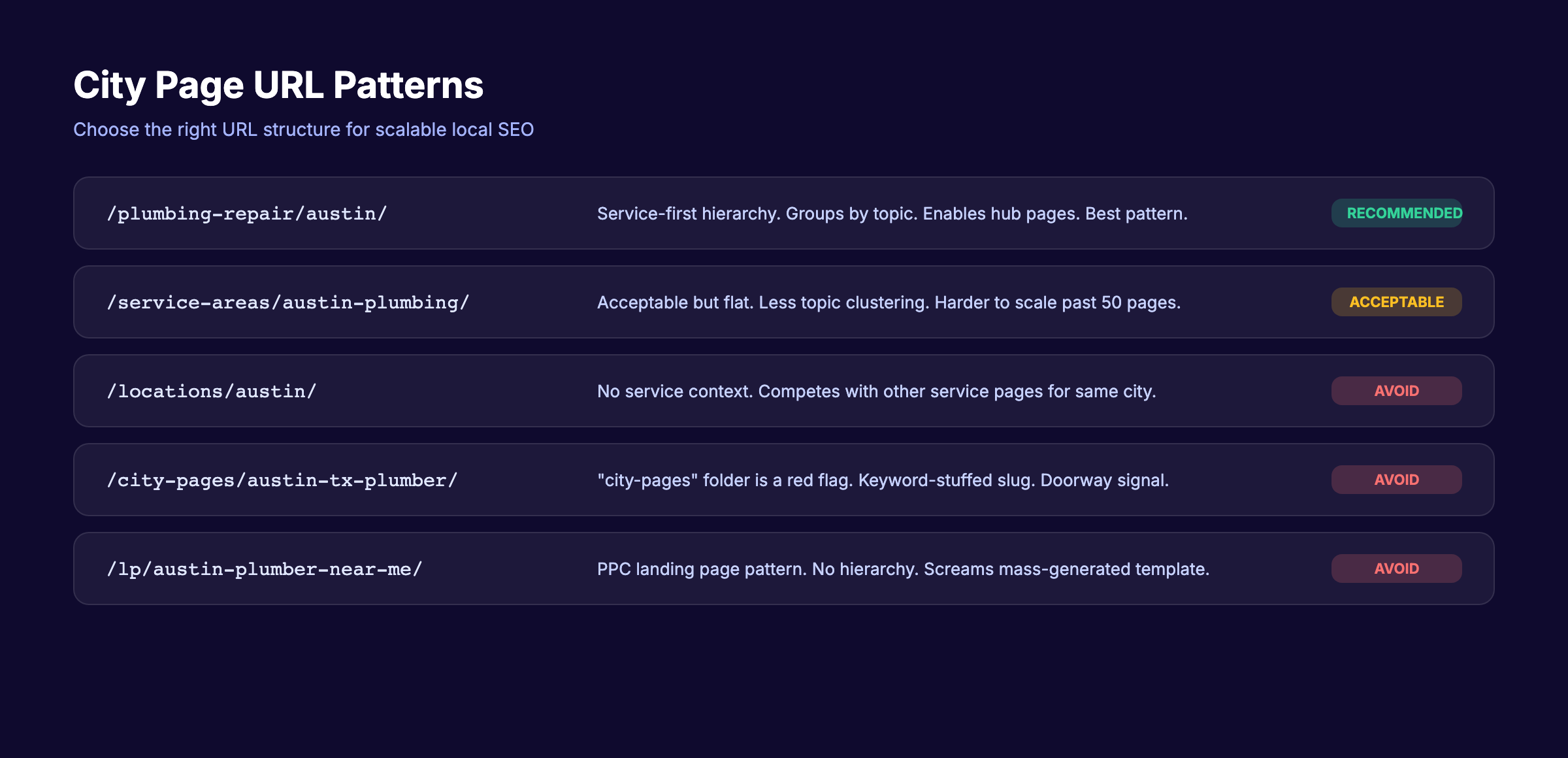
The cleanest pattern for local SEO uses a two-level hierarchy:
/[service]/[city]/Examples:
/plumbing-repair/austin//personal-injury-lawyer/tampa//hvac-installation/denver/
This structure groups pages by service first, then city. It creates natural topic clusters. It also allows you to build service hub pages (like /plumbing-repair/) that link down to every city variation.
Avoid these patterns:
| Pattern | Problem |
|---|---|
/locations/austin/ | No service context in URL |
/city-pages/austin-plumbing/ | ”city-pages” folder screams doorway |
/lp/austin-tx-plumber-near-me/ | Keyword-stuffed, no hierarchy |
/austin/ | Too broad, competes with homepage |
Site architecture rules:
- Each city page links up to its parent service page
- Each service page links to all child city pages
- The homepage links to top-level service pages
- Navigation includes a “Service Areas” or “Locations” dropdown
- Create an XML sitemap that includes every city page
Why this step matters: A clean URL hierarchy tells Google these pages are part of a planned content architecture — not mass-generated spam. It also distributes PageRank from your homepage through service hubs to individual city pages. Learn more about building topical authority through content structure.
Step 3: Write Unique Content for Every City Page
This is the step where 90% of businesses fail. They write one template, swap the city name, and publish 30 pages in an afternoon.
Google catches this pattern instantly. After the December 2025 core update, pages with thin, duplicative content lost visibility across the board.
Unique content does not mean rewriting the same information in different words. It means each page contains information specific to that city.
The local layer framework:
Start with a consistent structure (service description, process, pricing range, CTA). Then add a local layer that varies per page:
- Neighborhoods served — Name 3-5 specific neighborhoods or districts within that city
- Local regulations or conditions — Permit requirements, climate factors, building codes
- Common local problems — “Austin homes built before 1985 often have galvanized pipes”
- Local stats — Population, number of businesses, housing stock data
- Scheduling context — “Same-day service available in Tampa; next-day for surrounding Hillsborough County”
- City-specific FAQ — 2-3 questions unique to that location
Content length targets by tier:
| Page Tier | Word Count | Local Layer Depth |
|---|---|---|
| Tier 1 cities | 1,200-1,800 words | Full local layer + case study |
| Tier 2 cities | 800-1,200 words | Local layer + testimonial |
| Tier 3 (regional) | 600-800 words | Light local layer |
What NOT to do:
- Swap only the city name and H1 tag
- Use AI to “spin” the same article 40 times
- Copy content from city government websites
- Write generic content with no geographic specifics
Sterling Sky documented a case study where a dermatology practice grew from 35 to 1,350 daily clicks by building genuinely unique service area pages with first-party data, staff credentials, and location-specific treatment details.
Why this step matters: Thin content is the number 1 reason city pages get flagged as doorway spam. Every page must justify its existence with information a visitor cannot find on your other city pages. If you can place two of your city pages side by side and 90% of the content matches, you have a problem.
Building city pages for 10+ locations takes serious content volume. Stacc publishes 30 to 80 SEO-optimized articles per month, including location pages with unique local content. Start for $1 →
Step 4: Optimize On-Page SEO Elements Per Page
Every city page needs its own set of on-page signals. Reusing the same title tag with a different city name is not optimization. It is a template.
Title tag formula:
[Service] in [City] | [Brand] — [Benefit or Qualifier]Keep it under 60 characters. Put the city name in the first half when possible.
Examples:
- “Plumbing Repair in Austin | FastFlow — Same Day Service”
- “Personal Injury Lawyer Tampa | Smith Law — Free Consult”
Meta description formula:
Write 145-155 characters. Include the service, city, and a conversion trigger. Read our full guide on writing meta descriptions that earn clicks.
H1 tag: Match the primary keyword pattern. “[Service] in [City]” or “[City] [Service].”
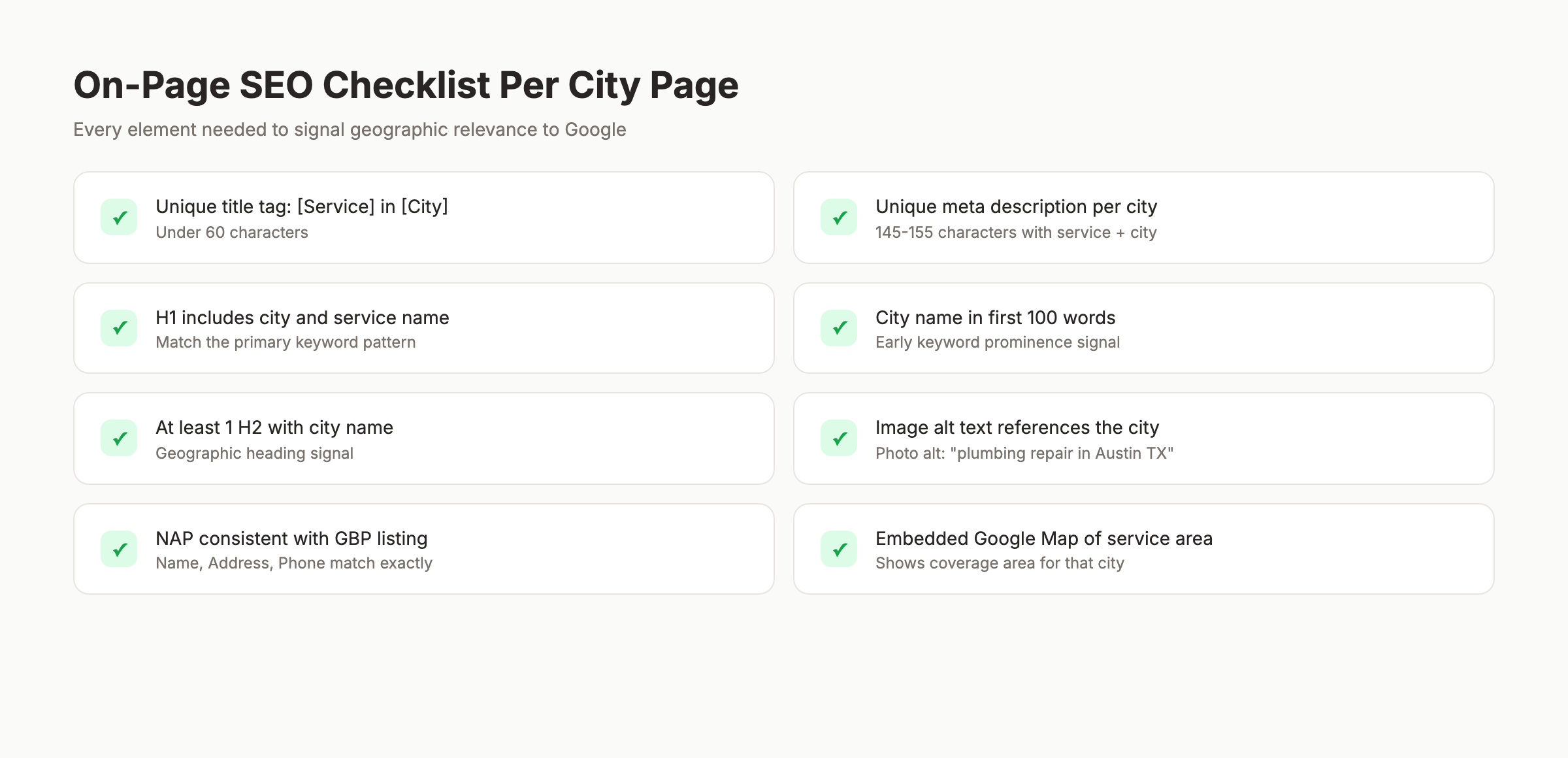
On-page checklist per city page:
- Unique title tag with city + service (under 60 characters)
- Unique meta description with city + service (145-155 characters)
- H1 includes city and service
- At least 1 H2 contains the city name
- Image alt text references the city
- City name appears in the first 100 words
- NAP (Name, Address, Phone) is consistent with Google Business Profile
- Embedded Google Map showing your service area
Why this step matters: On-page SEO signals tell Google exactly what geographic area and service each page targets. Without unique on-page elements, your city pages compete against each other instead of against competitors. This is keyword cannibalization at the page level.
Step 5: Add Local Proof and Trust Signals
Content and on-page SEO get you indexed. Local proof gets you ranked.
Google’s E-E-A-T framework rewards pages that demonstrate real experience in the location they target. Generic city pages without proof signals fail this test.
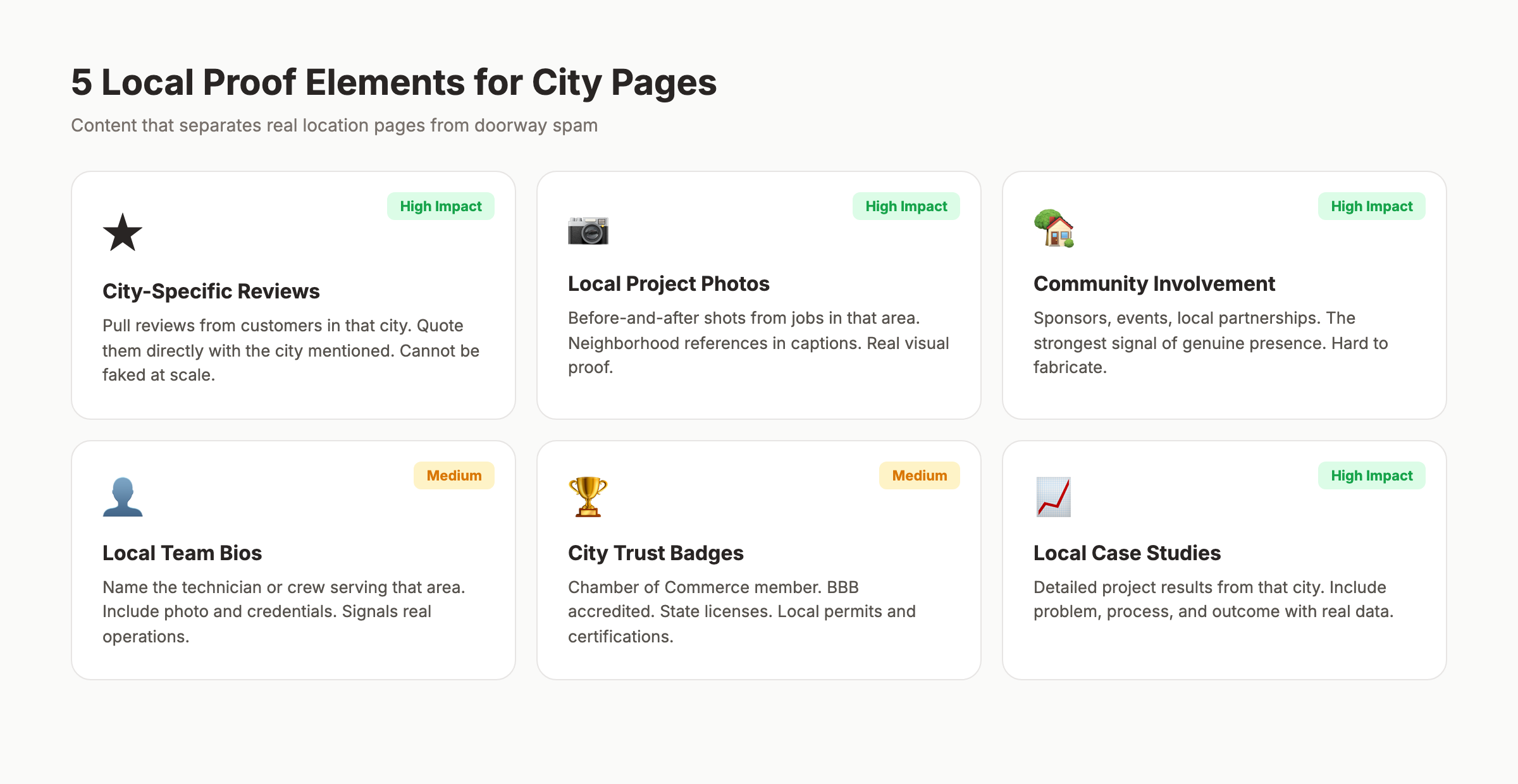
Local proof elements to add per page:
1. Location-specific reviews and testimonials
Pull reviews from customers in that city. Quote them directly with the customer’s city noted. This is the single most powerful differentiator between a real location page and a doorway page.
Read our guide on getting more Google reviews to build this asset systematically.
2. Local case studies or project galleries
Before-and-after photos from jobs in that city. Project descriptions with neighborhood references. Results data from local clients.
3. Local team or technician information
Name the team member or crew that serves that area. Include a photo. This signals real operational presence.
4. City-specific trust badges
Licensed in [State]. Member of [City] Chamber of Commerce. BBB accredited in [Region]. Local permits and certifications.
5. Community involvement
Sponsor a little league team in that city? Mention it. Participate in local events? Add photos. This is the kind of content that cannot be faked at scale.
| Trust Signal | Difficulty | Impact |
|---|---|---|
| City-specific reviews | Medium | Very High |
| Project photos from that city | Medium | High |
| Local team bios | Low | Medium |
| Chamber/BBB badges | Low | Medium |
| Community involvement | High | Very High |
Why this step matters: Local proof creates content that is impossible to replicate with a city-name swap. It is the strongest defense against doorway page classification. Google’s algorithms and human quality raters both look for evidence of genuine local presence.
Step 6: Implement Schema Markup for Each Location
Schema markup tells search engines exactly what your city page represents in machine-readable format. Without it, Google has to guess whether your page is a location page, a service page, or an article.
Use LocalBusiness schema on every city page:
{
  "@context": "https://schema.org",
  "@type": "LocalBusiness",
  "name": "FastFlow Plumbing — Austin",
  "address": {
    "@type": "PostalAddress",
    "addressLocality": "Austin",
    "addressRegion": "TX"
  },
  "areaServed": {
    "@type": "City",
    "name": "Austin"
  },
  "serviceArea": {
    "@type": "GeoCircle",
    "geoMidpoint": {
      "@type": "GeoCoordinates",
      "latitude": 30.2672,
      "longitude": -97.7431
    },
    "geoRadius": "30mi"
  },
  "hasOfferCatalog": {
    "@type": "OfferCatalog",
    "name": "Plumbing Services in Austin",
    "itemListElement": [
      {
        "@type": "Offer",
        "itemOffered": {
          "@type": "Service",
          "name": "Emergency Plumbing Repair"
        }
      }
    ]
  }
}
Schema checklist per city page:
- LocalBusiness type matches your business category
-
areaServedspecifies the target city -
serviceAreaincludes geographic coordinates -
hasOfferCataloglists services available in that city - Aggregate rating included (if you have reviews for that area)
- Validate with Google’s Rich Results Test
For service area businesses without a physical address: Use Service schema instead of LocalBusiness. Set areaServed to the city and omit the physical address. This follows Google’s structured data guidelines for SABs.
Why this step matters: Schema markup earns rich results — star ratings, service lists, and location details directly in the SERP. Pages with rich results get higher click-through rates. Schema also helps Google confirm your page is a legitimate location page, not a doorway.
Schema markup, local content, and on-page SEO across dozens of city pages is a full-time job. Stacc handles the entire process — 30 to 80 optimized pages per month, published automatically. Start for $1 →
Step 7: Build an Internal Linking Web Across Pages
Isolated city pages do not rank. Pages that are woven into your site architecture do.
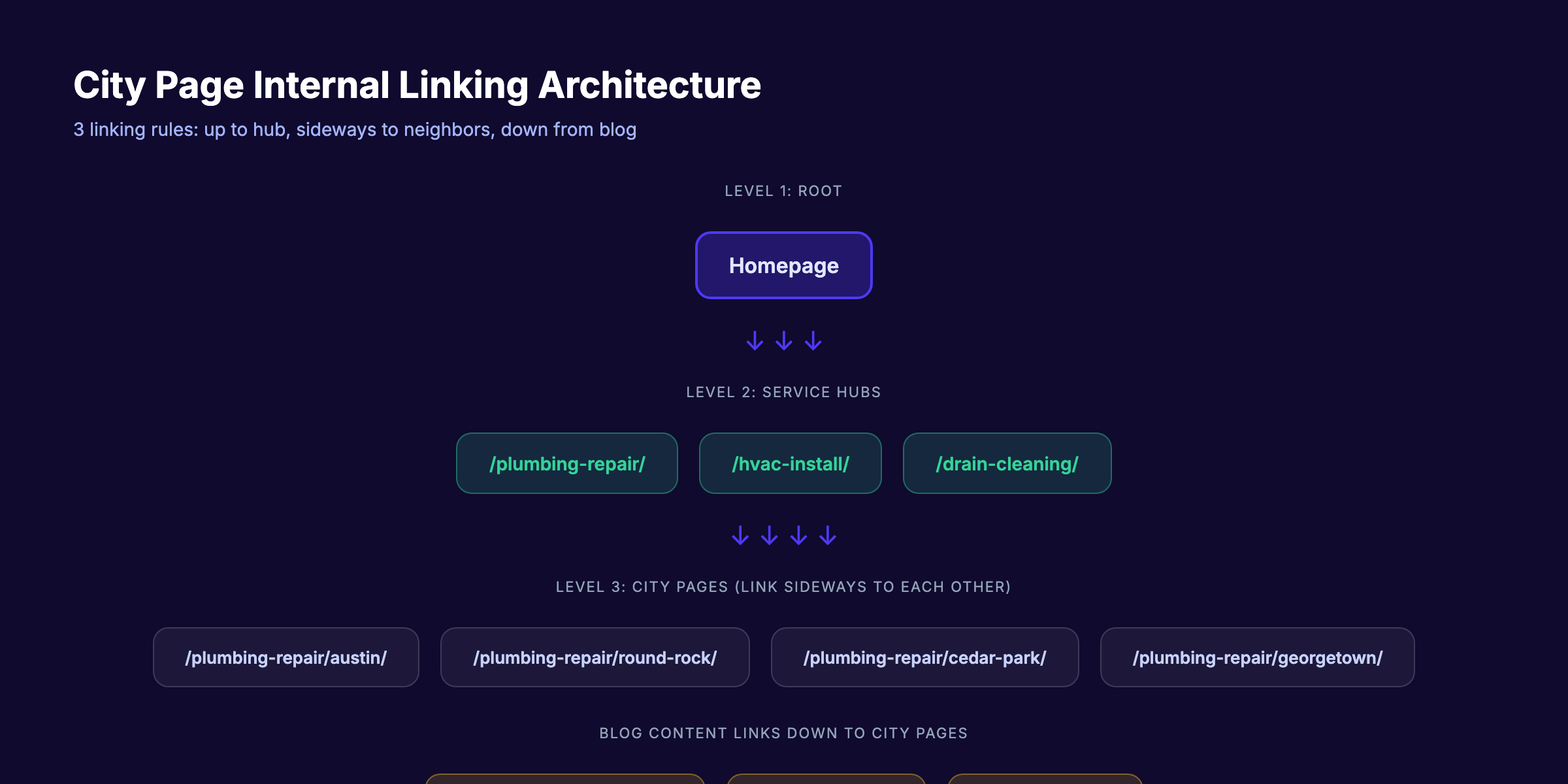
Your internal linking strategy for city pages should follow 3 rules:
Rule 1: Link up to the parent service page.
Every city page links to its parent service hub. “Plumbing Repair in Austin” links to “/plumbing-repair/”. This passes topical relevance upward.
Rule 2: Link sideways to neighboring city pages.
City pages in the same metro area link to each other. Austin links to Round Rock, Cedar Park, and Georgetown. Use a “We Also Serve” section at the bottom of each page.
Rule 3: Link down from blog content.
Your blog articles should link to relevant city pages using descriptive anchor text. A post about home services SEO links to your plumbing city pages. A post about local SEO strategies links to your service area hub.
Internal linking map example:
Homepage
  └── /plumbing-repair/ (service hub)
        ├── /plumbing-repair/austin/
        ├── /plumbing-repair/round-rock/
        ├── /plumbing-repair/cedar-park/
        └── /plumbing-repair/georgetown/
  └── Blog articles → link to relevant city pages
Anchor text rules:
- Use “[Service] in [City]” as the primary anchor
- Vary with “[City] [service] page” or “our [City] team”
- Never use “click here” or “learn more”
- Distribute links naturally within body content
Why this step matters: Internal links distribute PageRank across your city pages. Without them, each page is an island competing alone. A connected architecture compounds authority — what we call the Content Compound Effect. Every new city page strengthens the others through link equity.
Step 8: Avoid the Doorway Page Penalty
Google defines doorway pages as “sites or pages created to rank for specific search queries that funnel users to a single destination.” The penalty is severe. Flagged pages get deindexed. In extreme cases, the entire subdirectory loses visibility.
Here is how to stay on the right side of the line.
The doorway page test — ask these 5 questions:
- Can this page stand alone as a useful resource for someone in that city?
- Does it contain information not found on any other page on the site?
- Would you feel comfortable showing this page to a Google reviewer?
- Does it serve the user or does it exist only to rank?
- If you removed the city name, would the page be identical to your other city pages?
If you answered “no” to questions 1-4 or “yes” to question 5, you have a doorway page.
Red flags Google watches for:
- 30+ city pages published in a single week
- 90%+ content overlap between city pages
- No unique local information per page
- Pages that redirect to a main service page
- City pages for locations you do not serve
- Mass-generated pages with obvious template patterns
Safe publishing cadence:
Do not publish all your city pages at once. Roll them out in batches of 5-10 per week. Start with Tier 1 cities. Monitor indexation in Google Search Console before publishing the next batch.
Recovery if flagged:
If your city pages lose rankings after a core update, consolidate. Merge thin pages into regional hubs. Add genuine local content to surviving pages. Submit for reconsideration through Search Console. Read our guide on fixing thin content for the full recovery process.
Why this step matters: Every algorithm update since 2024 has tightened enforcement on doorway pages. The March 2026 core update continued this trend. Building pages the right way from day 1 means you never have to recover from a penalty.
Results: What to Expect
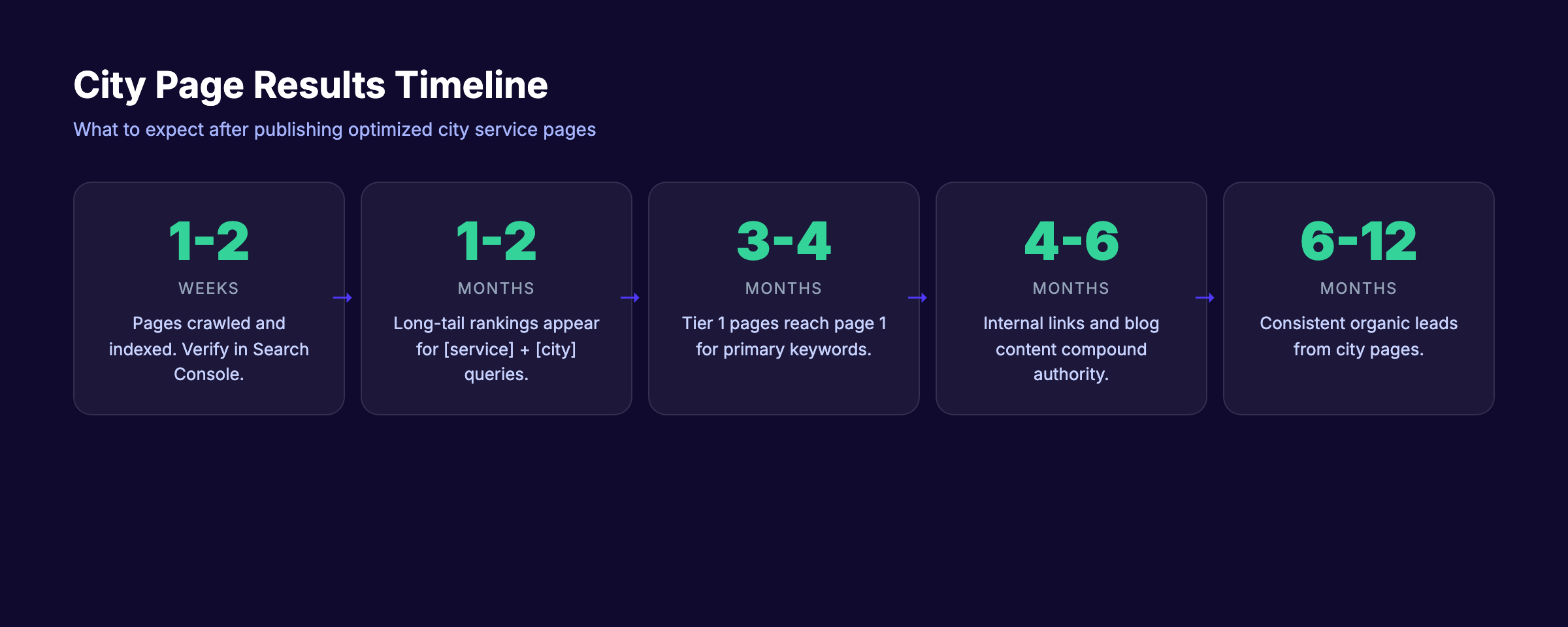
City service landing pages are not an overnight ranking strategy. Here is a realistic timeline based on what we see across 70+ industries:
- Week 1-2: Pages crawled and indexed (verify in Search Console)
- Month 1-2: Pages begin appearing for long-tail “[service] + [city]” queries
- Month 3-4: Tier 1 city pages reach page 1 for primary keywords
- Month 4-6: Internal linking and blog content start compounding authority
- Month 6-12: City pages generate consistent organic leads
The compounding effect is real. Each new city page you add strengthens the entire service hub. A site with 20 well-built city pages will outperform a site with 100 thin ones every time.
For context, local SEO improvements typically take 3 to 6 months to show measurable results. City pages follow the same timeline.
City Page vs. Doorway Page: Quick Reference
Use this table to audit your existing pages or plan new ones.
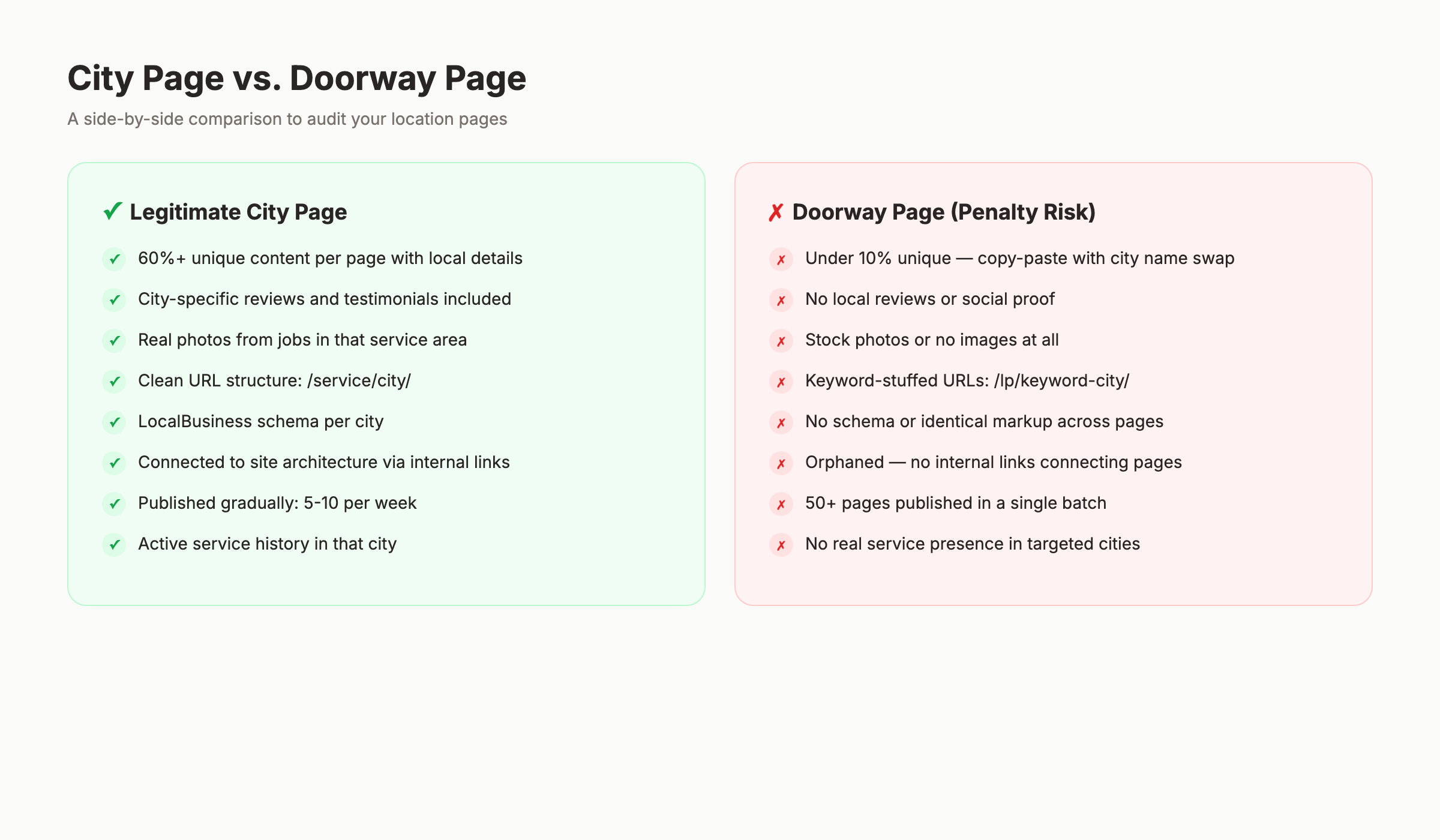
| Signal | City Page (Safe) | Doorway Page (Risk) |
|---|---|---|
| Content uniqueness | 60%+ unique per page | Under 10% unique |
| Local reviews | Included per city | None |
| Local photos | Real photos from area | Stock photos or none |
| URL structure | /service/city/ | /lp/keyword-city/ |
| Schema markup | LocalBusiness per city | None or identical |
| Internal links | Connected to architecture | Orphaned |
| Publishing pace | 5-10 per week | 50+ in one batch |
| Service history | Active in that city | No real presence |
| User experience | Answers local questions | Bounces to main page |
FAQ
How many city pages should I build?
Build pages only for cities where you actively provide service and where search demand exists. Most service area businesses perform best with 10 to 30 city pages. Going beyond 50 without genuine local content for each page increases doorway risk. Start with your top 10 revenue-generating cities.
Do city pages work without a Google Business Profile in that city?
Yes. City pages rank in organic results independent of the local pack. You do not need a GBP listing in every city. However, cities where you have both a GBP listing and a city page see the strongest combined visibility. This is the Stacc Stack Method — blog content and local SEO compound together.
Will Google penalize me for having city pages?
Google penalizes doorway pages, not city pages. The distinction is content quality and user intent. If each page provides unique value to someone searching in that city, you are safe. If your pages are templates with swapped city names, you are at risk. Follow the 8 steps in this guide to stay compliant.
Should I use programmatic SEO to generate city pages?
Programmatic SEO can work for city pages if you have genuine data per location. Property listings, local pricing data, city-specific statistics — these make programmatic pages valuable. Generic templates without real data do not. The key is whether the programmatic process adds unique information or just swaps variables.
How do I track which city pages are performing?
Set up filtered views in Google Search Console by URL pattern. Track impressions, clicks, and average position per city page. Use Google Analytics 4 to measure conversions (calls, form fills, direction requests) per city. Review monthly and consolidate pages that generate zero traffic after 6 months.
What is the ideal word count for a city page?
Tier 1 cities deserve 1,200 to 1,800 words with full local layers — reviews, case studies, neighborhood details, and city-specific FAQs. Tier 2 cities work well at 800 to 1,200 words. Small regional pages can succeed at 600 to 800 words. The word count matters less than the uniqueness of the content. A 600-word page with real local data outperforms a 2,000-word page of generic filler.
City service landing pages remain one of the most effective local SEO strategies in 2026. Build them with real local content, proper architecture, and genuine proof — and they will rank through every algorithm update Google releases.
Stacc builds and publishes SEO-optimized pages for local businesses every month. 30 to 80 pages, on autopilot, starting at $99. Start for $1 →
Written and published by Stacc. We publish 3,500+ articles per month across 70+ industries. All data verified against public sources as of March 2026.
