Build an SEO content calendar in 8 steps: keyword research, clustering, cadence, briefs, assignment, publishing, and tracking what each post earns.
An SEO content calendar is a dated publishing plan built from keyword research rather than inspiration. It gives each post a target query, a cluster, an owner, a brief, and a publish date, so the blog compounds instead of drifting. These eight steps build one from scratch.
Most businesses publish blog posts whenever inspiration strikes. A keyword catches someone's eye on Monday. A trending topic sparks an article on Thursday. By the end of the month, the blog has 4 disconnected posts with no strategy behind them.
That approach burns time and budget. 90.63% of web pages get zero organic traffic from Google. Random publishing is a big reason why. Without a plan, you target the wrong keywords, miss internal linking opportunities, and never build the topical depth Google rewards.
An SEO content calendar fixes this. It turns keyword data into a publishing schedule that builds authority, fills content gaps, and drives organic traffic on a predictable timeline.
We have published 3,500+ blog posts across 70+ industries. Every one of them started with a content calendar. Here is the 8-step process we use.
Here is what you will learn:
- How to set SEO goals that drive your content plan
- How to turn keyword research into a topic pipeline
- How to organize topics into clusters that build authority
- How to match every post to the right search intent
- How to set a publishing cadence that fits your resources
- How to build and maintain the calendar itself
- How to track results and adjust based on data
What Is an SEO Content Calendar?
An SEO content calendar is a planning document that maps every piece of content to a target keyword, search intent, topic cluster, publish date, and status. It is not a generic editorial calendar with random topic ideas and due dates.
The difference matters. A regular editorial calendar answers "what are we publishing this week?" An SEO content calendar answers "what do we need to publish to rank for our target keywords, and in what order?"
Every entry in an SEO content calendar includes:
- Target keyword and monthly search volume
- Search intent (informational, commercial, transactional)
- Content format (guide, listicle, comparison, how-to)
- Topic cluster assignment (pillar or supporting post)
- Publish date and current status
- Internal links to related published content
This structure connects each post to a larger strategy. No orphan articles. No wasted effort.
Step 1: Set Clear SEO Goals
Every calendar starts with a destination. Without defined goals, you cannot prioritize keywords or measure whether the calendar works.
Specifically:
- Define 1 primary traffic goal (example: "grow organic sessions from 5,000 to 15,000 per month within 6 months")
- Identify 3 to 5 target keyword themes tied to your product or service
- Set a monthly content volume target based on available resources
Your goals determine everything downstream. A business targeting local customers needs a different calendar than an e-commerce brand targeting national keywords.
Why this step matters: Without goals, every keyword looks equally important. You end up publishing 20 articles that each target a different topic instead of 20 articles that build deep authority in 3 to 4 key areas.
Pro tip: Set goals by working backward from revenue. If 1 in 50 organic visitors converts and your average deal is worth $2,000, then 500 new monthly visitors equals $20,000 in pipeline. That number tells you exactly how aggressive your calendar needs to be.
Step 2: Run Keyword Research
The foundation of your content calendar is keyword research. Every topic slot in the calendar should map to a real keyword with proven search demand.
Specifically:
- Start with 5 to 10 seed keywords related to your core topics
- Expand each seed into 20 to 50 long-tail variations using Google Keyword Planner, Ahrefs, or Semrush
- Record monthly search volume, keyword difficulty, and current ranking position for each term
- Filter out keywords with zero search volume or difficulty scores above your domain authority
Group keywords by priority tier:
| Tier | Criteria | Examples |
|---|---|---|
| Tier 1 | High volume, high intent, directly tied to revenue | "best [product category]", "[service] pricing" |
| Tier 2 | Medium volume, informational, builds topical authority | "how to [outcome]", "what is [concept]" |
| Tier 3 | Low volume, long-tail, easy to rank | "[niche topic] tips", "[specific question]" |
A strong calendar balances all 3 tiers. Tier 1 keywords drive revenue. Tier 2 builds the authority needed to rank for Tier 1. Tier 3 delivers quick wins that prove the strategy works.
Why this step matters: A calendar built on guesswork targets keywords you cannot rank for or keywords nobody searches. Data removes the guesswork.
Pro tip: Check Google Search Console for keywords your site already ranks in positions 11 to 30. These "striking distance" keywords are the fastest path to page 1. Prioritize them in your first month.
Step 3: Build Your Topical Map
Keywords alone are not enough. Google evaluates whether your site covers a topic in depth. That means organizing keywords into topic clusters that build topical authority.
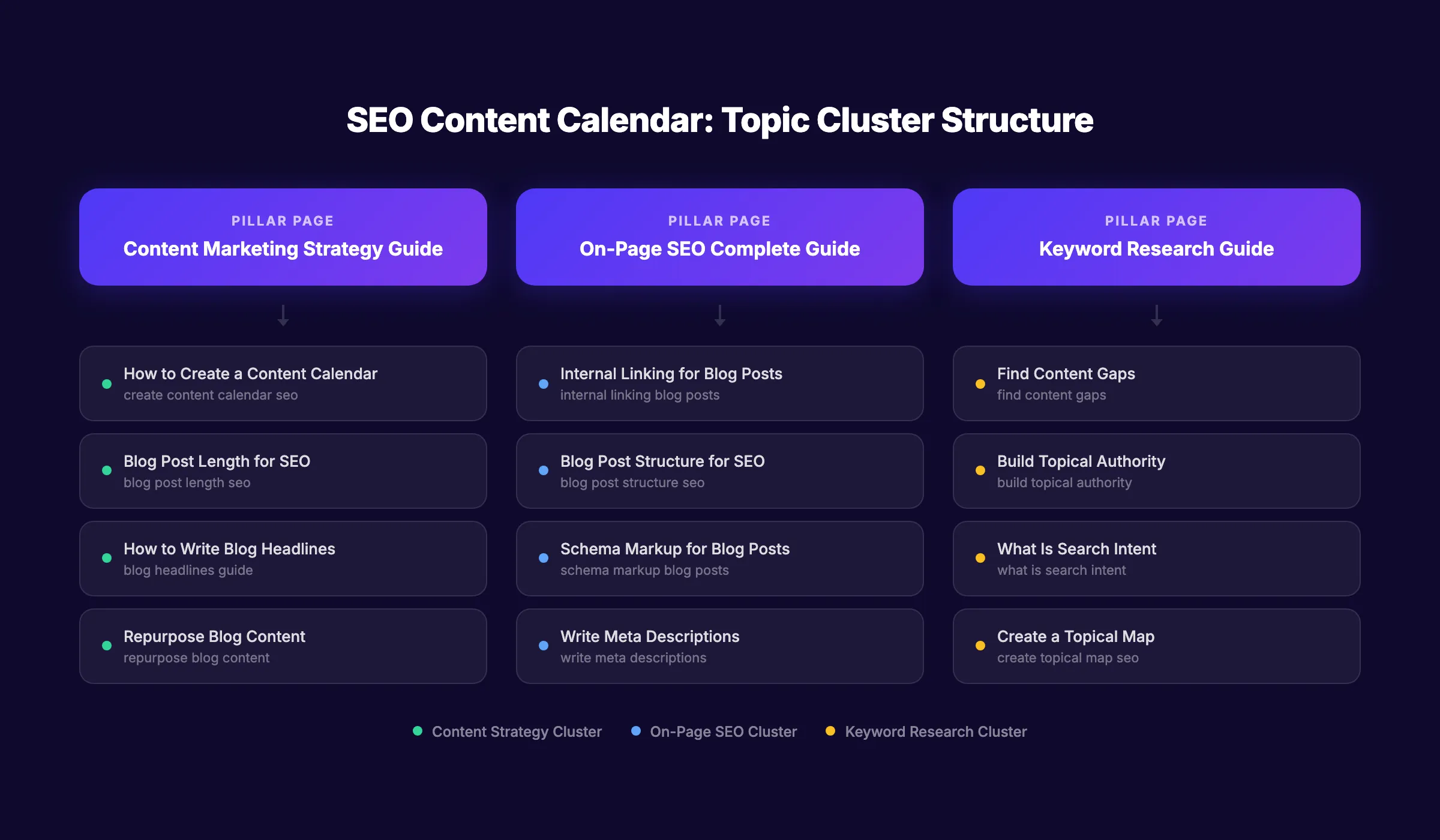
A topical map is a visual structure that shows how every piece of content connects. Each cluster has 1 pillar page (a broad, in-depth guide) and 5 to 15 supporting posts (narrower subtopics that link back to the pillar).
Specifically:
- Group your keywords into 3 to 5 core topic clusters
- Identify 1 pillar page per cluster (targeting the broadest, highest-volume keyword)
- Assign supporting keywords to each cluster
- Plan internal links between supporting posts and their pillar page
Example cluster for "content marketing":
| Role | Topic | Target Keyword |
|---|---|---|
| Pillar | Content Marketing Strategy Guide | content marketing strategy |
| Support | How to Create a Content Calendar | create content calendar seo |
| Support | How to Write Blog Headlines | blog headlines seo |
| Support | Blog Post Length for SEO | blog post length seo |
| Support | How to Repurpose Content | repurpose blog content |
For a detailed walkthrough, see our guide on how to create a topical map.
Why this step matters: Sites that publish 20 random articles across 20 different topics build zero authority. Sites that publish 20 articles across 3 clusters build deep authority in each cluster. Google rewards depth.
Stop writing. Start ranking. theStacc plans, writes, and publishes SEO articles from $99 per month. Every post follows the exact calendar process described in this guide.
Step 4: Match Content to Search Intent
Every keyword carries an intent. A searcher typing "what is a content calendar" wants information. Someone searching "best content calendar tools" wants to compare products. Your content format must match the intent or Google will not rank it.
The 4 intent types and matching formats:
| Search Intent | Signal Words | Best Content Format |
|---|---|---|
| Informational | "what is", "how to", "guide" | Step-by-step guide, explainer, tutorial |
| Commercial | "best", "top", "vs", "review" | Listicle, comparison, review |
| Transactional | "buy", "pricing", "sign up" | Landing page, product page |
| Navigational | "[brand name]", "[product] login" | Brand page, documentation |
How to apply this:
- Search your target keyword on Google
- Look at the top 5 results. What format dominates? Guides? Listicles? Videos?
- Match that format. Do not publish a 5,000-word guide for a keyword where Google ranks short listicles
Mark the intent for every keyword in your calendar. This prevents the common mistake of writing the wrong content type for a keyword.
Why this step matters: Intent mismatch is the number 1 reason good content fails to rank. A 3,000-word guide will not rank for "best project management tools" because Google knows that keyword needs a ranked list, not an essay.
Step 5: Set Your Publishing Frequency
How often should you publish? The answer depends on your resources and goals, not on what a competitor does.
Publishing frequency benchmarks:
| Goal | Recommended Frequency | Time to Results |
|---|---|---|
| Maintain rankings | 4 to 8 posts per month | Ongoing |
| Grow organic traffic 2x | 12 to 16 posts per month | 4 to 6 months |
| Aggressive growth (3x+) | 20 to 30 posts per month | 3 to 4 months |
Companies that publish 16+ blog posts per month get 3.5x more traffic than those publishing 0 to 4 posts.
But consistency matters more than volume. Publishing 8 posts every week for 1 month and then going silent for 3 months is worse than publishing 8 posts per month for 4 months straight. Google rewards sites that publish on a regular cadence.
Specifically:
- Start with a frequency you can sustain for at least 6 months
- Assign specific publish dates in the calendar (not "sometime this week")
- Build a 2-week buffer of drafted content to absorb unexpected delays
Why this step matters: An ambitious calendar that falls apart after 6 weeks is worse than a modest calendar you follow for 6 months. Set a pace you can maintain.
Pro tip: If resources are tight, start with 4 posts per month focused entirely on 1 topic cluster. Depth in 1 area beats shallow coverage across 5 areas.
Step 6: Build the Calendar Spreadsheet
Now assemble everything into a working document. Use a spreadsheet, Notion database, or project management tool. The format matters less than the fields you track.
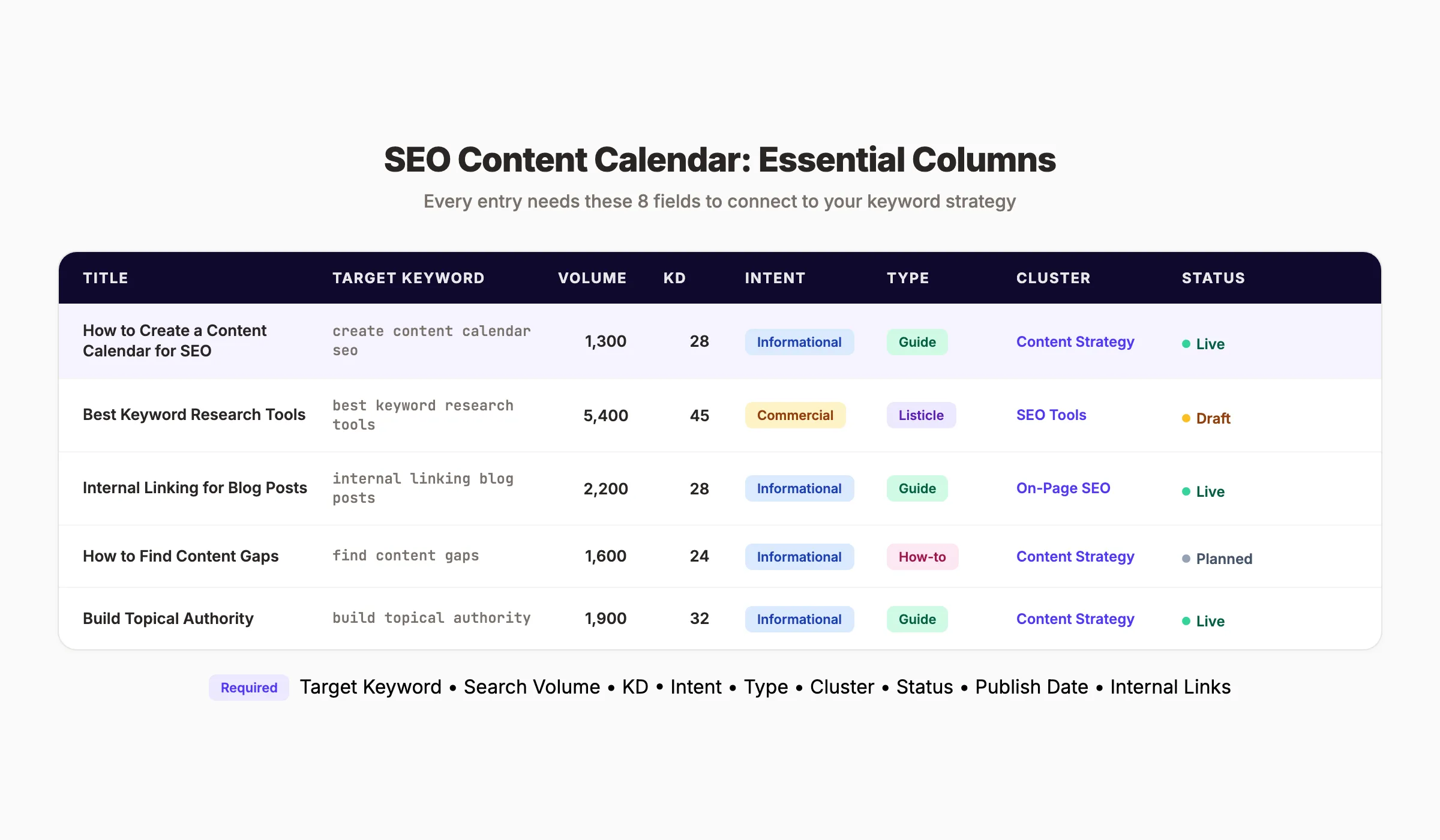
Required columns for every entry:
| Column | Purpose | Example |
|---|---|---|
| Title | Working headline | "How to Create a Content Calendar for SEO" |
| Target Keyword | Primary keyword to rank for | "create content calendar seo" |
| Search Volume | Monthly searches | 1,300 |
| Keyword Difficulty | Competition score (0 to 100) | 28 |
| Search Intent | User intent category | Informational |
| Content Type | Format of the post | Step-by-step guide |
| Topic Cluster | Which pillar this supports | Content Strategy |
| Publish Date | Scheduled publication day | 2026-04-15 |
| Status | Current stage | Draft / In Review / Published |
| Internal Links | Posts to link to and from | /blog/keyword-research, /blog/topical-map |
| Writer | Person responsible | theStacc Editorial |
Calendar layout tips:
- Color-code by topic cluster so you can spot gaps at a glance
- Sort by publish date for the weekly view and by cluster for the strategic view
- Add a "last updated" column for posts that need periodic refreshes
- Include a notes field for SEO optimization checklists per post
Real example. A 4-week SEO content calendar:
| Week | Title | Keyword | Volume | KD | Intent | Cluster | Type |
|---|---|---|---|---|---|---|---|
| Week 1 | How to Create a Topical Map for SEO | create topical map seo | 1,900 | 22 | Informational | Content Strategy | Guide |
| Week 1 | What Is Topical Authority? | what is topical authority | 2,400 | 18 | Informational | Content Strategy | Explainer |
| Week 2 | Best Content Marketing Tools for Small Business | best content marketing tools | 3,100 | 35 | Commercial | Content Tools | Listicle |
| Week 2 | How to Find Content Gaps | find content gaps | 1,600 | 24 | Informational | Content Strategy | How-to |
| Week 3 | Internal Linking for Blog Posts | internal linking blog posts | 2,200 | 28 | Informational | On-Page SEO | Guide |
| Week 3 | Blog Post Structure for SEO | blog post structure seo | 1,800 | 20 | Informational | On-Page SEO | Guide |
| Week 4 | How to Write SEO Blog Posts | write seo blog posts | 4,100 | 42 | Informational | Content Strategy | Guide |
| Week 4 | How to Update Old Blog Posts | update old blog posts | 1,300 | 16 | Informational | Content Strategy | How-to |
Notice the pattern. Weeks 1 and 2 build the "Content Strategy" cluster with 3 posts. Weeks 3 and 4 add an "On-Page SEO" cluster while continuing Content Strategy. Every post connects to a cluster and a keyword with real search demand.
Why this step matters: A calendar without structure becomes a disorganized list within 2 weeks. These fields keep every post connected to your keyword strategy and publishing workflow.
Your SEO team. $99 per month. 30 optimized articles, published automatically. Every post follows a keyword-driven content calendar built for your industry.
Step 7: Create and Optimize Each Post
With the calendar built, execute it. Each post should follow a consistent SEO writing process that covers on-page optimization from the start.
For every post on the calendar:
- Write a headline that includes the target keyword in the first 60 characters
- Structure the post with a clear H2 and H3 hierarchy that covers the topic
- Include the target keyword in the first 100 words, at least 1 H2, and the meta description
- Add 3 to 5 internal links per 1,000 words to related posts in the same cluster
- Link to 2 to 3 authoritative external sources with specific data or research
- Optimize images with descriptive alt text that includes the keyword
- Match the post length to what currently ranks on page 1 for that keyword
On-page checklist to include in the calendar:
- ✓ Title tag under 60 characters with keyword
- ✓ Meta description between 145 and 155 characters
- ✓ Keyword in first 100 words
- ✓ Keyword in at least 1 H2
- ✓ 3+ internal links per 1,000 words
- ✓ 2+ external links to authoritative sources
- ✓ All images have descriptive alt text
- ✓ Schema markup added where applicable
Why this step matters: A calendar without execution standards produces inconsistent quality. The checklist ensures every post meets a baseline SEO standard before it publishes.
Step 8: Track Results and Update the Calendar
An SEO content calendar is a living document. Review it monthly to find what works, what does not, and what needs updating.
Monthly review process:
- Open Google Search Console and identify posts gaining or losing impressions
- Check keyword rankings for each published post against its target keyword
- Flag posts ranking in positions 5 to 15 as "optimization candidates". Small updates can push them to page 1
- Identify topic gaps where competitors rank but you have no content
- Update old blog posts that have dropped in rankings or contain outdated information
Key metrics to track per post:
| Metric | Where to Find It | Action Threshold |
|---|---|---|
| Organic sessions | Google Analytics | Under 50 per month after 90 days = review |
| Average position | Google Search Console | Positions 5 to 15 = optimize for quick win |
| Click-through rate | Google Search Console | Under 2% = rewrite title and meta description |
| Impressions trend | Google Search Console | Declining 3 months straight = update content |
| Bounce rate | Google Analytics | Over 85% = improve content quality or intent match |
Why this step matters: SEO is not "publish and forget." The calendar should reflect what your data tells you. Posts that rank update the strategy. Posts that fail reveal gaps. Both make the next quarter's calendar sharper.
Pro tip: Schedule a recurring 60-minute calendar review on the first Monday of every month. Block it on your calendar like any other meeting. Consistency in review is as important as consistency in publishing.
Results: What to Expect
After completing these 8 steps and executing for 90 days, you should expect:
- A fully organized content calendar with 30 to 90+ topic slots mapped to keywords
- A clear publishing cadence that your team can sustain
- First ranking improvements for long-tail keywords within 30 to 60 days
- Measurable organic traffic growth within 60 to 90 days
- A compounding content library where every new post strengthens the ones before it
SEO compounds over time. The first 10 posts build the foundation. Posts 11 through 30 start ranking faster because the foundation exists. By post 50, your site has enough topical authority that new content can rank within weeks instead of months.
3,500+ blogs published. Every article is SEO-scored before publish. See what theStacc can do for your site. We build the calendar, write the content, and publish it for you.
What practitioners are saying on X
AI search advice ages quickly. Here is high-signal public discussion from SEO and growth operators — context for your roadmap, not a substitute for primary data.
- @varunram (Jul 2026): Critique of GEO slopfarm products that combine SEO clickbait with unresearched content marketing — quality and research still separate winners from farms. See the post on X.
- @jakezward (Feb 2026): 2026 SEO predictions emphasize AI Overview share-of-SERP, schema for LLM token efficiency, brand mentions in AI answers as a KPI, proprietary data as a moat, and content refresh beating net-new AI slop. See the post on X.
- @HlynurStefDev (Jul 2026): Public case: niche site traffic jumped from ~18 to 4,162 Google visits/month after focused technical/on-page SEO work (GSC screenshots claimed) — reminds that fundamentals still move numbers. See the post on X.
Grok, AI Overviews, and multi-engine visibility
Content topics like “create content calendar seo” get AI citations when process steps, quality bars, and examples are concrete. Operator consensus on X is clear: research-backed pages beat unedited bulk generation — reflect that honestly.
- Google AI Overviews: Use passage-ready answers, tables, and FAQ schema where relevant.
- ChatGPT / Perplexity: Cite named sources next to key claims.
- Grok: Maintain accurate entity facts on-site and in high-signal X posts.
Publish content built for Google and AI citations. theStacc’s Content SEO module ships SEO-scored articles structured for rankings and generative engines — including clearer entity pages models like Grok can quote.
FAQ
It depends on your goals and resources. Most small businesses see results with 8 to 12 posts per month. Businesses targeting aggressive growth publish 20 to 30 posts. Start with a number you can sustain for at least 6 months. Consistency beats volume.
Google Sheets is the simplest option and works for most teams. Notion and Airtable offer more structure with database views, filters, and templates. The tool matters less than the fields you track. Every entry needs a target keyword, search intent, topic cluster, and publish date at minimum.
Plan 3 months ahead for topic slots and keyword assignments. Schedule specific publish dates 4 to 6 weeks in advance. This gives enough structure to stay on track while leaving room to add timely topics or respond to trending searches.
Keep them separate. An SEO content calendar is driven by keyword data, search intent, and topic clusters. A social media calendar is driven by platform algorithms, engagement patterns, and audience behavior. They serve different goals and need different structures. You can use repurposed blog content to feed your social calendar from your blog output.
theStacc builds a keyword-driven content calendar for your industry, writes every post following SEO best practices, and publishes automatically to your site. Plans start at $99 per month for 30 articles. You do not need to manage the calendar, the writing, or the publishing.
Plan for AI Search in Your Calendar
Google AI Overviews, ChatGPT, and Perplexity now pull answers directly from web content. 60% of Google searches end without a click. Your content calendar needs to account for this shift.
Add 2 columns to your calendar for generative engine optimization:
| Column | Purpose | Example Entry |
|---|---|---|
| Citability Score | How likely AI will quote this post | High. Includes original data and step-by-step |
| AI Format | Structure optimized for AI extraction | FAQ section, numbered steps, definition box |
What makes content citable by AI:
- Clear definitions in the first 2 sentences of each section
- Original statistics, benchmarks, or frameworks (not just reworded competitor content)
- Numbered steps that AI can extract as a direct answer
- FAQ sections with concise 2 to 3 sentence answers
- Schema markup that helps AI understand the content structure
This is a competitive advantage most calendars ignore. Of the top 10 ranking pages for "create content calendar seo," zero include AI search planning. Adding this column positions your content for both traditional and AI-driven search.
Common Content Calendar Mistakes
Mistake: Filling the calendar with random topics. Every slot should trace back to a keyword with search volume. If a topic does not have a target keyword, it does not belong on the calendar.
Mistake: Planning 6 months of content but never reviewing results. A calendar older than 90 days without a data review is outdated. Search trends shift. New competitors appear. Monthly reviews keep the calendar relevant.
Mistake: Ignoring content updates. Your calendar should include refresh cycles for posts older than 6 months. Updating old blog posts is often faster and more effective than writing new ones from scratch.
Mistake: Publishing without internal links. Every new post should link to 3 to 5 existing posts and receive links from at least 1 to 2 previously published posts. Build this into the calendar as a required field.
Building an SEO content calendar takes effort upfront. The research, clustering, and scheduling work is real. But it pays off every month after. Each post you publish from a well-built calendar stacks on the last, building authority that compounds over time. Start with 1 topic cluster, 8 posts, and a 90-day commitment. The rankings follow.
Related Tools & Resources
Free SEO Tools:
Best Lists:
Sources & references
- [1] Princeton / Georgia Tech et al. — GEO research (arXiv:2311.09735)
- [2] @varunram on X — Critique of GEO slopfarm products that combine SEO clickbait with unresearched content marketing — quality and research
- [3] @jakezward on X — 2026 SEO predictions emphasize AI Overview share-of-SERP, schema for LLM token efficiency, brand mentions in AI answers
- [4] @HlynurStefDev on X — Public case: niche site traffic jumped from ~18 to 4,162 Google visits/month after focused technical/on-page SEO work (G
- [5] Referenced source — ahrefs.com

Plan topics, review article drafts, and publish to a connected CMS.
Weekly local SEO teardowns
One practical email a week. Map Pack, GBP, AI Overviews — no fluff. Unsubscribe anytime.
Explore this topic: Content Calendar.