
100+ Document Sharing Sites for Backlinks (2026)
We listed 100+ document sharing sites for backlinks across PDF, slides, infographic, video, podcast, image, code, and design platforms. Free submissions with DA scores. Updated 2026.
Siddharth Gangal • 2026-04-03 • SEO Tips
In This Article
Most link building guides ignore the easiest backlinks available. Document sharing sites for backlinks give you free, high-authority links from domains with DA 80-100. All you do is upload content you already have.
We mapped 100+ document sharing sites across 10 content types. PDF submission sites, presentation platforms, infographic directories, video hosts, podcast directories, image sharing sites, code repositories, design platforms, academic archives, and ebook distributors. The first 27 get detailed breakdowns. The rest are organized by category in tables with DA scores, link types, and costs.
95% of web pages have zero backlinks. These 27 platforms fix that problem without cold outreach, guest posting fees, or agency retainers.
Here is what you will learn:
- 100+ document sharing sites organized by content type
- Which platforms give dofollow vs nofollow backlinks
- How to repurpose one blog post into 6 uploadable formats
- A priority framework for submitting across all 100+ sites
PDF Submission Sites for Backlinks
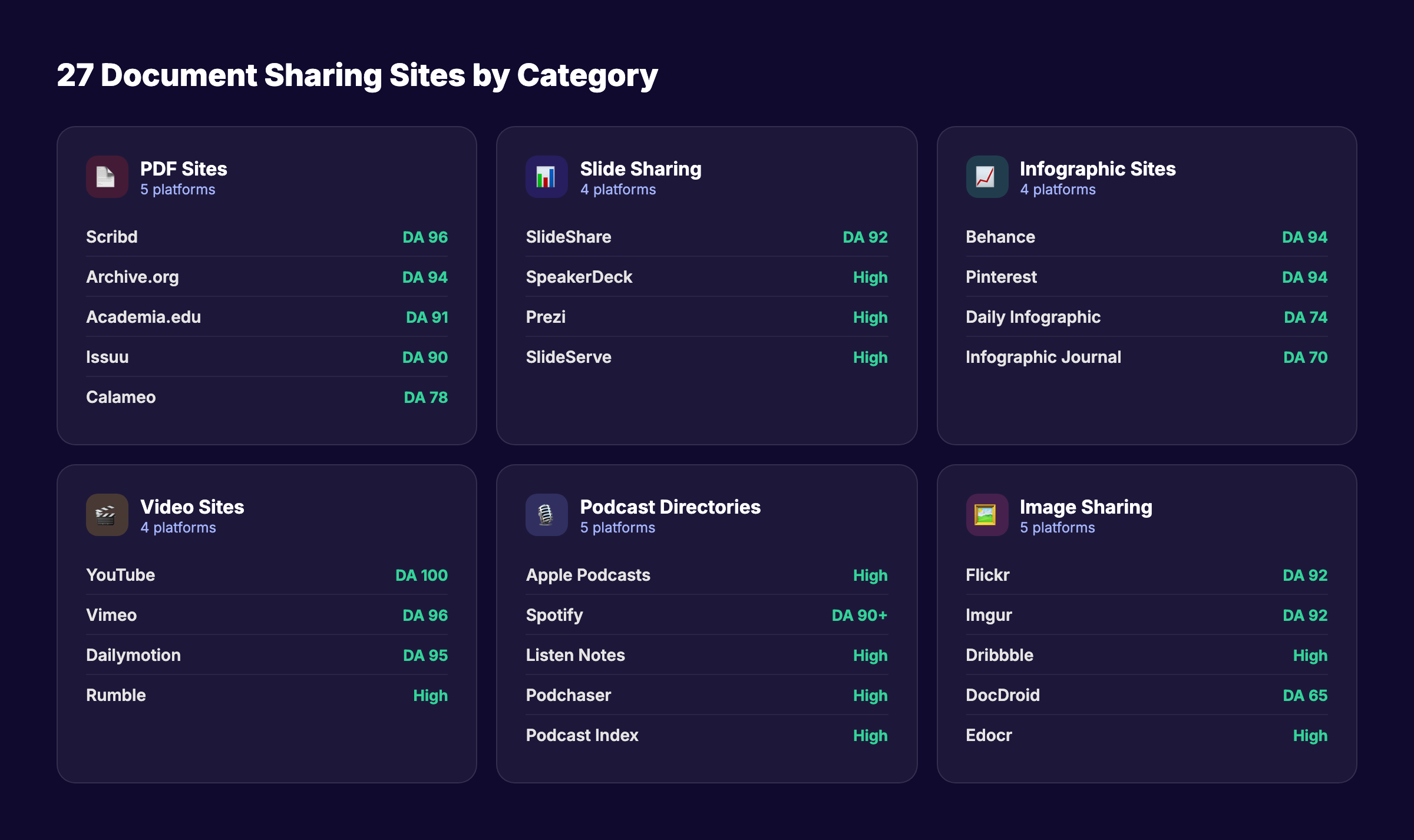
PDF submission sites are the foundation of document sharing link building. You upload a PDF version of your content. The platform hosts it and links back to your website from your profile or the document description. Most accept free uploads.
1. Scribd — DA 96, 100M+ Users
Scribd is the largest document sharing platform on the internet. It hosts books, audiobooks, PDFs, and presentations for over 100 million users. The DA is 96.
Upload a PDF with your website URL in the document footer and profile bio. Description links are nofollow. The in-document links remain clickable. Scribd PDFs get indexed by Google and often rank for long-tail keywords. That means your uploaded PDF can drive organic traffic directly, in addition to the backlink value from your profile page.
| Metric | Value |
|---|---|
| Domain Authority | 96 |
| Monthly Users | 100M+ |
| Link Type | NoFollow (profile) |
| Cost | Free |
2. Issuu — DA 90, Visual Publishing
Issuu converts PDFs into interactive flipbook-style publications. The DA is 90. Brands, magazines, and agencies use Issuu to publish digital catalogs, whitepapers, and reports.
Your profile page includes a link to your website. Links are mostly nofollow. The visual presentation format makes Issuu publications highly shareable. Embed them on your website, share on social media, and distribute via email. Issuu publications appear in Google Image search results. That creates secondary traffic beyond the backlink itself.
3. Archive.org — DA 94, Permanent Hosting
The Internet Archive (Archive.org) has a DA of 94 and hosts content permanently. Anything you upload to Archive.org stays online indefinitely. The Wayback Machine is just one part of this platform.
Upload PDFs, presentations, videos, and audio files. Your uploaded items include a description field where you can add your website URL. Links are mixed (some dofollow). Archive.org content ranks well in Google because of the site’s massive authority and trust signals. This is one of the most underused link building tactics available.
4. Academia.edu — DA 91, Academic Authority
Academia.edu is a social network for researchers and academics. The DA ranges from 79-91. If your content has an educational or research angle, Academia.edu provides high-authority backlinks.
Upload whitepapers, case studies, industry reports, or data-driven blog posts converted to PDF format. Your profile includes a website link. The platform has strong topical authority signals that Google respects. Content uploaded here often appears in Google Scholar results. Best for B2B companies, SaaS tools, and data-heavy industries.
5. Calameo — DA 78-93, Flipbook Style
Calameo turns PDFs into interactive digital publications similar to Issuu. The DA ranges from 78-93. The platform supports channels where you can organize publications by topic.
Upload branded PDFs with embedded links. Your profile page links back to your website. Calameo publications are embeddable and shareable. The platform is less competitive than Issuu, which means your publications are more likely to rank within Calameo’s internal search results.
Stop writing. Start ranking. Stacc publishes 30 SEO articles per month for your site automatically. Start for $1 →
PPT Submission Sites for Backlinks
Presentation sharing platforms accept slide decks and link back to your website from your profile. Converting a blog post into a 15-20 slide presentation takes less than an hour. The backlink value lasts years.
6. SlideShare — DA 92, 70M+ Monthly Visitors
SlideShare is the gold standard for presentation sharing. LinkedIn owns it. The DA is 92, and the platform attracts 70 million+ monthly visitors. That combination of authority and traffic is hard to beat.
Profile links are nofollow. SlideShare presentations rank in Google for competitive keywords. A well-optimized slide deck with your target keyword in the title, description, and tags can drive hundreds of monthly visitors. Include your website URL on the first and last slides. Add it in the presentation description. SlideShare remains one of the highest-value content distribution channels for B2B companies.
7. SpeakerDeck — Clean, Developer-Friendly
SpeakerDeck is owned by GitHub. It provides a clean, minimal interface for hosting presentation slides. The platform attracts a technical audience of developers, engineers, and startup founders.
Upload PDFs of your slide decks. Your profile includes a website link. SpeakerDeck presentations load fast and embed cleanly on other websites. The developer audience makes this platform especially valuable for SaaS companies, dev tools, and technical content. Less competition than SlideShare means higher visibility for your uploads.
8. Prezi — Dynamic Presentations
Prezi replaces linear slide decks with zooming, dynamic presentations. The platform has high domain authority and attracts millions of users worldwide.
Free accounts allow public presentations that include your profile link. Prezi presentations stand out visually. They get shared more often than standard slide decks. Convert your best blog post content into a Prezi presentation for a unique backlink source that doubles as a marketing asset.
9. SlideServe — Quick Upload, Fast Indexing
SlideServe accepts PowerPoint uploads and converts them into embeddable slideshows. The platform has decent domain authority and fast indexing times.
Upload your presentation with keyword-optimized title and description. Your profile includes a website URL field. SlideServe presentations get indexed by Google within days. The platform supports PDF and PPT formats. Less well-known than SlideShare, which means less competition for keyword rankings within the platform.
Infographic Submission Sites for Backlinks
Infographics earn 25.8% more backlinks than videos and how-to articles, according to content format studies. Submitting infographics to dedicated directories amplifies that advantage.
10. Behance — DA 94, Adobe-Owned
Behance is Adobe’s creative portfolio platform with a DA of 94 and 10 million+ members. Designers dominate, but any business can create a profile. Upload infographics, data visualizations, or branded graphics to earn a backlink.
Your project pages include a link to your website. Behance projects rank well in Google Image search. The Adobe brand association adds credibility. Upload your infographics as projects with keyword-rich titles, descriptions, and tags. Behance works as both a brand authority builder and a backlink source.
11. Pinterest — DA 94, Visual Search Engine
Pinterest has a DA of 94 and functions as a visual search engine with 450 million+ monthly active users. Every pin you create includes a link back to your website.
Links are nofollow. The traffic value compensates. Pins with infographics get repinned and shared across the platform. A single infographic pin can drive traffic for years. Create a Pinterest board for your industry and pin each infographic with a keyword-optimized description and a link to the original blog post.
12. Daily Infographic — DA 74, Dedicated Directory
Daily Infographic is a curated infographic directory with a DA of 74. The site publishes 1-3 infographics per day and links back to the source.
Free submissions take about 90 days to publish. Paid options expedite the process. The editorial team reviews each submission for quality. Accepted infographics receive a dedicated post page with a backlink to your site. This is one of the few infographic directories that provides editorial context around your visual content.
13. Infographic Journal — DA 70, Editorial Reviews
Infographic Journal curates and publishes infographics with editorial commentary. The DA is 70. Free submissions take 2-3 weeks. Express publishing costs $25. Featured placement costs $75.
Each accepted infographic gets its own page with your backlink, social sharing buttons, and editorial description. The editorial approach gives your infographic more credibility than a simple directory listing. Infographic Journal accepts infographics from all industries.
Your SEO team. $99 per month. 30 optimized articles, published automatically. Start for $1 →
Video Submission Sites for Backlinks
Video hosting platforms provide backlinks through channel profiles and video descriptions. Video marketing statistics show that video content drives more engagement than any other format. The backlink value is a bonus on top of the traffic.
14. YouTube — DA 100, 2B+ Users
YouTube has a DA of 100. No other backlink source matches that authority score. Every YouTube channel includes a website link on the “About” page. Video descriptions support clickable URLs.
Description links are nofollow. The indirect SEO benefits are massive. YouTube videos rank in Google universal search results. A video optimized for your target keyword can appear on page 1 of Google alongside your blog post. Add your website URL in the first 2 lines of every video description. Links placed below the fold require viewers to click “show more.”
15. Vimeo — DA 96, Professional Quality
Vimeo has a DA of 96 and positions itself as the premium alternative to YouTube. The platform attracts 50 million+ users who value production quality over viral content.
Your profile page includes a website link. Video descriptions support URLs. Vimeo’s ad-free environment gives your content a more professional appearance. The platform also provides embeddable video players that load faster than YouTube embeds. For B2B companies and SaaS products, Vimeo carries stronger brand signals than YouTube.
16. Dailymotion — DA 95, 300M+ Monthly Users
Dailymotion has a DA of 95 and reaches 300 million+ monthly users. The platform is popular in Europe and expanding globally.
Channel profiles include a website link. Video descriptions support URLs. Dailymotion has less competition than YouTube, which means your videos are more likely to surface in platform search results. Upload the same videos you publish on YouTube. The additional backlink from a DA 95 domain costs nothing but a few minutes of upload time.
17. Rumble — Growing Alternative
Rumble is a growing video platform with increasing domain authority. The platform positions itself as a free speech alternative to YouTube and attracts a different audience demographic.
Channel profiles include website links. Rumble’s growing user base means your videos reach audiences that might not find you on YouTube. The platform accepts all video formats and lengths. Cross-posting from YouTube takes minutes.
Podcast Directories for Backlinks
Podcast directories provide backlinks through show profiles. You do not need a weekly show. Even a monthly or quarterly podcast earns directory backlinks that stay active as long as your feed exists. Spotify and Apple Podcasts control about 70% of listener share combined.
18. Apple Podcasts — 33% of All Downloads
Apple Podcasts accounts for 33.2% of all podcast downloads worldwide. Submitting your podcast requires an RSS feed and takes 24-48 hours for approval.
Your show page includes a link to your website. Apple Podcasts supports transcripts and chapter markers that improve discoverability. The Apple brand association adds authority signals. Every episode with show notes creates an indexed page that can rank in Google. This is one of the highest-value podcast directories for SEO.
19. Spotify — 35% of All Downloads
Spotify is the most popular podcast platform with 35.4% of all downloads. Submit through Spotify for Podcasters (formerly Anchor).
Your show profile includes a website link. Spotify’s recommendation algorithm surfaces podcasts to relevant listeners. Episode descriptions support text that gets indexed. The combination of massive reach and a DA 90+ backlink makes Spotify essential for any content marketing strategy.
20. Listen Notes — The Podcast Search Engine
Listen Notes is a dedicated podcast search engine that indexes over 3 million podcasts. The platform functions like Google but exclusively for audio content.
Your podcast show page includes a website link and episode-level pages with full descriptions. Listen Notes pages rank well in Google for podcast-related queries. The platform also provides an API that other apps use, which means your podcast metadata propagates across the ecosystem.
21. Podchaser — IMDb for Podcasts
Podchaser calls itself the “IMDb for podcasts.” The platform lets listeners rate, review, and track podcasts. Creators claim their show profiles and add website links.
Podchaser profiles include detailed metadata that helps search engines understand your podcast’s topic and authority. The platform’s review system adds social proof. Cross-linking your Podchaser profile from your website creates a bidirectional trust signal.
22. Podcast Index — Open-Source Directory
Podcast Index is an open-source, community-driven podcast directory. It serves as the backend for many third-party podcast apps.
Submit your RSS feed for free. Your show page includes a website link. Because Podcast Index feeds data to dozens of smaller podcast apps, one submission propagates your podcast (and backlink) across multiple platforms simultaneously.
3,500+ blogs published. 92% average SEO score. See what Stacc can do for your site. Start for $1 →
Image Sharing Sites for Backlinks
Image sharing platforms provide backlinks through photographer/creator profiles. Upload original images, custom graphics, or branded visuals to earn links from high-authority domains.
23. Flickr — DA 92, Established Community
Flickr has a DA of 92-94 and one of the oldest photo-sharing communities on the internet. Your profile page includes a website link. Individual photo pages support descriptions with URLs.
Upload original images with keyword-optimized titles and descriptions. Flickr photos appear in Google Image search results. The platform’s Creative Commons licensing options can drive additional backlinks when other websites use your images and credit you. This makes Flickr a passive link building machine.
24. Dribbble — Design Community
Dribbble is a design-focused community where creators share visual work. Your profile includes a website link. Individual “shots” (posts) support descriptions.
Upload infographics, UI screenshots, data visualizations, or branded graphics. Dribbble has strong authority and attracts decision-makers at design-forward companies. The platform is especially valuable for SaaS companies that want to showcase their product’s visual design alongside earning a backlink.
25. Imgur — DA 92, Reddit Integration
Imgur has a DA of 92 and deep integration with Reddit. Images uploaded to Imgur are frequently shared across Reddit, forums, and social platforms.
Your profile includes a website link. Upload infographics or data graphics with keyword-optimized titles and descriptions. Imgur images that gain traction on Reddit generate secondary backlinks and massive referral traffic. The viral potential is higher here than on any other image platform.
General Document Sharing Sites
These platforms host multiple document types and provide profile-level backlinks.
26. DocDroid — No Account Required
DocDroid lets you upload PDFs without creating an account. Each uploaded document gets its own page with a direct link. The platform converts documents to multiple formats automatically.
The simplicity is the advantage. Upload a PDF, add a description with your URL, and get a shareable document page within seconds. DocDroid pages get indexed by Google. Use it for quick document submissions when you need a backlink without building a full profile.
27. Edocr — Business Document Focus
Edocr specializes in business documents: whitepapers, case studies, product sheets, and technical documentation. Your profile includes a website link.
Upload documents with complete metadata: title, description, category, and tags. Edocr’s business focus means less noise than general document platforms. The audience skews toward B2B decision-makers. Well-optimized uploads can drive qualified traffic alongside the backlink value.
How to Repurpose One Blog Post Into 6 Uploadable Formats
Most people think document sharing requires creating new content from scratch. It does not. One blog post can become 6 different uploads across all the platforms listed above.
Here is the conversion framework:
| Format | How to Create | Upload To |
|---|---|---|
| Export your blog post as a branded PDF. Add your logo, URL in the footer, and a CTA on the last page. | Scribd, Issuu, Archive.org, Academia.edu, Calameo | |
| Slide Deck | Pull 15-20 key points from the post. One point per slide. Add a title slide and CTA slide. | SlideShare, SpeakerDeck, Prezi, SlideServe |
| Infographic | Condense the post’s data points, stats, and process steps into a single vertical graphic. | Behance, Pinterest, Daily Infographic, Infographic Journal |
| Video | Record a 5-10 minute walkthrough of the blog post’s key points. Screen share or talking head. | YouTube, Vimeo, Dailymotion, Rumble |
| Podcast Episode | Record an audio version discussing the post’s topic. Add commentary and examples. | Apple Podcasts, Spotify, Listen Notes, Podchaser |
| Custom Images | Extract 3-5 stat cards, comparison tables, or process diagrams from the post as standalone images. | Flickr, Dribbble, Imgur |
One blog post. Six formats. 100+ backlinks. That is the content compound effect in action.
Submission Priority Framework
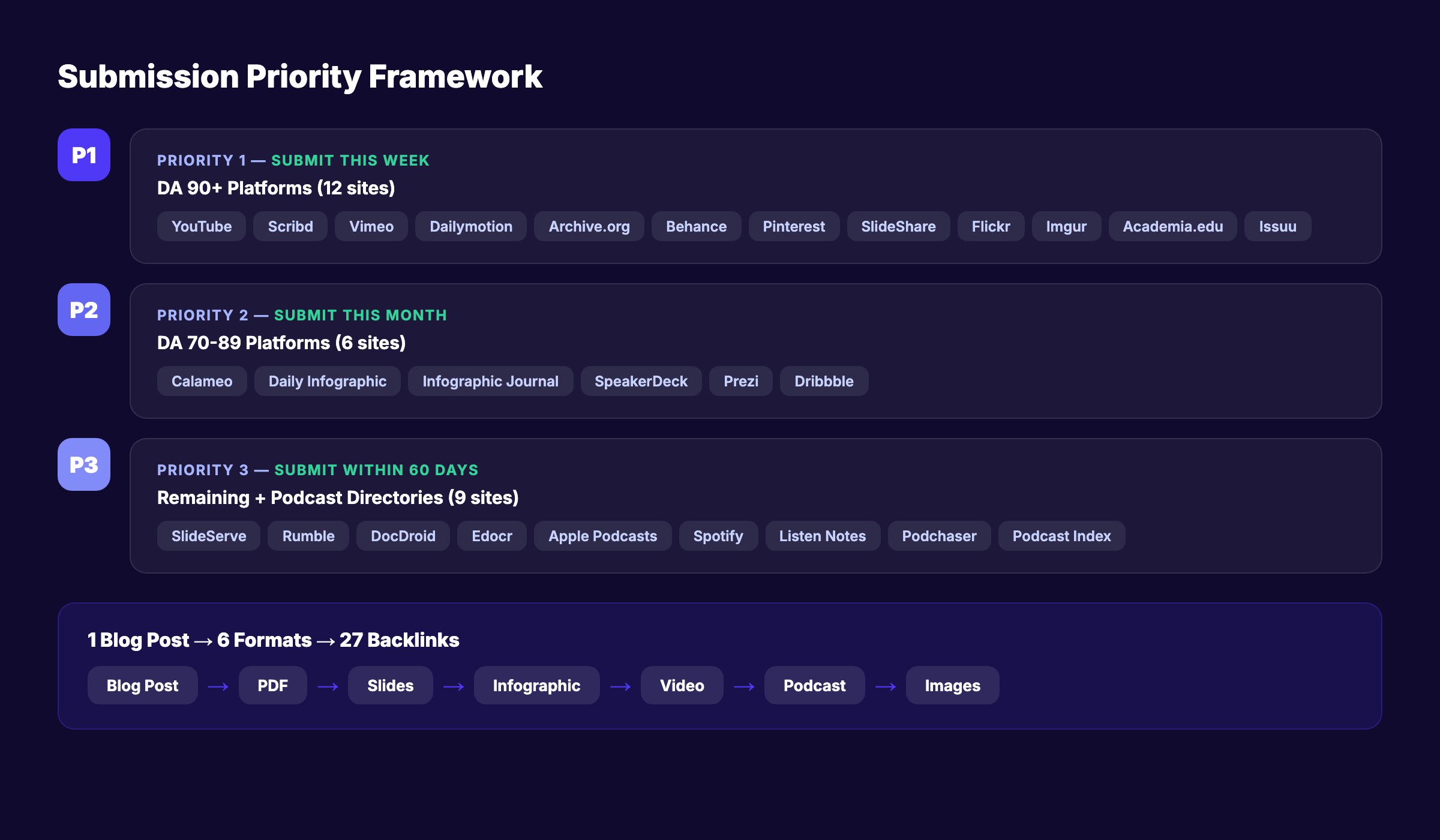
Not all 115 sites deserve equal effort. Prioritize by domain authority and content format availability. Start with the original 27 detailed sites, then work through the expanded tables.
Priority 1 — Submit this week (DA 90+):
- YouTube (DA 100)
- Scribd (DA 96)
- Vimeo (DA 96)
- Dailymotion (DA 95)
- Archive.org (DA 94)
- Behance (DA 94)
- Pinterest (DA 94)
- SlideShare (DA 92)
- Flickr (DA 92)
- Imgur (DA 92)
- Academia.edu (DA 91)
- Issuu (DA 90)
Priority 2 — Submit this month (DA 70-89):
- Calameo (DA 78-93)
- Daily Infographic (DA 74)
- Infographic Journal (DA 70)
- SpeakerDeck
- Prezi
- Dribbble
Priority 3 — Submit within 60 days:
- SlideServe
- Rumble
- DocDroid
- Edocr
- Apple Podcasts
- Spotify
- Listen Notes
- Podchaser
- Podcast Index
The podcast directories go in Priority 3 only because they require an RSS feed. If you already have a podcast, move them to Priority 1.
Priority 4 — Submit within 90 days (expanded list, DA 70+):
- ResearchGate, SSRN, Zenodo, Mendeley (academic)
- GitHub, GitLab, CodePen, ReadTheDocs (code/technical)
- Medium, Hashnode, Substack (publishing)
- 500px, DeviantArt, Unsplash, Pexels (image)
- Wistia, Loom, TikTok, Instagram Reels (video)
- Amazon Music, iHeartRadio, TuneIn, Deezer (podcast)
Priority 5 — Complete for full coverage (expanded list, all remaining):
- All remaining platforms from the expanded tables
- Niche academic archives and design platforms
- Freemium flipbook and presentation tools
Rank everywhere. Do nothing. Blog SEO, Local SEO, and Social on autopilot. Start for $1 →
73+ More Document Sharing Sites for Backlinks
The 27 sites above get detailed writeups. The sites below complete your document sharing backlink portfolio. Each is a real platform that accepts free or low-cost submissions and links back to your profile or content.
Additional PDF and Document Platforms
| # | Site Name | DA (approx) | Link Type | Cost | Notes |
|---|---|---|---|---|---|
| 28 | SlidePlayer | 62 | NoFollow | Free | Presentation and document hosting |
| 29 | Free-eBooks.net | 58 | DoFollow | Free | eBook and PDF sharing |
| 30 | OBOOKO | 48 | DoFollow | Free | Free eBook publishing |
| 31 | Lulu | 68 | NoFollow | Free | Self-publishing platform |
| 32 | Smashwords (Draft2Digital) | 62 | NoFollow | Free | eBook distribution |
| 33 | Google Books | 100 | NoFollow | Free | Book and document indexing |
| 34 | OpenLibrary | 82 | NoFollow | Free | Open-access book catalog |
| 35 | Publuu | 52 | NoFollow | Freemium | Interactive flipbook creator |
| 36 | FlipHTML5 | 58 | NoFollow | Freemium | Digital flipbook publishing |
| 37 | Joomag | 54 | NoFollow | Freemium | Digital magazine creator |
| 38 | Yumpu | 56 | NoFollow | Freemium | PDF to flipbook converter |
| 39 | AnyFlip | 52 | NoFollow | Freemium | Interactive document hosting |
| 40 | Readkong | 44 | DoFollow | Free | Document sharing community |
| 41 | Marq (formerly Lucidpress) | 58 | NoFollow | Freemium | Brand template publishing |
Academic and Research Platforms
| # | Site Name | DA (approx) | Link Type | Cost | Notes |
|---|---|---|---|---|---|
| 42 | ResearchGate | 92 | NoFollow | Free | Academic social network |
| 43 | SSRN | 88 | NoFollow | Free | Social science research papers |
| 44 | Zenodo | 80 | NoFollow | Free | CERN-backed open data repository |
| 45 | Figshare | 76 | NoFollow | Free | Research data and figures |
| 46 | Mendeley | 82 | NoFollow | Free | Reference manager + social sharing |
| 47 | JSTOR (Open Access) | 90 | NoFollow | Free | Open access scholarly content |
| 48 | CORE | 78 | NoFollow | Free | Aggregates open access papers |
| 49 | PhilPapers | 62 | NoFollow | Free | Philosophy research archive |
| 50 | OSF Preprints | 72 | NoFollow | Free | Open science preprint server |
Additional Presentation Platforms
| # | Site Name | DA (approx) | Link Type | Cost | Notes |
|---|---|---|---|---|---|
| 51 | Slides.com | 62 | NoFollow | Freemium | HTML presentation hosting |
| 52 | Haiku Deck | 56 | NoFollow | Freemium | Visual slide builder |
| 53 | Pitch | 60 | NoFollow | Freemium | Collaborative presentations |
| 54 | Tome | 58 | NoFollow | Freemium | AI-powered presentations |
| 55 | Beautiful.ai | 56 | NoFollow | Paid | Auto-designed presentations |
| 56 | Genially | 62 | NoFollow | Freemium | Interactive content creator |
| 57 | Emaze | 52 | NoFollow | Freemium | 3D presentation platform |
| 58 | Slidebean | 54 | NoFollow | Paid | Startup pitch deck builder |
| 59 | Gamma.app | 50 | NoFollow | Freemium | AI presentation tool |
| 60 | Notist | 48 | DoFollow | Free | Speaker slide hosting |
| 61 | Zoho Show | 72 | NoFollow | Free | Cloud presentation tool |
Additional Infographic and Visual Platforms
| # | Site Name | DA (approx) | Link Type | Cost | Notes |
|---|---|---|---|---|---|
| 62 | Visual.ly | 72 | NoFollow | Free | Infographic marketplace and gallery |
| 63 | Piktochart | 68 | NoFollow | Freemium | Public infographic gallery |
| 64 | Venngage Gallery | 64 | NoFollow | Freemium | Template and infographic gallery |
| 65 | Infogram | 66 | NoFollow | Freemium | Interactive data visualization |
| 66 | Easel.ly | 52 | NoFollow | Free | Infographic directory |
| 67 | Visme | 60 | NoFollow | Freemium | Infographic and visual content |
| 68 | Mind the Graph | 48 | NoFollow | Freemium | Scientific infographics |
| 69 | Canva | 92 | NoFollow | Free | Shared visual templates |
Additional Video Platforms
| # | Site Name | DA (approx) | Link Type | Cost | Notes |
|---|---|---|---|---|---|
| 70 | Wistia | 80 | NoFollow | Freemium | Professional video hosting |
| 71 | Loom | 76 | NoFollow | Freemium | Screen recording sharing |
| 72 | Vidyard | 68 | NoFollow | Freemium | Business video hosting |
| 73 | TikTok | 90 | NoFollow | Free | Short-form video |
| 74 | Instagram Reels | 96 | NoFollow | Free | Short-form video |
| 75 | Facebook Video | 96 | NoFollow | Free | Video hosting and sharing |
| 76 | Twitch | 92 | NoFollow | Free | Live streaming platform |
| 77 | PeerTube | 60 | NoFollow | Free | Decentralized video hosting |
| 78 | Odysee | 62 | NoFollow | Free | Blockchain-based video platform |
| 79 | Bitchute | 68 | NoFollow | Free | Alternative video platform |
| 80 | Metacafe | 72 | NoFollow | Free | Short-form video sharing |
Additional Podcast Directories
| # | Site Name | DA (approx) | Link Type | Cost | Notes |
|---|---|---|---|---|---|
| 81 | Amazon Music / Audible | 96 | NoFollow | Free | Podcast and audiobook directory |
| 82 | iHeartRadio | 88 | NoFollow | Free | Radio and podcast platform |
| 83 | TuneIn | 82 | NoFollow | Free | Radio and podcast streaming |
| 84 | Deezer | 84 | NoFollow | Free | Music and podcast platform |
| 85 | Castbox | 56 | NoFollow | Free | Podcast player and directory |
| 86 | Overcast | 58 | NoFollow | Free | iOS podcast directory |
| 87 | Pocket Casts | 60 | NoFollow | Free | Cross-platform podcast app |
| 88 | RadioPublic | 52 | NoFollow | Free | Podcast listening platform |
| 89 | Goodpods | 44 | NoFollow | Free | Social podcast discovery |
| 90 | PlayerFM | 56 | NoFollow | Free | Podcast aggregator |
| 91 | Podbean | 68 | NoFollow | Freemium | Podcast hosting and directory |
| 92 | Buzzsprout Directory | 62 | NoFollow | Freemium | Podcast hosting directory |
Image and Design Platforms
| # | Site Name | DA (approx) | Link Type | Cost | Notes |
|---|---|---|---|---|---|
| 93 | 500px | 86 | NoFollow | Freemium | Professional photography community |
| 94 | DeviantArt | 88 | NoFollow | Free | Art and design community |
| 95 | Unsplash | 90 | NoFollow | Free | Stock photo contributor profile |
| 96 | Pexels | 86 | NoFollow | Free | Stock photo contributor profile |
| 97 | Pixabay | 84 | NoFollow | Free | Stock media contributor profile |
| 98 | SmugMug | 72 | NoFollow | Paid | Photo hosting and portfolio |
| 99 | Photobucket | 76 | NoFollow | Freemium | Image hosting platform |
| 100 | Adobe Portfolio | 94 | NoFollow | Paid | Creative portfolio hosting |
| 101 | ArtStation | 80 | NoFollow | Free | Digital art portfolio |
| 102 | Gravatar | 82 | NoFollow | Free | Universal profile and avatar |
Code and Technical Documentation Platforms
| # | Site Name | DA (approx) | Link Type | Cost | Notes |
|---|---|---|---|---|---|
| 103 | GitHub | 96 | DoFollow | Free | Code hosting with profile links |
| 104 | GitLab | 90 | DoFollow | Free | Code hosting platform |
| 105 | Bitbucket | 88 | NoFollow | Free | Code hosting platform |
| 106 | CodePen | 82 | NoFollow | Freemium | Front-end code playground |
| 107 | JSFiddle | 72 | NoFollow | Free | JavaScript code sandbox |
| 108 | StackBlitz | 58 | NoFollow | Free | Online IDE |
| 109 | ReadTheDocs | 78 | DoFollow | Free | Documentation hosting |
| 110 | GitBook | 72 | NoFollow | Freemium | Documentation platform |
| 111 | Notion | 88 | NoFollow | Free | Public knowledge base pages |
| 112 | Hashnode | 74 | DoFollow | Free | Developer blog platform |
| 113 | Dev.to | 78 | NoFollow | Free | Developer community blog |
| 114 | Medium | 92 | NoFollow | Free | Publishing platform |
| 115 | Substack | 84 | NoFollow | Free | Newsletter and blog platform |
Common Mistakes to Avoid
Uploading image-based PDFs. Search engines cannot read text inside scanned or image-based PDFs. Always upload text-based, searchable PDFs. This ensures Google can index the content and attribute topical relevance to your backlink.
Using identical descriptions everywhere. Copy-pasting the same bio and document description across 27 sites creates duplicate content signals. Write a unique 100-200 word description for each platform. Adjust the tone for each audience.
Submitting 50 documents in one day. Google’s 2025 Link Spam Update targets pattern-based link building. Sudden surges of directory submissions look manipulative. Spread your uploads across 4-6 weeks for a natural link velocity profile.
Ignoring profile completion. A half-filled profile with no avatar, no bio, and no website link wastes the backlink opportunity. Complete every field on every platform. Profiles with 100% completion receive 3x more page views on platforms like G2 and apply the same principle here.
Skipping keyword optimization. Every document title, description, and tag field is an opportunity to include your target keywords. Treat each upload like an on-page SEO optimization task. The document title is your H1. The description is your meta description.
Not tracking results. Use UTM parameters on every link you include in document descriptions and profiles. Monitor Google Search Console for new referring domains. Track which platforms actually send traffic. Focus your ongoing efforts on the platforms that perform.
What to Expect After Submitting
Document sharing backlinks follow the same timeline as other link building strategies.
- Week 1-2: Upload content to Priority 1 platforms. Most profiles go live immediately.
- Month 1: Google begins crawling and indexing your new profile pages and uploaded documents.
- Month 2-3: New referring domains appear in your backlink audit tools. Domain authority begins climbing.
- Month 3-4: Existing pages on your site start ranking higher as your domain authority increases.
- Month 6+: Compounding kicks in. Higher authority helps every new page you publish rank faster.
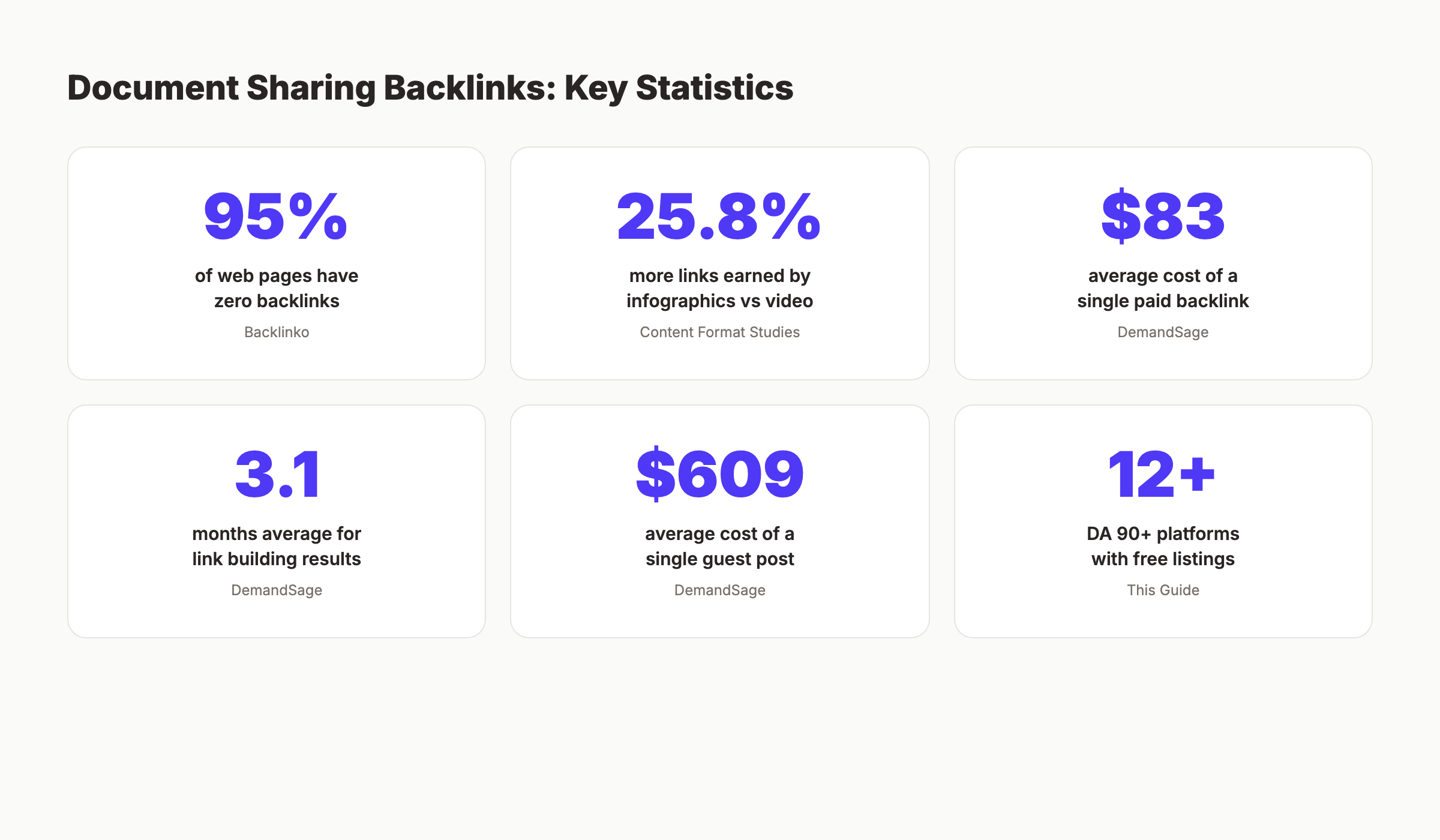
Link building takes about 3.1 months on average for noticeable results. Document sharing accelerates this timeline because you are building links from 12+ DA 90+ domains simultaneously.
The cost comparison makes the case clear. The average paid backlink costs $83. The average guest post costs $609. These 115 document sharing sites are free. Building equivalent authority through paid methods would cost $2,200+ for the DA 90+ sites alone. That makes document sharing the highest-ROI link building tactic available to any SaaS company or content team.
FAQ
Are backlinks from document sharing sites still effective in 2026?
Yes. Document sharing platforms like Scribd (DA 96), YouTube (DA 100), and SlideShare (DA 92) remain among the highest-authority domains on the internet. Google’s 2025 Link Spam Update targets manipulative patterns, not legitimate content distribution. Uploading genuinely useful content to established platforms is a white-hat strategy. The key is uploading real content, not spammy placeholder documents.
Do document sharing sites give dofollow or nofollow backlinks?
Most provide nofollow links on profile pages. A few (Archive.org, some infographic directories) provide mixed or dofollow links. NoFollow links from DA 90+ domains still send trust signals and drive referral traffic. 54% of SEO professionals consider nofollow links valuable. Check the dofollow vs nofollow guide for the full explanation.
How do I create SEO-optimized PDFs for submission?
Start with an existing blog post. Export it as a branded PDF with your logo, website URL in the footer, and a call-to-action on the final page. Use a text-based PDF format (not scanned images). Include your target keyword in the PDF title, file name, and the first paragraph. Add internal links within the PDF text. Keep the file under 10 MB for faster uploads.
Will uploading blog content as a PDF cause duplicate content issues?
No. Google handles duplicate content across different domains intelligently. Your blog post on your website and the same content as a PDF on Scribd are treated as separate entities. Google identifies the canonical source (your website) and treats the Scribd version as syndicated content. This does not trigger penalties. It actually reinforces your content’s authority.
How many document sharing sites should I submit to per week?
Aim for 3-5 new platform submissions per week. Spread your activity across 4-6 weeks to build a natural link velocity profile. Avoid submitting to all 27 sites in a single day. Google’s spam detection algorithms flag sudden, pattern-based link surges. A steady cadence of 3-5 per week looks organic and avoids potential issues.
Can document sharing backlinks help with AI search visibility?
Yes. AI search engines like ChatGPT, Perplexity, and Google AI Overviews reference content from high-authority platforms when generating answers. Having your content on Scribd, YouTube, SlideShare, and podcast directories increases the surface area where AI models encounter your brand. 73.2% of SEO professionals believe backlinks influence AI search results. Document sharing extends your brand presence across the platforms AI models train on.
Document sharing sites remain one of the most underused link building channels in SEO. The platforms are free. The domain authority is massive. The content already exists on your blog. Convert one post into 6 formats. Upload across 115 platforms. Build a backlink foundation that would cost thousands through any other method.
Start with YouTube, Scribd, and SlideShare this week. Add 3-5 more platforms each week after that. The backlink statistics are clear: more referring domains means higher rankings. These 115 sites are the fastest path to building that portfolio.
Written and published by Stacc. We publish 3,500+ articles per month across 70+ industries. All data verified against public sources as of March 2026.
