
Dofollow vs Nofollow Links: The Complete Guide (2026)
Learn the difference between dofollow and nofollow links, how they affect SEO, and when to use each. Covers Google's hint update. Updated 2026.
Every link on the internet falls into one of two categories. Dofollow links pass ranking authority. Nofollow links tell Google not to count the link as a vote.
Understanding the difference between dofollow vs nofollow links determines how you build backlinks, structure internal links, and audit your link profile. Get this wrong and you waste months chasing links that do not move rankings. Or worse, you trigger a Google penalty by building an unnatural link profile.
89.4% of all backlinks across the top 110,000 websites are dofollow. The remaining 10.6% are nofollow. But a healthy link profile needs both types. Google expects a natural mix.
We have published 3,500+ SEO articles across 70+ industries. Link strategy is part of every campaign. This guide covers everything you need to know about dofollow and nofollow links, including Google’s 2019 update that changed how nofollow works.
Here is what you will learn:
- The exact difference between dofollow and nofollow links
- How Google changed nofollow from a directive to a “hint” in 2019
- When to use
rel="nofollow",rel="sponsored", andrel="ugc" - How to check any link’s follow status in seconds
- The ideal dofollow-to-nofollow ratio for a natural profile
- Common mistakes that trigger Google penalties
What Are Dofollow Links?
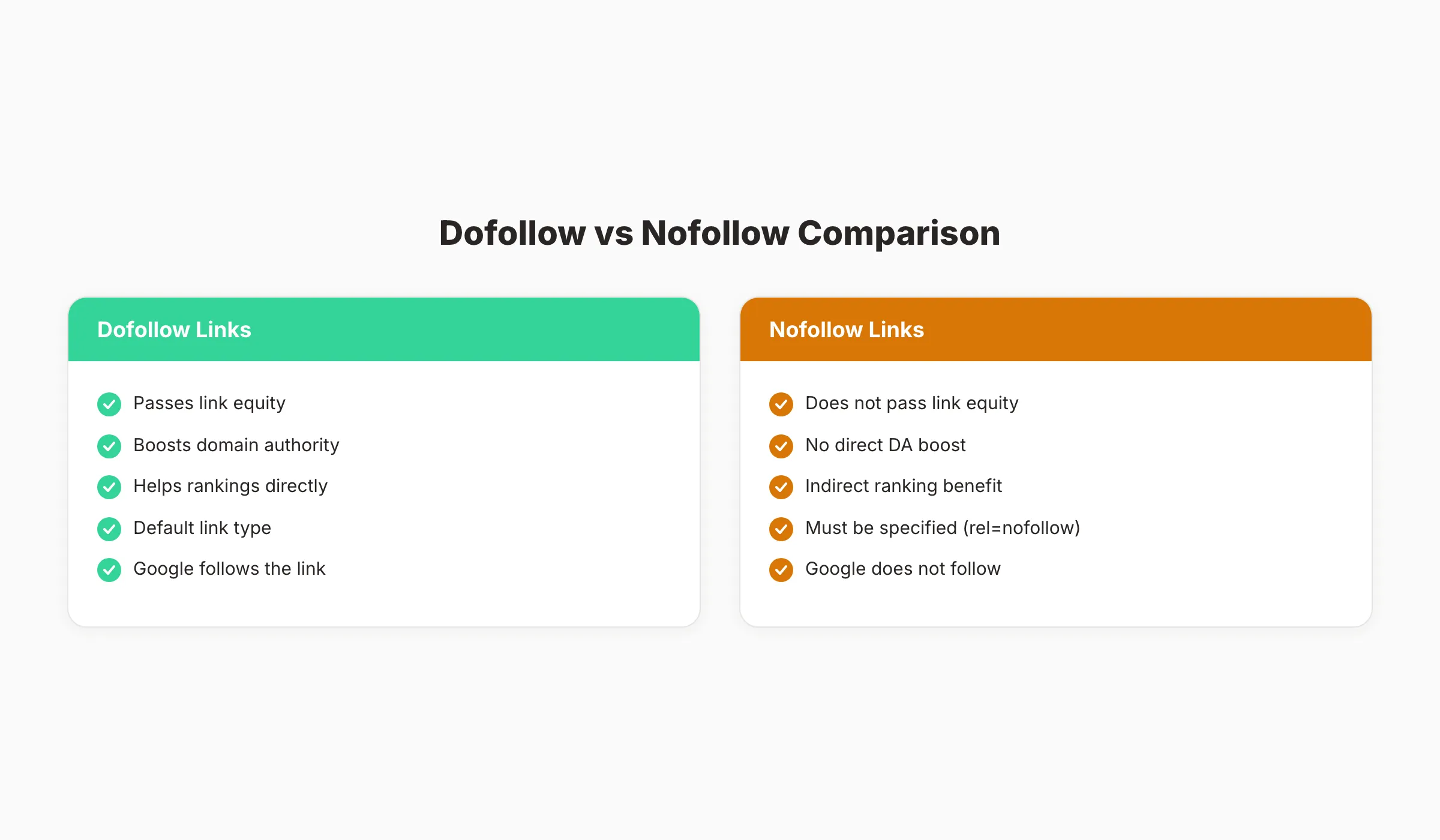
A dofollow link is a standard HTML link that passes link equity (also called “link juice” or PageRank) from one page to another. There is no rel="dofollow" attribute in HTML. “Dofollow” is industry shorthand for a link with no nofollow attribute applied.
Here is what a dofollow link looks like in HTML:
<a href="https://example.com">Anchor Text</a>No special attribute needed. Every link is dofollow by default.
When Google crawls a dofollow link, 3 things happen:
- Google follows the link to the destination page
- Google passes a portion of the source page’s authority to the destination
- Google uses the link as a ranking signal for the destination page
Dofollow links are the foundation of Google’s original PageRank algorithm. The more dofollow links pointing to a page from authoritative sources, the higher that page tends to rank. Websites with strong backlink profiles receive 67% more organic traffic than sites with weak profiles.
This is why link building remains one of the most important (and most difficult) parts of SEO. 41% of marketers say building quality backlinks is the hardest SEO task they face.
What Are Nofollow Links?
A nofollow link includes the rel="nofollow" attribute. This attribute tells search engines: “Do not use this link as a ranking signal.”
Here is what a nofollow link looks like in HTML:
<a href="https://example.com" rel="nofollow">Anchor Text</a>Google introduced the nofollow attribute in 2005 to combat comment spam. Spammers were flooding blog comments and forums with links to boost their rankings. Nofollow gave site owners a way to link without passing authority.
Where Nofollow Links Appear Naturally
Most links on the internet are nofollow by default on these platforms:
- Social media: Links from Facebook, X (Twitter), LinkedIn, Instagram, Pinterest, and TikTok
- Forums and communities: Reddit, Quora, Stack Overflow, and most forum software
- Blog comments: WordPress and most CMS platforms automatically nofollow comment links
- Wikipedia: All external links carry nofollow
- Press releases: Most press release distribution services use nofollow
- User-generated directories: Yelp, Google Business Profile links, and review platforms
Nofollow links do not directly boost rankings. But they serve other purposes. They drive referral traffic, build brand awareness, and signal to Google that your site has natural link diversity.
Dofollow vs Nofollow: Key Differences
The difference comes down to one question: does the link pass ranking authority?
| Feature | Dofollow | Nofollow |
|---|---|---|
| Passes link equity | Yes | No (but Google may override) |
| HTML attribute | None (default behavior) | rel="nofollow" |
| Direct SEO impact | Yes. Improves rankings | No direct impact |
| Referral traffic | Yes | Yes |
| Google crawling | Always followed and crawled | May or may not be crawled |
| Brand visibility | Yes | Yes |
| Natural profile need | 60-80% of total links | 20-40% of total links |
| Risk of over-optimization | High if 100% dofollow | Low |
The critical detail most guides miss: since 2019, Google treats nofollow as a “hint,” not a directive. Google can choose to follow and count a nofollow link if its algorithms determine the link is relevant and trustworthy. More on this in the next section.
Dofollow links build ranking authority. Nofollow links build a natural profile. You need both.
Google’s 2019 Update: Nofollow Became a Hint
On September 10, 2019, Google published a blog post titled “Evolving nofollow” that changed how nofollow links work. This update is the most important development in link attribution in over a decade. Many SEO guides still get it wrong.
What Changed
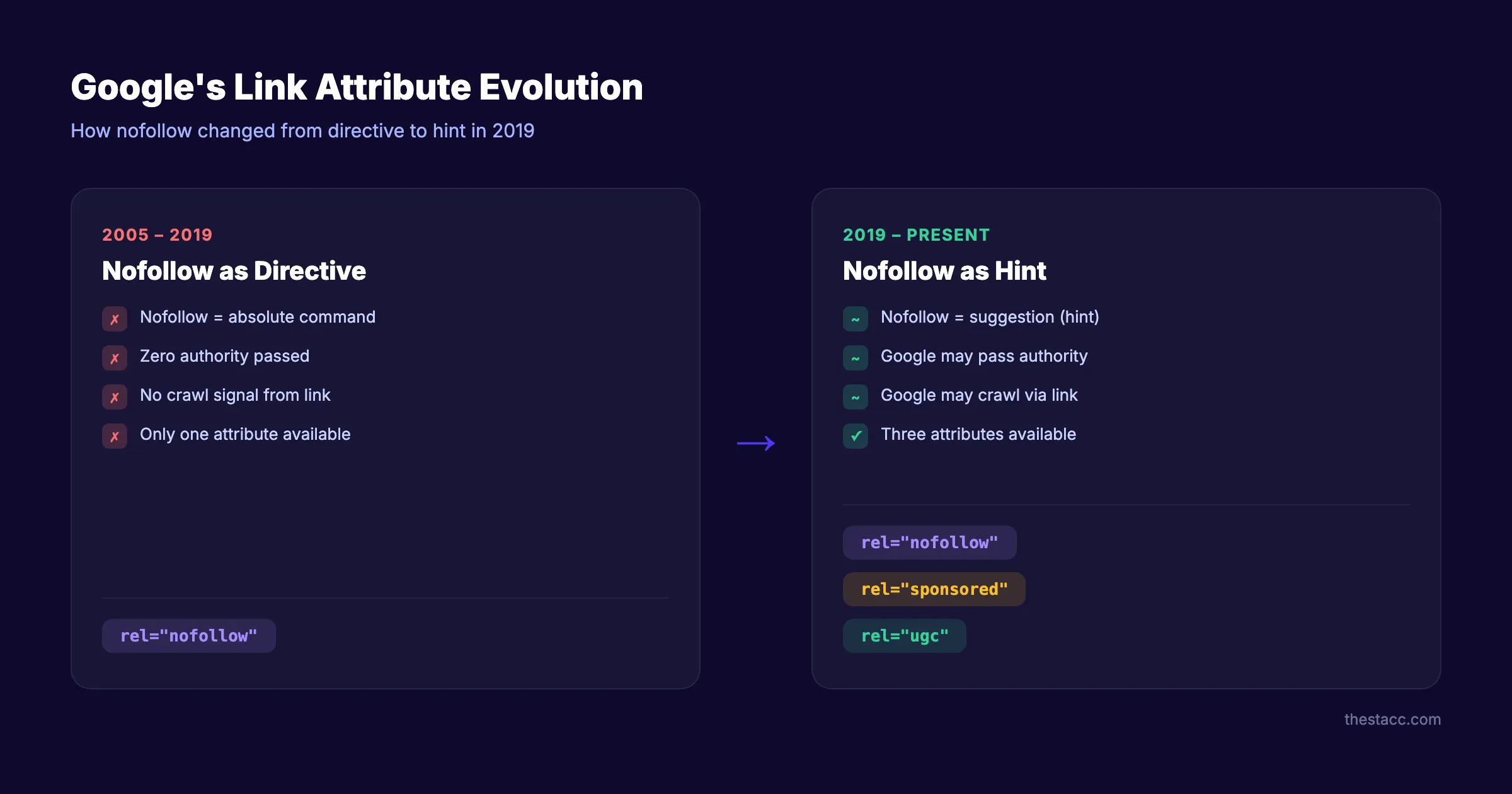
Before 2019: Nofollow was a directive. Google obeyed it absolutely. A nofollow link passed zero authority, zero crawl signals, and zero ranking benefit. Period.
After 2019: Nofollow became a hint. Google reserves the right to consider nofollow links as ranking signals if its algorithms find them relevant. Google can also discover and index new pages through nofollow links.
Three New Link Attributes
Google introduced 2 new attributes alongside nofollow:
| Attribute | Use Case | Example |
|---|---|---|
rel="sponsored" | Paid links, advertisements, sponsorships | Affiliate links, paid placements, banner ad links |
rel="ugc" | User-generated content | Blog comments, forum posts, community submissions |
rel="nofollow" | General “do not endorse” signal | Any link you do not want to vouch for |
You can combine attributes: rel="nofollow sponsored" or rel="nofollow ugc". Google recommends using the most specific attribute available.
What This Means in Practice
For link builders: Nofollow links from authoritative sites (Wikipedia, major publications, Reddit) may now carry some ranking value. You should not dismiss them.
For site owners: Use rel="sponsored" on paid links. Use rel="ugc" on user-submitted links. Use rel="nofollow" on any link you do not trust or endorse. Existing nofollow links do not need to be changed.
For SEO auditors: A backlink audit should now analyze nofollow links from high-authority domains separately. These may contribute to rankings even without passing traditional link equity.
78.8% of SEO professionals now believe nofollow links still affect rankings to some degree. The “hint” model means Google’s treatment of nofollow is no longer binary.
Stop writing. Start ranking. Stacc publishes 30 SEO articles per month for $99. Every article builds your domain authority with internal and external links. Start for $1 →
When to Use Each Link Type
Knowing when to apply dofollow or nofollow attributes prevents penalties and maximizes link value.
When to Use Dofollow (Default)
Leave links as dofollow when you genuinely endorse the destination:
- Editorial links in your own content: Links to sources, references, and resources you recommend
- Internal links: All internal links should be dofollow (with rare exceptions)
- Guest post author bio links: Standard practice for legitimate guest contributions
- Resource page links: Curated lists of tools, guides, or references you trust
- Partner and vendor links: When the relationship is genuine, not paid
When to Use Nofollow
Apply rel="nofollow" when you do not want to vouch for the destination:
- Untrusted content: Links to sites you have not personally verified
- Comment sections: Any link submitted by users (most CMS platforms handle this automatically)
- Login or signup links: Google does not need to crawl these pages
When to Use rel=“sponsored”
Apply rel="sponsored" on any link involving monetary exchange:
- Affiliate links: Product recommendations with tracking parameters
- Paid placements: Sponsored content, advertorials, paid directory listings
- Banner ad links: Display advertising that links to external sites
- Influencer partnerships: Product review links with compensation involved
Google has explicitly stated that failing to mark paid links with rel="sponsored" or rel="nofollow" can result in a manual penalty. This applies to both the linking and linked site.
When to Use rel=“ugc”
Apply rel="ugc" on links created by your users:
- Blog comments: User-submitted comments with links
- Forum posts: Community-generated content
- User reviews: Product or service reviews submitted by customers
- Wiki-style content: Pages editable by community members
Quick Reference Decision Tree
| Link Scenario | Attribute to Use |
|---|---|
| You wrote it and endorse the destination | Dofollow (no attribute) |
| User submitted the link | rel="ugc" |
| Money changed hands | rel="sponsored" |
| You do not trust the destination | rel="nofollow" |
| Internal link within your own site | Dofollow (no attribute) |
| Affiliate link with tracking | rel="sponsored" |
How to Check If a Link Is Dofollow or Nofollow
You can check any link’s follow status in 3 ways. From manual inspection to bulk auditing tools.
Method 1: Inspect Element (Manual)
Right-click any link in your browser and select “Inspect” or “Inspect Element.” Look at the <a> tag in the HTML.
Dofollow example:
<a href="https://example.com">Link Text</a>No rel="nofollow" attribute present. The link is dofollow.
Nofollow example:
<a href="https://example.com" rel="nofollow">Link Text</a>The rel="nofollow" attribute tells Google not to pass authority.
This method works for checking individual links. It does not scale for auditing an entire site.
Method 2: Browser Extensions (Quick Check)
Install a browser extension that highlights link types automatically:
- NoFollow (Chrome): Highlights nofollow links with a red dotted border
- SEOquake (Chrome/Firefox): Shows follow status in a toolbar overlay
- MozBar (Chrome): Displays link attributes alongside DA/PA metrics
These extensions work on any webpage. They are useful for quick competitor analysis and spot-checking your own content.
Method 3: Crawling Tools (Bulk Audit)
For a complete site audit, use a crawling tool to analyze every link:
- Screaming Frog: Crawls your entire site and exports all links with their attributes
- Ahrefs Site Audit: Identifies your dofollow/nofollow ratio across all pages
- Semrush Backlink Audit: Analyzes your inbound link profile by follow status
A full SEO audit should include a link attribute analysis. This reveals whether your profile looks natural or over-optimized.
Building a Natural Link Profile
Google expects a natural mix of dofollow and nofollow links. A profile with 100% dofollow links signals manipulation. A profile with too many nofollow links suggests low authority.
The Ideal Ratio
| Profile Type | Dofollow % | Nofollow % | Risk Level |
|---|---|---|---|
| Natural / Healthy | 60-80% | 20-40% | Low |
| Slightly aggressive | 80-90% | 10-20% | Medium |
| Over-optimized | 90-100% | 0-10% | High |
| Authority deficit | Below 50% | Above 50% | Medium |
The average across the top 110,000 websites is 89.4% dofollow and 10.6% nofollow. But this average skews high because large authority sites naturally attract more dofollow editorial links.
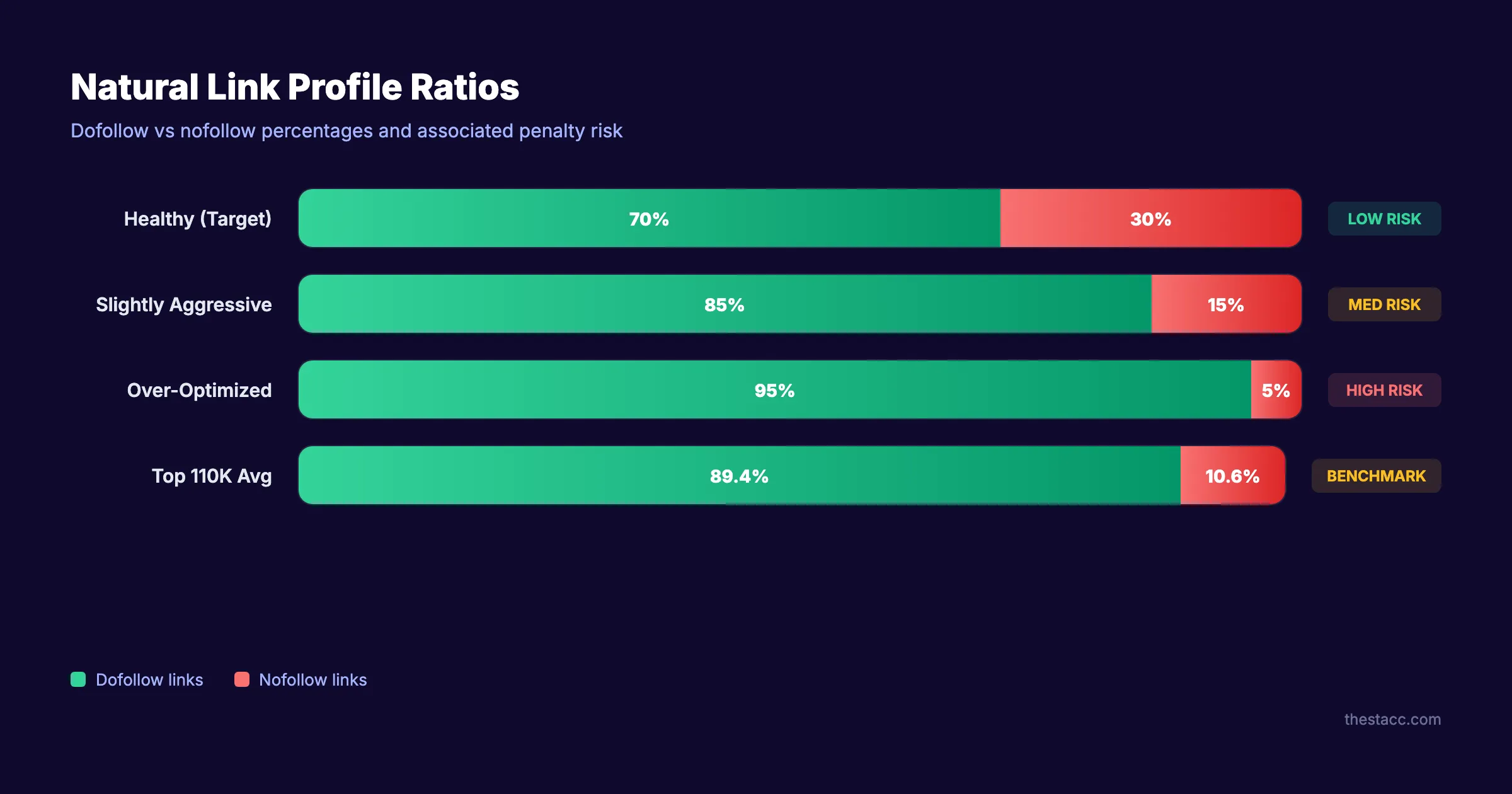
For small and mid-sized businesses, a 70/30 split is a healthy target. Achieve this by building quality dofollow links through content and outreach while naturally accumulating nofollow links from social media, forums, and directories.
How to Build Dofollow Links
The best dofollow links come from editorial mentions. Someone reads your content, finds it valuable, and links to it without being asked. Here are strategies that generate editorial dofollow links:
- Publish original research or data. Data studies attract citations. Journalists and bloggers link to original statistics.
- Create high-utility guides. Step-by-step guides that solve real problems earn links from resource pages.
- Build free tools. A useful free tool earns natural links from anyone who recommends it. Check our SEO tools for examples.
- Guest posting on relevant sites. Write for sites in your industry. Include a natural dofollow link in the content body (not just the bio).
- Fix broken links. Find broken outbound links on authority sites and offer your content as a replacement. This is called broken link building.
- Earn press mentions. Respond to journalist queries on platforms like HARO, Connectively, or Qwoted.
How to Earn Nofollow Links Naturally
Nofollow links accumulate through normal business activity:
- Share your content on social media platforms (all social links are nofollow)
- Participate in relevant Reddit and Quora discussions
- Maintain business listings on directories and review platforms
- Encourage customer reviews that link to your site
- Comment on industry blogs with genuine insights (not spam)
Your SEO team. $99 per month. 30 optimized articles, published automatically. Every article earns backlinks and builds topical authority over time. Start for $1 →
Common Dofollow vs Nofollow Mistakes
These errors cost rankings and sometimes trigger penalties. Avoid all of them.
Mistake 1: Nofollowing your own internal links. Internal links should almost always be dofollow. Adding nofollow to internal links blocks PageRank flow within your own site. This is called “PageRank sculpting,” and Google confirmed in 2009 that it does not work. The PageRank that would have flowed through a nofollowed internal link evaporates. It does not redistribute to other links.
Mistake 2: Building 100% dofollow links. An all-dofollow profile looks manufactured. Google’s algorithms detect unnatural patterns. A healthy profile includes nofollow links from social platforms, directories, and user-generated content. Target a 70/30 dofollow-to-nofollow ratio.
Mistake 3: Not tagging paid links as sponsored.
Google requires rel="sponsored" or rel="nofollow" on any link involving payment. Failing to tag paid links can result in a manual action penalty against both sites. This includes affiliate links, sponsored posts, and paid directory placements.
Mistake 4: Ignoring nofollow links in your backlink analysis. After the 2019 update, nofollow links from high-authority domains may carry ranking value. A complete backlink audit should analyze both link types. Dismissing all nofollow links misses potential ranking signals.
Mistake 5: Obsessing over individual link attributes. One dofollow link from a low-authority spam site hurts more than it helps. One nofollow link from the New York Times drives thousands of referral visitors. Quality and relevance matter more than follow status. Focus on earning links from relevant, authoritative sources regardless of their nofollow policy.
Mistake 6: Using nofollow on outbound editorial links. Some site owners nofollow every outbound link to “hoard” PageRank. This is unnecessary and potentially harmful. Google expects natural outbound linking. Nofollowing every external link makes your content look suspicious. Link to authoritative sources with dofollow. It does not hurt your rankings.
Dofollow vs Nofollow and Internal Linking
Internal links deserve special attention. They work differently from external backlinks.
Every internal link on your site should be dofollow. Internal links distribute PageRank across your pages. They help Google discover and index new content. They signal which pages you consider most important.
The only exception: login pages, shopping carts, or other pages you do not want Google to prioritize. But even these rarely need nofollow. Google handles most of these through robots.txt and noindex tags.
A strong internal linking structure multiplies the value of every dofollow backlink your site earns. When an external dofollow link points to your homepage, internal links distribute that authority to your blog posts, product pages, and service pages.
Use anchor text optimization for internal links. Descriptive anchor text tells Google what the destination page is about. Avoid generic phrases like “click here” or “read more.”
The Nofollow vs Noindex Distinction
Beginners often confuse nofollow with noindex. They serve completely different purposes.
| Attribute | What It Does | Scope |
|---|---|---|
rel="nofollow" | Tells Google not to pass authority through a specific link | Link-level |
<meta name="robots" content="noindex"> | Tells Google not to include a page in search results | Page-level |
A nofollow link still allows Google to see and potentially crawl the destination page. It only affects whether authority passes through that specific link.
A noindex tag hides an entire page from search results. The page still exists and loads for visitors. But Google removes it from the index.
These two attributes solve different problems. Use nofollow when you do not want a link to pass authority. Use noindex when you do not want a page appearing in search results. They can be used together on the same page for maximum control.
For more on how Google handles indexing directives, see our technical SEO checklist.
3,500+ blogs published. 92% average SEO score. See what Stacc can do for your link-building strategy. We publish content that earns backlinks. Start for $1 →
FAQ
What is the difference between dofollow and nofollow links?
A dofollow link passes ranking authority (PageRank) from one page to another. A nofollow link includes rel="nofollow" which tells Google not to count it as a ranking signal. Dofollow directly improves SEO. Nofollow drives traffic and brand visibility without direct ranking impact.
Do nofollow links help SEO?
Nofollow links do not directly pass ranking authority. But they contribute to a natural link profile, drive referral traffic, and build brand awareness. Since Google’s 2019 update, nofollow is a “hint” rather than a directive. Google may choose to count some nofollow links as ranking signals. 78.8% of SEO professionals believe nofollow links still affect rankings.
What is the ideal ratio of dofollow to nofollow links?
A healthy link profile contains 60 to 80% dofollow links and 20 to 40% nofollow links. The average across top websites is 89.4% dofollow. For small and mid-sized businesses, a 70/30 split signals a natural, organic profile. A 100% dofollow profile looks manufactured and risks triggering Google penalties.
Are social media links dofollow or nofollow?
All major social media platforms use nofollow links. This includes Facebook, X (Twitter), LinkedIn, Instagram, Pinterest, and TikTok. Social media links do not pass direct ranking authority. They do drive referral traffic and contribute to your nofollow link percentage.
What is the difference between nofollow and noindex?
Nofollow is a link-level attribute that prevents authority from passing through a specific link. Noindex is a page-level directive that prevents an entire page from appearing in search results. They solve different problems. Use nofollow on links you do not endorse. Use noindex on pages you do not want indexed.
Should I nofollow all outbound links?
No. Nofollowing every outbound link is unnecessary and looks unnatural. Link to authoritative sources with dofollow when you genuinely endorse the content. Google expects natural outbound linking. Only use nofollow on links you do not trust, paid links, or user-generated content.
What are rel=“sponsored” and rel=“ugc”?
Google introduced these attributes in September 2019 alongside the nofollow “hint” change. Use rel="sponsored" on any link involving monetary exchange (affiliate links, paid placements, sponsorships). Use rel="ugc" on user-generated content (comments, forum posts, reviews). Both tell Google not to pass ranking authority through the link.
Dofollow and nofollow links serve different purposes. Both are essential for a healthy SEO strategy. Build dofollow links for ranking authority. Earn nofollow links for traffic, diversity, and natural signals. Monitor your ratio, tag paid links properly, and remember that Google treats nofollow as a hint, not a command.

Written by
Siddharth GangalSiddharth is the founder of theStacc and Arka360, and a graduate of IIT Mandi. He spent years watching great businesses lose organic traffic to competitors who simply published more. So he built a system to fix that. He writes about SEO, content at scale, and the tactics that actually move rankings.
30 SEO blog articles published every month
Keyword-optimized, scheduled, and live on your site. Automatically.
30-day trial · Cancel anytime
theStacc
Stop writing SEO content manually
30 blog articles, 30 GBP posts, and social media content. Published every month. Automatically.
Start Your $1 Trial$1 for 3 days · Cancel anytime