Use Claude Code to generate, validate, and deploy programmatic location pages at scale. 7-step workflow with quality gates, deploy steps, and real costs.
Claude Code can generate, validate, and deploy hundreds of location pages from a structured data file in a weekend. The work is mostly data preparation and quality gates, not writing. This walkthrough covers the seven-step workflow, the checks that stop thin pages shipping, and the real token costs.
You need 500 city pages for your service business. A freelance writer quoted $45,000 and 14 weeks. An agency quoted $28,000 and 8 weeks. You have one weekend.
That gap is exactly what Claude Code closes. Claude Code is Anthropic's coding agent that lives in your terminal, reads your repo, writes files, and runs scripts. Paired with a clean dataset, it can generate hundreds of programmatic location pages in a single weekend session — for the cost of a few API calls.
The catch: most teams that try this end up with 500 thin pages that get deindexed in the next core update. The difference between a working pipeline and a deindex risk is not the model. It is the workflow.
This guide is the workflow. We publish 3,500+ blog posts across 70+ industries and our average SEO score is 92%. We use programmatic patterns for glossary pages, location pages, and integration pages every week. This is what works in 2026.
Here is what you will learn:
- What Claude Code actually does for programmatic SEO (and what it does not)
- Where Claude Code stores config, skills, and project memory
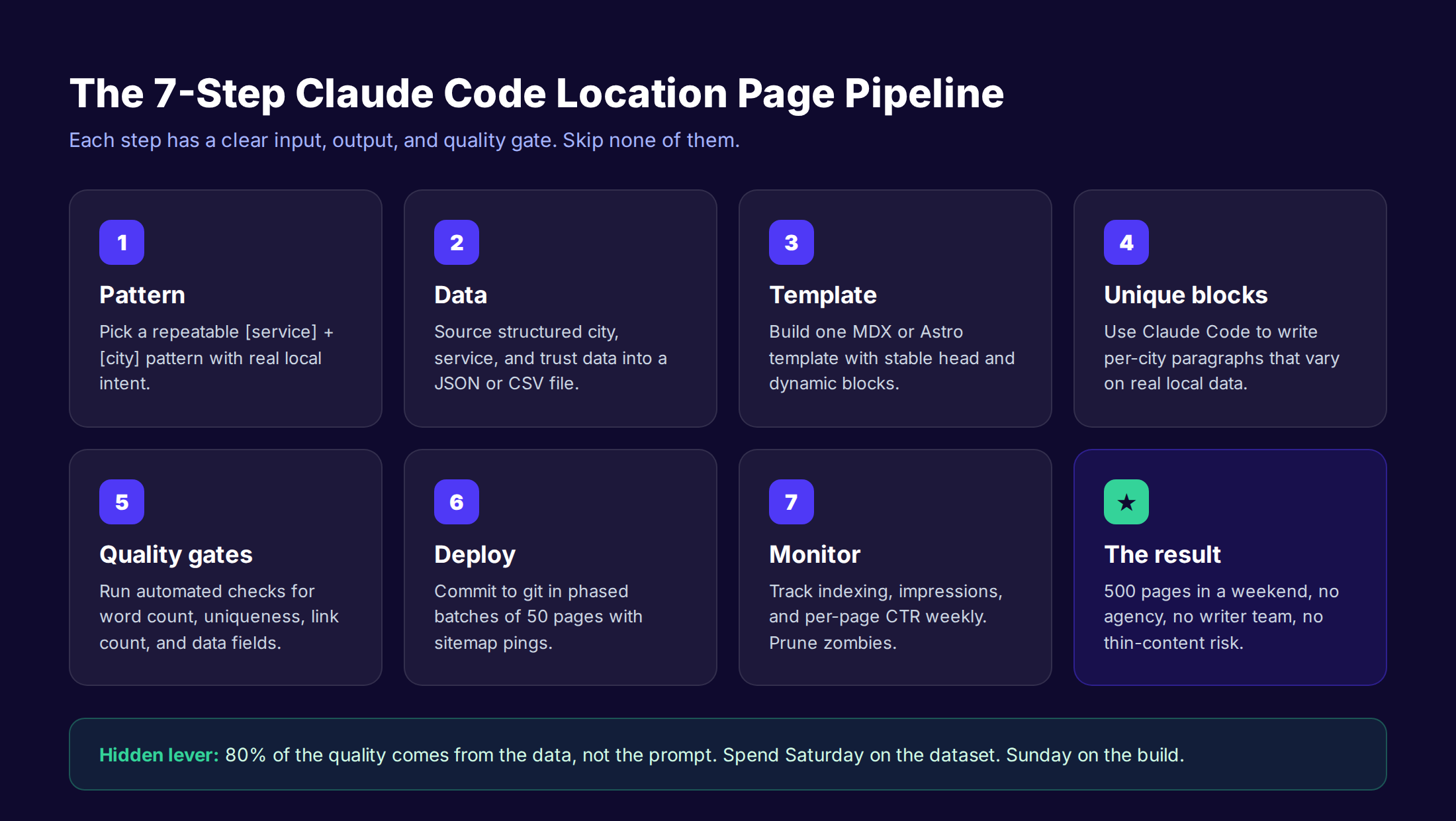
- The 7-step pipeline to take 1 template and 500 cities to live pages
- The 5 quality gates every page must pass before deploy
- The 6 mistakes that get Claude-generated pages pruned
- The real cost of DIY vs done-for-you at 500-page scale
What Claude Code Brings to Programmatic Location Pages
Claude Code is not a content tool. It is an agent that runs in your terminal, reads your files, edits them, runs shell commands, and orchestrates other tools through MCP servers. For programmatic SEO, that combination is the unlock.
Traditional programmatic SEO pipelines stitch together five or six services. You have a data source, a templating engine, a content generator, a deploy step, and a monitoring layer. Each handoff is a place to break. Claude Code collapses the middle layer.
In a single session, Claude Code can read your city dataset, generate a unique paragraph per city, validate the output against a quality schema, write the resulting MDX files into your repo, commit them to git, and ping your sitemap. The agent loop replaces the middleware.
What Claude Code Does Well For Location Pages
Three jobs are where Claude Code outperforms tools like Jasper, Surfer, or Frase for programmatic work:
- Per-row generation with context. Claude Code can read the full city dataset, sort by population or region, and write content that references neighboring cities or regional patterns. A standalone content tool does not know what city is next to what city.
- In-repo validation. The agent can read its own output, run a word-count check, diff it against the template, and reject pages that fail. No upload-download loop.
- Native deploy steps. Git, npm, and shell commands are first-class. Claude Code can commit a batch of 50 pages, push the branch, and trigger your CI build without leaving the session.
What Claude Code Does Not Do
Be honest about the gaps. Claude Code does not pull real local data on its own. It does not validate that "Cleveland" actually has 372,000 people. It does not check Google Search Console for cannibalization risk. It does not measure indexing health post-deploy.
You still need a data source, a search analytics workflow, and a monitoring system. Claude Code is the orchestration layer. The data, the schema, and the quality bar are still yours.
For a deeper take on how programmatic content fits inside a broader strategy, our programmatic SEO guide covers patterns, scaling, and Google's Scaled Content Abuse policy.
Where Claude Code Lives: Setup, Config, and Data Storage
Before you generate one page, know where Claude Code keeps everything. Three paths matter. Get these wrong and your skills will not load, your context will reset, and your batch runs will fail mid-deploy.
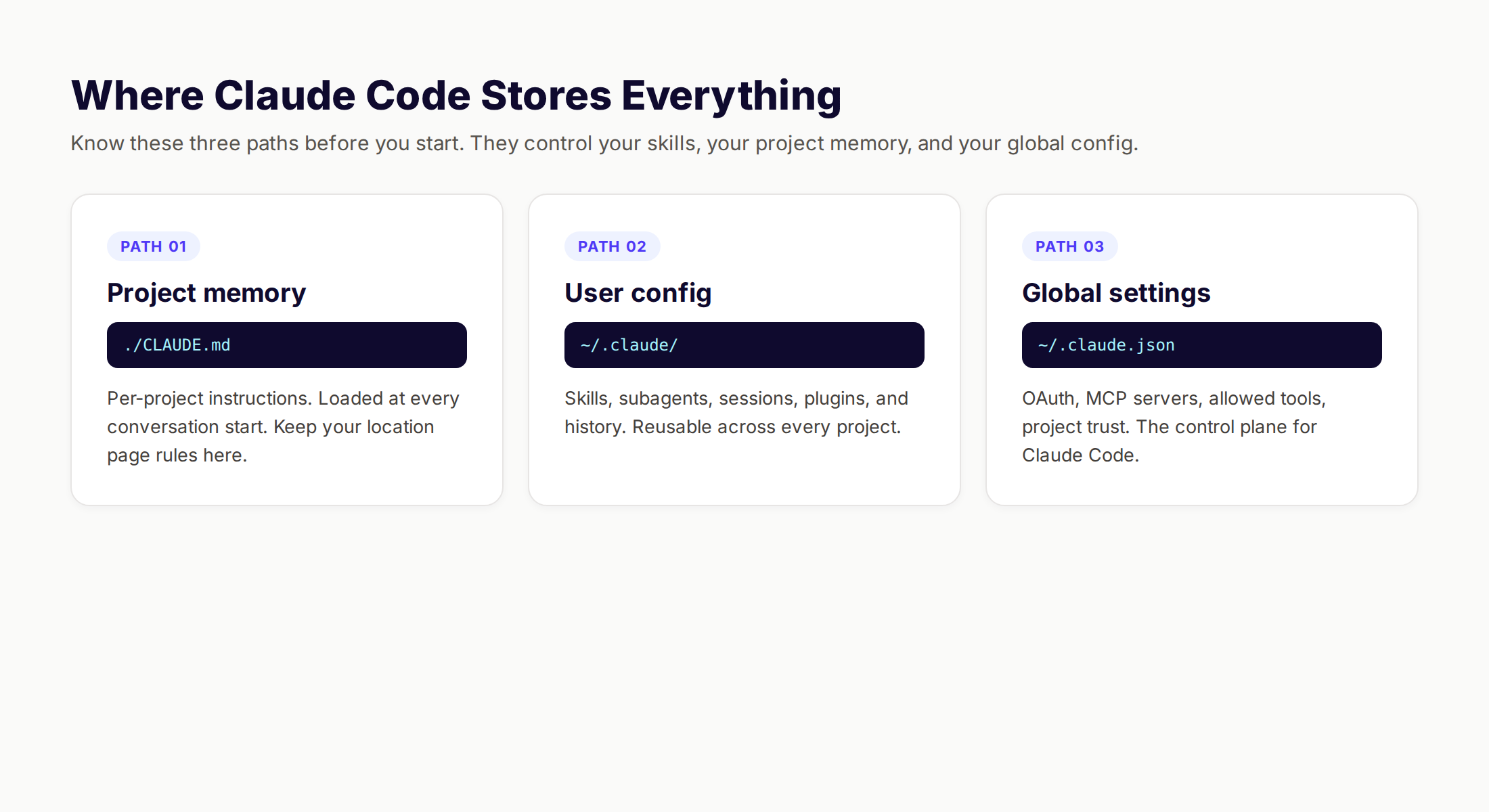
The Three Paths You Need to Know
| Path | What lives here | Why it matters for location pages |
|---|---|---|
./CLAUDE.md | Project memory. Per-repo instructions loaded at every conversation start. | Define your location page rules, banned phrases, and quality bar here. |
~/.claude/ | User-scope directory. Skills, subagents, sessions, plugins, history, and runtime data. | Reusable location-page skill goes here so you can apply it across client projects. |
~/.claude.json | Global config. OAuth, MCP servers, allowed tools, per-project trust, and caches. | Controls which MCP servers (data sources, CMS connectors) are available. |
Source: Claude Code settings documentation and the .claude directory reference.
Setup Checklist for the Location Page Pipeline
- ✓ Install Claude Code globally and authenticate with your Anthropic account
- ✓ Create a fresh repo with your Astro, Next.js, or Hugo site as the host
- ✓ Add
CLAUDE.mdwith your brand voice, banned words, and page schema - ✓ Add a
data/cities.csvordata/cities.jsonfile with structured input - ✓ Configure your CMS or git remote so the agent can deploy
- ✓ Add a quality-gate script the agent will run after every batch
What Goes In CLAUDE.md
This file is your specification. The clearer you are here, the less prompting you do later. A strong project memory file for location pages should cover:
- Brand voice and banned phrases (e.g. "no contractions, no 'use' or 'smooth'")
- Word-count floor (e.g. 800 words minimum per page)
- Required data fields per city (e.g. population, ZIP codes, top 3 neighborhoods)
- Internal linking rules (e.g. each page links to the service hub, one sibling city, and one related service)
- Schema requirements (e.g. valid
LocalBusinessJSON-LD on every page) - A list of competitor pages to not copy
If you are doing this for a client, treat CLAUDE.md as the deliverable. It is the only file that captures the rules. The pages are downstream.
The 7-Step Workflow to Generate 500 Location Pages
Claude Code can run a long-running session that touches every file in your repo. That is the wrong way to use it for programmatic SEO. The right way is a 7-step pipeline with checkpoints, where each step has a single owner, a clear output, and a quality gate.
Skip any step and you ship thin pages.
Stop writing. Start ranking. theStacc plans, writes, and publishes SEO articles from $99 per month, including programmatic location and service pages, fully managed.
Step 1: Define the Location Page Pattern
The single most expensive mistake in programmatic SEO is generating pages for patterns no one searches for. Define the pattern before you open Claude Code.
A strong location page pattern has three traits. The query is repeated across hundreds of cities. The query intent is consistent everywhere. And the user expects a unique local answer, not a generic national one.
Examples that work:
- "{service} in {city}" — "Plumbers in Austin"
- "{noun} near me" expanded to city — "Pet groomers in Tampa"
- "{city} {service} cost" — "Phoenix HVAC repair cost"
- "best {category} in {city}" — "Best CPAs in Charlotte"
Examples that fail:
- "{niche product} in {city}" with no local intent — informational queries lose to national content
- "{tiny town} {service}" without enough population to drive search volume
- "{service} {state}" — state-level intent is wider, fewer wins
- "{city} {generic term}" — too broad, gets out-competed by the city's own SEO
Validate the pattern with a sample of 10 cities. Use Google Search Console, Ahrefs, or Semrush to confirm that the top 10 cities each have at least 20 monthly searches and a localized SERP. If 8 of 10 fail, the pattern is wrong.
The Honest Conversation About Volume
A common pitfall is the "any volume is good volume" trap. Pages for cities with 0-10 monthly searches still cost you crawl budget, internal linking equity, and editorial attention. We cap our location page builds at cities where the keyword volume is at least 20 per month, or where the city has a population over 50,000.
For more on selecting profitable keyword patterns, see our keyword research for local SEO guide.
Step 2: Source the City and Service Data
This is the step that decides whether your pages are unique or thin. Claude Code does not invent local data. You feed it.
A well-built dataset for a single city includes:
| Field | Example | Why it matters |
|---|---|---|
city_name | "Austin" | The dynamic head in your H1 and title |
state | "Texas" | Disambiguation and schema |
population | 974,447 | Trust signal and an easy uniqueness point |
zip_codes | ["78701", "78702", "78703"] | Local intent and schema coverage |
neighborhoods | ["Downtown", "East Austin", "Zilker"] | Per-city content uniqueness |
nearest_office | "5th Street, Austin" | E-E-A-T signal |
local_landmark | "Lady Bird Lake" | Per-city natural sentence |
market_note | "Tech-heavy, high HVAC demand in summer" | One-sentence local context |
service_modifier | 1.15 | Per-city price index |
Build this dataset before you write a single prompt. Sources include US Census API (free), local business directories, Wikipedia infoboxes (with cleanup), and your own CRM if you have local presence.
Build the Data Once, Run Forever
A well-structured cities.json file is reusable across every service line. The same 500-city dataset can drive plumbing pages, electrician pages, HVAC pages, and pest control pages with different service_modifier fields. You build the data once. You run it forever.
For multi-service or multi-location businesses, this is the asset, not the pages. The pages are the output. The dataset is the IP.
If you operate across multiple locations and want a strategic view of the bigger picture, our multi-location SEO guide explains how location pages, GBP profiles, and citations stack.
Step 3: Build the Page Template in Claude Code
The template is the second decision point. Get this wrong and every page is born thin.
The Five Section Architecture
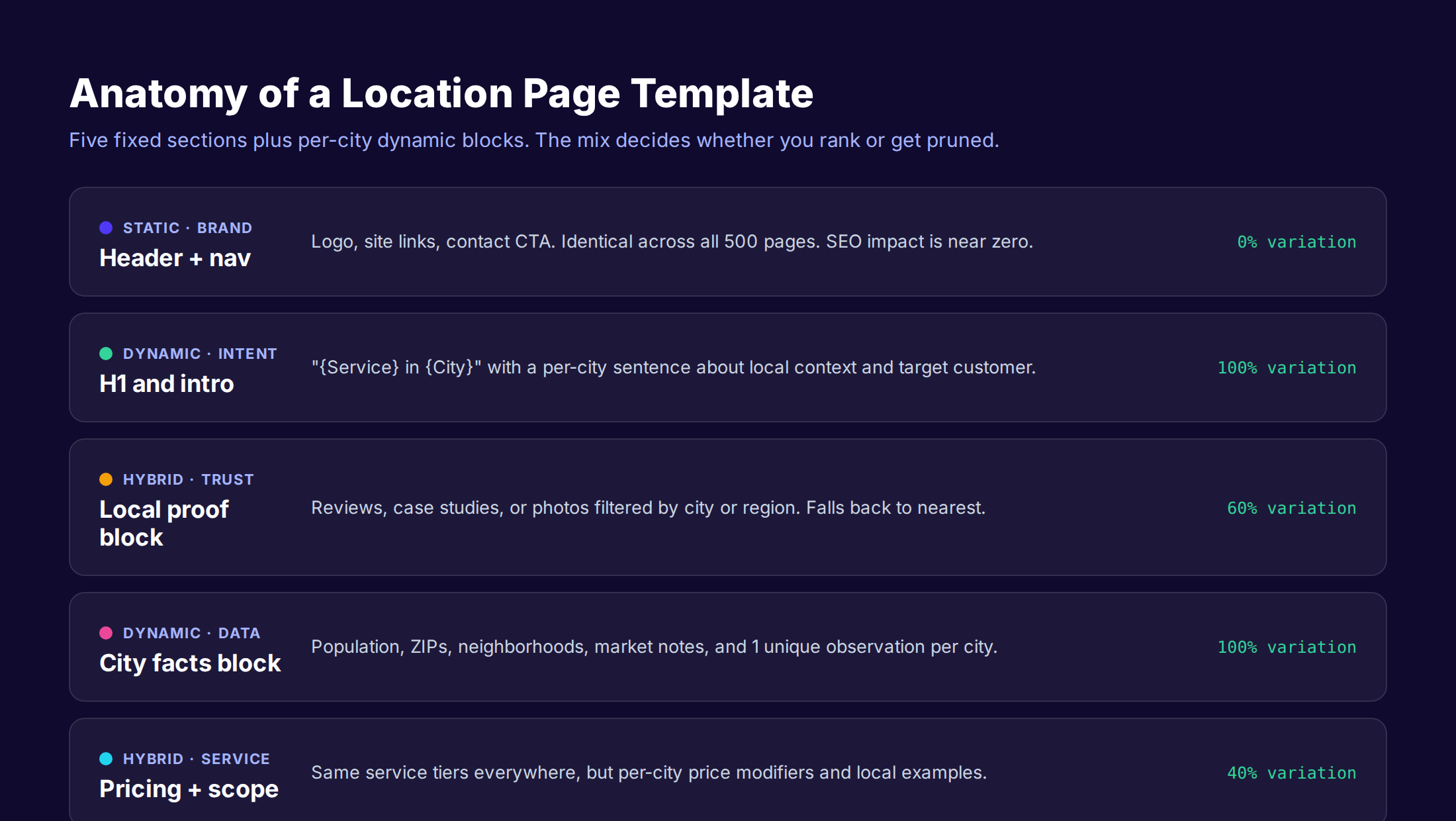
Every location page should have five sections, mixing fixed and variable blocks:
- Header and nav — 100% static. No SEO value, no risk.
- H1 and intro — 100% dynamic. Title is "{Service} in {City}". Intro is a 2-3 sentence paragraph with at least one local data point.
- Local proof block — 60% dynamic. Reviews, case studies, or photos filtered by city. Falls back to nearest with a clear note.
- City facts block — 100% dynamic. Population, ZIPs, neighborhoods, market note, and one observation written by Claude Code.
- Service scope and pricing — 40% dynamic. Same tier structure, per-city price modifier, and a local example.
The total page should land between 800 and 1,200 words. Below 800 is thin. Above 1,200 is unnecessary for transactional intent.
Why This Mix Beats Pure Templates
A 100% template page is what gets deindexed. A 100% custom page is what costs $45,000. The mix is what wins.
The goal is not to make every section unique. The goal is to make every page meaningfully different where the user cares. Users do not care that your nav is the same on every page. They care that the city facts are real and the pricing reflects their market.
For more on Google's Scaled Content Abuse policy and how it applies to templated pages, our scaled content ban survival guide covers the policy text and the specific patterns Google targets.
Step 4: Generate Per-City Unique Content Blocks
This is where Claude Code earns its keep. You will use it to generate 3 blocks per city: the intro paragraph, the city facts paragraph, and the local example for the pricing section.
The Prompt Structure That Works
The prompt you send to Claude Code for each city is not a one-shot. It is a structured request with the data injected as JSON. A working pattern:
You are writing the intro for our HVAC service page targeting {city_name}, {state}.

Data to reference (use 2-3, not all):
- Population: {population}
- Top neighborhoods: {neighborhoods}
- Market note: {market_note}
- Nearest office: {nearest_office}

Rules:
- 110-140 words total
- No contractions
- Mention {city_name} twice maximum
- One concrete number from the data
- One local sentence that would not work for any other city

Output: a single paragraph. No headers, no markdown.
The "would not work for any other city" line is the unlock. It forces the model to commit to one local detail per page. Without that constraint, you get generic prose with the city name pasted on.
Run In Batches, Not All At Once
A common mistake is asking Claude Code to generate all 500 cities in one session. The context window fills, the agent drifts, and the last 100 cities are noticeably worse than the first 100.
The fix is batching. Run 25-50 cities per session. Save each batch's output to a file. Spot-check 3 random pages per batch before continuing. If the quality drifts, reset the conversation.
For larger runs, Anthropic's documentation on programmatic tool calling shows how to wrap Claude Code in a loop where each city is its own contained request. That is the production-grade pattern.
Vary Sentence Structure Across Batches
A subtle issue: even with unique data, Claude Code tends to use the same sentence structure across runs. Every intro reads "Located in {city}, our team has served {population} residents since {year}."
The fix is to specify 3 acceptable intro patterns and rotate them per batch:
| Pattern | Example opener |
|---|---|
| Data-first | "Austin has 974,447 residents and one of the country's hottest HVAC markets." |
| Customer-first | "If you live in East Austin or Zilker, you have likely felt the August heat differently than the rest of Texas." |
| Service-first | "Our HVAC team works across all 78 ZIP codes in Austin, with a primary office on 5th Street." |
Specify which pattern to use per city in your dataset. The result is a page set that does not read like one author wrote 500 pages.
Step 5: Run Quality Gates Before Publishing
The single most important step in this whole workflow is the one most teams skip. Build automated quality gates and reject any page that fails any gate.
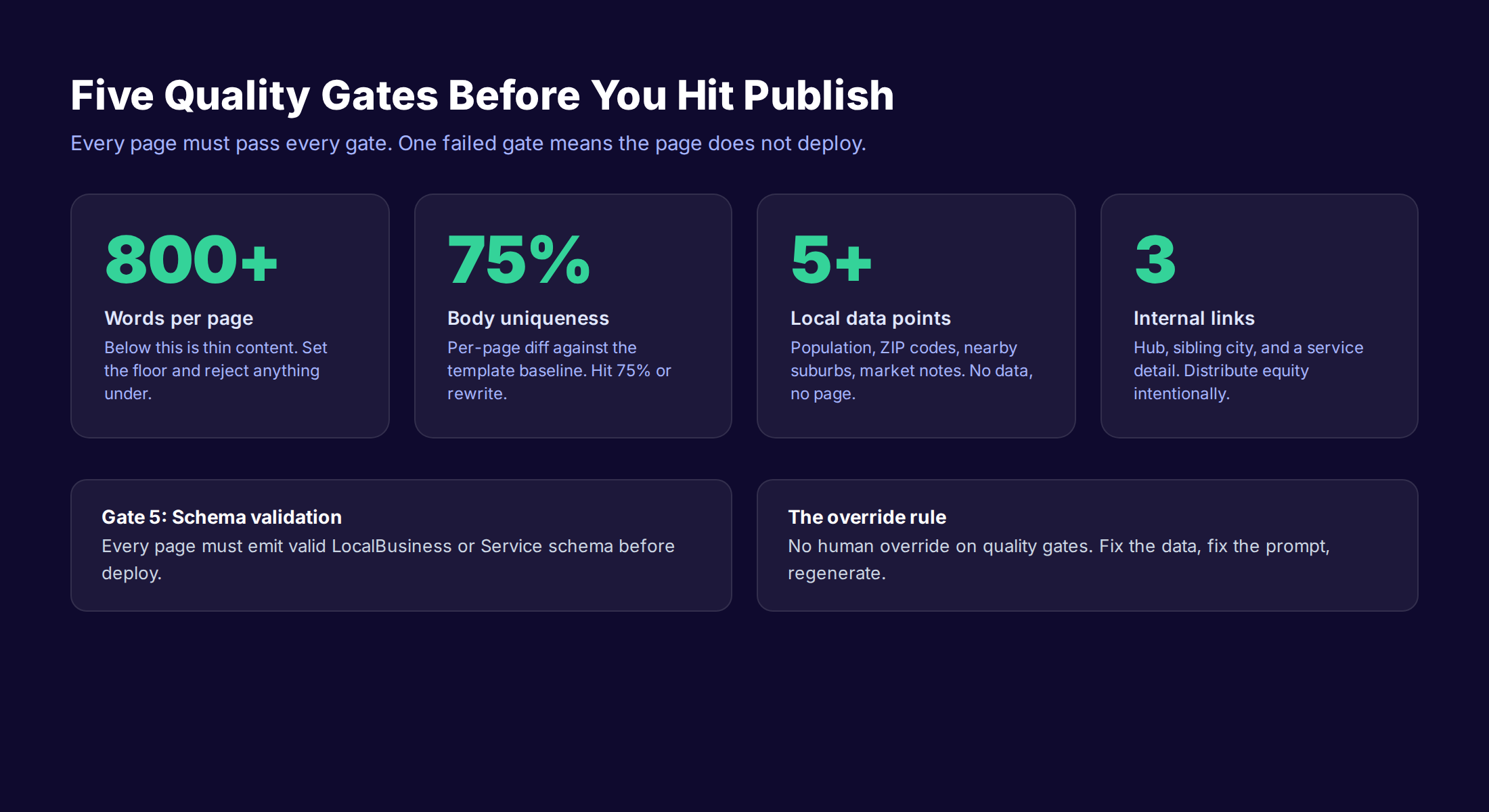
The 5 Gates Every Page Must Pass
- ✓ Word count floor. Reject pages under 800 words.
- ✓ Body uniqueness 75%+. Diff each page body against the template baseline. Under 75% means the dynamic blocks are too short or too generic.
- ✓ Five local data points. The page must reference at least 5 distinct fields from the city dataset.
- ✓ Three internal links. Each page links to the service hub, one sibling city, and one related service. No exceptions.
- ✓ Schema validation. Every page emits valid
LocalBusinessorServiceJSON-LD. Use Google's Rich Results Test in CI.
Write these gates as a single script Claude Code runs after every batch. A page that fails any gate gets logged, not deployed. You fix the data or the prompt and regenerate that specific city.
Why No Human Override
The temptation is to override the gates for "almost passing" pages. Resist it. The gates exist because Google does not grade on a curve. A page that scrapes 750 words with no schema is the same risk whether you flagged it or not.
The override rule is simple: no human override on quality gates. If a page fails, fix the upstream input. Do not push the page.
Quality Gate Pseudo-Code
The script does not need to be complex. A working pattern in any language:
for each page in batch:
  if word_count(page) < 800: reject(page, "word_count")
  if uniqueness(page) < 0.75: reject(page, "uniqueness")
  if data_points(page) < 5: reject(page, "data_points")
  if internal_links(page) < 3: reject(page, "internal_links")
  if !valid_schema(page): reject(page, "schema")
  approve(page)
Claude Code can write this script for you in 5 minutes. The point is not the code. The point is committing to the rule before you run.
For a deeper view of automated content quality control at scale, our AI content quality control guide breaks down the checks that matter and the ones that are theater.
Step 6: Deploy to Your CMS Programmatically
You have 500 validated MDX or HTML files. Do not push them all at once.
The Phased Deploy Pattern
| Phase | Pages live | Timing | What you watch for |
|---|---|---|---|
| Phase 1 | 50 | Day 1 | Indexing speed in GSC. Should be 80% indexed in 14 days. |
| Phase 2 | +100 | Day 14 | Impression growth on phase-1 pages. Indexing rate holds. |
| Phase 3 | +150 | Day 30 | First clicks on phase-1 pages. No manual actions in GSC. |
| Phase 4 | +200 | Day 60 | Phase-2 pages indexed at the same rate. Site-wide rankings stable. |
The reason for phasing is not aesthetic. Google's crawler treats a 500-page deploy in 24 hours very differently than a 500-page deploy over 60 days. The first looks like spam. The second looks like a content team.
What "Deploy" Actually Looks Like
For most stacks, Claude Code handles the deploy in three commands:
git addthe validated pages for the current batchgit commit -m "feat: add 50 location pages, batch 1"git push origin mainand let your CI rebuild
For headless CMS setups (Contentful, Sanity, Strapi), Claude Code can hit the CMS API directly via MCP and create each page as a record. For WordPress, the REST API works the same way.
The agent does not need to babysit the deploy. You set the rule (50 pages per batch, 2 weeks between batches), and Claude Code executes on schedule via routines or a cron job.
Sitemap and Submission
After each batch, two things must happen:
- Your sitemap regenerates and lists the new pages
- You ping the sitemap to Google Search Console (manually or via API)
Skipping the sitemap step means the new pages enter Google's index by crawl, which is slower and less predictable. The whole point of programmatic SEO is predictable scale.
Step 7: Monitor Indexing and Iterate
The job is not done at deploy. The job is done when the pages rank.
What To Watch Weekly
Every week for the first 90 days, check these 5 metrics in Google Search Console:
- Pages indexed. Target: 80% indexed by week 2 per batch. Below 60% means Google is rejecting pages — investigate quality.
- Impressions per page. Target: median page hits 20+ impressions by week 4. Pages stuck at 0 are zombies.
- CTR by page. Target: median CTR 3%+ by week 6. Lower means weak titles or wrong intent.
- Crawl stats. Target: stable crawl rate. A drop means Google has lost interest.
- Coverage errors. Target: zero. Any "Crawled - currently not indexed" group above 10% needs review.
Prune the Zombies
After 90 days, any page with 0 impressions and 0 indexed status is a zombie. You have three options:
- Improve the page. Add more local data, more depth, more E-E-A-T signals
- Consolidate. Merge the page with its parent service or regional hub
- Delete and 410. Tell Google the page is gone. Better than a thin page draining link equity
The mistake is leaving zombies in the index. They cost crawl budget. They depress site-wide quality signals. A 500-page set should be evaluated quarterly and pruned by 5-15%.
For a tactical view of monitoring local pages, our local SEO guide covers the dashboards and metrics that matter for service-area businesses.
Common Mistakes That Get Location Pages Deindexed
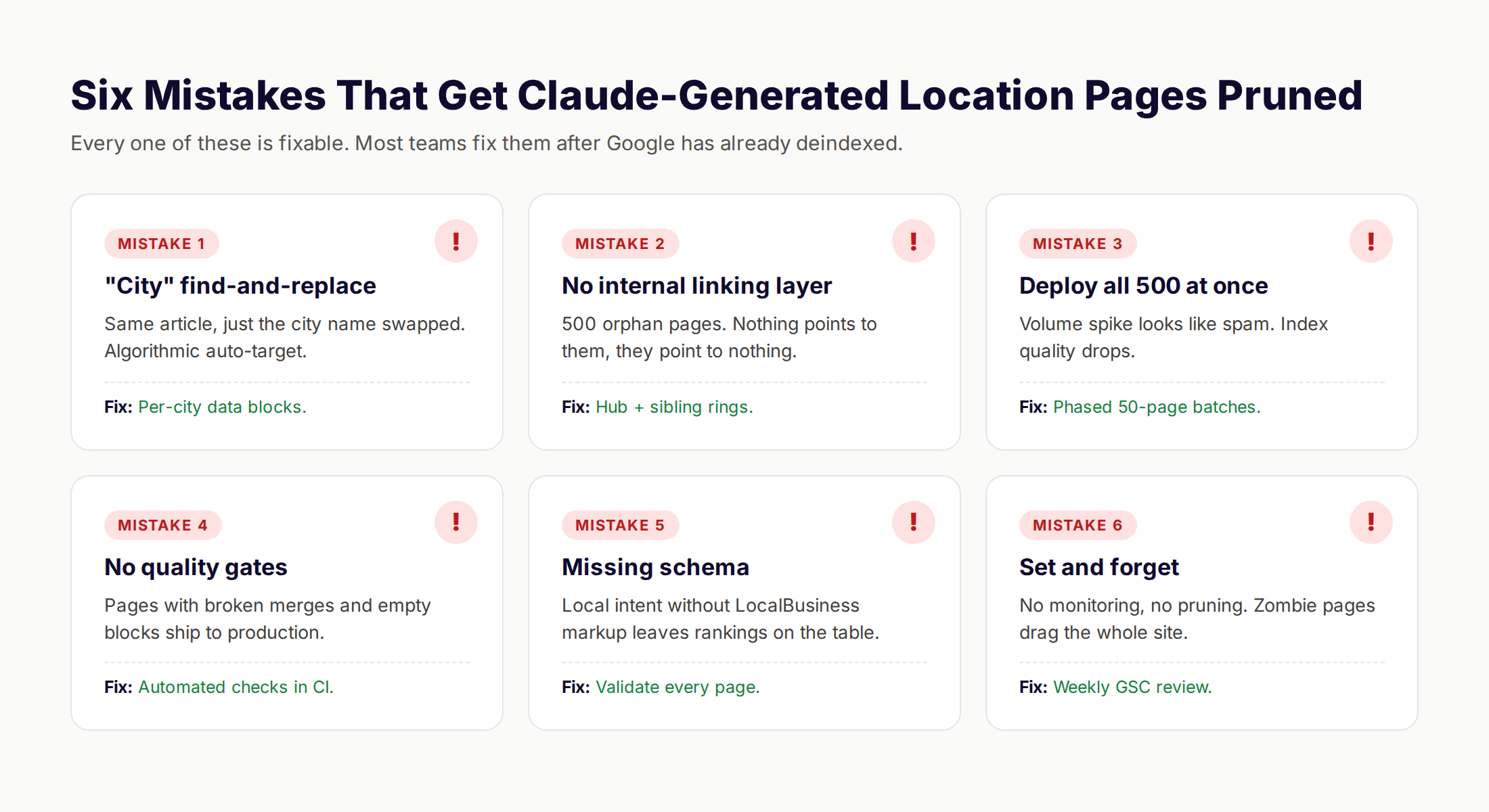
Every one of these is fixable. Most teams fix them after Google has already deindexed the page set.
Mistake 1: "City" Find-and-Replace
The same 900-word article with only the city name swapped. This is the easiest pattern for Google to detect algorithmically. It is also the most common Claude Code output if you do not specify per-city blocks.
Fix: Per-city data blocks with at least 5 unique fields referenced per page.
Mistake 2: No Internal Linking Layer
You generate 500 location pages and forget to update the rest of the site. Now you have 500 orphan pages. Nothing links to them, they link to nothing.
Fix: Hub-and-spoke architecture. A service hub page links to every city. Each city links to 3-5 sibling cities. Each city links to the hub.
Mistake 3: Deploy All 500 at Once
The crawler sees a 500-page volume spike with near-identical templates. Even with unique data, the velocity itself is a flag. Phased rollout is not optional.
Fix: 50-page batches with 14-day gaps. See Step 6.
Mistake 4: No Quality Gates
Pages with broken template merges, empty data fields, or 400-word bodies ship to production. By the time you find them, they have been indexed.
Fix: Run the 5 quality gates from Step 5 as a CI check. No page deploys without passing.
Mistake 5: Missing or Invalid Schema
Local intent without LocalBusiness markup leaves rankings on the table. Even a single typo in the schema can disable rich results for the whole page.
Fix: Schema validation in CI. Use Google's Rich Results Test API as part of your deploy gate.
Mistake 6: Set And Forget
No monitoring, no pruning. The pages decay over 12 months and drag down the whole site's quality signal.
Fix: Quarterly review. Prune the bottom 5-15% of pages every quarter.
For more detail on Google's actual policy text and the patterns that trigger Scaled Content Abuse flags, the Google helpful content guidelines define the bar in their own words.
Want this whole pipeline done for you? theStacc plans, writes, and publishes SEO articles from $99 per month, including programmatic location pages with quality gates and phased deploy.
The Real Cost of DIY vs Done-For-You Location Pages
The pitch for Claude Code programmatic SEO is "free pages." The reality is your time has a cost. Be honest about it before you commit a weekend.
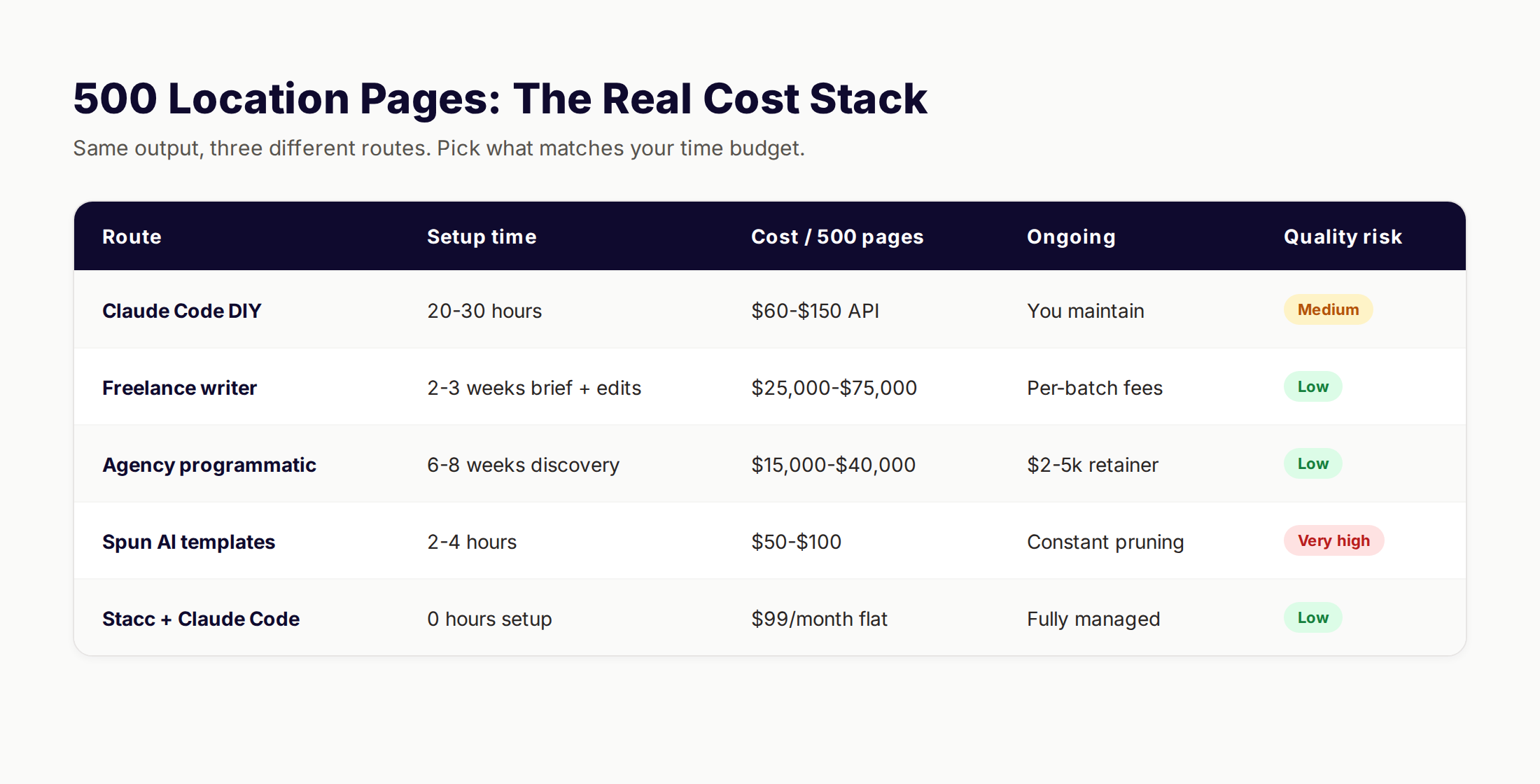
The True Cost Stack at 500 Pages
| Route | Setup time | Cost per 500 pages | Ongoing | Quality risk |
|---|---|---|---|---|
| Claude Code DIY | 20-30 hours | $60-$150 API spend | You maintain forever | Medium |
| Freelance writer | 2-3 weeks brief + edits | $25,000-$75,000 | Per-batch fees | Low |
| Agency programmatic | 6-8 weeks discovery | $15,000-$40,000 | $2-5k retainer | Low |
| Spun AI templates | 2-4 hours | $50-$100 | Constant pruning | Very high |
| theStacc + Claude Code | 0 hours setup | $99/month flat | Fully managed | Low |
The honest read: Claude Code DIY is excellent if you have 30 hours, technical comfort with a terminal, and willingness to maintain the pipeline yourself. The API spend is real but minor. The hidden cost is the maintenance — every new city, every product update, every algorithm change is your problem.
When DIY Wins
- You have a technical co-founder or in-house developer
- You have a clean, structured dataset already
- You are testing a new market and need to move in days
- You want to learn the pipeline before scaling
When Done-For-You Wins
- You have no internal SEO ownership
- You need ongoing publishing, not a one-time build
- You operate across multiple service lines and want one bill
- You want someone else accountable for the quality bar
Both routes work. The wrong answer is doing DIY half-heartedly and shipping thin pages. If you do not have 30 focused hours, do not start.
For a strategic look at the broader make-vs-buy question on content, our SEO automation guide covers what to automate, what to outsource, and what to keep in-house.
How Claude Code Compares to Other Programmatic SEO Tools
Claude Code is not the only path to programmatic location pages. The honest comparison:
| Tool | Best for | Weakness for location pages |
|---|---|---|
| Claude Code | Full pipeline in one agent, in your repo | Requires terminal comfort and a clean dataset |
| Cursor or Windsurf | IDE-native AI coding with similar capabilities | Less mature for non-coding orchestration workflows |
| Webflow + AI plugins | No-code visual builds | Hard to enforce quality gates at scale |
| WordPress + WP All Import | Existing WordPress sites with CSVs | Templating is primitive, content is thin |
| theStacc | Fully managed content + local SEO | Less granular control than DIY |
| Programmatic SEO platforms | Specific verticals (real estate, jobs) | Locked to their templates and data shapes |
The choice is not "best tool." It is "which combination of time, money, and risk tolerance fits your situation right now." Most growing service businesses end up with a mix: a one-time Claude Code build for the first 500 pages, then a managed service for ongoing updates and adjacent content.
What practitioners are saying on X
Local SEO advice ages quickly. Here is high-signal public discussion from operators who still win Map Pack visibility — context for your roadmap, not a substitute for primary data.
- @noelcetaSEO (Sep 2025): Local SEO playbook still centers complete GBP, NAP consistency, quality citations, local keywords, location content, review velocity, and local links. See the post on X.
- @irentdumpsters (Jan 2026): Most businesses have a GBP; few fully optimize every ranking-relevant section for Map Pack visibility. See the post on X.
- @EldarCohenSEO (Jul 2026): 2026 WhiteSpark-oriented reminder: primary Google Business category is a top Map Pack ranking factor — wrong primary category can erase visibility for money queries. See the post on X.
Grok, AI Overviews, and multi-engine visibility
AI/search topics like “claude code location pages” need multi-engine notes: AI Overviews, ChatGPT/Perplexity, and Grok. Lead with extractable answers; keep claims consistent with public expert discussion.
- Google AI Overviews: Use passage-ready answers, tables, and FAQ schema where relevant.
- ChatGPT / Perplexity: Cite named sources next to key claims.
- Grok: Maintain accurate entity facts on-site and in high-signal X posts.
Publish content built for Google and AI citations. theStacc’s Content SEO module ships SEO-scored articles structured for rankings and generative engines — including clearer entity pages models like Grok can quote.
FAQ
Yes, with the right configuration. Claude Code can use web search and web fetch tools to retrieve content from specific URLs. The agent will search when the prompt requires it, then fetch the full content of cited pages. For programmatic SEO, that means Claude Code can read competitor pages and your own existing content to inform new page generation — though you should still feed it your structured city dataset rather than relying on web fetches for data.
Claude Code stores data in two locations. The ~/.claude/ directory holds your conversations, project sessions, permissions, plugins, skills, history, and runtime data. The ~/.claude.json file holds global configuration including OAuth session, MCP server settings, per-project trust, and recently used prompts. For programmatic location page projects, your CLAUDE.md file lives in the project repo at ./CLAUDE.md.
Claude Code's config is stored in ~/.claude.json at the user level and in ./CLAUDE.md at the project level. The user-level file controls OAuth, MCP servers, allowed tools, and per-project trust settings. The project-level file controls instructions, brand voice, and rules that apply only to that codebase. On Windows, managed settings live under C:\Program Files\ClaudeCode\managed-settings.json.
Yes, and at scale. Claude Code can take a structured dataset and a template, generate hundreds of landing pages with per-page unique content, validate each page against quality gates, and commit the output to your repo. For location pages specifically, this is one of the strongest use cases — generating 500 city pages in a weekend is realistic if your data and template are clean.
Not by default. Claude Code operates within the project directory you launch it from and asks permission before reading files outside that scope or running shell commands that touch the broader filesystem. You can opt into wider access through computer-use features, but those require explicit configuration. For programmatic SEO work, the default scoped access is what you want.
500 is a realistic upper bound for a single operator with a clean dataset. The bottleneck is rarely the model. It is the quality of your input data, the strictness of your quality gates, and the time you spend reviewing batches. Teams that try to hit 1,000+ in a weekend typically ship thin pages because they skipped the data prep.
They can, if you skip the quality gates. Google's Scaled Content Abuse policy targets "content created primarily for search engines." A page with unique local data, real internal linking, valid schema, and 800+ words of substantive content does not trigger the policy. A page with the same template and only the city name swapped does. The model is not the risk. The pipeline is.
Claude Code itself is free to install. API usage is metered based on Anthropic's per-token pricing. For 500 location pages with the workflow in this guide, expect $60-$150 in total API spend. That assumes a clean dataset, structured prompts, and batch sizes of 25-50 cities per session.
You can, but the learning curve is real. Claude Code runs in a terminal and works with files and shell commands. Non-developers can use it for simple writing tasks. For programmatic SEO at scale, you will need basic comfort with git, with editing JSON or CSV files, and with reading Claude Code's outputs in the terminal. If that sounds like a weekend project, Claude Code is for you. If not, a managed service is a better fit.
A handful of community skills exist, including the Programmatic SEO Claude Code skill and similar marketplace plugins. The honest answer is that custom skills tailored to your data shape and quality bar beat generic ones. Spend 2 hours writing a skill that matches your dataset and you will produce better pages than any pre-built option.
Three rules: batch your requests (25-50 cities per session), use Claude Code's lower-cost model tiers for non-critical generation passes, and watch the daily API usage report. Set a monthly budget cap in your Anthropic console. For 500 location pages, $200 should be the upper limit. If you are spending more than that, the pipeline is leaking.
Bottom Line
Claude Code is not magic. It is a fast, cheap, terminal-native agent that can collapse a multi-week programmatic SEO build into a focused weekend. The model is not the differentiator. The pipeline is.
If you have 30 hours, a clean dataset, and the discipline to enforce quality gates, you can generate 500 ranking location pages for the cost of a few API calls. If you skip the data prep or the gates, you generate 500 deindex candidates. There is no middle path.
For teams that want the output without the build, that is the gap theStacc fills. We use the same patterns covered in this guide — programmatic location pages, automated quality gates, phased deploys — but managed end to end at $99 per month. No agency retainer, no writer team, no Claude Code session to babysit.
This article was researched, written, and published by theStacc — the same platform businesses use to publish SEO content automatically. We use Claude Code for parts of our own pipeline and we are a service that competes with the DIY route. We have worked to present the workflow fairly and we would encourage you to verify Claude Code features and pricing directly on Anthropic's site before building.
Sources & references
- [1] Princeton / Georgia Tech et al. — GEO research (arXiv:2311.09735)
- [2] @jakezward on X — 2026 SEO predictions emphasize AI Overview share-of-SERP, schema for LLM token efficiency, brand mentions in AI answers
- [3] @alexgroberman on X — Case narrative: organic value plus multi-engine citations (ChatGPT, Perplexity, Grok) from knowledge-hub pages, category
- [4] @varunram on X — Critique of GEO slopfarm products that combine SEO clickbait with unresearched content marketing — quality and research
- [5] Referenced source — code.claude.com

Plan topics, review article drafts, and publish to a connected CMS.
Weekly local SEO teardowns
One practical email a week. Map Pack, GBP, AI Overviews. No fluff. Unsubscribe anytime.