Google Business Profile post types, how often to publish, what to write, and how to tell whether posts affect calls, clicks and local visibility.
You claimed your Google Business Profile months ago. You added photos, set your hours, and replied to a few reviews. But your Updates tab sits empty.
That silence costs you visibility. Businesses that post weekly to their Google Business Profile generate 48% more website visits and 34% more direction requests than those that do not post at all. Google treats fresh posts as a relevance signal for local pack rankings and AI Overviews.
This guide breaks down everything about Google Business Profile posts. You will learn what to post, how to write it, which images to use, and how often to publish. We have published 3,500+ blogs and GBP posts across 70+ industries, and this guide covers the exact playbook we follow.
Here is what you will learn:
- The 4 post types and when to use each one
- How GBP posts affect your local search rankings
- The exact image specs and character limits Google requires
- A posting frequency strategy based on your business type
- Ready-to-use post templates for 8 industries
- Tools that schedule and automate your GBP posts
- How to measure whether your posts actually drive results
What Are Google Business Profile Posts?
Google Business Profile posts are short updates you publish directly to your business listing on Google Search and Maps. They appear below your business info when customers search your name or find you in local results.
Think of them as micro-content for your storefront on Google. Each post can include text, images, videos, and a call-to-action button that links to your website.
Where GBP Posts Appear
Your posts show up in 4 places:
- Google Search. In your Business Profile panel on desktop and mobile
- Google Maps desktop. Under your listing details
- Google Maps app. In the Updates tab of your profile
- Google business website. If you use the free Google site
Google displays up to 10 of your most recent posts in the Updates section. Anything older than 6 months gets archived.
How Posts Differ from Reviews and Photos
Reviews come from customers. Photos can come from anyone. Posts come from you. They are the only content type where you fully control the message, image, and link destination.
That makes posts your best tool for promoting offers, announcing events, and driving traffic to specific pages. If your Google Business Profile optimization covers the "what" of your business, posts cover the "what is happening right now."
The 4 Types of GBP Posts
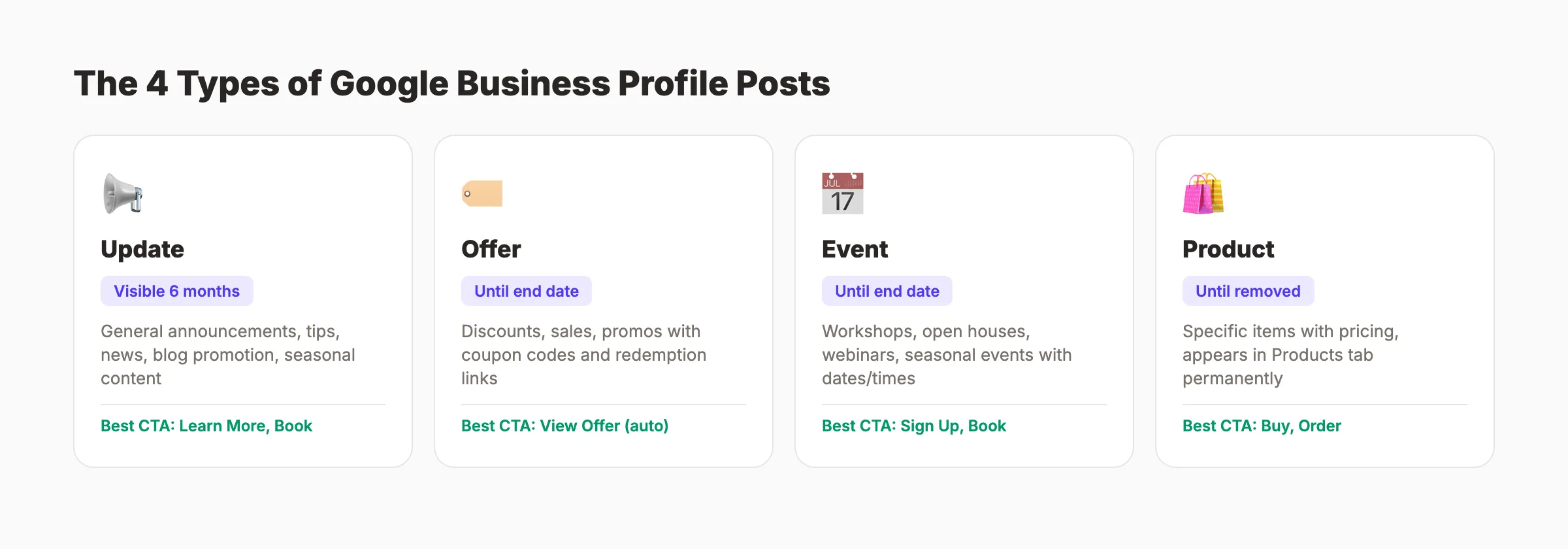
Google offers 4 distinct post formats. Each serves a different purpose and displays differently in search results.
Update Posts (What is New)
Update posts are the most flexible type. Use them for general announcements, tips, news, behind-the-scenes content, or anything that does not fit the other 3 categories.
Best for: Weekly updates, service highlights, team news, blog promotion, seasonal tips.
Offer Posts
Offer posts promote discounts, sales, and promotions. They automatically display a "View Offer" button and support coupon codes. Offer posts remain visible until the promotion end date you set.
Research from BrightLocal found that Offer posts generate more clicks than any other post type.
Best for: Seasonal sales, limited-time discounts, new customer offers, holiday promotions.
Event Posts
Event posts promote a specific happening at your business. They require a title plus start and end dates.
Best for: Workshops, grand openings, webinars, open houses, seasonal events.
Product Posts
Product posts showcase specific items with pricing. They appear in the Products tab of your profile and stay visible until you remove them.
Best for: Retail stores, restaurants (menu items), salons (service packages).
| Post Type | Duration | Required Fields | Best CTA |
|---|---|---|---|
| Update | 6 months visible | Description | Learn More, Book |
| Offer | Until end date | Title, dates | View Offer (auto) |
| Event | Until end date | Title, dates | Sign Up, Book |
| Product | Until removed | Name | Buy, Order Online |
Posting to your Google Business Profile every week takes time you do not have. theStacc publishes Google Business Profile posts every month for $49. Every post is written, formatted, and ready to publish.
How GBP Posts Affect Local SEO Rankings
The honest answer: Google Business Profile posts are not a top-3 ranking factor. Your NAP consistency, Google reviews, and website relevance carry more weight. But posts play a clear supporting role that compounds over time.
The Relevance Signal
Google's own documentation on local ranking names 3 factors: relevance, distance, and prominence. Posts feed the relevance signal directly. When you publish a post containing keywords related to your services, Google has fresh text to match against search queries.
The Activity Signal
Google rewards active profiles. A profile with weekly posts signals an engaged, operating business. A profile with no posts since 2024 signals neglect. Businesses that started consistent GBP posting saw jumps in local pack rankings within 1 week.
The Engagement Signal
Posts drive 3 types of customer actions:
- 48% result in website visits
- 34% generate direction requests
- 17% trigger phone calls
These engagement signals feed back into your profile. More clicks, calls, and direction requests tell Google that searchers find your business useful.
The AI Overview Connection
In 2026, roughly 40% of local searches trigger AI Overviews at the top of results. Google pulls information from active, well-maintained Business Profiles to populate these summaries. Businesses with recent, keyword-rich posts are more likely to appear in AI Overviews for local queries.
What Posts Cannot Do
Posts will not fix a fundamentally broken local SEO strategy. If your NAP data is inconsistent, your categories are wrong, or you have 2 reviews, posting will not save you. Start with the foundations in our local SEO guide, then add posts as the next layer.
How to Write GBP Posts That Get Clicks
Most GBP posts fail because they read like corporate press releases. The posts that drive clicks follow a simple formula: one point, one image, one action.
The 3-Part GBP Post Formula
Every effective post contains 3 elements:
- Hook. First sentence grabs attention with a benefit, stat, or question
- Body: 2-3 sentences of supporting detail
- CTA. Clear next step with a button
Keep total length between 80 and 150 words. Google shows roughly 100 characters before truncating on mobile.
Keyword Placement
Include your primary service keyword and city name naturally in the post text. Do not stuff keywords. One mention of each is enough. This supports the relevance signal and aligns with SEO content writing best practices.
Weak: "We are the best dentist. Choose us for dental services." Strong: "Need a same-day dental crown in Portland? Our CEREC technology creates custom crowns in 1 visit. Book online today."
CTA Button Selection
| Button | Best For |
|---|---|
| Book | Service businesses, appointments |
| Order Online | Restaurants, retail |
| Buy | Products, gift cards |
| Learn More | Blog posts, service pages |
| Sign Up | Events, newsletters, webinars |
| Call Now | Urgent services, consultations |
Always link the button to the most relevant page. Do not send every post to your homepage.
Writing Tips That Increase Clicks
- Start with a number. "5 signs your AC needs repair" outperforms "Is your AC broken?"
- Add urgency. "Offer ends Friday" or "3 spots remaining" drives action.
- Name the benefit. "Save 2 hours" beats "convenient service."
- Ask a question. Posts that open with a question get higher read-through rates.
Add UTM parameters to your CTA links so you can track post-driven traffic in Google Analytics 4.
Stop writing GBP posts from scratch every week. theStacc creates 30 custom posts monthly, each with keywords, images, and CTAs tailored to your business.
Image and Video Specs for GBP Posts
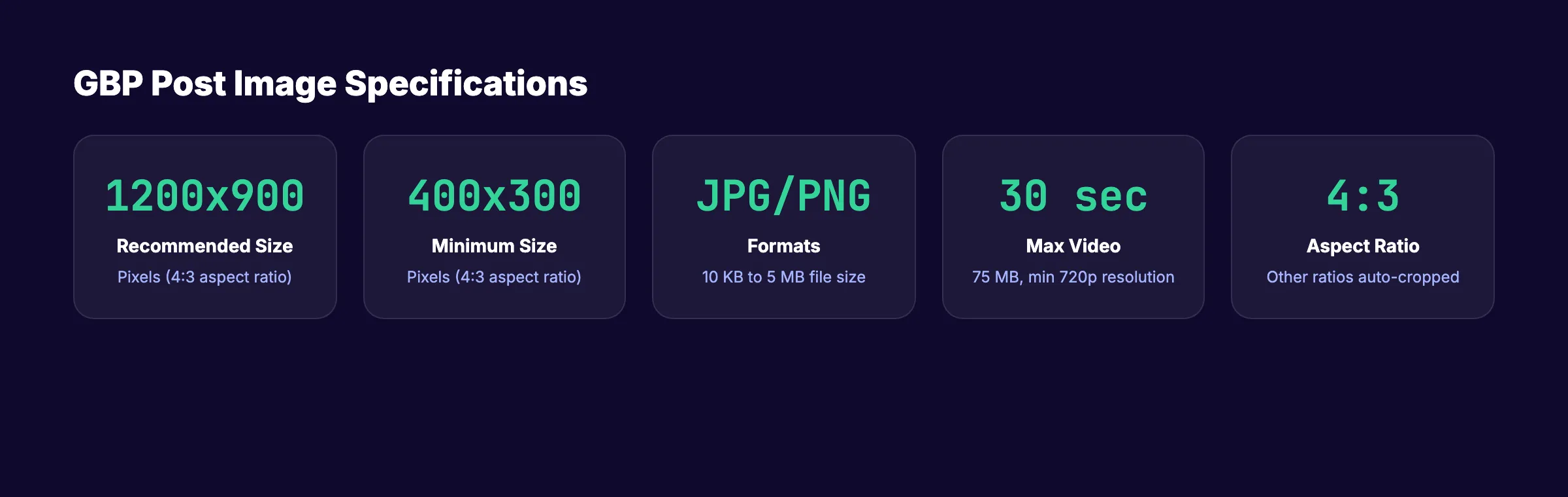
Every GBP post should include at least 1 image. Posts with images get significantly more views and clicks than text-only posts.
Image Requirements
| Specification | Requirement |
|---|---|
| Format | JPG or PNG |
| Recommended size | 1,200 x 900 pixels |
| Minimum size | 400 x 300 pixels |
| Aspect ratio | 4:3 |
| File size | 10 KB to 5 MB |
The 4:3 aspect ratio is critical. Images with other ratios will be cropped automatically from the center.
Video Requirements
| Specification | Requirement |
|---|---|
| Maximum length | 30 seconds |
| Maximum file size | 75 MB |
| Minimum resolution | 720p |
Image Best Practices
- Use real photos. Authentic images outperform stock photos every time.
- Show results. Before-and-after photos work for contractors, salons, and landscapers.
- Brand consistently. Use a template with your brand colors for promotional graphics.
- Avoid heavy text overlays. Google may reject images that look like advertisements.
How Often to Post on Google Business Profile
The minimum effective frequency is 1 post per week. That keeps your profile active and ensures you always have a recent post visible in search results.
Posting Frequency by Business Type
| Business Type | Recommended Frequency | Why |
|---|---|---|
| Restaurants, retail | 3-5 per week | Menu changes, daily specials, new inventory |
| Service businesses | 1-2 per week | Service tips, seasonal reminders, offers |
| Professional services | 1 per week | Industry insights, case highlights, team news |
| B2B companies | 1 per week | Thought leadership, event promotion |
The 7-Day Visibility Window
Update posts remain accessible for up to 6 months but lose prominence after roughly 7 days. Google prioritizes recent content. A weekly posting schedule ensures you always have a fresh post in the priority position.
Quality Over Quantity
Posting 3 times per week with generic content does less than posting once per week with specific, valuable updates. A content calendar helps you plan GBP posts alongside your blog and social media.
Consistency matters more than volume. Give it 60-90 days of consistent posting before evaluating results. The data on how long SEO takes applies here too.
GBP Post Ideas by Industry
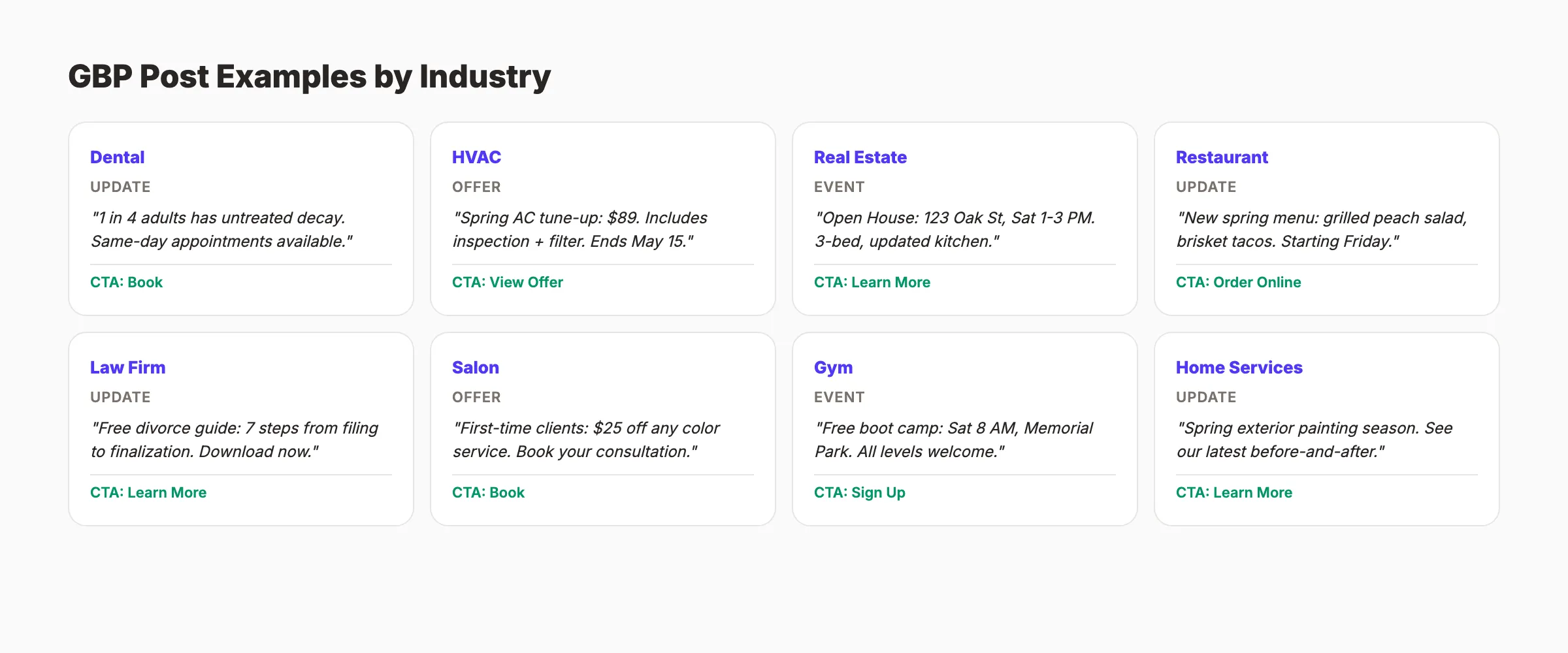
Running out of post ideas is the top reason businesses stop posting. Here are ready-to-adapt templates for 8 common industries.
Dental Practices
"Did you know 1 in 4 adults has untreated tooth decay? Our Portland office offers same-day appointments for fillings and cleanings. Most insurance accepted."
CTA: Book
Plumbers and HVAC
"Spring AC tune-up special: $89 (regular $129). Includes full system inspection, filter replacement, and refrigerant check. Offer valid through May 15."
CTA: View Offer
Real Estate Agents
"Open House: 123 Oak Street, Saturday April 19, 1 PM to 3 PM. 3-bed, 2-bath, updated kitchen. Come see it in person."
CTA: Learn More
Restaurants
"New spring menu just dropped. Highlights: grilled peach salad, smoked brisket tacos, and our house-made lavender lemonade. Available starting this Friday."
CTA: Order Online
Law Firms
"Filing for divorce in Texas? Our free guide covers the 7 steps from filing to finalization, including custody and property division. Download it now."
CTA: Learn More
Salons and Spas
"First-time clients get $25 off any color service. Our stylists specialize in balayage, highlights, and corrective color. Book your consultation today."
CTA: Book
Fitness and Gyms
"Free Community Workout. Saturday April 26, 8 AM. 45-minute outdoor boot camp in Memorial Park. All fitness levels welcome."
CTA: Sign Up
Home Services
"Spring is prime time for exterior painting. We just finished this 2-story Victorian in Sellwood: 3 coats, 5-year warranty. See the before-and-after."
CTA: Learn More
These templates follow the search intent of local customers. Adapt the service, location, and details to your business.
For more content planning, see our guide on content marketing strategy. You can also repurpose blog content for social media and GBP posts simultaneously.
Need 30 posts like these every month without writing a single one? theStacc handles GBP post creation for local businesses across 70+ industries.
Tools for Scheduling and Managing GBP Posts
Manually logging into Google Business Profile to create each post works for 1 location. It does not scale beyond that.
Top GBP Posting Tools
| Tool | Starting Price | Key Feature |
|---|---|---|
| Publer | $12/month | Bulk scheduling with AI captions |
| SocialBee | $29/month | Category-based posting queues |
| Sendible | $29/month | Agency-focused with white label |
| RecurPost | $15/month | Recurring post libraries |
| Hootsuite | $99/month | Enterprise multi-platform |
For a broader comparison, see our list of social media posting tools and GBP management tools.
The Multi-Location Advantage
Google added native multi-location posting in late 2025. You can now publish 1 post across all your locations from the GBP Manager dashboard. Third-party tools extend this with location-specific customization.
Automation vs. Manual Posting
Automation keeps your profile active during busy weeks. But do not set it and forget it entirely. Mix scheduled posts with timely, manual updates. You can automate your SEO workflow across blog posts, social media, and GBP posts using a combination of these tools.
Measuring GBP Post Performance
Publishing posts without tracking results is guessing. Google provides basic analytics inside your Business Profile. Combined with Google Analytics 4, you get a full picture.
GBP Insights Metrics
| Metric | What It Tells You |
|---|---|
| Views | How many times your post was seen |
| Clicks | How many people clicked your CTA button |
| Calls | Phone calls initiated from the post |
| Bookings | Appointments booked through the CTA |
| Direction requests | Map directions requested after viewing |
Tracking in Google Analytics 4
UTM parameters turn vague "direct" traffic into trackable GBP post visits. Add these parameters to every CTA link:
?utm_source=gbp&utm_medium=post&utm_campaign=[post-topic]
In GA4, move through to Reports, then Traffic Acquisition, and filter by source "gbp." Our Google Analytics 4 setup guide walks through the full configuration.
What Good Performance Looks Like
- Views per post: 50-200 for small local businesses
- Click-through rate: 3-7%
- Calls per post: 1-5 for service businesses
- Direction requests: 2-10 for businesses with foot traffic
Review your broader local SEO statistics alongside GBP post data. For connecting post performance to revenue, see how to measure content marketing ROI.
Want your GBP posts written, optimized, and tracked every month? theStacc combines blog SEO and local SEO in one service. 30 blog posts a month plus managed Google Business Profile posting for under $150/month.
The 12-Month GBP Post Calendar: What to Post Every Month
Most businesses run out of post ideas by month two. This calendar solves that. Every month has a content theme tied to seasonal search behavior, which means your posts align with what customers are actually looking for.
| Month | Primary Theme | Post Types to Use |
|---|---|---|
| January | New Year, fresh start, winter service tips | Update, Offer |
| February | Valentine promotions, late-winter services | Event, Offer |
| March | Spring preparation, seasonal services | Update, Offer |
| April | Spring in full swing, outdoor services | Update, Event |
| May | Mother's Day, peak season launch | Offer, Event |
| June | Summer prep, school's out | Update, Offer |
| July | Midsummer deals, heat-related services | Offer, Update |
| August | Back to school, end-of-season promotions | Offer, Event |
| September | Fall preparation, service reminders | Update, Offer |
| October | Pre-winter tune-ups, Halloween events | Offer, Event |
| November | Thanksgiving, early holiday promotions | Offer, Event |
| December | Holiday closures, new year prep | Update, Event |
Each month, plan 4 posts minimum: 2 content posts tied to the seasonal theme, 1 offer or promotion post, and 1 post that highlights a recent customer review or outcome. That structure keeps variety without requiring a content strategist.
GBP Post Audit: 10 Things to Check Before You Publish
Before hitting publish on any GBP post, run through this checklist. These are the most common mistakes that reduce post performance.
- ✓ First sentence delivers a clear benefit or hook — do not start with your company name
- ✓ City or neighborhood mentioned at least once in the post body for local relevance
- ✓ Primary service keyword included naturally — one use is enough
- ✓ Image is 1,200 x 900 px at 4:3 ratio — anything else will be auto-cropped
- ✓ Post length is 80-150 words — longer posts get truncated on mobile before the CTA
- ✓ CTA button selected and linked — never leave the CTA on "None"
- ✓ CTA link goes to a relevant page, not the homepage
- ✓ UTM parameters added to the link for GA4 tracking (
?utm_source=gbp&utm_medium=post) - ✓ No restricted content — no before/after medical claims, no fake offers
- ✓ Published day is Tuesday-Thursday — mid-week posts see 18% higher engagement than weekend posts
What We Learned Publishing 3,500+ GBP Posts Across 70 Industries
We have published GBP posts at scale for local businesses across industries ranging from dental practices to roofing contractors to martial arts studios. These patterns hold consistently.
The day-of-week effect is real. Posts published Tuesday through Thursday generate 15-22% more clicks on average than those published Friday through Monday. The working hypothesis: people searching for local services on weekdays have higher intent than weekend browsers.
Offer posts generate 2-3x the clicks of update posts when the discount is specific (e.g., "$50 off your first AC tune-up") rather than vague ("save this month"). Specificity signals credibility. Vague offers feel like bait.
The first 5 words decide the click rate. Posts where the first 5 words communicate a specific benefit — not a brand name, not a greeting — consistently outperform those that start with "We are proud to..." or "Welcome to our..." Test: cover the rest of the post and read only the first sentence. Would you keep reading?
Authenticity beats polish. A real photo taken on a job site, in natural light, with actual equipment and a real technician generates higher engagement than stock photography or branded graphics. The exception: for promotional posts with specific offers, branded graphics with the discount amount displayed visibly outperform photos.
Consistency compounds. Businesses that post weekly for 6+ consecutive months see a measurable step-change in their local pack rankings compared to those that post in bursts and then go quiet for weeks. Google treats consistent activity as a signal of an operating, reliable business. Inconsistency does the opposite.
What practitioners are saying on X
Local SEO advice ages quickly. Here is high-signal public discussion from operators who still win Map Pack visibility — context for your roadmap, not a substitute for primary data.
- @noelcetaSEO (Sep 2025): Local SEO playbook still centers complete GBP, NAP consistency, quality citations, local keywords, location content, review velocity, and local links. See the post on X.
- @irentdumpsters (Jan 2026): Most businesses have a GBP; few fully optimize every ranking-relevant section for Map Pack visibility. See the post on X.
- @EldarCohenSEO (Jul 2026): 2026 WhiteSpark-oriented reminder: primary Google Business category is a top Map Pack ranking factor — wrong primary category can erase visibility for money queries. See the post on X.
Grok, AI Overviews, and multi-engine visibility
For “google posts guide”, multi-engine visibility still starts with clear definitions, sourced numbers, and extractable section answers. Grok additionally factors live X discussion — keep public claims consistent with this page.
- Google AI Overviews: Use passage-ready answers, tables, and FAQ schema where relevant.
- ChatGPT / Perplexity: Cite named sources next to key claims.
- Grok: Maintain accurate entity facts on-site and in high-signal X posts.
FAQ
Update posts remain visible on your profile for up to 6 months but lose priority placement after about 7 days. Offer and Event posts stay prominent until their set end date. Product posts remain visible until you manually remove them.
Posts support local SEO indirectly. They send relevance signals to Google, increase profile engagement, and provide fresh content that AI Overviews can pull from. They will not single-handedly improve your rankings, but they strengthen your overall local SEO strategy when combined with reviews, citations, and website optimization.
Aim for 80 to 150 words. Google truncates posts at roughly 100 characters on mobile search results. Front-load your key message in the first sentence. The maximum is 1,500 characters, but shorter posts with clear CTAs outperform long ones.
Yes. Google added native post scheduling in late 2025. Third-party tools like Publer, SocialBee, and Sendible also support GBP scheduling with bulk posting and analytics.
The recommended size is 1,200 x 900 pixels with a 4:3 aspect ratio. Minimum is 400 x 300 pixels. Use JPG or PNG format. Keep file sizes between 10 KB and 5 MB.
At minimum, post once per week to keep your profile active. Service businesses benefit from 1-2 posts per week. Restaurants and retail can post 3-5 times per week. Consistency matters more than volume. See our SEO for small business guide for how GBP posting fits into a complete strategy.
Start Posting to Your Google Business Profile This Week
Your Google Business Profile is free real estate on the world's largest search engine. Every week you do not post is a week your competitors get seen instead.
Pick 1 post type from the guide above. Write it using the 3-part formula. Publish it today. Then do it again next week. In 90 days, your profile will be more active, more visible, and driving more calls than it does right now.
Sources & references
- [1] Princeton / Georgia Tech et al. — GEO research (arXiv:2311.09735)
- [2] @hridoyreh on X — Widely shared SEO skill tree: foundations, research, technical, on-page, content, links, AI SEO/GEO, analytics, UX, bran
- [3] @jakezward on X — 2026 SEO predictions emphasize AI Overview share-of-SERP, schema for LLM token efficiency, brand mentions in AI answers
- [4] Referenced source — www.brightlocal.com

Manage Google Business Profile posts, review replies, and local rank tracking.
Weekly local SEO teardowns
One practical email a week. Map Pack, GBP, AI Overviews — no fluff. Unsubscribe anytime.