
How Search Engines Work: The Complete Guide
Everything about how search engines work in one 9-chapter guide. Covers crawling, indexing, ranking, PageRank, E-E-A-T, and AI Overviews. Updated for 2026.
Stacc Editorial • 2026-04-04 • SEO Tips
In This Article
You publish a blog post. Nothing happens. No traffic. No rankings. No sign that Google even knows the page exists.
That silence costs you leads every single day. Competitors who understand how search engines work get indexed faster, rank higher, and capture the clicks you are missing.
This guide breaks down the full process. From the moment a crawler discovers your URL to the instant Google decides where your page appears in results.
We publish 3,500+ blogs across 70+ industries. We watch pages get crawled, indexed, and ranked every week. This guide covers everything we know about how search engines work.
Here is what you will learn:
- How Google discovers and crawls billions of pages
- What happens during indexing and why some pages get skipped
- The ranking signals that decide positions 1 through 100
- How PageRank and link equity still shape results
- What E-E-A-T means for your content quality
- How AI Overviews and featured snippets change the game
- A checklist to make sure your pages get found
Table of Contents
- Chapter 1: What Is a Search Engine?
- Chapter 2: Crawling — How Google Finds Your Pages
- Chapter 3: Rendering — How Google Reads JavaScript
- Chapter 4: Indexing — How Pages Get Stored
- Chapter 5: Ranking — How Google Orders Results
- Chapter 6: Link Signals and PageRank
- Chapter 7: E-E-A-T and Quality Signals
- Chapter 8: SERP Features That Shape Click Behavior
- Chapter 9: How AI Is Changing Search
- Frequently Asked Questions
Chapter 1: What Is a Search Engine? {#ch1}
A search engine is software that discovers, organizes, and retrieves web content based on user queries. Google dominates with roughly 91% market share worldwide. Bing holds about 3.5%. Everything else splits the remaining fraction.
The Core Purpose
Search engines exist to match questions with answers. A user types a query. The engine returns a ranked list of pages it believes will satisfy that query. Speed and relevance are the two metrics that matter most.
Google processes over 8.5 billion searches per day. Each query triggers a race through an index containing hundreds of billions of pages. The entire process takes under half a second.
Three Stages Every Page Goes Through
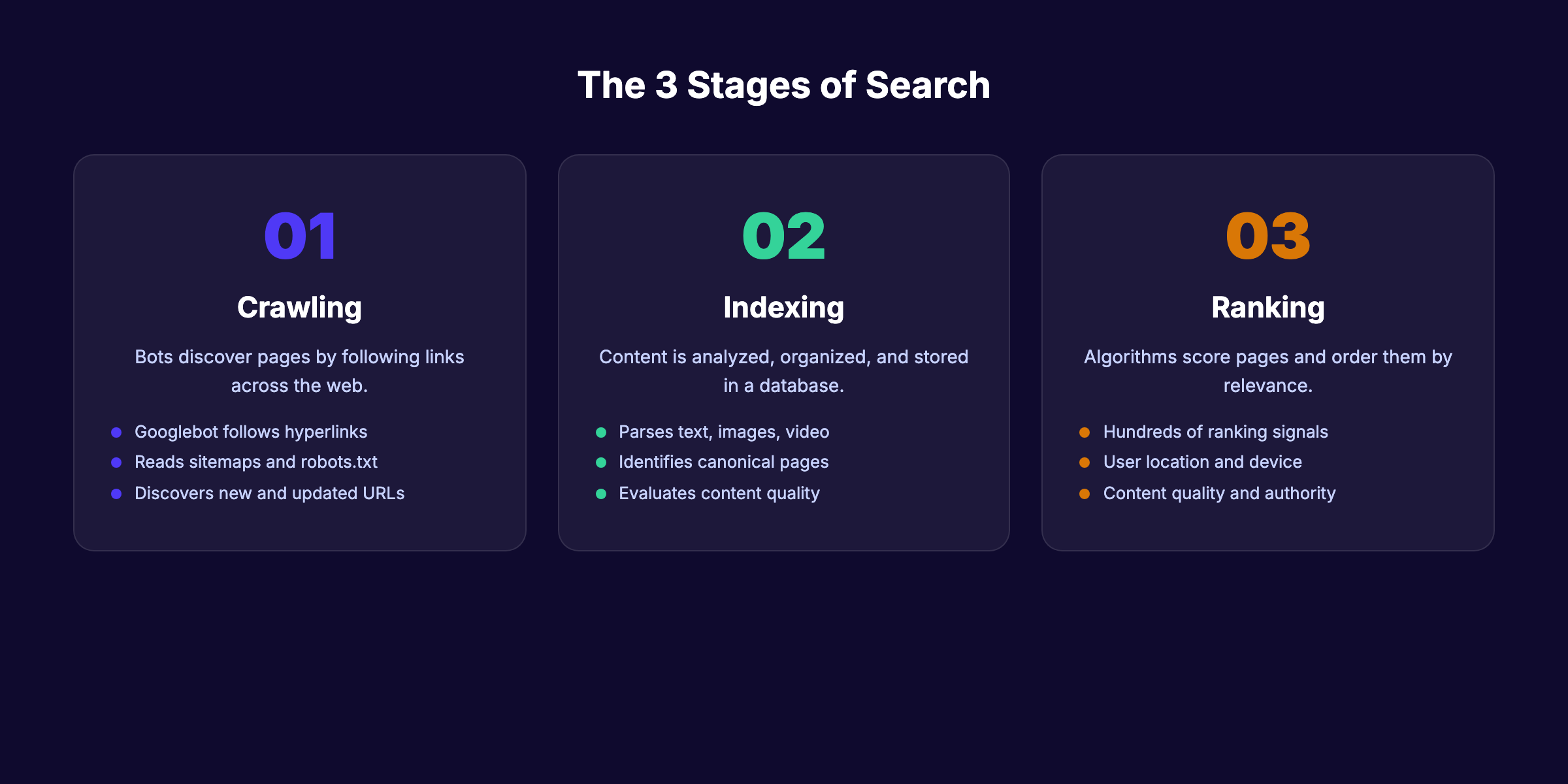
Every URL that appears in search results has passed through 3 stages: crawling, indexing, and ranking. Skip any stage and your page stays invisible.
This is not optional knowledge for anyone doing SEO. Understanding how search engines work is the foundation. Everything else builds on top of it.
Chapter 2: Crawling — How Google Finds Your Pages {#ch2}
Crawling is the discovery phase. Google sends automated programs called crawlers (or spiders) to follow links across the web. The primary crawler is Googlebot. It fetches pages, reads their content, and reports back to Google servers.
How Googlebot Discovers URLs
Googlebot finds new pages in 3 main ways:
- Following links. A link from an already-crawled page to a new URL triggers discovery. This is the most common method.
- Reading sitemaps. An XML sitemap lists every URL you want Google to know about. Submit yours through Google Search Console.
- Direct URL submissions. The URL Inspection tool in Search Console lets you request crawling for a specific page.
Internal links matter enormously here. Pages buried 5 or 6 clicks deep from your homepage rarely get crawled. A strong internal linking strategy keeps every important page within 3 clicks of the root.
Crawl Budget and Why It Matters
Google assigns every site a crawl budget. This is the number of pages Googlebot will crawl within a given timeframe. Small sites (under 1,000 pages) rarely need to worry. Large sites with millions of URLs face real constraints.
Two factors determine your crawl budget:
| Factor | What It Means |
|---|---|
| Crawl capacity limit | How fast Google can crawl without overloading your server |
| Crawl demand | How often Google wants to crawl based on page popularity and freshness |
Wasting crawl budget on low-value pages (duplicate content, filtered URLs, parameter strings) means important pages get crawled less often. Log file analysis reveals exactly where Googlebot spends its time.
What Blocks Crawling
Your robots.txt file controls which pages crawlers can access. A single misconfigured rule can block your entire site from Google. Server errors (500 status codes) also stop crawlers. Slow response times cause Googlebot to reduce crawl rate.
Check your robots.txt file monthly. One wrong Disallow directive is all it takes to disappear from search results.
Chapter 3: Rendering — How Google Reads JavaScript {#ch3}
After fetching a page, Google must render it. Rendering means executing the code (HTML, CSS, JavaScript) to see the final page exactly as a user would.
The Two-Wave Process
Google renders pages in 2 waves:
- First wave: Googlebot downloads the raw HTML. It extracts links and basic content immediately.
- Second wave: The Web Rendering Service (WRS) executes JavaScript to see dynamically loaded content. This second pass can happen seconds, hours, or days later.
The delay in wave 2 is the problem. If your content loads only through JavaScript, Google might not see it for days. Critical content should exist in the initial HTML response.
Why JavaScript SEO Matters
Single-page applications (SPAs) built with React, Angular, or Vue often deliver empty HTML shells. All content loads via JavaScript. Google has improved at handling this, but delays and failures still happen.
Server-side rendering (SSR) or static site generation (SSG) solves the problem. Both approaches deliver complete HTML to crawlers on the first request. Our JavaScript SEO guide covers the full technical setup.
| Rendering Method | Crawler Sees Content | Risk Level |
|---|---|---|
| Server-side rendering (SSR) | Immediately | Low |
| Static site generation (SSG) | Immediately | Low |
| Client-side rendering (CSR) | After JS execution (delayed) | High |
| Dynamic rendering | Immediately (serves pre-rendered version to bots) | Medium |
Your content should not depend on JavaScript to be visible. Google confirms that pages requiring JS execution may face indexing delays. Start for $1 →
Chapter 4: Indexing — How Pages Get Stored {#ch4}
After crawling and rendering, Google decides whether to index your page. Indexing means adding the page to Google’s database so it can appear in search results. Not every crawled page gets indexed.
What Google Analyzes During Indexing
Google examines multiple elements on each page:
- Title tag and meta description. These tell Google what the page covers. Write clear meta descriptions that match page content.
- Heading structure. H1, H2, and H3 tags signal topic hierarchy and subtopic coverage.
- Body content. The actual text on the page. Google parses every word for relevance, quality, and depth.
- Images and alt text. Google reads alt attributes to understand visual content.
- Structured data. Schema markup helps Google understand entities, relationships, and page type.
Why Pages Get Excluded From the Index
Google Search Console reports common exclusion reasons. The most frequent ones:
| Exclusion Reason | What It Means |
|---|---|
| ”Crawled — currently not indexed” | Google found the page but chose not to index it (usually a quality signal) |
| “Discovered — currently not indexed” | Google knows the URL exists but has not crawled it yet |
| ”Duplicate without canonical” | Multiple versions of the same content exist without a canonical tag |
| ”Blocked by robots.txt” | Your robots.txt prevents crawling |
| ”Soft 404” | The page returns a 200 status but appears to have no content |
The most frustrating exclusion is “crawled, currently not indexed.” Google found your page, read it, and decided it was not worth storing. The fix is almost always content quality. Thin pages with fewer than 300 words, duplicate content, and pages with no unique value get excluded consistently.
How to Check Your Index Status
Open Google Search Console. Go to the Pages report. You will see how many pages are indexed versus excluded. Check this report weekly.
For individual pages, use the site: operator. Type site:yourdomain.com/page-slug into Google. If the page appears, it is indexed. If not, investigate.
Chapter 5: Ranking — How Google Orders Results {#ch5}
Ranking is where SEO lives. Google uses hundreds of signals to score every indexed page against every query. The pages with the highest scores appear first.
The Top Ranking Factors in 2026
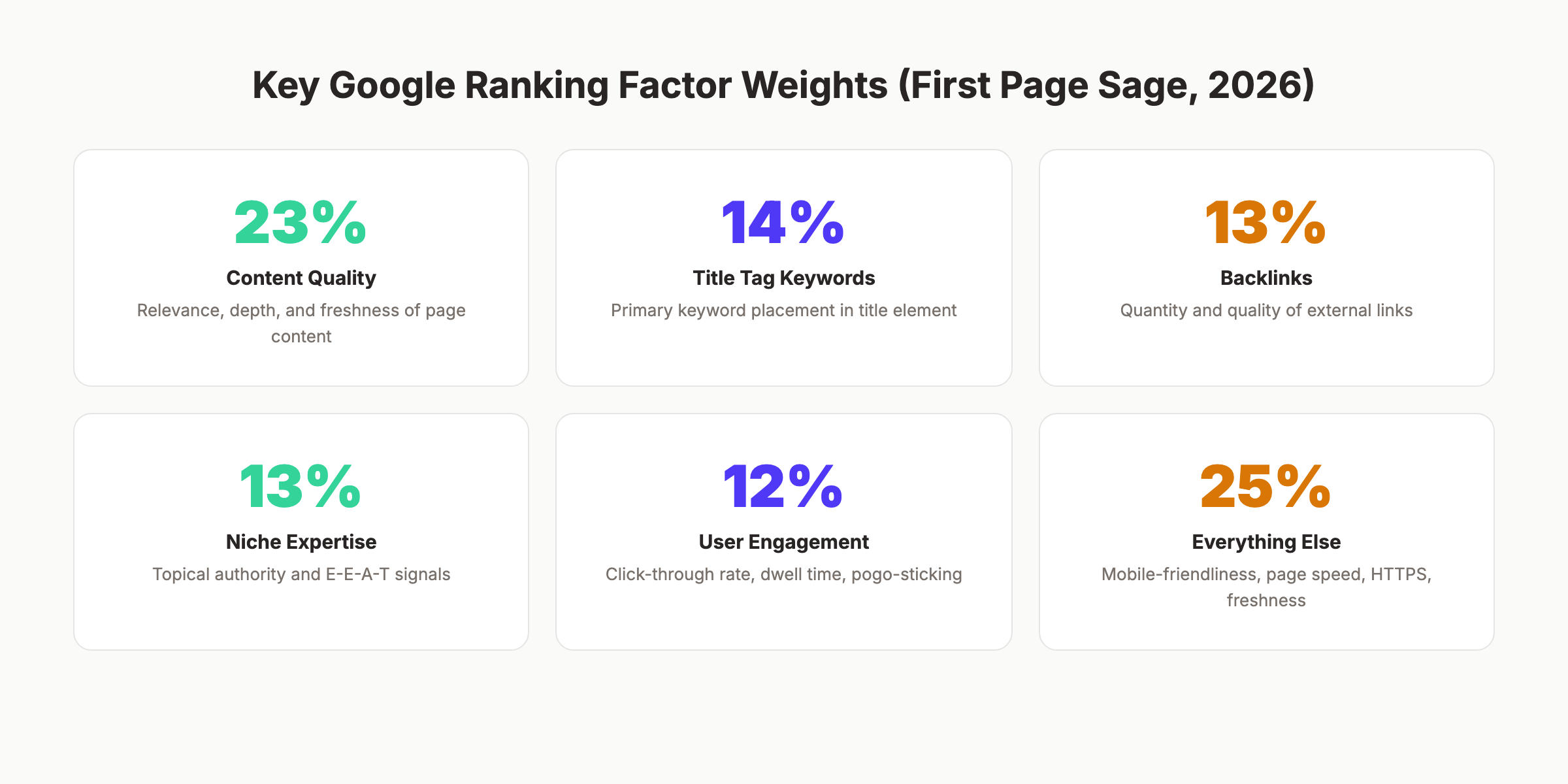
According to First Page Sage data, 5 factors account for 75% of the ranking algorithm:
| Factor | Weight | What It Means |
|---|---|---|
| Content quality | 23% | Relevance, depth, accuracy, freshness |
| Keywords in title tag | 14% | Primary keyword in the title element |
| Backlinks | 13% | Number and quality of external links pointing to the page |
| Niche expertise | 13% | Topical authority signals across the domain |
| User engagement | 12% | CTR, dwell time, bounce rate, pogo-sticking |
| Other factors | 25% | Page speed, mobile-friendliness, HTTPS, freshness |
Read the full breakdown in our Google ranking factors guide.
How Google Matches Queries to Pages
Google does not just match keywords anymore. Semantic search means Google understands meaning, context, and intent. The BERT and MUM language models parse natural language at a deep level.
A query like “best place to eat near me when it is raining” involves location, weather context, dining preference, and proximity. Google pieces all of that together.
This is why keyword stuffing died years ago. Google reads content the way a human would. Write for the topic, not just the keyword.
Search Intent and Its Impact
Google classifies queries into 4 intent types:
- Informational — “how search engines work”
- Navigational — “Google Search Console login”
- Transactional — “buy SEO audit tool”
- Commercial investigation — “best SEO tools 2026”
The intent behind a query determines what type of content ranks. Informational queries surface guides and articles. Transactional queries surface product pages. Mismatching intent is one of the fastest ways to fail at ranking, even with perfect on-page SEO.
Our SEO for beginners guide covers search intent in more detail.
Ranking on Google is not random. It follows a measurable system. Understanding that system is how you move from page 5 to page 1. Start for $1 →
Chapter 6: Link Signals and PageRank {#ch6}
Links remain one of the strongest ranking signals. Google co-founder Larry Page invented PageRank in 1998 as a way to measure page importance based on incoming links. The core concept still drives rankings in 2026.
How PageRank Works
Every page on the web has a PageRank score. When Page A links to Page B, it passes a portion of its PageRank to Page B. Pages with more high-quality incoming links accumulate higher scores.
Not all links carry equal weight. A link from The New York Times passes far more value than a link from a brand-new blog with zero authority. Relevance also matters. A link from an SEO blog to an SEO guide carries more weight than a link from a cooking blog to the same guide.
Dofollow vs Nofollow
Links come in 2 main types:
- Dofollow links pass PageRank and signal trust. These are the default link type.
- Nofollow links tell Google not to pass PageRank. Common on sponsored content, user-generated links, and social media.
Google treats nofollow as a “hint” rather than a directive since 2019. Some nofollow links still influence rankings. Our dofollow vs nofollow guide explains the differences.
Internal Links as a Ranking Tool
External backlinks are hard to control. Internal links are fully within your power. Every internal link passes PageRank within your own site. Pointing multiple internal links to a priority page signals its importance to Google.
Sites with strong internal linking architecture rank better. Period. The internal linking strategy guide covers the exact framework.
Chapter 7: E-E-A-T and Quality Signals {#ch7}
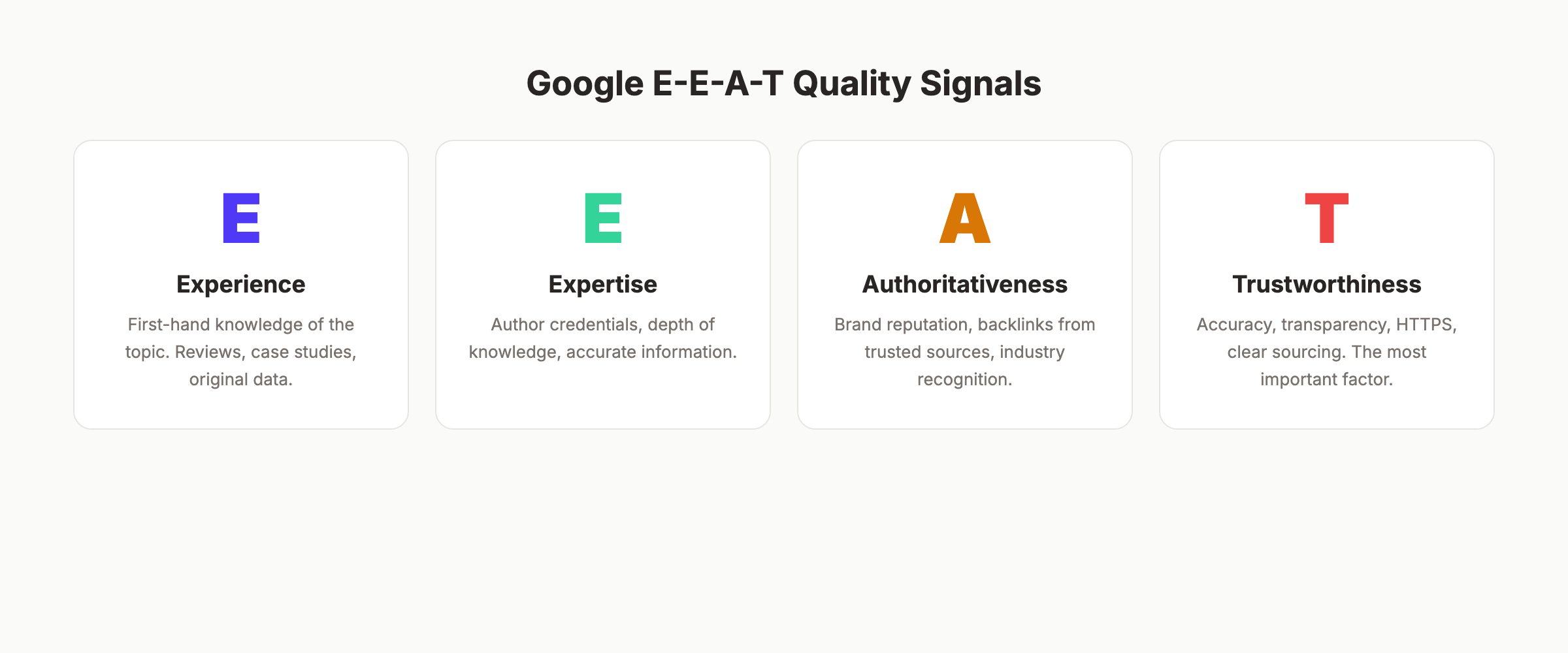
Google does not just evaluate content. It evaluates the source of that content. E-E-A-T stands for Experience, Expertise, Authoritativeness, and Trustworthiness. It is not a direct ranking factor. It is a framework that Google’s quality raters use to assess search results.
What Each Letter Means
- Experience. Does the author have first-hand experience with the topic? A product review from someone who actually used the product scores higher than a summary from someone who read the spec sheet.
- Expertise. Does the author have deep knowledge? For medical or financial topics (YMYL pages), Google expects content from credentialed experts.
- Authoritativeness. Is the site recognized as a go-to source? Backlinks, brand mentions, and industry recognition all contribute.
- Trustworthiness. Is the content accurate and transparent? HTTPS, clear sourcing, author bios, and editorial standards matter. Google calls this the most important of the 4 signals.
How to Strengthen E-E-A-T
- Add author bios with real credentials to every article
- Link to authoritative external sources (studies, official documentation)
- Publish original data, case studies, or first-hand experiences
- Maintain HTTPS across your entire site
- Keep content accurate and update it regularly
Read the full breakdown in our E-E-A-T guide.
YMYL and Higher Scrutiny
Pages covering health, finance, safety, or legal topics face stricter quality evaluation. Google calls these “Your Money or Your Life” pages. Wrong information on these topics can cause real harm. Google applies higher E-E-A-T standards accordingly.
If your site covers YMYL topics, invest heavily in author credentials, source citations, and editorial review processes.
Chapter 8: SERP Features That Shape Click Behavior {#ch8}
The search results page is no longer 10 blue links. Google now displays a variety of features that pull attention (and clicks) away from standard organic listings.
Featured Snippets
Featured snippets sit above position 1. They display a direct answer extracted from a web page. Formats include paragraphs, lists, and tables. Winning a featured snippet can double your click-through rate.
Featured snippets typically pull from pages already ranking in the top 10. Structure your content with clear question-and-answer formatting to earn them.
People Also Ask
The People Also Ask (PAA) box expands with related questions. Each answer links to a source page. PAA appears in over 52% of Google searches. Optimizing for these questions drives additional visibility even if you do not rank on page 1.
Our People Also Ask optimization guide covers the full strategy.
Other SERP Features
| Feature | What It Shows | Impact on Clicks |
|---|---|---|
| Knowledge Panel | Entity information (brands, people, places) | Reduces clicks to websites |
| Local Pack | Map with 3 local businesses | High click-through for local queries |
| Image Pack | Row of images | Pulls visual-intent clicks |
| Video Carousel | YouTube and video results | Captures video-intent traffic |
| Shopping Results | Product listings with prices | Dominates transactional queries |
The Zero-Click Problem
Over 65% of Google searches now end without a click to any website. Users find their answer directly on the results page. This is the zero-click phenomenon.
It does not mean SEO is dying. It means the type of content that earns clicks has changed. Generic definitions lose. Deep, opinionated, data-rich content wins because users need more than a snippet can provide.
Google is becoming an answer engine, not just a search engine. Your content must go deeper than a one-paragraph answer. Start for $1 →
Chapter 9: How AI Is Changing Search {#ch9}
AI has reshaped every stage of how search engines work. From crawling efficiency to result generation, machine learning now powers the entire system.
AI Overviews
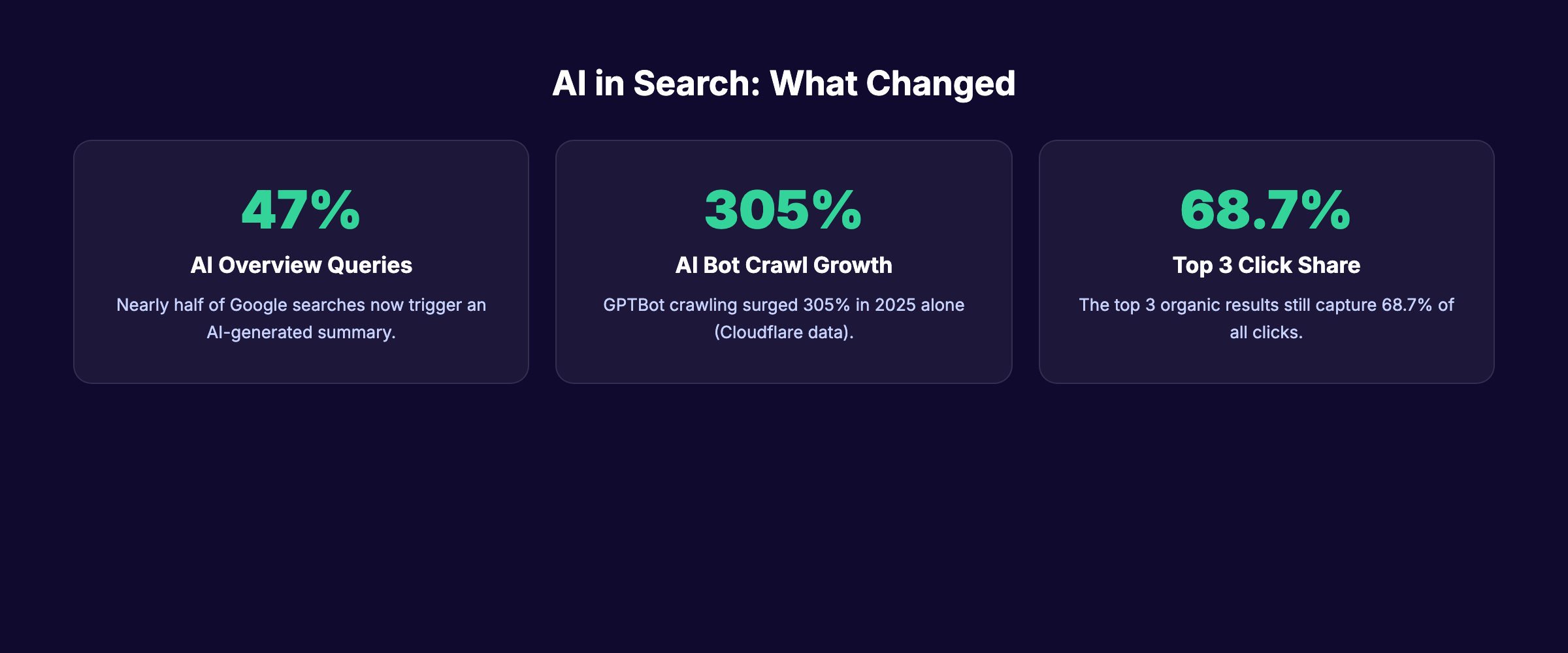
Google AI Overviews (formerly Search Generative Experience) display AI-generated summaries at the top of results for many queries. Nearly 47% of searches now trigger an AI Overview.
These summaries pull from multiple sources and synthesize an answer. Cited sources get visibility, but overall click-through rates to websites drop. Our AI Overview optimization guide explains how to get your content cited.
Machine Learning Ranking Systems
Google uses several AI systems in its ranking pipeline:
- RankBrain (2015) — Machine learning system that helps interpret ambiguous queries.
- BERT (2019) — Natural language processing model that understands word context within sentences.
- MUM (2021) — Multimodal model that can process text, images, and video across 75 languages.
- Gemini integration (2024-2026) — Powers AI Overviews and conversational search features.
These systems mean Google understands language with near-human accuracy. The gap between “what the user typed” and “what the user meant” has nearly closed.
The Rise of Alternative Search Engines
AI chatbots like ChatGPT, Perplexity, and Claude now handle queries that previously went to Google. Cloudflare data shows GPTBot crawling increased 305% in 2025 alone. These AI systems consume web content to generate answers.
Optimizing for AI citations is now a parallel strategy alongside traditional SEO. The fundamentals overlap: clear structure, authoritative sources, and factual accuracy help you rank in Google and get cited by AI systems simultaneously.
Check our SEO checklist for 2026 for the full list of optimization tasks covering both traditional and AI search.
Crawling and Indexing Checklist {#checklist}
Use this checklist to make sure Google can discover and index your pages:
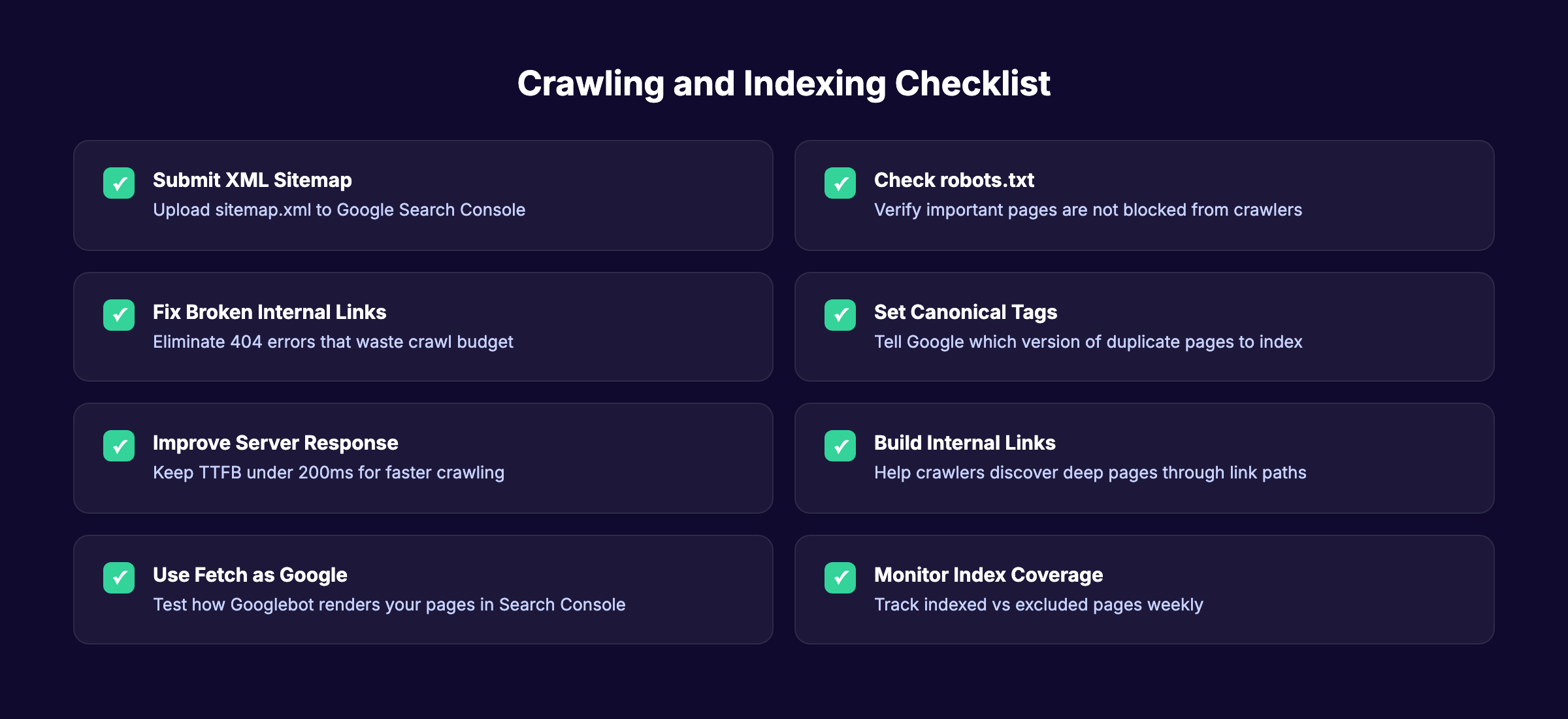
- Submit an XML sitemap through Google Search Console
- Audit robots.txt to confirm no important pages are blocked
- Fix all broken internal links returning 404 errors
- Set canonical tags on pages with duplicate content
- Keep server response time (TTFB) under 200ms
- Build internal links from high-authority pages to priority content
- Use the URL Inspection tool to test how Google renders your pages
- Monitor the Pages report in Search Console weekly
- Reduce redirect chains to 1 hop maximum
- Ensure mobile-friendly design passes Google’s test
Use our free SEO audit tool to identify crawling and indexing problems on your site.
Frequently Asked Questions {#faq}
How long does it take for Google to index a new page?
Most pages get indexed within 4 days to 4 weeks. High-authority sites with frequent publishing schedules get indexed within hours. New sites with few backlinks can wait weeks. Submitting your URL through Google Search Console speeds up the process.
Does Google crawl every page on the internet?
No. Google discovers over 25 billion pages daily but does not index all of them. Pages with low quality, duplicate content, or crawling restrictions get excluded. Only pages Google deems valuable enough to store appear in search results.
How many ranking factors does Google use?
Google uses hundreds of ranking signals. The exact number is not public. The 2024 algorithm API leak confirmed systems related to links, content quality, user engagement, and site authority. The top 5 factors account for roughly 75% of the algorithm weight according to First Page Sage research.
What is the difference between crawling and indexing?
Crawling is discovery. Google finds your page by following a link or reading your sitemap. Indexing is storage. Google analyzes the page content and adds it to its database. A page can be crawled but not indexed if Google decides the content is not valuable enough.
Can I force Google to index my page?
You cannot force indexing. You can request it through the URL Inspection tool in Google Search Console. If Google repeatedly refuses to index a page, the issue is usually content quality, duplicate content, or technical problems. Fix the underlying issue rather than resubmitting repeatedly.
Do backlinks still matter for rankings in 2026?
Yes. Backlinks account for approximately 13% of Google’s ranking algorithm. Quality matters more than quantity. One link from a high-authority, relevant site outweighs hundreds of links from low-quality directories. The SEO statistics for 2026 page has the latest data.
What to Do Next
Google follows a clear system. Crawl, index, rank. Every SEO decision you make either helps or hurts your performance at one of those 3 stages.
Focus on the fundamentals first. Make your pages crawlable. Ensure they get indexed. Then build the content quality, link signals, and E-E-A-T that drive rankings upward.
The sites that increase organic traffic consistently are the ones that publish quality content on a schedule. That is the compounding effect of SEO.
We publish 30 SEO-optimized articles per month, starting at $99. Your pages get crawled, indexed, and ranked without you writing a single word. Start for $1 →
Written and published by Stacc. We publish 3,500+ articles per month across 70+ industries. All data verified against public sources as of March 2026.
