
On-Page SEO Checklist: 32 Items for 2026
A 32-point on-page SEO checklist covering title tags, meta descriptions, headers, content, images, and internal links. Copy and use. Updated March 2026.
Most on-page SEO guides explain concepts. This on-page SEO checklist gives you the exact items to check before publishing any page.
32 items. Each one affects rankings. Miss a single element and your page underperforms. We use this exact checklist on every blog post we publish across 70+ industries. It works for blog posts, landing pages, product pages, and service pages.
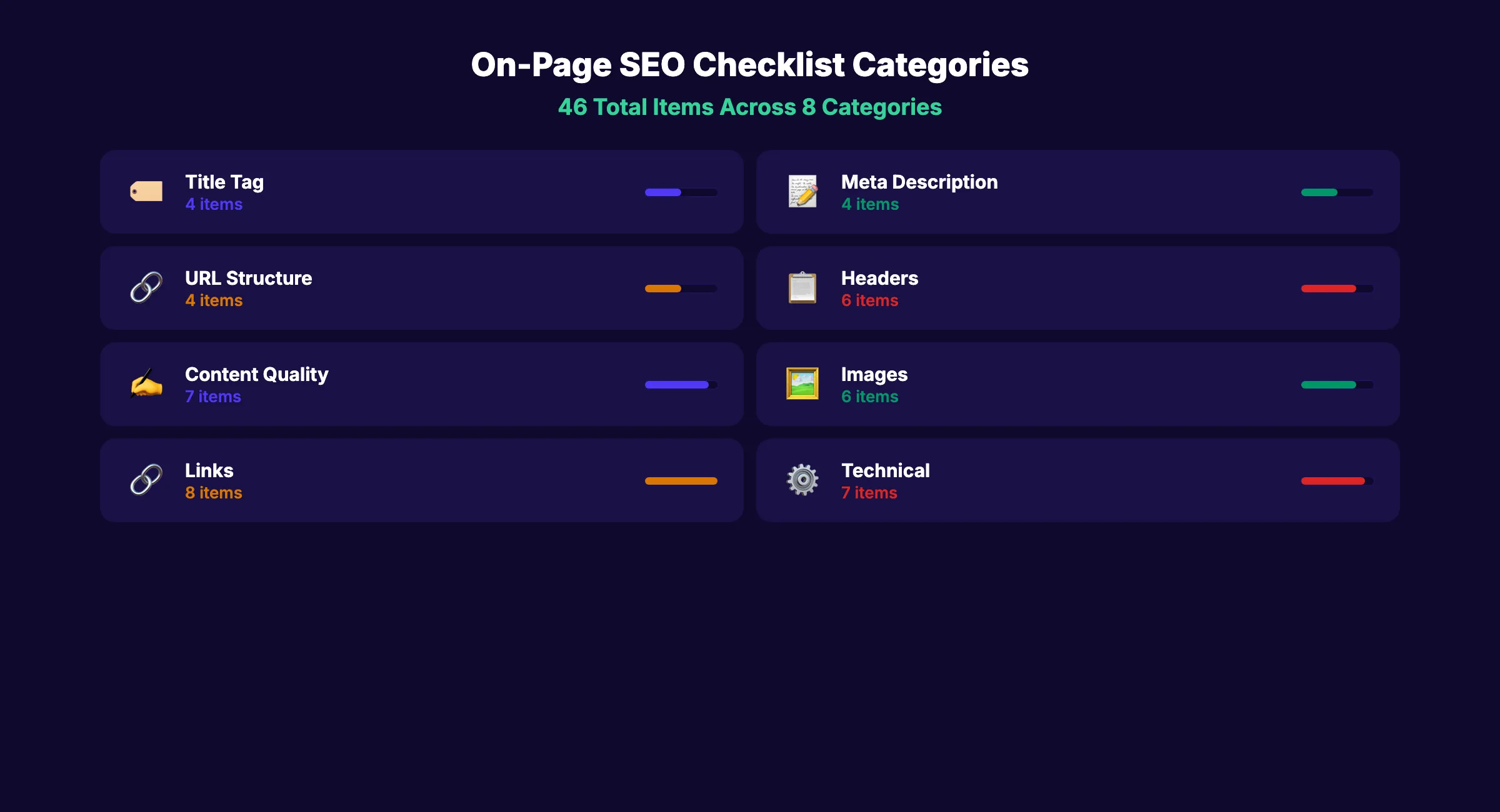
Here is what you will check:
- Title tag and meta description optimization
- Header hierarchy and keyword placement
- Content quality and readability signals
- Image optimization and alt text
- Internal and external linking
- Technical on-page elements
- Schema markup and structured data
Print this page. Bookmark it. Run through it before every publish.
Title Tag Optimization
The title tag is the single most important on-page ranking factor. Google uses it to understand what your page is about. Searchers use it to decide whether to click.
- Primary keyword appears in the title tag. Place it within the first 60 characters. Closer to the front is better.
- Title is under 60 characters. Google truncates longer titles in search results. Check with a SERP preview tool.
- Title includes a power word or hook. Words like “Complete,” “Proven,” “Updated,” or a number increase click-through rates.
- Title is unique across your site. No two pages should share the same title tag. Duplicate titles confuse Google.
Good title: “On-Page SEO Checklist: 32 Items for 2026” Bad title: “SEO Tips and Tricks for Your Website”
The good title includes the keyword, a specific number, a year, and stays under 60 characters. The bad title is vague, generic, and targets no specific keyword.
For a deeper dive into title optimization, read our on-page SEO guide.
Meta Description
Meta descriptions do not directly affect rankings. But they directly affect click-through rate. A higher CTR means more traffic from the same ranking position.
- Meta description is 145-155 characters. Shorter gets cut off. Longer gets truncated.
- Primary keyword appears naturally. Google bolds matching keywords in the description, which draws the eye.
- Description includes a benefit or value proposition. Tell the searcher what they will get from clicking.
- Description is unique per page. Never duplicate meta descriptions across pages.
Good meta: “A 32-point on-page SEO checklist covering title tags, headers, content, images, and links. Copy and use. Updated March 2026.”
Bad meta: “Learn about SEO and how to optimize your website for search engines with our tips.”
Use our meta tag analyzer tool to check your title and description before publishing.
URL Structure
Clean URLs help both Google and users understand what a page is about before they visit it.
- URL contains the target keyword. Use the keyword phrase as the slug.
- URL is short and descriptive. Under 5 words in the slug is ideal. Drop stop words (the, and, of, for).
- URL uses hyphens between words. Not underscores, not spaces, not camelCase.
- URL is lowercase. Mixed case URLs can cause duplicate content issues on some servers.
Good URL: /blog/on-page-seo-checklist
Bad URL: /blog/2026/03/the-ultimate-guide-to-on-page-seo-optimization-tips-and-tricks
For more on URL best practices, see our URL structure SEO guide.
Stop writing. Start ranking. Stacc publishes 30 SEO articles per month for $99. Every one passes this checklist. Start for $1 →
Header Tags (H1-H6)
Headers create the content hierarchy that Google uses to understand your page structure. They also improve readability for users who scan content.
- Page has exactly one H1 tag. The H1 is your page title. It should include the primary keyword.
- H2 tags mark major sections. Each H2 should describe a distinct subtopic.
- H3 tags nest under H2s. Never skip from H2 to H4. Maintain proper hierarchy.
- At least one H2 contains the primary keyword. This reinforces topic relevance.
- Headers are descriptive, not generic. “How to Write Title Tags” is better than “Step 1.”
- No consecutive headers without body text. Every header should have at least one paragraph of content below it.
Google uses header hierarchy to understand content relationships. A well-structured page with clear headers outranks a wall of text on the same topic.
Content Quality
Content quality is the biggest ranking factor in 2026. Google evaluates whether your content satisfies the search intent better than competing pages.
- Primary keyword appears in the first 100 words. Early placement signals topic relevance.
- Content matches the search intent. If the top results are how-to guides, publish a how-to guide. If they are listicles, publish a listicle.
- Content is more useful than the top 3 competing pages. Read what ranks. Cover everything they cover. Add what they miss.
- Word count meets or exceeds the SERP average. Check the word count of the top 5 results. Match or beat it. Do not pad with filler.
- Content demonstrates E-E-A-T. Experience, Expertise, Authoritativeness, Trustworthiness. Include original data, author credentials, or first-hand experience.
- Paragraphs are 1-3 sentences maximum. Short paragraphs improve readability and reduce bounce rate.
- Sentences average under 20 words. Shorter sentences are easier to read. Mix lengths for natural rhythm.
Thin content with 300 words will not rank against a 3,000-word guide covering the same topic. Depth matters. But depth without quality is just length.
For more on writing SEO content, read our SEO content writing guide.
Image Optimization
Images affect page speed, user experience, and search visibility. Google Images drives 22.6% of all searches. Optimized images rank.
- Every image has descriptive alt text. Alt text tells Google what the image shows. Keep it under 125 characters.
- Alt text includes a keyword naturally (when relevant). Do not stuff. Describe the image and include the keyword where it fits.
- File names are descriptive. Use
on-page-seo-checklist-items.pngnotIMG_4521.png. - Images are compressed. Target under 100KB for inline images. Use WebP or AVIF format.
- Images include width and height attributes. Prevents layout shift (CLS) during page load.
- First visible image is not lazy loaded. Lazy load only below-the-fold images. The above-the-fold image should load immediately for LCP.
For a complete guide, read our image SEO optimization post.
Your SEO team. $99 per month. 30 optimized articles, published automatically. Start for $1 →
Internal Linking
Internal links distribute authority across your site and help Google discover new pages. They also keep readers on your site longer.
- Page has 3-5 internal links per 1,000 words. Distribute them naturally throughout the content.
- Anchor text is descriptive. “SEO content writing guide” is better than “click here” or “read more.”
- Links point to relevant pages. Link to topically related content, not random pages.
- No orphan pages. Every page on your site should have at least one internal link pointing to it.
- No broken internal links. Check all links before publishing. Broken links waste crawl budget and frustrate users.
Internal linking is the most underused SEO tactic. According to Ahrefs, 86% of ecommerce brands have poor internal link optimization. Fix your internal links before building external ones.
External Linking
External links to authoritative sources signal that your content is well-researched. They also provide value to readers who want to verify claims.
- Include 2-3 external links per post minimum. Link to primary sources, studies, or official documentation.
- Link to specific pages, not just homepages. Link to the exact page with the data you are citing.
- External link text describes the destination. “According to Google’s SEO Starter Guide” is better than “according to this source.”
External links do not hurt your rankings. They help your content by associating it with authoritative sources.
Schema Markup
Schema markup helps Google understand your content and display rich results (FAQ dropdowns, star ratings, how-to steps).
- Article schema is implemented on blog posts. Include headline, author, datePublished, and dateModified.
- FAQ schema is added to pages with FAQ sections. Enables FAQ accordion display in search results.
- Schema is valid. Test with Google’s Rich Results Test before publishing.
Pages with schema markup achieve 20-40% higher click-through rates. For implementation details, read our schema markup guide.
Page Speed and Core Web Vitals
Google uses Core Web Vitals as a ranking signal. Slow pages lose rankings and users.
- Largest Contentful Paint (LCP) is under 2.5 seconds. This measures how fast the main content loads.
- Interaction to Next Paint (INP) is under 200ms. This measures page responsiveness to user interactions.
- Cumulative Layout Shift (CLS) is under 0.1. This measures visual stability during page load.
- Page passes Google PageSpeed Insights on mobile. Mobile performance matters more than desktop for rankings.
Check your Core Web Vitals in Google Search Console. Fix issues on your highest-traffic pages first.
3,500+ blogs published. 92% average SEO score. Every article passes this checklist. Start for $1 →
Quick Reference: The Complete On-Page SEO Checklist
Copy this checklist and use it before every publish.
Title Tag (4 items):
- Primary keyword in title
- Under 60 characters
- Includes power word or hook
- Unique across site
Meta Description (4 items):
- 145-155 characters
- Contains primary keyword
- Includes benefit statement
- Unique per page
URL (4 items):
- Contains target keyword
- Short and descriptive
- Uses hyphens
- Lowercase only
Headers (6 items):
- Single H1 with keyword
- H2s for major sections
- Proper H2 → H3 nesting
- Keyword in at least one H2
- Descriptive header text
- Body text under every header
Content (7 items):
- Keyword in first 100 words
- Matches search intent
- More useful than top 3 competitors
- Word count meets SERP average
- Demonstrates E-E-A-T
- Short paragraphs (1-3 sentences)
- Average sentence under 20 words
Images (6 items):
- Alt text on every image
- Keyword in alt text where natural
- Descriptive file names
- Compressed under 100KB
- Width/height attributes set
- Above-fold image not lazy loaded
Links (8 items):
- 3-5 internal links per 1,000 words
- Descriptive anchor text
- Links to relevant pages
- No orphan pages
- No broken links
- 2-3 external links minimum
- External links to specific pages
- Descriptive external anchor text
Technical (7 items):
- Article schema implemented
- FAQ schema if applicable
- Schema passes validation
- LCP under 2.5s
- INP under 200ms
- CLS under 0.1
- Mobile PageSpeed passing
Total: 32 items
FAQ
What is an on-page SEO checklist?
An on-page SEO checklist is a list of optimization tasks to complete before publishing any web page. It covers title tags, meta descriptions, headers, content quality, images, links, and technical elements. Running through the checklist ensures every page is optimized for search engines before it goes live.
How many items should an on-page SEO checklist have?
A thorough checklist covers 25-35 items across 8 categories: title tags, meta descriptions, URLs, headers, content, images, links, and technical SEO. Fewer than 20 items misses critical elements. More than 40 becomes impractical to use on every page.
What is the most important on-page SEO factor?
Content quality is the most important factor. Google ranks pages that best satisfy search intent. But content quality without proper title tags, headers, and internal links leaves rankings on the table. The checklist works as a system. Every item contributes.
How often should I update my on-page SEO?
Audit your highest-traffic pages quarterly. Update content with fresh data and fix any technical issues. For new pages, run the full checklist before publishing. For existing pages showing ranking declines, re-audit against the checklist to find gaps.
Can on-page SEO alone improve rankings?
On-page SEO fixes are the fastest way to improve rankings for pages already indexed by Google. Technical fixes (title tags, headers, internal links) often show results within 2-4 weeks. Content quality improvements take 4-8 weeks. Off-page factors like backlinks also matter, but on-page is where you start.
On-page SEO is not a one-time task. It is a publishing standard. Every page that leaves your site should pass this 32-item checklist. The teams that treat on-page optimization as a system outrank the teams that treat it as an afterthought.
Related Tools & Resources
Free SEO Tools:
Best Lists:

Written by
Siddharth GangalSiddharth is the founder of theStacc and Arka360, and a graduate of IIT Mandi. He spent years watching great businesses lose organic traffic to competitors who simply published more. So he built a system to fix that. He writes about SEO, content at scale, and the tactics that actually move rankings.
30 SEO blog articles published every month
Keyword-optimized, scheduled, and live on your site. Automatically.
30-day trial · Cancel anytime
theStacc
Stop writing SEO content manually
30 blog articles, 30 GBP posts, and social media content. Published every month. Automatically.
Start Your $1 Trial$1 for 3 days · Cancel anytime